
GPT Image 2 adds Runway and Meshy integrations
GPT Image 2 went live in Runway and Meshy, and users also reported PixPretty support plus new 4K size and quality controls in third-party interfaces. The rollout extends text rendering and layout control into app identity, brand boards, and infographic work.
TL;DR
- runwayml's launch post and MeshyAI's launch post show GPT Image 2 moving into two creator tools that already sit upstream of video and 3D workflows, not just chat interfaces.
- In hands-on posts, AIwithSynthia's PixPretty comparison and hasantoxr's feature list both center the same gains: cleaner text, stronger layout control, and UI outputs that look production-ready.
- bas_fijneman's Sprout brand exercise pushed the model past single hero shots into mascot design, onboarding, app screens, and App Store-style marketing with one consistent character system.
- According to egeberkina's product-sheet test, GPT Image 2 can also hold proportions and spec-style layouts closely enough to fake a design-catalog page, while underwoodxie96's interface screenshot shows some third-party tools already exposing 4K output plus separate size and quality controls.
You can already browse Lovart's GPT Image 2 writeup, watch Runway add it to its own stack, and see Meshy pitch it as a 3D starting point. The fun part is how quickly people stopped using it for one-off art and started using it for brand boards, flyers, app identities, editable campaigns, and spec sheets.
Runway and Meshy
Runway's pitch was broad, detail-first image generation. Meshy framed the same model more narrowly, as a starting point for 3D creation, with a promo image full of characters, props, and modeled objects already built in its stack.
That split is the useful reveal. GPT Image 2 is landing as infrastructure inside creative products with very different downstream jobs, video in Runway, asset and model creation in Meshy, not as a destination product on its own.
Brand systems and UI boards
The strongest creator tests are structured, not artsy. In bas_fijneman's Sprout thread, four ordered prompts produced a mascot sheet, onboarding flow, gameplay mockups, and a marketing graphic that all kept the same bird character intact.
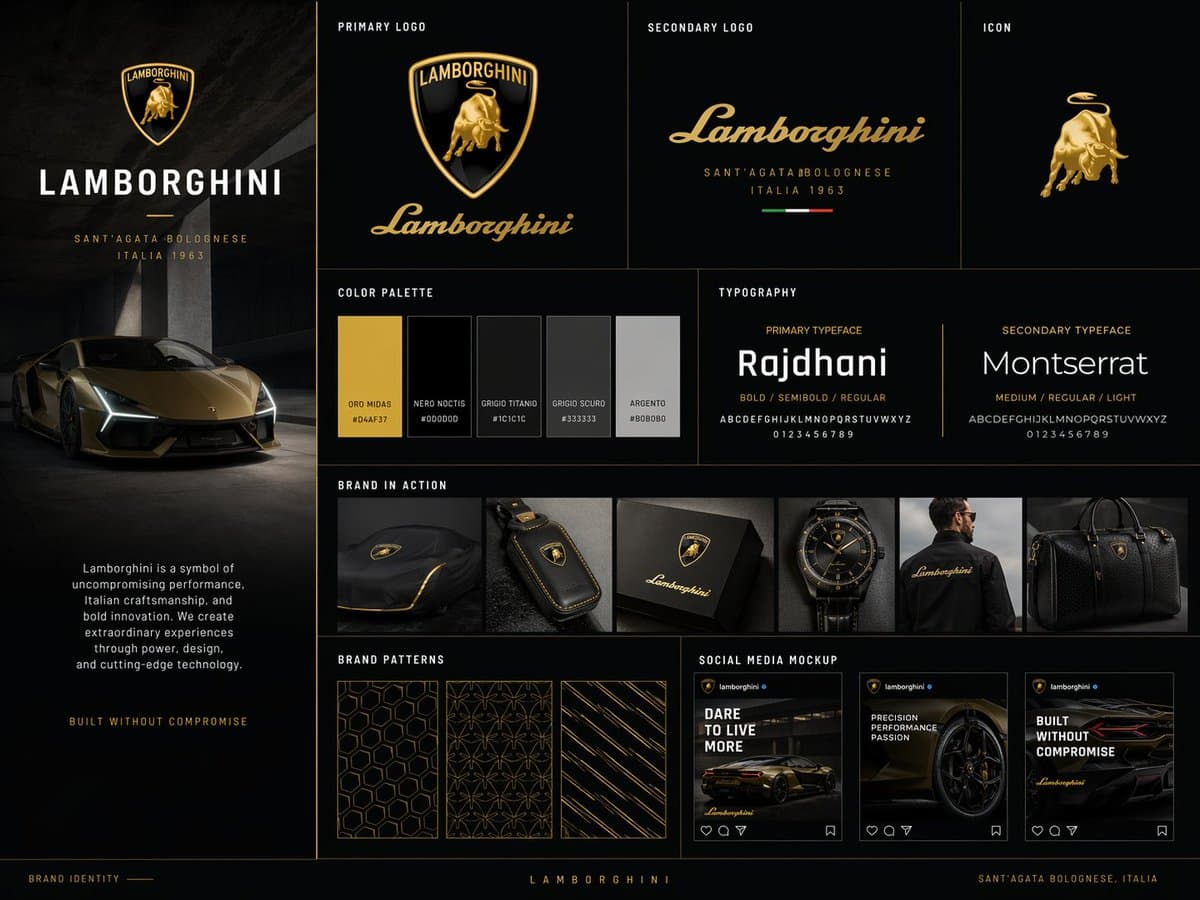
A separate branding test from MayorKingAI's Leonardo post used GPT Image 2 for a studio-style brand board. Across these posts, the repeatable pattern is simple:
- name concrete app or brand references
- define the mascot or product as a specific object
- specify the layout components you want on the board
- run prompts in sequence so the visual system stays consistent
Text, layouts, and editable campaigns
The model's reputation is settling around four jobs that older image models regularly fumbled, according to hasantoxr's feature list:
- readable text, including dense captions
- believable UI and dashboard mockups
- more photographic skin and material rendering
- clocks, logos, and structured layouts that stay coherent
What changes in Lovart is the wrapper. hasantoxr's campaign breakdown describes one brief turning into a main visual, social posts, email art, and motion assets on one canvas, while hasantoxr's text-layer demo shows post-generation text edits without re-prompting.
4K and dimension-locked outputs
A quieter shift is that third-party interfaces are starting to expose controls that make the model easier to aim at production formats. underwoodxie96's 4K interface screenshot shows selectable image size, quality, and 4K output in one generator.
Meanwhile, egeberkina's product-sheet test used a rigid JSON-style prompt to hold exact product proportions, an editorial top section, and an orthographic spec panel below. That is a different kind of image task than "make me a nice ad," and it points toward catalogs, manuals, and technical one-pagers as part of the rollout too.