
Creators share GPT Image 2 and Runway workflows for short image-to-video ads
AIwithSynthia posted a Higgsfield prompt that turns one character reference into a six-panel ramen ASMR ad using GPT Image 2 and Seedance. 0xInk showed a workflow that animates a Midjourney character in Runway.
TL;DR
- The repeatable pattern was storyboard-first: the ramen prompt in AIwithSynthia's Higgsfield post and the cookie prompt in AIwithSynthia's Pollo post both turn a GPT Image 2 board into a 15-second Seedance ad.
- VlogMe's creator flow collapsed the handoff into one studio: AIwithSynthia's workflow post lists upload storyboard, select model, add prompt, adjust settings, generate final video.
- Runway showed up as the animation bench for stylized character work, with 0xInk_'s agency demo pairing a Midjourney character with Runway and Artedeingenio's music-video test combining Midjourney, Suno, and Seedance 2.0 in Runway.
- Creators are treating the 15-second ceiling as a shot-planning constraint: GlennHasABeard's Pollo test starts clip two on the exact last frame of clip one so the chase reads as continuous.
Pollo's Seedance 2.0 API docs list generation lengths from 4 to 15 seconds. Runway's Seedance page says creators can add image, video, or audio references, then choose aspect ratio, resolution, and duration up to 15 seconds. Higgsfield MCP and Runway MCP both push the workflow into chat, with Claude-style connectors exposing image and video generation tools inside the assistant.
Storyboard-first ASMR ads
AIwithSynthia's ramen prompt is a client-pitch board disguised as a generation prompt: exact character reference, six panels, agency-layout typography, action labels, and ASMR-only audio.
The same structure reappears in AIwithSynthia's cookies-and-milk post, which uses GPT Image 2 for the storyboard and Seedance for the final Pollo video.
The template is tight:
- 16:9 storyboard infographic.
- Six numbered action panels.
- Product-specific doodle words like “POUR,” “DIP,” “CRUNCH,” or “YUM.”
- VISUAL, ACTION, and DIALOGUE blocks under each panel.
- A second video prompt with timestamps.
- Natural ASMR audio only, no music, subtitles, logos, or watermarks.
A short community walkthrough by Sifu Yik Chan describes the same pattern: give ChatGPT a product image, ask for an ASMR storyboard, ask for a video prompt and script, then paste it into Seedance.
The five-step VlogMe loop
AIwithSynthia says the VlogMe run started with a GPT Image 2 storyboard, then moved into VlogMe Video Studio, where the shots followed the board closely.
The five steps in AIwithSynthia's VlogMe workflow were:
- Upload the storyboard.
- Select the video model.
- Add a prompt.
- Adjust generation settings.
- Generate the final video.
VlogMe's own features page describes a broader version of that loop: brief the AI director with text, voice, images, video, a portrait, or a finished track, then approve an editable scene plan before generation begins.
Runway as the animation bench
0xInk_ taught a 3D team at their agency how they make videos, using a Midjourney character animated with Runway.
In replies, 0xInk_ said the team helped with “3D wording and vocabulary,” then wanted to make their own videos after the demo in 0xInk_'s agency reply and 0xInk_'s 3D vocabulary reply.
Artedeingenio used a different stack for a Tim Burton and Ethel Cain inspired music video: Midjourney for visual style and character design, Suno for the song, and Seedance 2.0 in Runway for animation.
Runway's product page now positions the app as a combined image, video, audio, editing, and language-model workspace, with Seedance 2.0 listed alongside Gen-4.5, Kling 3.0, Claude Opus 4.8, and other models.
15-second shot math
GlennHasABeard hit the Seedance 2.0 cap by making two clips, then opening the second on the exact last frame of the first. Two colored-pencil reference images held the style across the cut.
techhalla's Seedance prompt shows the same constraint at the shot level:
- 0 to 5 seconds: sprint from the cooking station, toss the tortilla, and hold a slow-motion orbit on the flip.
- 5 to 10 seconds: reach the second table, transfer the tortilla into bread, add sauce, and hand it off.
- 10 to 15 seconds: cut to the elderly woman taking the bite.
The useful trick is not longer generation. It is writing prompts as timed production schedules.
Claude production connectors
CharaspowerAI gave Claude one character sheet and asked it to revisit Odysseus, producing a 40-plus-second siren sequence through Higgsfield MCP.
The setup in CharaspowerAI's connector walkthrough was Claude → Settings → Connectors → add the Higgsfield MCP connector → sign in. Higgsfield's MCP page lists the connector URL and says it exposes 30-plus image and video models to Claude and other MCP-compatible clients.
CharaspowerAI said the connection took around 30 seconds, and Claude needed less than five minutes to understand the character sheet, story, and workflow before generating consistent shots.
Magnific showed the same agent-to-video pattern from another angle: Magnific's side-by-side test compared Fable 5 and an Opus-labeled script from one character sheet, while Magnific's MCP note says the character sheet was given to Claude and the videos were generated through Magnific MCP.
Creator examples worth saving
Artedeingenio reversed the usual image-to-sketch effect, starting with a realistic Midjourney image and animating it into a drawing with Seedance 2.0 in Topview.
A few other posts turned the same toolchain into specific formats:
- Kling_ai's beauty clinic tutorial walked through a Kling MCP ad workflow from concept planning to final production.
- CharaspowerAI's anime exorcist prompt used a 0 to 15 second structure for subway combat, magic seals, and a train-door ending.
- ClaireSilver's anti-AI ASMR post became funnier after ClaireSilver's reply said it was “just Seedance 2.0 with references.”
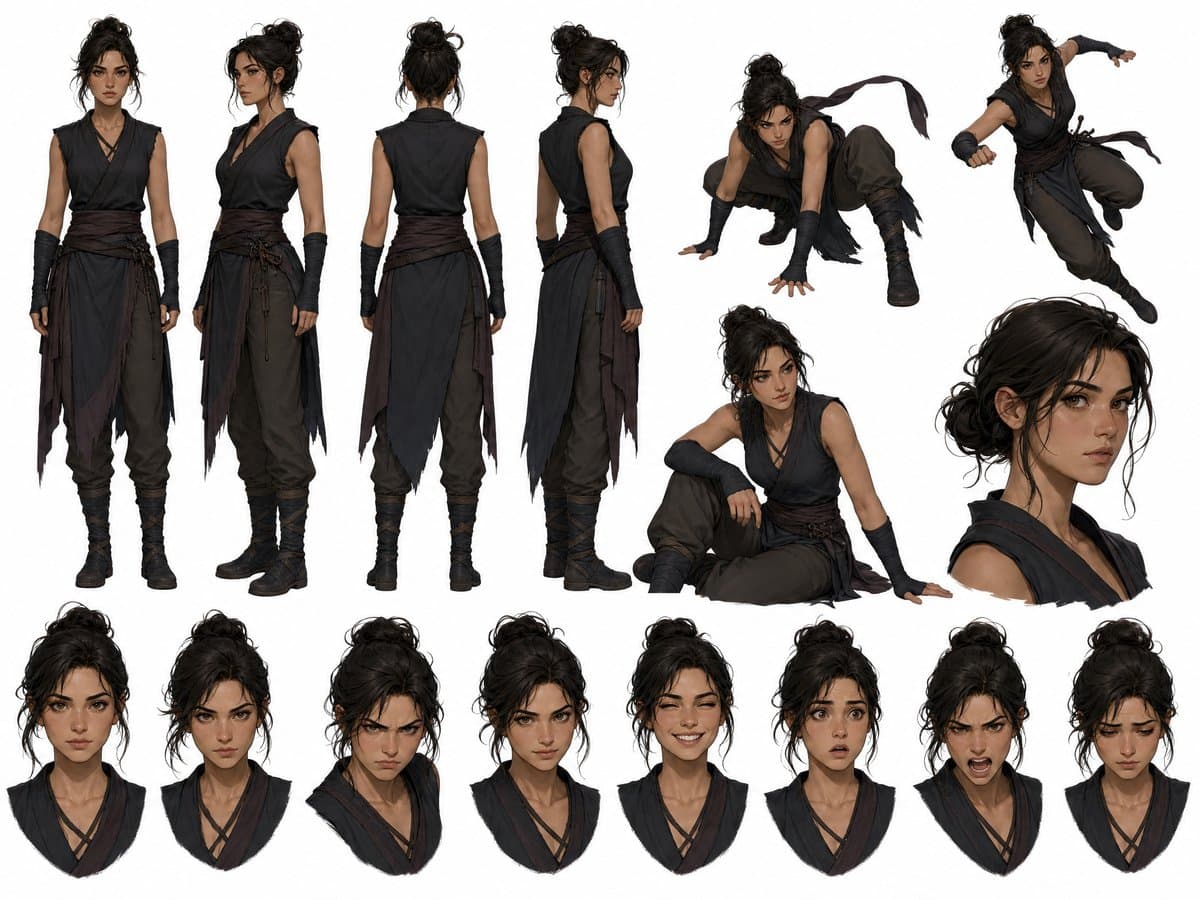
- 0xInk_'s character sheet posted a stylized design sheet before more character-video experiments.
- MengTo's product-video note pointed to an 8-minute Opus 5 workflow for camera moves, zooms, perspective shifts, and seamless transitions.
Product prompt anatomy
AIwithSynthia's coffee prompt locks the same woman across every shot, then moves her from a Scandinavian kitchen to a neighborhood bakery with macro ice, milk, espresso, croissant, and ambient-audio details.
The Sprite-style prompt keeps the same character-control pattern, but swaps in a brand-color system, fountains, skate-park movement, fizz physics, and a final spoken line: “Stay cool. Stay fresh.”
Across the product spots, the reusable prompt fields are clear:
- Character lock: same face, body proportions, outfit, and expressions.
- Environment arc: kitchen to café, plaza to fountains, apartment to street.
- Macro physics: condensation, fizz, crumbs, espresso layers, fabric, steam.
- Camera language: handheld tracking, gimbal movement, push-ins, shallow depth of field.
- Audio contract: natural ambient sound only, with explicit bans on music, subtitles, watermarks, and extra text.