
InVideo Agent One tests Seedance 2.0 storyboard guidance
Creator tests show InVideo Agent One generating storyboards that Seedance 2.0 then uses as clip guidance, with similar production-sheet planning also appearing in GPT Image 2 workflows. It matters because scene beats and camera moves get defined before rendering, which can improve continuity across multi-tool video pipelines.
TL;DR
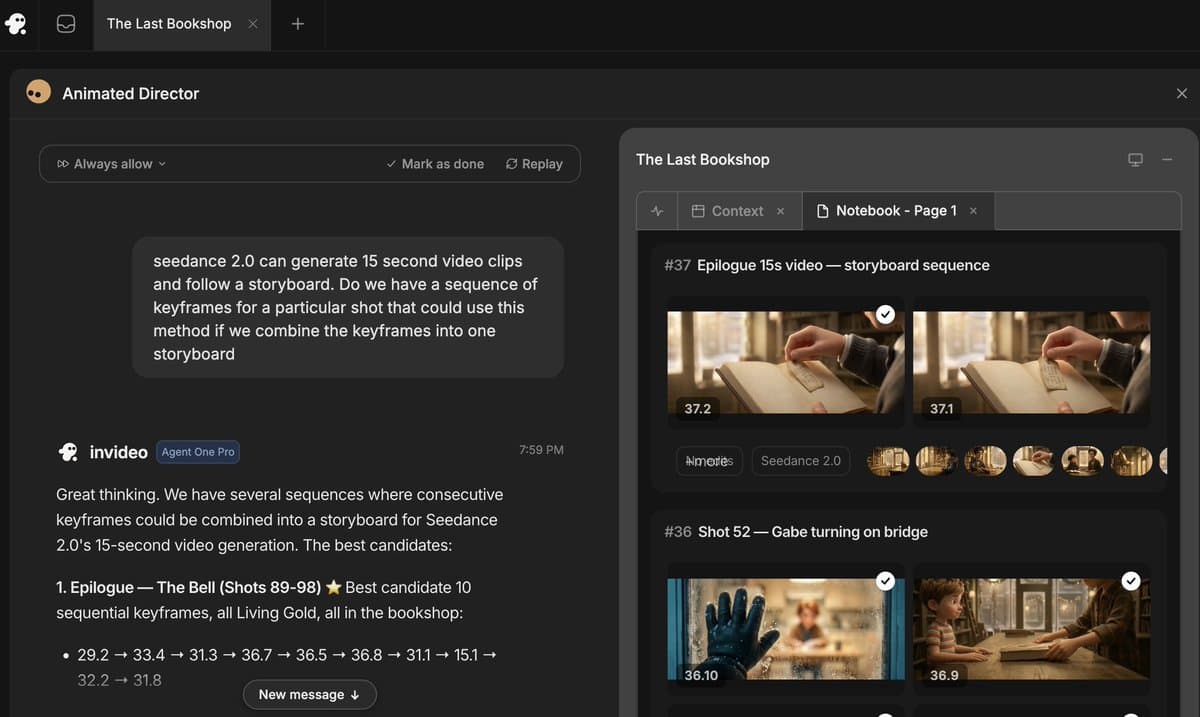
- DavidmComfort's first Agent One test, his follow-up test, and his multi-shot sequence thread all show the same pattern: InVideo Agent One can generate a storyboard first, then hand that storyboard to Seedance 2.0 as guidance for the rendered clip.
- According to techhalla's walkthrough, Agent One is not just generating a single video, it is building a package of references, storyboards, title cards, host clips, and reaction clips before animation starts.
- MayorKingAI's Smart Shot thread and techhalla's OpenArt workflow show the same production logic outside InVideo: GPT Image 2 handles the planning document, then Seedance 2.0 renders the actual motion.
- In MayorKingAI's production-sheet prompt and the matching Seedance 2.0 animation prompt, the planning layer carries concrete camera moves, palette, lighting, and shot timing into the video pass.
- rainisto's MCP demo and starks_arq's recorded-video test push the workflow further, using storyboard images, live footage, and agent tools as Seedance inputs instead of treating text prompting as the whole job.
You can browse OpenArt's Smart Shot page, watch techhalla's InVideo walkthrough, and see MayorKingAI point people to Leonardo for the same GPT Image 2 plus Seedance stack. The interesting bit is not that multiple apps now expose Seedance 2.0. It is that several creators are converging on the same pre-production habit: make the shot plan first, then render.
Agent One storyboards
DavidmComfort's tests are the clearest evidence for the headline claim. In one post he says Agent One can create the storyboard, then use Seedance 2.0 to turn that storyboard into a clip, and in another he shows the same setup on a different example.
A third post adds the missing detail: the storyboard does not have to be a single still. DavidmComfort's storyboard-sequence test says Agent One can build a multi-shot sequence from a series of images acting as a storyboard, then pass that sequence to Seedance 2.0.
That makes the control surface much more specific than a plain prompt. The guidance can include shot order, not just style.
Agent One's asset package
InVideo's page is pitched as a general creation flow, but techhalla's thread shows what the agent is actually assembling inside the product.
From the thread and screenshots, the package includes:
- Character reference sheets.
- Location and set references.
- Title card branding.
- A 12-panel episode storyboard.
- Generated host clips and reaction videos.
- A final Seedance 2.0 extension pass using those generated assets as references.
The screenshots matter because they show Agent One behaving more like a lightweight production coordinator than a one-shot generator. One panel even shows the system warning users to double-check outputs while it locks a "production bible" and bundles assets into a ZIP techhalla's notebook screenshots.
Shot plans before rendering
OpenArt's Smart Shot gives the same workflow a cleaner name. MayorKingAI's launch thread says Smart Shot connects GPT Image 2 and Seedance 2.0 by creating a full Shot Plan before any video renders.
Across MayorKingAI's summary, his two-step explanation, and his itemized breakdown, that Shot Plan includes:
- character references
- environment and set design
- floor plan
- storyboard
- camera moves
- lighting
- mood
- lens choices
- color palette
- cut count
That same structure appears in techhalla's detective example. The screenshots in techhalla's Smart Shot thread show a generated pre-production sheet with character cards, a forest crime-scene map, storyboard cuts, style notes, then a second Seedance 2.0 prompt that continues the scene with exact references and second-by-second timing.
Production sheets as prompts
The most useful detail in the evidence is that creators are publishing both halves of the workflow. MayorKingAI's production-sheet prompt shows GPT Image 2 being asked for a pre-production board with five storyboard beats, a floor plan, palette, lighting notes, and camera language.
Then his Seedance 2.0 prompt rewrites that board into a timed animation brief:
- 0 to 3 seconds: wide low-angle crane-down
- 3 to 6 seconds: medium side tracking shot
- 6 to 9 seconds: close-up frontal handheld
- 9 to 12 seconds: wide low-angle dolly-in
- 12 to 15 seconds: wide dynamic push-in
This is the part that feels like Christmas come early for prompt-control nerds. The prompt stops being a vibe paragraph and starts looking like a shot list.
The same move shows up in MayorKingAI's later example, where a "production plan sheet" made with GPT Image 2 is followed by a final cinematic sequence rendered with Seedance 2.0.
Seedance in multi-tool pipelines
The last twist is that Seedance is starting to act like a render engine inside broader toolchains, not just a destination UI.
In rainisto's post, BeatBandit develops the story, Cursor tells Higgsfield to make "shot 12," and the system submits a Seedance 2.0 job with the storyboard image and other references attached. The screenshot shows the agent explicitly rewriting prompts to bind those references before rendering.
Meanwhile starks_arq's camera-to-style demo and his follow-up post show another input type: real recorded footage plus a style reference image. That pushes the same idea out of the pre-production-doc world and into live-action capture, where the source clip itself becomes part of the guidance stack.