
InVideo Agent Two produces a nearly 4-minute AI trailer with playbooks
A creator used InVideo Agent Two to make a nearly four-minute trailer using a script, character and location sheets, visual references, and a project playbook. The workflow iterated Seedance 2.5 shots before final editing.
TL;DR
- A nearly four-minute sci-fi trailer came from a connected InVideo production run that CharaspowerAI's trailer post says moved through script, characters, a Playbook, Seedance 2.5, iteration, and final editing.
- The project used reusable direction rather than loose continuity notes: CharaspowerAI's Playbook breakdown lists rules for continuity, cinematography, characters, locations, story logic, and visual style.
- Character sheets, location sheets, and visual references were iterated before shot generation, according to CharaspowerAI's asset post.
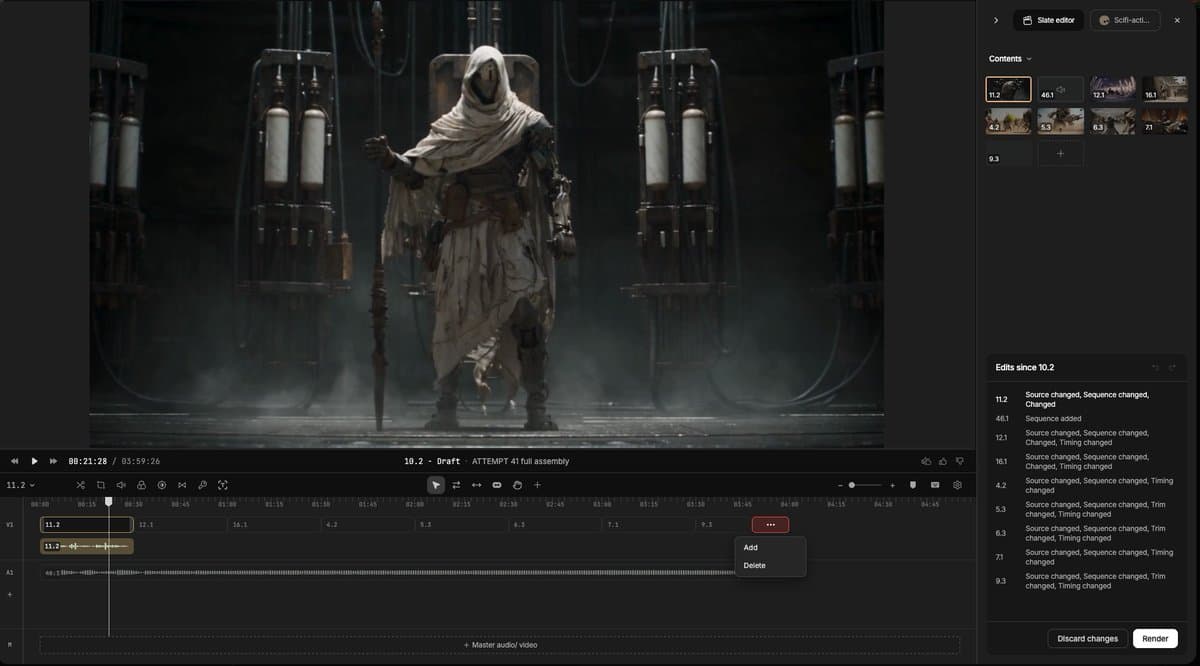
- The completed shots still needed editorial work, with CharaspowerAI's editing post placing cuts, pacing, transitions, effects, and audio on an editable timeline.
Agent Two's Playbooks announcement frames standing rules as a filmmaker's preferences stored once rather than repeated in chat. The Agent Two product page says it reads scripts, PDFs, links, rough cuts, and other uploads against a project's Context. Its Slate announcement says the editor receives the script, shot breakdowns, and approved takes without a new briefing.
The project Playbook
CharaspowerAI supplied Agent Two with four production inputs:
- Script
- Character sheets
- Location sheets
- Visual references
Their Playbook then specified:
- Continuity
- Cinematography
- Characters
- Locations
- Story logic
- Visual style
The creator ran Seedance 2.5 shot by shot, using a generate, review, refine, fix, regenerate loop rather than asking for the whole trailer at once.
Asset sheets
CharaspowerAI's asset post treats the reference package as a separate stage: generate multiple versions of character sheets, locations, and visual references, compare them, then retain the strongest results.
The post links those locked assets to better continuity, stronger later generations, and fewer downstream fixes.
Twenty-to-thirty-second scenes
A separate three-minute short disclosed a broader toolchain: starks_arq's prompt release names Seedance 2.5 in CapCut, Blender, Midjourney, and NB Pro.
That team divided its script into consecutive 20 to 30 second units, with each section becoming one generation in starks_arq's pacing plan.
For each unit, starks_arq's prompt template mapped:
- Angles
- Camera movement
- Lighting
- Lens
- Actions
They handed that draft to Fable 5.1 with a template intended to return prompts as timestamped beats, assets, and constraints.
A-roll, B-roll, and reference stills
starks_arq's storyboard, shown in their A-roll and B-roll map, separated a consistent-world A-roll from B-roll environments that punctuate the dialogue. The A-roll held Eve and Spectrum before The Creation of Adam; the B-roll carried the cutaways and supported the ending reveal.
starks_arq's reference-stills post says character designs, environments, and B-roll plates were generated as still images before video runs began.
Surgical reruns and Blender blocking
starks_arq's revision method describes changing only the prompt lines tied to a failed moment, while leaving working material untouched. Timestamps made it possible to identify the second that needed a rerun.
When a camera move needed more precision than language could carry, starks_arq said in their Blender post that the team blocked grey-box MP4s in Blender and fed them in as video references, preserving composition and movement.
Their continuity workaround joined two generations with three edit steps:
- Extract the prior generation's final frame.
- Start the next generation on that frame for 0.5 seconds, then cut to another angle and continue the prompt.
- Remove the half-second hold in the edit.
The editable timeline
CharaspowerAI moved the finished shots into InVideo Editor for cuts, pacing, transitions, effects, and audio, while retaining a timeline they could inspect and revise.
CharaspowerAI assigns Agent Two to building the film and the editor to finishing it in their final workflow post. A parallel CapCut finish from starks_arq's final edit post lists minor cuts, smooth transitions, sound design, color grading, and a grain overlay.
InVideo's Slate announcement says its edit surface uses the project's existing Context to line up approved takes from the earlier production stages.