
Kling launches Motion Control 3.0 challenge with $30,000 and 300M credits
Kling launched a Motion Control 3.0 prize challenge offering $30,000 and 300M credits, while creators shared trailer, horror, and multi-shot examples. Test motion with cheaper passes first, then move to higher-control setups for final sequences.
TL;DR
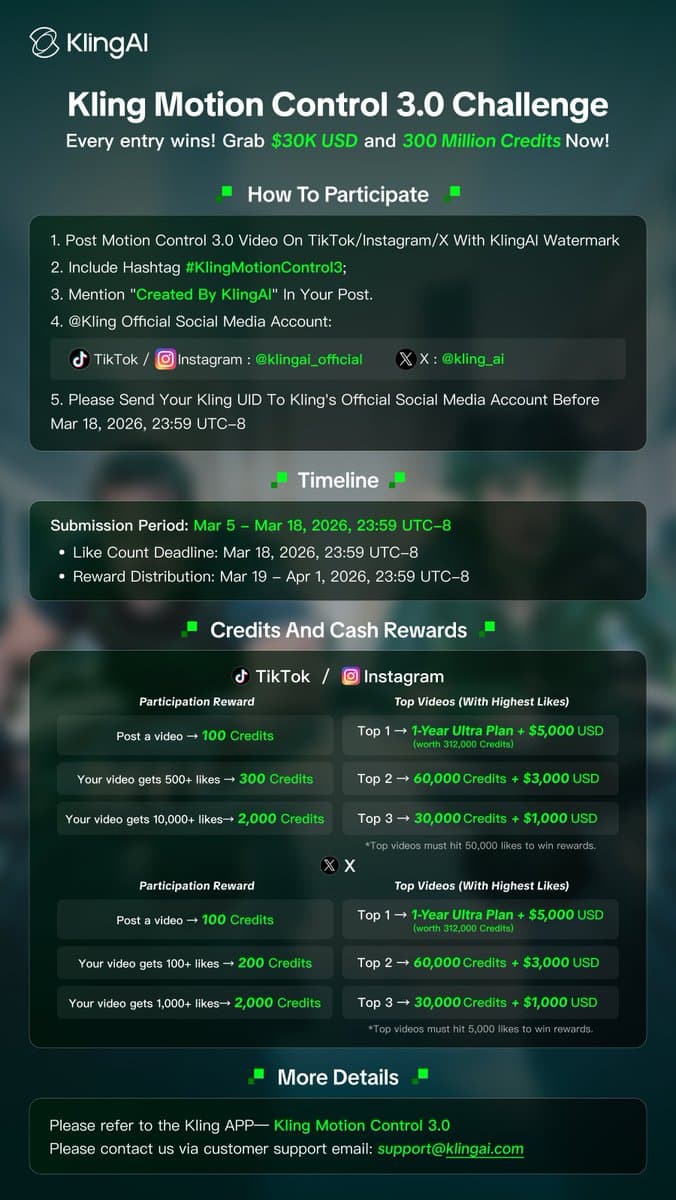
- Kling’s challenge post opened a Motion Control 3.0 contest with up to $30,000 in cash and 300 million credits across participation, like-based, and top-video rewards.
- The rules graphic says entries must use Motion Control 3.0, keep the Kling watermark, post with the required hashtag and “Created by KlingAI,” tag Kling, and submit a Kling UID before the March 18 deadline.
- According to the tutorial thread, Motion Control 3.0 works by combining a reference video, a character image, and a text prompt, with Standard for cheaper tests and Pro for higher-quality final renders.
- Creators are already using Kling 3.0 for stylized outputs, from Artedeingenio’s trailer setup for a Fallout/Mad Max/Terminator-style apocalypse to scripted multi-shot fashion prompts like MayorKingAI’s Y2K sequence.
What does the challenge actually pay?
Kling is framing this less as a single grand prize and more as a participation funnel. The promo graphic offers 100 credits just for posting a qualifying X video, 200 credits at 100+ likes, and 2,000 credits at 1,000+ likes, while the top X posts can earn a one-year Ultra plan plus $5,000 for first place, then $3,000 and $1,000 for the next two spots. TikTok and Instagram use higher like thresholds, but the same top-line cash ladder.
A separate reminder post confirms the challenge is still live and ending soon, with the campaign centered specifically on Motion Control 3.0 clips rather than general Kling outputs.
How are creators using Motion Control 3.0?
The clearest workflow detail so far comes from AI FILMS Studio’s tutorial: creators feed Kling a reference performance, a replacement character image, and a scene prompt, then choose between Video Orientation for full-body movement and camera dynamics or Image Orientation for more locked talking-head setups. The same thread says Standard is faster and cheaper for iteration, while Pro handles facial consistency and complex motion better, with clips capped at 30 seconds.
The tutorial also positions Motion Control as part of a larger chain. It can be routed into image generation, upscaling, lip-sync, and node-based automation for multi-step production.
What kinds of clips are landing?
Kling creators are leaning into short, tightly directed sequences instead of vague one-line prompts. MayorKingAI broke a 15-second Y2K rooftop-party scene into five timed shots, specifying camera angle, wardrobe, crowd behavior, and the final sunglasses reveal.
Artedeingenio is pushing the opposite direction: a post-apocalyptic trailer brief inspired by Fallout, Mad Max, and Terminator in the trailer thread, plus a separate horror test built around a closet scare in Kling 3.0. Together, those examples make the current pattern pretty clear: the strongest clips pair genre references with shot logic, then use motion transfer or multi-shot structure to keep the sequence coherent.