
LetzAI launches Canvas with Present mode and 2,500 free credits
LetzAI opened Canvas as an infinite board for references, storyboards, web layouts, and video panels, with present mode, inline comments, client links, and an on-board assistant. Generation, review, and handoff now happen in one shared surface instead of across folders, decks, and chat threads.
TL;DR
- LetzAI opened Canvas as an infinite board for generating shots, arranging storyboards, building decks, reviewing work, and sharing preview links, according to ai_artworkgen's workspace walkthrough and LetzAI's official homepage.
- The pitch is consolidation: ai_artworkgen's thread opener framed the usual AI creator workflow as scattered across shot tools, folders, decks, email, and chat, while the same walkthrough shows those steps pulled onto one surface.
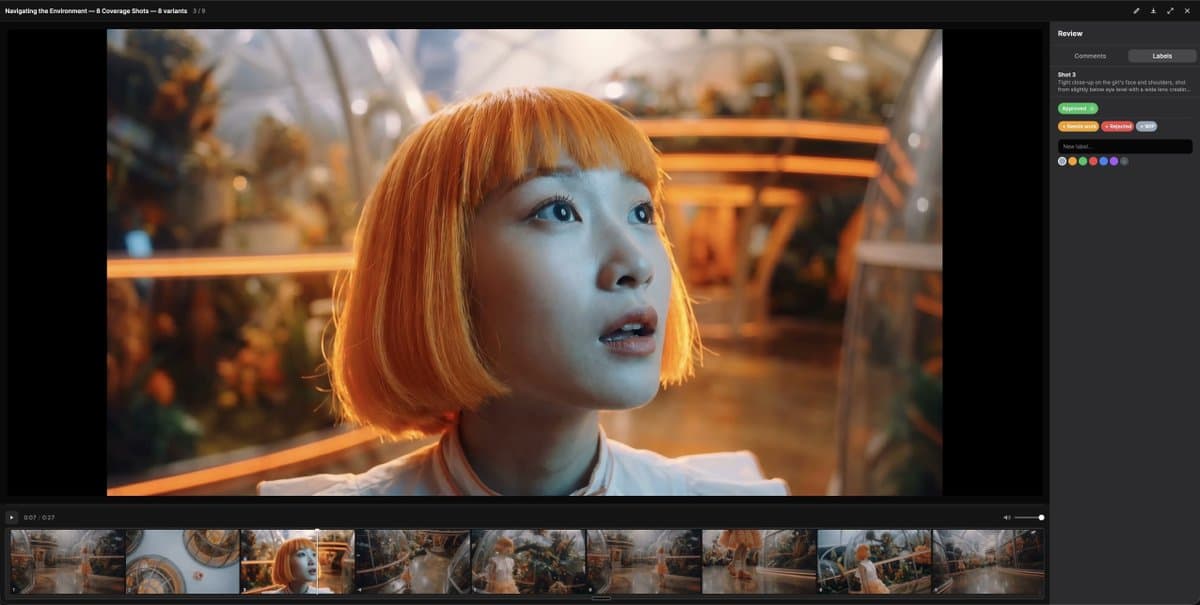
- Review happens on the asset itself, with Present mode, shot-level comments, and color-coded labels, per ai_artworkgen's review post and LetzAI's Canvas section.
- The board also includes an assistant that can plan storyboards, generate stills, animate panels, pull web references, and run multi-step jobs, according to ai_artworkgen's assistant post.
- Canvas is live for active LetzAI plans, and ai_artworkgen's availability note said free accounts got 2,500 credits to try it.
You can browse LetzAI's new Canvas landing section, skim the Canvas shortcuts doc, and trace the product's earlier board lineage in LetzAI's 2024 Community Boards post. The interesting bit is how much of the workflow moved into one surface at once: ai_artworkgen's client handoff clip centers preview links and stakeholder comments, while the assistant post adds board-aware generation on top.
One surface for shots, boards, and decks
The official homepage calls Canvas a workspace for AI filmmakers to generate shots, lay out storyboards, build pitch decks, review with a team, and share preview links, all in one place. ai_artworkgen's opener pushes the same claim from the creator side: the real mess was not generation, it was bouncing between disconnected tools.
The feature list breaks cleanly into five jobs:
- generate shots and videos
- place reference frames on the board
- arrange storyboard strips and decks
- review assets in context
- publish preview links for outside viewers
Present mode and comments move review onto the board
According to ai_artworkgen's review post, Canvas review includes:
- Present mode in fullscreen
- a timeline for stepping through stills and clips
- comments attached directly to an image or video
- color-coded labels for approvals, VFX notes, and alternates
LetzAI's homepage mirrors that setup with its own "Canvas & review" and "Share & present" language, including preview links for stakeholders. ai_artworkgen's handoff demo adds one concrete distribution detail: reviewers do not need an editor, an account, or a download.
The assistant is board-aware
The assistant is not a separate chat pane bolted onto Canvas. ai_artworkgen's assistant post says it reads the board layout, respects the current selection, and can work against the project already sitting on the canvas.
Its listed jobs are:
- plan a storyboard
- generate stills shot by shot
- animate panels
- pull web references onto the board
- run multi-step jobs
That lines up with the workflow shift in ai_artworkgen's side-by-side variants demo, where variants stay visible on the same surface instead of getting exported and compared elsewhere.
Access starts with existing plans, and boards are not brand new
Canvas shipped first to active LetzAI plans, while ai_artworkgen's availability note said free accounts received 2,500 credits to test it. The shortcuts doc also hints at a permissions split: collaborator-only users can navigate a board but not use generation shortcuts in the same way as editors, according to the Canvas shortcuts reference.
Boards themselves predate Canvas. In December 2024, LetzAI's Community Boards launch post introduced shared boards for subscribed users and dropped 500 promotional credits to seed adoption. Canvas looks like the much bigger follow-on, with generation, review, presentation, and handoff folded into that board model.