
AI short-film makers use reference-heavy workflows for scene continuity
Recent AI shorts used character sheets, storyboard frames, hard-cut continuity frames, timed Seedance prompts, and custom film tools to keep scenes coherent. Creators still report heavy cleanup, review, and cinematography work.
TL;DR
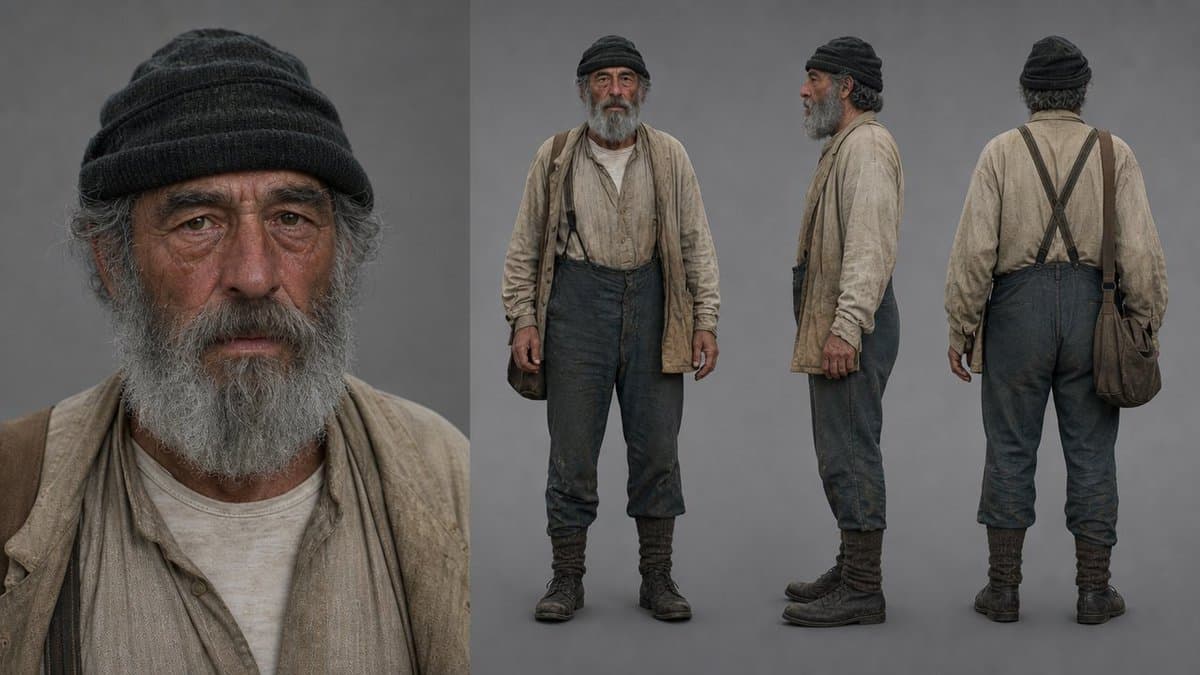
- Reference sheets did the heavy lifting: DrSadek_'s workflow split the elder, lantern, lighthouse, and creature into separate refs before animation, while MayorKingAI's Griffin’s Flight thread did the same with a boy, a griffin, and an environment.
- Continuity came from editorial hacks: DrSadek_'s hard-cut trick used the final 2 to 3 seconds of one clip as the setup for the next, and the lighthouse climax prompt reused an exact first frame.
- Creators treated 15 seconds like a shot list: MayorKingAI's parkour prompt divides the clip into five timed beats, and AllaAisling's Sock Thief prompt maps eight 1.9-second panels.
- Agents moved into production controls: AmirMushich's Unreal setup had Codex operate Unreal through Python, while CharaspowerAI's Higgsfield MCP note says Claude could analyze references and generate through Higgsfield.
- The quality caveat was blunt: icreatelife said high-quality AI video still needs cinematography knowledge, and his frame-by-frame reply pointed to the time spent checking consistency.
Invideo's Agent One page says agents store project context in long-term memory so clips stay consistent. Higgsfield's MCP page puts 30-plus image and video models behind a Claude connector. Flick's 3D Stage docs describe a character, camera, and scene workspace, while Flick's animation docs add preset actions and timeline paths. Seedance's own trailer guide still says AI trailer workflows struggle with character consistency and camera continuity, so final polish comes from the editor choosing the sequence.
Reference sheets
DrSadek_ started a fantasy sequence from one Midjourney 8.2 image of an old man on a misty coastal cliff, then turned it into separate refs before generating clips.
The split was practical:
- Elder keeper character sheet
- Glowing butterfly lantern prop sheet
- Lighthouse cliff approach sheet
- Sea-born creature sheet
The same pattern appears in MayorKingAI's Griffin’s Flight thread, which breaks the scene into Eryan, the griffin, and the rocky valley before the Seedance 2.0 prompt combines them.
The sharp move is limiting what each reference is allowed to control. DrSadek_ used all four refs for the climb and creature shots, then removed the elder and lantern refs for the final exterior so the lighthouse beam, fog, sea, and dissolving creatures carried the frame.
Continuity frames
DrSadek_'s most reusable finding was a handoff trick: the last 2 to 3 seconds of a generated clip became a hard-cut setup shot, then the first frame of that setup became the next video's first frame.
The method shows up immediately in the second clip prompt, where the first frame continues from the elder's boots climbing the wet stone steps, and again in the third clip prompt, which tells the model to use “2.png” as the exact first frame.
That is old-school editing logic applied to generative video: give the model a locked frame, then ask for motion.
Timed shot lists
MayorKingAI's Seedance 2.0 parkour prompt uses two still references, one character and one Blade Runner-style city, then writes the whole 15-second clip as five 3-second beats:
- Rooftop sprint and leap
- Freefall between skyscrapers
- Roll onto a flying car
- Leap to a second car
- Landing on a higher platform
AllaAisling pushed the same idea into comedy. The Sock Thief animation prompt maps a 15-second claymation short into eight labeled beats: slam, storm, dodge, swing, monster, grab, tear, innocent.
For longer pieces, AllaAisling used a master storyboard as an anchor rather than a literal shot list. The 3AM Ramen Chef storyboard defines four 15-second clips and eight shots, then the follow-up clip prompts animate each section separately.
Magnific's alternate-ending workflow compressed the same structure into social format: its tips post says each script used a 0 to 5 second setup, 5 to 10 second action beat, and 10 to 15 second ironic reveal, with a freeze frame and music sting at the end.
Agents inside the production stack
AmirMushich's Unreal test had three components: OpenAI Codex, Unreal Engine, and the Unreal Python API. His follow-up says every tree, fern, rock, light, and camera remained a real Unreal object, while Codex could move meshes, adjust lighting and fog, edit Sequencer, save maps, and launch Movie Render Queue.
The useful part was the review loop. Floating plants became a natural-language correction in one Codex iteration, nervous camera paths became fewer keys and slower motion in another, and lighting notes like softer sunlight, brighter shadows, less bloom, lower contrast, subtle fog, and visible rays became engine setting changes in the lighting pass.
Agent products are starting to formalize that loop. Invideo's Agent One page describes long-term project memory, storyboarding, script writing, and a timeline editor. Higgsfield's MCP page says Claude and other MCP clients can connect to Higgsfield with https://mcp.higgsfield.ai/mcp, then generate images or videos through the platform.
CharaspowerAI's hands-on version used Claude as director and Higgsfield MCP as production studio: his setup post says Claude analyzed an anime reference video and a character sheet, then rebuilt the camera work, pacing, composition, and visual language around a new character.
Control layers
Curious Refuge tested a motion-transfer workflow that converts reference footage into a depth map, optionally adds color masks or skeleton poses, then feeds the depth map into Seedance 2.0 Omni with character and environment references. The workflow post says the depth map version produced the cleanest and most accurate motion transfer.
_OAK200 explained the same control idea for storyboards. A normal storyboard carries color, texture, and lighting, while his depth-map reply says a depth-map storyboard strips that away and preserves spatial layout, camera position, subject scale, depth relationships, and composition.
Rainisto found a nearby use for isometric references: his Seedance test says an isometric room image did not fully preserve spatial positions, but it remained useful as an environmental reference for shots from many angles.
Flick is packaging that control as an interface. minchoi's 3D Stage post describes an “AI agent-powered Blender” for blocking scenes, moving cameras, and directing shots; Flick's docs cover adding and transforming a character inside the 3D stage.
Long-form output
Shorts are getting longer. Ozan Sihay made a 9-minute AI mockumentary called “INTEGRATION” using ChatGPT and Claude for script development and prompting, GPT Image 2 and Nano Banana 2 for images, Gemini Omni Flash, Kling 3.0, Seedance 2.0, and Grok Imagine 1.5 for video, Topaz for upscale, Suno and Epidemic Sound for music, and Premiere Pro for editing.
Gossip_Goblin's “Pomegranate” went longer still. The YouTube link post points to the full film, and the YouTube page lists it as a 27:56 sci-fi short about a jaded aristocrat looking for an experience that feels real again.
DavidmComfort is building custom tooling for scale. His Threshold Studio post claims he can reasonably create a 25-minute short in 1 to 2 days using his platform, while his style-manager follow-up says the current constraint is cost because Seedance 2.0 is expensive.
The cleanup tax did not disappear. icreatelife said high-quality AI videos remain hard, his background-inconsistency reply called out background drift even with strong prompts, and his Premiere Pro post put editing back at the center of the workflow.
Cleanup and live production
Curious Refuge highlighted SAM2 Matting as an open-source rotoscoping tool based on Meta's Segment Anything models, then used Claude to help compile it into a native Mac app. The test post says the tool is especially useful for fine details like hair.
Format conversion is another cleanup lane. Curious Refuge's Reframe API test compared LTX's Reframe API with Seedance 2.0 Omni for 16:9 to 9:16 and 9:16 to 16:9 conversion, with Seedance producing cleaner results in almost every test.
Live production is entering the same stack. Dustin Hollywood's STAGES post says StudioX can connect an HDMI camera, stream an iPhone wirelessly, or use a webcam, then switch sources live, record isolated feeds for video-to-video, and generate with AI in real time. His follow-up says the same live tether applies to photography shoots, with generative editing, color, and style transfers running before the shoot ends.