
OpenArt adds Smart Shot for GPT Image 2 shot plans before Seedance 2.0 renders
OpenArt added Smart Shot, which uses GPT Image 2 to draft a shot plan before Seedance 2.0 renders the final clip. Creators can review character refs, floor plans, camera, and lighting choices before spending render time.
TL;DR
- OpenArt's new Smart Shot pairs GPT Image 2 for planning with Seedance 2.0 for rendering, according to MayorKingAI's launch overview and MayorKingAI's workflow breakdown.
- The main hook is a previewable shot plan that lays out character refs, storyboard, floor plan, camera work, lighting, mood, and lens choices before the final video run, per MayorKingAI's shot plan description and MayorKingAI's breakdown of one plan.
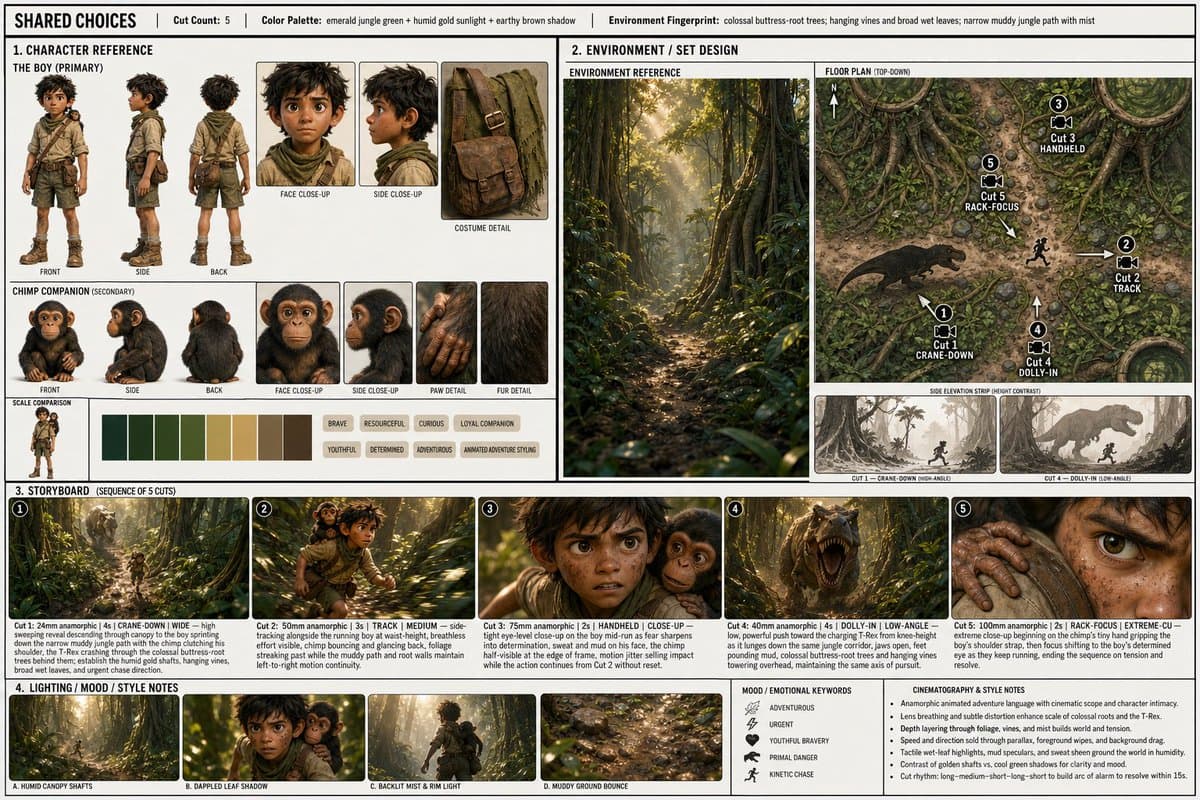
- In one creator demo, Smart Shot generated a production sheet with character boards, a top-down floor plan, storyboard cuts, and lighting notes before a 15-second 1080p render, as shown in techhalla's workflow thread.
- OpenArt is positioning the feature beyond film scenes. MayorKingAI's format roundup shows fashion, product, and narrative examples, while the official OpenArt Smart Shot page is already live.
- A second workflow trick surfaced fast: techhalla's continuity post says creators can feed a generated clip back in as reference material to keep later shots consistent, including music and voices.
You can open the tool, watch MayorKingAI's first demo turn a prompt into a pre-production sheet, and then compare it with techhalla's hands-on thread, which shows the exact reference setup, the sheet preview, and a follow-up continuity trick for chained scenes.
Shot Plan
Smart Shot's useful idea is simple: spend tokens on pre-production before you spend tokens on rendering.
According to MayorKingAI's shot plan description, GPT Image 2 handles the creative direction stage first, so the user can inspect a structured plan instead of sending a raw prompt straight into video generation. MayorKingAI's workflow breakdown describes it as a two-step handoff, first plan, then render.
Sheet anatomy
In MayorKingAI's Sun Wukong example, the sheet breaks the scene into scan-friendly production blocks:
- main concept and location
- cut count
- color palette
- environment details
- character reference views
- set design, including side elevation and top-down floor plan
- camera moves
- shot-by-shot storyboard
- lighting notes
- mood and style notes
That is more structure than most text-to-video tools expose up front, and it explains why the outputs read more like planned sequences than one-off prompt rolls.
Reference inputs
techhalla's thread shows the setup more concretely than the launch copy. The workflow starts with separate visual refs for each character, plus a cleaned environment image with the subject removed, then drops them into Smart Shot alongside a scene description.
The prompt box in
also shows how detailed the downstream Seedance prompt can get: named reference assets, a second-by-second timeline, dialogue beats, sound cues, and style constraints. In the OpenArt UI screenshot inside techhalla's workflow thread, the sheet preview step sits before the final video run, with output set to 16:9, 1080p, and 15 seconds.
Generated pre-production doc
Instead of returning a single image board, Smart Shot appears to assemble a compact production packet.
The sheet in techhalla's sheet preview includes four clear blocks:
- Character reference, with visual variations and keyword tags.
- Environment and set design, including a floor plan with camera paths.
- Storyboard panels, with cut-by-cut shot descriptions.
- Lighting, mood, palette, and lens notes.
That floor-plan layer is the weirdly practical bit. It gives creators a spatial diagram for movement, not just a style board.
Seedance render
Once the plan is approved, Seedance 2.0 renders the clip. MayorKingAI says the result looks more directed because framing, motion, and continuity have already been specified in the plan, while AllaAisling's Seedance comparison shows the model being used for tightly choreographed 15-second action prompts outside Smart Shot too.
That matters here because Smart Shot is not replacing the renderer. It is wrapping Seedance with a planning layer that constrains the renderer before the first frame gets generated.
Formats beyond narrative scenes
OpenArt and early users are already pitching the tool as a general creative format rather than a film-only feature. MayorKingAI's format roundup points to fashion campaign, product spot, and narrative scene variants from the same interface, and Artedeingenio's comic animation thread shows the broader Seedance ecosystem leaning into format-specific prompt design, in that case a comic page that breaks open into motion.
Continuity chaining
The most concrete workflow tip in the evidence pool comes from techhalla's continuity post: after generating one clip, creators can reuse that video itself as a reference for the next one.
techhalla says this preserves continuity across later shots, including music, voices, character models, lighting, and environment. That turns Smart Shot from a one-off scene generator into something closer to sequence planning, especially for creators trying to stitch multiple 15-second clips into a longer piece.