
OpenAI Codex supports the iOS simulator on Mac via plugin
Creator demos showed OpenAI Codex building, running, and testing iOS apps through a Mac-only simulator plugin, and a companion thread listed Figma, illustration, video, and local model workflows. Separate posts also showed Codex sessions moving onto iPhone home screens and PM-built internal tools, so developers can test whether the plugin fits their stack.
TL;DR
- OpenAI already has an official Build for iOS guide and a separate Debug in iOS simulator guide, which line up with [MengTo's simulator demo](src:11|MengTo's simulator demo) showing Codex building and driving an iOS app through a simulator loop.
- The simulator path is Mac-bound for now: OpenAI's docs center the workflow on XcodeBuildMCP and the iOS Simulator, and [MengTo's reply on platform support](src:7|MengTo's platform reply) says the plugin only works on Mac.
- The interesting part is not just native app testing. [minchoi's roundup](src:0|minchoi's Codex roundup) paired the iOS plugin with Figma, MagicPath, illustration, video, and local-model workflows, while OpenAI's Figma integration post describes a two-way code-to-canvas loop.
- Codex is also leaking out of the desktop workflow: [Peter Yang's iPhone home-screen workaround](src:8|petergyang's iPhone workaround) and OpenAI's v0.138.0 release notes both point to sessions moving between terminal, desktop, and phone.
You can watch the simulator demo, browse OpenAI's iOS build guide, and open the separate simulator debugging guide. The same evidence trail also runs sideways into OpenAI's Figma MCP post, the public Codex plugins page, and a fresh v0.138.0 changelog that added desktop handoff from the CLI.
Build iOS apps
OpenAI's official iOS docs describe a CLI-first loop: scaffold a SwiftUI app, drive builds with xcodebuild, then switch to XcodeBuildMCP when you want simulator control, screenshots, logs, and UI interaction in the same run.
That is exactly what the simulator debugging guide formalizes. OpenAI says the Build iOS Apps plugin can build, launch, inspect, and drive a simulator session, then capture screenshots, logs, and stack traces while Codex narrows a bug.
Mac-only simulator loop
The current constraint is simple. [MengTo's platform reply](src:7|MengTo's platform reply) says the iOS simulator only works on Mac, which matches OpenAI's own setup because the workflow assumes Xcode, a booted simulator, and XcodeBuildMCP.
OpenAI's docs also make the loop more specific than the tweet version suggests:
- discover or reuse the right Xcode project or workspace
- pick an app scheme and simulator device
- verify the right screen with a UI snapshot before interacting
- drive taps, typing, scrolling, and swipes through accessibility labels
- capture screenshots, simulator logs, and LLDB traces when the app breaks
Apple's WWDC materials add broader context here. In Apple's Xcode 27 announcement, coding agents can interact with the simulator through Device Hub, and Xcode plugins can connect tools through MCP and ACP.
Figma and multiplayer canvas
The iOS simulator is the flashy demo, but the more creator-native angle is that Codex now has multiple ways to leave the code window. [minchoi's roundup](src:0|minchoi's Codex roundup) put the iOS plugin next to a Figma connection and a MagicPath multiplayer canvas.
OpenAI's Figma MCP post says Codex can generate editable Figma files from code and also pull design context back from Figma into code generation. The public plugins docs frame that as the larger Codex model: plugins bundle skills, app integrations, and MCP servers into reusable workflows.
The companion examples split into two different surfaces:
- Figma: turn working UI into editable design files, then move design context back into code
- MagicPath: put Codex inside a collaborative canvas where multiple people can design and build together
- Sites and other plugins: extend Codex with app connections rather than just prompts, according to the plugins overview
A June 8 commit in the public openai/plugins repository also refreshed marketplace metadata for both Figma and MagicPath, a small sign that these workflows are being treated like first-class plugin surfaces instead of one-off hacks.
Codex beyond engineering
The most useful non-demo evidence came from [Aakash Gupta's post about an OpenAI PM](src:10|aakashgupta's PM prototype story). Abhi Muchhal, who runs international growth for ChatGPT according to the post, used Codex to replace a seven-dashboard morning routine with a single internal web app and attached a 10-question FAQ instead of a PRD.
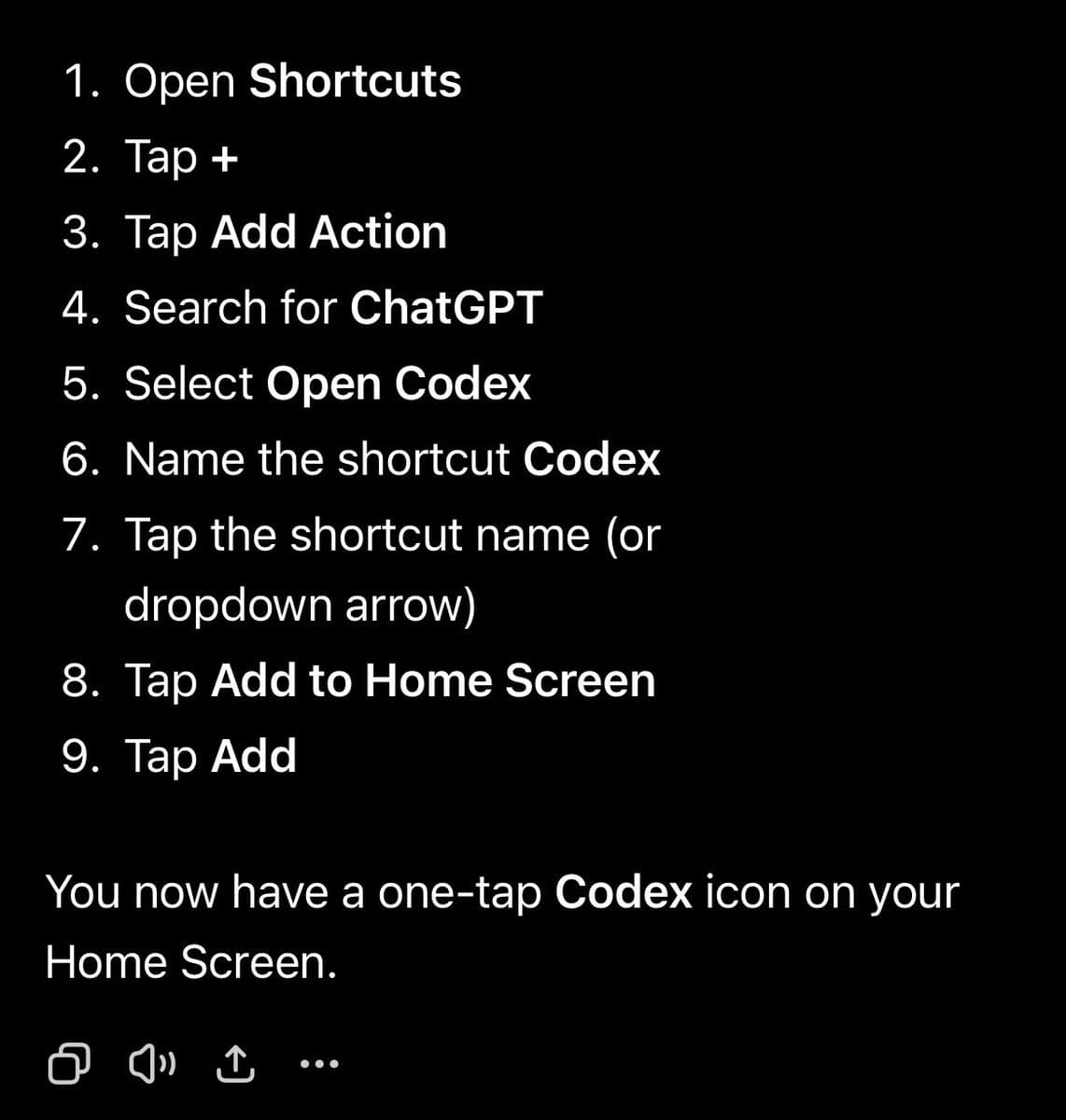
The adjacent phone posts show the same product stretching into odd places. [Peter Yang's workaround](src:8|petergyang's iPhone workaround) explains how he pinned Codex to the iPhone home screen, while [his follow-up](src:9|petergyang's laptop-on workaround) says he keeps threads alive remotely by leaving his laptop awake and resuming them from ChatGPT on the go.
That lines up with the newest Codex plumbing. OpenAI's v0.138.0 release notes say the /app command can hand off a current CLI thread into Codex Desktop on macOS and Windows, which makes the product feel less like one interface and more like a roaming session.
Local models and agent loops
The last piece in [minchoi's longer thread](src:16|minchoi's ten-use-case thread) is easy to miss because it sits below the simulator clip and Figma examples: one item points to LM Studio plus Qwen models on a Mac, and another argues for building systems that prompt agents for you.
Those two ideas are part of the same shift:
- local stack: LM Studio plus open Qwen models for on-device agentic work on a Mac, as [minchoi's local example](src:18|minchoi's local Mac example) summarized
- orchestration stack: Codex as one worker inside a larger loop, not just a chat box, per [minchoi's agent-loop example](src:19|minchoi's agent loops example)
- hybrid stack: cloud Codex for heavier app work, local models for privacy or cost-sensitive runs, which is close to the setup described in recent community writing about LM Studio-powered local agents
That makes the Mac-only iOS simulator plugin feel less like a niche iPhone-dev trick and more like one node in a broader agent workspace that now spans simulator control, design tools, desktop handoff, and local runtimes.