
Figma Motion supports shader prompts with canvas handles in beta
Creator testing around Figma Motion now shows shader prompts, canvas handles, and keyframe retiming in the beta, alongside a detailed tutorial. Designers can keep more motion polish inside Figma before handing work to separate animation or code tools.
TL;DR
- Figma shipped Figma Motion, shader effects and fills, and generative plugins into the same canvas at Config 2026, with beta availability rolling out across the new features via Figma's Motion beta post, Figma's shaders beta post, and Figma's Weave beta post.
- Creator testing quickly showed a more specific workflow than the keynote pitch, because rogie's reply to Stephen Haney said shader canvas handles are already implemented and promptable, while Tran Mau Tri Tam's follow-up showed prompt-based keyframe retiming inside Motion.
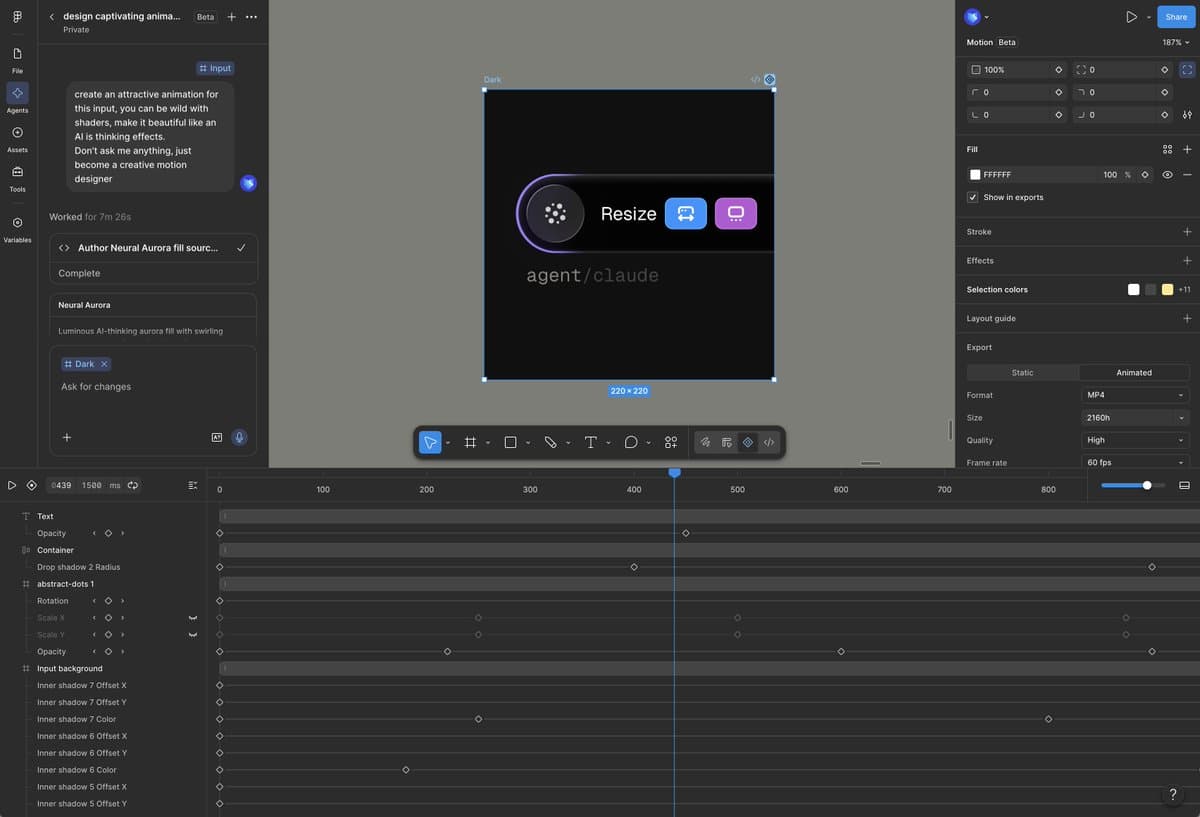
- Tran Mau Tri Tam's demo turned a single prompt into a polished animated input, and his export note said the result could be exported and published without screen recording.
- The strongest practical case came from Meng To's three-point breakdown, who argued the mix of prompting plus sliders and timeline controls keeps the last stretch of motion polish editable inside Figma instead of pushing everything into a separate AI or code tool.
- Access is broad, but not free forever: Meng To's beta reply described Motion as unlimited during beta, while Tran Mau Tri Tam's credit warning said AI credits become the issue after beta ends.
You can watch Meng To's 10 minute tutorial, scrub through Tran Mau Tri Tam's one-prompt demo, and see zoink's custom shader clip generating shader code with the Figma agent. Figma's own rollout posts also split the stack cleanly: Motion for animation, shaders for visual effects, Weave tools for on-canvas generation, and generative plugins for bespoke workflow tools.
Shader prompts
Figma's keynote framed shaders as a native canvas material, and Figma's shader announcement positioned them as visual effects you can create directly in Figma.
The more useful detail came one reply deeper. In rogie's reply to Stephen Haney, Rogie said canvas handles for shaders are already implemented, can also be created with prompts, and that interactive mouse-driven shaders are still coming soon while the team tunes performance.
That turns shaders into two different control surfaces at once:
- promptable generation, per rogie's reply
- direct canvas handles, also per the same reply
- upcoming interactive mouse behaviors, again per rogie's note on performance
Keyframe retiming
The clearest creator example is still Tran Mau Tri Tam's animated input, which he said came from a single prompt.
The thread matters more than the headline clip. In his posted prompt, Tran Mau Tri Tam asked Motion to "be wild with shaders" and create an "AI is thinking" effect, then in a follow-up reply said his first pass felt slower than expected and used prompt edits to tweak keyframes, speed, and over-animated scale effects.
That gives Motion a pretty specific editing loop:
- Generate the first animation pass from a text prompt, as in Tran Mau Tri Tam's prompt.
- Retime keyframes by describing what feels off, as in his slower-than-expected note.
- Remove unwanted flourishes like scale exaggeration, again in the same follow-up.
Timeline controls
Figma's own pitch for Motion was simple: its launch post called it "design AND animate in the same file," while Linus Ekenstam's keynote thread said the tool is built around a new timeline primitive and is fully collaborative.
Meng To's three-point breakdown is the sharpest explanation of why that matters for working designers. He argued that animation and shaders are hard to prompt consistently, so the timeline and slider controls handle the last 10 percent without another token-burning roundtrip.
That breakdown also split the product logic into three parts:
- AI still struggles with consistency, so starting from an existing Figma file preserves context, according to Meng To.
- Sliders and timeline controls handle the final polish on hard-to-prompt motion work, again according to his thread.
- Motion and shaders live in code as well as canvas objects, which makes cross-tool transfer possible, per the same post.
Export and code handoff
A lot of Motion products die at the demo stage. Figma pushed the opposite angle from day one.
In Linus Ekenstam's post, he said Motion projects can export to code, MP4, WebM, and GIF, with more formats coming. Tran Mau Tri Tam's export note added a smaller but practical detail: he liked that he did not need to record his screen, and could just export and publish.
The code handoff story is still early, but it is present. Meng To's reply about Liquid Glass said he was hoping for 1:1 transfer from Figma to code, another Meng To reply said he still needed to test shader code, and Linus Ekenstam's question from the keynote explicitly asked how Motion gets to code.
Beta access and credit limits
The canvas unification pitch came straight from zoink's Config recap, which grouped code, motion, shaders, Weave, and agent-built tools as one stack living together in the canvas.
Availability is wider than just Motion. Figma's pre-keynote post said the design agent beta opened to 100 percent of Pro, Org, and Enterprise plans before the keynote, while Figma's Motion beta post, its shaders beta post, its Weave beta post, and its generative plugins beta post marked the new canvas features as available in beta.
The catch showed up in creator replies, not the keynote clips. Meng To's reply about beta access said Motion has MCP, agents, and unlimited usage during beta, but Tran Mau Tri Tam's credit warning said AI credits become the problem once the beta ends.