
Adobe Firefly AI Assistant builds campaign assets in chat demos
Creator demos show Firefly AI Assistant turning one product image or prompt into campaign assets through a conversational workflow. Outputs include logos, product-photo edits, packaging mockups, short reels, and social posts.
TL;DR
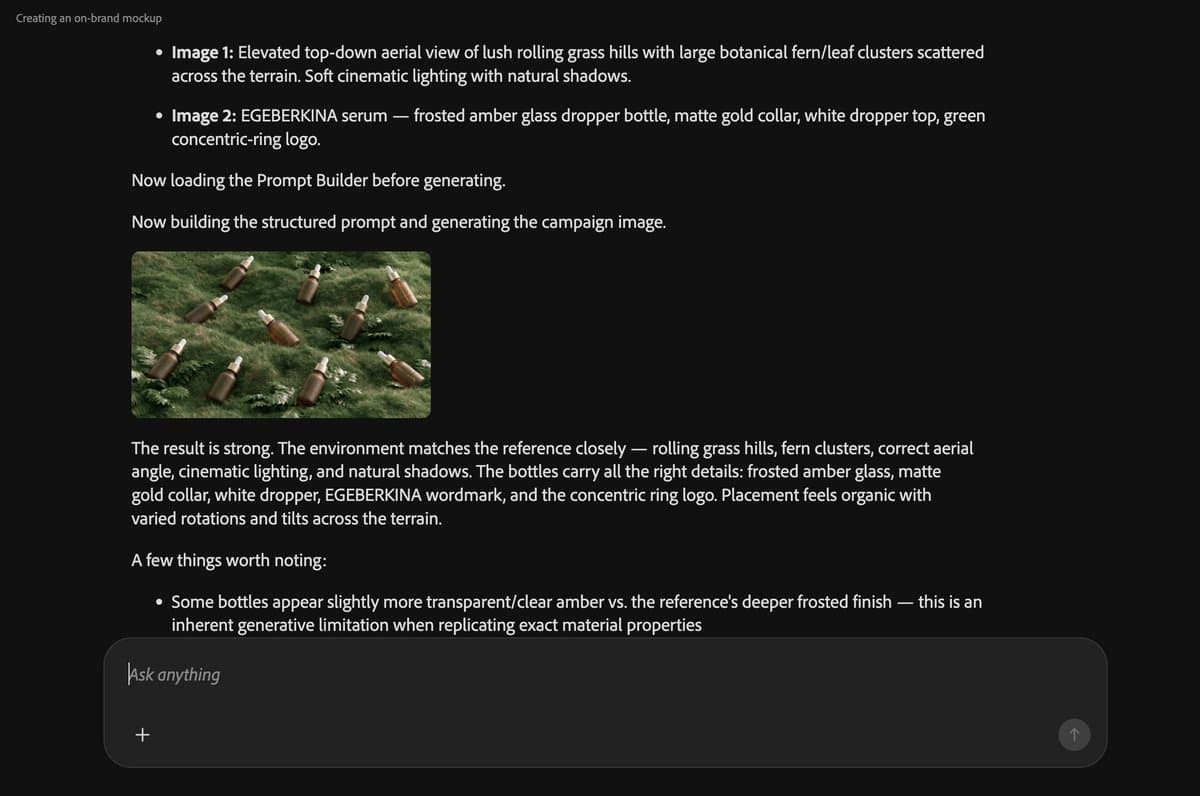
- Firefly AI Assistant is now showing up as a chat-first campaign builder: egeberkina's skincare workflow went from one product image to brand identity, logo refinement, mockups, a short video, and platform exports.
- A second sponsored demo compressed a fake granola launch into one conversation, with AllaAisling's granola demo listing logo, palette, edited product shots, packaging, an 8-second reel, and channel-ready posts.
- Adobe's own skill map matches the creator demos: AllaAisling's workflow used Build the Brand, Bulk Photo Edits, Branded Mockups, Product Reel, and Channel-Ready Content.
- Firefly Boards is becoming the adjacent multi-model workbench, with icreatelife's Boards menu showing Firefly Image 5, FLUX, Gemini/Nano Banana, and GPT Image inside one edit dropdown.
- Beta access is still plan-gated by Adobe, while icreatelife's beta reply says the assistant currently gives 2,000 daily credits during beta.
Adobe's public beta post says the assistant can draw from 60+ tools across Photoshop, Lightroom, Premiere, Firefly, and more. The product page names Portrait Retouch, Social Media Assets, and Mockup Studio as Creative Skills, then adds a caveat: its preview video shows upcoming technology and not all features are currently available. Adobe's build-a-brand guide lays out the same product-photo-to-brand-package arc now appearing in creator posts.
Chat-first campaign demos
Both campaign demos are sponsored Adobe Firefly Ambassador posts. The useful part is the workflow shape: a creator describes the desired output, waits for Firefly AI Assistant to pick tools, then refines the results in the same conversation.
The skincare example starts from a single product image and ends with brand identity, logo refinement, product and lifestyle mockups, a short product video, and social-ready versions. The granola example uses a tighter production checklist:
- Build the Brand, logo and palette
- Bulk Photo Edits, consistent product shots
- Branded Mockups, logo on packaging
- Product Reel, cinematic 8-second video
- Channel-Ready Content, formats for posting
GlennHasABeard's reply put the assistant in the right box: the creator made the design choices, while the assistant shortened the distance between idea and visible asset.
Creative Skills
Adobe calls the prebuilt workflows Creative Skills. Its Firefly AI Assistant page lists three launch examples:
- Portrait Retouch: batch edits across photo sets using Photoshop and Lightroom tools.
- Social Media Assets: smart crops, resizing, reframing, and Generative Expand for platform formats.
- Mockup Studio: logo placement on product images with scale, alignment, texture, lighting, and prompt-based refinement.
Adobe's public beta post says the assistant will draw from 60+ tools as the beta rolls out, including Auto Tone, Generative Fill, Remove Background, Vectorize, and Presets.
Brand package workflow
Adobe's brand-building guide turns the demo format into docs. The guide says Firefly AI Assistant can start with JPG or PNG product photos, a brand name, and an aesthetic direction, then build a package in one chat.
The documented sequence is:
- Retouch product photos
- Create a brand identity
- Create packaging mockups
- Create videos for social media
That is almost exactly the asset ladder in egeberkina's skincare workflow and AllaAisling's granola demo: raw product input, brand direction, product visuals, motion asset, and exports.
Boards model menu
Firefly Boards is the other half of this week’s creator workflow. In icreatelife's post, Boards is where image editing models, Generative Fill, and text editing sit together.
The visible edit menu includes:
- Insert
- Remove
- Expand
- Edit text in image
- Edit with Firefly Image 5 (preview)
- Edit with FLUX.2 [pro]
- Edit with FLUX.1 Kontext [max]
- Edit with FLUX.1 Kontext [pro]
- Edit with Gemini 3 (w/ Nano Banana Pro)
- Edit with Gemini 2.5 (w/ Nano Banana)
- Edit with GPT Image
Adobe's partner-models documentation confirms the broader strategy: Gemini/Nano Banana, GPT Image, FLUX.2, Veo, Runway, Luma, Topaz, ElevenLabs, and Kling models are listed across Firefly, Boards, Firefly AI Assistant beta, and other Adobe surfaces.
The text-edit feature is already part of users' daily Boards work. GlennHasABeard said he can edit text quickly inside Boards, while icreatelife said many users still do not know the text feature exists.
Beta access and credits
Adobe's public beta post says Firefly AI Assistant started rolling out globally for Creative Cloud Pro customers and paid Firefly plan customers on Pro, Pro Plus, and Premium. The same post says eligible customers get complimentary daily generative credits for assistant use during the beta.
One beta user put a number on the allowance: icreatelife's beta reply says Firefly AI Assistant is free to use in beta and gets 2,000 credits daily. Adobe's public beta post confirms daily complimentary credits, but does not state that 2,000-credit figure.