
GPT Image 2 adds character sheets and 10-shot storyboards before Seedance animation
New workflows used GPT Image 2 for color-coded boards, character sheets, album covers, and 10-shot storyboards before Seedance animation. It matters because the model is now serving as preproduction input for animation and typography, not just a still-image endpoint.
TL;DR
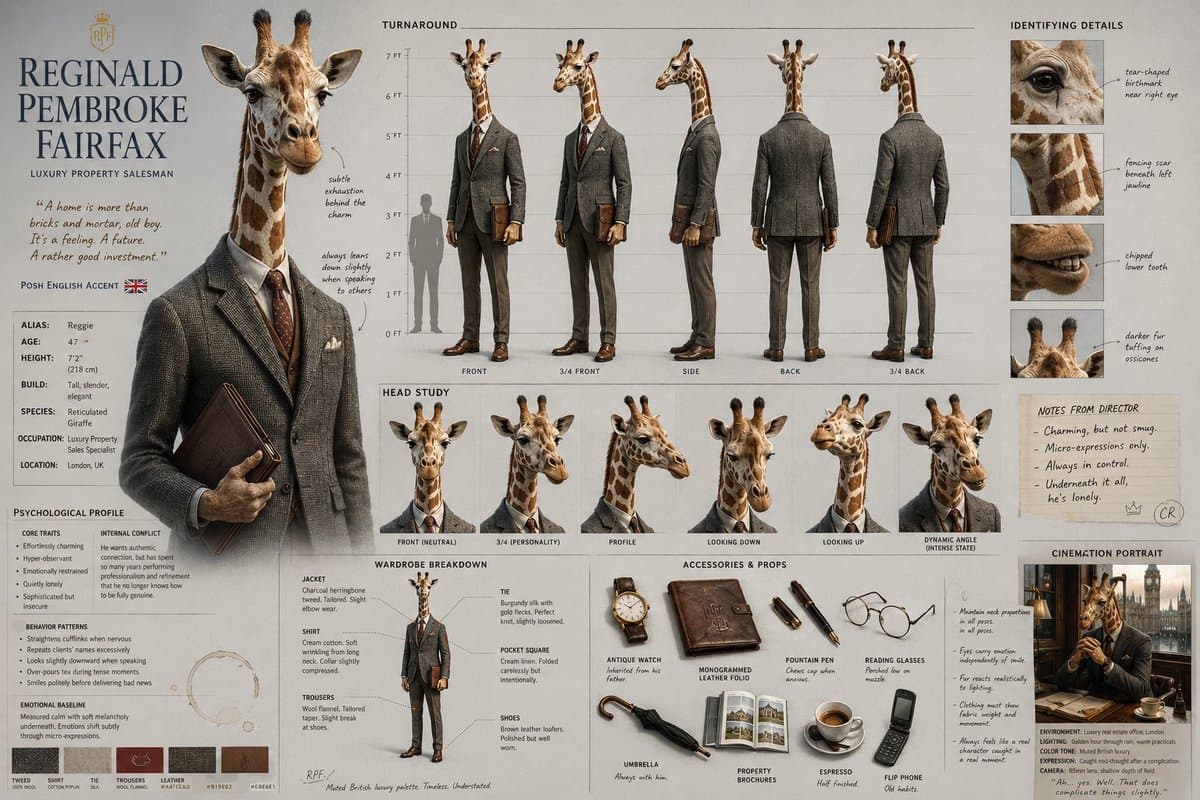
- CuriousRefuge's workflow thread shows GPT Image 2 being used as a preproduction tool, not just a still-image model: one character sheet becomes a multi-shot Seedance 2.0 sequence, with consistency close enough to hold across short scenes.
- icreatelife's storyboard method pushes the same pattern into planning, using GPT Image 2 inside Adobe Firefly Boards to generate a color-coded eight-panel chase storyboard adapted by Claude from another creator's prompt.
- AllarHaltsonen's storyboard prompt and AllarHaltsonen's LTX Studio step turn a single image into a 10-shot board with camera notes, then pass that board into Seedance 2.0 for a full animated sequence.
- pzf_ai's album-cover thread pairs Claude with GPT Image 2 on Leonardo AI, splitting creative direction and typography from image execution, then finishing with pzf_ai's upscaler step to clean artifacts at output size.
You can inspect the image prompt and the Seedance prompt behind underwoodxie96's magazine-cover test, browse icreatelife's board screenshot for a fast storyboard format, and follow AllarHaltsonen's thread opener through Midjourney, GPT Image 2, storyboard generation, and Seedance animation. The striking part is how often GPT Image 2 sits in the middle of the workflow, between ideation and motion, rather than at the end.
Character sheets
CuriousRefuge's three examples, Dave, Reginald, and Vivian, all use the same structure: a single GPT Image 2 character reference goes in, then Seedance 2.0 turns it into a short cinematic clip.
According to CuriousRefuge's workflow thread, the consistency is "not 100%" and Seedance still hallucinates a little. That caveat is useful because the workflow still holds up as a shot-planning system even when identity lock is not perfect.
The repeatable pattern is simple:
- Generate one reference sheet in GPT Image 2.
- Feed that reference into Seedance 2.0.
- Use short cinematic sequences, where near-match consistency is good enough.
- Expect some drift, especially across multiple shots.
Color-coded boards
icreatelife used GPT Image 2 in Adobe Firefly Boards to build an eight-panel chase sequence after asking Claude to adapt Koda's original prompt to a new setup, a woman chasing a tortoise through New York City.
The board itself carries most of the story. It specifies shot type, action beat, and location across roughly 15 seconds:
- Wide establishing shot on a busy sidewalk.
- Side tracking shot as the chase starts.
- 3/4 front angle at the crosswalk.
- Overhead shot at the intersection.
- Close action at the subway entrance.
- Low angle in the subway corridor.
- Hero side shot for the catch.
- Wide payoff in a small city park.
That is a real shift in where the image model sits. icreatelife's storyboard method is not asking GPT Image 2 for one hero frame. It is asking for sequence grammar.
10-shot storyboards
AllarHaltsonen's thread is the cleanest step-by-step recipe in the evidence set. The workflow starts with a Midjourney style reference, turns that frame photoreal with GPT Image 2, asks GPT Image 2 for a 10-shot storyboard, then animates the result in LTX Studio with Seedance 2.0.
The chain breaks down like this:
- Start image: Midjourney with
--sref 2273339709, per AllarHaltsonen's starting-image step. - Realism pass: GPT Image 2 rewrites the frame as photoreal while keeping the color grading and aspect ratio, per AllarHaltsonen's realism prompt.
- Board generation: GPT Image 2 creates a 10-shot storyboard with camera angles, SFX, lighting, and color-grade notes, per AllarHaltsonen's storyboard prompt.
- Animation: Seedance 2.0 in LTX Studio uses the storyboard as a start-frame reference and is told to adhere to the notes, per AllarHaltsonen's LTX Studio step.
What makes this workflow more than a prompt trick is the shot metadata. AllarHaltsonen's storyboard prompt explicitly asks for camera brands, lens choices, settings, lens flare, and handheld shake when needed. That turns GPT Image 2 into a lightweight previs tool.
Magazine covers to motion
underwoodxie96 posted a smaller version of the same idea: make a polished still in GPT Image 2, then hand it to Seedance 2.0 for motion.
The output here is not a full scene. It is a magazine-cover-style visual with subtle motion, hair movement, and title treatment. That matters because it shows the stack working on design surfaces too, not just cinematic clips.
A second post in the same thread pushed the look into anime-themed beach magazine covers, which suggests the style transfer is robust enough for repeatable editorial layouts rather than one-off demos.
Album cover typography
pzf_ai's album-cover thread adds a different division of labor. Claude handles composition, mood, typography, and plain-English prompting, while GPT Image 2 on Leonardo AI handles image execution.
The workflow has two branches:
- If there is already an image, Claude analyzes composition, palette, and mood, then writes the title and layout prompt for GPT Image 2, according to pzf_ai's existing-image step.
- If there is no image yet, Claude proposes visual directions from the lyrics and genre, then writes the cover prompt before a second pass adds the title treatment, according to pzf_ai's no-image step.
The final production detail is new relative to the other examples: pzf_ai's upscaler step finishes the cover with Leonardo AI's Pro Upscaler to clean artifacts that become more visible at larger sizes. That makes GPT Image 2 part of a typography-and-finishing pipeline, not just a concept-art stage.