
InVideo supports GPT Image 2 character sheets for Agent One story scenes
Creators documented an Agent One workflow that starts with GPT Image 2 character sheets and feeds scripted scene direction back into InVideo for shots, sound, and sequencing. Try this if you want story direction and asset generation inside one iterative loop instead of separate tools.
TL;DR
- Creators are using OpenAI image outputs as the front end of an InVideo workflow: CharaspowerAI's character-sheet post says the story started with three GPT Image 2 character sheets, and CharaspowerAI's later example shows the kind of detailed sheet that made the setup stick.
- The handoff into InVideo is unusually compact. In CharaspowerAI's workflow post, the inputs are just character sheets plus a precise script, and Agent One handles image generation, video, sound, and sequencing inside one loop.
- The useful shift is editorial, not just generative. AllaAisling's shot-fix post, her Carrion Hammer breakdown, and her Obsidian Spire notes all describe the same pattern: the creator rejects bad takes, the agent flags issues, and nothing locks without sign-off.
- Agent One also appears to make local production decisions on its own, then hand control back. AllaAisling's timing note says it generated four extra beats when footage could not be stretched, while her music post says it rebuilt a custom score and surfaced branching choices like pacing and final mastering.
You can jump straight to the Agent One access link, browse a GPT Image 2 character-sheet example, and then compare that setup with AllaAisling's shot revision notes, her timing adjustment post, and her music and mastering post. The interesting part is how often the agent is doing production cleanup in the background while the creator keeps final cut authority.
Character sheets
The cleanest workflow in the evidence starts before video. CharaspowerAI's character-sheet post says the project began with three character sheets made inside InVideo using GPT Image 2, with each sheet defining role, personality, and visual identity before any scene work started.
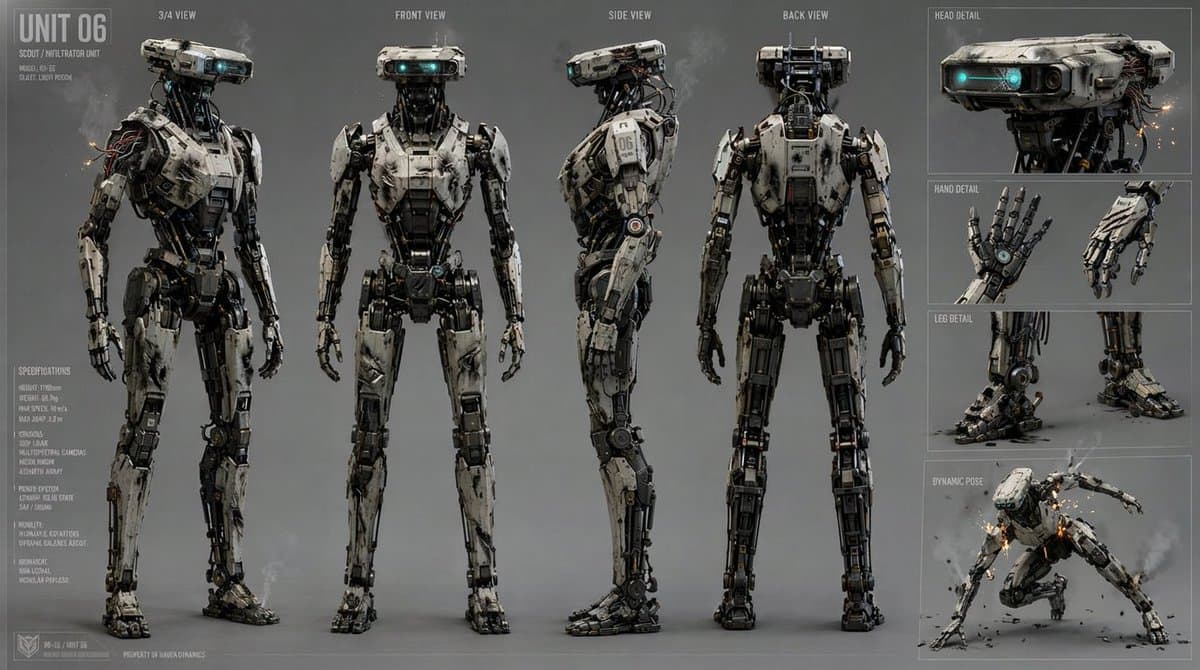
The attached example in CharaspowerAI's GPT Image 2 post is much closer to an animation bible than a single portrait. It includes turnaround views, expressions, accessory details, and prop references, which explains why the same creator calls those sheets the foundation for scene consistency.
Scripted scene direction
The handoff is simple enough to copy. According to CharaspowerAI's workflow post, the creator gives Agent One two things:
- character sheets
- a precise scene script
The script details are also explicit in that same post. The prompt carries:
- the story
- the visual style
- the rhythm
- the emotional beats
- the action moments
That matters because it turns the agent into a scene builder, not just an asset generator. CharaspowerAI's opener describes the process as constant back-and-forth, not a one-shot render.
Review loop
The strongest evidence in the set is not the finished clips. It is the correction loop.
Across multiple posts, AllaAisling's shot-fix post, her Carrion Hammer breakdown, and her Obsidian Spire notes describe the same mechanics:
- the creator sends shots back when gaze, staging, or reactions read wrong
- the agent proposes a fix or asks whether to regenerate
- the system catches some failures on its own, including voice-render issues
- final approval stays with the human creator
That gives Agent One a more editor-like role than most text-to-video tools get credited for. In CharaspowerAI's closing note, the creator summarizes it as a tool that stays inside the creative process instead of replacing it.
Timing, music, and continuity
The posts from AllaAisling add a second layer: Agent One is not only fixing shots, it is adjusting structure.
In AllaAisling's timing note, a cut landed at about 54 seconds, the agent argued the voice needed more room, then generated four new lingering shots because the engine could not stretch existing footage. In her follow-up on Carrion Hammer, another cut came in lean at about 65 seconds, and the system handed back the pacing decision, keep it tight or let it breathe to 90 seconds.
Music is handled in the same loop. AllaAisling's music post says the agent rebuilt a custom score after Episode 1's music felt wrong, then surfaced choices about timing and a 2K master. Her Carrion Hammer breakdown also says it built an enemy fleet that could recur later, which is a small but telling continuity move for a multi-episode series.