
Magnific adds 12-reference inputs for MiniMax H3 Max
Magnific says MiniMax H3 Max can use up to 12 image, video, or audio references for clips up to 15 seconds. Its examples separate character, wardrobe, expression, and location references to maintain continuity across shots.
TL;DR
- Magnific has made MiniMax H3 Max reference-to-video available in its editor, and magnific's launch post says the feature can carry character, location and visual-look references between generations.
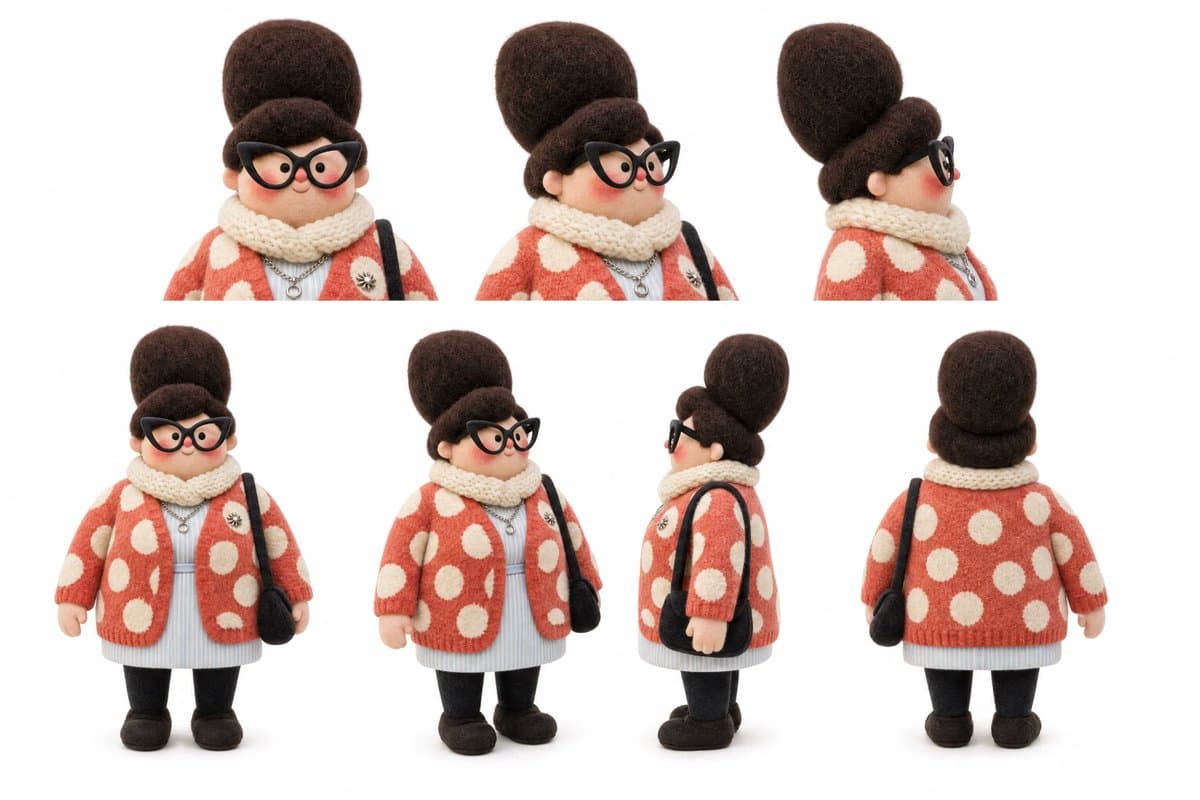
- The demonstrated continuity pack separates facial expressions from wardrobe and equipment, using magnific's felt-character prompt for turnarounds and close-ups, then dedicated sheets for other identity details.
- A 15-second scene can be written as four timed beats with character, location and prop constraints, as magnific's park-bench prompt shows.
- Magnific's sample pipeline generates shots, upscales them and assembles the cut in Premiere Pro, according to magnific's Premiere workflow.
- The same product now offers 3D Motion Control, where magnific's six-person demo uses an AI-built scene layout to keep six faces intact during a camera move.
MiniMax's H3 technical announcement establishes the format: video up to 15 seconds with native stereo audio and a wide range of aspect ratios. The H3 model card spells out modality ceilings, while fal's H3 Max endpoint tells prompt writers to identify assets by their type and order.
Twelve inputs
magnific's launch post puts the reference mode inside Magnific, and availability update confirms H3 Max is live there. Its stated ceiling is 12 files across image, video and audio, with output up to 15 seconds.
MiniMax's published H3 specification allows up to nine images, three video clips and three audio clips, with any mixed request capped at 12 files. Audio must accompany an image or video input; fal's API documentation also has prompts label assets as Image 1, Video 1 and Audio 1.
magnific claimed whole-film character and location continuity plus 10-second generation in its film workflow post.
Character sheets
The asset pack is divided by what must stay stable. magnific says a face-only expression sheet helps a model preserve angles and avoid artifacts in its character-sheet tip.
- A felted stop-motion character sheet establishes front, three-quarter, profile and back views, plus three face close-ups, in magnific's felt-character prompt.
- A 3 x 3 head sheet specifies nine expressions while holding camera angle, framing, scale and studio light constant in magnific's expression-sheet prompt.
- A separate astronaut costume sheet removes the head entirely, then gives front and back suit views alongside the helmet, gloves, chest panel, harness, patch and boots in magnific's costume-sheet prompt.
Location references
magnific applies the same method to sets: its location note says one reference can keep every shot in the same world. Its alien-valley plate locks a specific landscape, lens treatment, lighting and exclusions before any character enters the frame in magnific's location prompt.
Four-beat continuous shot
magnific says a single uploaded reference can retain a character's personality through a continuous shot in its continuous-shot demo. Its character-sheet post identifies sheets as the source for both figures in the stop-motion example.
The accompanying 15-second prompt divides the park-bench gag into four beats:
- 0 to 4 seconds: a bored blue-haired character slowly sips while pigeons peck nearby.
- 4 to 8 seconds: one pigeon climbs onto the bench and copies the character's slouch and deadpan face.
- 8 to 12 seconds: a close two-shot holds their matching stare.
- 12 to 15 seconds: the sip and peck land in unison, with no new characters or props introduced.
The prompt also bans morphing and holds the autumn bench setting throughout magnific's four-shot prompt.
Editor timeline
magnific said it generated every shot in under a minute, used its Video Upscaler for added definition, then assembled the result with its Premiere Pro plugin in its Premiere workflow. The company's plugin documentation lists in-editor tools for Premiere Pro, After Effects and DaVinci Resolve, with available functions varying by host app.
magnific reduces the generation cadence to "ten seconds per generation" in its generation note.
3D Motion Control
magnific says 3D Motion Control is available now in its motion-control announcement. In its six-person test, Magnific Agent builds the scene in 3D without manual modelling, while the prompt repeats a subtle push-in or creep camera instruction in magnific's six-person demo.
Interactive stories
Hailuo_AI described H3 Max as a possible live showrunner or interactive-cinema engine in its interactive-storytelling post. The company says H3 began as a video model and is now carrying stories forward in its H3 post, and calls its H3 Max Director work an interactive video experience in its Director post.
Hailuo_AI also said H3 Max's speed made a real AI open-world RPG possible in its RPG demo. Separately, gokayfem's repository post links the open-source Storytime project, where a child's voice becomes the next safe story beat while the current H3 Max clip continues playing.