
Promptsref adds AI Effects with one-click 9-frame storyboard grid prompts
Promptsref added AI Effects to its image editor so users can launch reusable prompts like a 9-frame storyboard grid without searching a library. Use it to turn one reference still into fast previs structure.
TL;DR
- Promptsref added an AI Effects layer to its image editor that turns reusable prompt recipes into one-click actions instead of making users hunt through a prompt library, according to launch post.
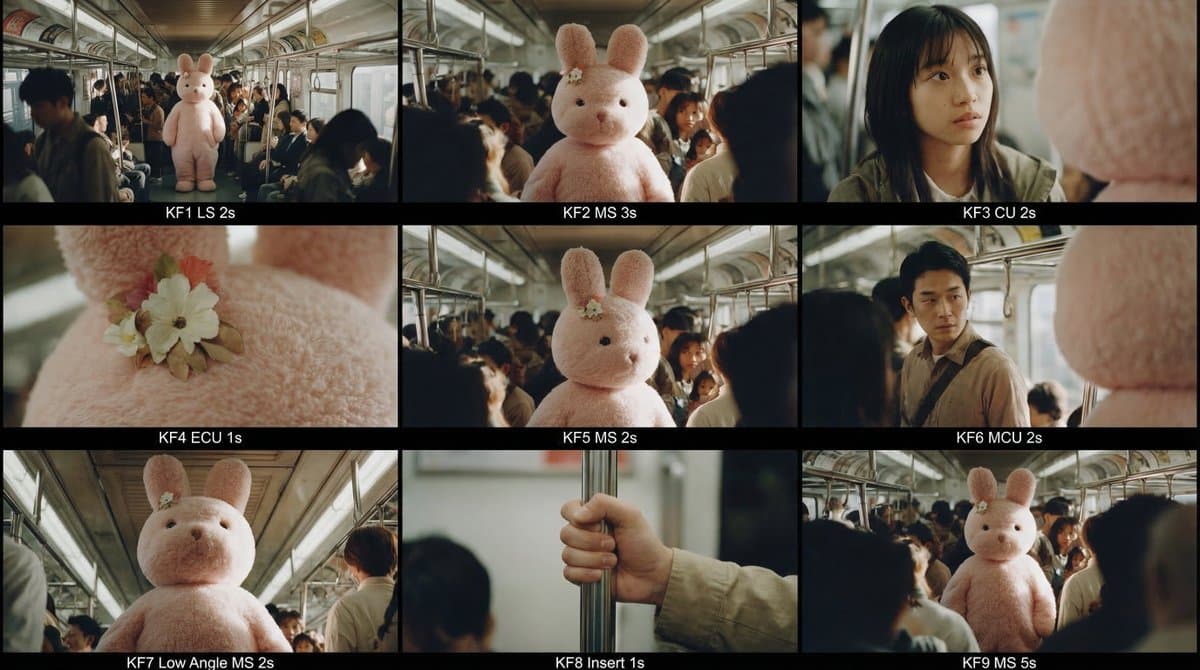
- The launch centers on a storyboard workflow from a single reference still: Promptsref's storyboard prompt turns one image into a 10–20 second sequence and outputs a single 3x3 contact sheet with nine labeled keyframes.
- The prompt is unusually production-minded: prompt details specify continuity locks for subjects, wardrobe, lighting, and color grade, while also requiring an establishing wide, close-up, extreme detail, and a power angle.
- Promptsref's tool page positions the feature inside a multi-model image generator, framing it as a faster entry point for storyboards, character work, and rapid visual iteration.
What shipped
The new feature is less a new model than a packaging change. Promptsref says AI Effects extracts "highly practical prompts" from a larger library and makes them clickable inside the editor, so a creator can apply a known-good recipe without rebuilding the prompt from scratch. In this rollout, the flagship example is the storyboard effect, which the company says grew out of a prompt that had already drawn more than 1 million views.
How the storyboard effect is structured
The storyboard preset is built like a mini previs brief. It first asks the model to analyze the source image for subjects, environment, lighting, and persistent visual anchors, then to map a four-beat arc — setup, build, turn, payoff — before generating nine keyframes as one master grid.
What makes it useful for filmmakers is the constraint stack: no new objects, no guessed identities or brands, realistic depth of field, and strict continuity across every shot. The output spec also forces shot variety and edit logic, including eyeline and axis consistency, which makes the grid read more like a usable shot plan than a mood board.