
Creators share Seedance 2.0 workflows for 15-second product ads
Creators shared reference-based ad workflows using Seedance 2.0 with GPT Image 2 for 15-second spots. A separate Weavy setup turns product photos into on-model catalog images for fashion brands.
TL;DR
- Creators converged on reference-first 15-second ads: AIwithSynthia’s office routine prompt locks an uploaded character reference, then breaks the spot into 15 one-second shots AIwithSynthia’s office routine.
- GPT Image 2 is being used as the still-image and art-direction layer: AmirMushich’s triptych prompt starts with an autonomous brand decode before generating the campaign image AmirMushich’s triptych workflow.
- Product-ad prompting is turning into production planning: AmirMushich claimed storyboards, character sheets, style frames, camera movement graphs, and reference boards can cut video-generation tokens by 70% AmirMushich’s planning doc.
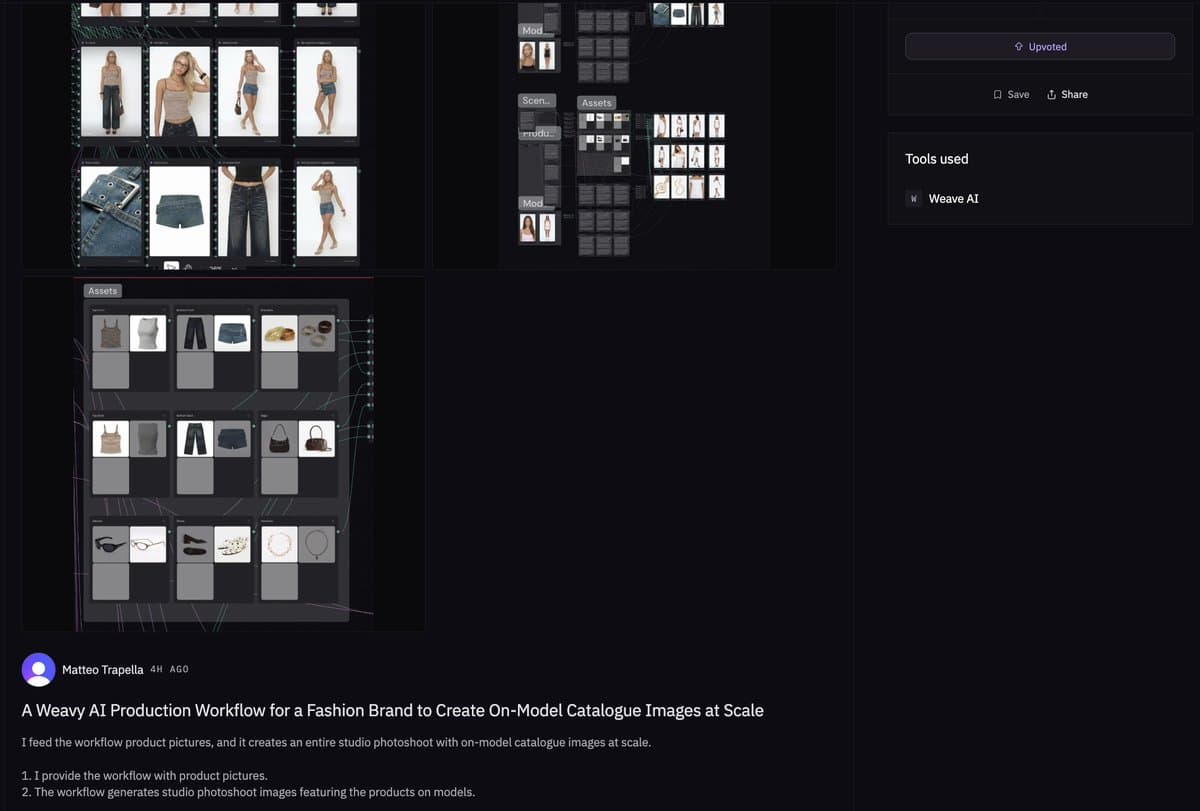
- Weavy’s fashion workflow takes product photos in and outputs on-model catalog images at scale, according to rowancheung’s Weavy post.
- Moving text is still brittle: 0xInk_ said a French-client ad used Minimax H3 for the phone-scrolling shot because Seedance 2 could not keep the text clean 0xInk_’s client ad.
Runway’s Seedance 2.0 page describes a three-step flow: upload references, write a prompt, choose aspect ratio, resolution, and duration up to 15 seconds. OpenAI’s GPT Image 2 docs frame the image model as text-and-image input, image output, for generation and editing. Segmind’s Seedance 2.5 prep guide says Seedance 2.0 accepts reference_images, reference_videos, reference_audios, plus first and last frame anchors. The Weavy workflow page is only two steps: provide product pictures, get on-model catalogue images.
The 15-second product ad grammar
The shared Seedance 2.0 ad prompts read like production schedules. AIwithSynthia’s office routine combines GPT Image 2 and Seedance 2.0, then specifies exact character preservation, 15 fast shots, match cuts, whip pans, object transitions, premium interiors, 4K HDR, and no text or watermarks in the prompt.
The repeatable pattern:
- Reference lock: AIwithSynthia’s office routine asks the model to preserve facial identity, hairstyle, eye color, makeup, skin tone, body proportions, and facial consistency.
- Shot timer: the same prompt defines 15 shots at roughly one second each, from alarm clock to desk arrival in the shot list.
- Wardrobe continuity: AIwithSynthia’s tennis prompt changes the outfit to a tennis look while asking for identical facial features and consistent accessories.
- Product continuity: AIwithSynthia’s toothpaste spot tells the model to keep the same toothpaste tube, branding, colors, and packaging in every scene.
- Negative controls: AIwithSynthia’s iced coffee prompt bans duplicate people, distorted hands, unrealistic faces, flicker, watermarks, and text.
Paid-client product spots
AIwithSynthia said a company hired her for the Paper Boat Aamras spot, then shared the full prompt with the client-ad post. The structure is classic beverage advertising: product beside face, orchard walk, swing moment, macro condensation, liquid pour, ripe mangoes, and a final hero shot.
The same grammar shows up in the toothpaste and iced-coffee prompts:
- Toothpaste: cap click, paste squeeze, mirror brushing, rinse, bright smile, marble bathroom, ASMR audio in the toothpaste prompt.
- Iced coffee: condensation, cap twist, pour over ice, milk swirl, laptop lifestyle frame, final spoken line in the iced-coffee prompt.
Brand intelligence triptychs
AmirMushich’s GPT Image 2 workflow turns a brand name into a three-panel campaign banner. The prompt’s first phase is research, not rendering: identify brand colors, typography character, current or iconic campaign content, and a real cultural figure with a documented brand relationship in the brand-intelligence phase.
The rest of the prompt is an art-director checklist:
- Triptych structure.
- Left-panel portrait.
- Center-panel typographic hero.
- Right-panel product close-up.
- Typography system.
- Lighting and photography.
- Composition unity.
- Technical specs.
Two-variable holo-vinyl objects
AmirMushich packaged another GPT Image 2 system around two variables: BRAND_NAME and BACKGROUND_COLOR in the prompt text. The prompt asks the model to identify the brand’s official symbol or wordmark, preserve its proportions and geometry, then render it as a collectible-grade laminated vinyl sticker with prismatic reflections, edge thickness, micro-scratches, and one peeled corner.
The images attached to the original post show the same material logic applied to Shell, UPS, Pinterest, and Perplexity. A follow-up called it a “2-variable design system for endless branded assets” in AmirMushich’s design-library post.
Production docs before generation
AmirMushich’s token-saving post lists the preproduction assets he uses before generating video: storyboards, character sheets, style frames, camera movement graphs, and reference boards in the workflow post. The attached planning board for a phone-case ad includes product references, set design, lighting diagram, six shot-flow thumbnails, a 15-second storyboard, mood tags, lens notes, and production specs.
That is the cleanest workflow shift in the evidence: creators are moving detail out of one giant prompt and into a structured brief the video model can follow.
Weavy catalog shoots
The fashion example is simpler than the ad prompts. The Rundown page linked from rowancheung’s post says the Weavy workflow starts with product pictures and generates studio photoshoot images featuring the products on models.
For fashion teams, the useful object is the pipeline, not a single hero image: product photos become on-model catalog variations without a traditional shoot.
Motion transfer with depth video
underwoodxie96 tested a depth-video workflow with Seedance 2.0 and said it produced more natural motion-transfer results than Kling Motion Control in the comparison post. The method converts a source clip into depth, then regenerates it with a reference character.
The post gives two reasons for using depth video:
- It removes original character and scene details, reducing copyright and sensitive-content risks.
- It preserves motion, timing, and spatial structure.
The linked depth-video generator describes the same separation: extract motion and spatial structure first, then use a generation model for the new character, lighting, and scene.
Runway and BytePlus access
Seedance 2.0 is showing up across creator surfaces. AllaAisling said a sci-fi robot colosseum clip was made with Seedance 2.0 in Runway in the Runway post, while Runway’s product page says the model supports images, video clips, and audio as references with downloads after generation.
AllarHaltsonen said Seedance 2.0 4K was available through BytePlus, with enterprise and developer access via the official API and direct use on BytePlus Lumina in the BytePlus post. BytePlus also lists Seedance 2.0 tutorials and video-generation API docs in ModelArk.
Moving text still breaks
0xInk_ used Seedance 2 for most of a French-client skincare ad, but said the first phone-scrolling shot was “impossible” to do with clean text motion in the client-ad post. Minimax H3 handled that shot better.
The replies narrowed the failure mode. 0xInk_ said Seedance is “too bad with letters and motion” and that elements transform into Russian letters in one reply, then added that the moving text was unclear in another reply.