
Seedance creators publish repeatable OpenArt Director prompts for AI shorts
Seedance creators shared full prompts for OpenArt Director and Krea clips with repeated character descriptions, scene beats, ambient audio, and 4K style notes. The examples include a laundromat ad and nested hollow worlds built from reproducible prompt structure.
TL;DR
- Creators are publishing production recipes, not teaser prompts: AIwithSynthia's laundry prompt packs a persistent character description, scene-by-scene routine, ambient audio, and 4K style notes into one Seedance brief.
- OpenArt Director is being used for longer narrative shorts: the prompt in AIwithSynthia's Wrong Date post runs 90 seconds, and Until the first snow asks for a two-minute Korean drama.
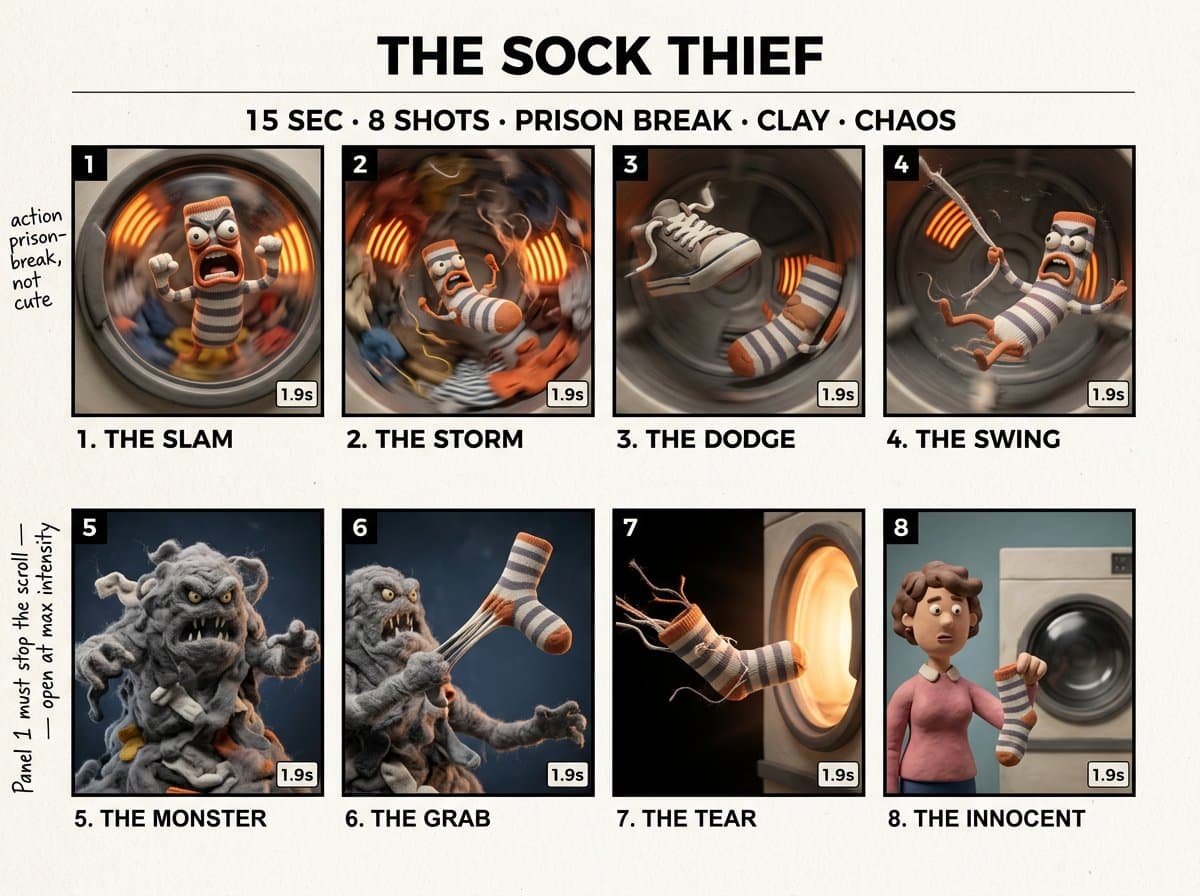
- Storyboard-first prompting is becoming a repeatable animation workflow: AllaAisling's Sock Thief animation prompt turns an 8-panel board into timed Seedance beats.
- Character consistency work is moving upstream into reference assets: MayorKingAI's character sheet post builds the hero before the Seedance parkour timeline animates him.
OpenArt's Director page says the tool is powered by Seedance 2.0, GPT Image 2, and more, with a Character Builder and five-minute coherent videos. ByteDance's Seedance 2.0 page describes a unified multimodal audio-video model that supports text, image, audio, and video inputs. Krea's Seedance 2.0 launch post calls it the strongest model Krea tested for motion coherence, camera control, and clip-level stability. A new awesome Seedance 2.0 prompts repo claims 2,000-plus curated prompts across cinematic, anime, UGC, ads, and meme styles.
The reusable prompt skeleton
Across AIwithSynthia's laundry prompt and the mango ad prompt, the pattern is less like a magic sentence and more like a production brief.
The reusable skeleton:
- Identity lock: age, face, hair, skin, body proportions, outfit, accessories.
- Scene container: neighborhood, café, laundromat, studio, orchard, or fantasy world.
- Beat list: every action in order, usually written as a continuous mini-script.
- Camera language: close-up, macro, gimbal, handheld, tracking, pullback, shallow depth of field.
- Sound brief: ambient audio only, with concrete noises named.
- Quality pass: photorealistic, 4K HDR, cinematic color grade, no subtitles, no logos, no watermarks.
The strongest prompts repeat the same identity details until they feel annoying. That annoyance is doing the consistency work.
Product ad locks
AIwithSynthia's ad prompts use the same structure for food and beauty: lock the person, lock the product, prove the product in macro, then end on a hero shot.
The mango juice prompt in the OpenArt Director post adds a branded bottle that must remain identical in every shot. The lip gloss prompt in the Hailuo post does the same for the applicator, formula, lips, wardrobe, and studio look.
The commercial recipe:
- Start with a reference image as the exact character reference.
- Preserve the product object across every shot.
- Add one transformation or hook, such as mango to bottle.
- Use macro shots for texture, condensation, liquid, formula, or shine.
- Write the spoken taglines directly into the shot plan.
- Use the negative prompt to ban deformed hands, duplicate people, bad labels, text overlays, and watermarks.
OpenArt Director shorts
The OpenArt Director examples stretch the same recipe past the 15-second demo. The prompt in Wrong Date asks for a 90-second romantic comedy, while Until the first snow asks for a two-minute Korean short film.
OpenArt's how-to guide says Director is built for coherent multi-shot videos up to five minutes, shaped through conversation rather than a conventional timeline.
The long-form prompts are act structures:
- Character bible: faces, hair, proportions, outfits, expressions.
- Setup: a message, promise, childhood memory, or missed plan.
- Middle movement: streets, café, park, hometown, river, or snow scene.
- Reversal: the wrong date, the first snow, the remembered promise.
- Ending image: hand-in-hand walk, snowman, sunset, or pullback.
- Continuity clause: no music, no subtitles, no logos, no watermarks, natural ambient audio.
Storyboard anchors
AllaAisling split the clay dryer short into two artifacts: the Firefly Boards storyboard prompt defines a 15-second, 8-shot sheet, and the Seedance animation prompt turns it into timed action beats.
The same method scales in the 3AM Ramen Chef thread, where one master storyboard covers a one-minute video across 4 clips and 8 shots. AllaAisling called the board an anchor, not a shot list.
The useful detail is the handoff:
- Board once, with panel numbers, captions, style, lighting, and timing.
- Animate from the board as visual reference.
- Split longer pieces into 15-second clip prompts.
- Repeat character, wardrobe, set, and lighting in every clip.
- Use the final clip for the punchline or reality cut.
Character sheets and environment refs
MayorKingAI's parkour thread has the cleanest still-to-motion pipeline in the batch.
The pipeline:
- MayorKingAI created the character in Midjourney with a personalization profile.
- The same post used GPT Image 2 to generate a three-panel character sheet with close-up, front, and back views.
- The environment post built a nighttime neon metropolis in Midjourney.
- The Seedance prompt referenced Image 1 for the character and Image 2 for the location, then wrote a 0:00 to 0:15 parkour timeline.
Spatial references still drift. rainisto found that an isometric room reference did not fully preserve positions in Seedance 2.0, though it remained useful for giving environmental context across many camera angles. A later rainisto follow-up said adding a third starting reference improved the match but made the scene feel emptier.
Camera grammar
The camera block has become the prompt's control surface.
Examples from the weekend:
- AllaAisling sent the camera low across an inverted hollow world, then up toward a central sun and out into nested worlds.
- techhalla wrote a second-by-second pirate fight with handheld shake, motion blur, close-ups, wide shots, and impact timing.
- MayorKingAI used whip pans, anamorphic flares, chase cam movement, and SFX for a rooftop runner.
- CharaspowerAI prompted a frozen fortress battle with IMAX panorama, crane moves, ground-level combat, low-angle siege beast shots, and a slow-motion lightning beat.
The best camera prompts read like a DP, stunt coordinator, and editor arguing inside one paragraph.
Seedance hosting stack
Seedance 2.0 is showing up less as a standalone destination and more as a model inside creator stacks.
Where these posts ran it:
- OpenArt Director: Wrong Date and the mango commercial both used OpenArt Director, while OpenArt's Seedance 2.0 page says the model supports text, images, video, and audio on OpenArt.
- Krea: AllaAisling's hollow-world prompt was made with Seedance 2.0 in Krea, and Krea's launch post says Seedance 2.0 is available on all paid plans.
- Leonardo: MayorKingAI's parkour thread was made in Leonardo, with a Leonardo.Ai link in the thread.
- Hailuo, Dreamina, Runway, Topview: the lip gloss ad used Hailuo, the ramen thread used Dreamina, Artedeingenio's music video used Runway, and Artedeingenio's animation post used Topview.
- Full mixed-tool films: ozansihay's 9-minute mockumentary combined ChatGPT, Claude, GPT Image 2, Nano Banana 2, Gemini Omni Flash, Kling 3.0, Seedance 2.0, Grok Imagine 1.5, Topaz, Epidemic Sound, Suno, and Premiere Pro.
- Clip assembly: magnific described a raptor short made from 9 Nano Banana Pro still scenes, Seedance 2.0 image-to-video clips, ambient SFX, documentary voiceover, and generated music.