
Adobe for creativity in Claude supports 50+ tools for in-chat branded asset workflows
Multiple creator demos showed Adobe for creativity in Claude handling template swaps, recolors, animation, and asset actions inside a single chat, with a second walkthrough covering skills-based setup. It matters because branded social production can stay inside Claude instead of bouncing between apps, though today’s evidence comes from sponsored creator demos rather than an Adobe launch post.
TL;DR
- Adobe's April launch post says its Claude connector exposes 50+ tools across Photoshop, Lightroom, Illustrator, Firefly, Premiere, Express, InDesign, and Adobe Stock, while ProperPrompter's thread and AllaAisling's demo show the pitch in action.
- In AllaAisling's sponsored walkthrough, Claude stays inside one chat while picking an Adobe Express template, swapping copy, recoloring the background, and animating the finished social asset.
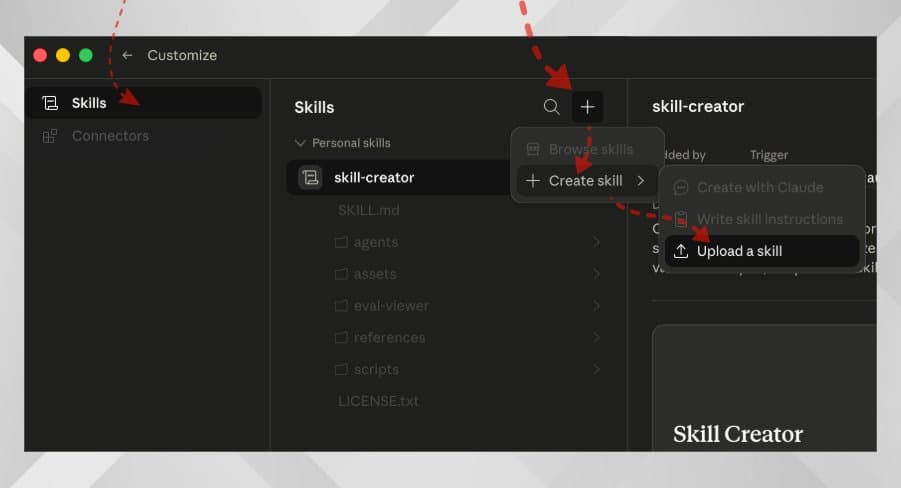
- Adobe's getting started guide splits the stack into a connector, optional plugin, and optional skills, and ProperPrompter's setup post shows the manual skill-upload path inside Claude's Skills page.
- Adobe's FAQ says the connector works on any Claude plan, but Cowork and plugins require paid Claude tiers, and mobile can run existing workflows but cannot install new connectors or skills.
Adobe shipped the connector in April, but the clearest evidence this week came from creator demos, not a fresh product post. You can read Adobe's original announcement, skim the setup guide, and browse the published skills on GitHub while AllaAisling's reply adds one more useful detail: the stack reaches beyond still images into partner image and video models, speech generation, and a Firefly video editor.
One-chat social asset workflows
Adobe's launch post says the connector is built to orchestrate multi-step jobs from a plain-language request, including portrait retouching, social asset generation, and video resizing across Creative Cloud apps. The two creator walkthroughs line up almost exactly with that framing.
In AllaAisling's video, the workflow is simple and concrete: pick a template, replace the text, recolor the background, then animate the result into an Instagram story. ProperPrompter's thread frames the same system as access to 50+ Adobe tools directly inside Claude chats.
Adobe's own examples in the launch post cover the same pattern in three buckets:
- Template-led design: create flyers, posters, social posts, and similar assets from Adobe Express templates.
- Photo editing: retouch portraits with steps like balanced lighting, background blur, auto-straighten, and portrait crops.
- Video repurposing: resize horizontal clips into platform formats like Shorts or Reels.
Connector, plugin, skills
The setup docs are more interesting than the marketing page because Adobe breaks the product into three layers. The getting started guide says the connector is the base link into Adobe tools, skills are reusable task-specific workflows, and the plugin bundles connector, skills, and slash commands for Claude Desktop and Cowork.
That structure explains why ProperPrompter's setup post tells users to download a SKILL.md file from GitHub and upload it through Claude's Skills page. Adobe documents the same manual path in the getting started guide: Claude users can install the connector, then add standalone skills if they are not using the bundled plugin flow.
The published skill set is narrower than the 50-plus-tool pitch
The official Adobe skills repository makes the distinction clear. The connector reaches 50+ underlying tools, but the public Adobe-for-creativity skill pack highlighted in the repo is a smaller set of packaged workflows.
According to the GitHub listings surfaced in Exa, Adobe currently publishes at least these six creativity skills under this package:
adobe-batch-edit-photos, for matched photo adjustments across sets.adobe-design-from-template, for Express-based flyers, posters, social posts, invitations, and business cards.adobe-retouch-portraits, for bulk portrait cleanup.adobe-edit-quick-cut, for turning longer footage into a highlight reel.adobe-resize-photos-and-videos, for exact dimensions or aspect ratios.adobe-create-social-variations, for platform-specific crops and versions.
Adobe's broader FAQ is where the bigger claim lives. It says natural-language access spans 50+ tools across Photoshop, Lightroom, Illustrator, Firefly, Premiere, Express, InDesign, and Adobe Stock, with skills reserved for more complex multi-step workflows.
Plans, surfaces, and install limits
The getting started guide says Adobe for creativity works in Claude chat on the web, Claude Desktop, and Cowork. The same page says any Claude plan can use the connector, while an Adobe account unlocks fuller functionality, higher limits, and saved work across sessions.
The FAQ adds three practical limits that did not show up in the demo threads:
- You can use many tools without signing into Adobe, but sign-in unlocks more, including Gen Expand and video tools.
- Paid Claude plans are required for Cowork and plugins.
- On iOS and Android, you can run existing workflows, but you cannot install new connectors, skills, or plugins from mobile.
That leaves this week's social demos looking less like a new launch and more like Adobe finally showing the day-to-day shape of the connector it announced in April.