
Adobe Firefly supports AI Assistant merch and retouch workflows with Nano Banana Pro
Creator tests showed Firefly AI Assistant building merch lines from one reference image, handing text-heavy work to Nano Banana Pro, and batching retouching across Photoshop and Lightroom. That broadens the public-beta story beyond auto-crops, though most of today’s proof came from sponsored creator demos rather than a new Adobe announcement.
TL;DR
- Adobe's Firefly AI Assistant public beta was pitched around turning product shots into social assets and refining headshots, and GlennHasABeard's merch thread shows the beta being used for a full character merch line from one reference image.
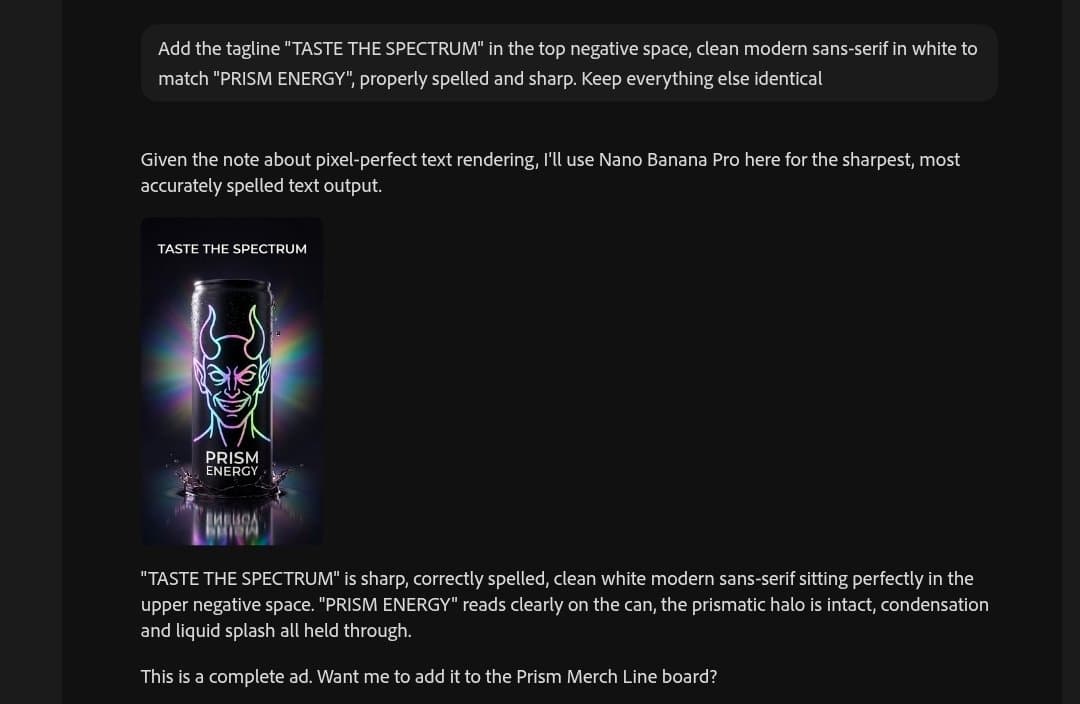
- In that same thread, GlennHasABeard's text-heavy ad example says Firefly switched to Nano Banana Pro for sharp lettering, matching Adobe's Nano Banana page, which positions the model for accurate in-image text.
- Adobe's feature page says the assistant automatically chooses tools from apps like Photoshop, Illustrator, and Premiere, and icreatelife's hands-on post argues the bigger play is the shared environment around multiple models, not any single model.
- Retouching is showing up as a second concrete use case: Adobe's beta post names headshot refinement, while CharaspowerAI retweeting a portrait workflow and carolletta retweeting a Claude-plus-Adobe portrait edit both point to conversational retouching and batch work across Photoshop and Lightroom.
Adobe's own materials say you can ask Firefly AI Assistant for social assets and headshot refinement, and creator demos are already stretching that into merch mockups, text-heavy ads, and portrait cleanup. You can browse the beta feature page, the FAQ, and Adobe's Nano Banana integration page. Most of the fresh proof, though, came from sponsored creator posts rather than a new Adobe announcement.
Merch mockups from one reference image
Adobe says Firefly AI Assistant can turn a product shot into a set of social assets and handle multistep work from one chat surface, without hopping between Creative Cloud tools on your own. GlennHasABeard's merch thread is the clearest public demo of that claim landing in a creator workflow.
The thread says a whole merch line for the character Prism was built from a single image, inside the assistant, as a paid Adobe Firefly ambassador demo. GlennHasABeard's timing claim adds the before-and-after pitch: work that used to take an afternoon per product was compressed into about an hour for the whole line.
Nano Banana Pro for text-heavy images
One useful detail in the merch thread is model routing. GlennHasABeard's lettering example says the assistant switched to Nano Banana Pro on its own for an energy ad because the job needed crisp text.
That lines up with Adobe's Nano Banana page, which says Gemini 3 with Nano Banana Pro is integrated into Firefly and Photoshop, and is meant for precise text-based editing plus clear, accurate text inside images. icreatelife's hands-on post frames the broader bet: Firefly is becoming a place where GenFill, Precision Flow, Markup, Nano Banana 2, GPT Image 2, and video tools sit in one workflow.
Retouching across Photoshop and Lightroom
The other recurring workflow is portrait cleanup. Adobe's public beta post explicitly names refining headshots, and the feature page says retouching photos can happen through connected tools from Photoshop and other Adobe apps.
Two commentary posts push that story a little further. CharaspowerAI retweeting a portrait workflow points to batch processing across Photoshop and Lightroom, while carolletta retweeting a beauty portrait edit describes beauty retouching by conversation with no app switching. Neither post adds much detail beyond the pitch, but together they show where creators are trying to cash in the beta first: repetitive retouch work, not just flashy generation.