
Designers share prompt systems for branded assets in Firefly and GPT Image 2
Carolletta and Amir Mushich shared prompt systems that feed guidelines, logos, and design libraries into Firefly, Illustrator, Nano Banana, and GPT Image 2. The workflows generate branded product shots and hero assets from reusable inputs.
TL;DR
- Prompt systems beat one-off prompts in this batch: AmirMushich's GPT Image 2 workflow starts with brand-guideline research, and his holo-vinyl workflow reduces repeatable branded objects to two variables.
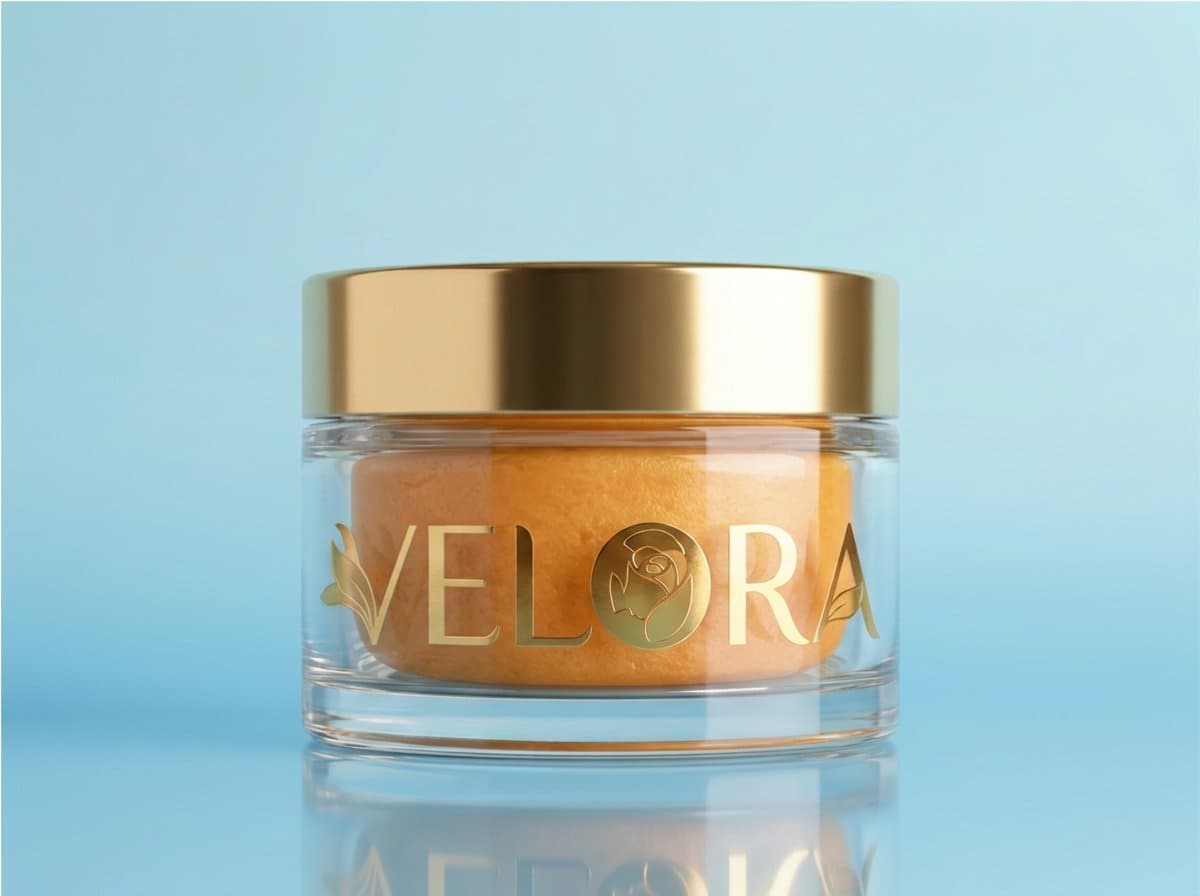
- Carolletta's Velora workflow moved across tools: her Firefly Boards portrait thread set the visual mood, her Illustrator prompt generated the logo, and her Nano Banana 2 prompt placed that logo onto packaging.
- Creators are packaging prompts as production documents: AmirMushich's planning post lists storyboards, character sheets, style frames, camera movement graphs, and reference boards as token-saving inputs for video generation.
- Brand asset work is moving into client-owned surfaces: 0xCharlota's Framer build put a thumbnail generator inside the website project, and the CMS follow-up had Framer Agent fill generated thumbnails into blog posts.
Adobe's Firefly Boards help page says Boards can be used for early ideas, moodboards, storyboards, and pitch materials, with partner models behind premium features. Adobe's GPT Image 2 page says the model works inside Generate Image, Prompt to Edit Image, and Firefly Boards, while OpenAI's image docs describe text generation, image edits, and multi-turn flows. Framer's CMS agent docs make 0xCharlota's demo less exotic: the agent can create CMS collections, set fields, and add items.
Velora brand kit
The useful part of carolletta's beauty-brand thread is the handoff between tools.
- Portrait: carolletta's Firefly Boards prompt used Firefly 5 for a soft beauty portrait with a white flower, dewy skin, pastel blue sky, and magazine-cover lighting.
- Logo: her Illustrator prompt used Generative Vector for a minimalist Velora logo with refined sans-serif typography, a white rose or lily petal, champagne gold, and ivory.
- Product: her Nano Banana 2 prompt moved the Velora logo onto an orange beauty pot, changed the background to baby blue, and kept the lid gold.
- Social ad: her Adobe Express demo turned the first beauty-brand assets into a finished reel from a template in a few minutes.
Adobe's Text to Vector Graphic page describes the Illustrator feature as a way to create, edit, and scale vector graphics that match a style. Adobe's social ad maker page says Express templates can swap text, fonts, images, logos, and color schemes.
Brand intelligence first
AmirMushich's prompt starts before the image prompt: find the brand's guidelines online, feed the link to ChatGPT, then generate.
The full workflow in his triptych prompt makes Phase 0 a brand decode:
- Color system: identify the dominant dark or neutral color and the vivid campaign accent.
- Typography character: describe the campaign type style, such as script italic, bold condensed grotesque, or extended serif.
- Campaign content: pull the current or iconic campaign, hero product, descriptor sentence, and CTA.
- Cultural figure: identify a real public figure with a documented relationship to the brand.
The image structure is equally locked: left portrait, center typographic hero, right product close-up. That is a campaign layout masquerading as a prompt.
Holo-vinyl variables
The holo-vinyl workflow turns a brand asset into two variables.
The full prompt in the prompt post exposes only [BRAND_NAME] and [BACKGROUND_COLOR], then holds the material, lighting, camera, and composition constant:
- Identify the brand's official symbol, emblem, standalone logo, or wordmark.
- Preserve proportions, geometry, spacing, and core color relationships.
- Render the mark as laminated vinyl with transparent prismatic reflections.
- Add subtle grain, micro-scratches, edge thickness, and a single peeled corner.
- Center one oversized sticker in a vertical 4:5 studio frame.
- Exclude hands, packaging, tables, captions, multiple stickers, distorted logos, and invented symbols.
The attached examples run Shell, UPS, Pinterest, and Perplexity through the same shell. The screenshot in the design-library follow-up frames the system as an extended library for endless branded assets.
Production docs
AmirMushich claimed a 70% token saving on video generations by assembling the future video as a structured doc before generation.
His planning stack has five parts:
- Storyboards
- Character sheets
- Style frames
- Camera movement graphs
- Reference boards
AIwithSynthia's beverage prompts show the same pattern in finished ads. The Paper Boat Aamras spot uses an uploaded character reference, preserves facial identity across shots, and ends on a hero pouch shot; the iced coffee spot locks the same bottle branding and packaging through apartment, macro, outdoor, and product-table scenes; the toothpaste spot adds ASMR instructions for cap opening, toothpaste squeeze, brushing, rinse, and ceramic sink sounds.
Framer asset generators
0xCharlota built an on-brand pattern generator for blog thumbnails inside a Framer project, using Framer Agent in a few prompts.
The client-facing mechanic is the point: the generator lives next to the site, not in a separate local tool. 0xCharlota's preview reply says it sits inside Framer Design Pages, where the client can open preview, toggle options, and export an image; the CMS follow-up says Framer Agent was asked to generate thumbnails and fill them into blog posts automatically.
DESIGN.md files
petergyang described a parallel fix for AI-generated UI that drifts into the same recognizable default look: create a design md file with color, typography, and related guidelines.
The designmd.sh docs define DESIGN.md as a single markdown file that documents colors, typography, spacing, components, do's, and don'ts so coding and design agents can build UI that matches a brand. petergyang's post points to Mobbin's MCP and the designmd.sh registry as sources for design-agent inspiration.
Preset workflows and typo tests
pzf_ai created a watch unboxing video in around 10 minutes with Leonardo.Ai Blueprints, using two stills: the watch and the presentation box. Leonardo's Blueprints page calls them ready-to-use workflows and lists product workflows such as Product In Scene and Product Studio Photoshoot.
magnific claimed P-Image generated four poster styles with every word spelled right and about a second per image. The poster prompts in the thread include full event copy, dates, phone numbers, footer lines, and title typography, while Magnific's image generator page says its tool accepts text prompts, image references, or both, with controls for style, character, and composition.