
Figma releases Motion at Config 2026 with Agent keyframes
Figma Motion demos showed designers prompting animations while retaining manual parameter control and auto-keyframes for shader and button effects. Try it for non-destructive animation edits across videos, frames, and objects.
TL;DR
- tranmautritam's button demo used Figma Agents to create a button animation in five minutes with zero hand-set keyframes, and his follow-up clarified that the five minutes covered agent context-reading and keyframe creation.
- The exact button prompt split the job into two motions: a flowing sparkle gradient and a looping border gradient with softened ends.
- LinusEkenstam's shader tutorial combined Figma Agent, manual controls, and Motion to make non-destructive visual filters inside Figma.
- LinusEkenstam's auto-keyframe note shows the other half of the release: after the agent starts the animation, designers can scrub the timeline, change values, and let Figma create keyframes automatically.
- figma's own Motion clip framed the launch as native motion on the Figma canvas, while AmirMushich's community remix showed the first wave of shareable Motion files.
Figma's Motion launch post says the canvas now has a native timeline, Figma's Config 2026 help page buries the practical access and export details, and Motion.dev already has Figma-to-React export docs. You can also open the FIFA26 Motion experiment from the community, which became remix material within days.
Prompted keyframes
The cleanest demo was a glass button. tranmautritam's post said Figma Agents handled timing, easing, and keyframes from one prompt, and his reply narrowed the claim: the agent took five minutes to understand the context and create the keyframes, not to design and export the whole asset.
The prompt was useful because it described motion as two separate systems:
- Sparkle icon: make the gradient flow smoothly along the icon shape in a continuous motion.
- Border: move a short gradient segment around the rounded border in a seamless loop, with both ends fading softly.
That is the mode Figma is pushing: prompt the first timing pass, then keep the timeline editable. Figma's official Motion post says the agent builds real keyframes on the timeline, grounded in components and tokens, rather than producing a flattened animation clip.
Motion timeline
Figma Motion is in open beta, according to Figma's Config 2026 help page. The same page says creating and editing Motion requires edit access to the file, while generating animations with the Figma agent, publishing animated components, and high-resolution video exports require a Full seat on a paid plan.
The core Motion stack is now visible in one place:
- Timeline control: drag layers, scrub the playhead, and keyframe position, scale, rotation, and opacity independently, per Figma's launch post.
- Presets: fade, move, and scale styles can be stacked or sequenced on the timeline, according to the same launch post.
- Auto keyframing: LinusEkenstam's walkthrough shows auto-keyframe next to the play button, where changed values become keyframes at the current scrub position.
- Curve editing: LinusEkenstam's follow-up shows value tweaks and bezier-curve edits after auto-keyframing.
- Motion systems: Figma's Motion launch post says animated components and motion variables can carry timing and easing across files.
The opinion hiding in the release: this is Christmas morning for UI designers who have been faking polished motion with prototype transitions and exported GIFs.
Shader controls
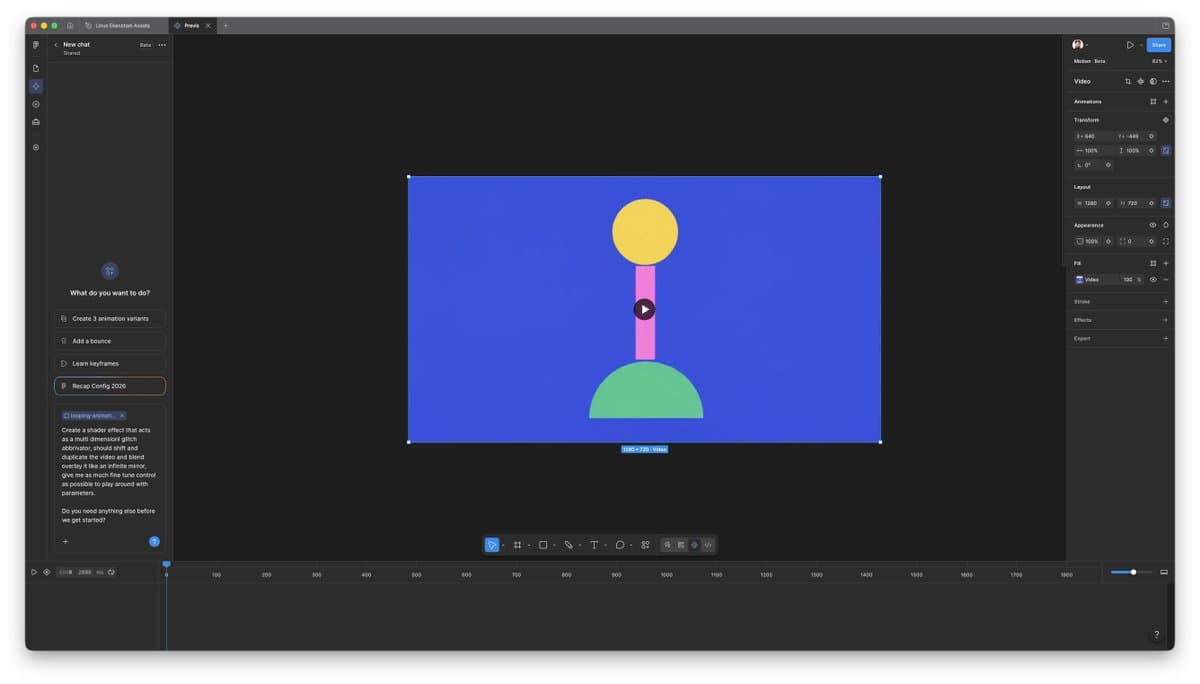
LinusEkenstam's Motion thread tested Figma shaders as an animated material, not just a visual effect. His setup started in Figma Design, switched to Motion, then placed both a primitive frame and a video into the file.
His prompt asked for a multidimensional glitch shader that could shift, duplicate, and overlay video like an infinite mirror, with fine-tune controls exposed for play. The result one-shotted a shader that had many controls and worked on the video.
Figma's Config help page says custom shader effects and fills are in open beta on paid plans, can be generated through the Figma agent without coding, and render as WebGPU shaders with on-canvas controls. The catch from the same page: shader effects do not currently appear in Dev Mode, though MCP export for JS/WGSL is listed as supported in crude or raw form.
Non-destructive stacks
The shader workflow stayed editable after the agent pass. LinusEkenstam's post said he kept full control of the parameters the agent animated, and his later clip showed the shader applied live to either a whole frame or an object inside the frame.
The thread's strongest production detail was stacking. LinusEkenstam's static-image examples used the same shader on still images, with the last example layering one shader on the frame and another on a second image.
His final read was the sweet spot for creative tools: LinusEkenstam's closing example combined AI agents for parts of the process with full manual control elsewhere on the canvas.
Export paths
Motion has a handoff path beyond video export. Figma's launch post says animated frames can export as MP4, GIF, SVG, or WEBM, and Dev Mode can expose timing values, easing curves, and keyframes for CSS, JSON, React, and motion.dev.
Motion.dev's Figma guide says a designer can select an animated layer, open the Motion panel in Dev Mode, choose React, and copy fully valid Motion code. Figma's Config recap adds that Motion is MCP-compatible, so animated-frame context can be sent to a coding agent.
The surrounding agent layer got new hooks too. figma's skills post pointed to skills for the Figma agent, and Figma's agent blog says the agent can now use file attachments, other Figma files, web search, and external connectors.
Remix files
Community files landed fast. AmirMushich's post pointed to an open Figma Motion experiment recreating a FIFA26-style intro, then repainted it into Bosnian colors in three minutes.
The underlying Figma Community page says the FIFA26 intro was built to test Motion's limits and find workarounds, not to make an accurate World Cup asset. Exa indexed the file at 321 users and a CC BY 4.0 license.
The button demo has a reusable-file angle too. tranmautritam's reply said the glass button had already been published on Figma Community, and the linked Glass Button 2.0 file is listed as a paid, editable vector resource.