
Figma Weave adds 20+ in-app AI tools and reusable node workflows
Figma Weave now exposes 20+ AI tools inside the desktop app and adds reusable node workflows for repeatable pipelines. Creators can use it to standardize illustration work, while full Figma frame embedding still appears to be coming soon.
TL;DR
- Figma shipped figmaweave's tool rollout and figma's beta post around Config 2026 with 20+ pre-built Weave tools that now run directly inside the Figma design canvas.
- The bigger interface shift is in Adham Dannaway's Weave explainer, which describes Weave as an infinite canvas of connected nodes that can be rerun as reusable workflows instead of one-off prompts.
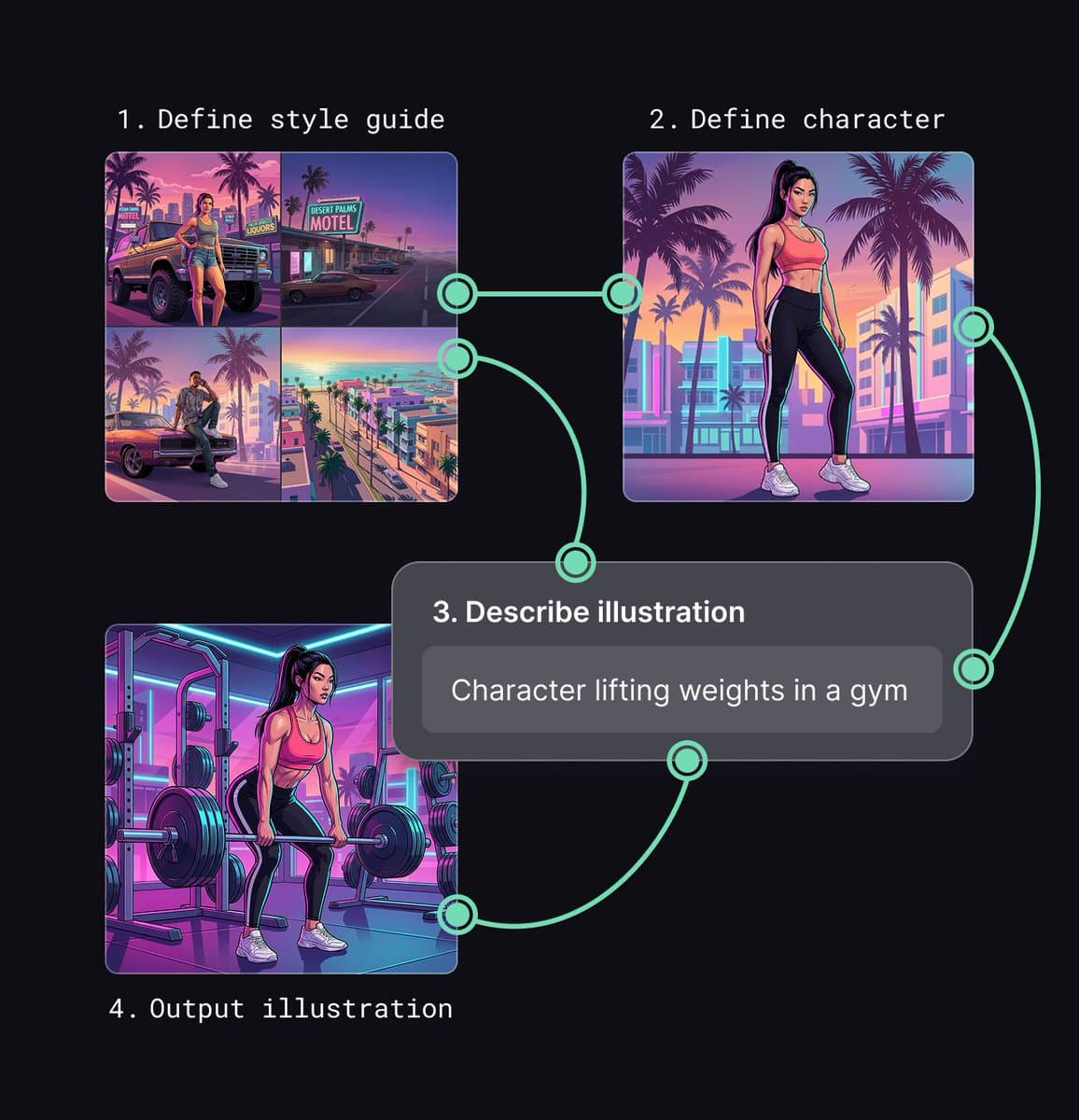
- Adham Dannaway's illustration workflow breaks that idea into a repeatable three-part pipeline: style guide, character reference, and scene description, then his reuse post shows the same setup generating more scenes with the same look.
- Sharing moved closer to the asset itself, because figmaweave's community post says workflows can now be published to the Figma Community, while figmaweave's reply about custom tools says user-made workflows are expected to become canvas tools later.
- The edges are still visible: figmaweave's desktop-app reply says full integration is not available yet, Adham Dannaway's tools-panel preview says custom workflows in Figma's tools rail are coming soon, and his Figma-node preview says live Figma frame embedding inside Weave is also still ahead.
You can watch figmaweave's demo clip run style transfer, product-shot, and material-extraction tools from inside the canvas, browse figmaweave's publishing post showing workflows headed into the Community, and check tranmautritam's tool screenshot for a live look at the in-app tool list. zoink's launch post also makes the product line clear: build workflows in Weave, bring them into the Figma canvas, then share or remix them with a team.
Weave tools in the canvas
Figma's Config pitch was that code, motion, shaders, agent tools, and Weave now live in the same canvas. zoink's keynote summary framed Weave as the generation layer in that stack, while figma's roundup bundled Weave tools with the rest of the canvas-native releases.
What shipped into Design, according to figmaweave's tool rollout and figmaweave's reply about custom tools, is a curated set of pre-built workflows rather than the full workflow builder.
- 20+ pre-built Weave tools in the design canvas
- task-specific runs for style transfer, product shoots, material extraction, art direction, and similar creative jobs
- production output generated without leaving the canvas
- current focus on curated tools, not arbitrary user-authored workflows in canvas yet
That is a more concrete product than the usual "AI in your editor" launch. The bet is not chat, it is a menu of opinionated creative operations that can be dropped onto design work.
Reusable node workflows
Outside the canvas tool picker, Weave itself is still a node-based workflow builder. Adham Dannaway's Weave explainer defines the core unit as a node, with each node transforming content before handing it to the next one.
His example workflow, shown across the three-step workflow post, the style-guide step, the character step, and the scene-description step, is basically a tiny art direction system for consistent illustrations.
- Define the style guide. Feed several reference images into a compositor node so later image generations inherit the same look, per Adham Dannaway's style-guide step.
- Define the character. Write a character description, generate a reference image, and keep the style guide attached, per Adham Dannaway's character step.
- Describe the illustration. Prompt the actual scene, then connect both the style guide and character reference into the output image node, per Adham Dannaway's scene-description step.
The useful part is not the first image. Adham Dannaway's reuse post says the same workflow can be rerun for new scenes while keeping the character and visual style stable, which is exactly the pain point his problem statement calls out in one-off image prompting.
Workflow sharing
Figma is also turning the workflow itself into something designers can publish. figmaweave's community post says workflows can now be published to the Figma Community so other people can discover, duplicate, and extend them.
That lines up with Adham Dannaway's publishing post, which argues that the process is the shareable object, not just the finished output. It is a small but important reframing for AI design tools: the reusable recipe becomes the artifact.
The team angle shows up in zoink's launch post, which says workflows brought into the Figma canvas can also be shared for teammates to use or remix. If Figma's traditional advantage was multiplayer design files, Weave is trying to make the generation pipeline collaborative in the same way.
Coming soon surfaces
The rollout is real, but it is also clearly staged. figmaweave's desktop-app reply says users can access 20+ Weave tools via the desktop app, but "a full integration is not available yet."
Three unfinished surfaces matter here:
- Custom workflows as Figma tools: Adham Dannaway's tools-panel preview says user workflows will be usable directly from Figma's left-side tools panel.
- Live Figma nodes inside Weave: Adham Dannaway's Figma-node preview says a pasted Figma frame will update in real time inside a Weave workflow.
- Credits and model routing: Adham Dannaway's credits reply says Weave sells credits, shows per-tool credit cost, and bundles multiple AI tools in one app.
That makes the current release feel like a good first slice rather than the whole system. tranmautritam's hands-on post says the 20+ tools are already usable in Figma now, while the more ambitious part, Figma frames and custom workflow surfaces moving bidirectionally between canvas and Weave, is still arriving.