
Figma launches Chrome extension for website-to-editable-layer import
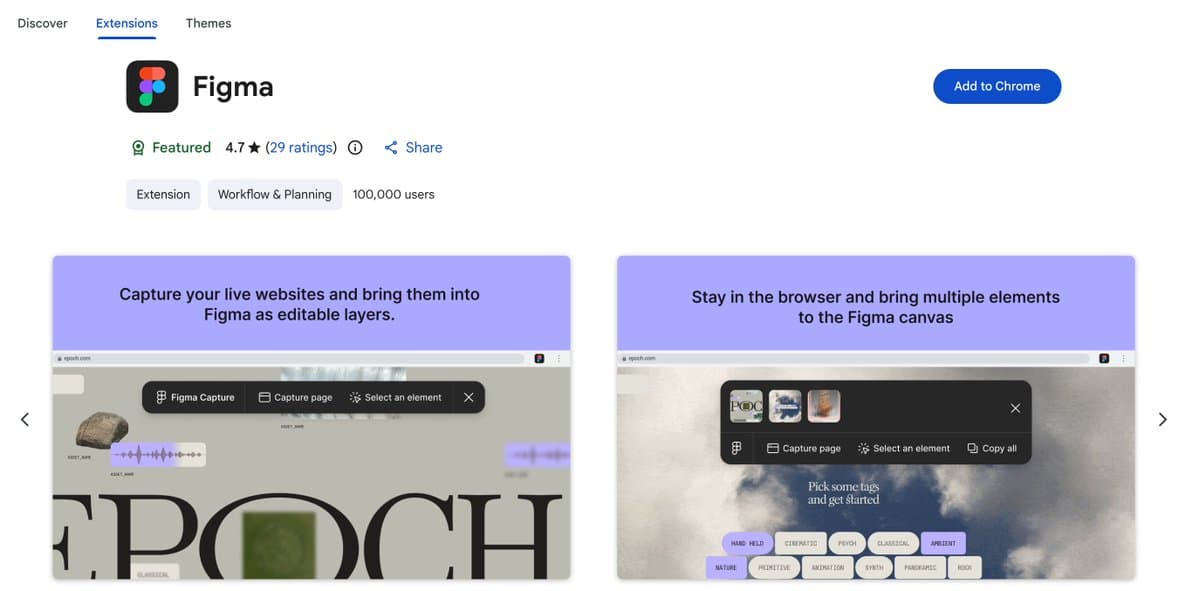
Figma shipped a Chrome extension that converts live websites into editable Figma layers and teased design-system-based generation as the next step. It matters because designers can start from real product surfaces instead of rebuilding layouts by hand.
TL;DR
- Figma said its launch post now lets people copy live websites into Figma as editable layers, while the official download page describes it as one-click HTML-to-Figma import.
- The first pass is explicitly production-first: the Chrome Web Store listing says you can grab a full page or selected elements straight from the browser, then paste them into Figma as layers instead of screenshots.
- Figma used its follow-up post to tease the next step, generating designs from your design system, which turns this from a tracing tool into the front end of a bigger remix pipeline.
- Early reaction from zoink's post was simple and telling: the website-to-Figma flow itself was the hook.
You can install the extension, skim Figma’s download page, and see in Figma’s demo post that the company is pitching a much faster jump from live product UI to editable design work. The quiet extra reveal is on the official page: captured pages can also be handed off to Figma Make as a starting prototype, which makes this feel closer to import-plus-remix than import alone.
Editable layers, not screenshots
Figma’s core claim in the launch post is that a live website can come into Figma as editable layers. The official page repeats that language and calls it structured layers, which matters because most capture tools stop at flat images.
The Chrome Web Store listing adds the practical framing: no codebase, terminal, or coding agent, just capture in the browser and paste into a file. Figma is selling speed here, but also fidelity to what is already live in production.
Full pages and element grabs
The extension is not limited to full-page import. According to the Chrome Web Store listing, it can capture either an entire page or selected elements, which makes it usable for smaller jobs like lifting a shipped modal, navbar, or card pattern without rebuilding the rest of the screen.
The same listing says the extension can bring live production UI onto the canvas so teams can riff on what already shipped. That is a different starting point from moodboards or static inspiration sweeps, and it lines up with the way Figma’s own demo frames the workflow.
Design-system generation is the obvious next layer
Figma did not stop at import. In its threaded follow-up, the company said design generation using your design system is coming soon.
That tease lines up with a detail on the official extension page: captured webpages can be sent to Figma Make as a starting prototype. Put together, Figma is sketching a loop where production UI becomes editable source material, then a generation system pushes it back toward new concepts inside the same stack.