
Photoshop on the web adds AI Assistant beta with AI Markup targeting
Photoshop on the web added AI Assistant beta for chat-based edits, and Adobe also rolled out AI Markup targeting, Firefly sync, speech generation, and Topaz Astra upscaling. Try it to rough in edits faster, target exact regions, and move drafts toward polished assets with fewer manual steps.
TL;DR
- Adobe's Photoshop web update adds a Photoshop AI Assistant beta on the web, turning edit requests into chat prompts instead of manual layer-by-layer setup.
- In a hands-on demo, the glitch-effect test showed the assistant creating layers, applying a VHS-style look, and handling color grading from the prompt “add a glitch effect and grade it like 90s nostalgia.”
- Adobe also added AI Markup targeting, which lets you draw arrows, circles, and other annotations to tell the model exactly where an edit should land.
- The release reaches beyond Photoshop: the Firefly sync demo shows web edits moving into Firefly Boards, while the Topaz Astra update and the ElevenLabs voices panel expand video upscaling and speech generation inside Adobe’s creative stack.
What shipped in Photoshop web
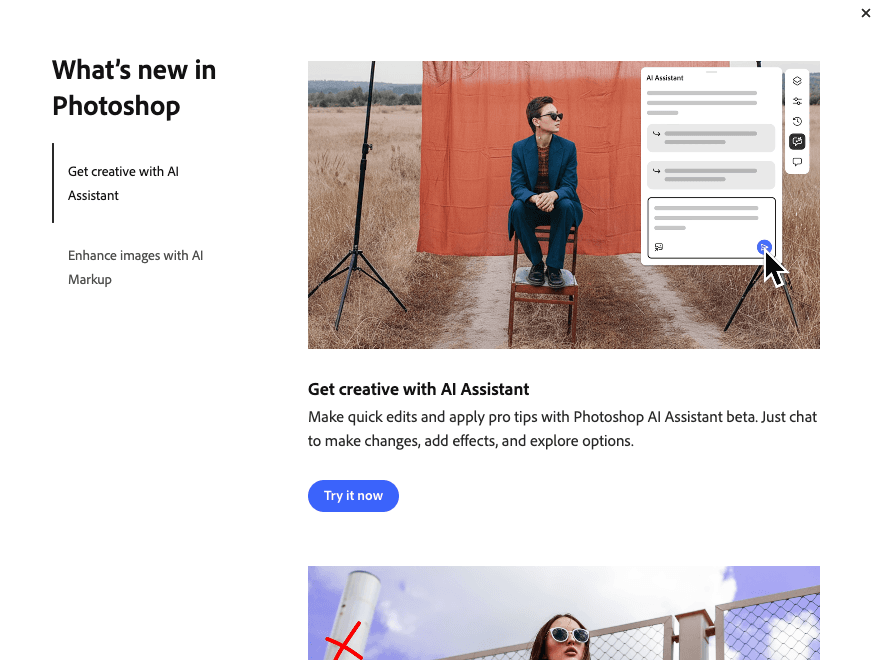
Photoshop on the web now includes an AI Assistant beta that Adobe positions as a conversational editing layer. The launch screen in the update post pairs “Get creative with AI Assistant” with “Enhance images with AI Markup,” framing the release around faster ideation and more directed edits.
The clearest workflow example came from a recorded test, where a single prompt — “add a glitch effect and grade it like 90s nostalgia” — triggered automated layer creation, effect application, and color work. That matters for designers who normally burn time building the first pass by hand; here, the assistant roughs in the stack and leaves the user to tweak taste and finish.
How targeting and handoff work
AI Markup is the more production-minded addition. In Adobe’s demo, the user draws visual annotations onto the image and pairs them with text instructions like “Add sunlight” or “Add a circus themed background,” giving the model spatial guidance instead of a broad whole-image command. That makes the tool read less like a generic chatbot and more like directed art notes on the canvas.
Adobe is also tying that edit flow into the rest of Firefly. The sync walkthrough shows AI Assistant work in Photoshop web moving into Firefly Boards, while the Firefly Boards update adds Topaz Astra upscaling to 1080p or 4K. A separate Adobe panel in the speech feature preview shows Generate Speech beta bringing in 70-plus voices from Adobe and ElevenLabs, with controls for emotion, pacing, and emphasis. Together, the update looks less like one chat feature and more like Adobe tightening the path from rough edit to polished motion asset.