
PromptDeck launches prompt rewrites for Midjourney, GPT Image 2, Seedance 2, and Kling in Retool
Linus Ekenstam shared a PromptDeck build that rewrites one creative brief into model-specific prompts for Midjourney, Nano Banana Pro, GPT Image 2, Seedance 2, and Kling Omni. The workflow stores optimizer rules in sheets or a database, so teams can edit prompt behavior without redeploying the app.
TL;DR
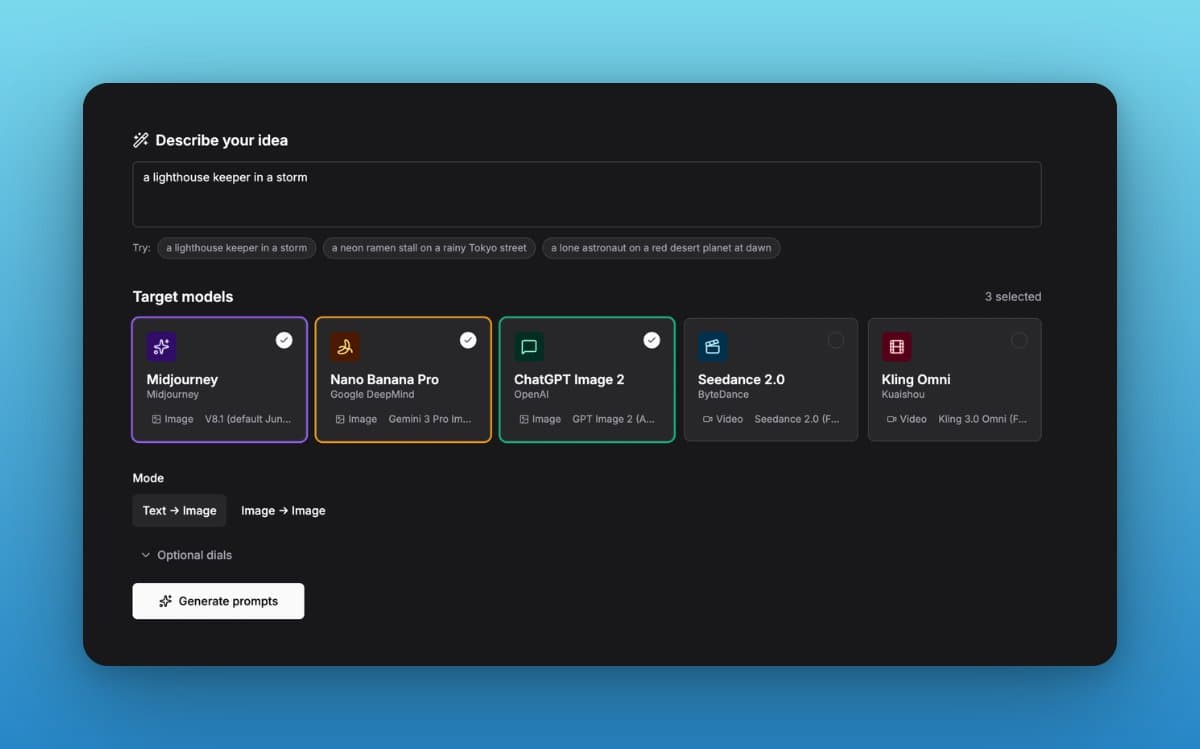
- LinusEkenstam's launch post framed PromptDeck as a one-brief router: type one creative sentence, get five rewritten prompts tuned for Midjourney, Nano Banana Pro, ChatGPT Image 2, Seedance 2, and Kling Omni.
- The core claim in LinusEkenstam's model-dialects post is simple and useful: image and video models do not want the same syntax, so PromptDeck rewrites one idea into different prompt styles instead of reusing one generic prompt everywhere.
- According to LinusEkenstam's spreadsheet architecture post, the app's prompt logic lived in six Google Sheet tabs, so editing a cell changed behavior without a redeploy.
- LinusEkenstam's Retool build post and LinusEkenstam's tracing post positioned Retool as the production layer, with governed resources, per-call query history, and SSO sharing added on top of the prototype.
- The most transferable part is in LinusEkenstam's optimizer-rules demo: the prompt behavior sits in a sheet or database that a team can tune live, which turns prompt engineering into editable ops instead of hardcoded app logic.
You can watch the optimizer-rules demo flip the app's writing style by editing one spreadsheet row, compare the three example prompt rewrites for the same lighthouse brief, and grab both Retool and the cheat-sheet template from LinusEkenstam's build-your-own post.
Model dialects
PromptDeck's bet is that "prompt engineering" is now a routing problem. LinusEkenstam breaks the stack into three prompt dialects:
- Midjourney: keyword-heavy syntax plus flags.
- Nano Banana Pro and ChatGPT Image 2: full-sentence descriptions.
- Seedance 2 and Kling Omni: direction for motion and scene control, not just description.
The lighthouse example in LinusEkenstam's rewrite example makes the difference concrete. The Midjourney version compresses style and camera cues into tags and parameters, while the Nano Banana Pro and ChatGPT Image 2 versions expand into shot language, lighting, composition, and lens details.
Spreadsheet brain
Editing one optimizer_rules row changes every generated prompt
The app logic started in a Google Sheet, not in code. According to LinusEkenstam's spreadsheet architecture post, six tabs held prompting techniques, camera language, lighting setups, per-model parameters, and the optimizer rules.
That structure matters because it changes who can tune the system. In LinusEkenstam's optimizer-rules demo, one row edit changes the style of every regenerated prompt, and LinusEkenstam's migration note says the same setup can move from Sheets into a Retool database without changing the basic pattern.
Retool turns the prototype into a shareable app
The sharpest line in the thread comes from LinusEkenstam's prototype warning: a paragraph-generated UI can appear in 10 minutes, but most AI-built apps die there.
His build notes split the gap into concrete production pieces:
- Governed data access: LinusEkenstam's Retool build post says the sheet was connected as a governed resource.
- One query, many model outputs: the same post describes a single AI query parameterized per model.
- Dynamic UI expansion: add a row to the model sheet, get a new model card in the interface, per the same build post.
- Auditability: LinusEkenstam's tracing post says every sheet read and AI call is visible in query history.
- Sharing and access control: the same post about tracing and sharing says SSO sharing is a one-toggle step.
The governance angle is partly vendor-sponsored, but it is still the practical reveal in the thread. LinusEkenstam's governance post cites a Retool survey of 307 CTOs and CISOs where 93 percent worried about vibe-coded apps in production and 8 percent rated their AI governance as strong.
Template and access
The final post in the thread turns the whole project into a reproducible kit. LinusEkenstam's build-your-own post links to Retool and a cheat-sheet template that includes techniques, camera language, lighting references, and parameters for all five models.
There is also a live access path. In LinusEkenstam's reply about trying it, he says people can ask permission to try the app, which makes this less of a concept thread and more of a working prompt router with an editable control surface.