
Hermes Agent adds Blank Slate mode in hermes setup
Hermes now offers a setup path that starts with only a provider, model, file operations, and terminal access. The smaller base gives users a minimal install they can extend manually.
TL;DR
- Hermes Agent now includes a Blank Slate path in
hermes setupthat starts from a minimal install, according to NousResearch's Blank Slate announcement and NousResearch's setup instructions. - The baseline is smaller than Hermes' usual Quick and Full presets: NousResearch says Blank Slate keeps only a provider, model, file operations, and terminal, while Teknium's launch post calls it "the lightest possible install you can have."
- The attached setup graphic in Teknium's Blank Slate post shows that exactly six tools reach the model: read, write, patch, search, terminal, and process.
- Blank Slate is framed as a new-install option, not a data reset: Teknium's reply on new installs says "Yes for new installs," while Teknium's later reply pushes back on the idea that it should remove existing data.
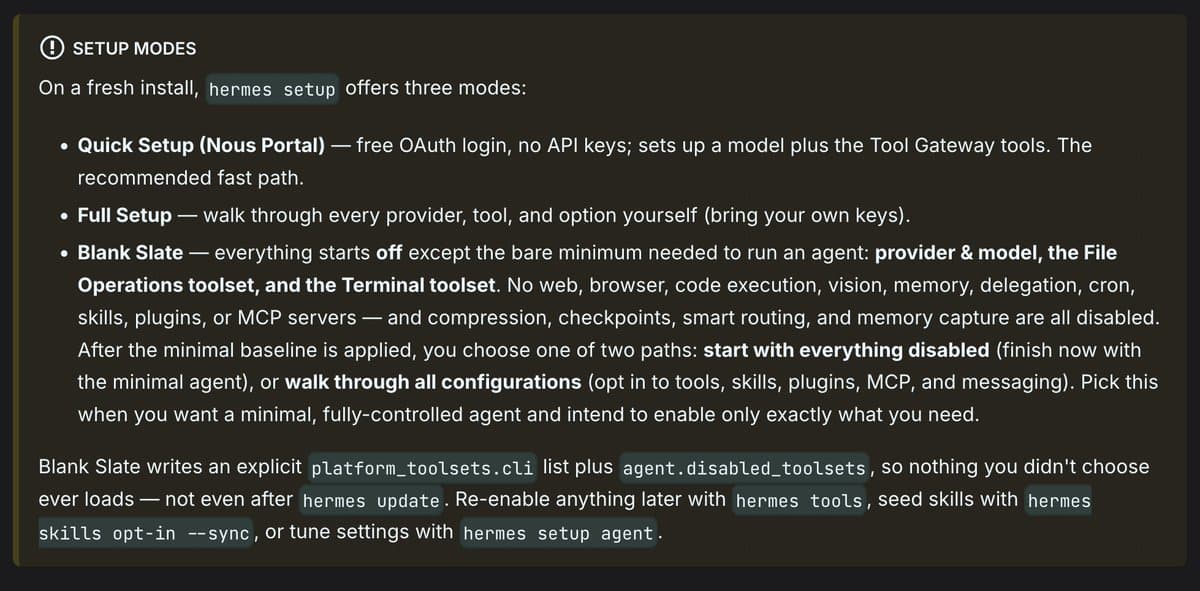
You can jump into the Quickstart Guide from NousResearch's setup post, browse the broader v0.17.0 changelog from NousResearch's release thread, and the most concrete detail sits in the launch image from Teknium's post, which lists everything Blank Slate turns off, including memory, delegation, skills, plugins, MCP, compression, checkpoints, and smart routing.
Blank Slate setup
Hermes is adding a third setup path for people who want less harness and more manual control.
According to NousResearch's announcement, the default Quick and Full modes remain the standard presets, but Blank Slate starts with only the bare minimum and lets users add capabilities back one by one. NousResearch's setup instructions says the entry point is just hermes setup, then selecting Blank Slate.
That puts the feature in a familiar split for agent tooling: fast presets for most users, plus a build-it-yourself path for people who care about exactly which tools and subsystems are live in the initial environment. Teknium's blunt reply in Teknium's setup-time comment gives the product logic in one line: most people are not going to spend 10 hours wiring an agent from scratch.
Six-tool baseline
The launch image is the useful part here because it turns a vague "minimal install" claim into a concrete inventory.
The graphic attached to Teknium's post breaks Blank Slate into three buckets:
- Forced on: provider and model, file operations, terminal.
- Everything else off: web, browser, code execution, vision, memory, delegation, cron, skills, plugins, MCP, compression, checkpoints, smart routing.
- Opt in to each: a full walkthrough where each capability is enabled manually.
It also names the exact tool surface that reaches the model: read, write, patch, search, terminal, and process.
That six-tool list is narrower than the first tweet summary from NousResearch's announcement, which describes the mode at the subsystem level. The image answers the more operational question: what commands the model actually gets on day one.
New installs and profiles
The replies fill in the edge cases that the launch post skips.
When asked whether Blank Slate applies to existing environments, Teknium's reply on new installs says yes for new installs. In a separate reply, Teknium's profile setup reply adds that users may be able to access it inside a profile with the profile-name setup command.
Another thread clarifies what Blank Slate is not. Teknium's later reply answers a request in terms of wiping data, which suggests the mode is about setup scope, not about clearing history or removing stored state from an existing install.
The bigger release context is NousResearch's v0.17.0 release thread and Teknium's release-notes link, both of which place Blank Slate inside Hermes Agent v0.17.0, "The Reach Release," rather than as a standalone patch.