
MiniMax M3.1 Flash builds landing pages from shared image references
MengTo built landing pages with MiniMax M3.1 Flash, using images to set visual direction before coding. Shared references, reusable skills and screenshot reviews guided revisions.
TL;DR
- M3.1 Flash powered three keyboard sites, a SaaS page, a rainy 3D Singapore scene and a lighthouse game in MengTo's showcase.
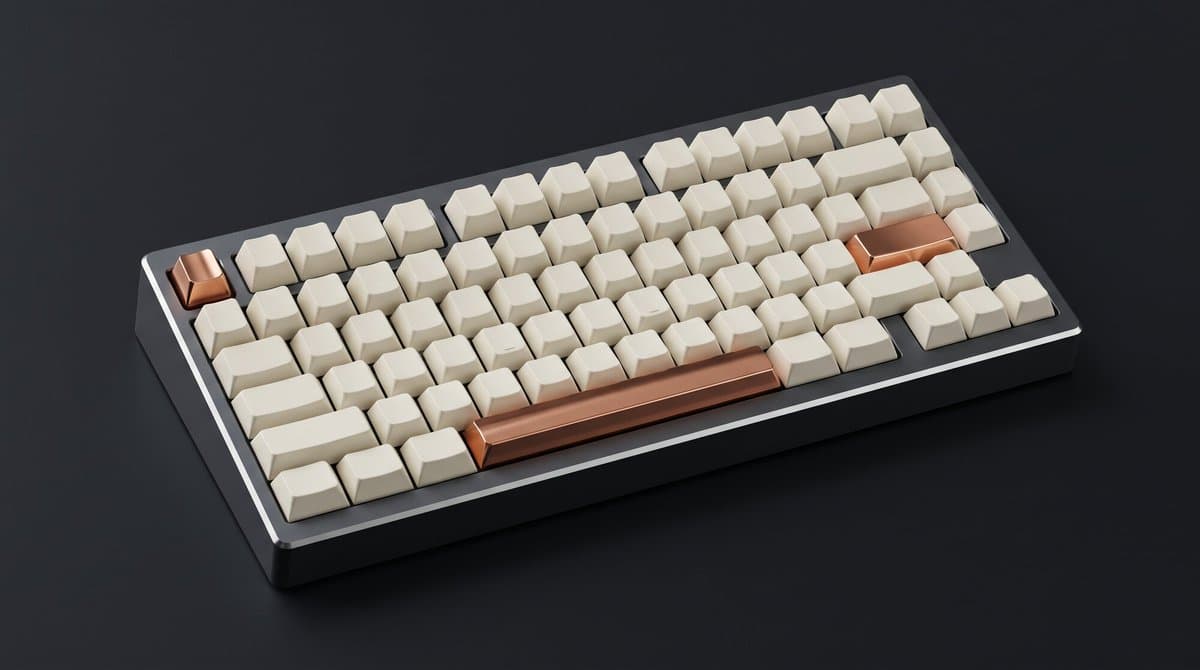
- One keyboard render supplied a consistent product reference for paintings, photos and H3 films, according to MengTo.
- Each page needed several rounds of work, with screenshot reviews and fresh-session fixes described in his walkthrough.
The cleverest detail is a Renaissance-style painting that keeps the keyboard's copper keys in place. The SaaS page's live product windows use real HTML text, while Singapore's art-direction prompt asks for a soundtrack before the 3D build.
MengTo's MiniMax-built landing pages, Singapore scene and lighthouse game
One render, three copper keys
MengTo's first image prompt fixed the product and lighting before any code:
Studio product photograph of a premium 75% mechanical keyboard. One solid block of dark graphite aluminium, blank cream keycaps, and exactly three keys of polished copper: Escape, Enter and the spacebar. Three-quarter view, deep charcoal background, soft key light from the upper left.
Two MiniMax H3 films started from frames of that same board:
- Hands typing on the keyboard.
- A slow turntable shot.
Three keyboard heroes
Dribbble shots from Verdant, ordivalabs and Sendit supplied starting references for three hero directions:
- A film-led hero.
- A drawing-to-real transition.
- Keycap tiles.
MengTo chose drawing-to-real for the Tessel page, using MiniMax stills and H3 clips as the actual backgrounds.
Singapore's two concept frames
The Singapore build began with two image-tool requests that established the visual targets for the 3D world:
- Marina Bay at night, viewed from the water.
- Supertree Grove glowing in the rain.
The same prompt requested a 60-second ambient score from the music tool. MengTo says the agent generated both frames and the rain soundtrack, then built the world around them.
Skills for live demos, 3D and games
Rather than writing long prompts for every interaction, MengTo supplied four groups of reusable skills:
html-demo: live product windows on the SaaS page.- @wheresryan22's anatomy skill: the camera explainer.
- Scroll-world and Awwwards skills: the 3D pages.
- Game skills: the lighthouse game.
MengTo also publishes a folder-based Markdown skill library.
M3.1 Flash pricing and access
MiniMax's October 19 launch announcement lists availability through its API, M Plan and MiniMax Code. Its API rates per million tokens are:
- Input: $0.15.
- Output: $0.60.
- Cached input: $0.015.
MengTo did not give a total production bill in his showcase.
Screenshot reviews in fresh sessions
After each build pass, MengTo repeated a three-step revision loop:
- Take screenshots.
- Have the screenshots reviewed.
- Give M3.1 Flash a short list of fixes in a fresh session.
He reports roughly an hour per round. His before-and-after comparisons cover the Kestrel 65 exploded keyboard, Singapore after dark and the keyboard-museum hero.