
Stages AI adds CASTING tool with saved looks and REF2V handoff
Stages AI introduced a CASTING workflow that saves editable character looks and reuses them across CUE, image, and reference-to-video generation, including multi-character setups. Character references now persist as app assets instead of needing per-shot uploads.
TL;DR
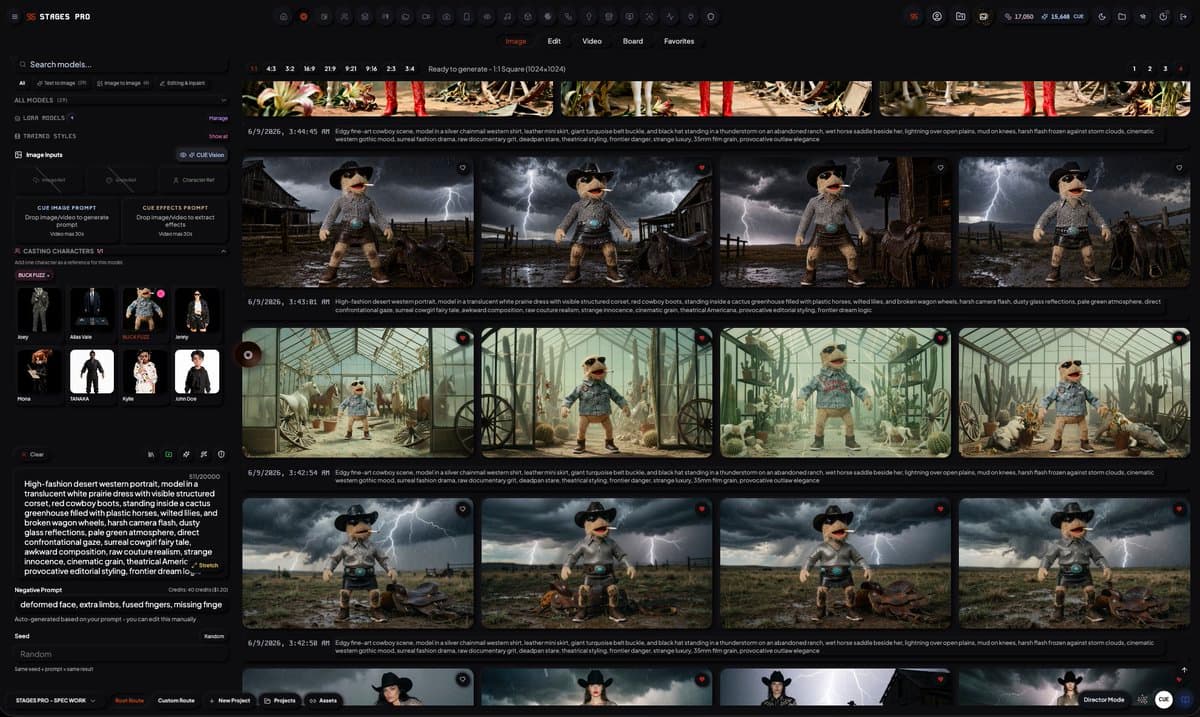
- dustinhollywood's demo thread introduced STAGES' new CASTING workflow, which lets creators prompt a character, generate one from a reference image, or load existing references into a reusable character asset.
- According to dustinhollywood's CASTING walkthrough, looks can be edited, inpainted, saved as variants, and then updated across the app and CUE instead of being re-uploaded shot by shot.
- dustinhollywood's REF2V handoff post said those saved characters can be sent straight into image-to-image and reference-to-video models, including some multi-character setups.
- The official STAGES product page frames CUE as the platform-wide orchestration layer and lists Casting alongside video, audio, and asset routes, which matches dustinhollywood's Buck Fuzz post about persistent project context.
You can browse the live product page, read STAGES' broader company framing, and watch dustinhollywood's first CASTING demo and his follow-up walkthrough show the same character moving from setup to reusable asset. The interesting bit is the handoff: his third post ties CASTING directly to REF2V and I2I generation, while the official site's media pipeline list already places Casting inside the same routed toolchain as Video Gen, VidX, and CUE.
Casting
The core pitch is simple: character setup becomes a persistent app object, not a folder of reference uploads.
According to dustinhollywood's walkthrough, the tool supports three entry points:
- prompt a new character
- generate one from a reference image
- load existing references
The same post says creators can edit and inpaint looks, save multiple variants, and switch between them later. That lines up with the official STAGES product page, which describes the platform as a single command surface for assets, direction, and orchestration rather than a collection of one-off generators.
CUE and persistent context
dustinhollywood's Buck Fuzz post describes CUE as the system layer behind the app, and the official product page is more concrete: CUE is the platform-wide command system for planning, generation, orchestration, and delivery, with context pulled from the active canvas, prompts, assets, and route state.
That matters here because CASTING is not presented as a standalone character lab. On the same product page, STAGES lists Casting inside its media pipelines and says CUE routes image, video, audio, and language jobs as one production thread. The site also claims project memory and postmortem loops keep runs coherent across long timelines, which helps explain dustinhollywood's claim that "everything you do and are is the context."
REF2V handoff
The third post in the thread is the cleanest workflow reveal. Once a character is saved, dustinhollywood's handoff post says creators can move into IMAGE or VIDEO, pick any REF2V model for video or I2I model for stills that accepts a character reference, and in some cases use multiple characters at once.
The official STAGES product page does not spell out REF2V by name, but it does list image-to-video, in-painting, and style transfer as real-time generative engines. Paired with the thread's handoff step, the product starts to look less like a character generator and more like a reference management layer feeding downstream models.
Pricing and next build
The public app is already taking signups at pro.stages-ai.io. dustinhollywood's launch offer post offered a free first month through June 15 with code LAUNCH2026, while the official pricing page section lists a free tier, a $29 Creator BYOK tier, $89 Creator Plus, $159 Pro, $399 Studio, and $1,499 Enterprise.
A later thread update in dustinhollywood's CUE showcase post added one more concrete product note: v1.01 was headed out after checks, and v1.02 was planned to add stem separation. That is audio, not casting, but it is a useful clue about how STAGES is shipping this whole thing, one routed creative subsystem at a time.