
InVideo AgentOne adds 6-panel reverse-gravity shorts with Seedance 2
DrSadek published a full AgentOne recipe that starts with one 6-panel GPT Image 2 storyboard, animates each beat in Seedance 2, then finishes in DaVinci Resolve with a Suno score. Follow the workflow to see where reverse-gravity prompts fail and how the time-reverse edit recovers the shot.
TL;DR
- DrSadek_'s project post lays out a compact four-step recipe for surreal shorts: one six-panel storyboard in AgentOne, one animated clip per panel in Seedance 2.0, edit and color in Resolve, then score in Suno.
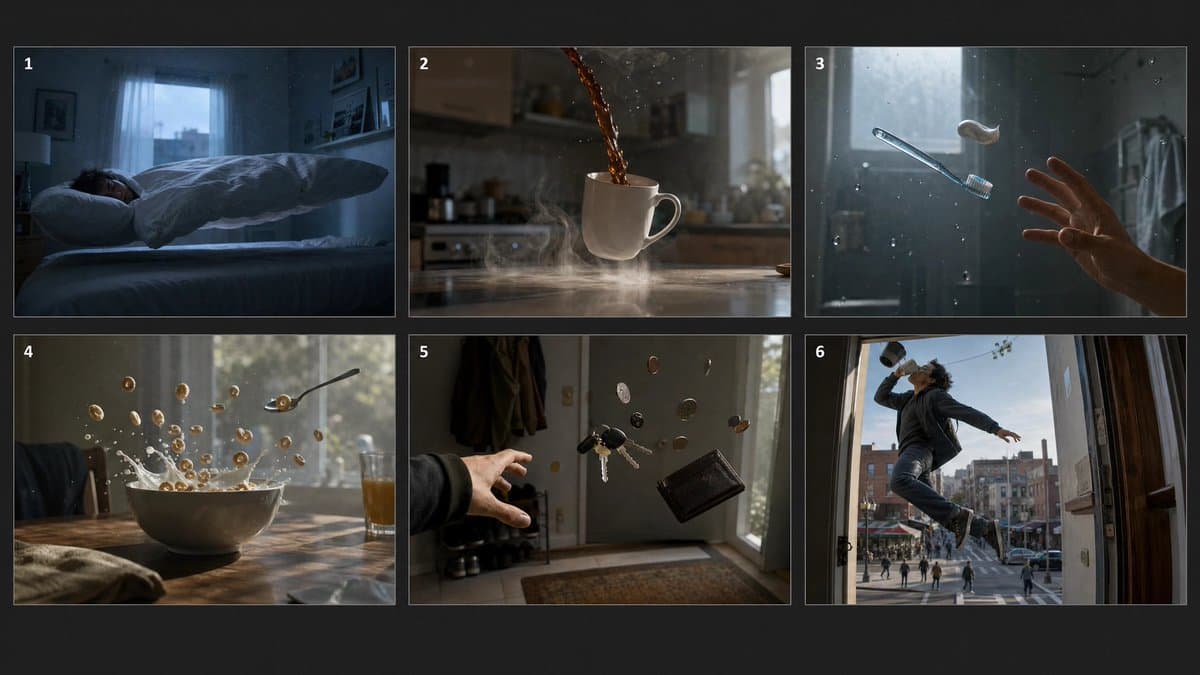
- The key continuity trick, according to DrSadek_'s storyboard post, is generating all six beats as one GPT Image 2 sheet first, so every shot inherits the same look instead of drifting panel by panel.
- DrSadek_'s Seedance step says each storyboard panel became its own roughly five-second clip, and the practical gotcha was to crop each panel clean first so the storyboard grid does not leak into frame one.
- The failure point was physics, not style: DrSadek_'s reverse-gravity note says prompts like "coffee pours up" still defaulted to normal gravity, so some shots only worked after reversing them in edit.
- DrSadek_'s Suno prompt and DrSadek_'s Resolve assembly post show the last polish layer was old-fashioned post work, with four-second trims, a compound clip, colorization transitions, and a dreamy ambient score.
You can watch the finished reverse-gravity short, inspect the full six-panel storyboard prompt, jump to the Seedance animation step, and compare it with a separate fantasy workflow where DrSadek_ uses the same storyboard-first logic with more elaborate reference sheets.
The six-panel storyboard spine
The useful idea here is not reverse gravity. It is locking the whole sequence before generating any motion.
According to DrSadek_'s storyboard post, the entire film starts as one 3-by-2 sheet on a dark background, with six numbered 16:9 frames covering the bedroom, kitchen, bathroom, breakfast table, entryway, and front door. That makes the storyboard a continuity anchor, not just a planning sketch.
The prompt itself is unusually production-minded. The storyboard prompt specifies dawn lighting, shallow depth of field, muted grading, exact number labels, and a repeated rule that each panel must stay photorealistic and distinct. For creative teams, that reads more like a mini shot bible than a one-off image prompt.
Seedance turns each panel into a shot
Once the sheet is locked, the workflow gets mechanical.
DrSadek_ says in the animation step that AgentOne animated each cropped panel with Seedance 2.0 into a separate clip of about five seconds. The structure is simple:
- Generate one six-panel storyboard.
- Crop one panel at a time.
- Animate each panel as its own shot in Seedance.
- Collect the clips for edit.
The crop warning matters because it is a real failure mode, not a stylistic preference. DrSadek_'s note says leaving the grid intact can make the panel borders show up in the first generated frame.
Reverse gravity breaks at physics
The most useful part of the thread is where the prompt stops being enough.
According to DrSadek_'s explanation, Seedance could preserve the dreamy look while still ignoring the intended motion. Coffee poured down instead of up, cereal splashed instead of hovering, and the model's default sense of physics kept overpowering the text instruction.
That forced a split workflow:
- Some shots worked directly from the prompt, per DrSadek_'s note.
- Some shots had to be fixed later with time reversal, also per the same note.
That is a sharper lesson than "prompt better." In this case, the surreal concept held together because the creator treated editing as part of generation, not cleanup.
Resolve and Suno finish the piece
The last stage is conventional post, and that is part of why the result works.
In the edit step, DrSadek_ says the five selected clips were imported into DaVinci Resolve, shortened to four seconds each, combined into one compound clip, then given colorization transition effects for the soft dream look. In the music step, the score prompt calls for felt piano, glockenspiel sparkle, airy pads, a slow 70 BPM pulse, and no vocals or heavy drums.
DrSadek_'s workflow summary condenses the whole thing into a pipeline: storyboard, shots, Resolve, Suno. The striking part is how little of the final mood comes from a single model. Image generation, video generation, editing, transitions, and music each handle a different layer.
The same pattern shows up in DrSadek_'s fantasy short
This was not a one-off trick. DrSadek_'s fantasy short shows the same creator using a storyboard-first setup on a separate Conan-style sea battle, this time mixing Hailuo MiniMax Hub, GPT Image 2, Nano Banana Pro, and Seedance 2.0.
In the fantasy workflow post, DrSadek_ says GPT Image 2 produced a broader video sheet and keyframes, while Nano Banana Pro produced cleaner film-still-ready images because GPT Image 2's noise was "unusable for video." Then the Seedance prompt post feeds two references, the warrior and the beast, into Seedance for the final shot generation.
That second example adds one new fact to the reverse-gravity recipe: the storyboard-first method scales from six domestic beats to a much heavier pre-production board with character turnarounds, creature design, and shot stills. The common move is still the same, build the visual spine first, then animate from anchored references.