
Higgsfield Recast delivers 30+ character presets, 6-language auto-dub – full-body swaps track complex motion

Stay in the loop
Free daily newsletter & Telegram daily report
Executive Summary
Higgsfield turned Recast into a practical body-swap tool, and the new demos matter: full‑frame gestures stay tracked, lip‑sync holds, and you can output six languages from one upload. The kicker for fast pipelines is breadth — 30+ one‑click character presets and four instant background looks cut the setup time from hours to minutes.
Today’s reels show steadier motion through camera changes, a notable jump from last week’s “not pro‑ready” creator take. Voice is handled, too: instant cloning plus 12 stock voices keep reads consistent, so dialogue‑driven skits and promo spots don’t drift when you localize. It’s live on the product page, and if you’re running UGC or small‑crew shoots, this stacks neatly with your existing edit flow (your stand‑in can keep their sneakers on).
If you need finer control, pair Recast’s swaps with training‑free motion tools: NVIDIA/Technion’s Time‑to‑Move adds drawable object and camera paths without fine‑tuning, and Comfy Cloud’s ATI Trajectory Control lets you sketch routes and animate stills. Net result: believable bodies, tighter motion direction, and multilingual cuts you can ship the same afternoon — we help creators ship faster.
Feature Spotlight
Full‑body swaps that actually track (Higgsfield Recast)
Higgsfield Recast brings production‑grade full‑body character swaps with real physics, voice cloning, and 6‑language auto‑dubs—turning complex VFX into a minutes‑long workflow for creators.
Today’s biggest creative tool story: Recast replaces entire bodies with real physics, tight lip‑sync, and multi‑language auto‑dubs. Multiple demos show one‑click presets for characters and backgrounds in minutes.
Jump to Full‑body swaps that actually track (Higgsfield Recast) topicsTable of Contents
🌀 Full‑body swaps that actually track (Higgsfield Recast)
Today’s biggest creative tool story: Recast replaces entire bodies with real physics, tight lip‑sync, and multi‑language auto‑dubs. Multiple demos show one‑click presets for characters and backgrounds in minutes.
Higgsfield Recast nails full-body swaps with convincing motion physics
Creators show Recast replacing entire bodies in minutes while preserving complex motion and body mechanics; tracking holds up through full‑frame gestures and camera changes feature reel. Following up on creator review that called it not pro‑ready, today’s demos look steadier, and you can try it directly via the product page Higgsfield homepage.
Auto‑dub exports to six languages with lip‑sync intact
Upload once and get six language versions; the demo keeps mouth shapes aligned to each locale, making quick international cuts viable for shorts and ads auto‑dub demo.
Recast ships 30+ one‑click character presets across human, anime, animal
A new reel spotlights 30+ presets that drop‑in swap your subject into humans, anime, animals, and cartoons with a single click—useful for fast ideation, UGC pipelines, and character tests presets reel. Access and pricing live on the main product site Higgsfield homepage.
Recast adds instant voice cloning and 12 stock voices with natural delivery
You can clone a voice in seconds or choose from 12 built‑ins; lip‑sync stays tight in the sample, which matters for dialogue‑driven skits and promo reads voice demo.
One‑click background swaps target faceless creators with four presets
Recast’s background switcher instantly changes your setting using four curated looks; it’s pitched at faceless creators who want repeatable, premium scenes without a lighting or set‑build scramble background demo.
🎚️ Training‑free motion control (TTM + Comfy Cloud)
Precise motion is the headline for filmmakers: NVIDIA/Technion’s Time‑to‑Move adds path‑level control without fine‑tuning, and Comfy Cloud’s ATI Trajectory Control lets you draw camera/object paths. Excludes the Recast feature.
Time‑to‑Move brings training‑free motion control to video diffusion
NVIDIA and Technion introduced Time‑to‑Move (TTM), a sampling‑time method that lets you draw object trajectories, control camera paths via depth reprojection, and apply pixel‑level conditioning without fine‑tuning the base model paper thread, ArXiv paper. Dual‑clock denoising allocates separate noise schedules to controlled vs free regions, matching or beating training‑based baselines while working across existing i2v backbones.
A filmmaker‑focused breakdown calls out practical wins—match‑moves, choreographed action beats, and compositing with live plates—with code and examples to try today creator analysis, analysis article.
ATI Trajectory Control lands on Comfy Cloud
ComfyUI shipped ATI Trajectory Control to Comfy Cloud: pin a subject, sketch a path, and turn a still into a motion shot in seconds—ideal for the sliding‑background look and path‑level camera/object control release demo. Following cloud workflows going live, this comes as a single drag‑in JSON workflow for the same “load and run” flow, with a live deep‑dive slated for Friday GitHub workflow.
Path Animator save issue reverts to demo paths
Creators report a regression in ComfyUI’s Path Animator Editor where saved, user‑drawn paths aren’t applied at run time and the workflow falls back to bundled demo routes. The short repro shows multiple custom paths saved, then ignored during execution—test before client work while a fix is pending bug report.
🧩 Krea Nodes: one canvas for your whole pipeline
Krea rolls all its realtime gen, styles, editing, rigging, and canvas tools into Nodes with API early access and a creator discount. Strong ops news for designers building repeatable pipelines.
Krea Nodes is live for everyone: one interface for gen, styles, editing, rigging
Krea rolled out Nodes to all users, combining its realtime generation, style models, editing, rigging, and canvas tools into a single node‑based workspace. API early access is open via comments, signaling upcoming automation hooks for studio pipelines launch video.
Why it matters: creatives can now build repeatable, shareable pipelines in one place—chain modules, version flows, and ship consistent looks without bouncing between apps.
Krea offers 50% off all Nodes generations this week for paid plans
Krea announced a 50% discount on all Nodes generations for one week, available to paid plans. This is a low‑risk window to batch‑test pipelines, compare styles, and validate throughput before scaling promo details.
🧑🎤 Consistent characters in LTX‑2 (Elements workflows)
How‑tos and reels show LTX Elements keeping a cartoon character consistent across shots, with tips like boosting the character token, clip extension from last frames, and speed ramps. Excludes the Recast feature.
LTX Elements tutorial shows how to keep a cartoon character consistent across shots
A hands‑on thread walks through creating a character in LTX Elements, saving it as an element, tagging it with @ to recall it in later prompts, and boosting the animated character token to hold identity across scenes Elements how-to. It also shows two practical editing tips inside LTX‑2: extend a shot by animating the last frame of the previous clip, and use speed ramps to smooth the joins Workflow thread.
Why this matters: consistent characters are the hardest part of AI shorts and ads; this flow turns one good still into a reusable, controllable asset. Try the workflow directly in the studio if you need to test it end‑to‑end today LTX product page.
A 20‑second, single‑take shot made with LTX‑2 shows clean motion continuity
Runware shared a 20‑second one‑take generated with LTX‑2, useful as a reference for camera coherence and temporal stability before you build multi‑shot sequences One-take reel. For teams chasing consistent characters, a strong single‑take establishes look, lighting, and motion cues you can carry into Elements workflows.
📐 Change the camera after the photo (Higgsfield Angles)
Angles reconstructs scenes to render new viewpoints from a single photo—useful for lookbooks, e‑comm, and storyboards. Multiple creators flagged rollout. Excludes the Recast feature.
Higgsfield launches Angles to change a photo’s camera view with one click
Higgsfield rolled out Angles, a one‑click tool that reconstructs a scene from a single photo to render new viewpoints—handy for lookbooks, e‑commerce, and storyboards feature explainer. Creators report the angle‑change feature is live now and worth testing on current projects rollout note, creator teaser.
🛍️ AI ad engines for Black Friday/Cyber Monday
High‑velocity ad tooling for marketers: Pollo 2.0’s speedier templates, InVideo’s photo→viral ad pipeline, and Pictory’s BFCM offer with Getty/ElevenLabs. Excludes the Recast feature.
Pollo 2.0 launches 30+ Black Friday ad templates with 3 free runs
30+ Black Friday/Cyber Monday templates just landed in Pollo 2.0, each with 3 free uses through Dec 1; a “Flash” reply promo adds 150 credits for followers who retweet and comment. The update also touts faster render speed and festive BGM on every template, following up on Pollo 2.0 adding voice‑sync and cleaner motion. See the feature pass in the short reel templates reel, and the offer details on the Pollo Black Friday page promo page with the full breakdown in Black Friday page.
InVideo turns a single product photo into a full ad—no prompts needed
InVideo is pushing a “no shoot, no editor, no prompt—just a photo” pipeline that converts a product image into a complete, social‑ready ad. A creator thread compiles Black Friday concepts—from a staged store brawl to a fight‑promo style—generated in seconds from single photos feature thread, with a representative clip here Store brawl concept and the product site for hands‑on trials in Invideo site.
Pictory AI BFCM: 50% off annual plans plus 2,400 credits and pro session
Pictory’s Black Friday deal offers 50% off annual plans (6 months free when you pay for 6), plus 2,400 AI credits, a free session with a video expert, and access to ElevenLabs voices and Getty media pricing promo. Full pricing and tiers are detailed on the promo page pricing page.

📞 Enterprise voice: SIP trunks + Scribe v2 Realtime
Voice infra news for agentic creatives: ElevenLabs upgrades SIP Integration for VoIP/PBX/self‑hosted flows, adds security/compliance details, and exposes a toggle for Scribe v2 Realtime; Raycast iOS transcription adopts it.
ElevenLabs adds SIP trunks, encryption and static IPs to Agents
ElevenLabs upgraded Agents’ SIP Integration so teams can connect Twilio or Telnyx, existing PBX systems like Exotel, or self‑hosted SIP servers—now with end‑to‑end encryption and static IPs for compliance and network allow‑listing SIP integration upgrade, Security notes. The update also highlights real‑time issue resolution with clean operator handoff and links detailed setup docs Handoff and routing, SIP docs.
For creative shops building phone support, booking lines, or live casting hotlines, this brings enterprise‑grade routing and security to the same agent stack you already use for voice, TTS, and tools.
Scribe v2 Realtime now powers Raycast iOS; toggle lands in Agents
Raycast Transcription for iOS switched to ElevenLabs’ Scribe v2 Realtime, giving mobile creators faster, clearer live notes Raycast iOS note. At the same time, ElevenLabs exposed a simple Advanced setting to enable Scribe v2 Realtime inside Agents, so your call bots can use the same low‑latency ASR—following up on Scribe v2 150 ms launch Agents settings. ElevenLabs also shared a side‑by‑side that shows stronger intent capture on tough audio versus a competitor ASR demo.
If you run hotline workflows or creative review calls, flip the toggle in Agents for production runs; on mobile, try Raycast’s iOS update to capture interviews and brainstorms without losing key details.
🧪 Gemini 3.0 shows up on mobile Canvas (watchlist)
Multiple sightings suggest Gemini 3 Canvas is live on mobile (not web), with Enterprise strings referencing 3.0 Pro+. Useful for on‑device creatives testing SVG/code tasks.
Gemini 3.0 shows up on mobile Canvas; Enterprise string mentions “3.0 Pro+” preview
Creators are spotting Gemini 3.0 behind Google’s Canvas in the Gemini mobile app, with outputs that differ from desktop. A test asking “Create an SVG for Penguins” produced clean inline SVG on mobile, hinting at a new model powering Canvas Mobile SVG test. Multiple reports say it’s on mobile only for now, not web Mobile only note.
In Enterprise, a console capture shows “Gemini 3.0 Pro+ (Preview model for testing),” reinforcing that a quiet rollout is underway on select surfaces Enterprise console. This lands after Arena RC, where a “riftrunner” entry hinted at a Gemini 3 Pro release candidate.
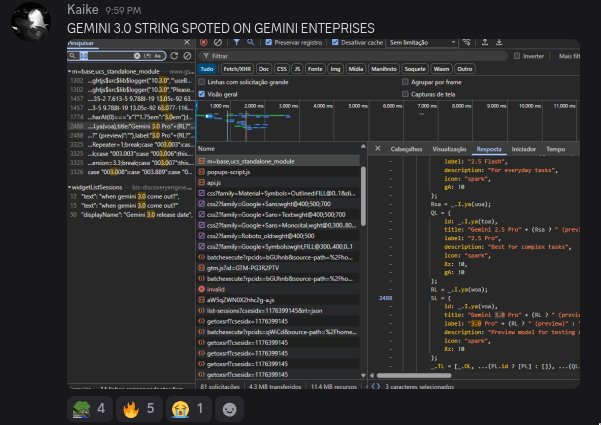
Why it matters: if mobile Canvas is now 3.0‑backed, on‑device creatives get faster SVG/code drafts to paste into design tools, and a clearer path to test structured outputs before a broader web release. An aggregator is capturing more examples and confirmations in one place Post roundup.
📓 NotebookLM for storytellers: custom video styles + history
Creator‑friendly upgrades: promptable video overview styles, chat history rollout, and Deep Research inside NotebookLM. Handy for briefs, recaps, and course content.
NotebookLM adds promptable video overview styles, rolling out globally
NotebookLM now lets you define the look of auto‑generated video overviews with a simple prompt (e.g., “cinematic style”), producing on‑brand recaps for lessons, briefs, and course content. The feature is rolling out worldwide and may take up to 7 days to reach everyone. Feature brief
For creators, this cuts post‑style passes and helps keep story packages visually consistent across episodes or modules. Flashcards and spaced‑repetition updates are also noted as “coming soon.” Feature brief
Deep Research lands inside NotebookLM for broader source discovery
A new “Deep Research” tile is live inside NotebookLM, upgrading beyond quick web lookups to pull richer sources and produce structured reports directly in the notebook. This helps writers and educators assemble references and outlines without leaving their workspace. UI walkthrough
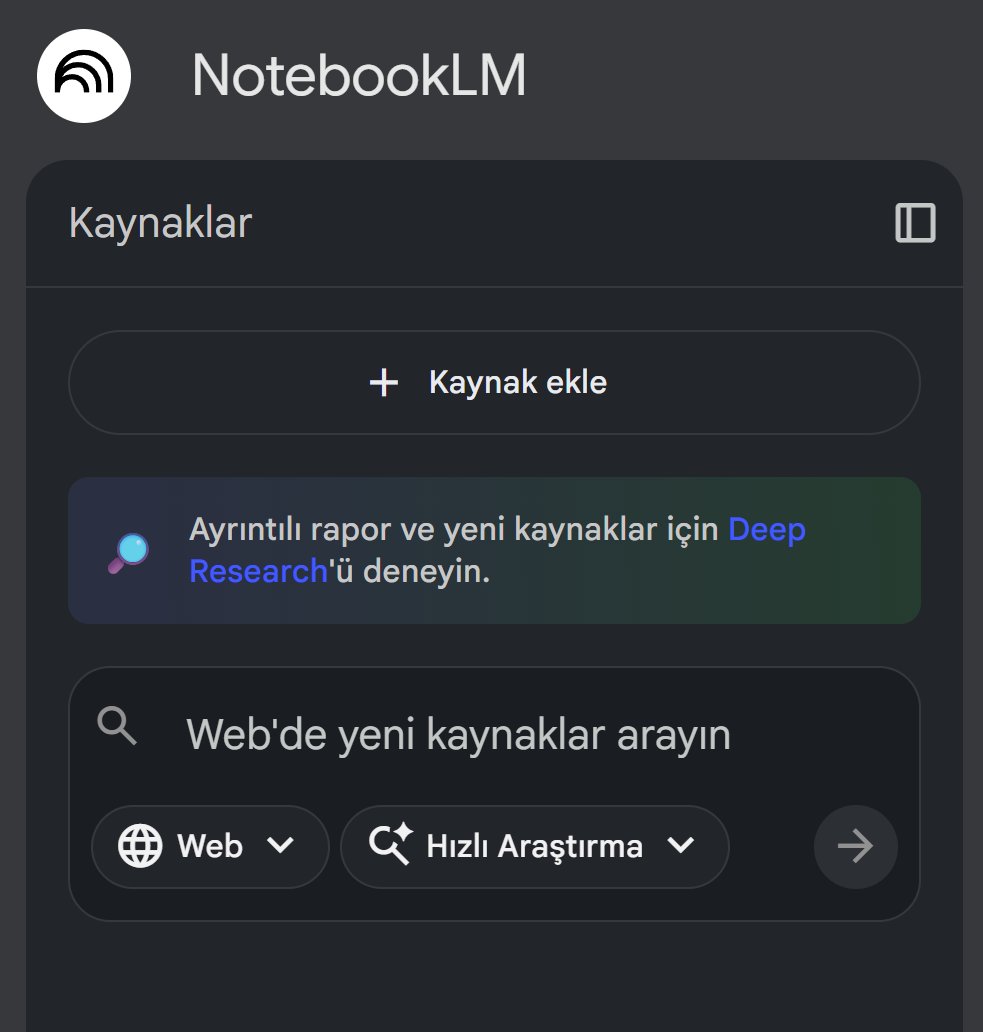
Chat history starts rolling out in NotebookLM
NotebookLM is rolling out chat history, so you can revisit prior sessions, pick up threads, and build on earlier briefs or research without copy‑pasting context. That’s handy for serialized videos, podcasts, and course builds that evolve over weeks. Feature sighting

🎨 Style packs to steal: MJ V7 + ink illustration
Prompt kits and srefs for artists: a neo‑retro MJ anime sref, a reusable ink‑illustration template, and a V7 collage recipe with consistent sref/sw stack.
MJ V7 collage stack: --chaos 33, --raw, --sref 3297549407, --sw 500, --stylize 500
A fresh V7 collage recipe lands: --chaos 33 --ar 3:4 --raw --sref 3297549407 --sw 500 --stylize 500, yielding a coherent “vintage yellow” set with tight character and prop continuity Recipe post. Following up on V7 collage recipe, this variant shows stronger color discipline and cross‑scene match, with multiple grids confirming repeatability More outputs.

Start with lifestyle or portrait prompts; keep the sref and sw combo to preserve the palette, then nudge chaos for layout variety without losing identity.
Neo‑retro anime look for MJ V7 via --sref 602722549
Midjourney V7 users got a crisp recipe for late‑80s/early‑90s OVA aesthetics: add --sref 602722549 to lock a cyberpunk/noir palette and faces that stay on‑model across shots Style reference. This is handy for action beats, moody close‑ups, and consistent character sheets.
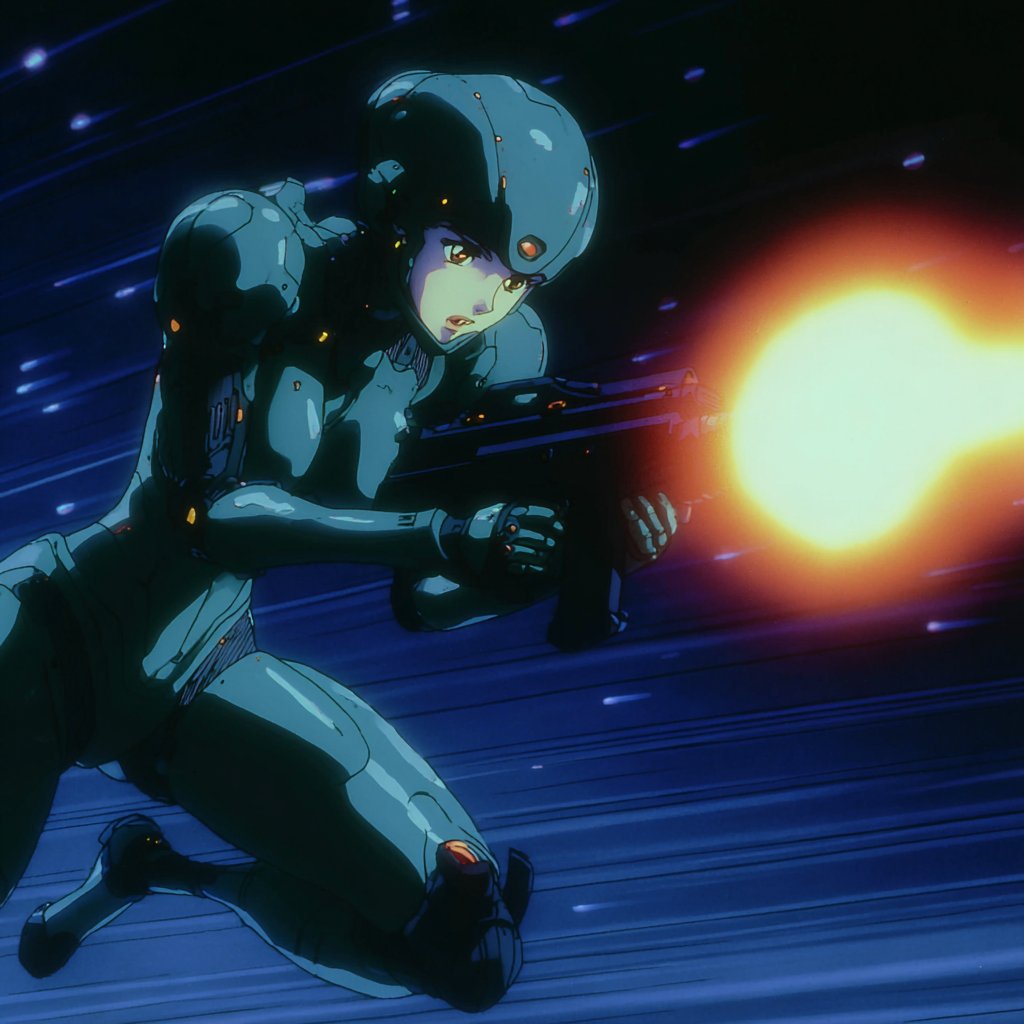
Try it on your base prompt, then tune --stylize for grit vs. polish; the sref does most of the heavy lifting for consistency.
Reusable ink‑illustration prompt template with subject and color slots
Azed shared a drop‑in ink‑illustration scaffold: “A flowing [subject] ink illustration… delicate gradients of [color1] and [color2]… minimalist composition, fine art aesthetic,” designed to produce organic linework on light backgrounds Prompt text. The thread shows samurai, koi, dancer, and horse variations, each holding the same visual grammar.

Use it as a style shell across engines; the examples pair well with --ar 3:2 and a V7 baseline when you want consistent gallery sets.
📺 Today’s standout reels (Luma, Grok, PixVerse)
A daily dose of creative reels and BTS: Ray3 image‑to‑video pieces, Grok Imagine tracking/comic looks, and a PixVerse growth vignette. Excludes the Recast feature.
Grok Imagine tracking shots land clean for anime and game vibes
A tight reel shows Grok Imagine handling forward/back dolly and lateral tracking with good temporal stability across anime and game‑style scenes. It’s a useful reference for action beats and chase setups. Watch the sequence in Tracking reel.
If your cuts rely on camera motion more than character acting, this clip is a strong baseline for prompt and pacing tests.
Luma Ray3 drops “Overclock” i2v reel with bold motion graphics
Luma showcased a new Ray3 image‑to‑video piece, “Overclock,” with kinetic typography and abstract energy fields—another strong stylistic swing following Iron Wild reel which leaned moody and textural. The clip underscores Ray3’s range for title sequences and brand opens. See the short in Release clip.
For motion designers, this reads as a ready reference for fast cuts, glowing forms, and logo resolves.
BTS: full music video animated with Luma Ray3, workflow breakdown
Creator Christopher Fryant shared behind‑the‑scenes on a final music video built end‑to‑end with Luma’s Ray3 i2v, walking through shot construction and look decisions. It’s sponsored, but the timeline and composites are practical for small teams. Watch the explainer in BTS breakdown.
If you’re sampling Ray3 beyond micro‑shots, this shows how to scale a concept across many beats without losing cohesion.
Grok Imagine nails comic looks: black‑and‑white and bold American ink
Two shorts highlight Grok Imagine’s strength in print‑inspired looks: one black‑and‑white panel treatment with clean inking, plus an American comic horror vignette with chunky lines and dramatic framing. See the B&W pass in B&W demo, and a second style in American comic clip.
For storyboarders and social shorts, these are handy targets when translating static panels into motion.
PixVerse micro‑story: puppy to full‑grown dog time jump
PixVerse posted a quick before/after vignette that jump‑cuts a puppy into an adult with an on‑screen “1 YEAR LATER” card. It’s a simple, repeatable structure for product or character growth beats. Watch it in Dog growth clip.
Creators can swap in seasonal or progress markers to make tight, narrative‑first reels without heavy setup.
Luma teases BTS for “The Lonely Drone” built in Dream Machine
Luma flagged an upcoming behind‑the‑scenes look at “The Lonely Drone,” indicating more long‑form Ray3/Dream Machine process material on deck. Thread watchers should expect workflow specifics similar to recent Ray3 BTS shares. See the note in BTS note.
🌍 World models in practice (Marble + creator demos)
Beyond the research hype, creators show Marble in workflows: deep‑dive videos and a 4.1/5‑rated talk on building a living world from one image. Focused on practical, creator‑facing use.
Marble opens to everyone with editable, exportable 3D worlds
World Labs’ Marble is now available broadly, letting creators generate full 3D spaces from text, images, or video, edit any object or region, expand scenes, and export as Gaussian splats, meshes, or cinematic video launch brief. The update also spotlights Marble Labs, a space where artists and devs trial workflows for VFX, games, design, and robotics.
For filmmakers and storytellers, that means virtual sets you can actually iterate on and ship. For designers, it’s a route from reference boards to navigable spaces without a DCC-first start. The availability call is also showing up in creator timelines, boosting awareness RT announcement.
Creator deep dive: Marble vs SIMA 2 for worldbuilding workflows
TheoMediaAI published a walkthrough comparing Marble’s world authoring and export paths with Google DeepMind’s SIMA 2 agent learning inside 3D environments—useful context if you build sets and want agents to act within them overview thread, with the full breakdown and demos on YouTube YouTube analysis.
Why it matters: Marble looks like the workspace for constructing editable, exportable worlds; SIMA 2 looks like the learner that can move, plan, and improve inside them. The pairing hints at a near-term pipeline of “author space here, practice behaviors there,” which maps cleanly to virtual production, previz, and interactive scenes.
“Memory House” talk on one‑image worldbuilding scores 4.1/5
At AI Tinkerers, Wilfred Lee’s “Memory House: Building a Living World from a Single Image with World Labs” earned an average 4.1/5, with eight perfect scores, highlighting practical appeal for narrative builders feedback screenshot.
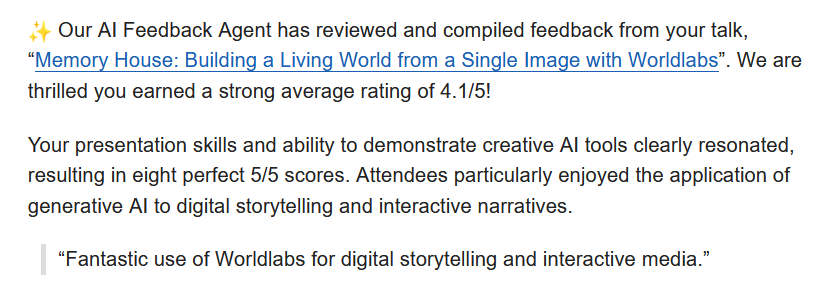
The session focused on turning a single still into a navigable, story-ready space and resonated with creators looking to fuse generative visuals, interactive beats, and spatial continuity—exactly the gap between pretty shots and production‑grade story spaces.
🔬 Research to watch: hybrid decoders and 3D agents
Mostly research/news this cycle: NVIDIA’s TiDAR hybrid decoding, DeepMind’s SIMA 2 agent in 3D worlds, and Lumine’s open recipe for generalist agents. Creator‑relevant trendspotting.
DeepMind’s SIMA 2 learns and adapts across open‑world 3D games
Google DeepMind outlined SIMA 2, an agent that plays 3D games, reasons about goals, explains actions, and self‑improves from its own gameplay; it was tested across three complex open‑world titles (MineDojo, ASKA, No Man’s Sky) to showcase zero‑shot adaptability Research overview. Following up on AligNet vision alignment momentum, the community is already asking when it can post a speedrun record—useful pressure‑testing for embodied generality Speedrun question.
NVIDIA unveils TiDAR: draft in diffusion, verify autoregressively
NVIDIA researchers introduced TiDAR, a hybrid decoder that drafts sequences with diffusion and finalizes them autoregressively, reporting higher throughput than speculative decoding while surpassing diffusion baselines on efficiency and quality Paper thread, with an emphasis on serving‑friendly deployment ArXiv paper. For long‑form text, scripts, and tool‑using agents, this promises faster, more consistent decoding without exotic runtime changes.

Lumine publishes an open recipe for generalist agents in 3D worlds
The Lumine team shared an open, end‑to‑end recipe for building generalist agents that operate in real‑time 3D environments, describing a VLM‑based stack with ~5 Hz perception and 30 Hz keyboard/mouse control that can complete multi‑hour quest lines and show cross‑game transfer Paper link. The page includes method details and examples creators can adapt for interactive films and game‑like experiences Paper page.