Nano Banana Pro powers free week, 1‑year access – $20k contest, 66% team deal

Stay in the loop
Free daily newsletter & Telegram daily report
Executive Summary
Nano Banana Pro took another step from curiosity to workhorse today. ImagineArt is running a free week on its Creator plan and cutting team tiers by up to 66% for roughly 40 collaborators, while Higgsfield is seeding 72‑hour links that unlock a full year of unlimited generations. Layer on a #HiggsfieldBanana contest with $20k in prizes—$10k to the top post—and you get a feed flooded with real production tests, not one‑off flexes.
The interesting shift from yesterday’s integrations is how specific the use cases are getting. People are dropping characters onto the Titanic wreck from GPS coordinates, pulling accurate Barça scoreboards from live web lookups, and doing vase‑only style transfers or “delete every tourist from this photo” edits in one prompt. Leonardo is restyling Google‑Maps‑style layouts into 8‑bit San Francisco, anime Japan, and casino Las Vegas, while Freepik and others lean on Pro as a one‑shot infographic engine.
On the workflow side, NB Pro is now embedded in CapCut for everyday editors and paired with Gemini 3 Pro to spin bespoke Pokémon‑style cards for kids’ parties—kids apparently remain the harshest art directors on Earth. If you needed proof this model can anchor real pipelines, not only hero shots, this promo window is about as forgiving as it gets.
Top links today
- Freepik Nano Banana Pro image generator
- Freepik Nano Banana Pro workflow tutorial
- Runway weekly update on new features
- Gradio ComfyUI minimal web UI repo
- Unreal Engine 5.7 AI Assistant release
- HunyuanVideo 1.5 open source overview
- Pictory AI BFCM offer and plans
- ImagineArt Nano Banana Pro Black Friday deal
- Higgsfield Nano Banana Pro free access
- Adobe Photoshop and Premiere AI features
- Custom Pokemon card generator project
- Kling VANS video-next-event research
Feature Spotlight
Nano Banana Pro: free week, unlimited year, wild use cases
NB Pro takes over: ImagineArt opens a free week (66% off + 40 invites), Higgsfield pushes 1‑year unlimited and a $20k challenge, while creators demo GPS scenes, object‑only style edits, map restyles, and LTX‑level 4K character consistency.
Today’s feed is dominated by NB Pro: free access promos plus creator proofs like GPS‑based scenes, object‑only edits, map restyles, and LTX claims of 4K character consistency. This continues yesterday’s access wave with new angles and contests.
Jump to Nano Banana Pro: free week, unlimited year, wild use cases topicsTable of Contents
🍌 Nano Banana Pro: free week, unlimited year, wild use cases
Today’s feed is dominated by NB Pro: free access promos plus creator proofs like GPS‑based scenes, object‑only edits, map restyles, and LTX claims of 4K character consistency. This continues yesterday’s access wave with new angles and contests.
Higgsfield dangles 1‑year unlimited Nano Banana Pro and a $20k #HiggsfieldBanana contest
Higgsfield is going hard on Nano Banana Pro hype: creators are seeing 4K macro renders with microscopic surface detail appear in under a second Macro gecko example, while selected users get 72‑hour links that unlock a full year of unlimited NB Pro generations if they claim in time Unlimited year offer. Building on the earlier discounted 12‑month deal Higgsfield offer, the company has now also launched the #HiggsfieldBanana challenge with up to $20,000 in prizes—$10k for the most viral, highest‑quality post, $5k and $3k for second and third, plus $200 each for ten Higgsfield’s Choice picks Contest terms.
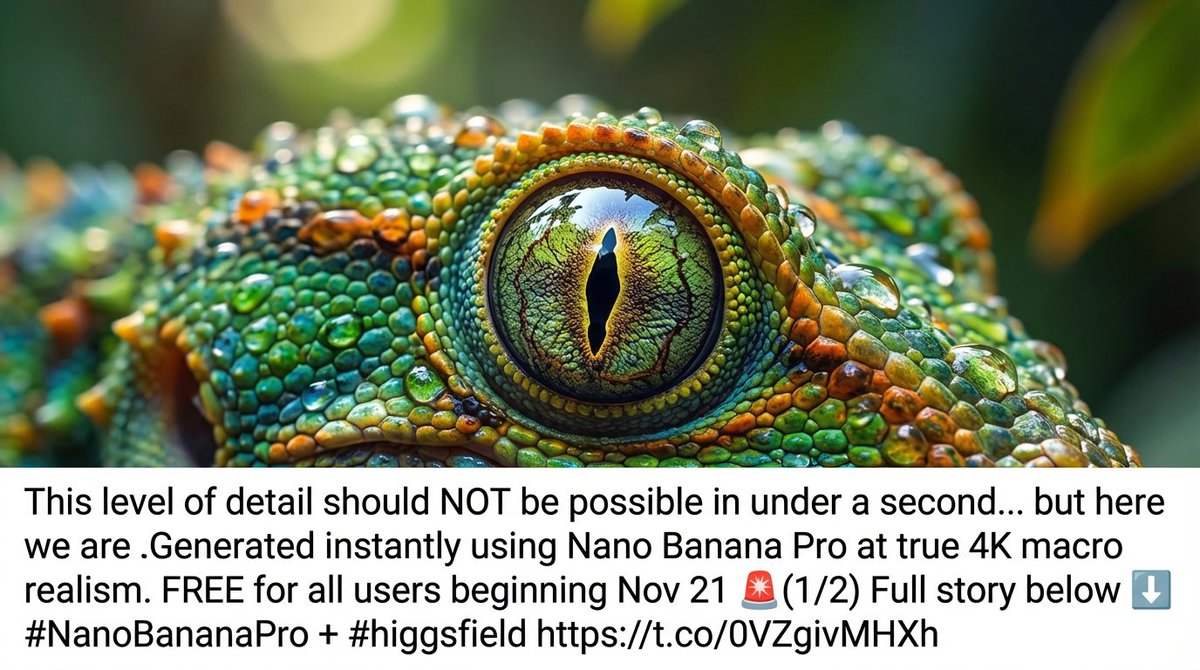
Multiple call‑and‑response tweets show Higgsfield auto‑replying with bespoke NB Pro images (from cinematic group portraits to extreme macro ants hauling rocks) whenever users quote their promo, each tagged with a 72‑hour “1 Year UNLIMITED Nano Banana Pro” hook Ant macro giveaway. For visual creators, the message is clear: if you want to stress‑test NB Pro’s physics‑aware splashes, macro textures, and text rendering at scale without worrying about credits, this short campaign window is the moment to do it (Higgsfield blog post).
ImagineArt gives a free week of Nano Banana Pro plus 66% off team plans
ImagineArt is turning Nano Banana Pro into an almost risk-free playground: the model is free for one week on the Creator Plan, while Black Friday pricing cuts Creator and Ultimate plans by up to 66% and lets you invite around 40 collaborators into the same workspace. Following up on ImagineArt deal, which first teased unlimited NB Pro, today’s posts show concrete creative wins—like dropping people into scenes using only latitude/longitude coordinates, e.g. “put a friend at these GPS coords” Coordinates demo, group face edits that used to confuse other models Group edit example, and images where NB Pro copies real handwriting style and even works through written equations on the page Handwriting and math.
For AI artists and small studios, this shifts NB Pro from “expensive toy” to something you can hammer on for a week across a whole team, testing whether its more accurate grounding and text handling are actually worth baking into your pipelines before the promo window closes (ImagineArt pricing).
Nano Banana Pro shows off GPS and live‑web grounding with Titanic and Barça prompts
Creators are stress‑testing Nano Banana Pro’s “world knowledge” by asking it to visualize events and scenes purely from coordinates or live web lookups, and it’s holding up surprisingly well. One viral prompt asked NB Pro to “Create an image of the major event that happened at these coordinates: 41°43′32″N 49°56′49″W” and got a cinematic image of the Titanic sinking at night amid icebergs Titanic coordinates example. Another demo had the model first fetch the current FC Barcelona score and then generate a stadium scene whose scoreboard showed the correct 1–0 scoreline with Lewandowski scoring in the 3rd minute Live match scoreboard.
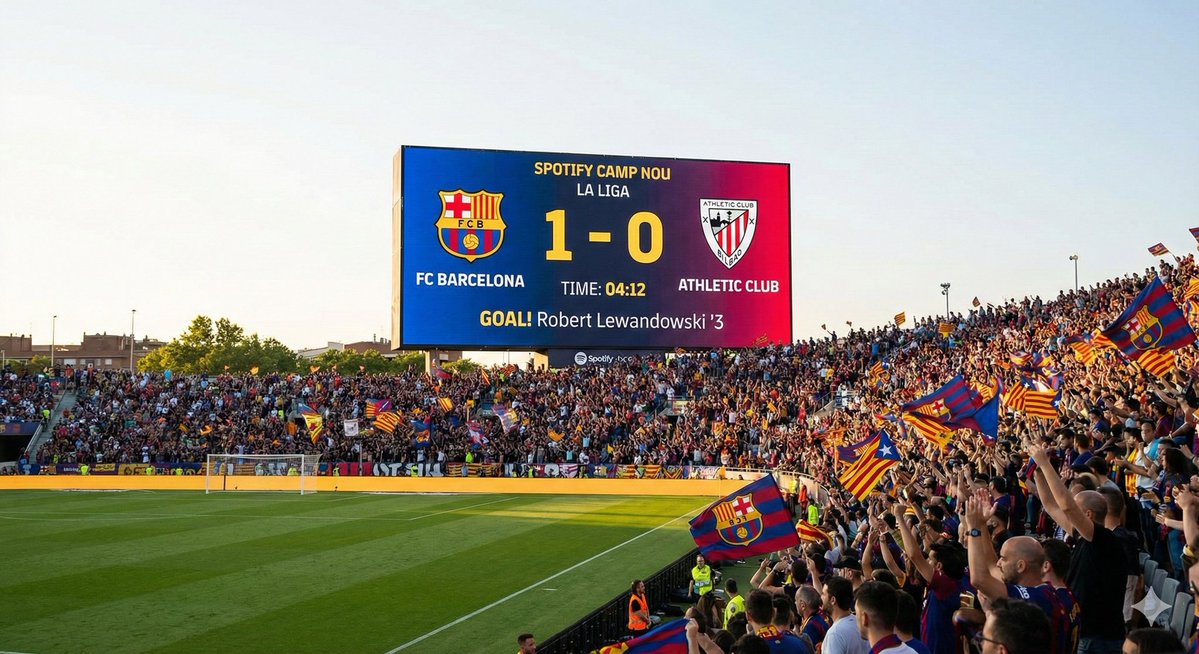
On ImagineArt, people are also using NB Pro to put subjects at arbitrary GPS points (“put someone anywhere in the world using only coordinates”) Coordinate placement thread, and even to find a plausible real‑world wall on Google Maps where a famous album cover might have been shot Album cover location. For storytellers and designers, this means NB Pro is more than a style engine: you can now prototype historically grounded scenes, live sports beats, or location‑specific art direction directly from text, which nudges it closer to a visual browser for space and time rather than a random image slot machine.
Leonardo AI uses Nano Banana Pro to restyle Google Maps into 8‑bit, anime, casino, and fantasy worlds
On Leonardo AI, Nano Banana Pro is being turned into a cartography remix engine: Mr_AllenT’s thread shows Google‑Maps‑style layouts of real regions being reimagined as 8‑bit games, anime worlds, casino boards, and fantasy realms with a single prompt swap Map restyle thread. The flagship example is an 8‑bit San Francisco map where Golden Gate Bridge, Twin Peaks, and Ocean Beach are rendered as pixel icons on a tan‑and‑blue NES‑like map, complete with little pins and labels Map restyle thread.

Follow‑ups include anime‑style Japan (“down‑top cartography map of Japan in an anime style”), a casino‑themed Las Vegas, a 3D fantasy Europe, and a comic‑book England, all generated with short, descriptive prompts Map prompt roundup. For game devs, dungeon masters, and motion designers, this is a practical NB Pro use case: you can feed in mundane map references and have it output production‑ready worlds in a coherent aesthetic, instead of hand‑drawing dozens of map variants from scratch (Leonardo project page).
LTX Studio leans on Nano Banana Pro for 4K character consistency, lipsync, and Kelvin control
LTX Studio is starting to spell out why it wired Nano Banana Pro into its LTX‑2 pipeline: the team says NB Pro finally solved character consistency across angles while keeping shots at native 4K with built‑in lipsync, so the same face holds up as you move the camera or shrink characters in frame LTX capability summary. On top, LTX is using NB Pro almost like a virtual color meter, claiming they can generate shots with dead‑on Kelvin temperature targets for lighting continuity Color temperature comment, and pitching face swaps as a one‑click operation rather than a fragile multi‑step hack Face swap note.
For filmmakers and pre‑vis artists, this is a useful real‑world datapoint on NB Pro’s strengths: instead of chasing ever‑wilder effects, LTX is betting that reliable faces, accurate color, and clean text inside the frame are what make NB Pro a better backbone for shot‑based tools than older diffusion models, following up on its initial integration LTX integration.
Nano Banana Pro becomes an infographic and how‑to generator across Freepik and X
Creators are increasingly treating Nano Banana Pro as a reasoning‑aware layout engine for infographics and tutorials rather than only for photos. Freepik shows NB Pro taking a single reference image and turning it into a multi‑step visual guide, and then demonstrates a prompt like “Make the step‑by‑step on how to make a paper plane,” which yields a clean, numbered fold sequence in one shot Paper plane steps. David Comfort goes further, getting NB Pro to synthesize a dense, multi‑panel infographic on U.S. economic inequality, complete with charts, timelines, and annotated ratios like “Top 1% now holds 30.4% of wealth” vs “Bottom 50% holds 2.5%” Inequality infographic.

Prompt packs from Proper Prompter encourage people to “TL;DR a tweet by making an infographic” so a long text rant becomes a single slide of boxes and arrows Infographic prompt idea. Combined with Freepik’s move to keep NB Pro unlimited for Premium+ and Pro users until the 27th Freepik unlimited note, this is turning NB Pro into a cheap replacement for a designer‑on‑call when you need explainer slides, process diagrams, or one‑pager summaries on short notice.
Nano Banana Pro nails object‑only style transfer and multi‑change edits in one prompt
A key upgrade artists are noticing from Nano Banana to Nano Banana Pro is fine‑grained control over where style changes apply. Halim Alrasihi showed a black‑and‑white vase photo where NB Pro was prompted to “sample the style, material, color and texture” from a reference and apply it only to the vase, leaving the rest of the frame untouched; the result is a richly colored, textured vase against the same monochrome background Object style transfer demo.
In follow‑up discussion, creators note that the older Nano Banana model often failed to truly change camera angle or background, instead just rotating the character while freezing the scene, while NB Pro can now handle angle shifts, new reference images, text overlays, and fresh actions in one prompt Angle change feedback. Paired with other tests like “remove all people from this travel photo” Person removal reference, this positions NB Pro less as a pure text‑to‑image toy and more as a surgical editor for production images, which is exactly the kind of control commercial retouchers, thumbnail designers, and VFX cleanup teams have been asking for.
CapCut integration makes Nano Banana Pro edits accessible to casual video creators
Nano Banana Pro is starting to show up where everyday editors actually work: CapCut. AI_for_success calls out that while “NB Pro on its own is cool, inside CapCut it actually becomes more useful for everyone’s everyday creates” CapCut integration comment. There’s no feature list yet, but the implication is that NB Pro’s strengths—accurate text, style transfer, and real‑world grounding—are now wrapped in CapCut’s timeline, templates, and export tools, not a separate pro‑only site.
For TikTokers, Reels editors, and social teams that already live in CapCut, this matters more than another standalone NB Pro UI: it means you can start swapping skies, cleaning plates, or generating overlays with NB‑level quality without leaving your main editing tool, then stack that with CapCut’s own filters and motion graphics.
Nano Banana Pro popularizes a 1998 disposable‑camera party look with one shared prompt
A very specific Nano Banana Pro prompt has started bouncing around X: “A flash photography snapshot taken on a disposable camera in 1998. A man at a chaotic house party. Red-eye effect, harsh shadows, motion blur, and film grain. The composition is slightly tilted and messy.” Azed_ai’s original post shows a textbook late‑’90s house‑party scene with red‑eye, timestamp, cluttered coffee table and Miller Lite cans Original 1998 party shot, and other users who tried the exact same text keep getting the same archetypal guy in similar 1998 party environments Prompt replication thread.

People are swapping in variations (“same prompt, different man,” changing hats or shirts) Variant party examples, but the aesthetic remains consistent: hard flash, washed‑out colors, wall posters, red plastic cups, and digital date stamps like “OCT 31 ’98” Album-style party image. For filmmakers and designers chasing nostalgia, this shows how NB Pro can lock onto a micro‑era and reproduce not just props but camera flaws—useful if you’re storyboarding flashbacks, fake archival footage, or album covers without building full sets.
Gemini 3 Pro plus Nano Banana Pro power a Pokémon card generator for kids’ parties
One of the more wholesome Nano Banana Pro use cases this week is a birthday‑party Pokémon generator: fofr built a mini‑app where each child invents a monster, HP, and description, and the system then generates unique card art and layout for them to print and take home Pokemon party demo. Behind the scenes it’s all Google: Gemini 3 Pro in AI Studio handles the structured text and stats, while Nano Banana Pro is used to create the on‑card creature illustrations like “Poisonous Hotdog” and “Gooey Mummy” Stack description.
Every time a new card appeared, “there was a scream of delight,” which is a decent signal that NB Pro’s consistency and charm hold up even under kid scrutiny. For game designers, educators, or parents experimenting with AI, this shows a clear pattern: pair a reasoning model for rules and structure with NB Pro for images and you can spin up bespoke card games, classroom rewards, or collectibles without touching Photoshop.
🎬 Generative video now: Pika 2.5, Grok shotcraft, Runway audio
Practical video updates for filmmakers—model quality, shot recipes, and workflow news. Excludes Nano Banana Pro promos/capabilities (see feature).
Pika 2.5 launches broadly with free 480p and 1080p tier for creators
Pika has rolled out Pika 2.5 to everyone, offering 480p generations for free and adding 720p and 1080p options while retiring most of its older 1.x/2.x models to focus quality on a single stack. The new release is positioned as a noticeable visual leap, with 2.5 now the default model and 480p a low‑friction way to previz shots before paying for full‑HD renders pika overview.
For filmmakers and editors, the shift matters because any Pika‑based pipeline built around Turbo or 2.2 will need to migrate prompts and styles onto 2.5, but in exchange you get a simpler choiceset (one main model, three resolutions) and a free tier that can stand in for animatics. The practical move now is to re‑run a few existing prompts at 480p to see how motion, style, and timing have changed before you lock anything at 1080p.
Grok Imagine teases 15‑second clips and video extension in 4.1
xAI’s Grok Imagine is quietly turning into a more serious video tool, with users reporting that Grok 4.1 ships visual and video model improvements and that single‑shot 15‑second generations plus video extension are on the near‑term roadmap grok roadmap. Right now, clips are short enough that creators are openly asking “When longer videos?” as they share stylized tests length complaint.
For storytellers, 15‑second shots and extension tools mean you can start thinking in real coverage instead of 3–4 second gifs: longer establishing shots, dialogue beats in one take, or animated camera moves that don’t need to be stitched. If you’re experimenting with Grok today, it’s worth treating current outputs as look‑tests and framing tests, knowing that once 4.1’s longer durations land you’ll be able to reuse a lot of the same prompts for usable story beats.
HunyuanVideo 1.5 looks viable for indie 5–10s clips on a single GPU
Tencent’s open‑source HunyuanVideo 1.5 continues to attract attention because it squeezes a cinematic text‑to‑video model into 8.3B parameters that can run on GPUs with 14GB VRAM while still pushing 5–10 second clips at 480p/720p and super‑resolving to 1080p hunyuan overview, following its initial open release on GitHub and Hugging Face open source video. Under the hood it uses a Diffusion Transformer plus 3D VAE, with sparse attention tricks to make generation fast enough for practical use ai films blog.
For small teams and solo directors, the big implication is control: you can host HunyuanVideo yourself on a 4090‑class box, keep all your IP in‑house, and tune prompts or finetunes without per‑minute platform fees. The trade‑off is that 14GB is the floor, not the comfort zone—Tencent suggests 80GB for best performance—so this is more of a studio workstation model than a laptop toy, but it’s one of the first open options that feels genuinely usable for real storyboards, motion tests, and mood cuts.
Runway’s weekly update demos Audio Nodes and new Workflow tricks
Runway dropped a new “This Week with Runway” episode that walks through Audio Nodes, new models, and several Workflow improvements, effectively turning the recent feature launch into a practical tutorial reel runway weekly video. Following up on the initial Audio Nodes announcement, which added TTS, SFX, dubbing, and audio isolation into node graphs audio nodes launch, this update focuses on how to wire those pieces together in real projects.
If you’re cutting trailers, TikToks, or shorts inside Runway, this matters because you can now design a reusable Workflow that ingests footage, auto‑generates or cleans dialogue, layers designed sound effects, and exports—all without leaving the tool. The smartest next step is to copy their showcased Workflow, then strip it down to your own minimal pass (dialogue cleanup + one music stem, for example) so you can start reusing it across multiple edits.
Grok Imagine rewards real cinematography: low‑angle horror and overhead light
Creators are finding that Grok Imagine responds strongly to classic camera language, not just style adjectives. One example shows a low‑angle hallway shot where a knife‑wielding figure becomes instantly more menacing purely from the camera being near the floor, a look explicitly recommended for horror in Grok low angle horror tip.
Another demo leans on an overhead viewpoint plus hard, directional lighting to cast long shadows, turning a simple standing figure into a very graphic, poster‑ready composition overhead shot tip. For filmmakers and motion designers, the takeaway is simple: treat your prompts like a shot list—specify angle, height, and light direction—and you’ll get back frames that feel composed rather than generic, which in turn makes it easier to cut Grok shots into live‑action or CG edits.
Shotcraft with Grok Imagine: turning prompts into graphic story frames
Two short Grok Imagine studies this week underline how much framing alone can change the feel of AI‑generated shots. A low‑angle hallway setup with a silhouetted figure and knife immediately reads as horror, even before you add any blood or monsters, purely because the camera feels like it’s at ankle height looking up low angle horror tip.
In contrast, an overhead shot with strong, directional light carves bold shadows around a solitary character, creating a top‑down, almost graphic‑novel panel that would sit comfortably in a title sequence or interlude overhead shot tip. For directors and storyboard artists testing Grok, the lesson is to build a mental library of “promptable” camera setups—overhead hard‑light, low Dutch angle, long‑lens closeup—and reuse them like you would in a real shot list so your AI clips start to share a coherent visual language across a sequence.
🎨 Reusable looks: MJ V7 recipes and anime srefs
Style recipes and srefs to lock aesthetics across shots—double‑exposure compositions and neo‑retro anime tones. Excludes Nano Banana Pro guides (feature).
MJ V7 recipe for double‑exposure silhouettes with sref 1171144595
Azed shares a compact Midjourney V7 prompt recipe that reliably produces stylish double‑exposure silhouettes using --chaos 7 --ar 3:4 --sref 1171144595 --sw 500 --stylize 500, demonstrated on a six‑image grid of animals, people, and landscapes layered into profile shapes MJ V7 settings.

For creatives, the key is that the style ref 1171144595 locks in the high‑contrast, double‑exposure aesthetic across prompts, so you can swap subjects or scenes while keeping a consistent poster/book‑cover look for a whole campaign or storyboard.
Neo‑retro anime portrait look with MJ sref 3826965101
Artedeingenio surfaces Midjourney style ref --sref 3826965101, which yields a high‑detail, neo‑retro anime look inspired by late‑80s/early‑90s OVAs, with cool bluish lighting contrasted by intense reds in eyes, lips, and capes Anime style thread.
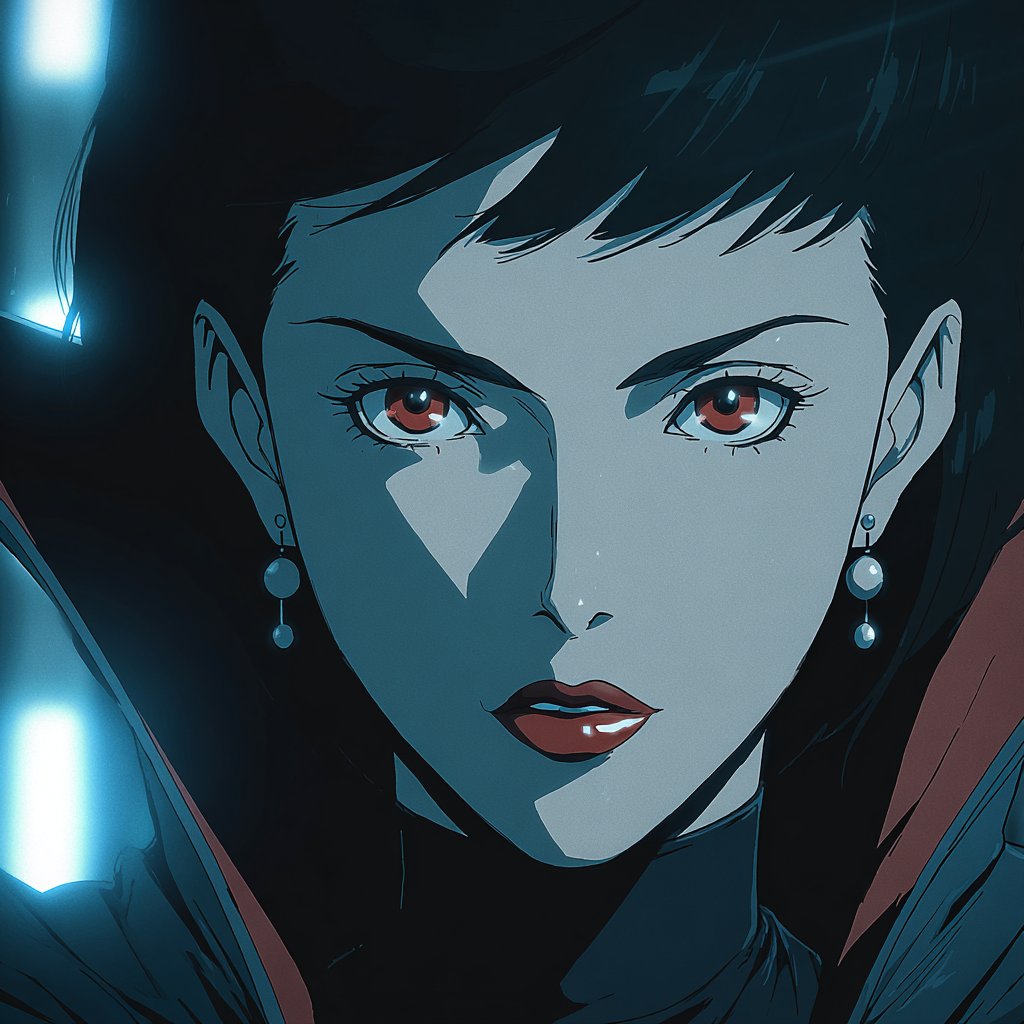
The set shows consistent facial proportions, cinematic lighting, and color language across multiple characters, making this sref a strong candidate when you need a reusable visual identity for anime key art, character sheets, or a stylized series bible.
Soft, foggy surreal worlds with MJ sref 5975256890
Bri_guy_ai highlights Midjourney style ref --sref 5975256890, which produces soft‑focus, hazy surreal scenes: a lavender monster as a gentle companion, a golden statue facing a shipwreck, a glowing jellyfish over hills, and a tiny church under a heart‑shaped cloud Surreal sref examples.

The through‑line is muted color, atmospheric haze, and quietly spiritual compositions, so this sref is useful when you want a cohesive dreamy tone for story beats, title cards, or mood passes on a fantasy project without re‑tuning prompts every time.
Portal‑path composition shows MJ’s strength at surreal layouts
Azed posts a striking Midjourney image of a broken stone path rising into darkness toward an arched portal revealing clouds and a planet, with a lone figure walking into the light, captioned "Only Midjourney can do this" Portal path showcase.

For designers and directors, it’s a ready‑made composition template: central one‑point perspective, strong negative space, and a framed "window" into another world, which you can reuse by swapping subject, environment, or portal content while keeping the same impactful layout across a sequence or poster set.
🧩 Workflow plumbing: ComfyUI minimal UI + agent browsers
Pipeline helpers for creatives: a minimal Comfy UI that adapts to your graph, plus Hyperbrowser’s scrape/crawl/extract endpoints for agentic research. Excludes NB Pro feature content.
Hyperbrowser ships /SCRAPE, /CRAWL, /EXTRACT and cloud Chrome for agentic web work
Hyperbrowser is positioning itself as a "browser infra for AI agents", exposing four main primitives over API: /SCRAPE to fetch any page and return clean HTML or markdown, /CRAWL to traverse whole sites from a seed URL, /EXTRACT to pull structured data into a schema using AI, and a cloud Chrome layer that you can drive via Puppeteer or Playwright without running your own headless fleet hyperbrowser overview.
For anyone building research agents, content spiders, or auto-updating dashboards, this moves a ton of brittle plumbing (proxy rotation, DOM cleanup, site-specific parsing) into a single service, so you can focus prompts and policies on what to collect instead of reimplementing scraping and crawling for every project.
Gradio Comfy UI adds a minimal, auto-adapting web front-end for ComfyUI graphs
Akhaliq is showing a new "Gradio Comfy UI" layer that sits on top of ComfyUI and turns node graphs into a clean, non-node web interface where you only expose the controls you care about. You mark which nodes should surface by renaming their titles in the Comfy graph, then hit Refresh in the Gradio panel and it auto-builds a minimal UI with prompt box, buttons, and image outputs that adapt to that workflow gradio ui demo.
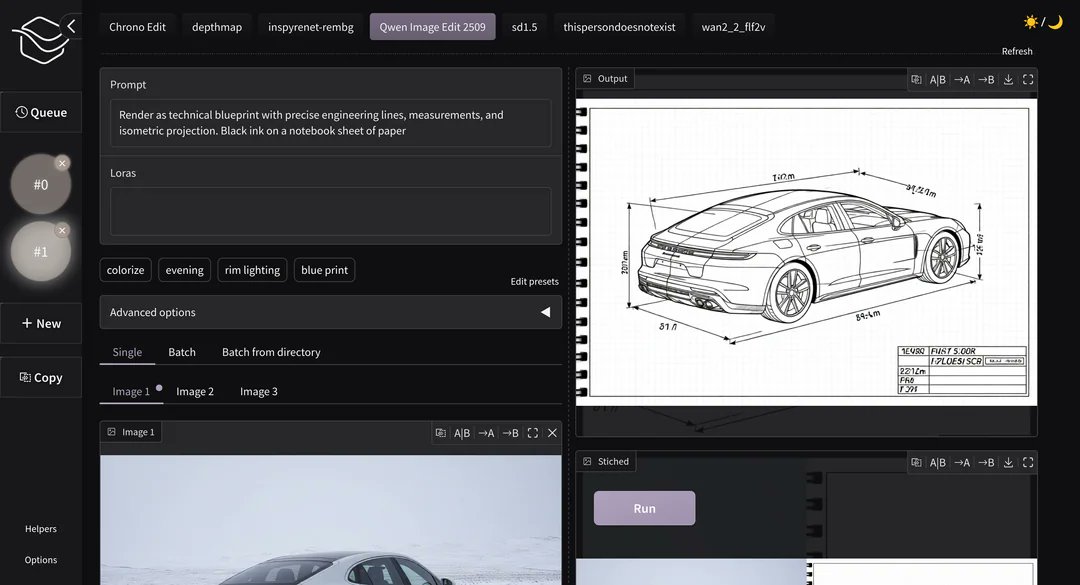
For artists and motion designers who hate dragging boxes but love Comfy’s power, this effectively lets you design a graph once and then hand a simple, client-friendly front-end to collaborators, juniors, or even yourself on a different day, without rewriting anything as a separate app.
Perplexity Comet vs ChatGPT Atlas poll surfaces how creatives choose AI browsers
Ai_for_success kicked off a poll asking which "AI browser" people actually use—Perplexity Comet or ChatGPT Atlas—and why, sparking hundreds of replies from power users who care about search quality, answer speed, and how well these tools slot into daily creative research ai browser poll.

Coming after Comet’s recent quiet Android appearance Comet Android, the thread reads like a qualitative field study for workflow designers: Comet fans tend to cite live, citation-heavy exploration, while Atlas users lean on tight integration with their existing ChatGPT projects, signaling that the "AI browser" that wins creatives may be the one that feels least like a separate app and most like an extension of their main assistant.
🗣️ Iconic voices, licensed: ElevenLabs does Oz
Narration for storytellers: a full production of The Wonderful Wizard of Oz using an AI Judy Garland voice licensed by the estate, with listening via ElevenReader.
ElevenLabs releases full Wizard of Oz with licensed AI Judy Garland voice
ElevenLabs has produced a complete audio edition of The Wonderful Wizard of Oz entirely in ElevenLabs Studio, narrated by an AI voice modeled on Judy Garland and officially licensed with permission from her estate Oz narration demo. The production is positioned as part of their Iconic Voices line and is available to listen to inside the ElevenReader app, giving storytellers a glimpse of what fully synthetic but rights-cleared narrators could mean for long-form adaptations and branded fiction.
For AI creatives and filmmakers, this is a concrete example of estate-approved vocal likeness being used to re-interpret classic material end‑to‑end, not just as a short demo. It hints at a future where teams can legally pair stylized visual treatments with historically recognizable voices for full stories, while keeping distribution tied to controlled apps like ElevenReader where licensing terms can be enforced.
🕹️ AI animation & NPCs: VFX tests and living characters
From AI‑assisted VFX to adaptive NPCs that react to players—useful for game cutscenes and animated shorts. Excludes Nano Banana Pro platform news (feature).
“Autumn Dragon” director’s cut shows shot‑by‑shot AI filmmaking
Creator @maybeegreen’s Autumn Dragon (Director’s Cut) stitches together a complete narrative sequence generated “shot by shot over 3 days,” demonstrating how far you can push consistency and mood with current tools. autumn dragon filmThe cut flows through multiple angles and environments while keeping the dragon, heroine, and color language coherent enough to feel like a single short.
For storytellers, this is a template for treating AI models as a virtual art department: you plan a shot list, iterate each frame or short clip until it matches your boards, then cut it like a live‑action project instead of relying on one big, uncontrollable text prompt.
AI film “The Last Dream” racks up indie festival accolades
Wilfred Lee reported that his AI‑driven fantasy short The Last Dream has now collected one Best Fantasy award, four finalist spots, one semi‑finalist, one honorable mention, and one additional selection across festivals. festival rundownThe film has been circulating for a while, but this new tally shows juries are starting to treat AI‑assisted work as legitimate entries alongside traditional projects. film linkFor filmmakers wondering whether AI shorts can play on the circuit, this is early evidence that strong storytelling still matters more than the tools, and that you can bring AI‑heavy work into festivals if you’re transparent and focused on narrative rather than tech flex.
ComfyUI recreates WanATI-style gooey character VFX
A creator reproduced Mizuno’s WanATI “gooey deformation” look inside ComfyUI, showing an animated 3D woman stretching and warping with fluid, almost rubbery motion. wanati vfx testThe test runs fully in ComfyUI’s node graph, suggesting you can now prototype WanATI‑like AI‑VFX shots without Blender‑specific tools, as long as you can wire the motion and style nodes correctly.
For VFX artists experimenting with AI, this points to a node‑based pipeline for body deformations that can live alongside more traditional compositing; you can keep using your usual node habits while letting an AI model handle the heavy lifting on mesh‑like motion and temporal consistency.
Grok Imagine powers a stylized Lord of the Rings tribute short
A creator released One Ring to Rule Them All, a Lord of the Rings tribute built and animated with Grok Imagine, featuring glowing Elvish script, molten‑lava vistas, and dramatic hero shots of the Ring. lotr tribute clipThe piece leans into a dark fairytale origami‑like look that other Grok users have been exploring for fantasy stories. lotr style plug
For fantasy filmmakers and fan‑project teams, this shows Grok Imagine is good enough to carry a full stylized sequence, not just single hero frames—useful if you want to storyboard or even release short homages without building full 3D pipelines.
Winter Fashion Film tests emotional AI cinematography in Freepik Spaces
WeAreDiva Studio’s Winter Fashion Film uses Nano Banana Pro inside Freepik Spaces to explore a moody, slow‑motion editorial piece, with the director calling it part of their work on “bringing emotions to our stories.”winter fashion short The clip blends fashion poses, drifting snow, and careful color to feel more like a brand film than a raw model test.
If you’re in fashion or beauty, this points to AI as a look‑development and pitch tool: you can rough out seasonal campaign films, test wardrobe and lighting ideas, and iterate on emotional tone long before you lock a real‑world shoot.
“Orphan Sky” sequence highlights painterly AI worldbuilding
Designer @D_the_Designer shared one of their Orphan Sky pieces, a 32‑second vertical sequence that pans through floating islands and luminous clouds in a cohesive hand‑painted style. orphan sky clipThe shot feels like a slice from a larger world bible, with enough consistency in palette and forms that you could imagine multiple episodes or levels set there.
For animation directors and game environment leads, sequences like this are useful as rapid environment concept reels—you can explore how a location feels in motion, with parallax and scale shifts, before you commit to modeling or matte‑painting it for real.
“The Beast Awakes” pairs Nano Banana Pro with Hailuo for robot microfilm
D Studio’s The Beast Awakes combines Nano Banana Pro with Hailuo AI to create a short where a mechanical arm plucks up a glowing nano‑banana before cutting to a looming, mech‑like figure. beast awakes shortThe piece reads like a teaser for a larger sci‑fi world, blending product‑style close‑ups with cinematic reveal shots.
For VFX‑minded teams, it’s a neat example of mixing product cinematography and character animation in one AI pipeline, hinting at how you might prototype title sequences or tech‑brand ads without firing up a full CG stack.
AI “Jackass 6.1” short mixes NB Pro and Kling 2.5 Turbo
James Yeung posted Jackass 6.1 – Crazy Grandpa, a slapstick micro‑short where an old man repeatedly takes crotch shots from a padded battering ram, tagged as made with Nano Banana Pro plus Kling 2.5 Turbo. jackass microfilmThe clip nails the crude, handheld, slightly over‑compressed feel of real Jackass footage, including timing on impact and character reactions.
If you’re experimenting with comedy or stunt previs, this shows how text‑to‑video can now rough out dangerous or expensive gags—letting you test framing, rhythm, and reaction shots before you involve a stunt coordinator or build physical rigs.
AI Tales builds a Beijing travel story from AI-generated frames
AI Tales NBH and guest @azed_ai put together a visual story of a trip to Beijing, using Nano Banana Pro to generate consistent shots of the same protagonist across the Great Wall, Forbidden City, night markets, and rooftop vistas. (beijing story concept, beijing trip frames)The concept pairs location‑based frames with a narrative structure, turning what would be a random set of AI postcards into something closer to a travel episode.
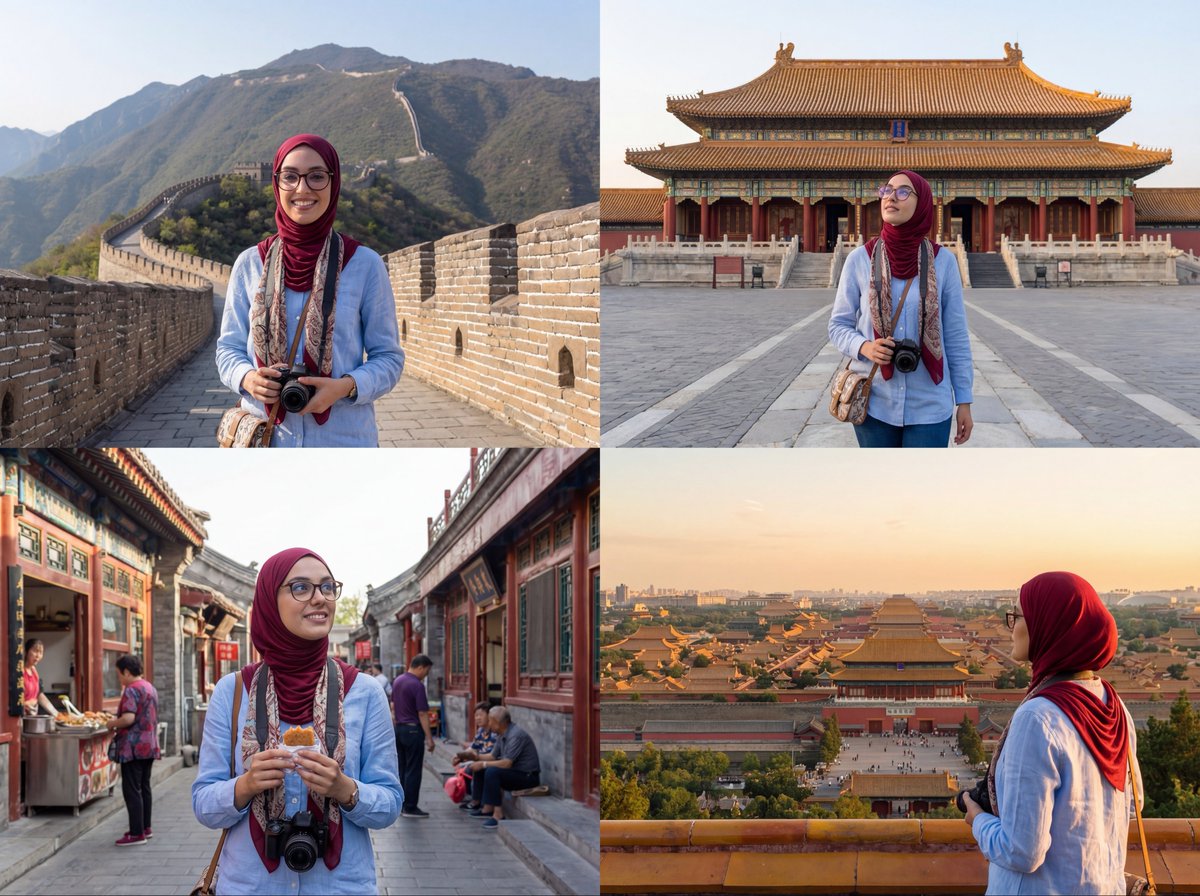
For storytellers, this is a light blueprint for episodic “AI travelogues”: define a character, pick a real route, and generate scenes that match each beat so you can later add VO, ambient sound, or light animation on top.
Nano Banana mascot short hints at playful AI character animation
A short clip made with Nano Banana Pro and Wan 2.2 shows a tiny green banana‑creature wobbling, spinning, and posing on a white surface, almost like a stop‑motion mascot test. banana mascot clipThe motion is simple but readable, and the character design is strong enough that you can imagine it anchoring a series of stings or idents.
For motion designers, this is a small but useful sign that AI tools are getting better at single‑character performance tests—the kind of thing you’d usually rough out with quick 3D rigs or claymation before pushing to a full opening sequence.
🎵 AI on the charts and in the lab
Music news for creators: an AI track tops Billboard, Suno’s big round despite lawsuits, and indie releases built with AI tools.
Suno raises $250M at $2.45B amid lawsuits and $200M ARR
AI music startup Suno has closed a $250M Series C at a $2.45B valuation, reportedly hitting around $200M in annual recurring revenue, even as it faces major copyright lawsuits from Sony, Universal, and Warner over training data. (suno growth thread, funding deep dive)For musicians and producers, this signals that prompt-based song generation is big enough to attract top-tier VC money despite legal risk, and that subscription-style access to AI composition tools may become a durable part of the music stack rather than a short-term novelty.
AI country track ‘Walk My Walk’ tops Billboard Country Digital Songs
An AI-created country song, Walk My Walk by the project Breaking Rust, has reached #1 on Billboard’s Country Digital Song Sales chart, pulling millions of plays on Spotify and YouTube and igniting a fresh authenticity debate around AI music. ai track debate
The same breakdown cites an IPSOS survey where 97% of listeners couldn’t reliably tell AI songs from human-made ones, yet 80% said they want clear AI labeling in music releases, pushing creatives to think about how they present AI-assisted tracks to fans and platforms. music industry analysis
AFRAID2SL33P releases ‘Come Undone’ and heavier AI tracks on SoundCloud
The father–son project AFRAID2SL33P has moved from previews to releases, dropping their single Come Undone on SoundCloud as part of a self-titled 8‑track EP built with Suno V5 plus hand-written lyrics. (track preview, come undone post, project backstory)They’ve also shared a heavier track, STEEL, continuing the trap‑metal/anime aesthetic and showing how small teams can carve out a cohesive sound and visual identity using AI composition for the audio bed and manual writing for words and direction. (steel full track, ep soundcloud page)
Indie creators pair Suno tracks with Midjourney and CapCut teaser videos
Indie musician–creators are stitching together AI tools into full release pipelines, using Suno for tracks, Midjourney for artwork, and CapCut plus Topaz for teaser-length vertical videos tailored to TikTok, YouTube Shorts, and Instagram. (teaser video test, tooling comment)
One thread shows a Suno-generated rap cover visualized with simple text-on-video and plans to upgrade to a 3–5 minute full video once a tool can take a song plus a few images and handle the rest, highlighting a very practical gap for anyone building AI-native music video editors. (editing stack chat, capcut workflow note)
📈 Reliability, next‑event video, and scaling pressure
Benchmarks and papers relevant to creative AI quality, plus an infra datapoint on serving growth. Excludes NB Pro capability demos (feature).
Artificial Analysis Omniscience Index shows most frontier models net negative
Artificial Analysis released its Omniscience Index, a 6,000‑question eval over 42 topics and 6 domains that scores models +1 for correct, –1 for incorrect (hallucination), and 0 for abstaining, revealing that most popular models hallucinate more than they help. Claude 4.1 Opus tops the Omniscience Index at +5 with 31% accuracy and 48% hallucinations, while Grok 4 hits the highest raw accuracy at 35% but still nets only +1 because it guesses wrong so often Omniscience overview.
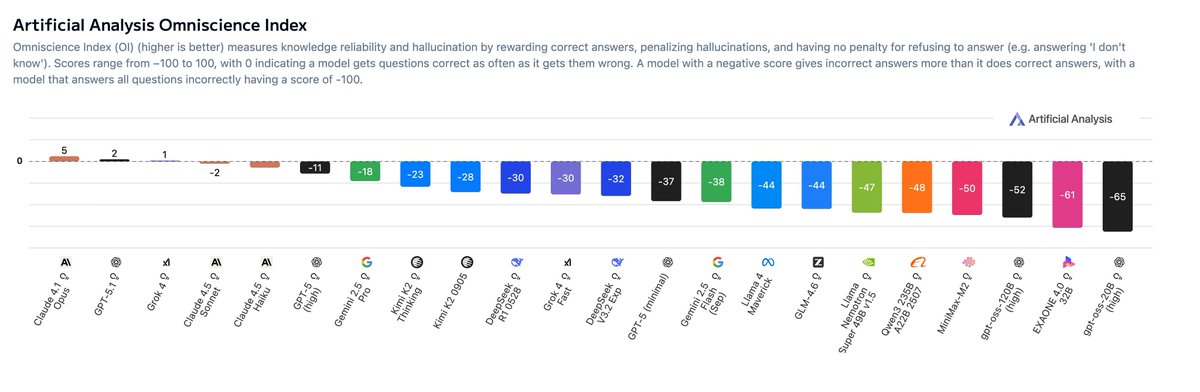
For creatives who lean on AI for research, scripts, legal context, or technical diagrams, the takeaway is that model choice really matters: Claude looks like the safest "fact partner" right now, especially in law, software, and humanities, while Grok 4 shines more in health and science but carries higher risk of confident nonsense Omniscience overview. The negative OI scores of many other models underline why you still need your own checks before dropping citations, medical details, or financial claims into a film, game, or client deck.
Google says AI serving capacity must double every six months
Google’s head of AI infrastructure, Amin Vahdat, told employees that to keep up with demand, the company has to double AI serving capacity roughly every six months, according to a CNBC report highlighted in today’s feed CNBC capacity quote. That’s a stark number: at that pace, serving headroom grows ~4× every year.

For people building with heavy models—4K image generators, long‑form video, or multi‑agent creative workflows—this offers a bit of signal through the hype. It suggests hyperscalers expect sustained growth in real usage, not just headline‑grabbing launches, and are planning infra so that bigger context windows, higher resolutions, and more concurrent users actually have somewhere to run. The flip side is obvious too: with capacity under this kind of pressure, you should expect aggressive prioritization (and possibly pricing skews) toward workloads that look like durable revenue: production video, enterprise search, and ad‑adjacent creative, not endless free experiments.
Kling’s VANS turns “what happens next?” into generated video answers
Kling’s research team framed VANS (Video‑as‑Answer) as a new task where the model doesn’t reply with text, but with an actual video predicting the next event in a clip—formalizing the idea that many procedures are better shown than told VANS summary. Following up on next-event, which introduced the Joint‑GRPO training scheme, today’s breakdown stresses how a vision‑language model and a video diffusion model are aligned under one reinforcement signal so the caption is both easy to animate and faithful to the prior scene.
The team also built VANS‑Data‑100K specifically for this next‑event task, and they report state‑of‑the‑art performance in both prediction accuracy and visual coherence across domains like tutorials and physical interactions paper page. For storytellers and educators, this points toward tools where you can feed in a step of a magic trick, a cooking shot, or a game mechanic and ask "show the next step"—getting back a draft shot instead of a paragraph of instructions. It’s early‑stage research, but it sketches a future where storyboards, how‑to sequences, and complex blocking are co‑designed with a model that thinks in video, not bullet points.
AGI forecast medians nudge later while keeping 2028 as modal year
An update from the "AI 2027" forecasting crowd says their AGI median has moved slightly later than the original ~2027 range, while the most likely single year (the mode) now sits around 2028 amid perceptions of slower recent progress AGI timing thread. The poster’s personal view is that the real jump in capabilities will land sometime between late 2026 and the end of 2028, once Nvidia’s next‑gen GB200/300 class hardware is fully deployed in new AI data centers.
They also hint that whatever "AGI" means operationally isn’t decided by Twitter, but by a combination of OpenAI, Microsoft, and an independent body that would have to ratify any claim AGI timing thread. For creatives planning careers and pipelines, the message isn’t "relax, it’s far away" so much as "expect a few more years of steep, uneven improvement, not an overnight phase change next quarter"—which argues for learning tools deeply and shipping work now, instead of waiting for some mythical final model.
Noam Brown pushes back on “AI slop” by pointing to RL‑trained outliers
Noam Brown weighed in on the meme that generative models only regurgitate "average internet slop," arguing instead that they model full distributions and can be pushed beyond human baselines through reinforcement learning Noam Brown summary. He points to classic examples like AlphaGo’s Move 37 in 2016 and more recent GPT‑5‑era systems assisting with real scientific work as evidence that RL‑tuned systems are already producing moves and ideas that lie off the training set’s mean.
For creatives frustrated by samey outputs, this matters. It’s a reminder that while base models often do collapse toward the median, the combination of better objectives (like the Omniscience Index’s +1/–1 scoring) and RL on the right feedback can push behavior into more original or superhuman zones. In practice, that means two things for builders: first, picking models and settings that value correctness and novelty over bland safety, and second, thinking about your own feedback loops—fine‑tunes, style refs, or human ratings—that teach your tools to move away from generic Pinterest‑board results and toward something that actually looks like you.
🗞️ Creator sentiment: cancellations, realism, and rumor mill
The discourse is the news—subscription switches, authenticity skepticism, and model‑war rumors. Product launch specifics are covered elsewhere (see feature/video).
Hyper-real Nano Banana Pro shots deepen “nothing online is real” anxiety
Following on earlier “is photography dead or evolving?” debates reality-confusion, today’s Nano Banana Pro demos lean hard into realism and world knowledge, and creators are openly joking about how many people think they’re real. One thread posts a mirror selfie of a woman in a black dress that looks like an iPhone shot, adding “2 minutes of silence for those who think this is real… almost indistinguishable from real life” ai-selfie-example.
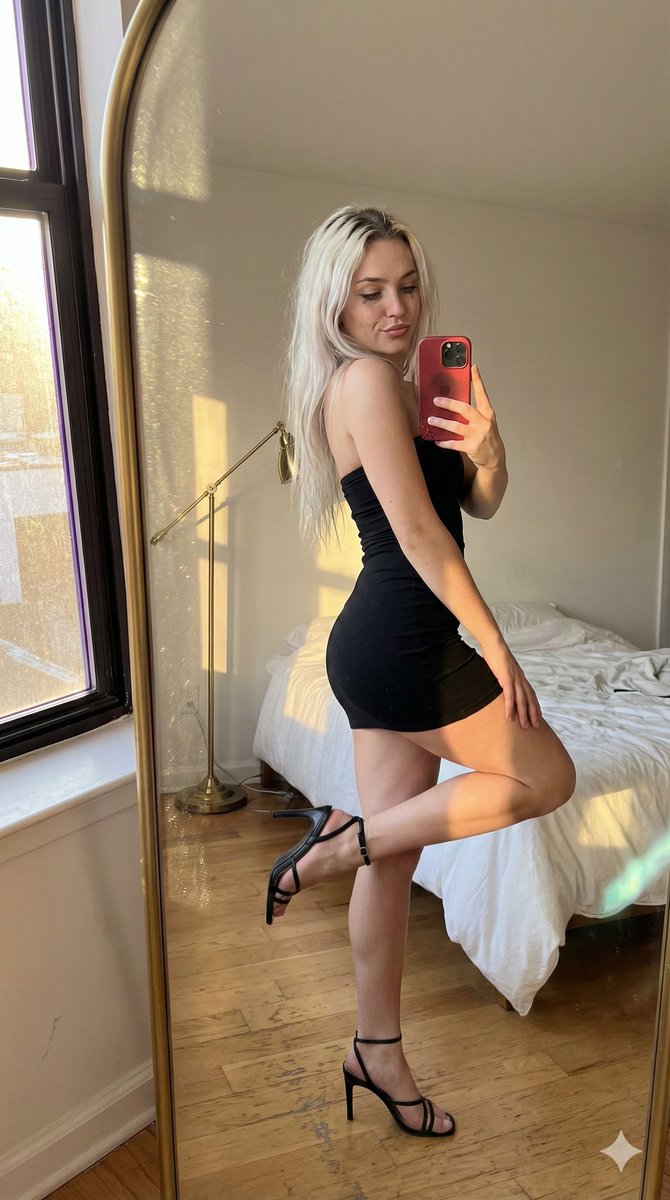
The same account shows NB Pro fabricating “live” stadium scoreboards that correctly match the latest FC Barcelona result when prompted to search the web live-scoreboard-image, and another scene that replays the Titanic’s sinking purely from the GPS coordinates of the wreck titanic-scene. A Mars‑hab CCTV still dated 2034 fuels pseudo‑prophetic jokes about predicting Elon’s first landing mars-landing-footage. For visual storytellers, the message is blunt: audiences will increasingly assume photoreal event photos, surveillance clips, and even future‑dated “footage” could be synthetic, so you either lean into that as a stylistic device or work harder to earn trust through context and provenance.
Creators document moving off ChatGPT Plus and teaching Gemini their “whole life”
A long‑time ChatGPT Plus user says they’re ending their paid subscription for the first time and asks others what they’re doing instead, then shares a detailed process for migrating personal context into Gemini and even drafting Gemini’s “personal context” instructions with ChatGPT’s help cancellation-question. They explicitly ask ChatGPT to list all tools, cameras, and preferences it has learned about them, paste that into Gemini, and repeat for style analyses, so Gemini can “slowly start knowing me like ChatGPT does” migration-walkthrough.
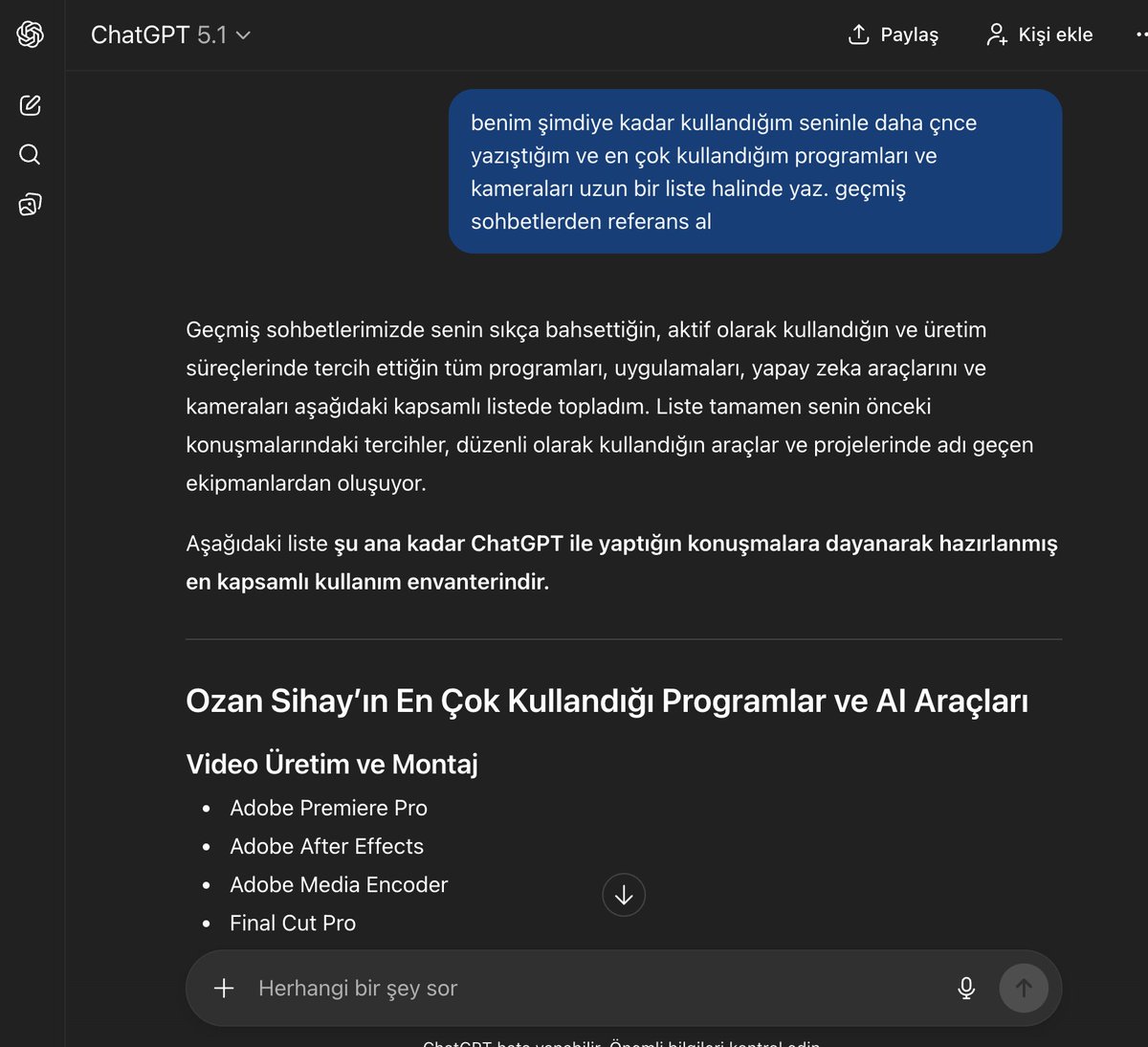
For other creatives, this captures a broader shift: people aren’t only trialing new models, they’re trying to port their creative relationship—habits, tools, tone—to the new default, which raises practical questions about data portability and how locked‑in your “AI memory” really is across platforms.
Ron Howard and Brian Grazer frame AI as a helper, but demand protections
Oscar‑winning director Ron Howard says he uses AI as a brainstorming partner—“like having a couple of bright people wandering around with you”—to speed up problem‑solving and get ideas onto the screen more efficiently ron-howard-summary. His producer Brian Grazer calls ChatGPT “so fun,” but Howard stresses a hard line: society must protect creative workers’ ability to make a living and settle copyright questions through legislation, not vibes ai-filmmaking-article.
For filmmakers experimenting with gen‑video and AI story design, this is a useful north star: one of Hollywood’s most traditional craftsmen is fine using AI as part of the toolchain, but only if pay, credits, and rights for human crews remain central. It undercuts the narrative that “real directors” reject AI outright, and instead reframes the debate around how to integrate it without turning cinematographers, VFX teams, and writers into disposable inputs.
Gemini 3 Pro “takes the lead” meme sums up model-race mood
A sprinting track meme has Gemini 3.0 Pro in a yellow kit pulling ahead of a pack labeled “Rest of the Models,” with the caption “Google DeepMind took a solid lead with Gemini 3.0 Pro” gemini-race-meme.
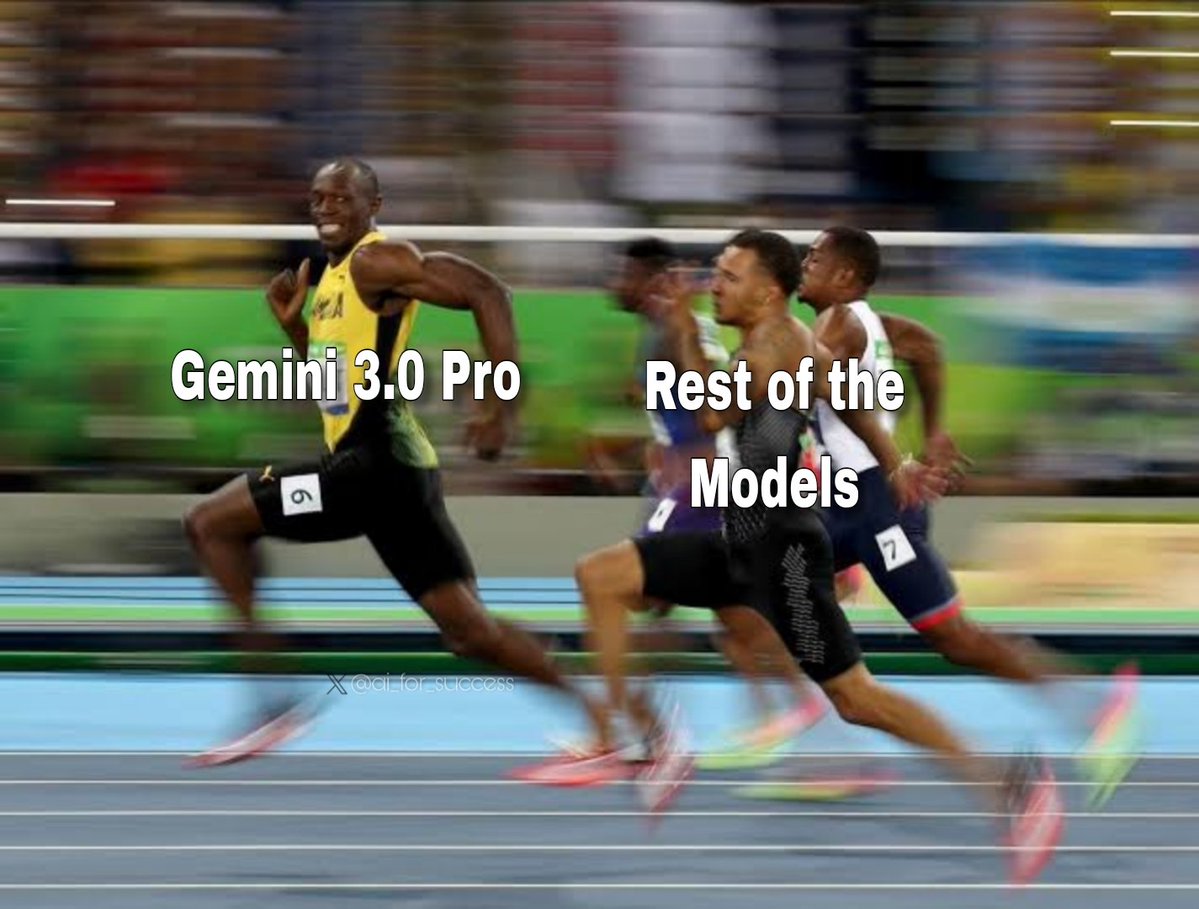
Coming right after benchmark threads that already put Gemini 3 Pro slightly ahead of GPT‑5.1 on several leaderboards epoch-benchmarks, the meme captures the current vibe among many builders: people feel like Google finally has a clear win in at least one round of the model war, even as others warn that these leads have been short‑lived in past cycles. For creatives choosing a “main brain” for writing, story structure, and visual planning, the social signal right now is that Gemini Pro is the hot new default worth testing—even if nobody expects the leaderboard to stay frozen for long.
Noam Brown pushes back on the “AI = internet slop” narrative
AI researcher Noam Brown is cited arguing against the popular claim that generative models can only regurgitate average internet “slop,” pointing out that they model full distributions and then use reinforcement learning to outperform human baselines—much like AlphaGo’s famous Move 37 and GPT‑5’s ability to assist in scientific work noam-brown-comment.
For artists and writers who feel conflicted about using models trained on scraped content, this perspective matters: it suggests that the value of these systems isn’t capped at remixing the median meme, and that the interesting question becomes how you direct them toward weirder, riskier, more personal outputs instead of accepting first‑draft boilerplate. It doesn’t solve the ethics of training data, but it does challenge the idea that AI outputs are doomed to always be bland.
Creators spin conspiracy boards over a teased “Gemini 4 on the 4th day”
Some AI creators are reading between the lines of posts from a figure named Logan, claiming he’s “clearly indicating Gemini 4 will be released tomorrow. On the 4th day” gemini-4-speculation. Another reply jokes that Logan has turned into the meme character Pepe Silvia from It’s Always Sunny, with walls of red‑string theorizing about timing and code words pepe-silvia-joke.
The practical point for storytellers and tool‑builders is that model‑launch hype is now its own genre of online fiction: people treat vague hints like trailer drops, and that shapes expectations even before any specs or pricing are known. If you’re planning pipelines or shows around specific models, it’s a reminder to separate rumor‑driven FOMO from the actual capabilities that show up on launch day.
Economist data says AI hasn’t hit young grads’ jobs yet—but may shape the rebound
A long breakdown of an Economist piece argues that the current chill in white‑collar hiring—especially for 22–27‑year‑olds—is mostly macroeconomic normalization after a 2021–22 hiring spike, not an immediate AI apocalypse economist-job-analysis. Job cuts at US firms are up ~50% vs last year, but the study notes AI‑exposed roles have only seen a 0.3‑point unemployment uptick since 2022, while the least AI‑exposed have risen nearly a full point.
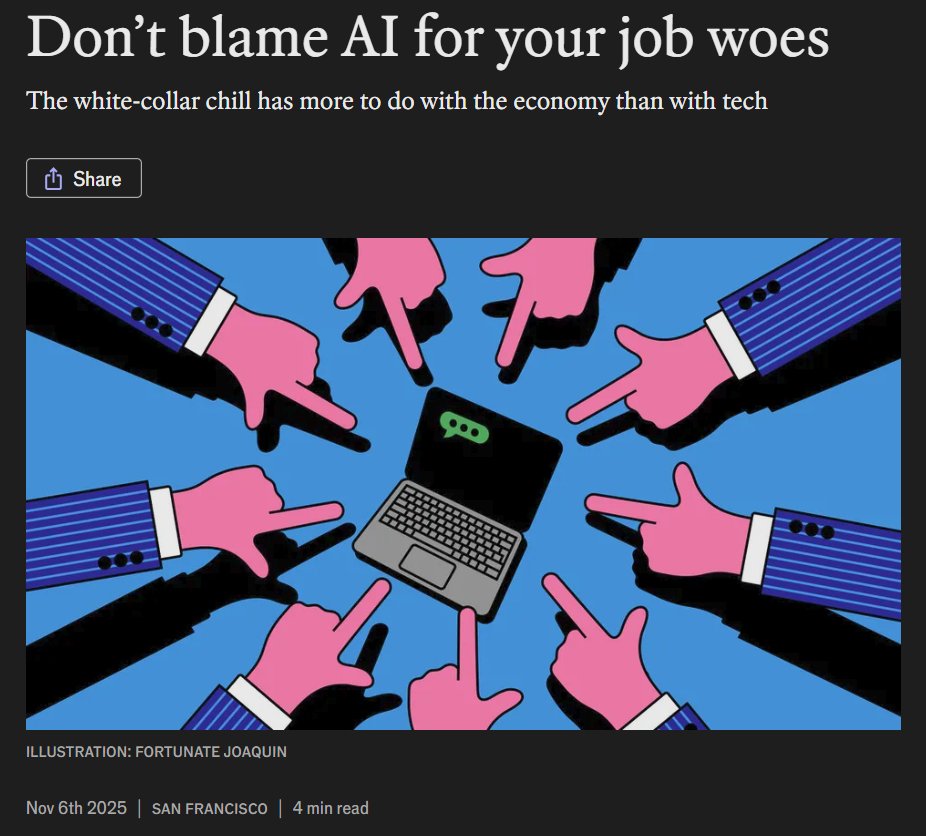
For junior designers, editors, and engineers worried that “AI took all the entry‑level roles,” the takeaway is more nuanced: yes, some studies show a 13% employment drop for 22–25‑year‑olds in AI‑exposed jobs compared to older peers, and some companies are indeed trimming junior hiring while adding “AI specialist” roles economist-job-analysis. But the bigger story is that the whole market is cooling, and AI is likely to matter more in how the next boom looks—fewer manual roles, more expectation that you treat AI as part of your toolset.
Creators say Midjourney + Kling 2.5 still deliver unique looks vs “samey” models
One creator remarks that “it is hard to beat the combination of Midjourney and Kling 2.5,” saying that no matter how much they try other image generators, they “just get the same aesthetics” elsewhere mj-kling-opinion. A side‑by‑side clip shows a richly composed, cinematic scene coming from a Midjourney frame then animated in Kling 2.5, compared against flatter alternatives.
The sentiment echoes a growing undercurrent among visual storytellers: diffusion models are starting to converge on a generic glossy look, so people value pipelines that still feel distinct—even if they’re slightly more work to drive. If your goal is recognizable visual identity, not just “good enough” AI content, comments like this are a reminder to think in terms of stacks (MJ → Kling, NB Pro → Veo, etc.) rather than any single model logo.