Retake video model edits 20s clips at $0.10/s – in‑shot directing hits production

Stay in the loop
Free daily newsletter & Telegram daily report
Executive Summary
Retake finally left the lab today, and your feed shows why it matters. LTX’s new model is live inside LTX Studio and on fal, Replicate, Weavy, Runware, RunDiffusion, and ElevenLabs, letting you re‑direct performances inside a finished shot instead of nuking the whole clip. Replicate’s endpoint takes uploads up to ~20 seconds and 100 MB, outputs 1080p, and charges about $0.10 per second of input, so “one more take” becomes a prompt, not a reshoot.
Creators are treating it like Photoshop for video. Techhalla’s tutorials show a door’s material fixed mid‑scene and a single wine glass recolored via a tiny prompt bar and time‑range selector, while LTX’s own reels swap line reads, facial expressions, even a rogue penguin at 0:02 without touching timing or background. Under the hood, hosts expose separate knobs for emotion, dialogue, camera motion, and props, turning a locked cut into something closer to a tweakable 3D scene.
Zooming out, this lines up neatly with fal’s Lucy Edit Fast, which is doing localized 720p video edits in about 10 seconds at $0.04 per second. The center of gravity is moving from “regenerate the shot” to “surgically patch what’s wrong,” which is exactly where professional workflows live.
Top links today
- Z-Image Turbo text-to-image on fal
- Luma Terminal Velocity Matching research overview
- Flux 2 Tiny Autoencoder open source repo
- Topaz upscale and enhancement on Comfy Cloud
- Train custom FLUX.2 LoRA models on fal
- Retake prompt-based video editor on Replicate
- Isaac 0.1 grounded vision model blog
- Higgsfield unlimited image models Black Friday offer
- Free Nano Banana pixel art converter web app
- Nano Banana Pro infinite pixel asset workflow
- Flux 2 image model on WaveSpeedAI
- Flux 2 production-grade model deep dive
- Agent-based video story tutorial with Nano Banana Pro
- Online multi-model LLM comparison playground
- Perplexity AI virtual try-on feature announcement
Feature Spotlight
Retake day‑0: in‑shot directing goes mainstream
Directable video goes wide: LTX Retake lands on fal, Replicate, Runware and Studio with creator guides—edit acting, dialogue, and framing within the same shot, no full re‑render.
LTX’s Retake is everywhere in today’s feed: creators show re‑performing lines, reframing emotion, and fixing continuity inside the same shot. Multiple hosts went live and detailed guides landed.
Jump to Retake day‑0: in‑shot directing goes mainstream topicsTable of Contents
🎬 Retake day‑0: in‑shot directing goes mainstream
LTX’s Retake is everywhere in today’s feed: creators show re‑performing lines, reframing emotion, and fixing continuity inside the same shot. Multiple hosts went live and detailed guides landed.
Retake launches as an in‑shot directing model across Studio, fal, Replicate and Runware
Lightricks and LTX Studio’s new Retake model is out of the lab and already running both inside LTX Studio and on multiple infra hosts, giving creatives a way to re‑direct performances inside the same rendered shot instead of re‑generating full clips. LTX positions it around three core actions—rephrasing dialogue, reshaping emotion, and reframing moments after a video is rendered. feature overview
An official partner list confirms Retake is live in LTX Studio itself and via fal, Replicate, Weavy, Runware, RunDiffusion, and ElevenLabs, so you can hit it either through a polished UI or direct APIs depending on your workflow. partner rollout fal announces Retake as "true directorial control" with promptable dialogue changes and partial shot remixes, aimed at teams iterating narrative or branding without nuking the underlying take. fal hosting Replicate exposes it as a hosted model with uploads up to ~20 seconds, 100 MB, and 1080p output, charging around $0.10 per second of input and documenting how to target specific time ranges and attributes like emotion or camera motion rather than regenerating the whole clip. (replicate launch, product specs) Runware’s D0 drop adds another option with API knobs to alter camera angle, script, audio, or on‑screen action independently, pitched at teams that want a controllable post‑generation pass over already‑approved shots. runware api For you as a filmmaker, editor, or motion designer, the change is that Retake treats a finished clip more like a 3D scene: you can nudge performance, pacing, or framing while preserving the original motion and sound, and you can do it from whatever stack you already use—LTX’s own Studio, a Replicate or fal pipeline, or Runware’s API if you’re embedding this in tools.
Creators show Retake fixing dialogue, props, and continuity inside a single shot
Early users are already treating Retake like "Photoshop for video," using prompts to surgically fix shots instead of re‑cutting or re‑rendering entire sequences. One walkthrough starts from a messy house clip, then dials it up into a full fire scene, adjusts stormy lighting, and even has an actor re‑perform a slap—all from the same base footage—framing it as "hands down the best video editing model out there right now" for promptable fixes. photoshop explainer
Techhalla’s tutorial goes deeper on continuity work: they use Retake to fix a single door’s material mid‑scene and to subtly recolor a wine glass, with the interface showing a small prompt bar and a time‑range selector so only the targeted region changes while the rest of the shot stays locked. door fix demo
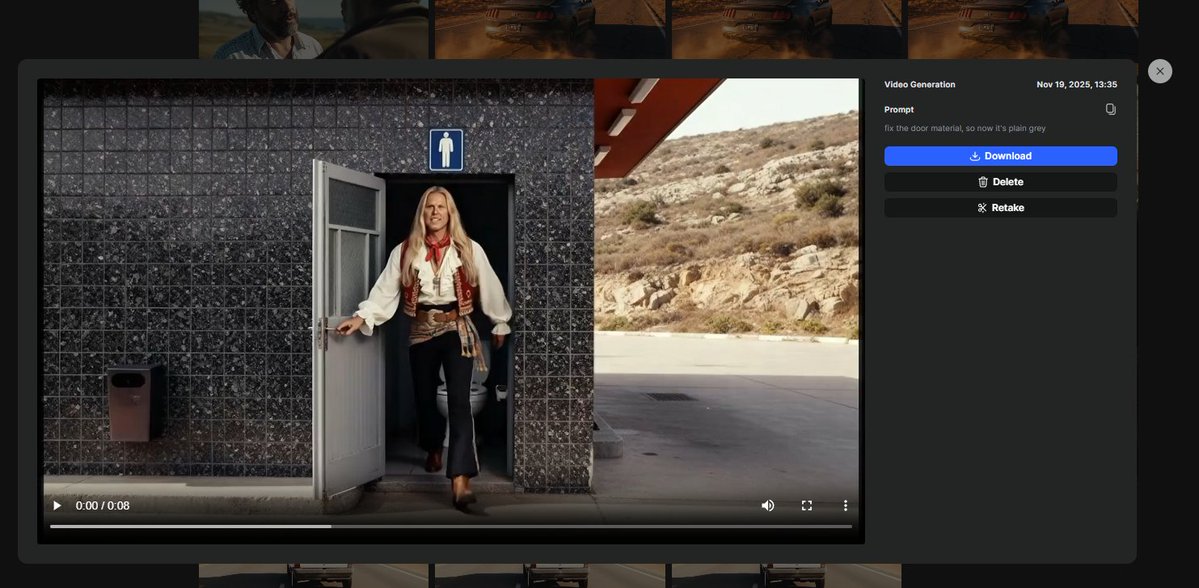
LTX’s own demo reel echoes this pattern, showing A/B clips where the actor’s expression and gesture change while timing and background remain identical, which is exactly what you need when a performance note comes in after picture lock. feature overview Even the jokey "rogue penguin at 0:02" clip from LTX highlights the same thing: fix that one stray artifact, keep the rest of the spot—and your budget—intact. penguin gag For working creatives, the takeaway is that Retake isn’t another "generate a whole new video" toy; it’s behaving like a surgical grade, in‑place editor: trim an awkward line read, calm or intensify an expression, clean up a prop, or remove a background glitch, all without asking the model to reinvent the shot. That makes it a realistic candidate for late‑stage tweaks on client work where continuity and timing are non‑negotiable but you still want AI’s flexibility.
🚗 Keyframes, poses, and start–end shots
Excludes Retake (covered as the feature). Creators chain NB Pro with Veo/Kling and use Flux 2 pose control on Higgs to storyboard precise motion, then animate with start/end frames.
Flux 2 pose mannequins on Higgs turn into Kling 2.5 start–end animations
Techhalla lays out a full Higgsfield workflow where you generate a poseable mannequin with Flux 2, reuse it to define multiple poses, transfer those poses onto your own photo, and then animate between start and end frames with Kling 2.5 pose control guide start end animation. It’s aimed squarely at solo filmmakers and UGC creators who want precise control over character body language while still moving fast.
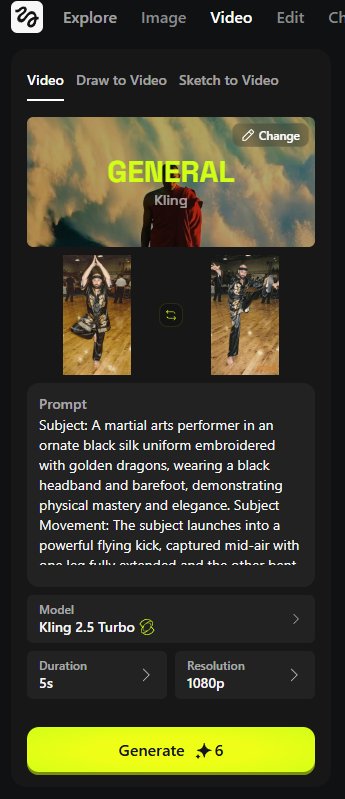
The process runs in stages: first you create a neutral "pose control" mannequin (optionally giving it a few traits), then you regenerate it in different stances while keeping style consistent, effectively building a pose library you can reuse across shoots mannequin prompt. Next, you feed Higgs both your original portrait and a mannequin pose, prompting Flux 2 to "transfer" that body position while preserving your identity and outfit pose transfer step. There’s even a reverse‑engineering trick: grab a still from any reference video and have Flux 2 rebuild a mannequin in that exact pose, so you can mimic choreography or iconic frames throughout a sequence reverse pose trick. Finally, you hand two frames (start and end pose) to Kling 2.5 in Higgs and let it interpolate a smooth move—shown in a martial‑arts sequence that pans laterally as the subject shifts from tree pose into a high kick, with prompts describing camera motion, lighting, and atmosphere start end animation.
NB Pro + Veo 3.1 car spot gets detailed keyframe prompt recipes
Ror_Fly expands the Nano Banana Pro → Veo 3.1 car‑commercial workflow into a very specific three‑step keyframe recipe, sharpening what was previously a more general "generate → animate → stitch" guide for motion designers car keyframes. Creators first design a consistent WRX STI rally car in NB Pro, then feed stills to Veo 3.1 with long, motion‑design style prompts that describe zooms, morphs, gold contour lines and labels drawing on, and engine‑bay reveals, before finishing with Topaz upscaling and Suno music car workflow thread prompt breakdown.
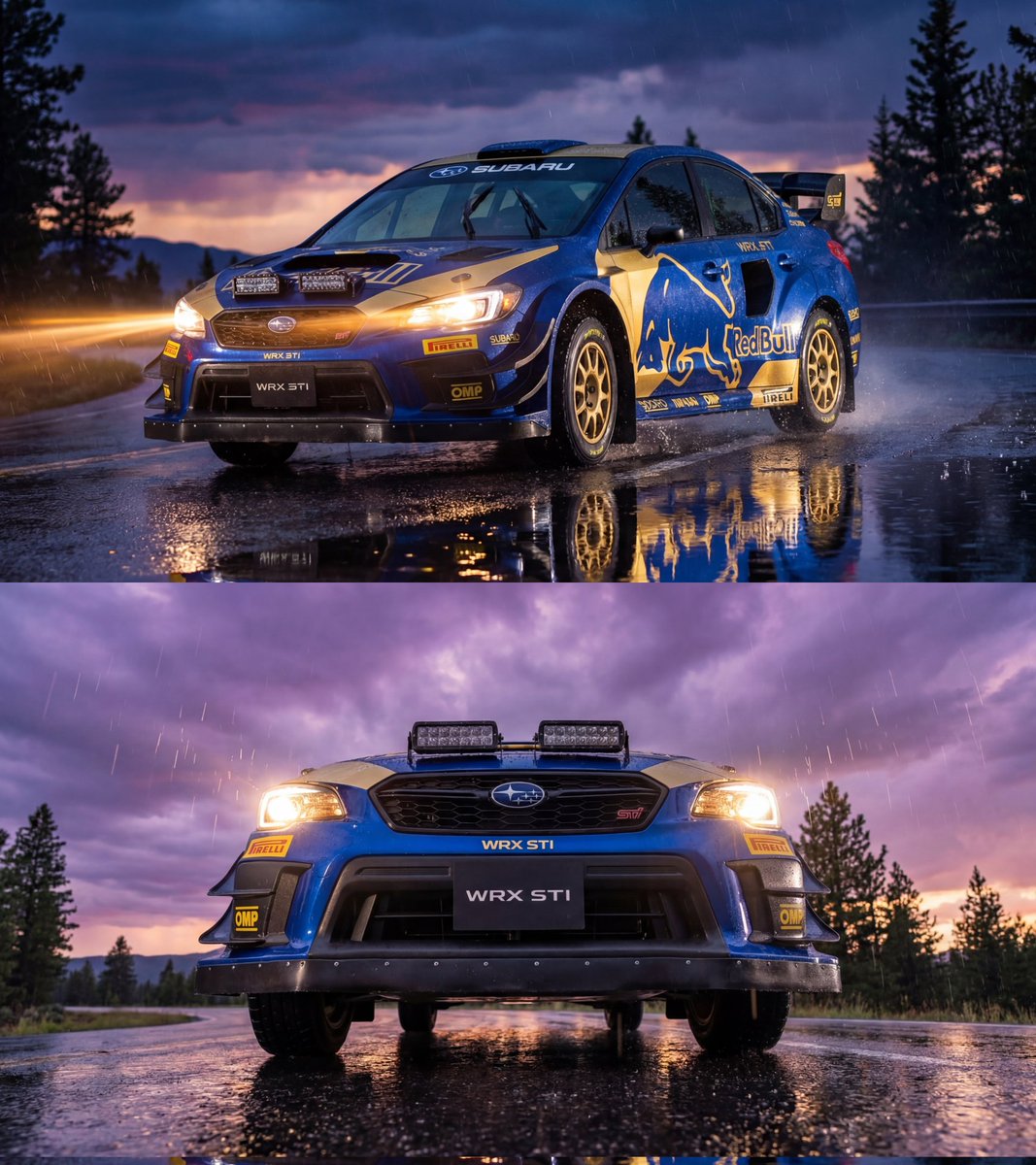
For people doing product or automotive spots, the interesting part is how detailed the Veo prompts are: they specify when text and technical contour lines should fade in and out, how the camera should swing to higher angles, and how to transition from flat collage to intimate realism without janky motion. The thread also suggests iterating by slightly changing keyframe perspectives in NB Pro so Veo has more parallax to work with between shots, which is a practical trick if your first pass feels too flat prompt breakdown.
Gemini API notebook chains NB Pro stills into Veo 3.1 videos
DavidmComfort shares a Jupyter notebook that calls the Gemini API to generate Nano Banana / Nano Banana Pro images and then automatically builds Veo 3.1 videos from those stills, turning a manual NB→Veo workflow into a reproducible scriptable pipeline pipeline description. The current demo takes a single NB‑generated reference frame (also color‑graded by Nano) and spins it into a short animated clip, with plans to bolt on Topaz upscaling, color grading, plus MiniMax and Kling APIs next reference image note future api plans.
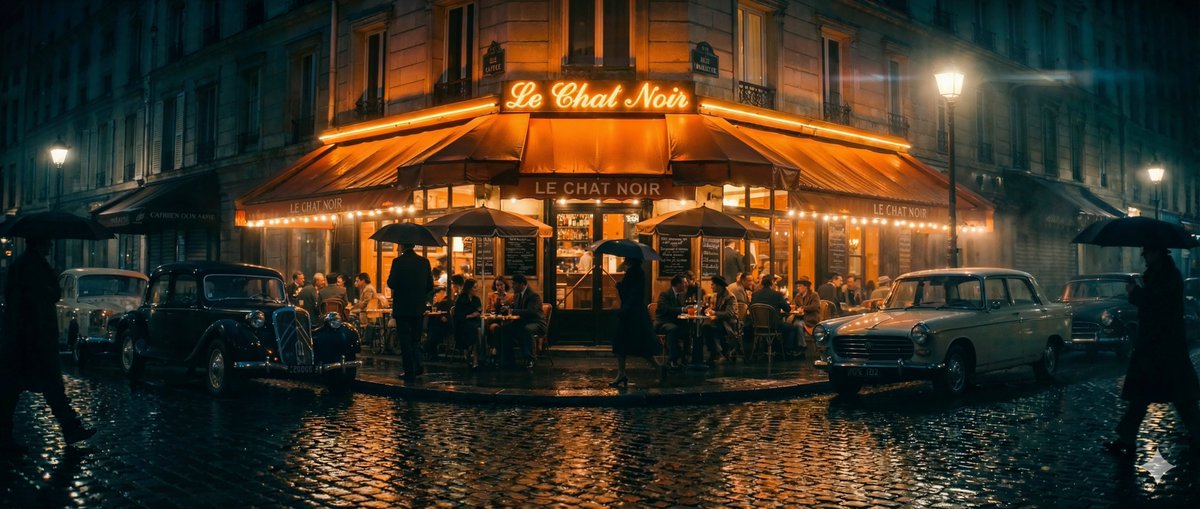
For technical creatives, the value is that the whole stack—prompting, image creation, and video generation—lives in code, so you can iterate on prompts, branch variations, and later add automatic evaluation with Gemini 3 to score or describe outputs gemini eval mention. He also notes an intention to wrap this into a web app once the pieces are stable, which would make this kind of start‑from‑still, end‑as‑clip pipeline accessible to non‑notebook users while keeping the Gemini→NB→Veo wiring under the hood web app followup.
🧩 FLUX.2 builder extras: Tiny AE + LoRA gallery
Continues yesterday’s FLUX.2 rollout with dev‑facing tools. New today: streaming intermediates via a Tiny AutoEncoder and a LoRA gallery/trainer on fal; more hosts highlight API/per‑image pricing.
fal open-sources FLUX.2 Tiny AutoEncoder for 20× faster streaming previews
fal has released a Tiny AutoEncoder for FLUX.2 [dev] that streams intermediate image states as they’re generated, so users see the picture refine live instead of staring at a progress bar. The tiny AE is trained on FLUX.2’s latent space, uses roughly 28× fewer parameters, and delivers up to ~20× faster encode/decode at a modest quality cost, making it attractive for UX-heavy tools and low-latency demos fal tiny ae.
Because it’s open-sourced on Hugging Face, any image app can bolt this onto an existing FLUX.2 [dev] pipeline to power real-time previews or scrub-able generation sliders without re-training their own autoencoder (model card). For creatives and tool builders, this means they can keep the 4MP FLUX.2 look while moving most of the "waiting" into a smooth, visual progression that feels closer to painting than batch rendering.
fal launches FLUX.2 LoRA Gallery with add‑background and virtual try‑on recipes
fal has stood up a dedicated FLUX.2 [dev] LoRA Gallery that exposes pre-trained editing recipes like Add Background, Virtual Try-On, and Multi-Angles, following up on fal lora launch that first brought generic LoRA training and free credits. The gallery runs on a per‑megapixel basis (around $0.021/MP), so designers can drop in a clean product or model photo and get on-brand composites, outfit swaps, or extra camera views in one click fal lora gallery.
Alongside the gallery, fal is also pushing a FLUX.2 Edit Trainer UI where teams upload 15–50 before/after pairs to fine-tune their own LoRAs for highly specific edits such as brand-safe background swaps or style-locked retouching (gallery page, trainer docs ). For creatives, this turns FLUX.2 into a controllable image editor rather than a raw generator, closing the gap between "random good shots" and repeatable production looks.
WaveSpeedAI exposes FLUX.2 [dev] with REST API and $0.012 per image pricing
WaveSpeedAI has added FLUX.2 [dev] as a hosted text‑to‑image model with a simple REST API and flat pricing of about $0.012 per generated image, aimed at teams that want fast, studio‑quality renders without running GPUs themselves wavespeed flux2 launch.
According to the model page, the service focuses on crisp text rendering, seedable outputs for reproducibility, and light resource usage, making it suitable both for rapid concept art and for high‑volume internal tools (WaveSpeed model page). For app builders and agencies, this is another plug‑in endpoint alongside the big clouds, but tuned specifically for FLUX.2’s 4MP dev weights and iterative design workflows.
Picsart Flows adds FLUX.2 with a limited free credit window for creators
Picsart has pulled FLUX.2 into its Flows workspace and is letting users hit the model for free while a shared credit pool lasts, effectively turning high‑end FLUX.2 generation into a front‑door experience for its massive creator base picsart flux2 note. This means non‑technical designers and social creators can try 4MP‑class image gen directly inside their existing collage and edit flows, without signing up for a separate AI host or learning new tooling.
For AI creatives, this matters less as a new endpoint and more as a distribution move: FLUX.2’s look and typography control become available inside a mainstream app people already use daily, which is often the difference between a model staying "pro-only" and becoming a default part of casual content workflows.
🍌 NB Pro creative recipes and tests
Mostly hands‑on image tricks and comparisons today—doodle‑apply edit flows, a one‑word recursion shortcut, multi‑frame broadcast prompts, and a few model edge cases. Excludes FLUX.2 tooling.
Hyper-detailed NB Pro prompt recreates a Temptation Island 4-panel broadcast
A monster Nano Banana Pro prompt shows how far you can push TV-style framing, asking for a 2×2 grid of scenes from the real show Temptation Island with a specific daytime pool moment, bonfire reaction shot, heated argument, and wide torch-lit finale—plus a tiny network logo bug and subtle compression artifacts of a digital HD feed. The resulting still looks like an actual broadcast capture: consistent characters across all four squares, plausible production lighting, and staged narrative beats that feel storyboard-ready. reality show prompt

For filmmakers and storytellers, the lesson is that NB Pro can honor quite granular production notes—lens feel, lighting mix, logo placement, even signal artifacts—if you spell them out, which makes it a serious pre-viz tool for unscripted or docu-style concepts. It also hints at workflows where you feed two character photos, drop in a longform narrative prompt like this, and instantly get near-broadcast-quality key art without touching a camera.
NB Pro doodle-edit workflow turns scribbles into finished portraits
A new two-step Nano Banana Pro workflow shows how you can have the model first annotate an image with doodles and text instructions, then apply those edits in a clean final render. The recipe is: prompt it to “doodle on this image to indicate an edit,” then feed that marked-up frame back in with “implement these edits, remove the instructions,” producing polished versions (e.g., changing hair to a braid, adding a denim jacket, or altering lighting and fabric texture) plus a shareable overview panel ready for X. edit flow thread
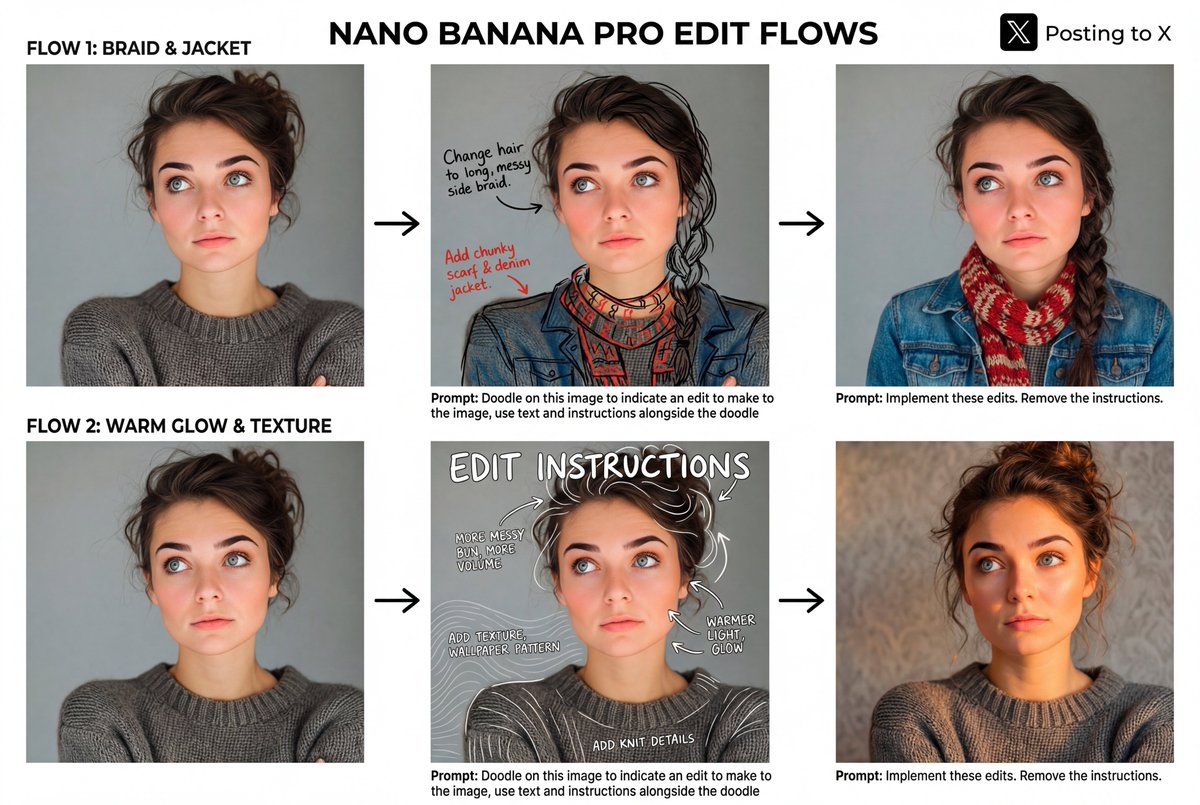
For art directors and solo creators, this turns NB Pro into a kind of visual brief assistant: you can think in rough arrows and sticky-note text, let the model propose a sketchy plan, and then have it execute those changes with consistent style and framing. It’s especially useful when describing nuanced tweaks (“warmer light, glow”, “add knit details”) that are hard to capture cleanly in a single monolithic prompt.
“Droste effect” prompt gives NB Pro instant recursive imagery
Creators discovered that adding the phrase “Droste effect” to a Nano Banana Pro prompt is enough to get self-recursive compositions—frames within frames—that resemble hand-crafted trompe-l’oeil paintings. One example uses “Droste effect without photography or people” to render an artist’s studio that infinitely repeats down a row of tables and windows, with each nested frame staying coherent in perspective and detail. droste prompt tip
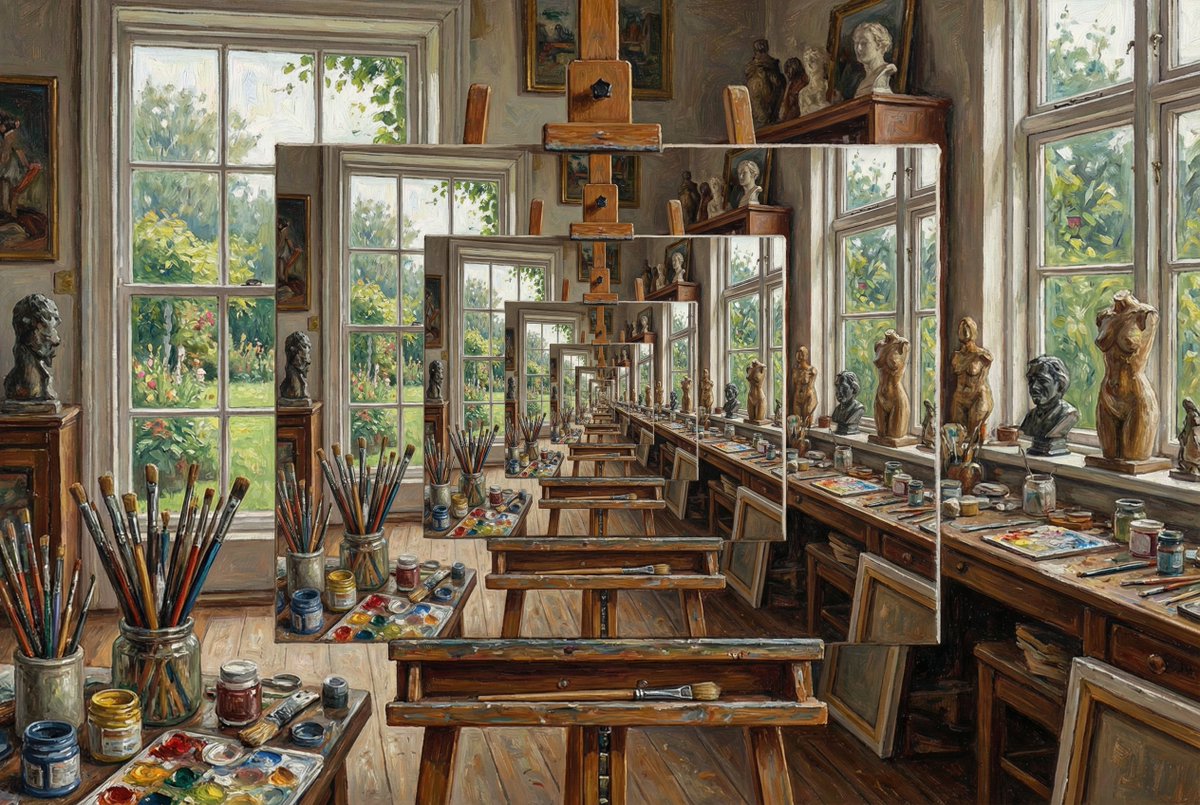
For designers, this is a handy shorthand: instead of describing “a picture that contains itself over and over,” you can rely on a single token and then spend the rest of your prompt on mood, medium, or subject. It’s particularly relevant for album art, posters, or title cards where you want a clever, self-referential visual without fighting the model for pages of explanation.
Side-by-side grids compare NB Pro and FLUX.2 on real-world photo prompts
Photographer Ozan Sihay posted four Nano Banana Pro vs FLUX.2 matchups using identical prompts—smoky Turkish tea house portrait, fishermen at sunset in Istanbul, a rider in dusty light below Mount Erciyes, and village women baking bread at a hearth—letting people inspect the differences in framing, lighting and texture rather than relying on benchmarks. side by side thread
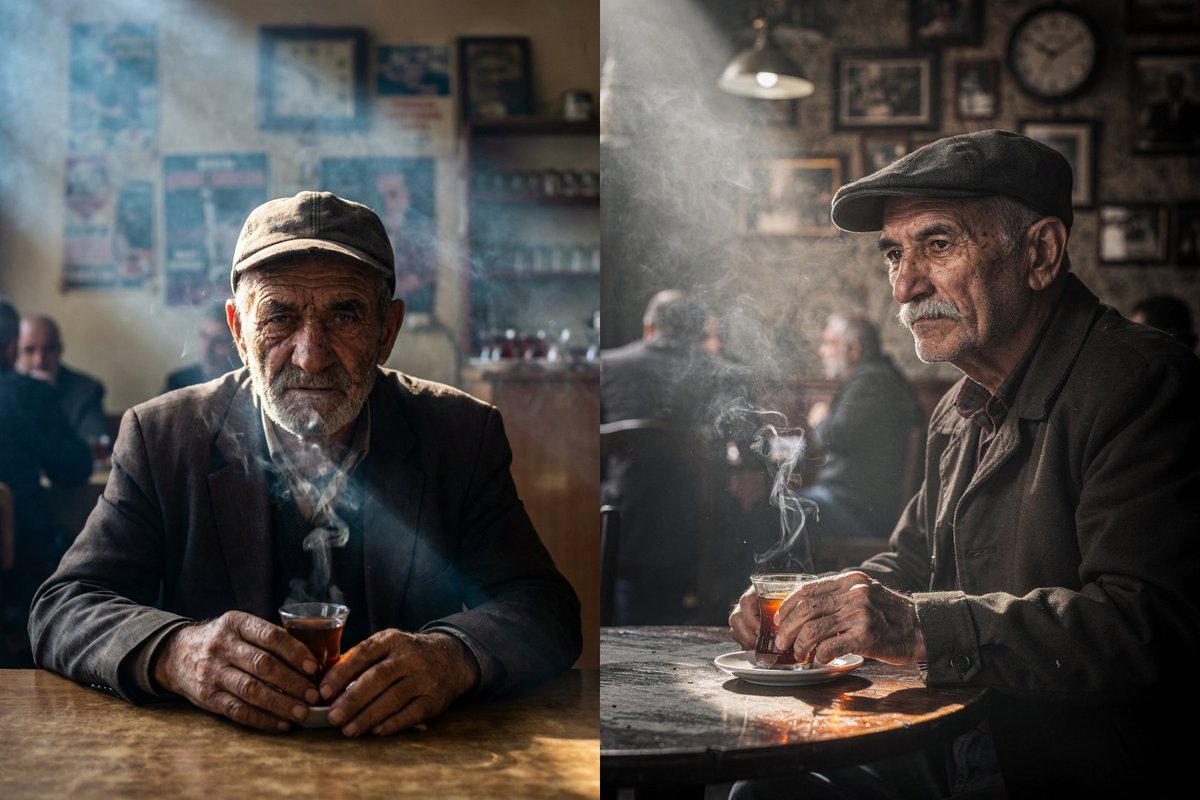
The comparisons show NB Pro often leaning into slightly more structured, editorial compositions, while FLUX.2 sometimes takes looser, more atmospheric angles, which is exactly the sort of nuance you need to see before committing a campaign or series to one model. For art teams, it’s a good reminder to run your own A/B grids with your actual subject matter, not generic model shots, because the models’ personalities really emerge in these grounded scenes.
Dice test shows NB Pro still struggles with exact numeric constraints
A small but telling experiment asks Nano Banana Pro for “five dice on a table, they sum to 17,” and the model returns a lovely, photoreal arrangement… that clearly adds up to 13 (faces showing 6, 1, 1, 1, and 4). dice failure example
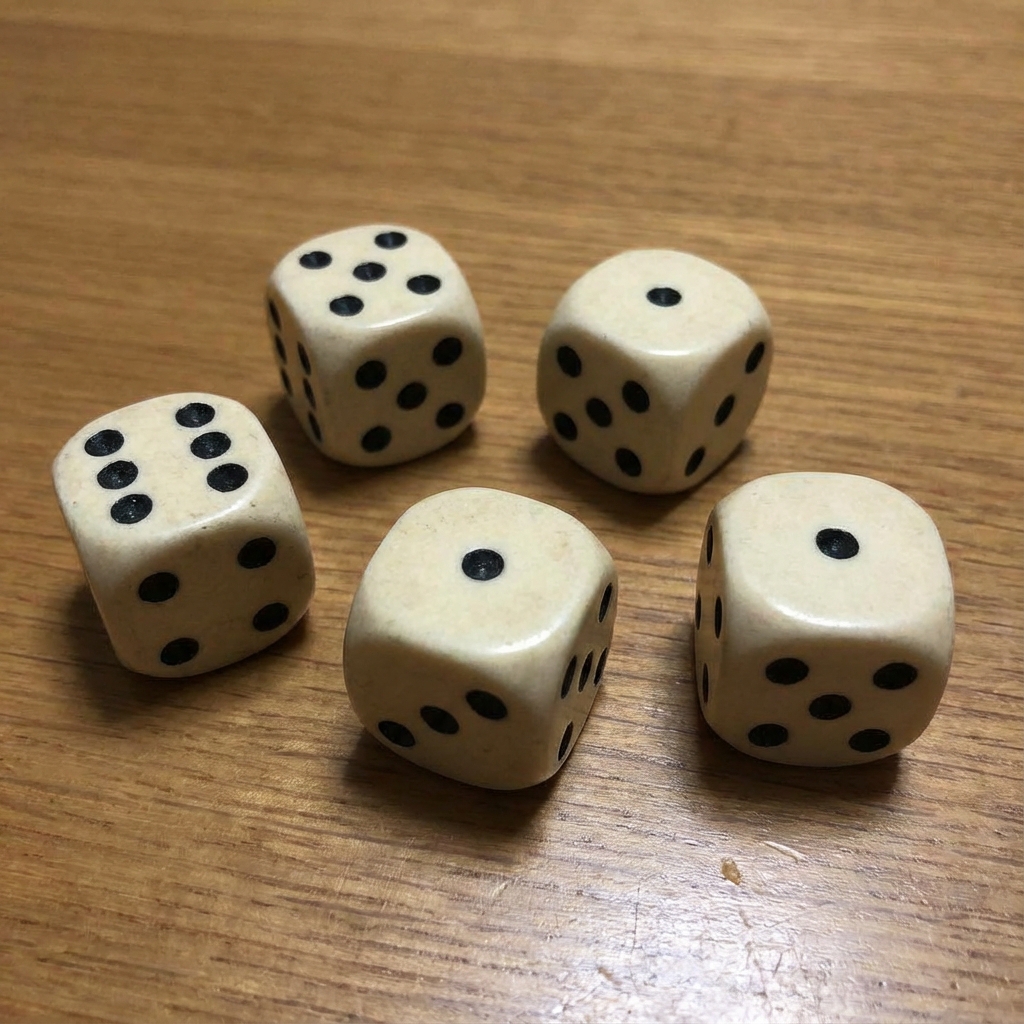
For creatives, this illustrates a broader point: NB Pro is strong at visual plausibility but still shaky at strict combinatorial or arithmetic constraints, even in simple object-counting setups. So if your concept hinges on exact card hands, puzzle states, or math-based symbolism, you’ll still want to treat the model’s output as a draft and either fix details manually or iterate with more explicit guidance and reference images.
🎨 Reusable looks: srefs and prompt packs
A style‑light day featuring Midjourney srefs and a versatile “plant sculptures” prompt. Great for quickly locking a consistent look across sets and remixes.
“Plant sculptures” prompt pack turns any subject into floral statuary
Azed shared a versatile prompt template that makes any subject look as if it’s organically grown from vines, leaves, and blossoms, creating eerie yet elegant “plant sculpture” hybrids. prompt template

The base structure is: “The [subject] appears as if organically grown from intertwining plants, flowers, and vines…”, and examples range from a ballerina and stag to a butterfly and skull, all with asymmetrical, dreamlike flow that still reads clearly as the underlying form. prompt template Creators are already remixing it into cats, unicorns, horses, logos, and mascots while keeping the same tasteful, gallery‑ready look for whole series of posters or cards. (cat and unicorn examples, horse variant) For designers and storytellers, it’s a drop‑in style capsule: swap the bracketed subject and you instantly get a coherent collection of nature‑infused characters, covers, or title cards.
Midjourney sref 1645061490 nails modern realistic comic noir
Midjourney users get a new, very reusable look with style reference --sref 1645061490, tuned for realistic comic art with deep blacks, saturated reds, warm skin tones, and cool green/blue backdrops that feel like thriller or urban‑horror covers. style ref breakdown

The style isn’t cartoony; it keeps human proportions and lighting believable while exaggerating contrast and color, which makes it ideal for femme fatales, vampires, and action characters across panels or key art. For creatives, this sref acts as a one‑line “look preset” you can reuse to keep covers, character sheets, and trailers visually consistent without re‑prompting the whole aesthetic every time.
MJ sref 8523380552 expands from rainy nights to portraits and surreal sets
Following up on rainy night style that locked a moody, cinematic night look, James Yeung shared more uses of Midjourney style ref --sref 8523380552, showing it works far beyond city rain. style pack update

New samples include stark tree‑line horizons, a foggy amusement park with a glowing carousel, a floating island over a waterfall with dripping light trails, and a glammy doorway scene with motion‑blurred pedestrians, all sharing the same teal‑orange gloom and soft haze. style pack update Another post applies the sref to tight sci‑fi portraits, showing how it can push character close‑ups into the same atmospheric world without losing facial detail. before after portrait For filmmakers and illustrators, this makes 8523380552 a reliable "world bible" sref: one code to keep both environments and character shots living in the exact same cinematic universe.
Midjourney V7 grid recipe with sref 607976961 for soft storybook fantasy
Azed posted a full Midjourney V7 recipe—--chaos 22 --ar 3:4 --sref 607976961 --sw 500 --stylize 500—that yields cohesive 3×2 grids of gentle, painterly fantasy scenes. grid recipe
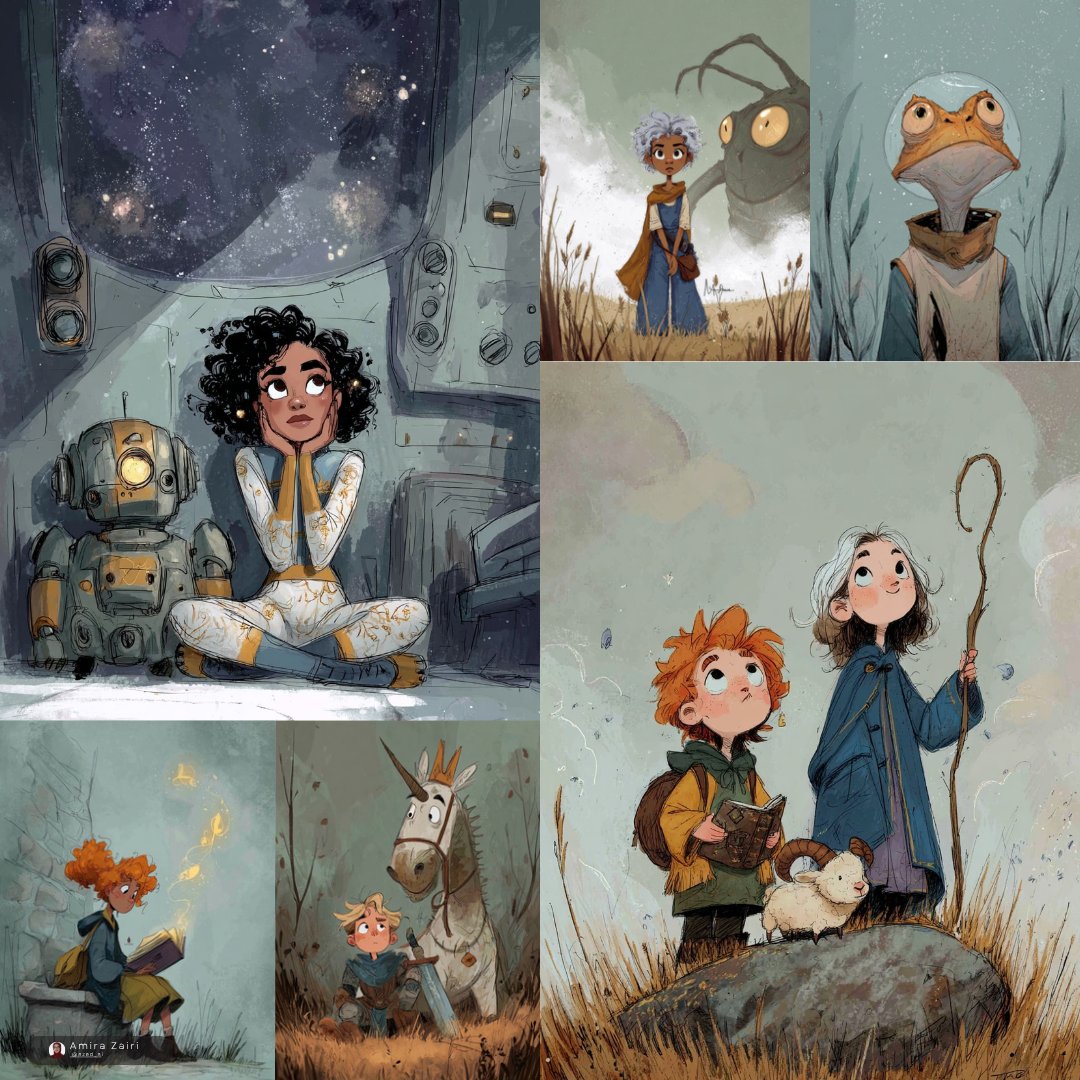
The shared grid mixes kids, animals, and creatures (space cabin, shadow monster in tall grass, frog astronaut, unicorn and knight, reading child with fireflies) yet everything shares the same muted palette, paper‑like texture, and soft, nostalgic mood. For storyboarders and children’s book creators, this combo acts like a “series setting”: you can rough out an entire mini‑world of related scenes and characters in one go, then iterate panels while the sref and settings keep the look locked in.
🛠️ Speed stacks: faster T2I, localized edits, templates
Practical creator tools dropping today. Excludes Retake (covered as the feature). Fast text‑to‑image, quick localized video edits, Topaz models in ComfyUI, and creator‑curated templates.
Lucy Edit Fast on fal brings 10s localized video edits at $0.04/s
fal has gone live with Lucy Edit Fast from DecartAI, a localized video editing model that delivers edits in about 10 seconds and is priced at $0.04 per second for 720p. model launch Rather than regenerating whole clips, you can target small regions—like changing a vase color or swapping a background—while the rest of the frame stays untouched. localized edit demo
For editors and motion designers, this turns tedious rotoscoping and clean‑up work into quick prompt passes: fix a prop, relight a patch of sky, or localize product details for different markets without rebuilding the entire shot.
fal launches Z-Image Turbo day‑0 with ~1s open‑source text‑to‑image
fal has added Z-Image Turbo, an open‑source text‑to‑image model, with roughly 1‑second latency and pricing at $0.005 per megapixel, focused on fast, photorealistic generation with strong prompt adherence for production use. fal launch tweet Users can try it immediately on fal’s hosted endpoint, making it attractive for creatives who need near‑instant concept art, product shots, or thumbnails without managing their own infra. model run page

For designers and filmmakers, this is a cheap, low‑friction way to stack fast stills into storyboards, previz frames, and reference packs, especially when you need lots of variations under tight deadlines.
Topaz upscale and interpolation models land in ComfyUI workflows
Topaz Labs’ flagship models are now available as nodes in ComfyUI, bringing 4K video upscale (Astra, Starlight Fast), frame interpolation (Apollo), and 8K image enhancement (Bloom) directly into node‑based pipelines. integration tweet These are the same models used in film and photography post, now wired into Comfy graphs so you can chain upscale, interpolation, and generative steps in one place.
For filmmakers and designers, this means you can keep your whole finishing stack—denoise, generative fill, upscale, and slow‑motion—inside ComfyUI instead of bouncing between separate desktop apps, while still getting broadcast‑grade sharpness on final exports.
Hedra Templates launch with 20+ presets and 2,500‑credit giveaway
Hedra has introduced Templates, a new surface where you pick from 20+ creator‑curated templates, upload a single photo, and get an instant stylized video out the other side. feature announcement To seed usage, they’re giving 2,500 credits to the first 500 active followers who reply with “Hedra Templates,” effectively letting early adopters stress‑test a lot of looks for free.
This is aimed squarely at solo creators and social teams: instead of hand‑building motion presets, you can lean on battle‑tested styles for intros, talking‑head flourishes, and character motions, then tweak prompts only where you need a custom touch.
🕹️ Infinite pixel art with NB Pro
Indie‑friendly sprite pipelines continue: 5×5 grids, isolating characters, 8‑direction sets, concept screenshots, and a free converter that snaps NB outputs to true pixel art.
NB Pro workflow turns one character into 25 enemies and full game scenes
ProperPrompter expands their Nano Banana Pro pipeline into an end‑to‑end system that takes a single reference character and explodes it into a 5×5 grid of consistent enemies, isolated sprites, and in‑engine concept screenshots, building on earlier 8‑direction sprite work 8dir sprites. The core prompt asks NB Pro to “fill the canvas” with 25 allies of the original design (5 rows × 5 columns), each front‑facing, unique in weapon and armor, but clearly from the same game world 5x5 grid prompt.
Next, a follow‑up prompt labels the grid 1–25 in the top‑left of each tile, then a third prompt isolates any chosen character (like #4) onto a centered, white background for clean sprite extraction isolate character tip. A later step recombines specific IDs (for example characters 2, 5, 8, 19, 20) into a 3/4 top‑down “in‑game” screenshot that matches their theme and environment, giving indie devs mock gameplay shots before any engine work concept screenshot prompt. The full walkthrough shows how this flows from one NB Pro call to another, so you can go from a single hero sketch to a small bestiary and mock level art in minutes rather than days workflow overview (see workflow thread).
Free converter snaps NB Pro images into true pixel art
A separate piece of the same ecosystem is a free web tool by Hugo that takes Nano Banana Pro outputs and converts them into clean, grid‑aligned pixel art with almost no setup. ProperPrompter shows that you upload any NB Pro character sheet or isolated sprite and the tool handles downsampling, palette quantization, and pixel snapping so the result looks like authentic retro asset sheets rather than “fake pixel” renders converter demo.
This matters because many artists like NB Pro’s designs but argue they’re not real pixel art; the converter bridges that gap so you can keep the expressive NB Pro workflow and still ship production‑ready sprites not pixel art reply. The thread positions it as the last mile of the pipeline: generate cohesive characters with NB Pro, then run the ones you like through the converter before importing into your engine or animation tools animation teaser.
Retro Diffusion now makes full 8‑direction NB Pro sprite sets
ProperPrompter notes that Retro Diffusion itself can now produce full 8‑direction sprite sets in one go, instead of having to hack them together from separate NB Pro generations. The idea is to feed it a consistent NB Pro character and let Retro Diffusion output all eight walking directions as a cohesive sheet, ready for top‑down or isometric games retro diffusion note.
For creators who want to go deeper, they point back to a longer guide on building 8‑direction views and integrating them into game workflows, so Retro Diffusion becomes a drop‑in replacement for hand‑drawn rotation passes rather than a one‑off effect 8dir guide (see sprite tutorial). This makes the NB Pro → pixel converter → Retro Diffusion chain a viable, near‑complete path from concept art to shippable indie game sprites without hiring a dedicated pixel artist.
🗣️ Voice agents hit real ops
A concrete enterprise use case pops up: Deliveroo cites strong re‑engagement and verification KPIs via ElevenLabs Agents; FLUX.2 is also now available in ElevenLabs Image & Video for creative tie‑ins.
Deliveroo deploys ElevenLabs Agents with strong real-world re‑engagement
Deliveroo has put ElevenLabs voice agents into real operations, reporting that automated calls re‑engaged 80% of inactive rider applicants, reached 75% of restaurants for operating‑hours checks, and contacted 86% of partner sites for rider tag activation ElevenLabs Deliveroo case.
For creatives and product teams, this is an example of AI voices doing measurable, high‑stakes work rather than lab demos: the same ElevenLabs stack that powers synthetic narration and character voices is now trusted to handle compliance‑sensitive logistics calls at scale. Following up on image video integration, which embedded FLUX.2 into ElevenLabs Image & Video, the company is positioning itself as a full pipeline where you can generate visuals, narrate them, and also run voice agents that talk to real customers and partners from the same ecosystem.
📊 Model watch: efficiency and eval spats
Mostly eval releases and efficiency work today. TVM promises diffusion‑level results in far fewer steps; a grounded VLM lands on Replicate; creators post Gemini, Grok, Kimi, and OpenRouter scorecards.
Early Gemini 3 tests: elite debugger, shaky at one‑shot apps
A detailed first‑day report on Gemini 3 paints a very specific picture: it’s extremely strong on deep technical reasoning and refactors, but weaker on intent, one‑shot app builds, and creative work Gemini 3 analysis. Following Gemini coding evals from Kilo Code, this thread claims Gemini 3 set a new SOTA in tasks like debugging complex compiler bugs, rewriting large Haskell files (notably an HVM4.hs refactor), solving λ‑calculus problems, and even competitive Pokémon teambuilding, often beating GPT‑5 Pro and Gemini 2.5 Deep Think by fixing subtle linearity and cloning issues those models missed
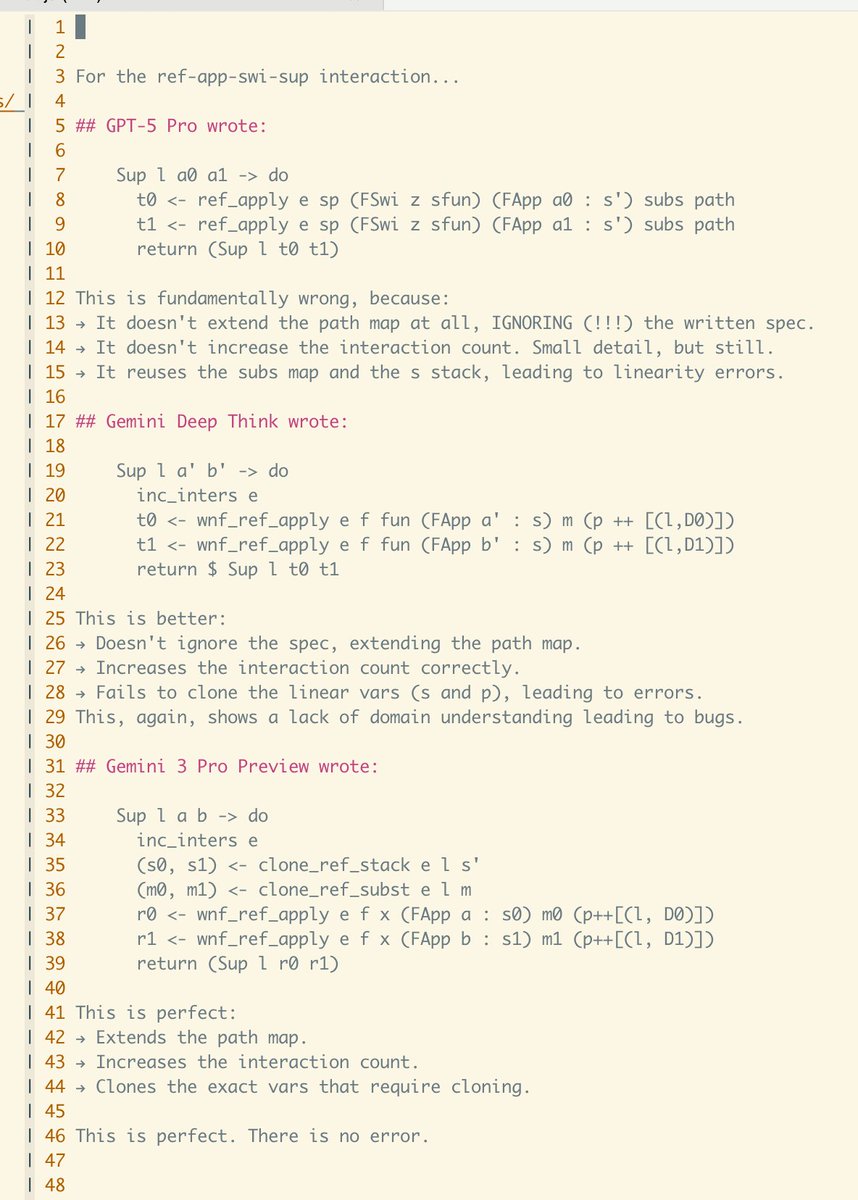
. At the same time, it reportedly underperforms GPT‑5.1 and Claude Sonnet on “vibe” tasks—one‑shot web app implementations, creative story writing, health triage (it incorrectly discarded meningitis), and not going overboard when brief context is provided. The tester notes Gemini 3 feels like an incredible “slow brain” for hard problems but is slower via the Gemini CLI (faster when hit directly), struggles to write intentionally wrong code when that’s desired, and often rewrites full files instead of targeted patches, which matters if you’re wiring it into real repos Gemini 3 analysis. For tool builders, that suggests using Gemini 3 as a heavy‑duty backend model for gnarly refactors or analysis, while keeping GPT‑5 or Claude in the loop for UX copy, creative briefs, and one‑shot prototypes.
Luma’s Terminal Velocity Matching targets diffusion quality with 25× fewer steps
Luma introduced Terminal Velocity Matching (TVM), a single‑stage generative training method that aims to match diffusion‑model image quality while cutting inference steps by around 25×, and they’ve already trained it at 10B+ parameters. For anyone rendering frames all day—storyboards, styleframes, concept shots—this points toward near‑diffusion quality at something closer to GAN‑like speeds, which is exactly what you want for fast iteration or in‑app generation. The write‑up emphasizes inference‑time scaling (how quality improves as you spend more steps) and shows TVM hitting a similar quality curve to diffusion models much earlier in the step budget, making it attractive for real‑time tools or mobile surfaces where every millisecond counts TVM announcement, with technical details on the loss, training recipe, and comparisons in the engineering post TVM blog post.
Isaac 0.1: 2B grounded VLM with strong OCR lands on Replicate
Perceptron’s Isaac 0.1 is now available on Replicate: a ~2B‑parameter grounded vision‑language model focused on OCR, spatial reasoning, and visual question answering rather than pretty captions Isaac demo. It doesn’t just answer “what’s in the image” but also highlights where it looked via bounding boxes and explains its reasoning, as shown in the “was the shot taken before the buzzer?” basketball example where it cites both the 1.5s shot clock and the ball already in mid‑air
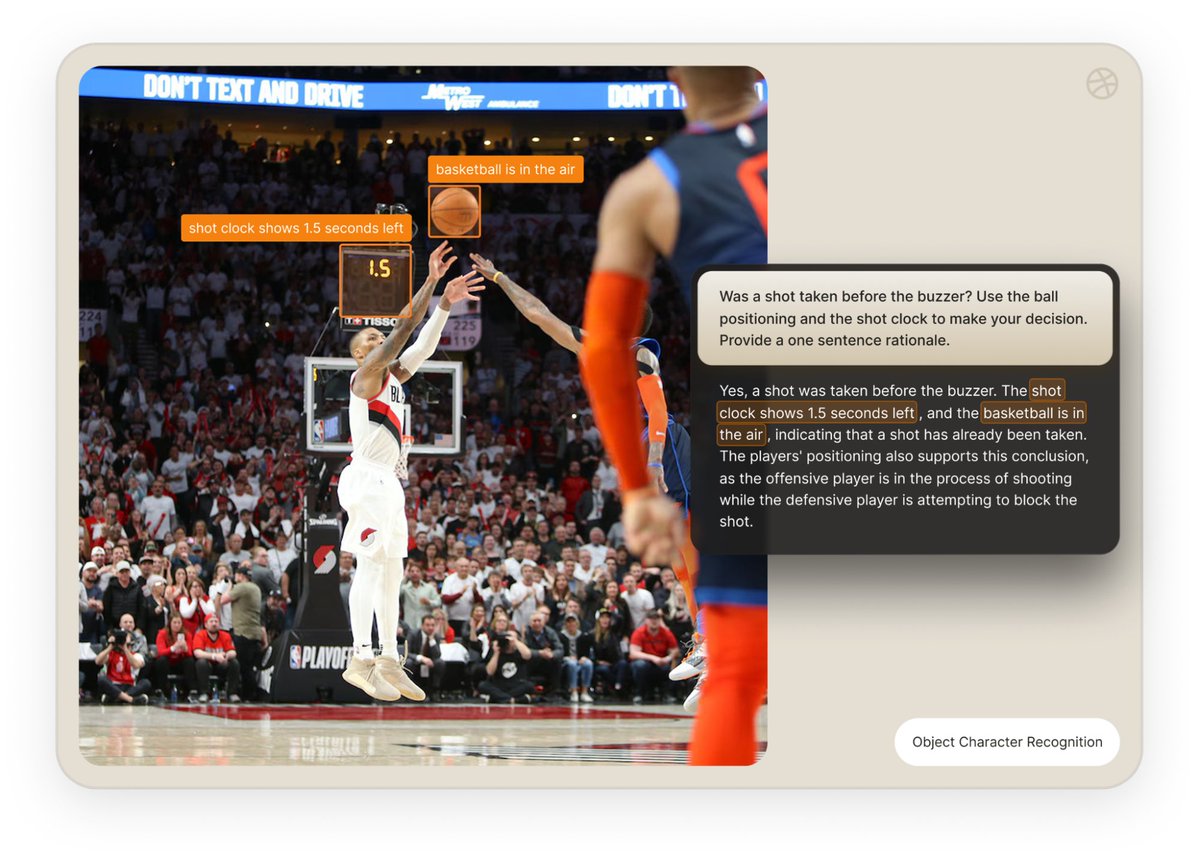
. For creatives and product teams, that means a small model you can call via Replicate to check layout rules, read UI text, do continuity checks, or analyze sports/scene blocking, with more detail on capabilities, latency, and API usage in the launch blog Replicate blog post.
Kimi K2 Thinking scores 67 on AA Index with only 4B params
AI‑for‑Success highlighted new Artificial Analysis Intelligence Index v3.0 results where Kimi K2 Thinking scores 67, just shy of Claude Opus 4.5 and GPT‑5.1 (both at 70) yet runs on an estimated 4B parameters instead of ~180–500B AA index chart. On the same chart, Grok 4 sits at 65, Claude 4.5 Sonnet at 63, and open‑source 120B‑class models in the low 60s, while Kimi’s smaller K2 0905 variant hits 50 at the same 4B size
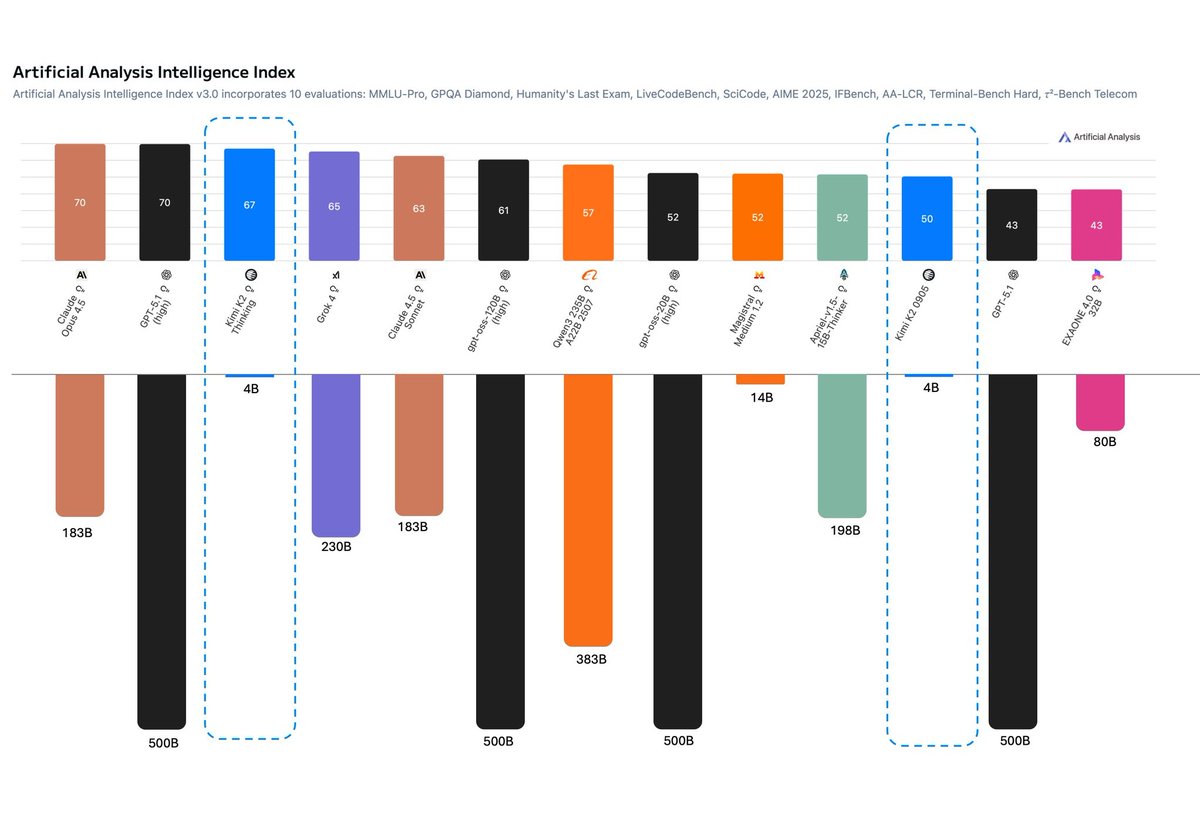
. For people building creative tools, it suggests you can get close‑to‑frontier reasoning and coding performance from a model that’s cheap enough to call aggressively (or even self‑host eventually), which matters when you’re running agents for editing, asset tagging, or game logic on every user action. The takeaway in the thread is that Kimi is probably “undervalued” relative to much larger labs that haven’t shipped comparable models yet, making it a sleeper candidate for cost‑sensitive AI products AA index chart.
Memori 3.0: 80% token savings for LLM apps via SQL caching
The open‑source Memori project, which has already crossed 6,400+ GitHub stars in 3 months, shared more detail on how it cuts LLM costs and added a 3.0 update with REST API support Memori cost thread. The core claim is that most production AI apps waste ~80% of their token budget on repeated queries; by sitting between your app and the model and doing a mix of exact and semantic caching into a standard SQL database, Memori reportedly drops the cost of 10M GPT‑5 tokens from ¥112.50 to ¥22.50 (about 80% savings) as shown in their bar chart
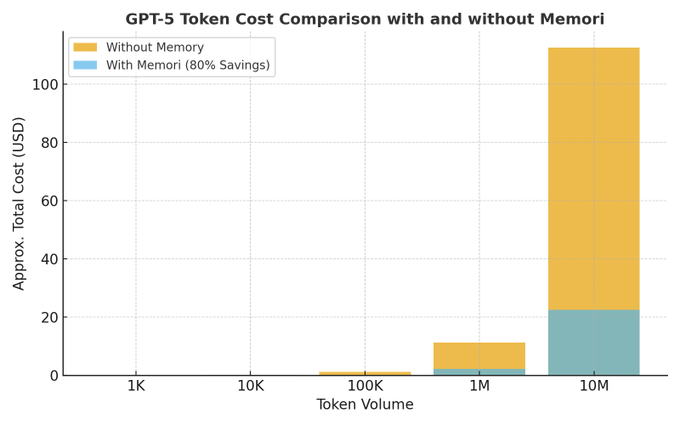
. The new release lets Python, JavaScript, and Java services all talk to the same memory engine, so a React frontend and a Python backend can share conversation history over HTTP instead of each managing context alone Memori 3 update. For creative pipelines—think AI editors, script doctors, or design assistants that users poke all day—this kind of caching can turn an otherwise expensive multi‑agent setup into something you can actually afford to keep online, with full control since memory lives in your own Postgres/MySQL/SQLite rather than a vendor’s black box GitHub repo.
DeepWriter tops Humanity’s Last Exam for agentic AI systems
On the Humanity’s Last Exam (HLE) benchmark for agentic AI systems, DeepWriter posted a score of 50.91, beating a field of big‑name LLM+tools stacks that cluster in the low‑to‑mid 40s HLE scores thread. The chart shows Gemini 3.0 with tools at 45.80, Kimi K2 Thinking with tools at 44.90, Claude Opus 4.5 with tools at 43.20, and GPT‑5 Pro with tools at 42.00, suggesting a specialized agent framework can outperform raw frontier models when it comes to multi‑step, tool‑driven tasks
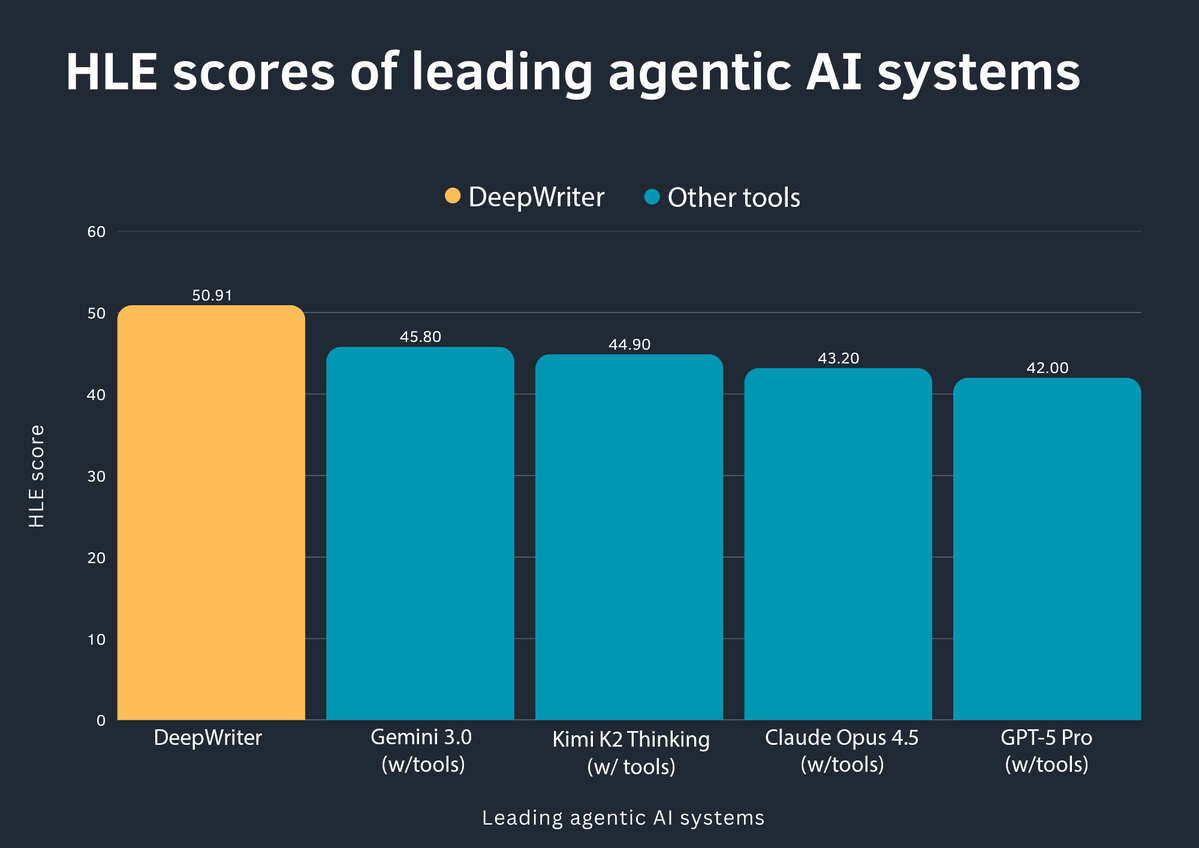
. For you, this means that the “which base model?” question is only half the story; orchestration, memory, and how the agent decomposes work can buy you double‑digit performance gains on complex workflows like research assistants, production checklists, or code‑review bots. It’s another data point that if you’re building serious creative or production agents, borrowing ideas from systems like DeepWriter (rather than slapping tools onto a chat model) might move the needle more than swapping GPT‑4 for GPT‑5.
Grok‑4 leads new election‑alignment leaderboard on 8 countries
A new Model Alignment Leaderboard compares how closely major LLMs’ policy recommendations match real‑world election results across eight countries, and Grok‑4 comes out on top, with six first‑place finishes alignment leaderboard. In the U.S. test, Grok predicted support for Trump at 42.9% vs an actual 49.8%, while other systems averaged around 14.6% support, showing a strong tendency for most models to cluster near center‑left positions regardless of actual outcomes
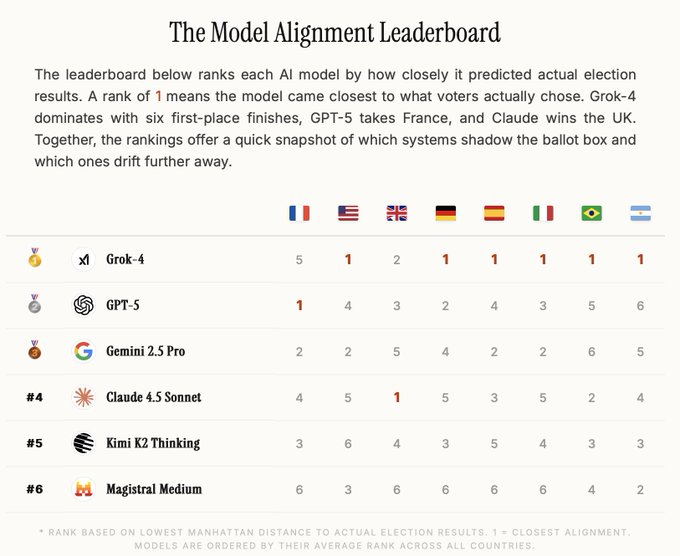
. For storytellers and brand teams, this matters less as “who’s right about politics” and more as a concrete signal of where different models sit ideologically by default—Grok appears to track median voter sentiment more closely, while GPT‑5, Gemini 2.5, Claude, and Kimi tend to drift further. That has implications for anything from political satire scripts to advice‑style content, where the model’s built‑in values will subtly shape what it suggests. The thread argues that this kind of benchmark may matter more for user trust than yet another coding or MMLU score alignment leaderboard.
OpenRouter side‑by‑side prompts highlight GPT‑3.5 → GPT‑5 gains
Matt Shumer pushed back on the idea that “LLMs aren’t improving” by pointing people to OpenRouter’s compare view: pick a few models (e.g. GPT‑3.5, GPT‑4, GPT‑5) and run the exact same prompt to see the progression in one screen OpenRouter compare. In the short demo clip, the GPT‑5 answer is clearly more structured and on‑spec than the earlier models, which supports the recent creative‑writing and capability benchmarks showing GPT‑5 outscoring GPT‑4/3.5 on complex tasks GPT‑5 writing score. For working creatives, this is a quick way to sanity‑check whether it’s worth paying for a higher tier: throw your real storyboard brief, lyrics prompt, or animatic outline into all three and judge the deltas by eye instead of trusting lab charts, with OpenRouter’s UI making A/B/C comparisons trivial
. The link in the tweet goes straight to the comparison interface, so you can drop in your go‑to production prompts without wiring any code OpenRouter app.
🏢 AI at work: jobs, scribes, and time saved
Non‑creative macro signal with direct AI ties: HP plans 4–6k job cuts by 2028 to fund AI and save ~$1B/yr; Penn/Jefferson report AI scribes cut documentation time 20% in‑visit and 30% after hours.
HP to cut 4–6k jobs by 2028 to fund AI push
HP plans to eliminate 4,000–6,000 roles (up to ~10% of staff) by fiscal 2028 as part of a restructuring meant to save about $1B a year and accelerate AI adoption across support and operations. hp restructure thread For creatives and production teams, this signals big enterprises shifting budget from traditional headcount into AI‑driven tooling, automated customer support, and AI‑augmented product workflows rather than hiring more people for those tasks.
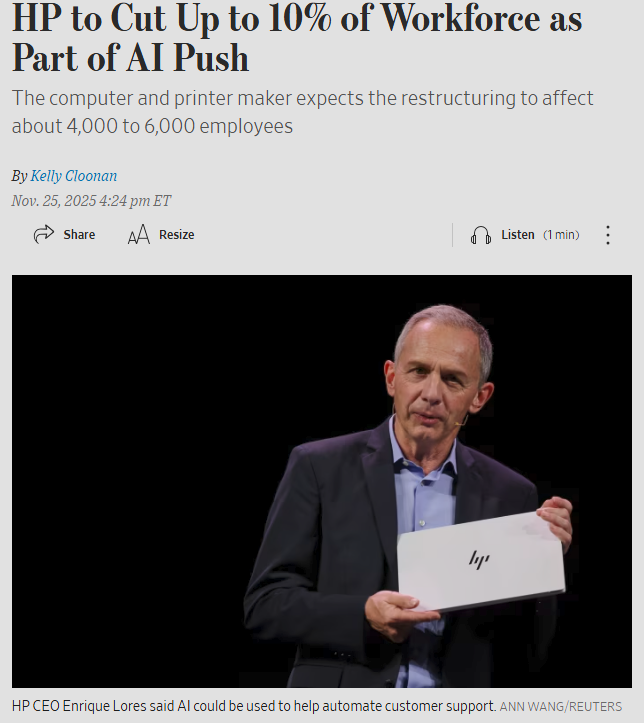
The CEO explicitly frames AI as a way to automate customer support and streamline internal processes, which suggests rising demand for AI agents and AI‑aware experience layers that sit in front of hardware and services. For freelancers and studios, expect more clients to ask for AI‑enhanced content and support systems while being under extra cost pressure on rates, since savings are being captured centrally rather than shared with contractors.
Philly hospitals report AI scribes cut doctor note time by up to 30%
Penn Medicine and Jefferson Health are rolling out ambient listening and AI scribe tools in exam rooms, with a University of Pennsylvania study reporting about 20% less documentation time during visits and 30% less after hours for clinicians. hospital scribe story The systems transcribe doctor–patient conversations into structured notes under patient consent, with physicians still required to review and correct errors.

For anyone building AI tools around narrative, transcription, or summarization (podcasters, educators, editors), this is a strong real‑world proof that well‑targeted "AI as stenographer + editor" can reclaim large blocks of professional time without fully removing humans from the loop. It also hints at future demand for more domain‑specific voice→structured story pipelines: think AI that can turn interviews, workshops, or production meetings into clean scripts, shot lists, or briefs the way these scribes turn conversations into chart‑ready notes.
🛍️ Last‑minute Black Friday for creatives
Quieter than yesterday but still useful: Higgsfield’s 65%‑off unlimited year (with viral mini‑apps) is ending; Pictory runs 50% off annual plans plus 2400 AI credits.
Higgsfield’s 65%‑off unlimited image year enters final hours
Higgsfield is in the last day of its Black Friday deal offering 65% off a full year of unlimited image models on its "Get Unlimited" plan, following up on Higgs BF deal that first extended the Nano Banana Pro access window. Higgsfield BF apps The bundle includes viral mini‑apps like Game Dump, Sticker Match Cut, and Outfit Swap that let you drop yourself into game presets, auto-cut sticker reels, or swap outfits from any reference.
For creators, the draw is that you can hammer image generation all year without worrying about per‑image costs, while still getting access to multiple underlying models and presets geared to TikTok/Shorts style content. Higgs pricing promo There’s also a short "flash" mechanic layered on top of the sale—retweet, like, reply, and follow within a 9‑hour window to receive 202 bonus credits via DM—making this one of the more aggressive last‑minute offers targeted at AI artists and short‑form video editors. pricing page
Pictory’s BFCM deal: 50% off annual plans plus bonus AI credits
Pictory is pitching itself as a "full‑time AI editing assistant" with a Black Friday/Cyber Monday offer of 50% off annual plans and bonus AI credits (up to 2,400 on higher tiers), building on the earlier Pictory BFCM announcement. Pictory bfcm offer The positioning is clear: stop cutting videos from scratch and instead feed it blogs, webinars, and PowerPoints to auto‑generate short, shareable clips for marketing and learning.
The sale pairs with Pictory’s newer features aimed at educators and content teams, like turning text prompts into storyboard‑aligned images and teaching how to go from "unengaging slides to unforgettable video lessons" in live sessions with AppDirect. L&D webinar invite Creators can also lean on the Text‑to‑Image tool to generate on‑brand visuals directly inside the editor, instead of pulling from stock sites. Text to image guide Limited subscription language in the promo suggests the 50% pricing and credit boost are capacity‑bounded, so if you’re planning to systematize content repurposing in 2026, this is one of the richer last‑minute deals.

(See the current plan breakdown in the Pictory pricing details. pricing page )
📺 Live sessions and head‑to‑heads
Learning and community beats: NB Pro vs FLUX.2 livestreams, Freepik’s live transitions session, Midjourney Office Hours, and Pictory’s L&D webinar promos.
Live Nano Banana Pro vs FLUX.2 showdown on AI Slop Review
Glif’s AI Slop Review is hosting a live head‑to‑head between Nano Banana Pro and FLUX.2 today at 1pm PST, aimed at creatives who want to watch both image models tackle the same prompts and see where each one shines in real workflows. stream schedule Following up on live showdowns where people shared static NB vs FLUX galleries, this is the first structured stream promising “no cherry‑picking” and real creative use‑cases, with an open YouTube chat so artists, designers, and filmmakers can ask about control, consistency, and style on the fly. livestream page
Freepik hosts live KeanuVisuals session on epic AI transitions
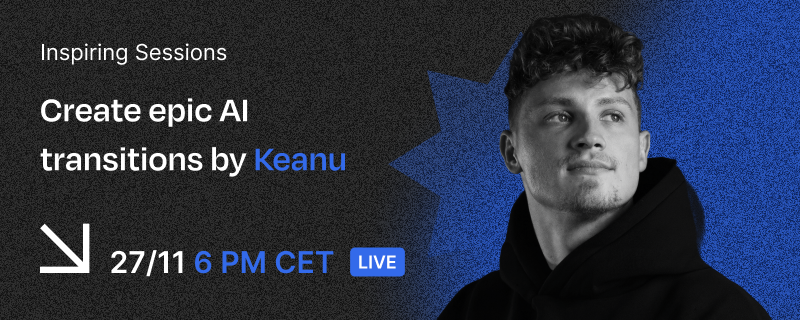
Freepik is running an Inspiring Sessions live event on Nov 27 at 18:00 CET with KeanuVisuals, focused on building “epic AI transitions” that mix UGC energy with cinematic production for social video. session invite
The session highlights how Keanu approaches concepting, directing, and editing around platform performance, so motion designers and short‑form creators can see concrete workflows for blending generative tools with practical shooting and editing tricks rather than relying on prompts alone.
Pictory and AppDirect webinar turns slides into AI video lessons
Pictory and AppDirect are co‑hosting a webinar called “From Unengaging Slides to Unforgettable Video Lessons, in Minutes,” aimed at L&D teams and marketers who want to turn slide decks into AI‑generated video content instead of static presentations. webinar promo The Zoom session (registration is open now) will walk through using Pictory’s text‑to‑video, stock, and voice tools to convert training slides, webinars, or sales decks into short, structured videos, with an emphasis on concrete workflow demos over abstract theory. registration page

Midjourney Office Hours returns with David leading this week’s Q&A
Midjourney Office Hours have started up again, with David taking this week’s slot, giving V7 users a live venue to ask about style refs, parameters, and recent changes while the team listens in. office hours note For illustrators and art directors who work in MJ every day, these Office Hours often surface unofficial recipes, edge‑case fixes, and hints about future tuning that never make it into formal docs, so catching the session or its community notes can pay off in better prompts and faster iterations.