FLUX.2 launches with 32B params, 4MP edits – live on 15 platforms

Stay in the loop
Free daily newsletter & Telegram daily report
Executive Summary
Black Forest Labs’ FLUX.2 landed today and, unlike most model drops, the ecosystem shipped with it. The 32B‑param visual model brings 4MP editing, up to 10 reference images, HEX‑accurate color, and JSON prompting, plus an open‑weights [dev] checkpoint. That combo—production‑grade typography and strong world logic you can actually self‑host—is why we’re suddenly seeing it everywhere, not in six months.
On day zero, Replicate, Runware, fal, Vercel’s AI Gateway, Cloudflare Workers AI, OpenRouter, Poe, and ComfyUI all wired it in. Replicate is quoting ~2.5–40s latencies depending on [dev]/[pro]/[flex], while ComfyUI’s FP8 build cuts VRAM to ~15GB so 4MP flows fit on a single RTX card. fal shipped LoRA trainers for product and identity tuning; Runware went with per‑image pricing and a Sonic engine that claims up to 7× faster, 4× cheaper [dev] vs [flex].
On the creator side, Freepik, Leonardo, LTX Studio, ElevenLabs, OpenArt, Higgsfield, and Krea are already treating FLUX.2 as a core backbone alongside Nano Banana Pro. Early tests back up the split we’ve been tracking all week: NB Pro for gritty realism and likeness, FLUX.2 when you care about layout, legible text, and color‑tight campaigns. If you make visuals for a living, this is the first image model rivalry that really moves your routing choices—and we help creators ship faster by paying attention to that, not leaderboard drama.
Top links today
- Black Forest Labs Flux 2 release
- Comfy Cloud Flux 2 setup guide
- Flux 2 Pro model on Replicate
- Fal Flux 2 LoRA trainer (text to image)
- Tencent Hunyuan 3D creation engine
- Tencent Hunyuan 3D API access page
- HunyuanVideo 1.5 open source project page
- ElevenLabs Templates multimodal creation overview
- Budget-Aware Tool-Use agents research paper
- Suno and Warner Music partnership press release
- Pictory text-to-video creation tool
- Freepik Nano Banana Pro image generator
- Leonardo AI creative platform signup page
- LTXStudio guide to using Flux 2
- OpenArt Unlimited Flux 2 access page
Feature Spotlight
FLUX.2 day‑0 ecosystem rollout
FLUX.2 lands everywhere at once: open weights + pro stacks across Replicate, ComfyUI, fal trainers, Freepik, ElevenLabs, LTX, Vercel/Cloudflare, Runware. It’s the new default image model for production pipelines.
Cross‑platform, creator‑ready release of Black Forest Labs’ FLUX.2 with 4MP editing, multi‑reference control, HEX/JSON prompting, and open weights. Massive partner adoption today across hosts, tools, and runtimes.
Jump to FLUX.2 day‑0 ecosystem rollout topicsTable of Contents
🖼️ FLUX.2 day‑0 ecosystem rollout
Cross‑platform, creator‑ready release of Black Forest Labs’ FLUX.2 with 4MP editing, multi‑reference control, HEX/JSON prompting, and open weights. Massive partner adoption today across hosts, tools, and runtimes.
ComfyUI ships day‑0 FLUX.2 with FP8 dev build and 4MP multi‑ref workflows
ComfyUI added FLUX.2 [dev] on day zero, with turnkey nodes for 4MP photorealism, 10‑image multi‑reference control, and enhanced text rendering in both Comfy Cloud and local installs. comfy release They quickly followed with an FP8 build co‑developed with NVIDIA that cuts VRAM needs in half to around 15GB, making full‑res FLUX.2 workflows feasible on a single consumer RTX card instead of datacenter GPUs. fp8 vram note The Comfy team is leaning into FLUX.2 as a new “frontier” backbone, showing node graphs for multi‑reference consistency, 4MP editing, and professional‑grade color and typography control. multi ref demo Their blog walks through best‑practice graphs and mentions GGUF‑quantized FLUX.2‑dev on Hugging Face for people who want even lighter local setups. comfy flux guide For artists already living in Comfy, this turns FLUX.2 into a first‑class citizen rather than just another external API.
fal hosts FLUX.2 and launches LoRA trainers plus free credit promos
fal brought FLUX.2 to its platform on day zero, exposing [pro], [flex], and [dev] variants with support for HEX color codes, JSON prompts, and up to 10 reference images in a single call. fal launch brief On top of raw inference, they shipped dedicated FLUX.2 [dev] trainers for both text‑to‑image and image‑edit LoRAs, so you can teach it products, identities, or domain‑specific transformations without retraining the base model. lora trainer post fal is clearly trying to seed experimentation: they’re offering a $5 coupon code "FLUX2PRODEV" for the first 1,000 users and 100 free FLUX.2 runs in their Sandbox interface. coupon announcement Their trainer docs spell out dataset expectations (15–50 pairs at ≥1024×1024) and cost formulas, making it approachable for small studios who want a house style or brand LoRA but don’t want to touch raw training scripts. trainer docs
Freepik enables Unlimited FLUX.2 Pro and a Flex tier for precision work
Freepik is now an official FLUX.2 launch partner, giving Premium+ and Pro users unlimited access to FLUX.2 [Pro], while FLUX.2 [Flex] runs on credits for higher‑fidelity, text‑heavy jobs. freepik launch The promo slots FLUX.2 alongside Nano Banana Pro as a top‑tier model in their suite, with creators already stress‑testing multi‑reference outfits, cinematic portraits, and magazine‑style typography inside Spaces. creator fashion test
Threads from Freepik and power users show that [Pro] is tuned for speed and general photorealism, whereas [Flex] excels at legible text, fine details, and tightly controlled palettes using HEX codes. pro flex breakdown There are some early rough edges—like failed generations and quirks when referencing inline images—but the team is actively collecting feedback and iterating in real time. bug report
LTX Studio becomes a FLUX.2 launch partner with a deep 7‑part guide
LTX Studio is an official FLUX.2 launch partner and published a 7‑tweet guide on how they’re wiring it into story‑driven workflows, from base image quality to color accuracy, editing, and infographics. ltx launch thread They expose both Flex (higher quality) and Pro (faster) up to 2K resolution, emphasizing consistent hands, faces, and textures for campaigns and product visuals. image quality note
The thread is packed with production‑grade prompts—multi‑animal studio scenes, hex‑locked fashion collages, Burj Khalifa infographics with clean labels—and shows how FLUX.2 handles multi‑reference inputs for brand‑consistent shots. infographic prompt LTX couples the launch with a 40% off yearly promo, clearly betting that Flux‑backed stills will feed directly into its AI pre‑viz and video tooling rather than staying siloed. guide and discount
ElevenLabs bakes FLUX.2 into its Image & Video pipeline
ElevenLabs added FLUX.2 as an image backbone inside its Creative Platform, so you can now generate and edit 4MP stills with multi‑reference control and then immediately animate or score them using the existing audio stack. elevenlabs flux launch That means a single tool can now take you from prompt → character sheet → voiced, lip‑synced video without hopping between half a dozen apps.
Their Image & Video page positions FLUX.2 alongside Veo, Sora, and Wan, with Studio 3.0 handling captions, voiceover, and timeline‑level edits on top of FLUX.2‑generated imagery. image video page For storytellers, this turns ElevenLabs from "audio add‑on" into a place where the visuals themselves are frontier‑grade instead of an afterthought.
OpenArt offers two weeks of Unlimited FLUX.2 Pro for Wonder users
OpenArt has brought FLUX.2 to its platform with both Pro (speed) and Flex (precision) variants, and is giving Wonder users two weeks of unlimited FLUX.2 Pro as part of a Black Friday promo. openart launch They’re pairing that with 60% off annual Wonder plans, clearly trying to hook artists while FLUX.2 is still new.
Creators testing inside OpenArt highlight Flux 2 as "insanely smart" at style awareness and character consistency, especially when prompts follow a clear Subject + Action + Style + Context structure. use case thread Early sentiment from power users is that Flux 2 on OpenArt feels like an always‑on, unlimited playground rather than a meter‑ticking API, which is great for building out big libraries of looks and prompts quickly. creator reaction
Runware launches D0 FLUX.2 with Sonic Inference and per‑image pricing
Runware went live as a day‑zero FLUX.2 partner, offering [dev], [pro], and [flex] variants behind their Sonic Inference Engine®, which they claim makes [dev] up to 7× faster and cheaper than [flex] on their stack. runware flux drop Unlike per‑megapixel billing, Runware prices per image, and says you can save up to 4× versus competitors by not paying separately for inputs and outputs. pricing explanation
They position [dev] as the best open‑weight checkpoint for both text‑to‑image and editing with multi‑image inputs, [pro] as a fast, prompt‑faithful option with up to eight references, and [flex] as a typography and detail beast handling up to 10 references. dev variant note For teams building user‑facing tools, the per‑image simplicity plus Sonic’s latency gains make FLUX.2 feel more like a SaaS primitive than a science project.
Vercel, Cloudflare, OpenRouter and Poe expose FLUX.2 as a routed endpoint
On the infra side, FLUX.2 is already showing up in the places developers actually route traffic: Vercel’s AI Gateway now lists FLUX.2 Pro as a first‑class text‑to‑image target for production apps, vercel gateway note Cloudflare Workers AI is hosting FLUX.2 [dev] for serverless use, workers ai post and OpenRouter has added the model to its catalog so you can hit it via a unified API. openrouter listing Poe also surfaced FLUX.2 inside its chat interface, making it accessible to non‑dev creators who live in messaging‑style UIs. poe integration This matters less for image hobbyists and more for teams that want to A/B FLUX.2 against existing models behind a single routing layer, or ship it in browsers and edge functions without babysitting their own GPU fleet.
FLUX.2 demos highlight hyperrealism, typography, and style transfers across hosts
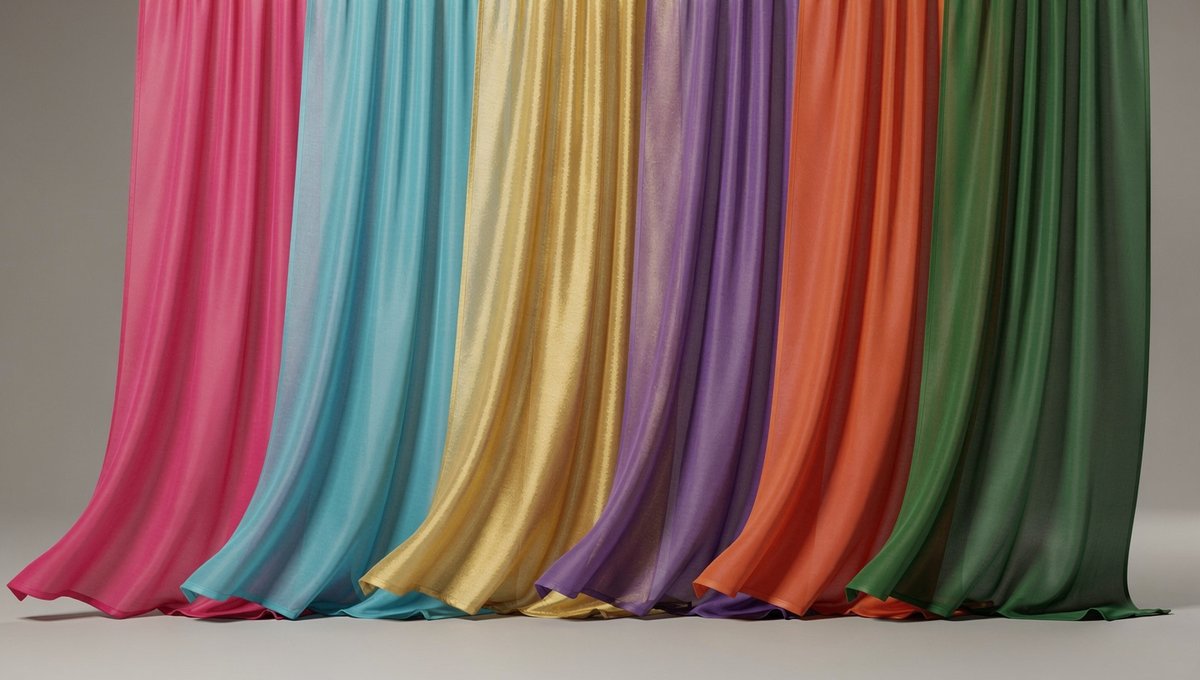
Across Replicate, Runware, Leonardo, and LTX, the most compelling FLUX.2 demos today cluster around three use cases creatives care about: 4MP hyperreal portraits and products, in‑scene text that actually reads, and style transfer that respects composition. Replicate and Runware lean into sharp product shots and candy‑land scenes; Leonard and LTX show magazine covers, infographics, and Burj Khalifa diagrams with clean labels and neat grids. hyperrealism demo
For filmmakers and storytellers, this all matters because it means one model can handle both key art (poster‑grade characters, logos) and practical things like deck slides and app mocks—without juggling SDXL for photos, a separate font pipeline, and a janky text‑overlay hack. infographic prompt The consistency of style across sequences, especially when you feed in multiple references, is what makes FLUX.2 feel ecosystem‑ready rather than just a fun toy.
Krea integrates Flux 2 with 10‑image inputs and native editing
Krea announced support for Flux 2, highlighting two key capabilities for visual builders: up to 10 image inputs at once and native image editing powered by the new model. krea flux announcement That pairs neatly with Krea’s real‑time, brush‑driven UI, so you can anchor poses, styles, or products from multiple references and then iterate in place instead of bouncing assets between tools.
They’re also hosting an "Infra Talks" event with Chroma and Daydream Live, where Flux 2 is part of a broader conversation about AI infra and search, infra event mention which is a good sign that Krea plans to treat Flux 2 as a long‑term backbone rather than a weekend experiment.
🎬 Shot‑to‑shot workflows: Kling, Veo, ImagineArt
Practical pipelines for creators: start–end frames, node graphs, and keyframes to turn stills into smooth sequences. Excludes FLUX.2 model news (see feature).
ImagineArt nodes turn NB Pro stills into a looping Kling 2.1 reveal
Techhalla shared a full ImagineArt Workflows graph that chains Nano Banana Pro images with Kling 2.1 Pro video to build a seamless looping "alien in my head" reveal shot. You start from a single portrait, use NB Pro to generate a 16:9 BEFORE/AFTER split, then automatically crop each panel to 1:1 and feed them as start and end frames into two Kling 2.1 nodes, wiring outputs so clip A opens the skull and clip B closes it, forming a perfect loop when placed back-to-back. Workflow overview
The screenshots show exactly how to wire the Upload → Prompt → Image → Prompt → Image → Prompt → Video chain in ImagineArt, including the long instruction prompt that makes NB Pro infer a plausible personality, generate a realistic workshop background, and render the alien cockpit as a physical prop rather than pure VFX. (Node graph setup, Long prompt example)

For motion, the Kling prompts are kept short and focus on "hyperrealistic, smooth mechanical motion" and "restoring the human appearance" while ImagineArt passes the first image as a clip’s starting frame and the second as its ending frame, which is why the animation sticks tightly to the stills instead of drifting off‑model. Kling prompt wiring For anyone building short loops or reels, this pattern is a very reusable template: any wild NB Pro transformation you can express side‑by‑side can become a reversible two‑clip loop with almost no manual editing, and the node graph makes it trivial to swap in new faces, props, or environments while keeping the structure intact. Workflow call to action
Leonardo’s ‘Primal Glow’ ad shows NB Pro‑driven storyboard‑to‑spot workflow
Leonardo AI published a behind‑the‑scenes breakdown of its "Primal Glow" launch ad for Nano Banana Pro, showing how you can go from idea to a finished, globally localised spot in a few hours using only AI tools. They concepted and storyboarded the whole piece in about 1.5 hours, locking the visual language by hard‑coding a specific film stock term—Ektachrome—into every prompt so the color and lighting stayed coherent across wildly different shots. Primal glow workflow
Once the visual grammar was stable, they leaned on NB Pro’s world knowledge for localisation instead of hand‑translating layouts: by prompting scenes like a Tokyo subway or a Berlin bus stop, the model automatically rendered ad copy in Japanese or German typography that matched the environment, turning a single core campaign into multiple region‑specific variants with no extra design passes. Primal glow workflow The team also shared two practical rules of thumb: treat consistency as a prompt problem, not a post problem (film stock, lens, and lighting baked into every call), and keep a small, curated set of prompts rather than a huge spreadsheet so your sequence feels like one director shot it. They’re DM‑ing the full guide to people who comment “glow,” but the Twitter clips already show how close this gets to a modern beauty or tech commercial without a physical shoot. Guide dm mention If you’re doing brand work, this workflow is a pattern: storyboard and tone‑lock in Leonardo with NB Pro, then only after that worry about timing, sound design, and final cut in your usual editor.
NB Pro plus Hailuo 2.x start–end frames land cinematic tension
Creators are leaning on Hailuo 2.0/2.3/2.5 Turbo’s start–end frame support to turn Nano Banana Pro stills into tense, cinematic sequences that actually feel like scenes rather than morph tests. In one example, a gritty action‑thriller shot—NB Pro stills of a climber in an industrial structure—is used as opening and closing frames for Hailuo 2.0, which then fills the middle with shaky‑cam movement, cable whips, and white‑flash cuts that stay on‑model. Action thriller test
Other experiments push the same pattern into stylised spaces: Half‑Life 2 behind‑the‑scenes shots, Titanic set recreations, and anime‑style RPG attacks, all driven from NB Pro stills and expanded into 10–20 second moves with dramatic lighting, dust, and camera drift that match the original frame. (Half life test, Titanic bts test, Anime battle test) Hailuo is also promoting Nano Banana 2 as “LIVE and UNLIMITED” inside its Agent surface, which means these start–end workflows are effectively free to iterate for now; you can keep regenerating until the motion fits your cut without worrying about per‑clip model fees. Unlimited hailuo agent For filmmakers and game artists, the key takeaway is that Hailuo 2.x is no longer just a text‑to‑video toy: if you arrive with strong NB Pro keyframes, you can rough out full coverage for a beat—wide to close, idle to impact—while preserving character and lighting continuity closely enough to drop into animatics or even short‑form spots.
Flux 2 plus Veo 3.1 in ImagineArt power drawing timelapses and transitions
In a separate ImagineArt tutorial, Techhalla shows how to pair Flux 2 stills with Veo 3.1 Fast using start–end frames and even JSON prompts to build drawing‑style timelapses and more complex transitions. The workflow: first, generate your character or scene frames in Flux 2 inside ImagineArt, including clever "reverse engineering" prompts that ask the model to partially erase and then sketch back in the subject, which gives you clean progression beats. Flux transitions overview
Those frames then become Veo 3.1’s anchors. For simple draw‑in effects you give Veo an initial blankish or rough version as the start frame and the finished illustration as the end frame; Veo 3.1 Fast handles the in‑between strokes and camera drift, producing an 8–10 second clip that looks like a sped‑up painting session. Drawing timelapse demo
For more advanced motion—like pushing through a game UI into a live‑action reveal—the tutorial uses full JSON prompting to describe what should happen between frames (zoom out from CRT, tilt to arcade, rotate around player, etc.), while still binding Veo to explicit start and end images in the node graph. (Json transition example, Workflow wrapup) The point is: you don’t have to abandon still‑image control to get interesting motion. ImagineArt’s node system makes it easy to insert any strong image model up front, then hand off to Veo 3.1 for shot‑to‑shot evolution, which is especially useful if you want a consistent character or layout but different story beats.
Runware outlines NB Pro → Veo 3.1 keyframe pipeline for car spots
Runware and community creator Ror_Fly walked through a practical pipeline that starts with Nano Banana Pro car renders and ends with Veo 3.1‑driven keyframed motion, basically giving you a mini spec commercial without touching a 3D package. The recipe is: generate a set of stills of the car in different poses and locations using NB Pro, pick a handful as style‑consistent hero frames, then feed those into Veo 3.1 as sequential keyframes so it interpolates the motion between them. Car keyframe breakdown
Runware’s own "Reborn through Veo 3.1" teaser leans on the same idea at a higher level: Veo 3.1 sits on top of your favourite image models (including NB Pro and their own FLUX.2 offering) and turns carefully chosen stills into dynamic camera paths, logo reveals, and environmental moves that feel like 3D even though they’re entirely image‑based. Veo promo clip
The important detail for designers is that you’re not leaving everything to Veo: your NB Pro keyframes control composition, reflections, and upgrades (body kits, lighting, decals), while Veo focuses on path, parallax, and motion blur. That means you can iterate on look in the image stage and only render video when the car’s design is locked—far cheaper than rerunning long video generations from text alone. Full process thread For small studios, this is a very achievable “fake 3D” pipeline for auto, product, or sneaker work: NB Pro for art direction, Veo 3.1 for movement, and your usual NLE to cut the beats.
Creator AB‑tests Nano Banana stills across Veo 3.1, Kling 2.5, MiniMax 2.3
David M. Comfort posted a quick screen‑recorded experiment where he takes the same Nano Banana Pro imagery and feeds it into three video models—Veo 3.1, Kling 2.5, and MiniMax 2.3—to compare how each handles motion and adherence to the original frame. The clip shows a desktop packed with terminals and UIs as he runs batches across the different services, highlighting that, while text prompts matter, the video model choice has a huge impact on camera feel, interpolation smoothness, and how hard the model drifts off‑style. Multi model experiment
There’s no formal benchmark yet, but it’s the kind of real‑world AB test filmmakers care about: same NB Pro art, same rough brief, three very different motion signatures. Veo leans into cinematic camera moves, Kling often feels more physical and snappy, and MiniMax offers another flavour again—all of which you can now audition in a single evening using one set of keyframes.
🧪 NB Pro creator recipes and comparisons
Hands‑on image tricks and head‑to‑heads around Nano Banana Pro—moodboards, multi‑panel layouts, upscaling, and style conversion. Excludes FLUX.2 model news (see feature).
Creators pit Nano Banana Pro against Flux 2 in 11 image tests
Multiple creators ran detailed head‑to‑heads between Nano Banana Pro and Flux 2 Pro, with Techhalla scoring 11 scenarios and ending in a 5–5 draw plus one tie, noting Flux 2 is noticeably faster. Comparison thread In his breakdown, Flux 2 wins on child‑style line drawings and product color accuracy, Child drawing test while Nano Banana Pro comes out ahead on weird conceptual prompts (topographic face maps, Rorschach tests, cursed BBQ meat) and keeping his facial identity intact in stylized posters. Topographic face test A separate set of tests by Halim finds Flux 2 slightly more consistent on simple portraits, but NB Pro generally “more realistic” on faces and lighting, especially when scenes get busier. Halim initial tests Both threads reinforce a pattern: NB Pro remains the pick for gritty realism and surreal concepts, while Flux 2 leans into precision, typography, and speed. Halim follow up
NB Pro multi‑scene trick: 4 panels plus instant 3D style swap
Billy Woodward shows that Nano Banana Pro can generate a full four‑panel storyboard in one shot by asking for “multiple quadrant scenes” (e.g. Snoopy setting an outdoor Thanksgiving table), which comes back as a clean 2×2 grid ready to animate. Multi scene prompt A second pass with a single line like “Change to 3D animation style” converts the whole grid into a unified 3D look—Pixar, claymation, stop‑motion, etc.—without re‑prompting per frame. 3d style conversion He then feeds each panel into Grok Imagine to animate them independently, which works surprisingly well given zero manual cleanup. Grok panel animation For storyboard‑driven creators, this is a fast way to explore both layout and style variants before committing to full video.
One‑ref Nano Banana Pro moodboards turn a single shot into full campaigns
Nano Banana Pro is being used in Leonardo to turn a single reference photo into an entire “moodboard universe” of on‑brand editorial shots, all matching style, lighting, and palette. One ref moodboard Creators then extend the same pattern into interiors and sports briefs by reusing the ref image and swapping only the subject focus in a prompt template. Interiors prompt recipe This lets fashion or brand teams prototype whole campaigns—jewellery, footwear, interiors, sports—off one hero image instead of rebuilding prompts from scratch. Sports moodboard prompt You can see the setup and CTA for Leonardo’s Image workspace in the walkthrough. Leonardo app

Extreme upscaling test shows 50×50 inputs rescued to clean portraits
fofr demos a “very good upscaler” by recovering a sharp, believable portrait from a tiny 50×50‑pixel source, then sharing a side‑by‑side crop where the right half remains heavily blurred. Upscaler portrait test They follow up with a huge knolling flat‑lay of hundreds of tiny objects, again upscaled to crisp detail without obvious artifacts or over‑sharpening. Knolling flatlay test For creatives working with tiny sprites, GIFs, or low‑res references, this shows Nano Banana‑powered upscaling can be part of a restoration or remaster pipeline instead of relying only on traditional tools.

Higgsfield reels off 20 Nano Banana Pro use cases in 10 minutes
Higgsfield dropped a 10‑minute “mandatory watch” reel walking through 20 distinct Nano Banana Pro use cases—comic book pages, game art, brandbooks, fingerprint maps, and more—aimed squarely at indie creators. Use case teaser The video leans into NB Pro’s consistency and scene control for sequential storytelling and branded content, showing how one model can cover everything from panels to UI mockups inside a single platform. Use case video For designers and filmmakers, it’s less about any one trick and more a menu of patterns you can steal: character sheets, faux BTS stills, fast pitch decks, and visual worlds that stay on‑model across dozens of shots.
Miniature studio-in-a-light‑bulb prompt showcases NB Pro scene control
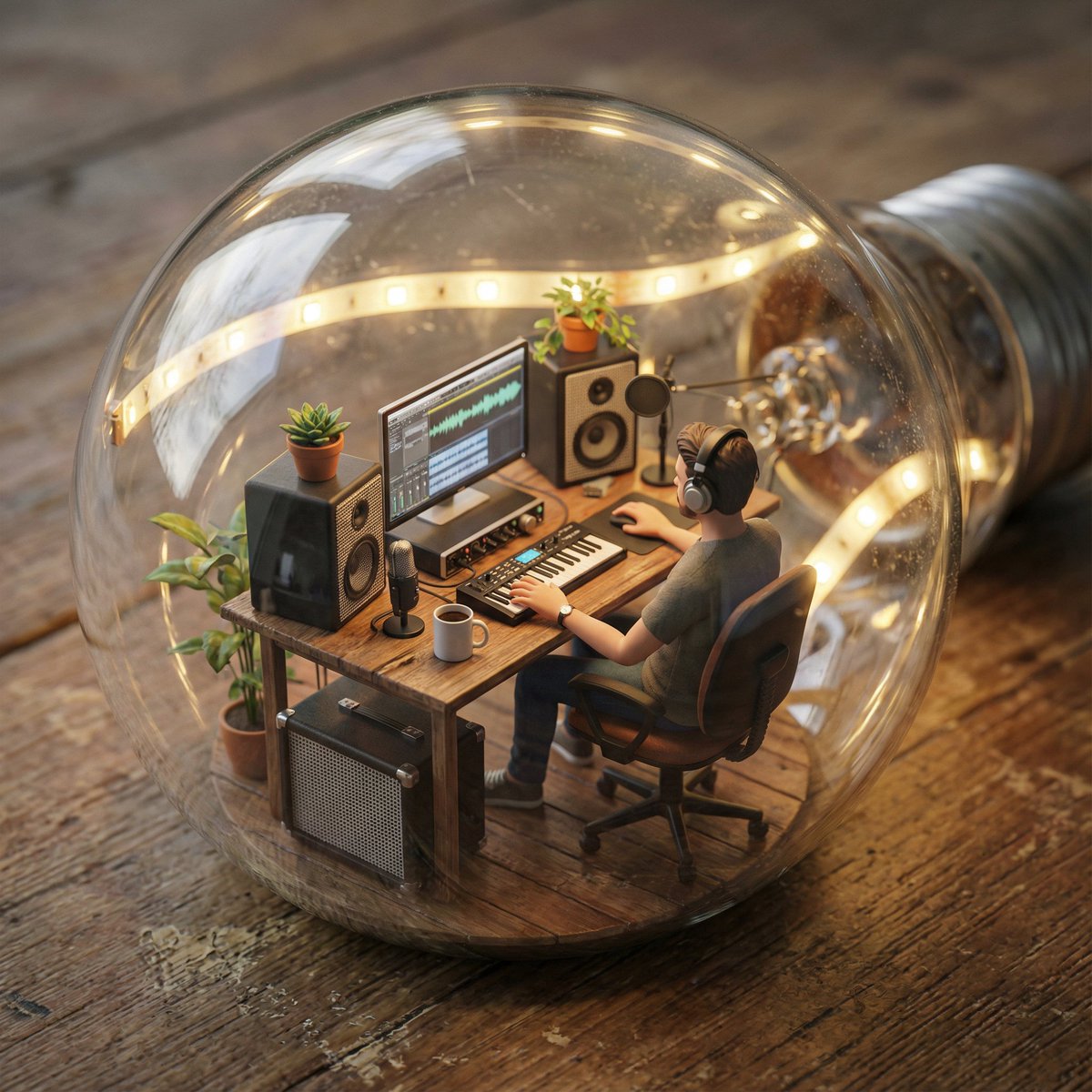
Runware shares a detailed Nano Banana Pro prompt that builds an entire miniature music studio inside a transparent light bulb—desk, keyboard, mic, plants, LED strips, condensation on the glass, and shallow depth of field on the tiny musician. Light bulb prompt The resulting render reads like high‑end product photography crossed with diorama art, underlining how far you can push NB Pro with long, structured prompts that specify props, materials, lighting, and camera behavior. It’s a good reference pattern for anyone designing whimsical “world-in-a-container” visuals for posters, covers, or motion keyframes.
Nano Banana Pro highlighted as a go‑to "pixel clean‑up" tool
ProperPrompter calls out a "nano banana pixel clean‑up tool" as part of their NB Pro workflow, using it to clean jagged edges and stray artifacts on pixel‑heavy assets before sharing or shipping. Pixel cleanup mention In the same broader set of tests, they describe NB Pro as their best option for crisp pixel art and bulk asset generation, which makes the clean‑up pass a natural last step before export. Pixel art praise For game devs and retro‑style illustrators, the takeaway is that NB Pro isn’t only good at generating sprites—it’s now also part of the polishing stack when a render is 90% there but still noisy.
NB Pro tested as a style reproducer from sketches to photographic scenes
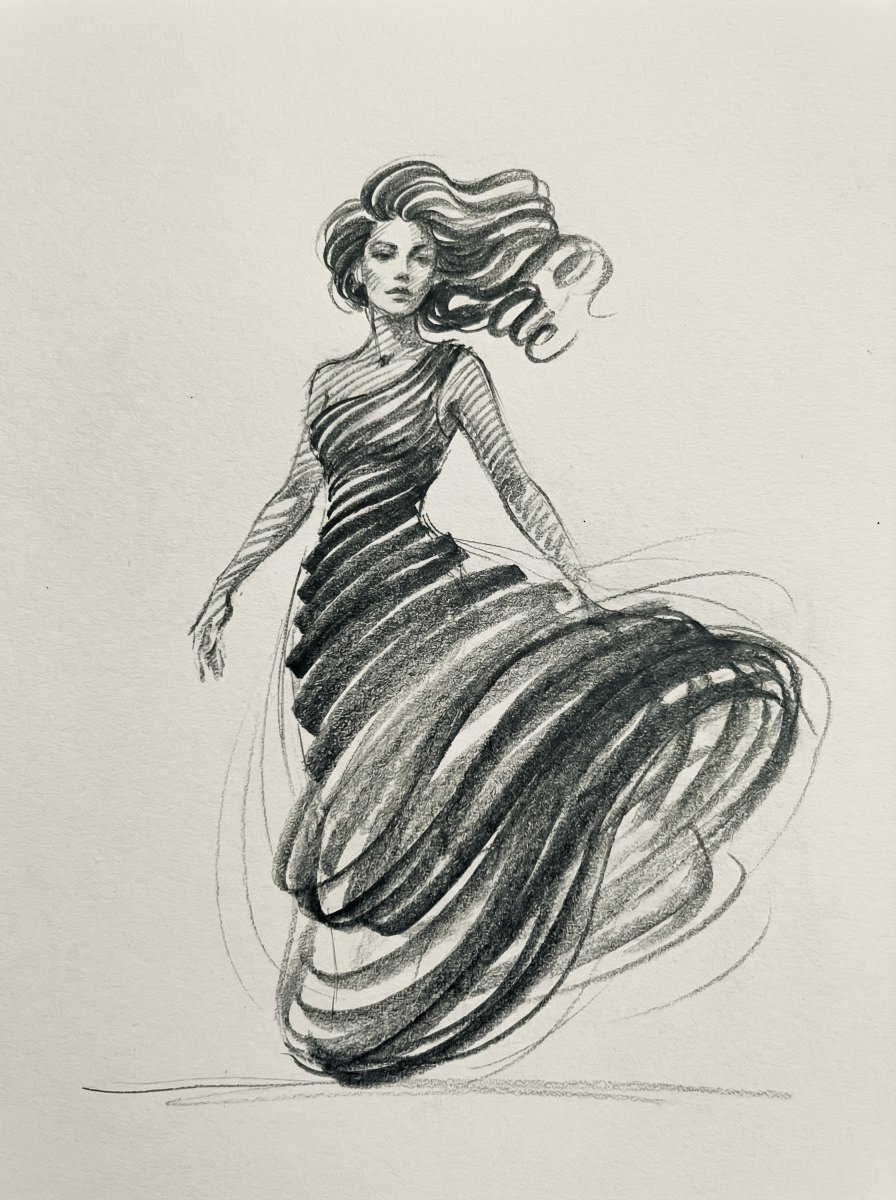
In a style‑transfer experiment, fofr feeds Nano Banana Pro a set of charcoal dress sketches that were originally used to train a LoRA, then asks it to apply that loose, stroke‑based look onto a real photo of a woman in a red dress. Style transfer notes The model nails the color blocking and overall painterly feel, but it doesn’t fully generalize the “form from just strokes” abstraction to new mediums the way a strongly cranked LoRA might, suggesting NB Pro is more literal with structure while still flexible on texture. For illustrators, that means NB Pro is strong at echoing a style from refs, but it won’t hallucinate wildly new structural interpretations unless you prompt it that way.
🎨 Reusable looks: MJ srefs + prompt packs
Style references and templates you can drop into briefs—Midjourney V7 recipes, MJ Style Creator srefs, and an atmospheric‑haze pack for cinematic scenes.
Midjourney V7 grid recipe with sref 246448893 and high chaos
Azed posted a full Midjourney V7 recipe that produces a cohesive collage of hazy, lens‑flared portraits and objects: --chaos 10 --ar 3:4 --exp 15 --sref 246448893 --sw 500 --stylize 500 v7 grid recipe.
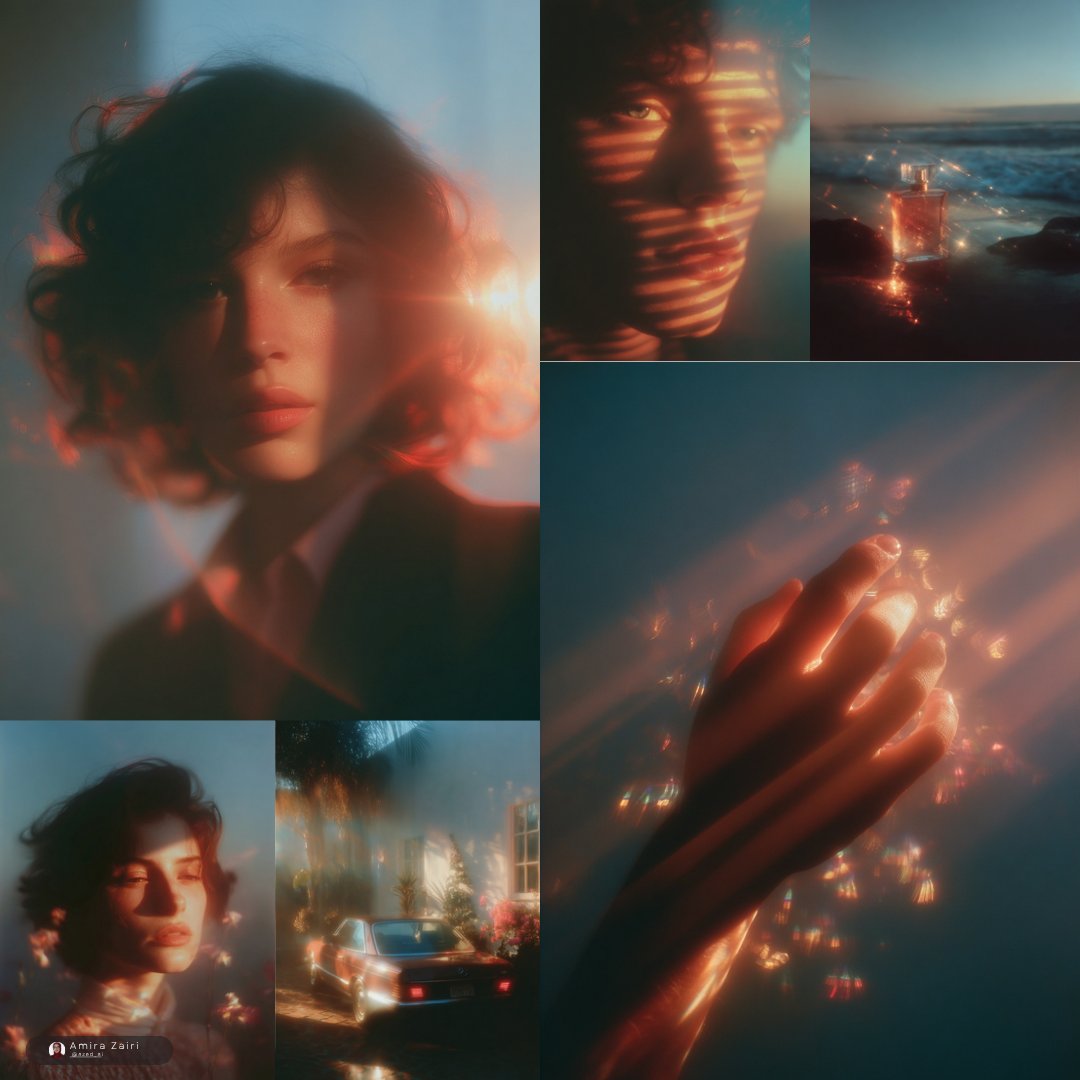
The shared grid mixes warm backlit portraits, a perfume bottle at dusk, a vintage car outside a flower‑filled house, and soft‑focus bokeh faces, all tied together by soft blue/orange toning and heavy flare. The high --chaos plus strong style weight make it ideal for moodboards and multi‑tile layouts where you want variation across tiles but a single photographic language; you can swap in your own subjects while keeping that dreamy, overexposed aesthetic nailed down.
Atmospheric haze prompt pack for instant cinematic backlight
Azed shared a reusable "atmospheric haze" prompt template that you can drop any subject, environment, and light color into to get consistent, backlit, moody, film‑like shots across styles. The examples range from a lone cowboy in a canyon to a dawn parking‑lot dancer, a concert‑hall violinist, and a forest traveler, all with strong silhouettes, shallow depth of field, and analog‑film grading baked in atmospheric prompt.
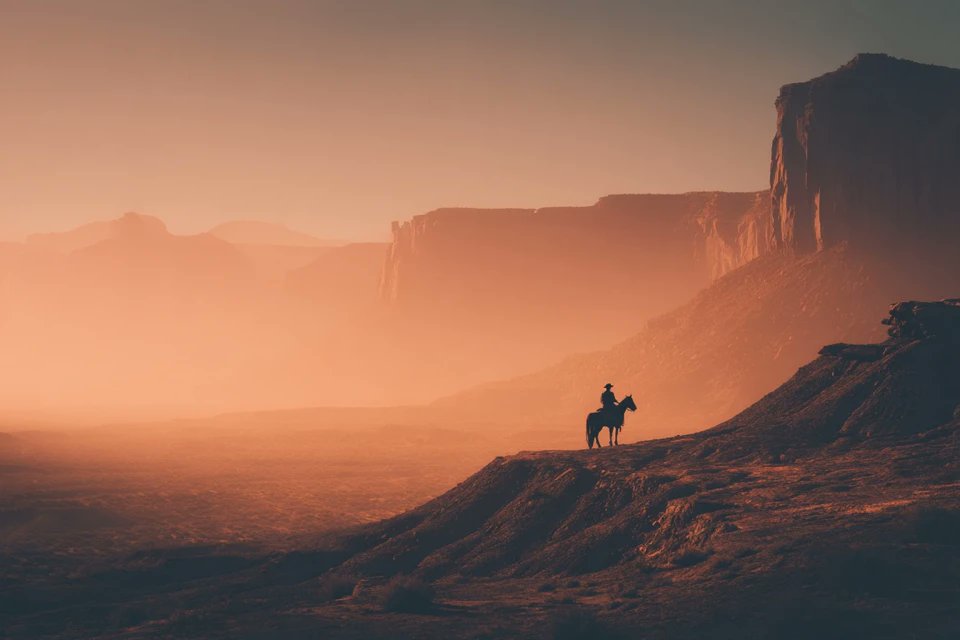
The structure is simple—[SUBJECT] in a vast [ENVIRONMENT], backlit by [LIGHT COLOR] light, atmospheric haze… plus a fixed tail (cinematic composition, analog film texture, high‑contrast shadows), which makes it easy to reuse across Midjourney and other text‑to‑image models. Others are already adapting it to their own scenes, including concert stages and grand pianos lit from a blinding backlight piano hall example. For art directors and storyboarders, this is an easy way to standardize a whole sequence around one atmospheric look without rewriting prompts from scratch.
Modern realistic comic look via MJ sref 2811860944
Artedeingenio surfaced Midjourney style reference --sref 2811860944, describing it as a modern realistic comic style with a cinematic digital finish—think high‑budget graphic novel frames rather than flat panels comic style share.

The examples show backlit cathedral interiors, low‑angle gunfighter walks, extreme facial close‑ups, and overhead shots that read like thriller storyboards, all with crisp linework, rich color, and strong composition. For illustrators and storyboard artists, this sref is a plug‑and‑play way to keep an entire sequence in one coherent visual language while still feeling like polished concept art, not generic “comic filter” output.
MJ Style Creator sref 8523380552 nails rainy, cinematic night photography
James Yeung shared Midjourney Style Creator reference --sref 8523380552, which locks in a very specific moody, cinematic night look: wet streets, deep contrast, long lenses, and rich color blooms on practical lights style creator set.

The sample grid covers a suspension bridge in the rain, a snow‑covered mausoleum, a lone mountain hiker, and a car‑window portrait, all with the same low‑key, filmic treatment and strong sense of depth. Because it’s an sref, you can attach --sref 8523380552 to your own prompts and keep that look across thumbnails, posters, or entire narrative boards, instead of chasing it with adjectives every time.
New MJ sref 7570143073 locks in foggy, monolithic sci‑fi mood
Bri Guy highlighted a fresh Midjourney Style Creator reference from @Handicapper_Gen, --sref 7570143073, which defines a very specific look: lone figures facing massive glowing structures in dense orange‑brown fog new style share.
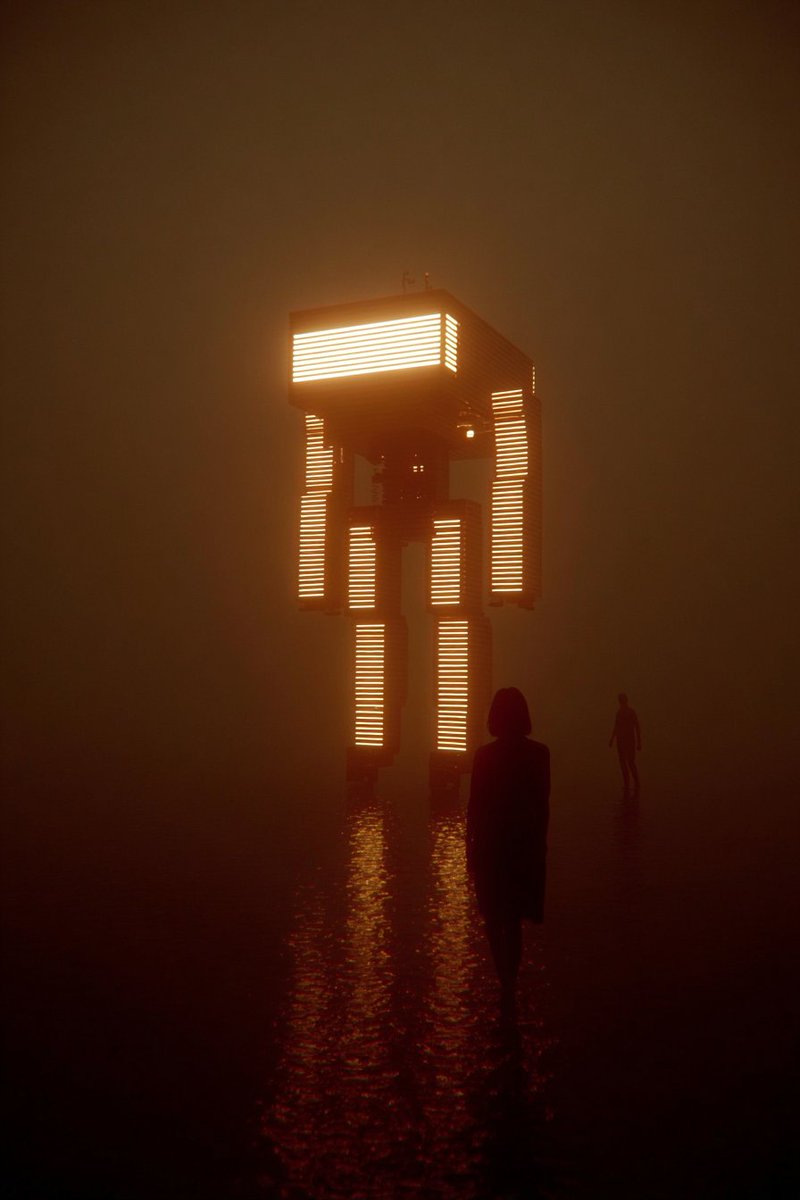
The sample shows a silhouetted character in front of a towering, light‑striped monolith reflected in wet ground, with a distant second figure for scale. It’s a ready‑made recipe for dystopian title cards, album covers, or key art where you need scale, atmosphere, and a touch of mystery; attaching this sref to your own prompts should keep that heavy haze, color palette, and composition even as you swap in new characters or environments.
“AI hater” Star Wars doodle style with MJ sref 1214430553
Another Midjourney style reference making the rounds is --sref 1214430553, which Artedeingenio jokingly positions as the exact kind of shaky Star Wars fan art an AI skeptic would draw by hand star wars line art.
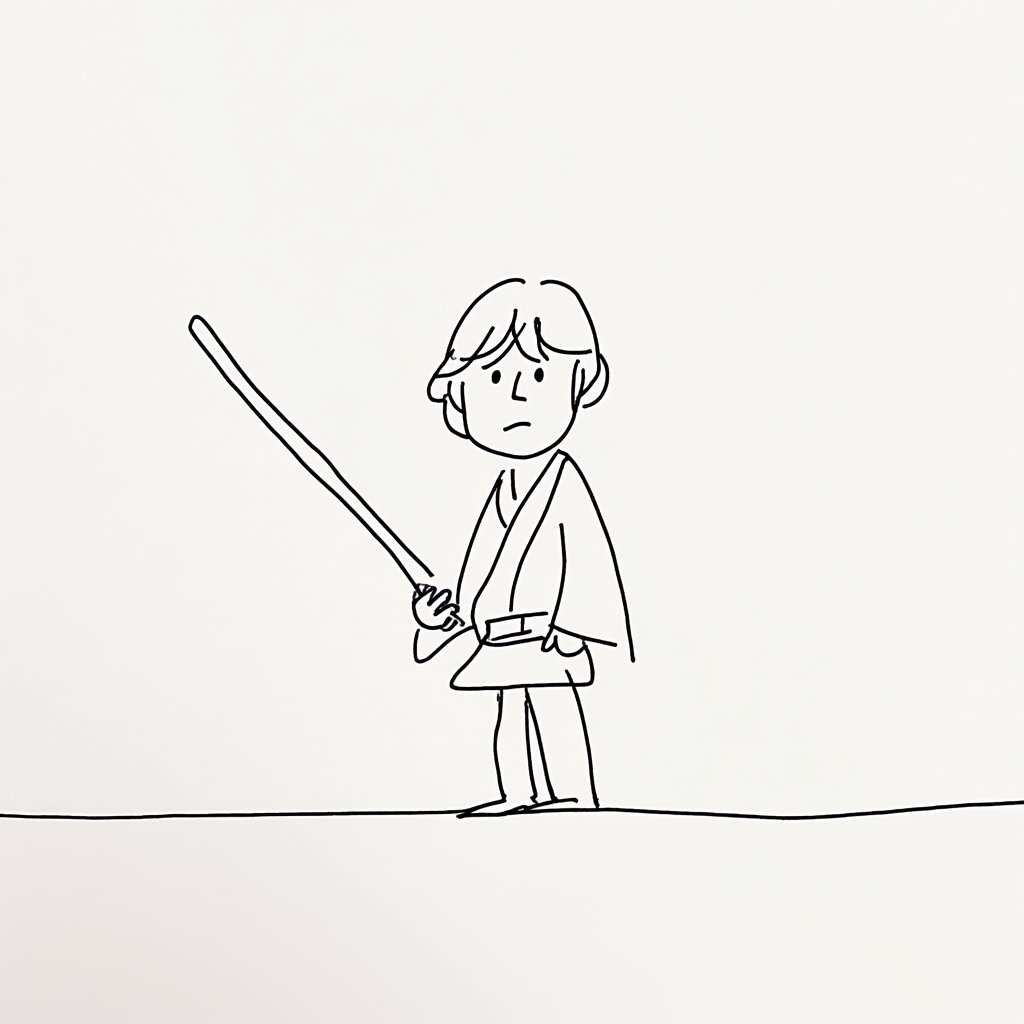
The set covers Luke, C‑3PO, Darth Vader with a wobbly magenta lightsaber, and Chewbacca, all rendered as ultra‑simple black line doodles on flat backgrounds—wide eyes, minimal detail, and intentionally naive proportions. It’s tongue‑in‑cheek, but as a reusable sref it’s handy whenever you want "bad" or childlike line art on purpose, whether for UI gags, zines, or to contrast with more polished panels in a sequence.
🧊 3D and game‑art pipelines
From instant 3D assets to sprite sheets—today’s drops enable fast asset creation for games and motion. Focus on Tencent’s 3D engine plus sprite workflows.
Tencent Hunyuan 3D Engine goes global for instant game‑ready assets
Tencent is taking its Hunyuan 3D Engine worldwide, offering text‑, image‑, and sketch‑to‑3D generation as a commercial API on Tencent Cloud International, with claims of cutting 3D asset production from days or weeks down to minutes and delivering ultra‑high detail up to 15363‑resolution meshes for games, e‑commerce, and advertising 3d engine launch. New users get 20 free generations per day on the web tool plus 200 free credits for the cloud API, and outputs export as OBJ/GLB ready to drop into Unreal, Unity, or Blender (creation portal, api docs).
For 3D artists, small studios, and technical art teams, the interesting part isn’t just another text‑to‑3D demo; it’s the combination of a hierarchical 3D‑DiT "carving" architecture (for sharper geometry), multimodal inputs (you can start from sketches or multi‑view photos), and an actual cloud endpoint that slots into existing pipelines instead of living as a lab toy 3d engine launch. If you’ve been hand‑sculpting props, background sets, or product models, this is the first serious sign that you can prototype and iterate those assets with AI, then refine by hand where it matters.
For game and XR teams, this changes where you spend time. You can imagine feeding rough blockouts or concept sheets, getting a decent mesh back in minutes, and letting environment artists focus on hero assets and lighting passes instead of cranking out low‑priority clutter. Because Hunyuan 3D exports standard formats and targets physically plausible detail, it should slot into existing build systems with minimal glue code—your main homework is going to be testing style consistency, retopo needs, and how well it respects your scale and unit conventions across scenes.
Nano Banana Pro becomes a pixel‑art and sprite factory for indie games
Nano Banana Pro is settling in as the default art department for a lot of indie‑scale game work: creators are using it to generate 8‑directional pixel‑art sprites, alternate palettes, and whole sheets of themed game assets from a handful of prompts and references sprite workflow. Building on the earlier 8‑direction walk‑cycle thread 8dir sprites, today’s posts focus on how well it handles sets of assets rather than one‑offs.
ProperPrompter calls it "the best image model for making beautiful pixel art" and shows NB Pro producing clean, readable 8‑dir character sprites with animation‑friendly silhouettes and color separations that look ready for a tileset editor pixel art praise. In follow‑up clips they lean into production thinking: one prompt yields multiple poses and directions, so instead of hand‑drawing per‑frame, you iterate on style and proportions once, then lock in the sheet sprite workflow. Other posts highlight that you can batch lots of assets in one go—UI icons, props, tiles—rather than prompting them one by one multi asset tip.
Another important angle is how well NB Pro respects multiple references. You can feed several concept sketches or style snapshots, then have it assemble a unified scene or asset pack that actually feels like one game, not a random collage reference control. That’s the big win over older models for game work: pose and palette stay under control, while you still get enough variation to avoid obviously repeated tiles.
If you’re a solo dev or tiny studio, the takeaway is simple: NB Pro is now good enough to stand up a whole visual identity—characters, enemies, pickups, and environment details—before you ever open Aseprite. You’ll still want to clean up collisions, alignments, and some animation quirks by hand, but as a fast front‑end for game‑ready pixel art, it’s already doing the heavy lift.
🎵 Licensed AI music takes shape
Two major moves point to a licensed AI music ecosystem with clearer rights and monetization. Useful context for filmmakers/musicians planning 2026 pipelines.
Suno and Warner Music shift AI songs to licensed models by 2026
Suno is formally partnering with Warner Music Group and says that starting in 2026 its current models will be deprecated in favor of new systems trained on fully licensed music, resolving WMG’s lawsuit and signaling a move toward a rights-cleared AI music stack for nearly 100 million users. suno wmg overview Suno’s own announcement frames this as a "new chapter" built on licensed catalogs rather than web-scraped audio. suno blog post For working musicians and filmmakers the concrete shift is about downloads and usage rights, not just model weights. From 2026, downloading audio will require a paid account with a capped number of monthly exports, while the free tier will be limited to playing and sharing in-app; Suno Studio is positioned as the unlimited-download tier. (suno wmg overview, press release) That changes how you plan bulk stems, temp scores, and library building.
Creators in the thread are already picking at the fine print, especially the line that current models will "deprecate" once the licensed stack arrives; one commenter worries this effectively means "we'll only have licensed models" and asks what happens to older generations and their reuse in new edits. user rights concern The safe assumption is that the sound and behavior of today’s models are not guaranteed to survive into 2026, so you should treat this as a sunset period for the pre-licensing era.
- Download and archive any critical cues or stems you rely on before 2026 in formats you fully control.
- Start testing how Suno’s licensed-era output sits next to your existing catalogs, especially for long-running shows or games.
- Budget for at least one paid Suno seat in 2026 if your pipeline depends on regular AI music exports rather than on-platform playback.
Warner Music and Stability AI partner on licensed pro audio tools
Warner Music Group is also teaming up with Stability AI to co-develop generative music tools built on Stable Audio, trained only on licensed material and pitched explicitly as "artist first" utilities for songwriters, producers, and label talent. wmg stability summary
The partnership promises professional-grade models that let artists experiment with composition, sound design, and interactive fan experiences while keeping credits, control, and revenue flows tied back to rights holders, rather than treating AI outputs as orphan works. wmg stability summary For studio pipelines, that points toward a future where there’s a clear, label-approved lane for AI-assisted stems and textures that can safely touch catalog sounds.
For creatives this sets up a two-track ecosystem: open, community models for maximum flexibility, and label-blessed tools like Stable Audio when you need to stay inside a rights-clean zone that’s acceptable for sync deals, trailers, and official releases. The trade is safety for flexibility, but it also reduces legal second-guessing when work might end up on a major soundtrack.
- If you work with majors, expect growing pressure to use licensed tools like Stable Audio when riffing on recognizable songs, voices, or catalog aesthetics.
- Independent teams may keep experimenting with open models, but it’s worth planning a separate “clean” pipeline for anything that could be pitched to labels or used in commercial syncs.
🗣️ Voices, templates, and sync realities
Multimodal templates for faster voice‑led projects and candid takes on lipsync. Creator clips show dialog‑aware imaging; toolchains reduce setup time.
ElevenLabs ships Templates to shortcut avatar, photo-animation, and music workflows
ElevenLabs rolled out Templates, a library of prebuilt multimodal workflows that bundle the right image, video, and audio models with tuned prompts so creatives can go from idea to finished content without building pipelines by hand. templates intro The initial set includes avatar explainers, “bring images to life” photo animations, a seasonal Santa message builder, and a Video→Music soundtrack generator, all with price estimates and resumable projects so you can remix past runs instead of starting from scratch. workflow overview Templates are fully prompt‑engineered by the ElevenLabs team, which means you’re inheriting best‑practice settings for voice, timing, and visuals rather than guessing model combos yourself. template list For voice‑led projects like branded spokescharacters or talking‑head shorts this cuts out a lot of glue work: you pick a template, drop in your script, images, or props, tweak a few fields, and generate, then refine in Studio or download the result.
Full details and examples live in the Template gallery. templates gallery
Grok Imagine’s Fun mode leans into goofy, dialog-aware cartoons
Creators are stress‑testing Grok Imagine’s Fun mode with fairy‑tale scenes and discovering it can tie spoken dialog, speech bubbles, and character motion together in short clips that feel surprisingly alive, even when the animation is chaotic. One run has Little Red Riding Hood chatting with the wolf at a table while the model generates both visual acting and fitting voices from the simple prompt “Little Red Riding Hood and the Wolf speaking.” red riding hood demo Another shows the Evil Queen delivering the exact line “Mirror, mirror on the wall. Who’s the fairest of them all?” with the mirror’s reflection lipsynced closely enough to sell the gag. mirror mirror scene A separate thread calls the generated dialogues “priceless,” with Grok bantering on screen before cutting to a barking dog, highlighting how the model leans into irony and timing rather than stiff, literal responses. dialogue joke Users note Fun mode’s wild motion sometimes introduces glitches, but in cartoon contexts that looseness reads as charm instead of error, making Grok Imagine a handy toy for fast meme clips, story beats, or stylized 80s OVA‑style action shots. (fun mode take, ova warrior clip) This builds on earlier Grok Imagine style reels and pushes it closer to a lightweight storyboarding tool for dialog‑driven shorts. retro anime clips
Pictory pushes text-to-video with built-in narration for L&D and marketing
Pictory is leaning hard into its script‑ and article‑to‑video tools, pitching them as a way to turn existing blogs or slide decks into narrated videos without touching a timeline. One promo shows a "Blog to Video" flow where you paste a URL or text, then let the AI handle visuals, captions, and background music, with voiceover options baked in. blog to video pitch Another clip with AppDirect highlights an L&D scenario: AI converts dense training slides into a paced story video in minutes, positioning this as an upgrade for corporate education teams. slides to story demo A parallel Black Friday campaign offers up to 50% off annual plans plus 2,400 AI credits and mentions perks like ElevenLabs voices and Getty Images access, which matter if you want higher‑quality narration and stock. bfcm offer Compared to hand‑edited explainer workflows, this moves a lot of toil—cutting b‑roll, timing subtitles, leveling voice tracks—into a single tool, so small teams or solo educators can ship more lessons and promos per week. Pictory site
Creator argues good lip-sync needs audio and acting generated together
Filmmaker Rainisto makes a blunt case that traditional “add lip‑sync after the fact” workflows are reaching a dead end: the best results happen when an AI generates audio, acting, and body movement in one shot, not when you bolt a talking mouth onto a finished clip. lip sync opinion In their view, post‑hoc lipsync tends to hit the uncanny valley because the face is saying one thing while the rest of the body and timing signal something else; the fix is models that treat voice, expression, and motion as a single performance. They speculate about a future where a system like Sora could take a raw voice track full of grunts and shouts and build a matching action sequence around it, but call that “a very hard problem,” especially if you want nuanced emotional beats as well as frame‑accurate mouth shapes. For creatives, the takeaway is simple: today’s auto‑lipsync is fine for quick explainers, but if you’re aiming for believable acting, you either want fully co‑generated clips or very carefully directed motion to match your dialog.
Image-to-lip-sync tools improve, but creators want real video-to-sync models
Following up on earlier threads about the current "best of" lipsync stack—Heygen Avatar 4, InfiniteTalk, and friends state of tools—creators are now drawing a line between image‑to‑sync tools that work decently and the still‑missing video‑to‑sync layer. Uncanny_Harry shares a test that used InfiniteTalk and Dremina on a character shot, with Wan Animate handling motion, and calls the result "ok" but not yet where performance capture needs to be. infinite talk test They add that image2synch is "getting pretty good" but what the field really lacks are models that can take an existing performance and tightly drive mouth, face, and body from a voice track at video level, without re‑rendering everything. video sync comment Another creator chimes in that they’ll be checking out new options as they appear, which sums up the mood right now: teams are willing to chain multiple point tools, but everyone is hoping for a next‑gen, video‑aware lipsync model that can sit cleanly in a serious film or ad pipeline. tool interest
📈 Benchmarks and memory: what’s actually working
Fresh coding/UI evals, GPT‑5.1 capability parity claims, and new agent frameworks for budget‑aware tool use and long‑term memory—all with creator relevance.
Gemini 3 Pro preview wins Kilo Code’s coding and UI benchmark
Kilo Code’s latest hands‑on benchmark puts Gemini 3 Pro Preview well ahead of Claude 4.5 Sonnet and GPT‑5.1 Codex on five real coding + UI build tasks, scoring 36/50 (72%) vs 27/50 (54%) for Claude and 9/50 (18%) for GPT‑5.1 Codex. coding eval recap

The tasks aren’t toy LeetCode—they include a transformer visualizer, browser “OS”, 2D physics sandbox, DAG workflow editor, and a digital “petri dish”, all judged on whether the app actually works end‑to‑end. coding eval recap For people building creative tools and internal dashboards, the takeaway is that Gemini currently looks like the safest one‑shot choice for front‑end‑heavy agents and prototypes: it tends to pick sensible libraries, gets CDN paths right, and ships usable UIs with less prompt wrangling than the others. Claude stays competitive on some UX polish, while GPT‑5.1 Codex often produces attractive shells with broken logic, which matters if you were leaning on it as your coding workhorse.
BATS makes tool‑using agents budget‑aware instead of blindly calling APIs
The BATS framework (Budget‑Aware Test‑time Scaling) tackles a common failure mode in tool‑using agents: giving them a larger tool‑call budget doesn’t help much if they have no sense of cost, so they spam tools or stall. bats overview BATS adds an explicit “budget tracker” plus planning and verification policies that condition on remaining budget, letting agents decide when to dig deeper vs cut off a line of inquiry.
Instead of only optimizing for recall (“did we find the fact?”), BATS evaluates and trains for cost‑adjusted performance across tasks, which early results show yields much better scaling curves as you raise the tool budget. paper page For anyone wiring up research, design, or marketing agents that hit search, code runners, and internal APIs, this gives you a concrete recipe to cut wasted tool calls and keep latency and spend under control as complexity grows.
EverMemOS brings long‑term, structured memory to open‑source agents
EverMind released EverMemOS, an open‑source “memory operating system” that sits under your agents and turns raw conversations and documents into structured, linked memories instead of a flat vector store. evermemos overview The system has four layers—agentic (intent/planning), memory (inserting and managing knowledge), index (knowledge graph + parametric memory + search), and interface (APIs/MCP)—designed to behave like a crude hippocampus rather than a keyword engine. architecture details In their EverMemBench tests, multi‑hop “awareness” questions jump from 48.1 for standard RAG setups to 92.36 when backed by EverMemOS, showing agents can answer “why” and “when” questions that require stitching events over time, not just retrieving a snippet. benchmark numbers The GitHub release includes the core EverMemModel, the OS layer, and the evaluation suite, so if you’re building persistent creative assistants (story bibles, long‑running game worlds, recurring client projects), you now have a concrete, inspectable memory stack to experiment with instead of bolting more chunks into a vector DB. (github repo, product page)
GPT‑5 Pro tops new 400‑story creative writing benchmark
A fresh creative‑writing benchmark over 400 human‑rated stories (600–800 words each) has GPT‑5 Pro in first place with a mean score of 8.47/10, narrowly ahead of GPT‑5.1 (8.44) and GPT‑5 (8.43), with Gemini 3 Pro Preview and Claude Opus 4.5 a bit further back in the low 8.2–8.3 range. writing scores summary
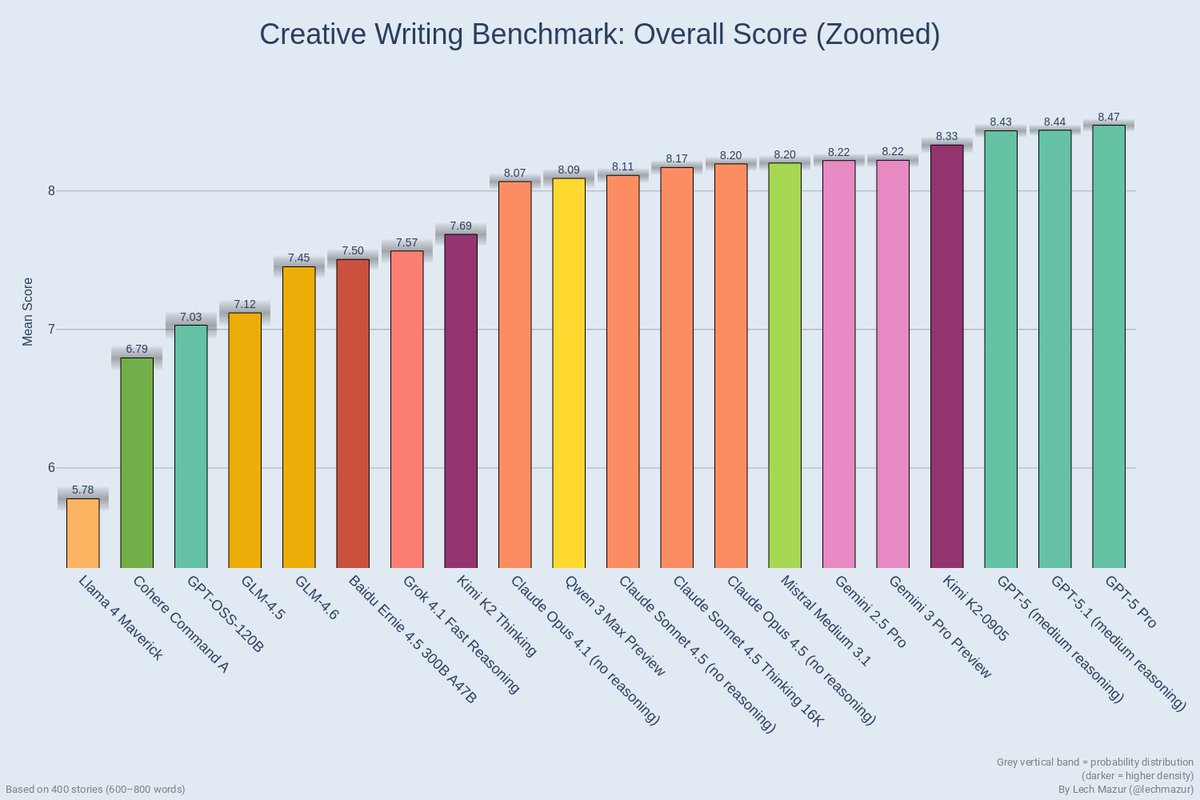
The differences are small but real at this scale, suggesting that if you’re a novelist, screenwriter, or copy lead squeezing for that last bit of prose quality, GPT‑5 Pro is the one to test first for long‑form drafts and stylistic mimicry. For teams that care more about reasoning or cost than about a few tenths on story ratings, these numbers say your current top‑tier model is probably “good enough”, and you should decide based on price, speed, and ecosystem rather than chasing single‑digit leaderboard shifts.
GPT‑5.1 matches GPT‑5 on Epoch index but burns more tokens
Epoch AI’s latest Capabilities Index update puts GPT‑5.1 (high‑reasoning mode) at 151 ECI—essentially identical to GPT‑5 (high)—with per‑benchmark scores inside each other’s error bars. eci comparison The odd part: GPT‑5.1 uses more tokens on hard problems without moving accuracy, so you’re not getting extra capability yet, just extra spend and latency.
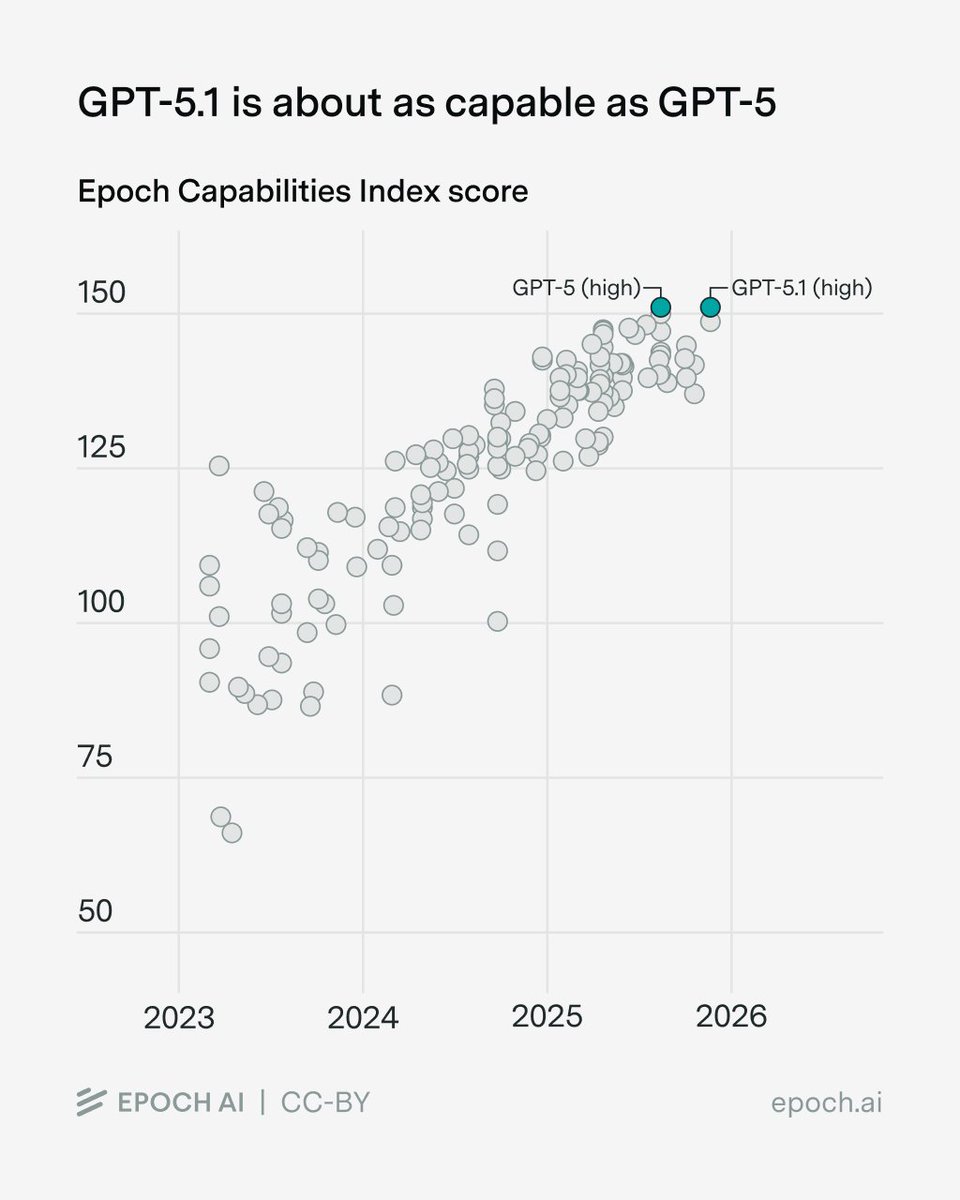
For builders, that means you can treat GPT‑5.1 as a lateral move rather than an automatic upgrade: swap it in only where its other behavior changes (style, safety, tool APIs) help, and keep GPT‑5 as your baseline for capability‑sensitive workflows like complex story planning or heavy research agents until we see a clearer gap.
PRInTS reward model trains agents that actually read what tools return
PRInTS proposes a new reward model for multi‑step information‑seeking agents that doesn’t only check if the final answer is right, but scores each step for how well the agent interprets tool outputs and chooses informative next calls. prints summary It adds dense scoring over trajectories plus trajectory summarization to keep long contexts tractable, then trains agents against that richer signal.
On benchmarks like FRAMES, GAIA (levels 1–3), and WebWalkerQA, PRInTS‑trained agents beat other process‑level reward models while using a smaller backbone model, which matters if you’re trying to keep inference cheap. paper page For creative pros using research assistants to outline scripts, campaigns, or documentaries, this line of work points toward agents that are better at reading, cross‑checking, and deciding what to open next, instead of hallucinating after one or two shallow searches.
🏷️ Black Friday: unlimiteds, credits, and plan cuts
High‑value offers across creative suites and video tools. Excludes the FLUX.2‑specific promos (covered as the feature).
ImagineArt Black Friday: 65% off and a year of unlimited image models
ImagineArt is running a Black Friday deal where you get 65% off and unlimited access to all image models for one year, alongside the launch of StyleSnap, which turns a single selfie plus a style preset into a 2K portrait of you wearing the outfit. (StyleSnap launch, pricing details)
For illustrators, VTubers, and thumbnail designers, this effectively turns ImagineArt into a flat‑rate art department: you can chain models like NB Pro and Kling via Workflows for complex transitions, then feed StyleSnap for lookbooks or character sheets without watching the meter. Pricing tiers and the 2‑day countdown are spelled out on the ImagineArt pricing page. pricing page
Lovart offers 365 days of unlimited Nano Banana Pro at up to 60% off
Lovart is running a Black Friday promo where a Basic+ membership unlocks 365 days of unlimited, 0‑credit Nano Banana Pro (1K/2K/4K) image generations, with subscriptions discounted by up to 60% through Nov 30. Lovart unlimited deal
For AI artists and designers this effectively turns Lovart into a flat‑rate image studio for a year, which is especially attractive if you’re iterating on lots of product shots, key art, or ad concepts; full details and plan tiers are on the Lovart site. promo site
LTX Studio Black Friday: 40% off all yearly AI video plans
LTX Studio is discounting all yearly plans by 40% until Nov 30, cutting the cost of its AI video production suite for both new users and existing ones who upgrade to annual billing. (LTX sale thread, LTX terms)
For filmmakers and creative teams already using LTX for storyboarding, shot generation, and editing, this turns a higher‑tier plan into a more palatable line item for 2026 productions; the offer applies across tiers so you can lock in multi‑month experiments with Elements, multi‑reference shots, and FLUX.2 without month‑to‑month pricing anxiety. Check the LTX site for exact tiers, dates, and restrictions. site landing
Pictory BFCM: 50% off annual, 6 months free, and 2400 AI credits
Pictory has upgraded its Black Friday/Cyber Monday offer: in addition to the earlier 50% off annual plans Pictory deal, you now effectively get 6 months free when you pay for 6, plus 2,400 AI credits, a free session with a video expert, and bundled access to ElevenLabs voices and Getty Images stock. Pictory bfcm details

For marketers and solo creators using Pictory’s script‑to‑video and blog‑to‑video flows, this is a strong chance to standardize a whole year of content repurposing at a lower per‑video cost, with higher‑quality stock and voices baked in. Full breakdown of plan limits and credit usage is on the Pictory pricing page. pricing page
PixVerse Black Friday expands with up to 40% off and new Ultra plan
Following the earlier credits promo for PixVerse’s AI video tools, PixVerse sale the company has detailed a Nov 26–Dec 03 Black Friday window with up to 40% off and yearly plans starting at $86.40, plus a new Ultra Plan that adds early access to all features and off‑peak unlimited use. (PixVerse promo, PixVerse sale terms) There’s also a 24‑hour social giveaway where retweet + follow + reply gets you a chance at 1 month of the Standard plan, which is a low‑friction way to test PixVerse in a real editing pipeline. The key point for video creators: if you’ve been dabbling with PixVerse for shorts or story beats, this is the cheapest way this year to lock in a production‑grade tier for 2026 projects. pricing page
Magnific AI Black Friday: 50% off all plans including annual
Magnific AI is offering 50% off across plans, including annual subscriptions, with the Black Friday code BFMAGNIFIC, right as it rolls out a new upscaling mode that can swing between “faithful” and more “creative” detail injection. (Magnific feature demo, Magnific bfcm code)
For photographers and concept artists who lean on Magnific as a last‑mile detail pass, this promo cuts the cost of high‑res upscaling for an entire year while you experiment with the new spell’s behavior on skin texture, landscapes, and product renders. You can see plan breakdowns and where to apply the code on Magnific’s site. pricing page
Pollo AI’s Christmas Special offers 30+ festive video templates with free runs
Pollo AI has launched a Christmas Special section powered by Pollo 2.0, adding 30+ holiday effects (each with festive background music) and giving every user 3 free uses per template until Dec 26, plus a 24‑hour giveaway of 100 credits for follow + RT + “XmasMagic” comments. (Pollo christmas launch, Pollo credit offer)
If you’re a social content creator or small brand, this means you can spin up dozens of on‑brand holiday ads, greetings, and short “magic” clips without touching an NLE, then use paid credits only once you know which formats are landing with your audience. The template browser and credit rules are outlined in Pollo’s campaign page. template gallery
🧰 Comfy Cloud: faster GPUs, custom LoRAs, unified credits
Production infra update for node‑based creators: Blackwell RTX 6000 Pros (≈2× A100), longer runs, custom LoRA uploads, and pay‑per‑second credits. Excludes FLUX.2 (see feature).
Comfy Cloud upgrades to Blackwell RTX 6000 Pros with 2× A100 speed
Comfy Cloud is moving all GPU workloads to NVIDIA Blackwell RTX 6000 Pros, which they say are roughly 2× faster than A100s and ship with 96GB VRAM, and existing users are being upgraded automatically at no extra setup cost. (update thread, gpu speed note) For AI artists and filmmakers, this means larger node graphs, heavier models, and 4K+ video/image workflows are more realistic in the browser, especially for memory‑hungry chains like upscaling, multi-pass video, or stacked ControlNets. The accompanying blog hints that these hardware gains underpin the upcoming plan and pricing tweaks rather than being sold as a separate "pro" tier. pricing blog
Comfy Cloud adds custom LoRA uploads and 1‑hour Pro workflows
Starting December 8, Comfy Cloud’s new Creator plan will let you upload custom LoRAs from Civitai and Hugging Face, while the Pro plan bumps maximum workflow runtime from 30 minutes to 1 hour to handle heavier graphs. plan changes This matters if you’ve been training styles or characters locally but couldn’t practically run them in the cloud: you’ll be able to bring those LoRAs into hosted workflows, then chain them with long‑running video, upscaling, or multi‑model passes without timing out. The blog post frames these changes as part of a broader restructuring of tiers, so teams will want to map which of their current jobs actually need LoRA uploads or >30‑minute runs before deciding who upgrades to Creator vs Pro. pricing blog
Comfy Cloud rolls out unified Comfy Credits and per‑second billing
ComfyUI is introducing a new Comfy Credits system that unifies billing across Comfy Cloud and Partner Nodes, charging you by the exact duration of each run so you "only pay for what you use." credit system
For production pipelines this simplifies cost tracking: one balance covers all remote GPUs, short tests don’t get overbilled, and long renders become easier to forecast against the new rate card detailed in the Cloud pricing blog. It also nudges creators to think in terms of runtime efficiency—optimizing node graphs, trimming unnecessary passes, and batching outputs—because every extra second now has a visible credit cost. pricing blog
🗞️ Creator mood: model race and live tests
Today’s chatter spans app‑store bragging rights, playful ‘AGI fail’ memes, and a live NB Pro vs FLUX.2 shootout stream. Pure discourse—no product launch repeats here.
Nano Banana Pro vs FLUX.2 becomes the main community shootout
The big creative argument of the day is whether Google’s Nano Banana Pro or Black Forest Labs’ FLUX.2 is the better image model, with multiple creators running structured tests and even a live “AI Slop Review: Nano Banana Pro vs Flux 2” stream at 1PM PST to settle it in real time. (Showdown teaser, livestream replay)
Techhalla runs both through 11 extreme prompts in LTX Studio—ranging from child‑style portraits of Steve Buscemi to Dark Souls boss posters and color‑critical product shots—and ends up calling the match a 5–5 draw: Flux often wins on kid‑drawing style mimicry, typography, and precise color control (especially with HEX codes), while Nano Banana tends to keep faces truer and looks more photographic in complex scenes. (Side‑by‑side tests, Score breakdown thread) Other testers echo the pattern: Halim Alrasihi finds Flux 2 Pro generates more consistent faces when scenes stay simple, but says "Nano Banana Pro outputs look generally more realistic." Halim comparison Realism vs consistency ProperPrompter still calls Nano Banana Pro "the most sophisticated image model ever" after heavy Freepik testing, yet Aze and others describe Flux 2 as "insanely smart" and style‑aware enough to feel like a true alternative rather than an also‑ran. (NB pro praise, Flux is smart) For working artists, this isn’t abstract leaderboard talk; it shapes how you route work: NB Pro when you need gritty realism, consistent likenesses, and multi‑scene continuity, FLUX.2 when you care about layout, legible text, color‑accurate campaigns, or fast iteration on reference‑heavy shots.
Gemini tops US App Store as creators double down on switching from ChatGPT
Gemini has climbed to the #1 spot on the US iOS free apps chart ahead of ChatGPT at #2, sharpening the sense that Google is winning at least the consumer mindshare battle for now. App store chart

Following up on Gemini hype, where people were already joking it’s “over” for OpenAI, multiple power users now say they actively prefer Gemini for creative and workflow tasks: video uploads, Gemini Live, NotebookLM, Nano Banana Pro integration, Deep Research, and even 2TB storage get name‑checked as reasons they’ve moved. (Gemini vs ChatGPT thread, Gemini pros list) One dev literally answers “Gemini. Zero question.” when asked which model they’d pick today, which is a pretty strong vibe. Gemini zero question Sundar Pichai adds fuel by teasing that “Gemini 3.0 Flash is coming and it's gonna be a very very good model. Might be our best one yet,” which makes this feel less like a temporary spike and more like a roadmap‑driven push. Gemini flash tease For creatives, this matters because it signals where big‑tech effort and distribution are tilting: more multimodal tools wired into the Google stack, and probably faster iteration on image/video models like Nano Banana Pro tied to Gemini’s UX.
ImagineArt 1.5 debuts at #3 on global image leaderboard, ahead of Imagen and GPT‑5
ImagineArt’s new 1.5 model is making noise after landing straight at #3 on a popular global image‑model leaderboard, with an ELO of 1187 and confidence interval overlapping heavyweights like Google’s Imagen 4 Ultra and Gemini 2.5 Flash, and even edging out GPT‑5 in the snapshot shared. Leaderboard post
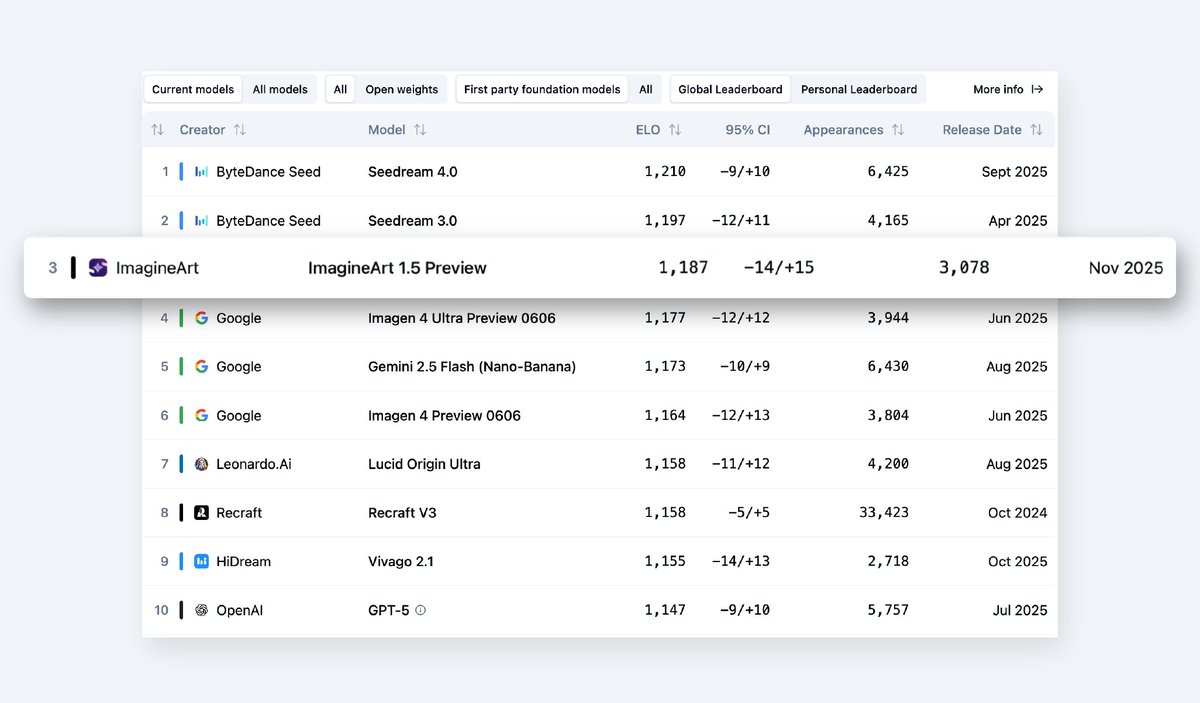
AzEd frames it bluntly: “Your favorite model might have just been dethroned. If you care about photorealism, you need to switch,” which is strong language in a week already dominated by Flux 2 and Nano Banana Pro chatter. Leaderboard post Techhalla jumps in with congrats, calling ImagineArt 1.5 “an insane model, sooo realistic,” reinforcing that this isn’t just a random chart entry but something serious creators are actually testing. Creator congrats For you, the signal is less “drop everything and migrate” and more that there’s now a third closed model sitting in that top cluster alongside Seedream and Google’s stack. If your workflow leans heavily on ultra‑real editorial or ad‑grade stills, it might be worth throwing a few of your go‑to briefs at ImagineArt 1.5 to see whether it outperforms your current default on faces, skin, and tiny product details.
Creators meme Claude Opus 4.5’s ‘AGI test fail’ despite strong benchmarks
Anthropic’s Claude Opus 4.5 is getting roasted today for an “AGI test fail” screenshot where it confidently answers “Five fingers” to the question “How many fingers?” when shown a raised‑hand emoji, framed as proof that frontier models still trip on simple semantics. AGI fail meme

The joke hits harder because it lands alongside benchmark flexes like an 80.9% score on SWE‑bench Verified that had engineers staring at charts in disbelief earlier in the week, so the contrast between elite coding and silly emoji misunderstandings feels especially sharp for builders. SWE benchmark card For creatives and product teams, the takeaway is familiar but important: these models can feel superhuman on structured tasks while still making very human‑looking mistakes on edge‑case inputs, which is why guardrails, UI checks, and human review still matter even when you’re “only” using them for scripts, treatments, or tool‑driven workflows.
Creators say Midjourney could stop updating for a year and still keep them
Amid all the Flux 2, Nano Banana, and leaderboard hype, some artists are openly saying Midjourney is still in its own lane: “so good, so unique and irreplaceable, that even if they didn’t release a single update for an entire year, they probably wouldn’t lose any users.” Midjourney loyalty
That sentiment isn’t coming from nostalgia alone. Creators keep sharing highly specific V7 recipes—like Amira Zairi’s sref 246448893 pack with cinematic light beams and hazy portraits—that deliver a look people haven’t been able to replicate 1:1 in newer models. MJ V7 recipe Others are playing with the new Style Creator to mint whole visual worlds, from painterly sci‑fi sets to moody character portraits, reinforcing the sense that MJ still has a distinctive, cohesive aesthetic engine. Style creator examples So while the model‑race leaderboard shifts daily, the mood around Midjourney is more about emotional lock‑in: if your brand or personal style is built on that MJ look, you might experiment with Flux or NB Pro for specific tasks, but you’re unlikely to rip out MJ as your main style generator anytime soon.