Adobe Firefly adds Nano Banana Pro, Gemini 3 – unlimited gens to Jan 2026

Stay in the loop
Free daily newsletter & Telegram daily report
Executive Summary
Nano Banana Pro’s takeover tour leveled up again today. Adobe is baking NB Pro and Gemini 3 straight into Firefly’s web editor, Boards, and Photoshop, and quietly extending Creative Cloud users to free, unlimited image generations until Jan 14, 2026. After last week’s “unlimited to Dec 1” window, this turns Adobe into a 13‑month front door for Google’s best vision models inside tools people already live in.
The more interesting shift is how precise the control recipes are getting. Creators are driving characters around the planet with raw GPS prompts like 37.4221° N, 122.0853° W, reviving DeepDream‑style psychedelia with hidden “fofr” text, and sculpting landscapes where hills and rivers spell words without breaking realism. NB Pro is also sneaking text into the world convincingly—from fogged‑window handwriting to in‑scene signage—solving a pain point we’ve all sworn at for years.
On the storytelling side, 4×4 decade grids age a face from 1880s portraits to 2030s cyberpunk, single‑prompt party collages track a 12‑panel bender, and car workflows flip one studio shot into labeled upgrade diagrams plus rally sequences. Novel pages from 1984 and IT become cinematic multi‑panel boards, making NB Pro feel less like a meme engine and more like a preproduction workhorse for anyone who wants to ship faster.
Feature Spotlight
NB Pro everywhere: Adobe unlimited + control tricks
Adobe unlocks free unlimited NB Pro image gens for Creative Cloud until 2026‑01‑14, while creators showcase GPS placement, DeepDream revival, clean in‑scene text, decade grids, and labeled tech diagrams.
Continues the NB Pro wave with new, practical control recipes dominating the feed. Today adds a big Adobe update (Creative Cloud unlimited gens until Jan 14, 2026) plus trending prompts for coordinates, DeepDream, typographic scenes, and timeline grids.
Jump to NB Pro everywhere: Adobe unlimited + control tricks topicsTable of Contents
🍌 NB Pro everywhere: Adobe unlimited + control tricks
Continues the NB Pro wave with new, practical control recipes dominating the feed. Today adds a big Adobe update (Creative Cloud unlimited gens until Jan 14, 2026) plus trending prompts for coordinates, DeepDream, typographic scenes, and timeline grids.
Adobe Firefly adds Gemini 3 + Nano Banana Pro with unlimited gens to 2026
Adobe is rolling Nano Banana Pro and Gemini 3 into Firefly’s web editor, Boards, and even Photoshop, and giving Creative Cloud users free, unlimited image generations until January 14, 2026. Adobe Firefly post This matters because Firefly becomes a front door for high-end Google models directly inside Photoshop-style workflows, not a separate playground.
The sponsored thread highlights how you can now drive lighting, camera angles, and color grading with prompts while editing any part of an image at pixel level inside Firefly. Adobe Firefly post One flagship use case is 3D character work: a two-step prompt turns a seated photo into a tan "clothed" clay maquette, then into a naked, high‑poly anatomical base mesh against a Blender-style viewport, giving character artists instant sculpting references. Clay modeling demo

For AI creatives, the combo is: generate look-dev and blockouts in Firefly with NB Pro’s realism and text fidelity, then refine non-destructively in Photoshop, all without worrying about credit burn for the next 13+ months. Firefly page
Decade-by-decade 4×4 portrait grids become a Nano Banana meme format
A specific Nano Banana Pro prompt is blowing up: "Make a 4×4 grid starting with the 1880s" where the same person appears restyled for each decade through the 2030s, including era‑accurate clothing, hair, facial hair, backgrounds, and film stock. Decade grid prompt

The results show a single face evolving from sepia Victorian portraits, to 1940s uniforms, to 1980s neon mullets, all the way to speculative 2030s cyberpunk shots. Decade grid prompt Others are remixing the template with their own photos or even meme faces—one reply turns the infamous Trollface grin into a 12‑panel "through the ages" set spanning black‑and‑white gangster shots to modern smartphone selfies. (Second grid example, Trollface variant) For designers, this is instant "history of" collateral; for storytellers, it’s a clean visual shorthand for character timelines and alternate universes.
NB Pro turns car renders into labeled upgrade diagrams and rally photo sets
A detailed workflow shows Nano Banana Pro acting as both a technical illustrator and lifestyle photographer for a Subaru WRX build. WRX upgrade sheet Starting from a clean studio photo, a prompt asks NB Pro to "modify the car" with rally upgrades and label each performance modification—widebody kit, aero wing, gravel tires, roof scoop, skid plate, roll cage—on a diagram-style contact sheet.
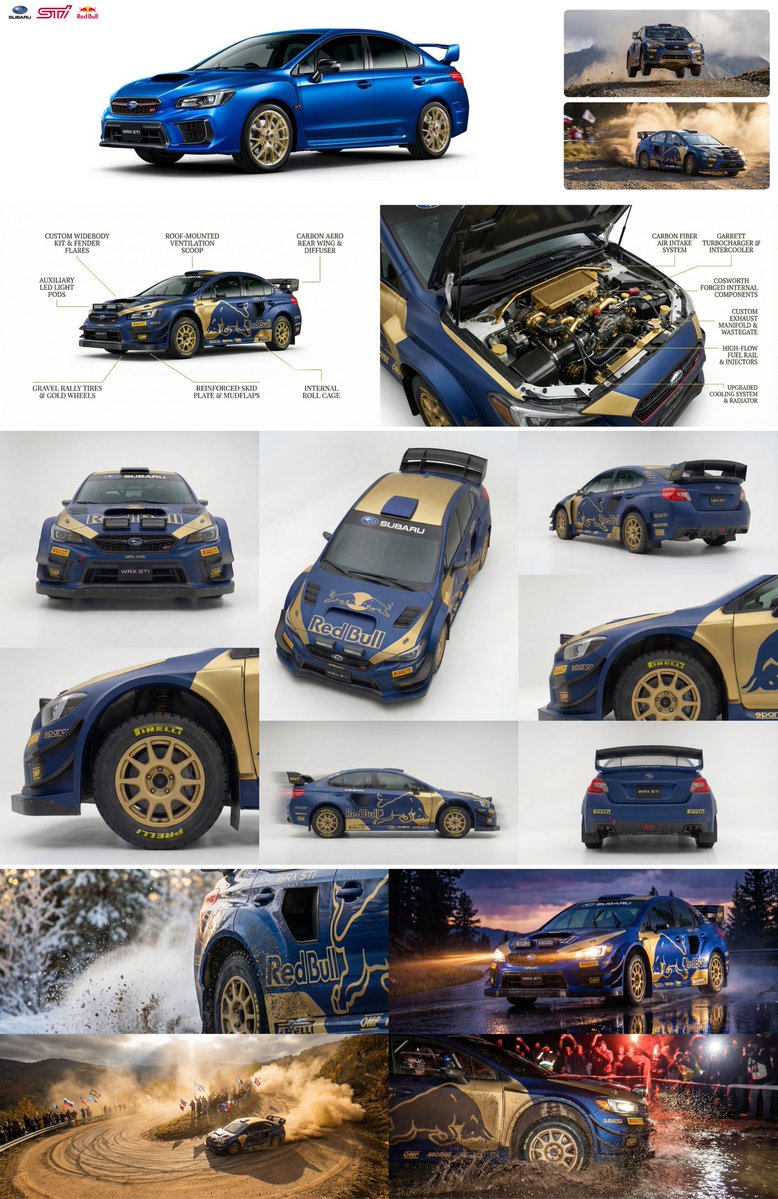
The creator then reuses that upgraded car to request a 6-image studio contact sheet from varied angles, and a 4-image "in action" sheet of the car tearing through snow, wet tarmac at dusk, dusty hairpins, and night rally water splashes, all in consistent livery. Rally contact sheet For automotive designers, advertisers, or game artists, this shows how NB Pro can handle spec sheet diagrams, hero renders, and gritty motorsport scenes from one source image and a few precise prompts.
One-prompt “party gone wild” selfie grids capture an entire night’s chaos
Creators are using Nano Banana Pro plus a single reference selfie to generate full snorricam-style party narratives—8 to 12 images that follow one person through a day‑long bender. Twelve panel party evolution

The shared prompt asks for a grid of "snorricam-style selfies" where a bald guy in a Lakers tee starts with chill poolside drinks, then the party escalates with smoke, white powder, celebrity cameos, shirtless crowd-surfing, and a bleak, hungover sunrise scene. Twelve panel party evolution A separate 3×3 composition leans into early‑2000s disposable-camera aesthetics with date stamps, motion blur, and harsh flash. Eight frame party grid For meme makers and storytellers, this is basically a one-prompt storyboard for "this party got out of hand" content.
Latitude–longitude prompts give NB Pro precise world placement
Creators are discovering that Nano Banana Pro will honor GPS coordinates in prompts, placing a consistent character at real-world landmarks without extra reference images. Coordinate prompt In one example, a cartoon guy in a yellow shirt appears first on Google’s Mountain View campus, then in front of the Eiffel Tower, driven purely by coordinates.
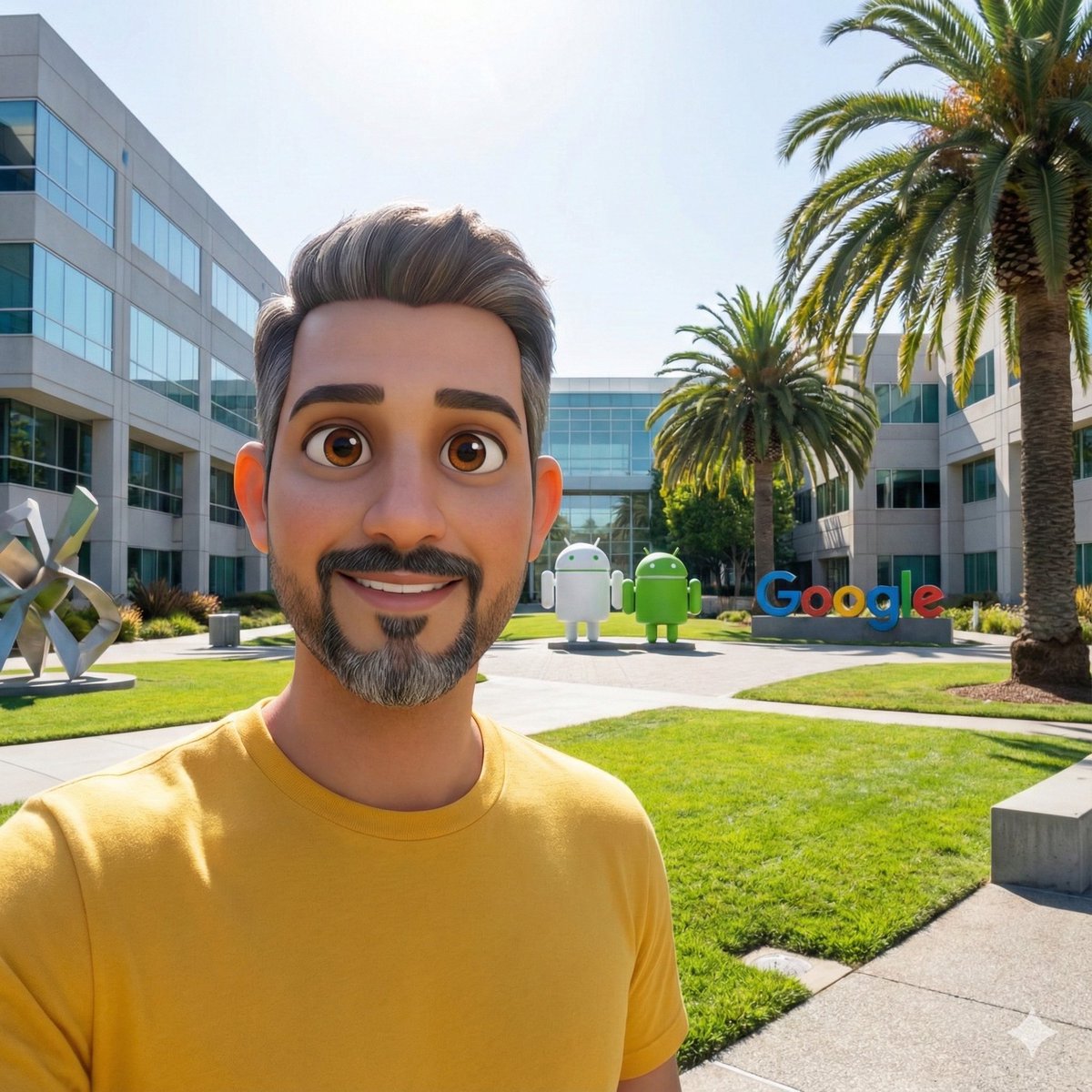
The prompt pattern is simple: "Take this character and place him to coordinate 37.4221° N, 122.0853° W, create 1:1 aspect ratio image," then swap in new lat/long for the second frame. Coordinate prompt For designers and storytellers, this is a neat control trick for travel posters, AR mockups, or comics that jump around the globe while keeping character identity and framing consistent.
Nano Banana Pro revives DeepDream aesthetics, including text Easter eggs
Nano Banana Pro is being pushed into full DeepDream nostalgia: psychedelic scenes packed with dog faces, swirling eyes, and the word "fofr" subtly embedded in the textures multiple times. Deepdream revival example

Beyond straight style mimicry, the same creator is experimenting with structure-aware prompts: feeding a black‑and‑white contrast map and asking NB Pro to paint a town whose buildings and streets follow those tonal paths, echoing the old DeepDream “pattern-following” feel. Contrast map town They even turn the aesthetic into a physical-looking bronze sculpture head sprouting dreamlike animal forms, showing NB Pro can hallucinate DeepDream both in 2D and as plausible 3D objects. Deepdream sculpture For surreal album art, posters, or narrative beats, this gives you a controllable way to get that classic trippy look in one prompt instead of a multi-step pipeline.
NB Pro turns novels like 1984 and IT into cinematic multi-panel storyboards
Storytellers are using Nano Banana Pro to convert book pages directly into cinematic storyboard grids, complete with panel composition and era styling. 1984 storyboard One prompt asks for "a cinematic storyboard of the first page of 1984" using widescreen panels, and NB Pro returns a four-panel strip: Victory Mansions exterior at 13:00, a dingy hallway with "BIG BROTHER IS WATCHING YOU" posters, a stairwell shot with an "LIFT OUT OF ORDER" sign, and a final descent under another looming poster.

A second prompt generalizes the idea: "create a cinematic sequence using multiple widescreen panels grids to tell the story of the imaginative script from the book IT"—and the result reads like a teaser trailer board, from Georgie’s paper boat in the gutter to Pennywise’s eyes in a pipe, the Losers’ Club circle in a cavern, a spider silhouette, and a foggy Derry roadside sign. IT storyboard grid For filmmakers, teachers, and authors, this is a fast way to visualize scenes, tone, and shot variety before moving into proper preproduction tools.
Prompt template turns NB Pro into an on-brief fashion brand look machine
AI Artwork Gen is sharing a prompt template that uses Nano Banana Pro as a style transfer engine for sports fashion brands like Adidas. Adidas style template You feed in a reference image as [@]img1 and ask for a 4‑image grid of editorial fashion shots focused on a brand, specifying "2 × macro, 2 × dynamic action" while keeping the style and palette of the reference.
The same template is reused across examples, with creators swapping in other brands and scenarios but keeping the core structure—brand name, shot types, and "follow the same style and colour palette as [@]img1"—to get consistent, on-brief variants in one go. (Brand prompt reuse, Example links, Second example) For designers working on spec ads or lookbooks, this is a handy recipe to generate moodboards and mock campaigns that feel coherent rather than four random fashion shots.
Fogged-window test highlights NB Pro’s realistic, legible in-scene text
A tiny but important test: someone asked Nano Banana Pro to show "nano banana pro" written on a fogged-up window, and it nailed both the handwriting and the physics of condensation. Foggy window test

The letters appear where a finger has wiped through steam, with streaky edges, beads of moisture, and a believable out-of-focus street scene behind the glass. Foggy window test For designers fighting models that still mangle text, this is a strong signal that NB Pro can handle in-world typography—signage, scribbles, UI screens—without needing heavy post work.
NB Pro hides words inside painterly landscapes without breaking realism
A clever prompt recipe uses Nano Banana Pro to make landscapes whose terrain literally spells a word, while still reading as a believable painting at first glance. Calm landscape prompt In the shared examples, hills, towers, and ruins form the letters C‑A‑L‑M, yet the scene still works as a moody valley or shoreline.
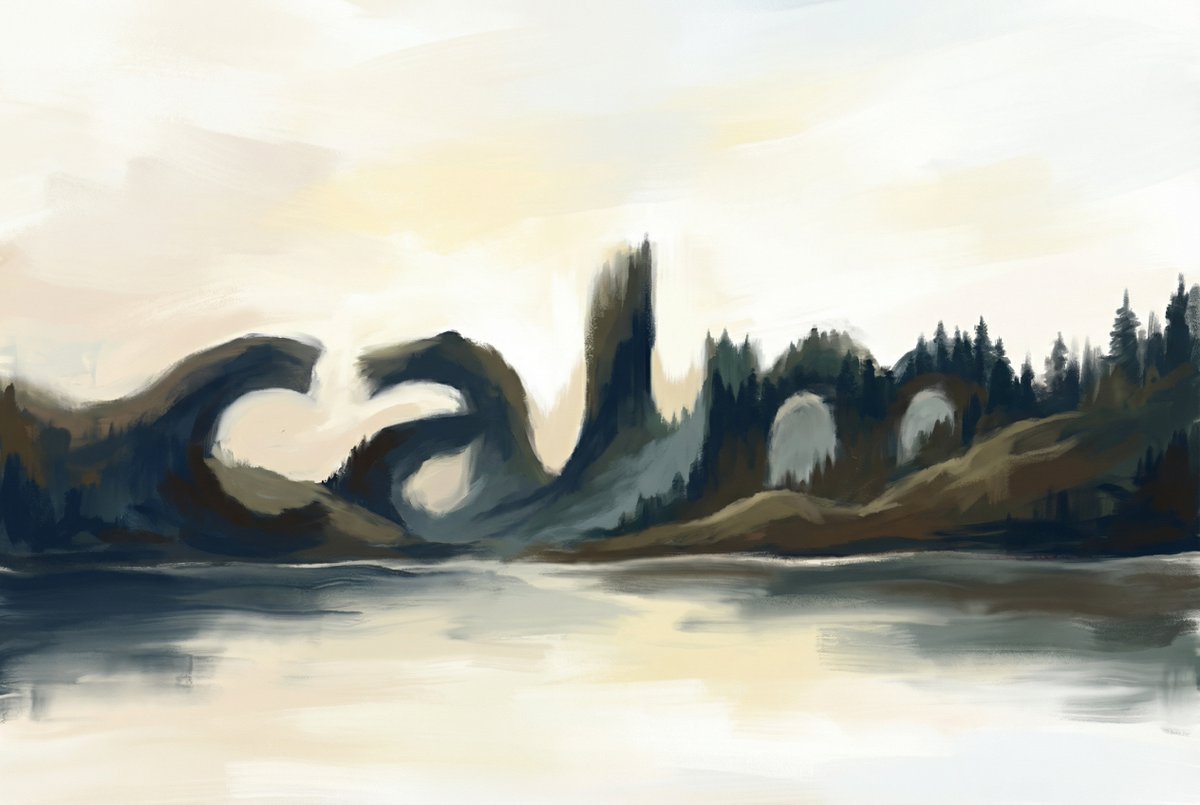
One version silhouettes the word against a glowing sky with its mirror reflection in water; another sculpts the letters out of rolling green hills and a winding river. Calm landscape prompt This is a powerful trick for subtle typography in covers, posters, and title cards—legible when you look, but not screaming "text overlay" the way traditional compositing does.
🎬 Shot pipelines: Veo cuts, Grok clips, Kling/Pollo moves
Non‑NB Pro video focus. Excludes the NB Pro feature and zeroes in on practical generation/edit techniques and consistency showcases across Veo 3.1, Grok Imagine, PixVerse, Kling, and Pollo 2.0.
Kling 2.5 Turbo spans pixel‑art games and TV‑style commercials
Kling 2.5 Turbo is being stretched in two very different directions: tight, readable pixel‑art game loops and straight‑ahead commercial spots. Following earlier clips that showed clean dance moves from a single reference frame dance moves, creators now have Bowser Jr. climbing a retro platformer stage with stable, frame‑to‑frame motion bowser jr pixel climb, plus a Japanese "sell your house" TV ad that uses Kling for the polished, narrative VFX layer while image models handle the static shots real estate cm.
The point is that Kling doesn’t seem locked to one aesthetic: the same engine can keep tiny sprite motions legible in a faux‑SNES game, then switch to cinematic camera moves and product‑driven pacing in a commercial. For indie game devs, that suggests a path to prototype side‑scroller cutscenes or promo footage; for marketers, it shows that AI video can already hit familiar TV language (establishing shots, character beats, end card) without feeling like a glitchy filter.
Veo 3.1 “Instant Cut” trick for clean mid‑scene reveals
Creators are using Veo 3.1’s "Instant Cut" option to force a hard cut just before the final frame, letting them reveal new objects or characters without mushy morphing between states. One workflow builds the first and last frames in Nano Banana Pro, then tells Veo 3.1 to jump straight from the old scene to the new one at the end of the shot for a crisp, film‑like transition rather than an interpolation blur veo instant cut tip.
For AI filmmakers and editors, this behaves like a manual edit point inside the generator: you can stage a reveal (new prop, costume, or character entrance) in the last frame, and Veo will play the motion up to that jump rather than trying to smoothly morph between incompatible layouts. Paired with earlier storyboard‑driven Veo 3.1 workflows for animating still frames veo combo shower, this makes the model more useful as part of a traditional editing pipeline, where you treat generations as shots you can time, cut, and assemble rather than one opaque clip.
Grok Imagine leans into retro anime, cosmic visuals, and music shots
Grok Imagine is showing range as a style‑driven video tool, with creators pushing it from neon, neo‑retro anime portraits to cosmic energy figures and music‑centric visuals. Building on earlier cinematic experiments lotr tribute that framed it as a shot design engine, today’s clips show it handling expressive character motion, abstract "we are energy in the cosmos" sequences, and piano‑focused cuts that play well with soundtrack timing retro anime demo cosmic clip piano visuals.
For storytellers, the key is that Grok Imagine appears comfortable staying in a strong, cohesive style over a whole 6–8 second beat: the Vampire Lord and Cottage Witch short keeps its 1980s OVA anime look across character acting and cosmic transitions without obvious model "style drift" vampire cottage short. Musicians can also mine it for loopable, high‑impact visuals that feel more like hand‑designed motion graphics than generic stock, especially in genres that suit bold color palettes and simple camera moves.
Pollo 2.0 effect templates power DIY champagne, perfume, and holiday spots
Pollo AI’s 2.0 model is surfacing as an "effects layer" for small teams who want ad‑like polish without building full pipelines. Creators are using its free, time‑limited templates to drop themselves into champagne service scenes and have branded bottles glide into frame, complete with text overlays champagne effect demo, and to produce perfume‑style product shots that mimic high‑end Western commercials, including macro glass highlights and English supers perfume cm spot.
Beyond those, there’s a wave of Pollo 2.0 holiday effects—Christmas entrances, 3D display illusions, winter fantasy shots, and even mushroom‑trampoline gags—where users only swap in their own photo and a few prompt tweaks christmas video effect pink sea elf demo. For AI creatives, Pollo sits closer to a motion‑graphics preset library than a raw model: you pick an effect, feed it your subject, and get back something structurally similar to a real campaign spot, which is ideal when you need templated but still eye‑catching video on a budget pollo ai site.
PixVerse V5 praised for rock‑solid character consistency in shorts
PixVerse V5 is getting called out for keeping characters on‑model across full clips, with one creator describing a new test as having "no misses" in terms of look and continuity v5 consistency praise. That feedback sits next to a lighthearted PixVerse piece where a banana character passes a cat’s passport inspection before celebrating, all rendered as a cohesive mini‑story banana passport skit.
For video makers, that consistency matters: it means you can design a mascot or avatar and expect it to stay recognizable as it moves through a scene, not subtly change face, outfit, or proportions between frames. The banana‑and‑cop skit also shows how PixVerse’s image and video tools can work together—design a cast in stills, then animate them into tight, meme‑length stories that are short enough for social but structured enough to feel like a real gag.
🎨 Reusable looks: MJ comic ink and glowing contours
Style recipes for image makers, focused on Midjourney. Excludes NB Pro feature; today’s set leans on a modern comic sref and a corrected glow‑contours pack, plus an MJ V7 anime grid recipe.
Glowing‑contours sref 3394984291 nails neon trails and light‑ring portraits
Creators are standardizing on Midjourney --sref 3394984291 as the "glowing contours" pack, turning simple prompts into high-impact images filled with light trails, orbiting rings, and gem‑like reflections prompt share.

Examples range from long‑exposure cityscapes and warp‑speed starships to portraits where a spinning light halo wraps a subject’s face or rhinestone mask, all sharing the same crisp highlights and motion‑blur streaks glow examples. A follow‑up correction adds an alternate --sref 3748514131 for adjacent looks corrected sref, and more tests show it also works for minimal glowing silhouettes in natural scenes, which makes this sref especially reusable for music covers, title cards, and motion‑design storyboards neon silhouette test forest outline test.
Midjourney sref 4060460422 delivers hand‑inked modern comic look
A new Midjourney style reference --sref 4060460422 is circulating as a go‑to for modern American comic art with pulp‑fantasy vibes, combining thick black inks, hyper‑detailed rendering, and dramatic rim lighting that still feels "hand‑inked" even though it’s digital style overview.

For illustrators and cover artists, this sref gives you consistent, print-ready faces and costumes with strong shadows, specular highlights on metal and jewelry, and a clear foreground–background separation, so you can reuse it across character sheets, key art, and faux comic covers without wrestling prompt spaghetti each time style overview.
MJ V7 anime grid recipe with sref 4030575206 and high style weight
A shared Midjourney V7 recipe shows how to get cohesive anime character sheets using --sref 4030575206 plus strong style weighting: -chaos 22 --ar 3:4 --exp 15 --sw 500 --stylize 500 anime grid recipe.

The posted 8‑image grid includes hero shots, duos, and full‑body trios that all match in line quality, palette, and facial design, which is exactly what character designers and storyboarders need when mocking up casts or key scenes from a single prompt alternate grid. This makes V7 feel less like a random sampler and more like a controllable "house style" you can dial in for manga covers, key art, or episodic pitches.
🛠️ Boards-to-cut: practical ad pipelines and auto-editing
Quieter on launches; stronger on workflow anatomy. Excludes the NB Pro feature and highlights Firefly Boards pre‑viz into edits plus Pictory’s automated script/URL/PPT→video flows.
Firefly Boards used to pre‑viz and cut a full Porsche spec ad
Designer @heydin_ai walks through a full Porsche 718 Cayman spec ad built almost entirely inside Adobe Firefly, using Boards to go from two stills to a finished spot. porsche overview Firefly Boards first serves as a visual brain dump: starting with front and rear photos of the car, he explores mood, color, and angle options before locking a direction. base images post Once the look is set, he turns the Boards explorations into a storyboard, blocking out key shots and transitions so the later video generation has a clear narrative arc. storyboard post Those frames then drive Firefly’s generative video, which outputs multiple candidate shots that he sequences and trims in a final editing pass. video gen post The whole flow—Boards → storyboard → gen‑video → manual polish—shows Firefly acting less like a one‑click effect and more like a proper pre‑viz and edit hub for spec ads, backed by Adobe’s broader creative stack. editing breakdown For creatives, the takeaway is that you can treat Boards as your pitch deck, shot list, and rough cut in one place, then hand off to Premiere or other tools as needed. firefly page
Pictory leans into script‑to‑video automation with 50% off BFCM deal
Pictory is marketing itself as a “full‑time AI editing assistant” and tying that pitch to a Black Friday / Cyber Monday offer of up to 50% off annual plans plus extra AI credits. pricing promo Following bfcm deal where it stacked 6 free months and a gear pack on some tiers, today’s push focuses on what the tool actually automates for solo creators and small teams.
At the workflow level, Pictory takes long‑form inputs—blog posts, webinars, audio, PPT decks or raw scripts—and auto‑cuts them into short, captioned social videos with stock visuals, background music and brand styling baked in. assistant pitch It can also turn URLs into videos, summarize long footage into highlight reels, and record the screen while auto‑cleaning silences and filler words, aiming to remove most of the tedious assembly passes. pictory home The refreshed pricing page shows Starter and Professional plans discounted by up to half (for annual billing) and adds 2,400 bonus AI credits across tiers, which matters if you’re planning to run a lot of auto‑cuts from webinars and course content. pricing page For AI‑savvy editors, this positions Pictory less as a creative canvas and more as a batch‑processing backend: you still pick story beats and brand voice, but the tool handles chopping, captioning, and packaging so you can stay focused on what to say rather than how to cut it.
🧠 Next‑event video and model watch
Broader R&D signals for creatives. Excludes NB Pro feature; today brings an autoregressive video model with speed gains, a geo‑reasoning demo, and frontier model release chatter.
InfinityStar autoregressive video model hits 83.74 VBench and ~10× speedup
FoundationVision’s new InfinityStar framework treats video like language, generating 5‑second 720p clips in about 58 seconds while scoring 83.74 on VBench, slightly ahead of HunyuanVideo’s 83.24 and roughly 10× faster than diffusion baselines for similar quality. InfinityStar summary It’s a single MIT‑licensed model that covers text‑to‑image, text‑to‑video, image‑to‑video, and video continuation with released code, training workflows, and checkpoints, which makes it directly usable for indie tools and studio pipelines rather than just a paper demo. InfinityStar link
For creatives, the big shift is iteration cost: an autoregressive engine you can fine‑tune or wrap in your own UI means near‑real‑time previs, animatics, and short social clips are more viable on modest hardware, and it gives a concrete proof point that video doesn’t have to be diffusion‑only going forward. GitHub repo
Epoch “Claude Kayak” entry sparks Claude Opus 4.5 expectations vs Gemini 3
An entry labelled "Claude Kayak" from Anthropic appears in Epoch AI’s public model database with a 2025‑11‑24 publication date and "Language" domain, which many read as an early signal of a Claude Opus 4.5‑class release landing imminently. Claude Kayak Epoch table In parallel, creators are already speculating whether this next Claude will outperform Gemini 3.0 Pro on creative and reasoning benchmarks, with threads explicitly wondering "if it will beat Gemini 3.0 Pro" and treating the launch as the next big check‑in on model rankings. Claude vs Gemini speculation
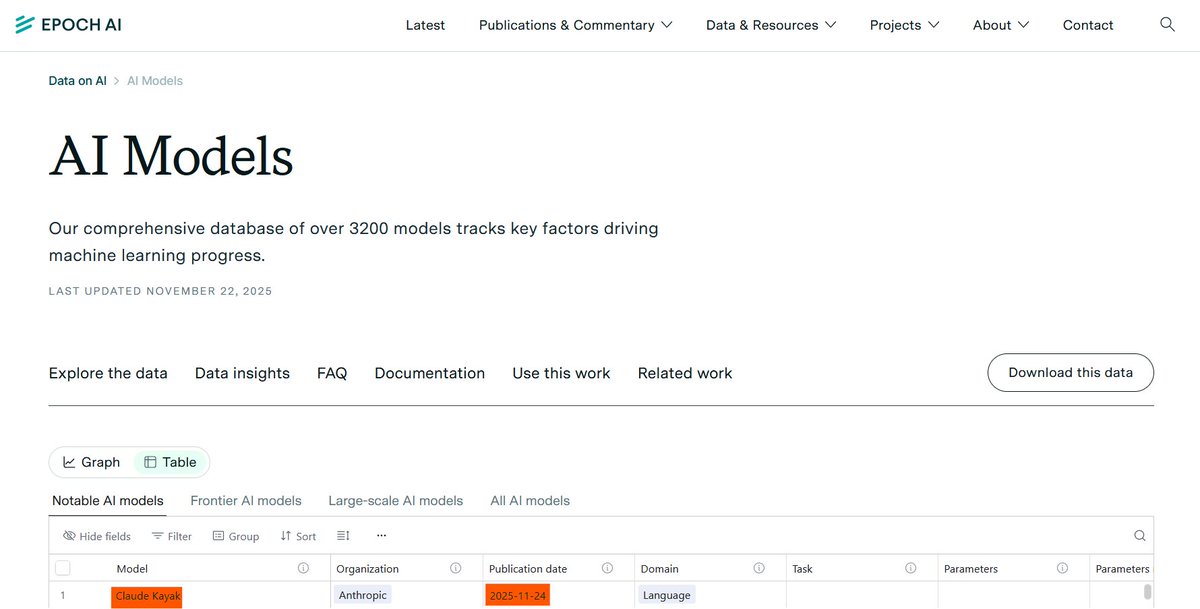
For writers, designers, and filmmakers who lean on Claude for structure and dialogue while using Gemini for vision and planning, this sets up a concrete "wait and benchmark" moment: the next Opus tier will likely be judged on how well it handles longform story planning, script doctoring, and style‑consistent worldbuilding compared with current Gemini 3 workflows.
GeoVista demos web-augmented, agentic visual geolocalization for scenes
GeoVista is shown as a web‑augmented visual reasoning tool that takes an image plus a natural‑language query, then uses an agent to reason over maps and web data to guess where the scene is in the world. GeoVista demo The interface pairs an interactive map with the current best guess and supporting imagery, hinting at use cases like scouting locations from mood frames, checking continuity against real cities, or generating grounded establishing shots.
For filmmakers and visual storytellers, this sort of geo‑reasoning is a step toward agents that can propose plausible real‑world settings given a storyboard panel, or verify whether a background plate actually matches the script’s stated place and era.
💼 Business of making: film pipelines and virtual influencers
Industry adoption and monetization signals. Excludes NB Pro feature; today covers Indonesia’s AI‑assisted film surge and an AI influencer platform pitching revenue‑first templates.
Indonesia’s fast-growing film market leans on AI to hit Hollywood quality on local budgets
Indonesia’s film industry is aggressively adopting generative AI across scripting, concept art, VFX and full scenes to stretch limited budgets, with 2023 local box office topping $400M and about 40,000 people working in film and animation as of 2020 Indonesia AI film.

Studios report concrete efficiency gains: some VFX tasks are cut by around 70% in edit time, and first-draft scripts that took hours now appear in minutes, using tools like Sora 2, Runway, Midjourney, Veo, and ChatGPT as an invisible layer in the pipeline rather than a single magic tool Indonesia AI film. The Bali AI International Film Festival went from 25 submissions in its first edition to 86 in the second, which is a strong signal that both local and international filmmakers are experimenting with AI-first production in this market Indonesia AI film.
For creatives and producers, the piece underlines a few trade-offs. AI lets smaller Indonesian studios attempt large-scale action and genre work—like Wokcop’s ambitious sequences—without Hollywood budgets, while VFX shops such as Visualizm still hand-correct AI shots for realism, instead of shipping raw generations Indonesia AI film. But there is open concern about “soulless” AI imagery, unauthorized likeness/voice use, and job losses for roles like storyboard artists, roto, and junior VFX staff. The article also ties this to wider trends, citing Hollywood’s own AI use in Secret Invasion, The Eternaut, and the upcoming $30M AI-heavy feature Critterz scheduled for May 2026, framing Indonesia as a preview of how mid-budget industries worldwide might lean on AI to stay competitive Indonesia AI film.
For working filmmakers, the message is clear: AI is already baked into real productions in a measurable way, especially in fast-growing, cost-sensitive markets. That suggests two paths: learn how to direct and constrain these tools so you stay in the loop for story, taste, and client communication, or risk being on the side of the pipeline that gets automated away as “assist” tools mature.
Apob pitches revenue-first templates for hyper-real AI virtual influencers
Apob is marketing itself as an AI filmmaking and influencer studio where users spin up hyper-realistic AI faces that can supposedly earn real money as virtual influencers, with the company calling this the “monetization of pixels” and saying the barrier to entry has dropped to zero Apob announcement.
The promo clip shows a generic stock-photo model morph into a highly stylized, photoreal AI woman while on-screen text claims “This is how you make money now”, and the CTA pushes creators toward templates for brand deals, content posts, and audience-building without a human in front of the camera Apob announcement. The linked page frames Apob as a way to design virtual personas that can host campaigns, appear in ads, or front social channels for a fraction of the cost of traditional influencer deals, effectively turning high-quality AI character design into a business asset rather than just portfolio art Apob landing.
For designers, filmmakers, and marketers, this sits at the intersection of character creation, motion pipelines, and business models. If platforms like this get traction, brands can test entire rosters of virtual ambassadors with A/B-tested looks, scripts, and posting schedules before they ever talk to a human creator. At the same time, it raises questions for human influencers and performers about competition, disclosure, and rights—who owns the likeness, who signs contracts, and how transparent campaigns need to be when the “face” is synthetic. Creatively, it also hints at a new niche: people who specialize in art-directing, animating, and managing these virtual talents as a service for brands that want the reach of influencers without the unpredictability of real humans.
🎵 AI music videos and cover experiments
A lighter day but useful for music storytellers: community contests and genre‑swap covers with full clip links. Excludes NB Pro feature.
Seven-song AI covers thread showcases genre-bent classics with full clips
Techhalla shared a thread of seven AI-generated cover songs where rock and metal tracks are reimagined in styles like flamenco, rumba, swing, and soul, ending on a Rosalía “Berghain” soul cover with a full music video clip.
Each entry links to a complete video, giving producers and storytellers concrete examples of style-transfer in music—how vocal tone, arrangement, and visual identity can all shift while the underlying song remains recognizable. covers thread
Producer AI crowns ShyAI in community music video challenge
Producer AI ran a community challenge to build full music videos from the same reference image, and has now announced ShyAI as the winner with a highlight reel of the best entries.
For AI musicians and video directors this is a good reference for how far you can push narrative, pacing, and visual style when everyone starts from identical source material, and how polished these workflows already look in a contest setting. challenge details
💬 Creator sentiment: promos, partners, and invisibility of AI
Discourse itself is the news. Excludes NB Pro feature; today creators push back on aggressive CPP promos and argue audiences won’t notice AI in films if the story lands.
Creators describe aggressive AI CPP promos and single out Freepik as the exception
A long post from an AI news creator lays out how brand and "creator partnership" promos around AI tools have become more aggressive while pay stays low, with the author making only $2–3k a year from X despite a sizable following and regular work cpp rant thread. He says many CPPs now DM demanding multiple posts for little or no money, often pushing sexualized or misleading marketing, and he’s choosing to ignore most of them while praising Freepik as the one partner that neither pressures usage nor threatens removal for low activity.
For AI artists and educators, this is a useful sanity check on the current sponsorship market: older, established tools that treat partnerships as genuinely optional are earning public loyalty, while newer startups get called out for desperation and "junk promotions" cpp rant thread. It also underlines a practical point for anyone trying to work with creators around AI—clear pay, low-pressure expectations, and alignment with the creator’s actual content niche matter more than flashy affiliate promises.
Filmmakers say audiences won’t care where AI is used if the story works
AI‑curious filmmakers are leaning into a story‑first mindset, arguing that debates over AI tools will fade once viewers are engrossed in the end product. One creator predicts that soon "you will be too busy watching your favorite movie not realizing how or where AI was used" ai film comment, while another, reflecting on film‑school friends, says that if the story lands, most people care as little about AI as they do about green screens or motion capture and closes with a simple directive: "Tell the story" storytelling thread.
Following director sentiment where Ron Howard and Brian Grazer framed AI as a helper behind the camera, this pushes the same idea down to everyday creators: audiences judge plot, emotion, and pacing far more than whether a background plate came from a model or a location shoot. For AI filmmakers, that’s both permission and pressure—permission to use whatever tools help you finish, and pressure to stop obsessing over toolchain drama and invest that time in writing, editing, and performance instead.