
Nano Banana Pro hits 12 creator platforms – 65% off unlimited 4K

Stay in the loop
Free daily newsletter & Telegram daily report
Executive Summary
Nano Banana Pro went from “new model” to default image engine almost overnight, landing in at least 12 creator tools with aggressive fixed‑cost deals. Higgsfield is dangling 12 months of unlimited 4K at 65% off if you join a 3‑day window, while Freepik and Lovart are running unlimited 1K–2K and 4K sprints for a week and a weekend respectively. Following Tuesday’s identity‑lock win with Nano Banana 2, the Gemini‑3‑based Pro upgrade is clearly aimed at real campaigns, not novelty posts.
The more interesting story is where it’s hiding: inside stacks you already use. Adobe quietly wired Pro into Firefly and desktop Photoshop with unlimited runs until Dec 1, ElevenLabs folded it into its Image & Video tab with a 22% plan discount, and Leonardo is using Gemini 3’s reasoning plus Google Search to spit out accurate infographics and dashboards. On the infra side, Replicate, fal, Runware (around $0.134 per image at 1K–4K), OpenArt, Hedra, and Flowith all turned on Pro endpoints, so swapping it into an existing API pipeline is basically a config change.
Meanwhile, Tencent open‑sourced HunyuanVideo 1.5, an 8.3B‑parameter text‑to‑video model that runs 5–10s clips on 14GB GPUs—handy if you’d like your previs budget to survive Q1.
Feature Spotlight
Nano Banana Pro goes platform‑wide
Nano Banana Pro lands across top platforms with 4K, precise edits, clean text, and consistency—plus aggressive promos (unlimited on Higgsfield, Freepik week, Firefly/PS access). A new baseline for design and film workflows.
Today’s dominant story: Gemini‑powered Nano Banana Pro spreads across major creator platforms with 4K, precise edits, multi‑image blending, clean multilingual text, and rock‑solid character consistency. Heavy launch promos target creatives.
Jump to Nano Banana Pro goes platform‑wide topicsTable of Contents
🍌 Nano Banana Pro goes platform‑wide
Today’s dominant story: Gemini‑powered Nano Banana Pro spreads across major creator platforms with 4K, precise edits, multi‑image blending, clean multilingual text, and rock‑solid character consistency. Heavy launch promos target creatives.
Adobe bakes Gemini 3 / Nano Banana Pro into Firefly and Photoshop
Adobe has quietly wired Gemini 3 Pro Image (Nano Banana Pro) into Firefly Text‑to‑Image, Firefly Boards, and Generative Fill in the desktop Photoshop app, and is letting Creative Cloud Pro and paid Firefly users hammer it with unlimited generations until December 1. In practice that means: you can now generate and iteratively edit references, moodboards, storyboard frames and UI mocks inside Firefly, then jump straight into Photoshop and use the same model for on‑canvas generative fills and localized edits with proper layer support. Compared to earlier Firefly models, users are reporting much cleaner typography (even in non‑Latin scripts), better aspect‑ratio control and fewer weird seams when dropping AI patches into photographed plates. If your studio is already on Adobe, this may save you a whole round‑trip out to separate AI tools for concepting, then back into Photoshop for comping and cleanup. adobe firefly brief
Freepik makes Nano Banana Pro unlimited in 1K/2K for one week
Freepik has switched its AI image stack over to Nano Banana Pro and is running a one‑week window where Premium+ and annual Pro users can generate unlimited 1K and 2K images, with 4K still gated behind credits. For creatives working in Freepik Spaces or the Image Generator, that means you can design posters, thumbnails, character sheets and layouts at production resolutions without watching a meter, then only pay credits when you need final 4K exports or print‑grade assets. They’ve also shipped 20+ ready‑made Spaces built on Nano Banana Pro (expression edits, infographic layouts, character generators, sketch→scene), which you can duplicate and customize instead of writing prompts from scratch. If your pipeline already lives in Freepik—social kits, slide decks, lightweight ad concepts—this is a low‑friction way to kick the tires on Pro‑level text rendering and consistency before deciding whether to move more serious work over. freepik rollout
fal rolls out Nano Banana Pro text-to-image and edit endpoints plus coupon
Inference host fal.ai launched two Nano Banana Pro endpoints—one for text‑to‑image, one for image editing—with straightforward per‑image pricing and a promo code (NANOBANANAPRO2) that gives new users $5 in credits. The text endpoint lets you hit Pro from their Playground or API with a single JSON payload, while the edit variant accepts a source image and an edit prompt, handling regional edits and multi‑image reference internally. For developers building creative tools—web banners, cover art, storyboard generators—this slots Nano Banana Pro into the same infra you might already use for Flux or SDXL, so you can compare output and latency model‑by‑model. The coupon window is also an easy excuse to stress‑test edits on real client plates before committing. fal model page
Replicate hosts google/nano-banana-pro for instant Playground and API use
Replicate has added Google’s official google/nano-banana-pro model, so you can call Nano Banana Pro from their web Playground, Python SDK, or plain HTTP without touching Google Cloud. For individual artists and small tools teams, this is handy if you want to prototype UI mockups, infographics or style‑transfer workflows around Nano Banana Pro, but don’t want to learn Vertex AI or manage your own quota. The model card emphasizes both text‑to‑image and edit‑in‑place use cases, including multi‑image conditioning and multilingual type, which is attractive if you’re building internal tools for marketing or education. If you’re already using Replicate for other models, this turns Nano Banana Pro into a drop‑in option you can A/B against your current image stack. replicate launch
Runware adds Nano Banana Pro as a layout-savvy design assistant
Runware’s Google models page now includes Nano Banana Pro with 1K–4K generation and a quoted starting cost around $0.134 per image, pitched specifically as a "design assistant" for infographics, slides, dashboards and product visuals. Their framing is that Nano Banana Pro’s reasoning over layout and text lets it treat a prompt like "explain transformers" or "summarize this launch" as an art‑directed canvas rather than a single illustration, which matters if you’re auto‑generating report covers, marketing one‑pagers or data‑heavy social posts. Because Runware already exposes multiple image models behind a consistent API, creative teams can plug Pro into existing pipelines and route certain prompt types (long‑form explainer, UI‑like compositions) to it selectively. For anyone running a custom creative backend, this is another serious host option alongside Vertex and Replicate. runware announcement
ElevenLabs Image & Video adds Nano Banana Pro with 22% off
Voice‑focused ElevenLabs has quietly upgraded its Image & Video tab to use Nano Banana Pro for visual generation and editing, and is running a 22% discount on Starter–Scale plans until Monday. That means you can now storyboard, generate hero stills or light motion assets inside the same tool you already use for multilingual voices and sound design, with access to up to 4K frames. For solo creators and small studios, this simplifies the stack: do your visual ideation with Pro, then immediately layer narration or SFX using ElevenLabs’ audio models, all exportable from one place. The sale is a nudge to lock in if you were on the fence about bundling image and audio in a single subscription. elevenlabs rollout
Hedra wires Nano Banana Pro into image batches and branding workflows
Hedra has layered Nano Banana Pro into its image tooling as the default engine for brand‑safe, consistent outputs, and is highlighting three things for creators: high‑quality portraits with expression control, logo/branding overlays on arbitrary surfaces, and "batches" that let you generate up to eight variants at once. For people using Hedra to prototype campaigns or packaging, this means you can run entire sets—different models, poses or compositions—off a single brief and still keep typography and logos locked in across the batch. They’ve also been dangling free‑credit promos around Nano Banana Pro launches, so if you want to see how far you can push on‑brand iterations without manual Photoshop, Hedra is one of the more polished frontends on top of Pro.
Lovart offers free Nano Banana Pro weekend plus a year on Basic+
Lovart has turned on Nano Banana Pro as its primary image model and is running two stacked promos: a "Banana‑On‑Us" weekend (Nov 21–23) where everyone gets free unlimited Pro generations, and a "Banana 365" week (through Nov 30) where upgrading to a Basic+ plan unlocks a full year of unlimited Nano Banana Pro. For illustrators and designers experimenting with Lovart’s design‑agent workflow, this takes the brakes off; you can explore new visual directions, brand kits and layout ideas without worrying about credits for at least a weekend, and then keep that behavior going if you commit to Basic+. It’s one of the more generous Pro bundles if you want a lightweight, browser‑based companion to heavier tools like Photoshop. lovart promo
OpenArt brings Nano Banana Pro to its image creator with credit model
OpenArt is now advertising Nano Banana Pro support in its image creator UI, giving users another front‑end to Pro alongside SDXL‑style models and its existing Nano Banana 2 support. Their positioning is aimed squarely at AI artists and prompt designers: you can pick Nano Banana Pro from a model dropdown, feed it longer, layout‑heavy prompts, and get images tuned for mockups, posters and social assets, all under OpenArt’s usual credit system. For people used to browsing OpenArt’s model zoo and community gallery, this is a way to fold Pro into your existing workflow—favorites, prompt history, style references—without hopping over to Google’s own tools.
Flowith makes Nano Banana Pro free inside its workflow tool
Flowith, a smaller creative workflow platform, is advertising Nano Banana Pro access as free for its users, effectively bundling Pro‑grade image generation into its broader automation and workflow tooling at no extra line item. For filmmakers, marketers and content teams already using Flowith for pipelines, that means you can add Pro‑backed image steps—like moodboards, keyframes, or thumbnail exploration—directly into existing flows instead of bolting on a separate image service and auth. The move is less about raw scale and more about convenience: if your collaborators live inside Flowith, this turns complex visual prompts into another node in your process, paid for by the subscription you’re already on. flowith note
🎬 One‑take video: keyframes, rails, and flows
Shot design tools for filmmakers: Dreamina’s Multi‑Frames stitches 10 images with promptable transitions for ~54s sequences. This section focuses on controllable video flow (excludes the Nano Banana Pro rollout feature).
Dreamina Multi-Frames gets rich prompt recipes for 10‑frame one‑take videos
Dreamina creators are turning Multi-Frames from a raw keyframe feature into a practical cinematography tool, sharing full prompt breakdowns for 10‑frame, ~54‑second one‑take sequences that walk a character through eras from the Stone Age to a near‑future city.time travel demo Building on the original 10‑keyframe launch initial launch, Ashutosh walks through both per‑frame scene prompts and dedicated "movement" prompts between frames so the man keeps walking forward as the environment morphs (Stone Age → Egypt → Greece → Rome → medieval → Renaissance → industrial → early 20th century → modern → future), which is exactly the kind of recipe filmmakers needed to treat Multi-Frames like a camera path tool rather than a slideshow.prompt pack thread Dreamina is also showing shorter one‑takes like a single shot riding "rails" through a scenerail demo teaser and lighter examples such as a Doris Day inspired 10‑frame character sequence,doris day example so you can see how the same mechanics apply to music videos, fashion, or mood pieces—not only big history explainers.
Dreamina’s Banana Frame Challenge turns 4 stills into a one‑take sequence
Dreamina launched the #BananaFrameChallenge around Multi-Frames, asking people to reply with 4 Nano Banana Pro images that feel like moments from the same scene, then promising to stitch the most‑liked sets into a single cinematic one‑take.challenge announcement The team clarified what “visually connected” means—same character from different angles, a walk through a space, a creature evolving, or a day passing from sunrise to night—so entrants are effectively storyboarding a trackable camera move or transformation, which Multi-Frames will then animate between those four beats.what counts explainer For AI filmmakers this is a useful pattern: generate keyframes in your image model of choice, but design them as a continuous shot, and let a keyframe video tool handle the in‑between motion and timing.
🧩 HunyuanVideo 1.5: open video gen for everyone
Tencent’s HunyuanVideo 1.5 releases a lightweight, open model (8.3B params) that runs at consumer scale (~14GB VRAM) with 480/720p native and 1080p SR—useful for rapid previs and concept reels.
Tencent open-sources HunyuanVideo 1.5, an 8.3B video model that runs on 14GB GPUs
Tencent released HunyuanVideo 1.5, a lightweight 8.3B‑parameter text‑to‑video model that natively generates 5–10 second 480p/720p clips and can be upscaled to 1080p, while fitting on consumer‑grade GPUs with about 14GB of VRAM. The model, code, and demos are live on Hugging Face and GitHub, giving creators an open, production‑quality alternative for previs, concept reels, and stylized shots without renting large cloud rigs model launch hugging face release hugging face model hugging face model.
For filmmakers and designers, the appeal is the combination of motion coherence, cinematic framing, and hardware accessibility: you can prototype 5–10 second scenes locally, then pass them through the built‑in super‑resolution stack for 1080p delivery model launch. The official montage and Foley‑backed teaser show stable camera moves, consistent characters, and relatively clean temporal dynamics, signaling that open models are catching up fast to closed systems for storyboards, mood pieces, and blocking tests foley teaser. Because it is open and scriptable, teams can wire HunyuanVideo 1.5 into existing ComfyUI or custom Python pipelines for batch shot generation, experiment with prompt libraries, and fine‑tune or LoRA it for specific visual styles without license drama hugging face release.
🧠 Agentic helpers for creatives
Agent tools rolling out to plan, act, and build: Gemini Agent appears in Labs and desktop for Ultra (US), Comet browser lands on Android, and agent IDEs mature. Excludes the Nano Banana Pro feature.
Gemini Agent rolls out on desktop for Ultra users with inbox and booking flows
Google has started rolling out Gemini Agent on desktop for US-based Gemini Ultra subscribers, turning the chatbot into a task-running assistant that can read your inbox, prioritize mail, draft replies, and even research and help book things like rental cars while always asking for confirmation before it sends or buys anything Gemini Agent thread. At the same time, some users are seeing new Labs toggles for both "Visual layout" and "Agent" inside the Gemini web app, hinting that these workflow-style assistants and generative UI panels are about to become a first-class part of the everyday Gemini experience rather than a separate product Labs toggle screenshot.
Google’s Antigravity IDE enters public preview with multi‑agent coding flows
Google’s Antigravity IDE, built by the former Windsurf team, is now in public preview on macOS, Windows, and Linux, letting you orchestrate multiple agents across the editor, terminal, and a built-in browser so they can implement features, run tests, and inspect web output while you supervise Antigravity IDE clip. Following up on agentic IDE demos, the new build can route work across Gemini 3 Pro, Claude 4.5 Sonnet, and GPT‑OSS, includes an Agent Manager to oversee workflows, and offers unlimited tab completions and command requests with generous rate limits—making it one of the first serious, agent‑first environments for day‑to‑day coding rather than toy demos.
BeatBandit’s Trailer Wizard agent builds shot lists for Sora‑style movie trailers
BeatBandit introduced a "Trailer Wizard" that reads a story you’ve written in its system, then auto‑generates a trailer concept: it proposes a trailer style (like “Blockbuster Action”), writes a script, and outputs a detailed shot list you can paste straight into a video model such as Sora 2
. In a live example, the creator built a beaver‑woman action trailer script and visuals in about 15 minutes, showing how filmmakers and showrunners can move from logline to trailer boards without manually storyboarding every beat Trailer type followup.
ChatGPT rolls out group chats so teams can co‑work with models
OpenAI has begun rolling out Group chats inside ChatGPT to all signed‑in users, letting multiple people share a conversation thread with the model and each other in a Slack‑like interface
. For creative teams, that turns ChatGPT from a solo assistant into a shared room where writers, designers, and producers can brainstorm, iterate on scripts, and keep model context synchronized instead of passing around pasted prompts and screenshots.
Perplexity’s Comet AI browser quietly appears on Android phones
Perplexity’s new Comet browser, designed as an AI‑native way to browse and search, has started showing up on Android with an onboarding flow that pitches it as “the browser that works for you,” suggesting deep integration between search, reading, and agent actions Comet onboarding screen. For creatives, that means a single mobile surface where you can research, summarize, and possibly script content directly in the browser instead of constantly alt‑tabbing between a standard browser and an AI chat app Comet Android promo.
Cursor’s Gemini 3 Pro integration earns praise over Antigravity’s implementation
Developer Matt Shumer reports that Cursor’s implementation of Gemini 3 Pro feels markedly more stable and focused than Google’s own Antigravity IDE, with fewer retries and better on‑track behavior during a real backend build Cursor stability comment. For builders choosing an agentic coding environment, that’s an early signal that third‑party IDEs like Cursor may currently offer a smoother Gemini‑powered workflow than Google’s first‑party tool, despite Antigravity’s richer browser and terminal integration.
Genspark pitches itself as an all‑in‑one AI workspace and agent hub
Genspark is being framed as an "AI workspace" that actually does work for you: one subscription gives access to top models plus agents that manage email, summarize threads, draft replies, turn inboxes into slide decks, and even generate Veo 3.1 JSON prompts or Thanksgiving posters from a single request
. For content and video teams, the appeal is that slides, docs, sheets, design, and video editing all live in shared projects where teammates can co‑edit while the agents keep handling repetitive tasks like research, structuring, and asset generation in the background Genspark feature thread.
🎨 Reusable aesthetics: Style Creator and packs
Style systems for consistent looks: Midjourney debuts an early Style Creator for wordless aesthetic exploration; creators share prompt packs like hand‑cut paper and xerographic animation for repeatable output.
Midjourney ships early Style Creator so you can define looks without words
Midjourney quietly turned on an early “Style Creator” in Labs, letting you explore and lock in visual aesthetics by mixing abstract swatches instead of writing prompts, so you can save and reuse those looks across generations.Style Creator announcement
For AI artists and directors this is a big shift from one‑off --sref codes to a more visual, wordless style system: you browse a grid of evolving color/texture tiles, click to refine into a custom aesthetic, then apply that style to new prompts for consistent output. Following up on paper style, which showed single‑code recipes like “paper sculpture,” this tool moves style control into the UI so you can iterate looks collaboratively (clients, teammates) without arguing over prompt phrasing, and it hints at a future where Midjourney becomes more like a style library than a raw prompt box.
Hand‑cut paper prompt pack nails layered paper diorama look
Creator azed_ai published a reusable prompt template for a “hand‑cut paper” look—layered, shadow‑box style scenes with clear subject, dual‑tone color layers, and soft directional lighting—so you can drop in any subject and get the same tactile aesthetic every time.Hand-cut paper prompt
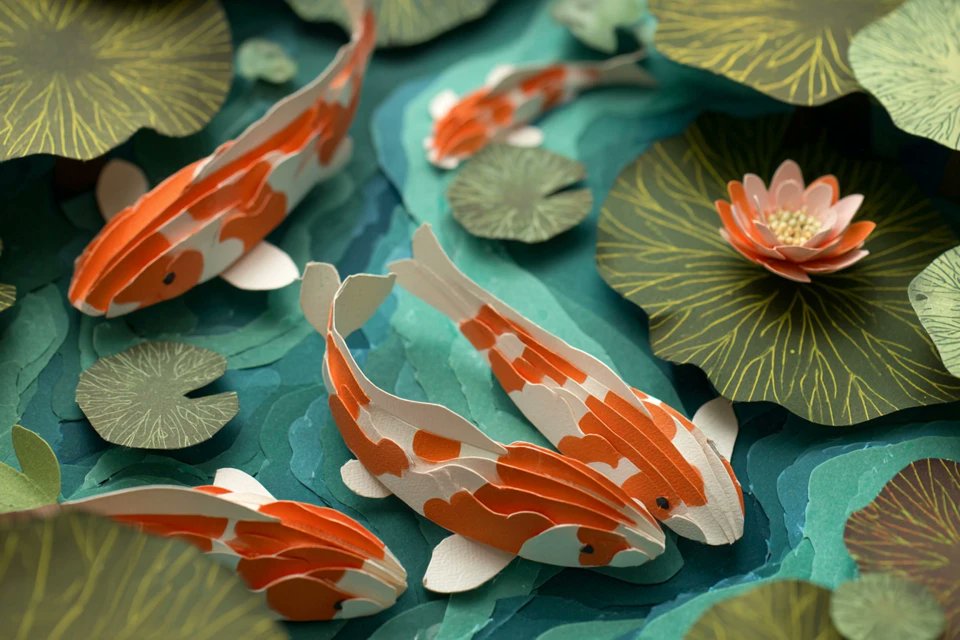
The shared prompt uses slots like [subject], [color1], and [color2] plus aspect ratio and version flags (for example --ar 3:2 --v 7) to standardize things like depth, folds, and lighting, and comes with four example renders (koi pond, fox in forest, astronaut in space, balloon over paper hills) that show how consistent the style stays as you swap subjects.Prompt pack reshare For illustrators, motion designers, or children’s media teams, this is effectively a free “paper craft” style pack you can adopt as a house look across storyboards, covers, and light animation.
Xerographic 60s/70s animation look captured in a single MJ style ref
Artedeingenio shared a Midjourney V7 style reference (--sref 2461064987) that reproduces the classic late‑60s/70s xerographic animation vibe—rough ink lines, flat colors, and that slightly gritty cel feel—so you can hit the same retro look on demand.Xerographic style thread

The pack includes four examples (a regal woman, a mustachioed writer at a desk, a city dog on a balcony, and an expressive rabbit) that all share the same line quality and color handling, showing that the sref generalizes across characters and scenes. For anyone doing nostalgic title sequences, faux‑vintage cartoons, or music videos, this gives you a one‑code way to keep every frame in the same era without hand‑tuning prompts for each shot.
✂️ Text‑driven segmentation & tracking for post
Production utilities for editors/VFX: SAM 3 arrives with text prompts, exhaustive instance detection, and video tracking; fal exposes SAM 3 image+video endpoints. Excludes the Nano Banana Pro feature.
Meta releases SAM 3 with text-driven segmentation and video tracking
Meta released Segment Anything Model 3 (SAM 3), a new vision model that can segment and track objects in images and videos from natural‑language prompts (e.g. “all red cars”), point/box prompts, or existing masks, and is trained over 4M annotated concepts covering ~270,000 distinct categories—more than 50× previous benchmarks. SAM 3 supports exhaustive instance detection (it finds every matching object, not just one region), and extends this to video by tracking text‑specified objects across frames, which is exactly what roto, cleanup, and compositing teams have been hand‑doing shot by shot Sam 3 overview. Meta reports roughly 2× better performance on the new SA‑Co benchmark versus prior models and near real‑time throughput on H200s (≈30 ms per image with 100+ objects, and interactive video tracking for about five objects at once), making it usable inside editing and review loops rather than as an offline batch job Sam 3 overview. Code, weights, and the SA‑Co dataset are open on GitHub and the Segment Anything Playground, so tool builders can start wiring SAM 3 into NLE plugins, review tools, or custom pipelines today rather than waiting for a hosted product Sam 3 blog.
Fal adds SAM 3 image and video APIs with text prompts and low per-frame cost
Inference host fal.ai shipped production endpoints for Meta’s SAM 3, giving VFX and editing tools a ready‑made API for text‑driven segmentation on both stills and video, plus exemplar and bounding‑box prompting for finer control Fal Sam 3 launch. The image endpoint handles promptable segmentation on single frames, while the video endpoint tracks selected objects across clips; pricing on fal’s model cards starts around $0.005 per image or per 16 video frames (roughly $0.0003 per frame), which keeps full‑sequence tracking cheap enough for batch pre‑processing or automated roto passes Sam 3 image docs Sam 3 video docs. For AI editors and post tools that don’t want to self‑host GPUs, this means you can now add features like “remove every red car”, “track this logo across the shot”, or “isolate all people in blue jackets” with a single API call instead of maintaining your own segmentation stack Fal Sam 3 launch.

🔊 Sound, dubbing, and enterprise voice pipes
Audio for storytellers: Runway adds Audio Nodes (TTS, SFX, dubbing, isolation) to Workflows; ElevenLabs details enterprise rollouts and a 7.5M‑minute interview agent case study.
ElevenLabs rolls out Forward Deployed Engineers to ship production voice agents
ElevenLabs is formalizing its "Forward Deployed Engineers" program: specialist teams that embed with enterprises to scope, build, and launch voice agents tied to concrete KPIs like resolution time and containment rate. The pitch is: they don’t just sell APIs, they co-own system design, integration, scaling, change management, and compliance until the agent is stable in production. fde overview
These FDEs focus on deployments built on ElevenLabs Agents and infrastructure, handling hard pieces like routing into existing CRMs or contact centers, logging and audit trails, and safe escalation rules, which most internal teams underestimate. ElevenLabs stresses that each engagement is outcome-driven rather than open‑ended consulting, and positions this as the missing layer between great TTS models and actually handling millions of real customer calls. fde value pitch kpi focused framing fde program page
Runway adds Audio Nodes to Workflows for TTS, SFX, dubbing, and isolation
Runway has upgraded its Workflows system with four Audio Nodes—Text to Speech, Text to SFX, Voice Dubbing, and Voice Isolation—so you can now design full audio passes inside the same node graph you use for video. For editors and motion designers this means you can keep VO, sound design, language versions, and cleanup in a single, automatable pipeline instead of bouncing between DAWs and online tools. audio nodes thread
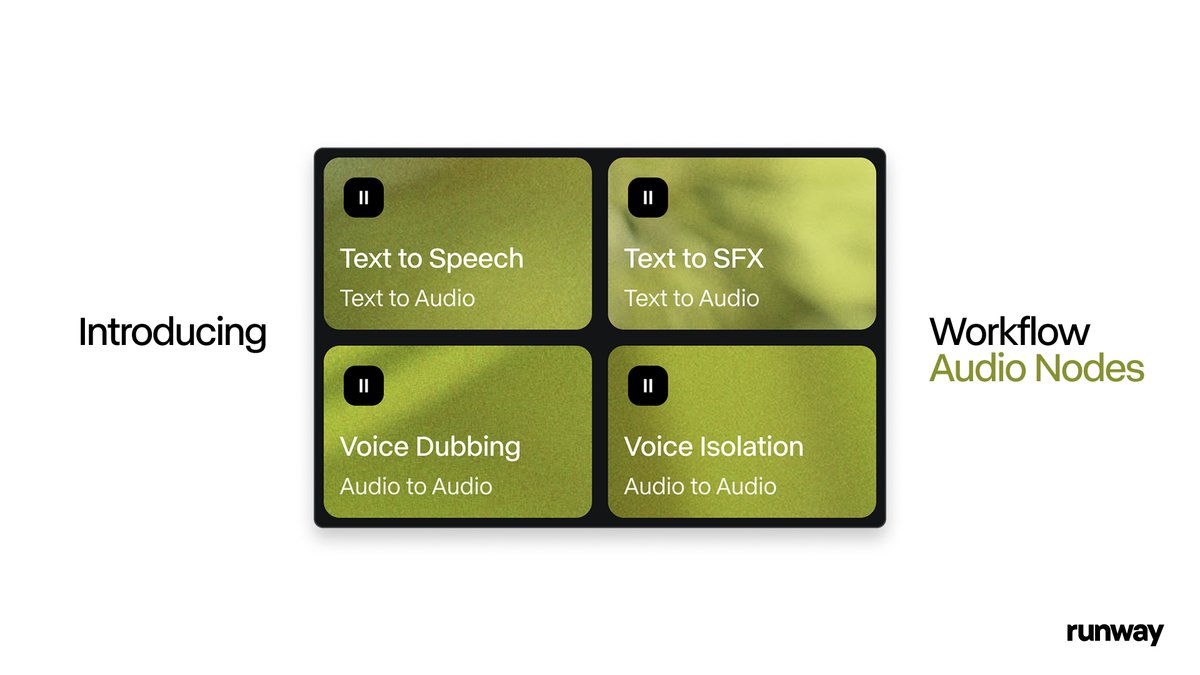
Workflows can now trigger narration from script, auto-generate sound effects from text descriptions, swap dialogue into new languages while keeping timing, and strip or isolate voices from noisy stems, all as reusable blocks you can wire up and version. That’s a big step toward treating sound as a first‑class part of templated video workflows rather than an afterthought tacked on in separate software. runway workflows
Apna runs 1.5M mock interviews and 7.5M voice minutes on ElevenLabs
Indian jobs platform apna has quietly scaled an AI interview coach to 1.5 million mock interviews, totaling 7.5 million minutes of spoken feedback, all voiced with ElevenLabs and orchestrated by partner Blue Machines. Latency sits around 150–180 ms per turn, which is fast enough that the conversation feels live rather than “botty,” important when you’re simulating high‑stakes interviews for 60M users. apna headline latency and stack
Under the hood, apna uses ASR + NLU to parse answers, a RAG‑style rubric graph tuned per role/company, and ElevenLabs voices to deliver nuanced feedback in English and Hindi with appropriate tone. This is a good reference architecture if you’re building coaching, training, or assessment products: it shows that long‑running, emotionally sensitive voice agents can run at scale without users bouncing off due to lag or uncanny delivery. apna case study
ElevenLabs expands to Korea with local team and media partners
ElevenLabs is opening a local presence in South Korea, bringing its voice AI and Agent Platform into one of the world’s most demanding, high‑connectivity media markets. A new Seoul‑based team will work with broadcasters and game studios including MBC, ESTsoft, Krafton, and SBS to localize voices and deploy real‑time, low‑latency agents for Korean audiences. korea launch thread
Korea’s near‑universal mobile access and strong 5G coverage make it a natural testbed for high‑frequency, high‑fidelity voice experiences—think interactive shows, game NPCs, and support bots that switch between Korean and English mid‑conversation. ElevenLabs frames this as a long‑term bet on Asia as a core market for voice AI, not just a translation add‑on for Western products. partner list agent platform note
📐 Template libraries for fast creative delivery
Freepik drops 20+ editable templates (expression edits, infographics, character generator, sketch→real scene) to speed creative workflows. Excludes the broader Nano Banana Pro rollout (covered as the feature).
Freepik drops 20+ editable Nano Banana Pro templates for faster production
Freepik has launched a library of 20+ Nano Banana Pro–powered templates in Spaces and the Image Generator, aimed at letting creators edit instead of prompt from scratch. Templates cover common production tasks like subtle or strong facial expression edits, infographic layouts, character turnarounds, and sketch→final-scene renders, all designed to be duplicated and customized for new projects Template launch thread Expression edit template Infographic template Character generator Sketch to scene template Templates explorer.
For creatives, this means you can start from a working layout—swap copy and data in infographics, tweak sliders to change a portrait’s mood, iterate character features while keeping pose and style locked, or feed line art into the sketch→scene template to get a production-ready render in one pass. Because these live inside Spaces, you can save house variants of each template for your studio (brand colors, type systems, aspect ratios) and hand them to teammates who don’t want to wrangle prompts but still need polished outputs on deadline.
🧪 Research to watch: video, texture, and agents
A compact set of papers relevant to creative AI: token‑routed multimodal diffusion, chaptering long video, seamless 3D‑aware textures, next‑event video generation, scaled spatial intelligence, and ideation diversity.
ARC‑Chapter structures hour‑long videos into chapters with a new GRACE metric
ARC‑Chapter from Tencent’s ARC Lab tackles hour‑long lectures and documentaries by training on over a million bilingual (EN/ZH) chapter annotations and generating both titles and hierarchical summaries for each segment. The team also proposes GRACE, a metric that scores many‑to‑one overlaps plus semantic similarity between predicted and human chapters, and reports around a 14‑point F1 boost over prior systems—useful if you cut longform video, podcasts, or streams and want AI to auto‑chapter rough cuts before you fine‑tune the pacing. paper page
Mixture of States routes tokens across modalities for stronger diffusion at 3–5B scale
The Mixture of States (MoS) framework introduces a token‑wise router that fuses text and image states inside diffusion models, letting relatively small 3–5B models match or beat far larger baselines on text‑to‑image and editing benchmarks with modest overhead. A learnable router sparsely selects top‑k hidden states per token using an ε‑greedy strategy, so the model can adapt which modality or layer to rely on as denoising progresses, which is especially relevant for layout‑heavy or typography‑sensitive generations where words must stay aligned to visuals. paper summary
SenseNova‑SI scales spatial intelligence for VLMs with an 8M‑example dataset
SenseNova‑SI adds a spatial‑intelligence layer on top of strong multimodal backbones (e.g., Qwen3‑VL, InternVL3, Bagel) and trains on SenseNova‑SI‑8M, a curated set of 8M spatial reasoning examples. The resulting model hits 68.7% on VSI‑Bench, 85.6% on MindCube and 50.1% on SITE while still scoring 84.9% on MMBench‑En, suggesting future creative tools will better understand layouts, camera geometry, object positions, and 3D relationships instead of treating scenes as flat images. paper link
Meta study finds ideation diversity key to strong AI research agents
A Meta FAIR paper on AI research agents shows that "ideation diversity"—how varied the agent’s thought trajectories are—robustly predicts performance on MLE‑bench, even when you control for model size and scaffold. By instrumenting and varying the diversity of generated ideas, they find agents that explore more distinct solution paths solve more tasks and generalize better, which matters if you’re building assistants to help with prompts, story beats, or design explorations rather than just spitting out one best guess. paper overview
NaTex turns latent color diffusion into seamless, geometry‑aware textures
NaTex reframes texture generation as "latent color diffusion" over dense 3D point clouds, pairing a geometry‑aware color VAE with a multi‑control diffusion transformer to paint assets directly in 3D rather than stitching multi‑view 2D renders. Because the model is trained end‑to‑end on 3D data with native geometry control, it produces seamless, UV‑aligned textures that wrap cleanly over complex meshes—promising for game art, props, and environment work where today you often hand‑fix seams or bake from multi‑view outputs. paper summary
Video‑as‑Answer uses Joint‑GRPO to train next‑event video predictors
The Video‑as‑Answer work recasts video QA as directly generating the next video event, then optimizes that generator via Joint‑GRPO reinforcement learning to better match ground‑truth futures. Instead of ranking canned options, the model imagines plausible next shots or outcomes and is rewarded when those generations align with actual footage, which is highly relevant to storyboarding and previs—your system can learn "what would likely happen next" in a shot rather than only labeling it. paper thread