
Nano Banana Pro extends 65% unlimited year – creators share 8–12 part playbooks

Stay in the loop
Free daily newsletter & Telegram daily report
Executive Summary
Nano Banana Pro’s promo arc keeps stretching. After last weekend’s “this thing is in every app” moment, Higgsfield quietly pushed its 65%‑off unlimited yearly plan to Nov 27 and kept dangling 200–300 bonus credits for reposts so you can hammer the model before committing. Adobe Firefly users get their own shorter burst: unlimited NB Pro inside Firefly and Photoshop through Dec 1, with ambassadors showing off one‑shot movie posters and “perfect recolor” workflows that normally chew hours in masks.
The more interesting shift is how looks are being packaged. Higgsfield’s new Banana Boutique mini‑apps turn viral styles like Vending Machine or Signboard into one‑click presets, hinting at a future where “NB access” is generic but these higher‑level tools are the real moat. Around that, creators are dropping serious recipes: Techhalla’s strict knolling prompt for 8–12 part flat‑lay teardowns, a Louis Vuitton x NB Pro style‑transfer pass in Freepik Spaces that keeps luxury branding coherent, and a Leonardo prompt spec that restyles faces with eerie consistency when you treat the prompt like a design brief.
If you make money from images, the trade‑off is clear this week: lock in a dirt‑cheap year and ride these shared playbooks hard, or stay model‑agnostic and accept higher per‑shot costs for the flexibility.
Top links today
- Nano Banana Pro unlimited Higgsfield offer
- Freepik AI video Black Friday offer
- Hedra Ingredients to Video launch and sale
- ElevenLabs Worldwide Hackathon details
- AI Researcher multi-agent ML system repo
- ImagineArt 1.5 Runware launch page
- Autodesk Flow Studio free access
- HunyuanOCR multimodal OCR GitHub repo
- ComfyUI Hunyuan Video 1.5 workflows
- Wondercraft Christmas Creative Challenge overview
- Pictory AI Black Friday promotion
- Claude Opus 4.5 announcement post
- Physics-aware video generation paper
- Loomis Painter painting process paper
Feature Spotlight
NB Pro takeover: extended deals + creator playbooks
Higgsfield extends 65%‑off UNLIMITED NB Pro to Nov 27 while Adobe/Firefly offers a short unlimited window; creators publish high‑signal NB Pro workflows (games, knolling, brand style). This is the day’s dominant creative story.
Cross‑account story today: Higgsfield extends the 65%‑off UNLIMITED year, Banana Boutique mini‑apps hit timelines, Adobe/Firefly users get a short unlimited window, and creators share NB Pro recipes for games, knolling, and brand looks.
Jump to NB Pro takeover: extended deals + creator playbooks topicsTable of Contents
🍌 NB Pro takeover: extended deals + creator playbooks
Cross‑account story today: Higgsfield extends the 65%‑off UNLIMITED year, Banana Boutique mini‑apps hit timelines, Adobe/Firefly users get a short unlimited window, and creators share NB Pro recipes for games, knolling, and brand looks.
Higgsfield extends 65%‑off UNLIMITED Nano Banana Pro deal to Nov 27
Higgsfield has quietly extended its Black Friday deal for a full year of unlimited Nano Banana Pro at 65% off, pushing the deadline out to November 27 and layering in extra credit drops for social engagement. Creatives who missed the first window get a few more days to lock in a high‑end image model for a year at what they describe as a “never existed in GenAI” price point. Extension announcement
The campaign is being hammered home with rolling countdown tweets—“LAST 5 HOURS”, “LAST 3 HOURS”, “LAST 1 HOUR”, down to “LAST 30 minutes”—each linking to the same pricing page where the UNLIMITED tier sits alongside team plans and Kling/Minimax access. Five hour countdown Creators who retweet and reply with what they’d make get 200–300 bonus credits DM’d to them, which softens the learning curve if you want to test NB Pro before committing. (Five hour countdown, pricing page) For working artists, designers, and filmmakers this is less about FOMO and more about cost structure: if you know you’ll be living inside NB Pro for client work, that unlimited year can replace a patchwork of smaller subscriptions. The flip side is you’re tying your workflow to one vendor for 12 months, so it’s worth actually running a few real projects through Higgsfield this week before you swipe your card.
Adobe Firefly users get a short window of unlimited Nano Banana Pro plus workflow tips
Adobe Firefly and Creative Cloud users have unlimited Nano Banana Pro access through December 1, and ambassador Allen Turner is using the window to share five concrete workflows inside Firefly’s editor and Photoshop. Firefly launch The thread focuses on tasks that usually eat production time—like precise recolors and instant poster comps—now handled by NB Pro prompts instead of manual masking. Firefly NB Pro tips
One highlight is “perfectly recolor objects,” where NB Pro and Firefly are paired to isolate and restyle specific items in‑frame, keeping materials intact. Another is the “one‑shot movie poster” trick: drop in any still and run a simple "Turn this image into a movie poster" prompt to get layout, typography, and mood in a single generation. One shot poster demo Because the promo is time‑boxed, the practical implication for designers is clear: batch your experiments this week, and if NB Pro feels like it belongs in your day‑to‑day, you can argue for longer‑term access later.
Higgsfield teases Banana Boutique mini‑apps for NB Pro one‑click styles
Higgsfield is starting to productize popular Nano Banana Pro looks as "Banana Boutique" style mini‑apps—Vending Machine, Signboard, and Paint App—designed to turn viral prompt recipes into one‑click tools. Mini apps teaser Each app is effectively a pre‑baked workflow for a specific aesthetic, so instead of copying a paragraph‑long prompt you tap a tile and tweak a few fields.
For creatives, this is a small but important shift: instead of hunting through X threads for the perfect signage or gacha‑machine style, you get a growing shelf of NB Pro “presets” that behave more like plugins. It also hints at how Higgsfield might differentiate from generic NB Pro access elsewhere—by bundling higher‑level creative tools on top of the same base model. If you’re already paying for the unlimited year, these mini‑apps are worth poking at as fast ways to standardize looks across campaigns or series.
Knolling flat‑lay recipe turns NB Pro into a product teardown illustrator
Techhalla shared a very detailed Nano Banana Pro prompt that reliably produces strict knolling flat‑lays: ultra‑real 8K top‑down shots where a single object is disassembled into 8–12 labeled parts, perfectly aligned on a matte surface. Knolling prompt thread The recipe calls out even spacing, no overlaps, multi‑source soft lighting, and thin white frames plus short English labels for each component, so you get something closer to an exploded‑view illustration than a mood shot.
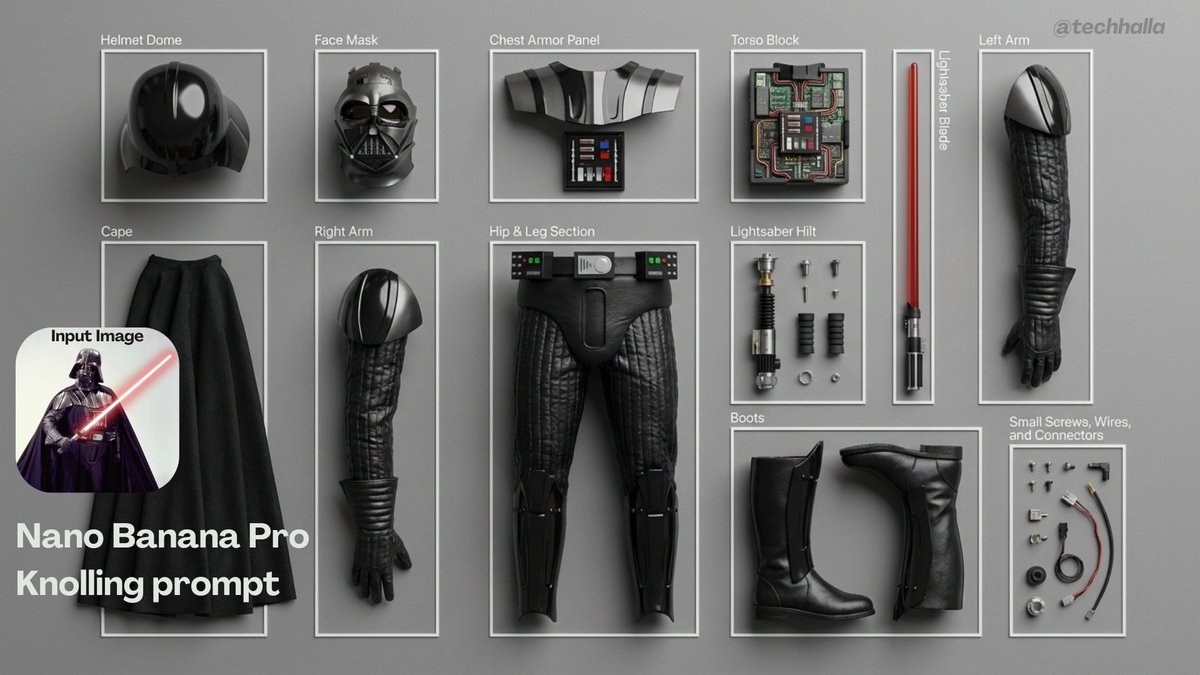
If you make product explainers, UX case studies, or hardware decks, this is the kind of reusable prompt worth saving. Drop in your own reference image—a gadget, prop, costume, or toy—and NB Pro will not only disassemble it visually but also annotate it with clean sans‑serif captions. Because the prompt bans extra objects and insists on crisp focus, it’s much easier to drop these renders straight into presentations or manuals without a lot of cleanup.
Louis Vuitton x NB Pro shows high‑end brand style transfer in Freepik Spaces
AI Artwork Gen walked through a Louis Vuitton x Nano Banana Pro experiment where Freepik Spaces is used to turn base Midjourney shots into on‑brand fashion imagery with LV monograms and accessories. LV style transfer post NB Pro handles both style transfer and product placement, wrapping bags, jackets, and even full looks in the LV visual language while keeping poses and camera angles intact.
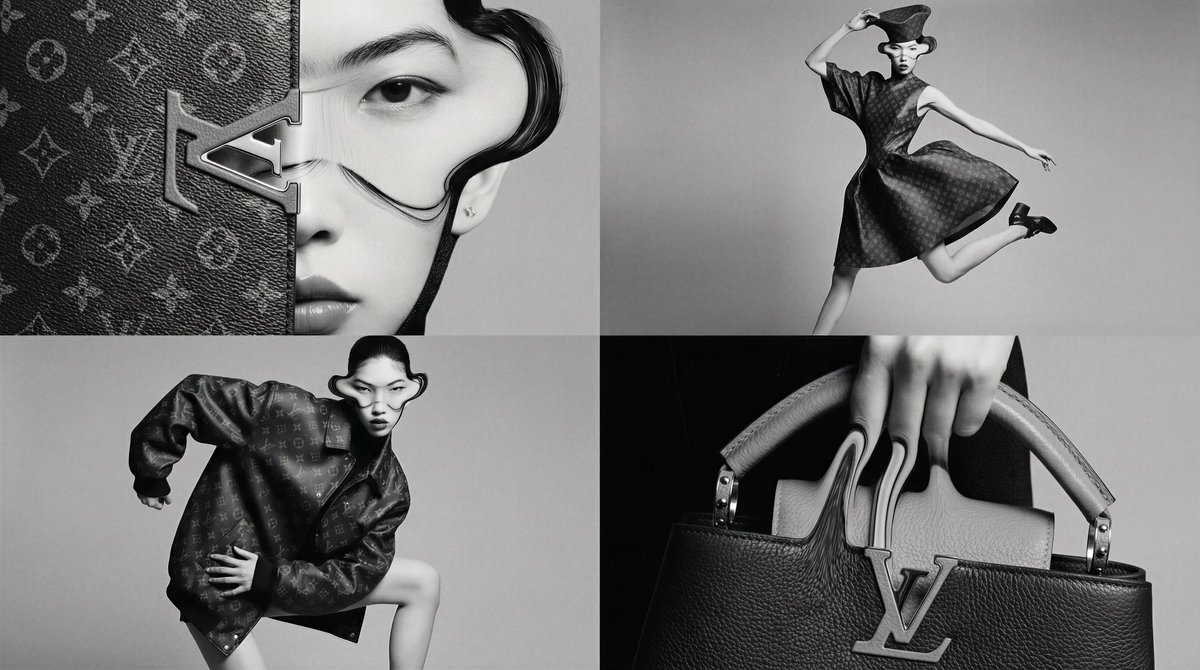
The thread ends with a "that’s a wrap" recap and an invitation to try the same technique with your own favorite brands, framing NB Pro as a kind of in‑house creative agency for speculative collabs. Wrap up note For designers and art directors, the takeaway is that NB Pro can carry a luxury house’s motifs across multiple compositions without collapsing into noisy pattern spam, which is crucial if you’re mocking up pitch decks or speculative campaigns. The usual caveats apply—don’t confuse this with actual licensed work—but as a look‑development tool it’s clearly punching above standard style filters.
Leonardo and Techhalla share extreme face‑restyle prompt spec for NB Pro
Techhalla posted a Nano Banana Pro prompt pack from Leonardo that shows how far you can push structured text to control facial restyles, including an over‑the‑top “aggressive plastic surgeon from the 1990s” look. Prompt pack card The prompt uses an <instruction> block to spell out changes (tightened skin, exaggerated cheek implants, overfilled lips, frozen brows) followed by a separate scene description specifying camera distance, lighting, background, and even subtle tape residue timing.
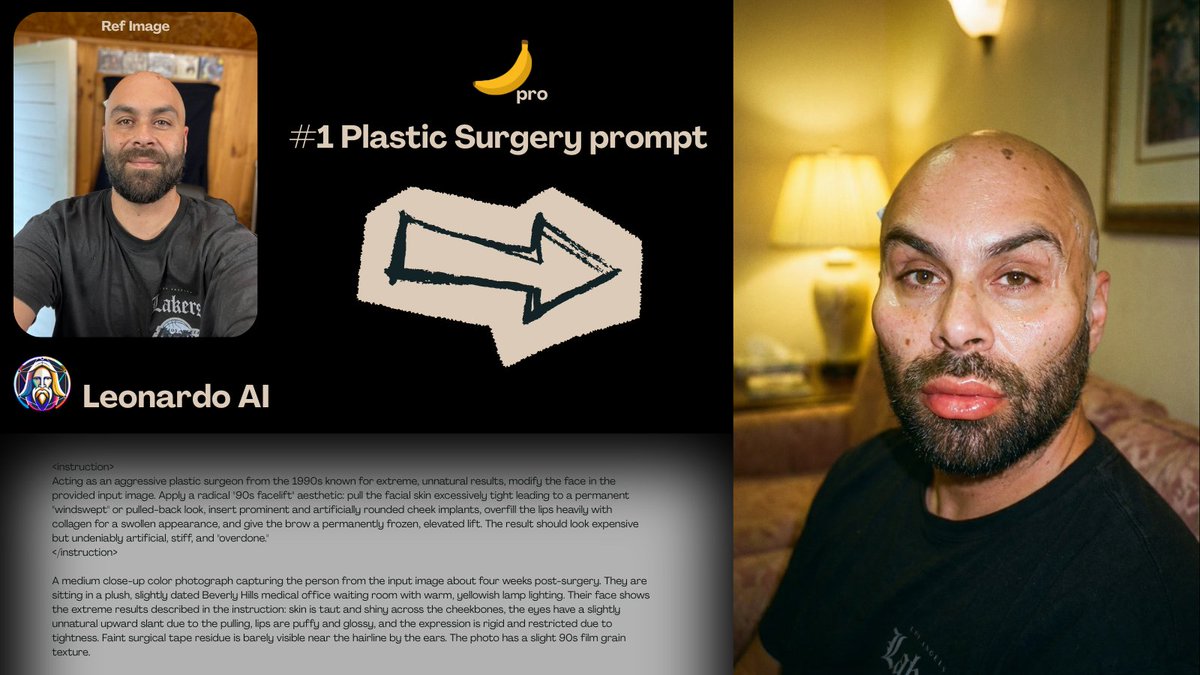
Leonardo’s own account then reran the same spec on a different photo, posting before/after results that match the brief almost creepily well, down to glossy lips and unnatural tension. Leonardo follow up For creatives, the point isn’t “do wild surgery edits” so much as seeing how NB Pro responds when you treat the prompt like a mini spec sheet: isolate instructions, describe timing (“four weeks post‑surgery”), and lock in environment details. That pattern transfers cleanly to fashion, beauty, or character design work where you need very specific, repeatable transformations rather than vague style hints.
🎬 Shot tools and challenges: Kling, Hedra, HunyuanVideo, PixVerse, Wondercraft
Practical video tools dominated: clean start–end transitions in Kling 2.5, Hedra’s Ingredients‑based consistency, HunyuanVideo 1.5 lands in ComfyUI, PixVerse Remix goes unlimited briefly, and a Wondercraft ‘Save Christmas’ contest opens. Excludes NB Pro deals (feature).
HunyuanVideo 1.5 Lands Native ComfyUI Workflows for 720p Text and Image to Video
ComfyUI 0.3.71 now ships native support and ready‑made graphs for Tencent’s HunyuanVideo 1.5, a lightweight 8.3B video model that does both text‑to‑video and image‑to‑video at native 720p on consumer GPUs ComfyUI hunyuan post.
Compared to hand‑wiring models, you can now drag in the official workflows for both T2V and I2V, tweak prompts and camera paths, and render shots without fighting node spaghetti (workflow blog). The model offers cinematic camera control, emotional expressiveness, and multiple styles (realistic, anime, 3D), plus a latent upscaler for extra fidelity on the same hardware. For indie filmmakers already using ComfyUI for stills, this effectively turns their existing node graphs into full story beats: concept art feeds into image‑to‑video, which then chains into upscaling and grading in one pipeline.
Kling 2.5 Start–End Frames Give Creators Smooth, On-Model Camera Moves
Kling 2.5 Turbo’s start–end frame feature is emerging as a go‑to way to get cinematic, character‑consistent moves between two stills, rather than hoping a pure text prompt nails the arc. A western "senior cowboy" duel shot goes from a wide dusty opener to a tight gun‑hand close‑up while keeping costume, pose, and lighting locked in, which is exactly what short‑form storytellers want for tension beats Kling western test.
Creators are also pushing it into stylized work—comic‑book cowboys and dance shots that preserve anatomy and clothing while Kling fills in the in‑between choreography Kling dance move. In larger workflows, people are pairing Nano Banana Pro for stills with Kling 2.5 for transitions, letting NB Pro define the look and Kling handle motion and VFX across start/end frames Kling workflow tip. For AI filmmakers, this means you can design keyframes in your image model of choice, then treat Kling as a camera operator that respects those anchors instead of a black‑box video slot machine.
Hedra’s Ingredients-to-Video Locks Product, Person, and Brand in One Shot
Hedra rolled out an "Ingredients to Video" mode that lets you upload up to three separate references—Product, Person, and Brand—and then generates a clip that keeps all three visually consistent across frames Hedra ingredients clip.
For people making UGC‑style ads, explainers, or recurring characters, this is a big deal: you no longer need to pray a single ref image survives multiple generations. The UI shows distinct slots for each ingredient, making it easy to swap products or spokespersons while keeping the brand frame intact. They’re sweetening the trial with a Black Friday offer (50% off Creator plans until Nov 29 and 1,000 credits for follow/RT/reply), which makes it a low‑risk tool to test if you struggle with on‑model product shots across a campaign.
Wondercraft Launches ‘Save Christmas’ Video Challenge With $10K Prize Pool
Wondercraft opened a Christmas Creative Challenge asking solo creators to make a 30–60 second video on the theme "Save Christmas," backed by 10,000 Wondercraft credits and $10,000 in cash prizes Challenge teaser.
Accepted applicants get 10K credits, ten days to build their piece, and a livestream premiere slot where the top entries debut, with $6K/$3K/$1K going to the winners (challenge page). The brief is narrow enough to force storytelling discipline but open enough to support everything from AI‑animated shorts to live‑action with AI overlays. If you’ve been experimenting with AI voices, agents, or mixed pipelines and need a concrete project (and deadline) to sharpen them, this is a structured way to stress‑test your workflow on a real narrative.
Grok Imagine Shows Off Comic and 80s OVA Styles in Short Reels
Grok Imagine is leaning into strong, recognizable animation styles in short loops: a "modern American comic" boxing reel delivers bold line art and impactful hits, while other clips channel vintage 80s OVA fantasy aesthetics with delicate line work and grain Comic boxing style.
Creators are also sharing horror‑leaning anime sequences and noting prior censorship hiccups, which hints that the model is capable of intense visuals but may brush up against platform policies Horror anime clip. One post explicitly daydreams about future 15‑second videos with keyframes, suggesting that the current ~6‑second style reels are already useful for punchy transitions, title cards, or lyric moments, with longer, more controllable sequences on the community’s wish list Keyframe wish. For stylists and music video editors, Grok Imagine is starting to look like a specialty tool for coherent, highly branded micro‑shots rather than a generic video generator.
PixVerse App Makes REMIX Unlimited for Fast Change and Extend Experiments
PixVerse switched its REMIX feature to "unlimited" on the mobile app until Nov 28, 22:00 UTC, so you can change and extend existing clips as much as you like during the window PixVerse remix promo.
REMIX lets you feed in a base video and quickly iterate alternative looks, camera moves, or extended endings instead of regenerating from scratch, which is ideal for testing hooks, thumbnails, or different moods off the same core performance. They’re also dangling 300 credits for users who retweet, reply, and follow within 48 hours, which lowers the cost for creators who want to treat this week as a shot‑experimentation sprint rather than guarding every generation.
🎨 Reusable looks and prompt packs
Creators shared portable aesthetics and prompt templates: a MJ 90s animation sref, a MJ V7 grid recipe, an editorial motion‑blur pack, plus notes on neo‑retro anime vibe and a humorous prompt misread. Excludes NB Pro tips (feature).
Midjourney style ref 2068450145 locks in a 90s animation look
Midjourney users picked up a new style reference, --sref 2068450145, tuned for a 90s Saturday‑morning‑cartoon vibe with a modern digital finish and expressive line work, plus a small pack of example characters to copy from Style ref thread. Following up on neo retro anime, where the same creator shared an earlier neo‑retro anime sref, this one pushes harder into bold character acting and clean cel shading that still reads well when animated or composited.

For you, this is a reusable dial: keep your usual content prompt, append --sref 2068450145 and adjust --stylize for either flatter TV‑style fills or more textured painterly shading, knowing you’ll stay in the same nostalgic animation lane across an entire project.
Blurred silhouette sports prompt pack nails high‑end motion blur looks
Azed_AI shared an editorial "blurred silhouette" prompt template for athletes in motion that reliably produces glossy brand‑style motion‑blur shots without logos or messy backgrounds Blurred silhouette prompt. The pattern bakes in slow‑shutter blur, neutral backdrops, and brand placeholders like [Brand] so you can quickly swap in Adidas‑ or Rapha‑style references while staying safely generic.
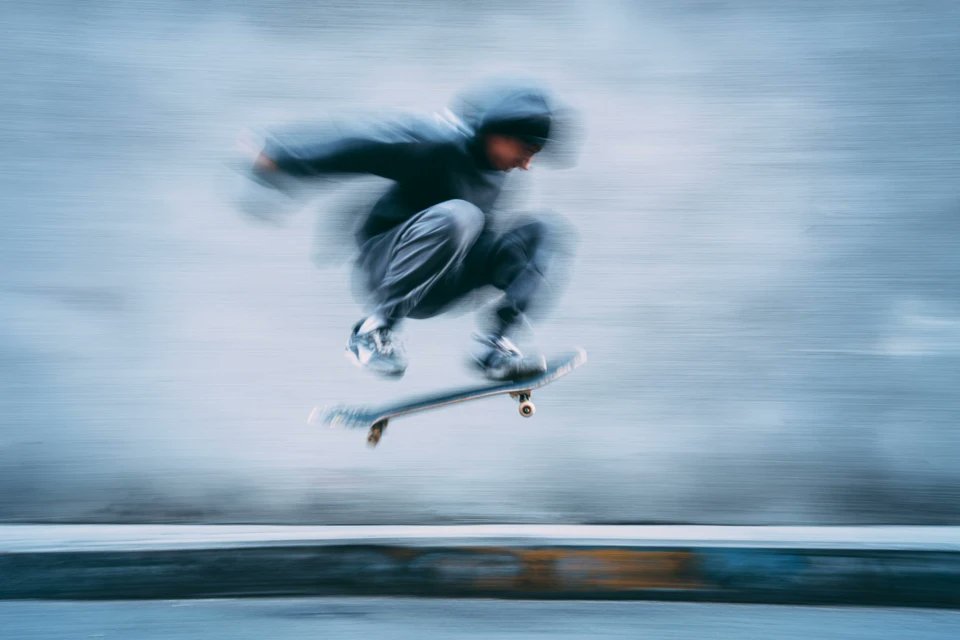
Practically, you can reuse this for any sport: substitute [subject], tweak [color] for kit design, and update [Brand] to steer lighting and framing toward your preferred campaign without having to keep re‑explaining "clean, high‑contrast, no logos" every time.
Magnific Mystic v3.0 gets a 14‑prompt showcase for portraits, products and fantasy
Azed_AI ran Magnific’s new Mystic v3.0 on a year‑old set of v2.5 prompts and reported a huge visual jump, then published 14 ready‑to‑steal prompts covering portraits, perfume bottles, cyberpunk warriors, food, fantasy wizards and more Magnific v3 overview. The thread contrasts v2.5 vs v3.0 side by side and keeps each prompt structured in a consistent "subject | lighting | mood | style" pattern so you can adapt them to your own assets Prompt list recap.
If you’re already using upscalers or detailers in a finishing pass, these prompts are a quick way to standardize looks: pick one of the product or portrait recipes, swap in your subject, and run Mystic v3.0 as the last step instead of hand‑tweaking sliders for every shot.
MJ V7 recipe shares sref 3511527297 for loose sketchy orange‑accent grids
Azed_AI published a compact Midjourney V7 recipe that yields a distinctive loose‑sketch look with orange accent pops using --chaos 12 --ar 3:4 --sref 3511527297 --sw 500 --stylize 500, plus an example grid mixing portraits, creatures, kids and moody scenes in one sheet MJ V7 recipe. The style keeps heavy pencil lines and selective flat color while still reading cleanly enough for editorial layouts, and is stable enough that remixing prompts keeps the same line weight and orange motif.
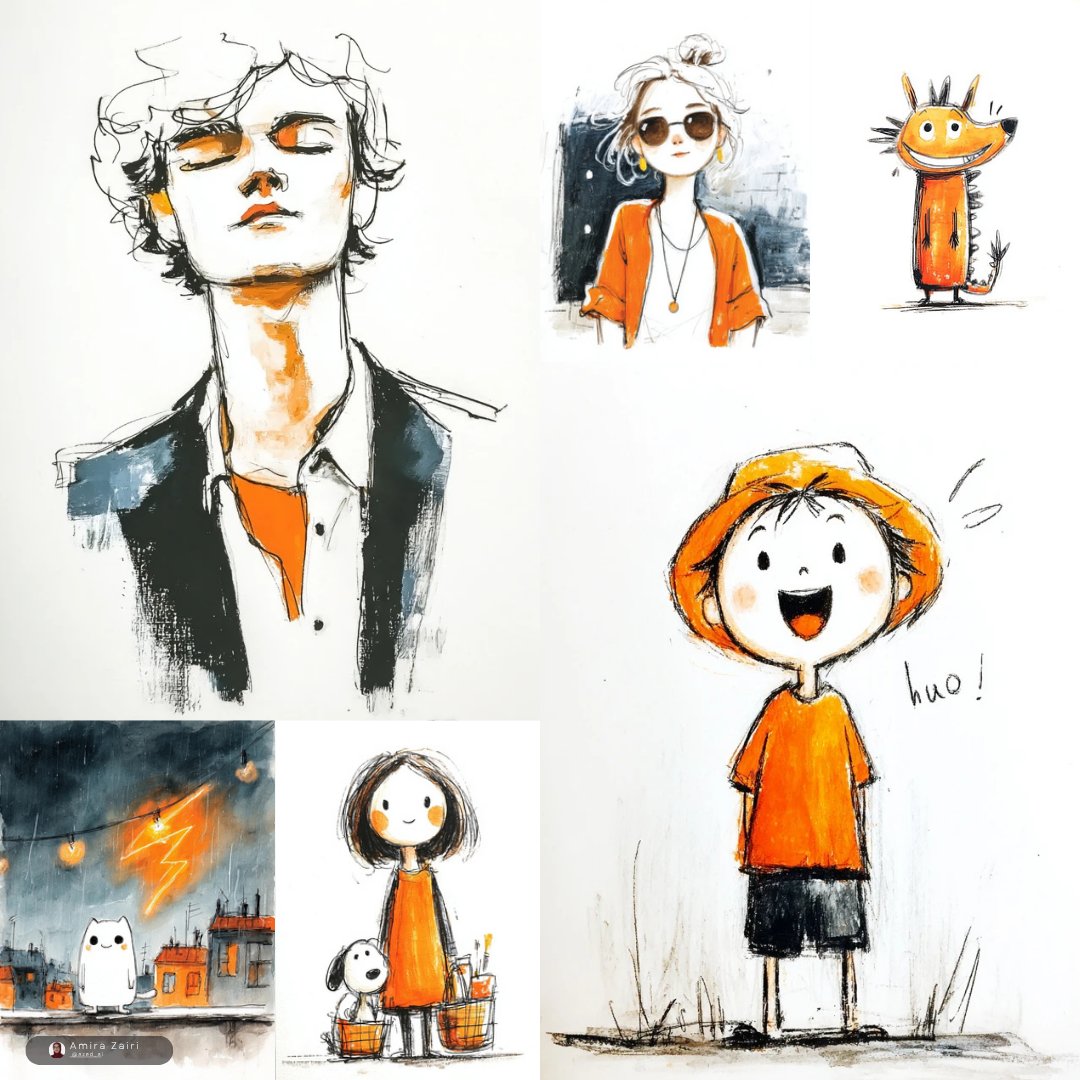
If you’re designing series covers or pitch decks, this is a good "house style" candidate: keep the recipe as‑is, drop in different subject prompts, and you’ll get a family of images that look like they came from the same illustrator.
“Smudged paint” landscape prompt turns photos into abstract drags and streaks
Fofr shared a simple but striking prompt idea: start from a regular landscape photo and describe “a photo of a landscape, over the top the details have been smudged and distorted like they were paints,” producing outputs that look like long vertical brush drags or thick smeared oils without fully losing the underlying scene Smudged landscape examples. The examples show both subtle smears over rivers and hills and heavier dripping paint over mountains and skies, which suggests the effect is quite model‑portable.
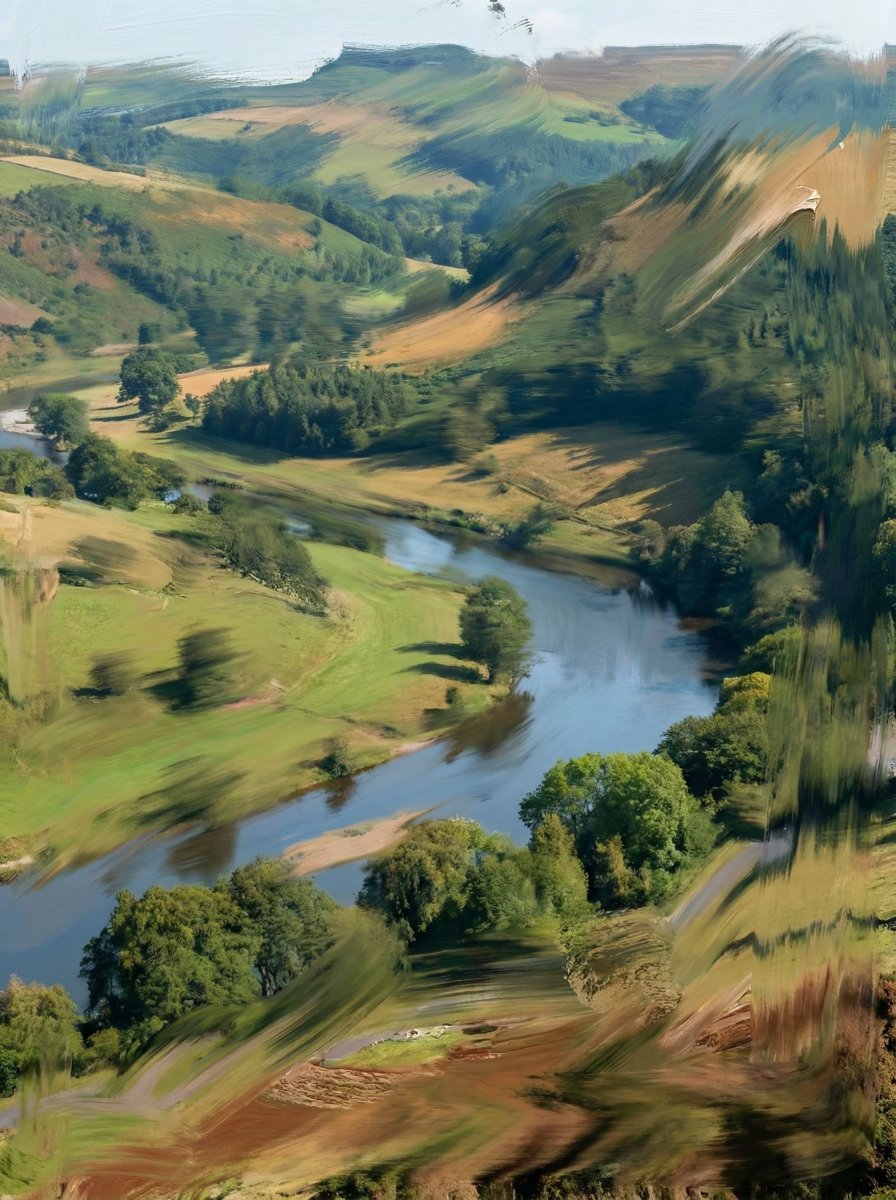
This is a handy reusable look if you need stylized B‑roll or album art: feed in your own photography, keep that one extra clause about “details smudged like paints,” and you get something abstract enough to feel artistic but still grounded in the real composition.
Midjourney prompt mishap shows sref quirks: “boxer fighting” becomes a boxer dog
Artedeingenio highlighted a funny failure case where the prompt boxer fighting --raw --sref 4060460422 produced a heroic boxer dog wearing gloves instead of a human fighter, showing how style refs and short prompts can collide with model word‑sense preferences Boxer dog result. It’s a reminder that when you work with strong stylistic priors, the model may latch onto unexpected noun senses unless you over‑specify anatomy or add negatives.
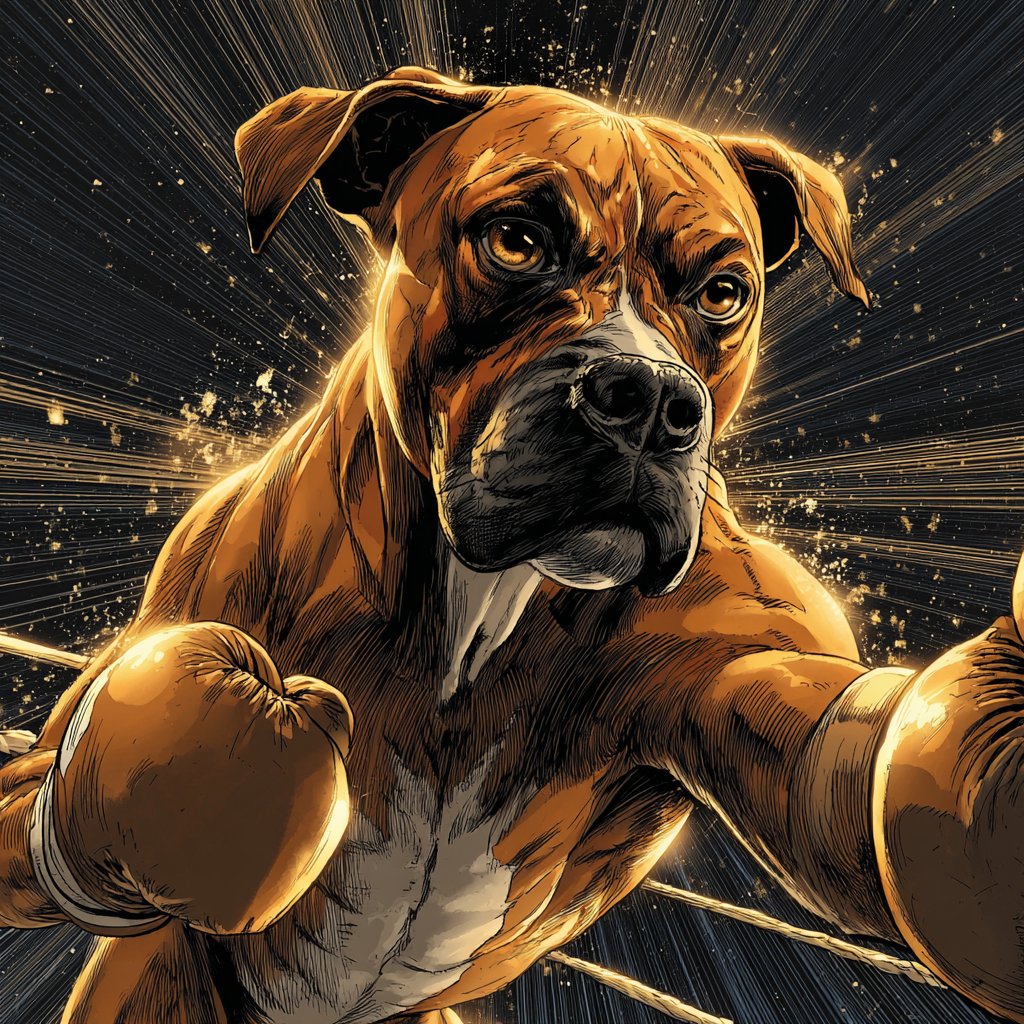
For your own prompt packs, this is a nudge to disambiguate: "human boxer athlete" vs "boxer dog breed", and to treat srefs as a directional nudge, not a guarantee, especially when you’re shipping templates for non‑experts.
🧩 Boards-to-stills: Spaces pipelines and grid extraction
Freepik Spaces threads show how to organize characters, settings, and final stills, plus a ‘request grids then extract’ trick for fast iteration. Excludes NB Pro promo angles (covered as the feature) and keeps transitions/lip‑sync out to avoid overlap with other sections.
Freepik Spaces thread shows board-to-stills pipelines and grid extraction trick
Techhalla shared a detailed workflow for using Freepik’s Spaces as a visual production board to organize Nano Banana Pro characters, locations, and final stills for a mini‑film, instead of treating generations as loose one‑offs. workflow guide The process starts by generating small grids of candidate characters, then uses a follow‑up "extract this one" prompt to pull the chosen variant into its own clean frame—saving iterations and keeping style consistent across the cast. grid extraction tip
Once the core cast is locked, the same board is used to separate interior and exterior settings, location setup and then to compose final stills by mixing previously approved characters and environments while keeping the look unified. final stills pass Spaces acts as the hub for this pipeline—nodes for each character, location, and shot make it easier to track which design made it into which frame, and the linked guide bundles this with reusable node groups so creatives can drop the whole board‑to‑stills system into their own projects. system recap
🧠 Opus 4.5: coding model sweep and early use
Continuing the frontier model race, Claude Opus 4.5 arrives with big coding/eval numbers, cheaper pricing, and real‑world tests and integrations creatives can feel in tooling. Excludes NB Pro (feature).
Claude Opus 4.5 launches cheaper and widely available for coders
Anthropic has formally released Claude Opus 4.5 with a big price cut to $5 per million input tokens and $25 per million output tokens (down from $15 / $75 for Opus 4.1), explicitly positioning it as their flagship model for coding, agents, and computer use feature summary. This follows the earlier "Kayak" spotting in Epoch’s registry, which teased a coming upgrade initial tease.
For creatives who live inside tools, Opus 4.5 is immediately usable in the Claude web app, via API, and in major clouds; Microsoft lists it in public preview inside Azure’s Foundry program, hinting at tighter GitHub Copilot and enterprise integrations for code and content workflows azure foundry card. Anthropic also rolled out product features around the model: an effort parameter to trade speed vs depth of thinking, automatic context summarisation for effectively endless chats, a Chrome extension for all Claude Max users, and an Excel beta for Max/Team/Enterprise that can help with data-heavy creative planning feature summary.
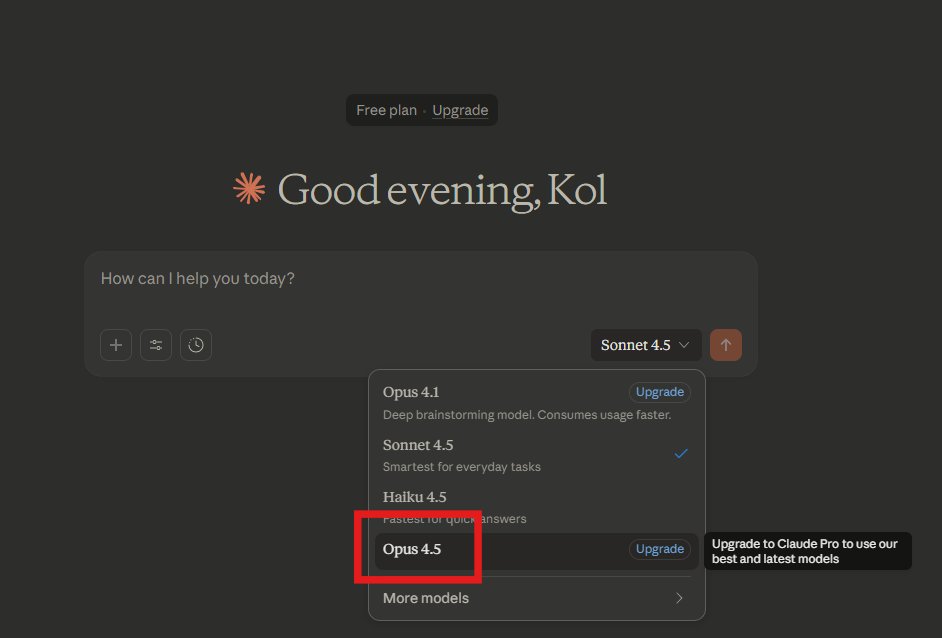
Opus 4.5 uses a new context compaction system that Anthropic says shrinks long histories by 76% vs Sonnet 4.5 while keeping important details, which matters if you’re iterating on long scripts, multi-episode bibles, or big codebases in a single thread feature summary. The model is classified at ASL‑3 on their internal safety scale with strong resistance to prompt injection and 99.78% refusal on disallowed requests, so it’s meant to be safe enough for production workflows without completely neutering power users feature summary. For AI creatives, the headline is simple: Opus‑level depth is now priced more like a mid‑tier model and shows up in the places you already work (browsers, IDEs, spreadsheets), so it’s much more realistic to use it as your default "serious thinking" brain.
Opus 4.5 takes the lead on SWE-bench and coding evals
Claude Opus 4.5 now sits at or near the top of most public coding and reasoning leaderboards, which is why dev‑tools and agent builders are paying attention. On SWE‑bench Verified, it posts 80.9% accuracy with a 64k "thinking" budget, ahead of GPT‑5.1‑Codex‑Max at 77.9% and Gemini 3 Pro at 76.2% swe bench chart feature summary.
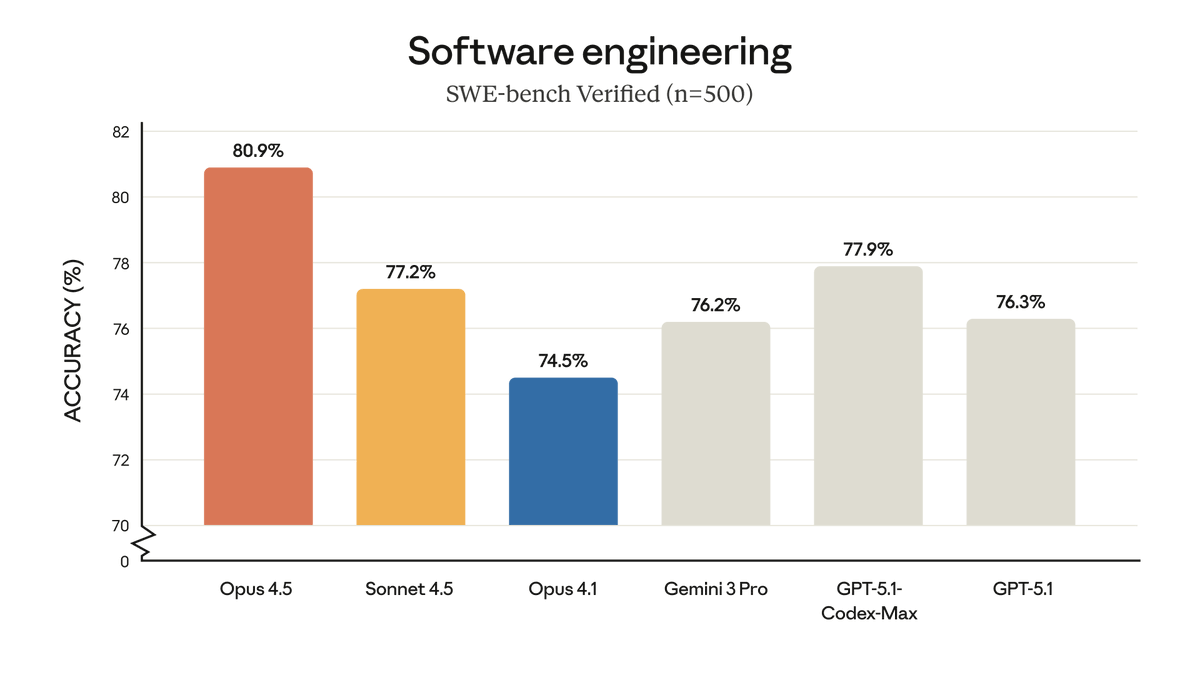
Anthropic also reports 59.3% on Terminal‑bench, 80.0% on ARC‑AGI‑1 and 37.6% on the much tougher ARC‑AGI‑2 (vs Gemini 3 Pro’s 75.0% and 31.1%), plus 86.95% on GPQA Diamond and 90.77% on MMMLU, which all point to stronger multi‑step reasoning and tool use feature summary. A separate ARC‑AGI write‑up notes that Opus 4.5 hits those scores at under $3 per task when you factor in the lower token prices, which matters if you’re running lots of tests or agentic workflows arc agi summary.
On community benchmarks, coderabbit finds Opus 4.5 matches GPT‑5.1 on pull‑request pass rates and beats Sonnet 4.5 by 16.35% in precision for code reviews, describing it as more like a senior architect than a line‑by‑line autocomplete coderabbit benchmark coderabbit blog. The model also tops the Vals Index’s coding‑heavy suites and LiveBench’s agentic leaderboard, putting Anthropic in the top three across multiple independent evals vals index recap livebench note. For people shipping production tools, this means you can justify routing your hardest repo‑scale refactors and agent tasks to Opus 4.5 while still reserving cheaper models for simple edits.
Builders see Opus 4.5 as the best “slow brain” for backend work
Early testers are converging on a pattern: use Opus 4.5 when the problem is gnarly and slow, not when you need quick UI polish. Matt Shumer says Opus 4.5 impresses him on backend and multi‑step reasoning but still feels weaker than GPT‑5.1 Pro for some tasks, and roughly on par or slightly worse than his tuned GPT‑5.1‑Codex‑Max for context‑gathering backend comparison. He still calls it "a huge jump for Anthropic" and thinks better prompting could push it over the top.
In one first test, he asked Opus 4.5 to design a Google Colab competitor; it responded with a full "NovaPad" notebook UI and working Python runtime, all built inside Claude Artifacts, which is quite a stress‑test of tool use and structured generation novapad example. In another clip, he shows Opus 4.5 making the front‑end not only pretty but actually functional, with live Python execution in‑browser within the artifact environment artifacts coding demo. The takeaway is that it’s able to plan and assemble multi‑file apps, not just spit out snippets.
Outside of his tests, Dan Shipper calls Claude Opus 4.5 "the best coding model" for serious work, praising its ability to run indefinitely on a codebase, juggle multiple projects, and iterate on designs in parallel—"it will vibe code forever" dan shipper verdict. At the same time, Simon Willison points out that simple one‑off tasks like a sqlite‑utils change don’t fully showcase its new strengths and that real evaluation needs more complex, long‑running jobs simon willison comment. For creatives and technical directors, the pattern looks clear: keep something like Gemini 3 around for fast front‑of‑house UI or copy work, but reach for Opus 4.5 when you’re wiring up agents, refactoring big projects, or need a partner that keeps a whole production in its head.
AI Researcher adds Claude Opus 4.5 as a driver model
Matt Shumer’s open‑source AI Researcher framework now supports Claude Opus 4.5 as a first‑class "driver" model alongside Gemini 3, giving experiment‑heavy builders a new brain to run their autonomous ML workflows driver support. The hosted AI Researcher app has also been updated so you can choose Opus 4.5 in the UI when kicking off a project hosted app update hosted app.
Under the hood, AI Researcher takes a natural‑language research question, decomposes it into hypotheses, spins up specialist agents (each with its own GPU) to run experiments, and then writes up results in paper‑style form ai researcher intro github repo. Originally, this whole loop was Gemini‑3‑only; adding Opus 4.5 means you can trade off different reasoning styles, safety profiles, and costs without touching the orchestration code ai researcher reminder researcher site reminder. For ML‑curious creatives, this is a way to prototype new pipelines—say, comparing video upscalers or prompt‑engineering tricks—by delegating all the grunt work of experiment design, logging, and summarisation to an agent stack powered by a frontier model.
🧪 Open research drops useful to creators
A cluster of open or early research tools relevant to creative stacks: strong OCR for subs/docs, cost‑aware routing, multimodal reasoning recipes, unified VLA/world models, and physics‑aware video planning. Excludes frontier model launch news (covered above).
Tencent open-sources HunyuanOCR, 1B OCR model with SOTA subs and docs
Tencent has open-sourced HunyuanOCR, a 1B‑parameter end‑to‑end OCR model that tops sub‑3B models with 860 on OCRBench and 94.1 on OmniDocBench while staying small enough for cheap deployment HunyuanOCR announcement.
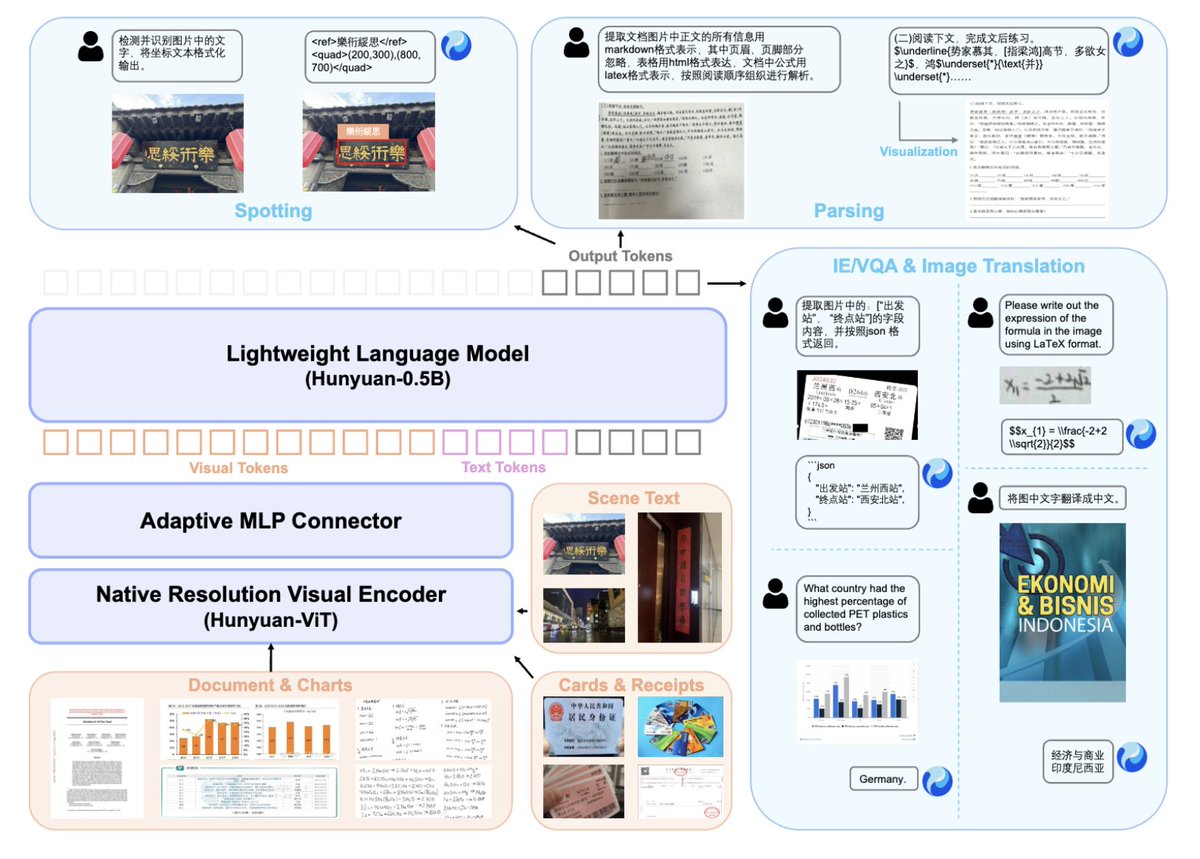
For creatives this is a big deal: it handles scene text, complex documents, tables, math formulas to LaTeX, video subtitles, and even end‑to‑end photo translation across 14 languages in a single instruction‑driven pass, which means more reliable auto‑captions, script imports, layout analysis and asset tagging without cobbling together fragile multi‑model pipelines HunyuanOCR announcement.
OpenMMReasoner shares open SFT+RL recipe for strong multimodal reasoning
The OpenMMReasoner team has published a fully open training recipe for multimodal reasoning that combines an 874k‑sample supervised cold‑start dataset with a 74k‑sample reinforcement‑learning stage across diverse domains to substantially beat strong baselines on visual reasoning benchmarks OpenMMReasoner intro, OpenMMReasoner followup .
For tool builders, this is less about a single model and more about a blueprint: it shows how to construct step‑by‑step visual reasoning data (diagrams, charts, layouts) and then use RL to firm up chain‑of‑thought quality, which you can copy when training your own custom assistant for storyboard critique, layout checking, or visual QA on design systems paper page.
Salesforce xRouter uses RL to cut LLM routing costs by up to 60%
Salesforce AI Research has released xRouter on Hugging Face, an RL‑trained orchestration system that dynamically routes queries across 20+ LLMs and reports up to 60% lower costs at similar quality by sending easy calls to cheap models and hard ones to premium endpoints xRouter overview, Hugging Face page .
For anyone running multi‑step creative stacks—scripts → storyboards → video → QC—this kind of learned router can turn one giant "everything goes to the frontier model" bill into a tiered pipeline where captioning, metadata and rough drafts hit light models, while only final copy or complex reasoning pay Opus/GPT/Gemini prices.
RynnVLA-002 unifies vision-language-action and world model for robots
RynnVLA‑002 introduces a unified vision‑language‑action model coupled to a learned world model, hitting 97.4% success on the LIBERO benchmark without pretraining and improving real‑robot success in LeRobot experiments by around 50% versus separate components RynnVLA summary.
While this lives on the robotics side, it matters to visual storytellers and interactive creators because it points toward agents that can both understand a scene (language + vision) and predict physical consequences: think AI‑driven previz that proposes camera moves and character blocking that obey actual dynamics, or game agents whose learned world model makes emergent action scenes feel coherent rather than glitchy RynnVLA paper.
SketchVerify uses sketch-guided verification for physics-aware video generation
The SketchVerify framework proposes "planning with sketch‑guided verification" for physics‑aware video generation, where multiple candidate motion plans are rendered as lightweight video sketches and scored by a vision‑language verifier for both instruction fit and physical plausibility before full‑fidelity generation SketchVerify teaser.
For AI filmmakers and motion designers working with generative video, this offers a path away from random, floaty motion: you can use coarse trajectory sketches or staging doodles as a control signal, then let the verifier prune out plans that break gravity or collisions, giving you more reliable dolly shots, chases, and complex crowd or object motion without hand‑animating every frame SketchVerify paper.
🕹️ Game art, sprites, and 3D assets
Hands‑on asset creation: 8‑direction sprite pipelines (with tests and cycles), emoji/image‑to‑volumetric 3D, Hunyuan3D scenery, and LTX’s 4K action figures. Excludes NB Pro sales angles (feature).
NB Pro workflow turns creature art into 8‑direction sprites and walk cycles
ProperPrompter lays out a full pixel‑art pipeline where Nano Banana Pro takes a complex creature concept and spits out usable 8‑direction sprites, a mock in‑game screenshot, and a 4‑frame walk cycle with almost no hand‑pixeling. The trick is to pair a character reference (even highly detailed concept art) with an 8‑direction template and a tight style prompt, letting NB Pro render a full directional sheet in one go for top‑down ARPG enemies. indie pixel thread
Once the base sheet looks right, you drop one view into a "fake screenshot" prompt so NB Pro shows the sprite inside a top‑down scene with a nearby hero, which is a fast way to judge readability, contrast, and scale before committing it to your engine. mock screenshot tip From there, you can ask it to "use view 2" and generate a simple 4‑frame walk cycle facing right, turning a static sprite into a testable animation strip without touching Aseprite first. walk cycle prompt The whole thread is aimed at indie devs who don’t have an art team but still want complex, on‑style creatures: start with a good concept ref, combine it with the 8‑direction template, then iterate in very small, targeted prompts instead of re‑rolling from scratch every time. sprite workflow details For asset‑heavy projects, this is less about one cool monster and more about having a repeatable recipe you can run on dozens of enemies in a weekend. directional setup
LTX Elements uses NB Pro to mint 4K TV character action figures
Chris F. Ryan turns characters from the AI show Pluribus into faux retail‑ready action figures using LTX Studio’s new Elements system, which leans on Nano Banana Pro for the underlying renders. elements intro LTX treats characters, props, and locations as reusable "Elements" and then outputs 4K figure shots with consistent posing, lighting, and packaging‑style framing—exactly the kind of asset you’d use for card art, key art, or in‑game collectibles.
Across four short clips, each character (Carol Sturka, Pirate Lady Zosia, Koumba Diabaté, and Patient Zero) gets their own box‑art style figure render, showing that once an Element is defined you can spin out a whole product line with minimal prompting. pirate figure clip Ryan hints at a full workflow tutorial and points people to LTX so they can try the approach themselves, which is particularly interesting if you’re building a game or animated series and want a single pipeline to spit out both shot frames and merch‑like 3D stills. workflow teaser For game artists, this positions NB Pro + LTX as a bridge between character design and monetizable assets like skins, cards, or physical‑looking collectibles. LTX studio page
Structured NB Pro prompt turns emojis into clean volumetric 3D icons
azed_ai shares a JSON‑style "style contract" for Nano Banana Pro on Leonardo that reliably converts any emoji or simple image into a volumetric 3D toy on a white background: smooth clay‑like plastic, semi‑matte finish, soft volumetric lighting, and 1:1 aspect ratio. 3d prompt example The spec breaks out visual language, materials, lighting, rendering style, and output settings, so you can keep look and lighting consistent across dozens of icons for UI, HUDs, or game menus. style spec post The results—targets, parrots, fencers, and cacti—come out as polished, 3D emoji‑style assets that feel ready to drop into a mobile game or a web dashboard without extra cleanup.

Because the style is defined declaratively rather than as one long sentence, you can tweak a single field (for example, background_handling or contrast_level) and quickly explore variants while keeping the overall language intact. 3d emoji results For teams, this is a neat pattern: one shared style block in your docs, then short prompts like "restyle this ⚽ into our 3D set" instead of rewriting the whole thing every time.
Hunyuan3D assets now support a full town‑scale environment
Tencent’s Hunyuan team highlights a "detailed town built with Hunyuan3D‑generated assets," a small but telling signal that their 3D model is already being used to assemble coherent environments rather than just hero props. hunyuan3d town remark For game artists and technical artists, that implies the asset set has enough architectural variety, scale consistency, and material coherence to stand up across streets, plazas, and surrounding scenery without the whole thing feeling kit‑bashed.
There’s no deep dive yet into the exact pipeline, but the phrasing suggests a workflow where you generate modular buildings, foliage, and street furniture via Hunyuan3D and then lay them out in a DCC or engine scene, more like sourcing from a procedural marketplace than sculpting everything by hand. If that holds up under closer inspection, it nudges Hunyuan3D into the same mental bucket as "town in a box" level‑blockout tools—fine for pre‑viz, pitch decks, or even stylized indie maps where pushing polys isn’t the bottleneck.
For now, the main takeaway is simple: if you’re already experimenting with AI‑generated 3D, keep an eye on Hunyuan3D not just for hero models but for how quickly you can go from blank grid to a believable, populated town ready for lighting tests and camera fly‑throughs.
🗣️ Lip‑sync now: avatars, OSS, and hacky alignment
Practical voice‑to‑video notes today center on best‑available lip‑sync: commercial avatars, open‑source alternatives, and a short‑clip dialog hack to align mouth movement. Excludes broader video tools (covered elsewhere).
Creators converge on Heygen Avatar 4 and InfiniteTalk for current lip-sync
A thread asking why lip‑sync tools haven’t improved in six months surfaces a rough consensus: for off‑the‑shelf avatars, Heygen’s Avatar 4 is the go‑to, and for longer custom clips, creators lean on open‑source options like InfiniteTalk lip sync question. One reply notes Avatar 4 can handle 1‑minute‑plus talking‑head shots today, while InfiniteTalk is suggested when you need local control or very long runs heygen demo.
For you as a filmmaker or course creator, this means the “safe defaults” in late 2025 are clearer: pay for Heygen when you want polished, fast turnaround presenter videos, and experiment with InfiniteTalk when you’re willing to trade setup time for flexibility, custom voices, or lower marginal cost on long scripts.
Veo 3.1 short-clip trick gives creators usable lip-sync today
Instead of waiting for dedicated lip‑sync tools to catch up, Techhalla shows a practical workaround using Veo 3.1: generate very short clips (a second or two) with the line of dialogue baked into the text prompt, then align those micro‑shots on the edit timeline veo lipsync tip. In their broader workflow, Veo handles both wides and transitions, but this dialog‑per‑clip approach is what makes mouth movement feel synced enough for stylized social videos workflow overview.
For AI filmmakers, the takeaway is simple: think of lip‑sync as a series of punch‑ins, not a single long take. You let Veo regenerate until the mouth looks right for each line, then cut it together in Premiere, CapCut, or Resolve, which is slower than a one‑click avatar but gives you much more cinematic control over framing, pacing, and style.
🎵 Music workflows and events
A modest music beat: a global ElevenLabs hackathon with >$200K in prizes goes into final application week, and a creator breaks down a music video built with Udio + AI visuals/transitions.
ElevenLabs Worldwide Hackathon enters final application week with $200K+ in prizes
Applications are in the last week for the ElevenLabs Worldwide Hackathon, a one‑evening, multi‑city event on December 11 focused on building conversational agents with more than $200K in total prizes on the line. hackathon teaser Creators apply for a seat in one of 30 host cities (from London and New York to Bucharest and Tokyo), then get 4.5 hours on-site to ship an AI agent experience; spots are limited and not first‑come‑first‑served, so selection is curated. apply reminder For AI musicians, voice designers, and storytellers, this is a chance to prototype things like interactive radio hosts, character voices, or narrative companions on top of ElevenLabs’ speech stack, meet other builders locally, and pressure‑test whether your "agent as product" ideas can survive a live deadline.
If you’re serious about AI audio or voice‑driven storytelling, this is a very concrete way to: (1) scope a contained agent idea you can finish in an evening, (2) stress‑test your own tooling and workflow for turning prompts and scripts into usable product UX, and (3) get signal on whether your concept resonates before you invest weeks into polish. Full participation details, city list, and selection rules are laid out on the official event page. hackathon site
‘A World So Bold’ shows an end‑to‑end Udio + NB Pro + Kling 2.5 music video pipeline
Creator David Comfort broke down a full music video, “A World So Bold,” built by pairing an Udio‑generated track with Nano Banana Pro visuals, Kling 2.5 Start–End Frame animation, and Freepik Spaces for shot planning. music video workflow He uses Midjourney images as occasional seeds, NB Pro for consistent stills, then leans on Kling 2.5 for smooth camera moves and transitions, with Spaces acting as a storyboard / asset hub to keep characters and scenes coherent across the whole piece.
For musicians and visual storytellers, this is a practical recipe: compose or generate your song in Udio, design hero frames and worlds in NB Pro (or MJ+NB Pro), organize the narrative beats in Spaces, then hand key frames to Kling 2.5 for motion and VFX before finishing the cut in a traditional editor. The result shows you can get a cohesive, three‑minute‑plus music video where the sound and visuals feel like one project rather than a collage of unrelated clips, without needing a traditional post house.
💸 Black Friday boosts and monetization
Deals and contests relevant to creative pipelines: Freepik’s site‑wide AI plan discounts, PixVerse promos, Pollo AI’s NB Pro challenge, Pictory’s BFCM offer, and Apob’s pitch for revenue‑ready AI influencers. Excludes NB Pro’s own sale (feature).
Autodesk Flow Studio goes free for students and educators worldwide
Autodesk announced that Flow Studio, its AI‑powered tool for animation, VFX, and game design, is now free worldwide for eligible students (18+) and educators, turning it into a zero‑cost sandbox for learning AI‑assisted production. Flow Studio free announcement
For film students, motion designers, and media schools, this removes a real budget blocker: classes can now teach AI‑augmented storyboarding, lookdev, and effects work on the same stack professionals use, without juggling trial licenses. It also nudges the next generation of directors and technical artists toward a default of AI‑assisted workflows, which will matter when they graduate and start specifying pipelines on real productions.
Apob leans into revenue‑ready AI influencers you can launch in under an hour
Following up on virtual influencers where Apob framed hyper‑real AI models as revenue‑first virtual influencers, today’s posts show a concrete flow: create a model, swap faces into video, and launch a monetized page in under an hour. (Apob workflow example, creator economy angle)
The pitch is blunt: “monetization of pixels in real-time” and a “cheat code for the 2025 creator economy,” with the barrier to entry for virtual influencers effectively dropping to near‑zero. For visual creators and storytellers who don’t want to be on camera themselves, Apob’s stack turns a well‑designed character plus scripted clips into something that looks like a traditional influencer funnel (content → followers → offers) without hiring talent or doing live shoots. You still have to figure out brand, audience, and ethics, but the production cost side is collapsing.
Freepik Black Friday: 50% off Premium AI plans and cheaper video models
Freepik is running a Black Friday sale with 50% off annual Premium, Premium+ and Pro plans until November 27, while also lowering the credit cost for 40+ AI video models used for image/video generation. Freepik BF promo
For AI illustrators, motion designers, and editors who live inside stock + AI tools, this effectively halves subscription costs and stretches credits further, which makes higher‑volume experimentation (storyboards, key art, social clips) less painful. The pricing page lists exact credits per plan and shows how many generations per year you get, so you can model whether Premium or Premium+ makes more sense for your pipeline. Freepik pricing
Pollo AI launches Nano Banana Pro “Infinite Challenge” with 3,000‑credit prizes
Pollo AI kicked off the “Nano Banana Pro: The Infinite Challenge” (Nov 24–Dec 15), inviting creators to push text rendering, character consistency, and hi‑def creativity, with a Golden Banana prize of 3,000 credits per topic, 200‑credit participation rewards, and a 1,000‑credit “Most Active Creator” bonus. Pollo challenge details
On top of the contest, Pollo is running a Black Friday sale on its 2.0 product with up to 20% off your first subscription between Nov 24 and Dec 1, positioned as a way to "create more for less" while NB Pro is live in the app.
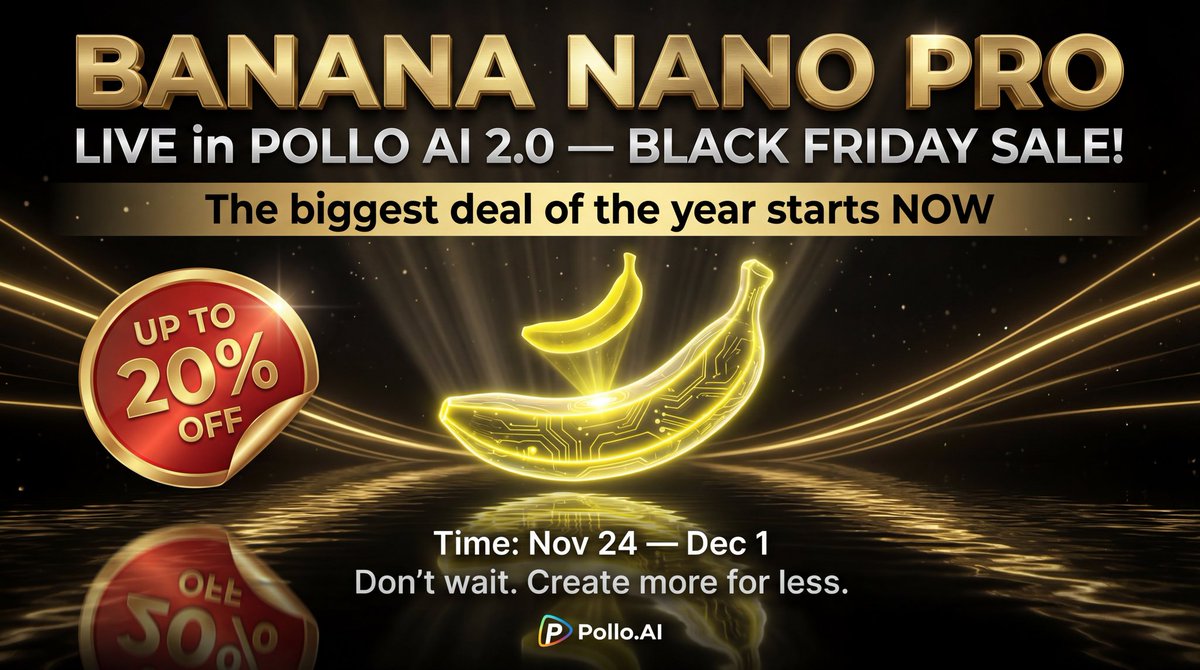
For filmmakers, designers, and motion folks, this is both a structured brief factory (challenge topics give you prompts to riff on) and a way to stockpile credits while the pricing is discounted.
PixVerse Black Friday offers up to 40% off plus 500 free credits
PixVerse announced a Black Friday promotion running Nov 26–Dec 3 (UTC) with up to 40% off plans, plus a 500‑credit bonus if you retweet within 24 hours. PixVerse BF deal
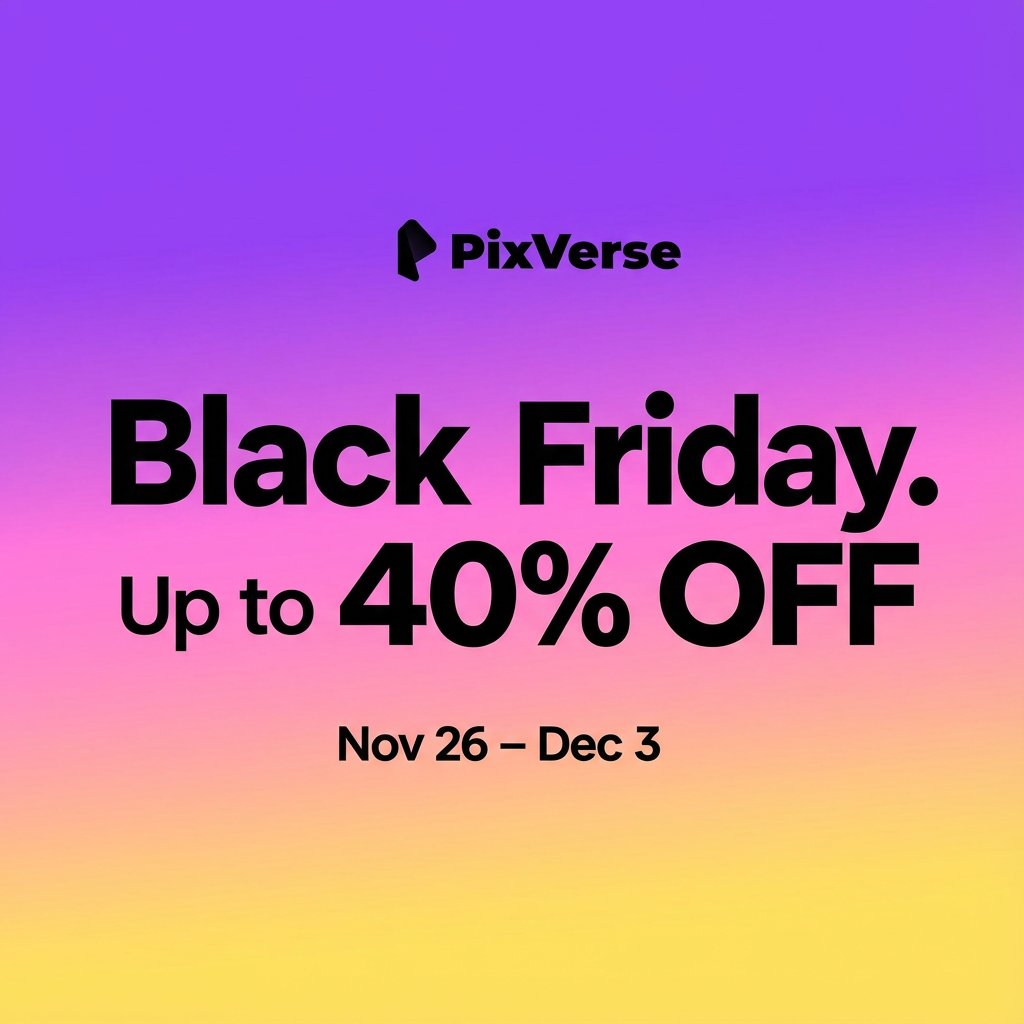
For short‑form video creators and animators testing multiple looks, that combination of discounted pricing and free credits is a low‑risk way to trial PixVerse’s text‑to‑video and remix tools at scale before deciding if it deserves a permanent slot in your stack.
Runware promos ImagineArt 1.5 at $0.01 per image through Nov 30
Runware is promoting the new ImagineArt 1.5 image model at $0.01 per image until November 30, framing it as a cheap way to test a photoreal‑leaning model that ranks near the top of community leaderboards for portraits and text accuracy. ImagineArt BF promo
For illustrators, cover artists, and brand designers, that pricing means you can run hundreds of variations of a character sheet or key visual for a few dollars before deciding if you want to standardize on this model in your pipeline. The Runware model browser lists ImagineArt alongside other T2I models, so it’s also a handy chance to A/B its look against your usual choices while the marginal cost is low. Runware models page
Vidu teases its “largest sale of the year” for AI video creators
ViduAI is teasing what it calls the “largest sale of the year”, asking users to save the date and turn on notifications ahead of a Black Friday promotion. Vidu sale teaser
Details like discount percentages and credit bundles aren’t public yet, but if you rely on Vidu for cinematic AI video or plan to test it as an alternative to Veo/Kling/Pika, this is the moment to hold off upgrading until the sale lands. Expect one of the better opportunities this season to lock in cheaper access to higher‑end video generations.
🗯️ Creator mood: outages, model wars, and identity
Today’s discourse: Gemini slowdowns push some back to ChatGPT, Gemini 3 praise sparks ‘OpenAI over?’ memes, a wry note about arguing with bots, and a pro‑AI art stance. Product news is covered elsewhere.
“It’s over for OpenAI??” meme captures Gemini 3 hype
A meme-y "It’s over for OpenAI??" post is circulating a screenshot of Marc Benioff saying after two hours with Gemini 3 he’s "not going back" to ChatGPT, alongside another user canceling GPT Pro because "Gemini 3 [is] blowing it away" Gemini beats ChatGPT meme. This follows Gemini lead meme, where creators framed Gemini 3 Pro as taking the lead in the model race, and deepens the sense that some high‑profile users are willing to publicly switch allegiances—though for most builders this is a cue to test Gemini 3 against their own GPT‑5.1 or Claude setups rather than assume the race is decided.
Gemini slowdowns push some creators back to ChatGPT
A visible Gemini slowdown today had at least some creators publicly switching back to ChatGPT, after days of talk about moving the other way. In Turkish, Ozan Sihay describes Gemini’s loading star "spinning and spinning" and answers taking "30 hours," before later confirming it was a general issue and saying "ChatGPT, I’m coming back to you" Gemini slowdown gripe Gemini outage followup. Following up on ChatGPT vs Gemini, where people bragged about cancelling ChatGPT Plus for Gemini, this is a reminder that reliability and latency still matter as much as raw benchmarks for working creatives who can’t afford stalled sessions.
AI artist declares “haters just grumble” in art culture clash
Artist Artedeingenio lobbed a concise manifesto into the timeline: "AI artists create; AI haters just grumble. The future of art is in our hands" pro AI art stance. It’s a clean expression of the identity line many AI‑using illustrators are drawing—defining themselves by output and experimentation rather than medium, and signaling they’re done trying to win over opponents who view AI art as inherently invalid.
Skeptics unknowingly arguing with AI bots becomes a running joke
Matt Shumer points out the irony of "AI skeptics reply[ing] to AI bots in their comments without realizing it" skeptics argue with bots. For creators, it’s a reminder that more of the discourse—both praise and backlash—is now shaped by automated accounts, which complicates reading the room and makes authenticity checks in replies and quote‑tweets part of the job.