
OpenArt Camera Angle Control adds Ultra HQ, Fast – Kling 2.5 locks end frames

Stay in the loop
Free daily newsletter & Telegram daily report
Executive Summary
OpenArt shipped Camera Angle Control, a one‑click way to change a photo’s viewpoint after it’s taken. It matters because you can reframe without reshoots, then pick Ultra HQ for production passes or Fast for quick explorations. Controls for camera rotation, type, and direction make it feel like a tiny dolly on a still. No tripod, no problem.
In parallel, fresh creator tests on Higgsfield Angles are encouraging: perspective shifts look natural and stability holds on busy compositions, but artifacts crop up. Expect occasional object insertion, character duplication, and texture damage even on high‑res sources, so keep a light retouch step for faces and crowded scenes.
The downstream payoff is in motion. Angle‑shifted stills fed into Kling 2.5 Start–End Frames held the final frame pixel‑tight, cutting the last‑frame wobble that used to break loops and match cuts. If you want a quick i2v baseline for comparison, Hailuo 2.3’s 6s, 1080p presets are live on Replicate and WaveSpeed and look steady enough for socials. The practical recipe: reframe once, animate once, and spend your time on timing and taste instead of cleanup.
Feature Spotlight
Post‑shot camera control (Angles + OpenArt)
Today’s standout for image creators: change a photo’s viewpoint after the fact. Higgsfield’s new Angles and OpenArt’s Camera Angle Control both let you reframe with one click; multiple creator tests highlight quality and limits.
Jump to Post‑shot camera control (Angles + OpenArt) topicsTable of Contents
🎥 Post‑shot camera control (Angles + OpenArt)
Today’s standout for image creators: change a photo’s viewpoint after the fact. Higgsfield’s new Angles and OpenArt’s Camera Angle Control both let you reframe with one click; multiple creator tests highlight quality and limits.
OpenArt ships Camera Angle Control with Ultra HQ and Fast modes
OpenArt launched Camera Angle Control to generate multiple new viewpoints from a single image, adding controls for camera rotation, type, and direction. You can choose between two models—Ultra High Quality for detailed, production‑ready outputs, or Fast for quick iterations OpenArt feature.
For creators, this means fewer reshoots and more layout options from one asset. It’s especially handy for storyboards, thumbnails, and product hero variations without re‑posing or re‑lighting.
Creator tests show where Higgsfield Angles shines—and where it breaks
Following up on Angles rollout that introduced one‑click reframing, a new field test reports natural perspective shifts and solid stability on complex images, but flags artifacts: occasional unwanted object insertion, character duplication, and texture damage even on high‑res sources Creator test. The same run paired Angles outputs with Kling 2.5 Start/End Frames for downstream animation; the integration note is promising, though the limits above still apply to stills.
Bottom line: Angles looks production‑useful for reframes, but budget time for spot fixes on faces, fine textures, and crowded scenes.
🎬 Frame‑locked motion gets cleaner (Kling 2.5)
Fresh creator tests show Kling 2.5 Turbo’s Start–End Frames improving fidelity and end‑frame stability. Excludes post‑shot angle tools, which are covered as today’s feature.
Angles + Kling 2.5 kill end‑frame drift in real‑world test
Following up on Start–End frames adding bookend control, a creator pairing Higgsfield Angles stills with Kling 2.5 reports “final frame perfectly consistent,” eliminating the tiny pixel shifts that used to require extra post work combo test video. The takeaway: 2.5’s end‑frame lock holds even when the input still comes from an angle‑shifted variant.
If you’re building loops or cutting back‑to‑back beats, this suggests 2.5 can carry the last frame reliably, making loops snap shut without a visible seam.
Kling 2.5 Turbo Start–End Frames deliver cleaner continuity, higher fidelity
A fresh creator test reports that Kling 2.5 Turbo’s Start–End Frames produce higher visual fidelity, steadier motion through the clip, and more controlled, cinematic moves. The tester says it “pushes the workflow closer to real production,” which matters for editors trying to nail frame-locked cuts without last‑frame wobble creator demo.
For teams doing precise transitions or match cuts, the early signal is that 2.5’s bookends reduce cleanup at the splice, saving time in post.
⚡ One‑click video edits and I2V bursts
Rapid video tooling for creators: PixVerse ships Modify (add/remove/replace) and Hailuo 2.3 shows strong image‑to‑video passes in multiple tests and reels.
Hailuo 2.3 I2V reels show clean motion and 1080p control
Creators keep stress‑testing Hailuo 2.3 image‑to‑video and the results look ready for quick social cuts: a boars‑through‑wildfire shot exposes a clear prompt, 6‑second duration, and 1080p setting in the UI while the drone camera holds a steady follow
. A separate ‘no‑prompt’ run converts a Midjourney still into smooth motion, and a quick single‑pass tweak flips a code screen into a fluid wave effect—both useful for testing motion baselines No‑prompt test, Quick tweak clip. Following up on horror entries where Hailuo powered contest shorts, these passes suggest consistent physics cues and frame pacing without heavy setup; you can inspect a public run log to reproduce 6s/1080p outputs Replicate output.
PixVerse ships Modify: one‑click add, remove, or replace elements
PixVerse rolled out Modify on its app, letting you add, remove, or replace elements in a shot with a single tap. The clip shows a user dropping text and titles into a video in seconds, which cuts round‑trips through desktop editors
. There’s also a 72‑hour engagement promo for 300 credits if you follow/RT/reply, useful if you want to test it at scale this week Feature details.
Hailuo 2.3 shows up on WaveSpeed and Replicate for quick I2V runs
Hailuo 2.3 is accessible via third‑party runners, handy if your team prefers hosted workflows. WaveSpeed lists an image‑to‑video endpoint with 6s/10s durations, physics‑aware motion, and 768p–1080p presets you can slot into pipelines WaveSpeed model. Community run pages on Replicate include code snippets and outputs for reference, like a 6‑second recreation of a tablet drawing sequence Replicate output,
.
🧩 Workflows and prompt boosters
Creators share pipeline wins: ImagineArt Workspaces for infinite lofi loops with frame‑grabs and Start/End frames, plus Hedra’s 1‑click Prompt Enhancer. Excludes camera‑angle news (feature).
ImagineArt Workspaces: infinite lofi loops with frame‑grab and Start/End frames
A creator laid out a clean loop pipeline in ImagineArt Workspaces: import a reference, generate an image, grab a frame in‑node, animate forward, then close the loop with Start/End frames. The recipe uses Veo 3 Fast for i2v, a frame‑grab node to avoid an editor round‑trip, and Kling Start/End to minimize pixel drift at the cut workflow thread, with the workspace accessible via the flow page ImagineArt flow page.
Why this matters: it removes manual frame extraction and gives you a reusable graph for endless lofi or ambient loops. If you already shoot stills or style boards, this turns them into perpetual motion pieces without leaving the browser.
Hedra ships one‑click Prompt Enhancer with a 12‑hour 1,000‑credit promo
Hedra introduced a one‑click Prompt Enhancer that rewrites short prompts into detailed, style‑aware versions; they’re pairing it with a 12‑hour offer for 1,000 free credits if you follow/RT/reply promo video. Following up on Character consistency 1,000‑credit promo, this targets the other bottleneck: fast, reliable wording that lifts output quality.
For creatives, it’s a quick way to standardize descriptive prompts across a team or client round without spending time in prompt engineering.
Two‑step Higgsfield swap: still face swap → Recast video for steadier IDs
Creators report cleaner identity consistency by first running a face swap on a single image, then feeding that image as the reference into Higgsfield Recast for the video swap. The trick reduces jitter and avoids over‑prompting; it also works within the free‑tries limits before you commit how‑to thread.
If you’re doing character recasts for shorts, this keeps motion physics from fighting identity and cuts retries.
Glif shares a $10 agent workflow to become any character with matching voice
Glif demoed a $10 agent that takes your clip plus a text or image reference and outputs a character‑swapped video with a matched voice. The free tutorial walks through the steps end‑to‑end for solo creators workflow video, with the detailed guide on YouTube YouTube tutorial.
Use this when you need quick persona passes for skits, explainers, or alt‑takes without a DAW and VFX stack.
NotebookLM adds Images as sources to ground drafting on visuals
NotebookLM now accepts images as sources, letting you drag a picture in and have drafts or answers reference what’s in the frame alongside your text notes. The demo shows drop‑in plus an immediate, grounded response product demo.
It’s a handy booster for story decks, thumbnails, and research docs where visual details matter and you don’t want to jump to a separate OCR tool.
🗣️ Voices on the go (ElevenLabs mobile)
For narrators and character creators: ElevenLabs upgrades its mobile app—clone your voice or design new ones directly on your phone.
ElevenLabs mobile app adds on‑device voice creation and cloning
ElevenLabs rolled out an upgraded mobile app that lets you design brand‑new voices or clone your own directly on your phone, aimed at creators making “stop‑the‑scroll” posts feature reel. Following up on Raycast iOS, which put Scribe v2 Realtime into mobile workflows, this brings a full voice studio into your pocket for quick drafts, character tests, and social cuts.
🎨 Steal these looks: neo‑retro anime + Grok motion
New style recipes and motion tests: a techno‑gothic OVA Midjourney sref plus Grok Imagine anime fights and kaiju reels for game/anime vibes.
Grok Imagine action‑anime prompt delivers clean rooftop fight
Creators share a turnkey prompt for Grok Imagine that yields a tight, dynamic rooftop clash in rain with classic OVA grit; results look production‑ready for previs and game key art Prompt demo, following up on Tracking shots that showed strong camera moves. Copy the full prompt to reproduce the tilt, highlights, and exaggerated poses.
Great starting point for animatic beats; tweak lensing and grain to match your show bible.
Midjourney sref 1250296128 unlocks neo‑retro techno‑gothic anime look
A new style recipe for Midjourney lands via --sref 1250296128, delivering a neo‑realistic, techno‑gothic OVA look with military cyberpunk vibes and soft painterly render Style recipe. This is a clean base for posters, character sheets, and motion handoff into your animator.

Use it to keep character identity stable across a series, then feed stills into your video model for consistent lighting and palette.
Grok Imagine nails OVA‑style kaiju and monster cuts
A short “Monsters” reel shows Grok Imagine handling OVA‑style kaiju with glow‑grain, aggressive cuts, and coherent mass across shots—useful for creature tests and mood boards Monsters reel.
If you’re building a bestiary, this look communicates scale without over‑crisping textures.
Neo‑retro anime look animates well in Grok Imagine
A creator recommends taking the neo‑retro anime style into Grok Imagine; the motion holds up with saturated neons and clean character reads, making it a strong combo for teasers Style motion test.
Pair with a fixed palette and a light film‑grain pass to keep frames cohesive.
Grok collage shows range, from neon crosses to desert robes
A six‑frame collage from Grok Imagine highlights how far the model can stretch aesthetics in one pass—sports silhouettes, fashion, street noir, and stylized signage Collage set. Useful for look‑dev boards when you need to survey tones fast.
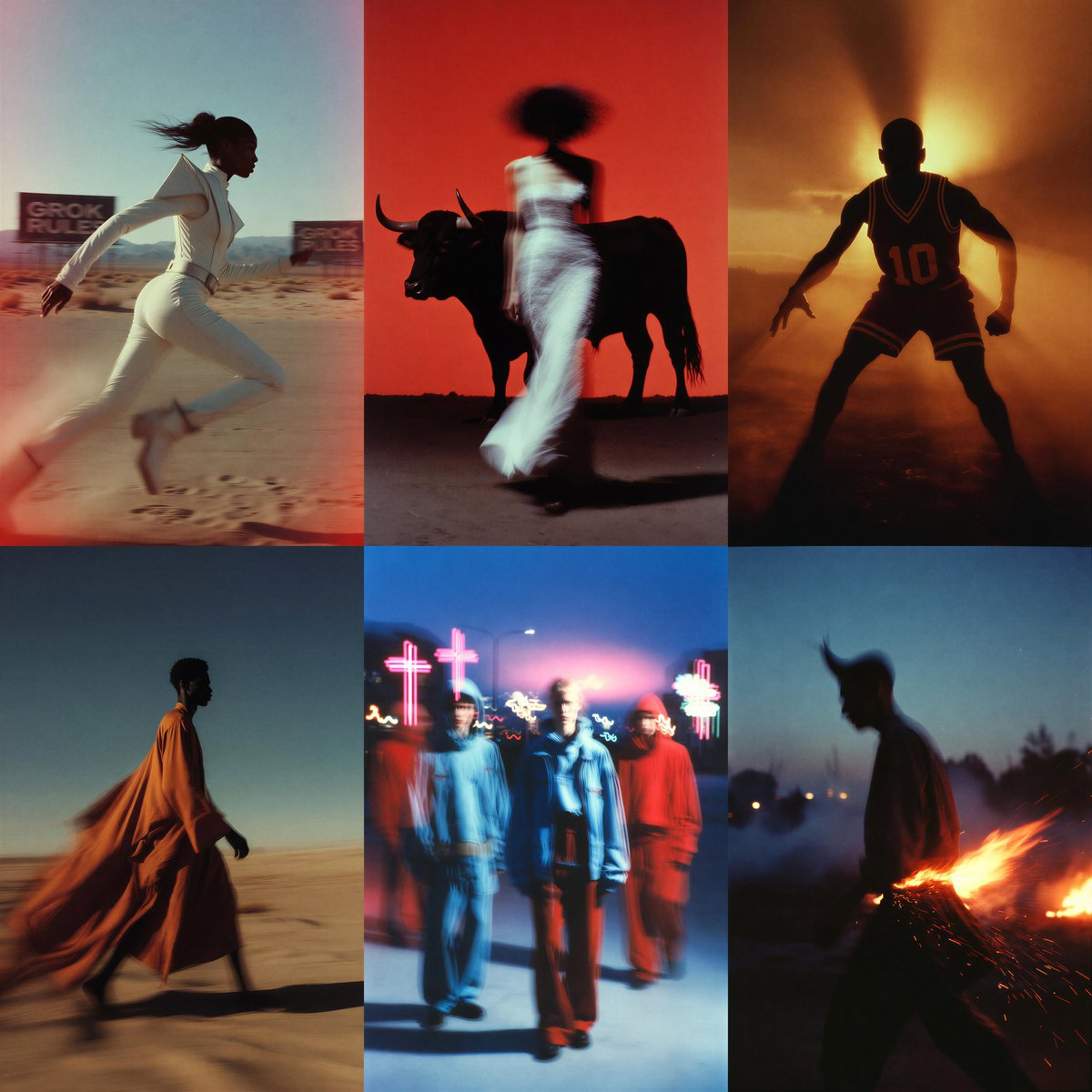
Lock one frame’s palette and re‑prompt for a consistent series as you narrow the direction.
📅 Where to build next: hackathons + contests
Big participation calls for builders and artists: ElevenLabs’ one‑night global hackathon, Hailuo’s horror film contest, Anthropic/Gradio’s MCP kickoff, and Krea × Chroma infra talks.
ElevenLabs sets Dec 11 Worldwide Hackathon across 30 cities with $200K+ prizes
ElevenLabs opened applications for a one‑evening global hackathon on Dec 11 (6:00–10:30 PM local) focused on voice‑first agents, with $200K+ in prizes and 30 host cities listed from New York to Tokyo. Sponsors include Stripe, Anthropic, Miro, n8n, Clerk, and more, signaling serious infra and partner support for teams shipping conversational experiences event overview and hackathon site.

Hugging Face community hackathon passes 6,300 registrants, runs Nov 14–30
Hugging Face says its two‑week global hackathon crossed 6,300+ sign‑ups, is open to anyone anywhere, and accepts submissions through Nov 30 hackathon stats. For solo builders and small teams, this is the broadest playground this month to test agents, vision, and audio ideas against an active community.
Hailuo Horror Film Contest runs Nov 7–30 with 20,000 credits and 60+ prizes
Hailuo opened a horror short contest (10–120s videos) through Nov 30 with 60+ prize slots and 20,000 credits in the pool; post on X/TikTok/IG/YouTube with #HailuoHorror and tag @Hailuo_AI, then submit the link on the site contest page. This follows horror entries reel highlighting early i2v entries made with Hailuo 2.3 creator invite.
MCP 1st Birthday Hackathon kickoff: rules, tracks, and dates go live
Anthropic and Gradio kicked off the MCP community hackathon with a livestream outlining tracks, rules, and dates: the event runs Nov 14–30 with winners on Dec 15, plus guidance on submissions and sponsors like OpenAI, Modal and SambaNova livestream replay and kickoff invite. Teams building tool‑using agents should expect strong MCP tooling coverage and judging clarity.
Krea × Chroma host SF Infra Talks on GPU concurrency and faster inference
Krea and Chroma scheduled an in‑person Infra Talks session in San Francisco on Nov 18, 6:30 PM, covering distributed training, keeping GPUs hot, faster inference paths, and highly concurrent systems behind RL rollouts. RSVP is open now for infra‑curious creators and engineers RSVP page.

🌐 From stillness to space (Marble worldbuilding)
Creators turn single images into explorable 3D rooms. New today: ‘Memory House’ playable demo, case study on a GPT companion, and Marble’s export options.
‘Memory House’ playable demo turns a single image into a walkable room
Creator Wilfred Lee released a public ‘Memory House’ demo built on World Labs Marble, turning a single still into an explorable 3D room with moodful staging and splat‑based depth. Following up on Available to everyone, he outlines next steps—proximity audio, interaction triggers, and added 3D assets—alongside the announcement demo announcement and deeper workflow notes case study.
A GPT ‘World Builder Companion’ auto-tunes lighting and geometry for Marble scenes
World Labs’ ‘Memory House’ case study describes a custom GPT that reviews generated rooms, proposes fixes for lighting, geometry and atmosphere, and keeps narrative coherence across connected spaces. It plugs into Marble’s image‑to‑world pipeline so non‑coders can iterate with traceable adjustments and faster polish loops case study.
Marble exports meshes and Gaussian splats; inputs span text, images, video
World Labs’ launch reel highlights Marble building persistent worlds from text, images, videos, layouts or panoramas, with export options to meshes and Gaussian splats for downstream DCC pipelines. The post also notes freemium and paid tiers, making it easy to prototype before committing launch video.
📓 NotebookLM for visual storytellers
NotebookLM gains visual inputs and styling demos. New today vs prior: direct ‘Images as sources’ support plus an 8‑bit retro video summary walk‑through.
NotebookLM adds Images as sources for visually grounded drafts
Google’s NotebookLM now lets you add images as first‑class sources, so drafts, Q&A, and outlines can reference visual details directly feature demo. The clip shows drag‑and‑drop of a photo and an auto‑generated response “based on the image,” which is useful for moodboards, storyboards, and art notes.
This cuts the “describe the picture” step and keeps treatment context tight for designers and filmmakers working from lookbooks or set photos.
Custom video summaries in NotebookLM get a retro 8‑bit style demo
A Turkish creator walks through NotebookLM’s customizable Video Summary, styling a history‑of‑games brief with 8‑bit retro visuals walk-through demo. Following up on custom video styles, this shows practical control over look‑and‑feel without leaving the app—handy for course intros, format pitches, and explainer series.
- Test a short source set, tweak style presets, then export and review pacing on mobile.
🕹️ Agents that act: SIMA 2 and PALs
Embodied/assistant agents update: SIMA 2 plays and learns in games via Gemini, while Tavus pitches proactive, multimodal PALs that can act on your behalf.
Tavus debuts PALs, proactive multimodal companions that can act on your behalf
Tavus introduced PALs, a new class of proactive, multimodal AI companions that can talk over text, voice calls, or face‑time, remember context and emotion, and take actions like sending emails or moving meetings. It’s pitched as a life/work coordinator that plugs into G‑Suite and responds like a teammate, not a tool. This targets solo creators and small teams who need follow‑through.
PALs are designed to be ever‑present and adaptive. They remember what you promised to do, check in when you don’t, and keep continuity across modes so a face‑time can spill into a text without losing thread. The system claims “perceptive” reads of tone and body language to adjust replies on the fly. That matters when you’re directing talent, negotiating, or scheduling shoots. See the feature rundown in the launch clip feature overview.
Agent actions are the point. PALs can draft and send mail, reschedule calendar items, and operate against your existing stack. For a filmmaker or music lead, that means routing casting emails, nudging collaborators for assets, and reconciling call sheets with venue changes. It turns reminders into done items.
Here’s the catch: this is an always‑on assistant wired to your accounts. Treat it like an intern with keys. Start with bounded permissions, log everything it’s allowed to send, and keep sensitive inboxes in a separate workspace until you trust its behavior.
• Start with a throwaway calendar and a test inbox. Route low‑risk tasks first, then expand scope.
• Define “safe verbs” it can execute (draft, propose, schedule holds) before allowing final‑send actions.
• Keep a daily digest. Require the agent to summarize what it did and what it plans to do next.
If Tavus delivers on perceptive, multi‑modal continuity, PALs could replace a handful of glue tools and reminder rituals. For creatives, that means fewer dropped balls between ideation, booking, and delivery. Watch for API docs and enterprise controls before connecting your main tenant.
🧪 Papers shaping creative AI this week
Mostly geometry/video/music and LLM training: new depth SOTA claims, a universal video agent, music‑aware ALMs, and black‑box distillation; plus a notable OSS adoption metric.
Depth Anything 3 claims any‑view geometry with a plain transformer
Depth Anything 3 introduces a single‑stack transformer that recovers camera poses and dense geometry from almost any view configuration, with a polished 3D reconstruction demo. Creatives get easier matchmove, parallax, and relighting without lidar or multi‑camera rigs Paper demo, with a hands‑on Space already live for testing HF space.
The paper frames it as "Recovering the Visual Space from Any Views," which matters for VFX layout and virtual production. If the SOTA holds in production footage, it could replace a bunch of photogrammetry steps while keeping coherence across shots ArXiv paper.
Microsoft’s GAD trains a student via black‑box, on‑policy distillation
Generative Adversarial Distillation (GAD) frames the student LLM as a generator and a discriminator as an on‑policy reward model, enabling black‑box distillation from a proprietary teacher. The authors report a Qwen2.5‑14B student becoming comparable to a GPT‑5‑Chat teacher on LMSYS‑Chat autoscores—promising for cheaper, in‑house assistants for creative teams Paper summary.
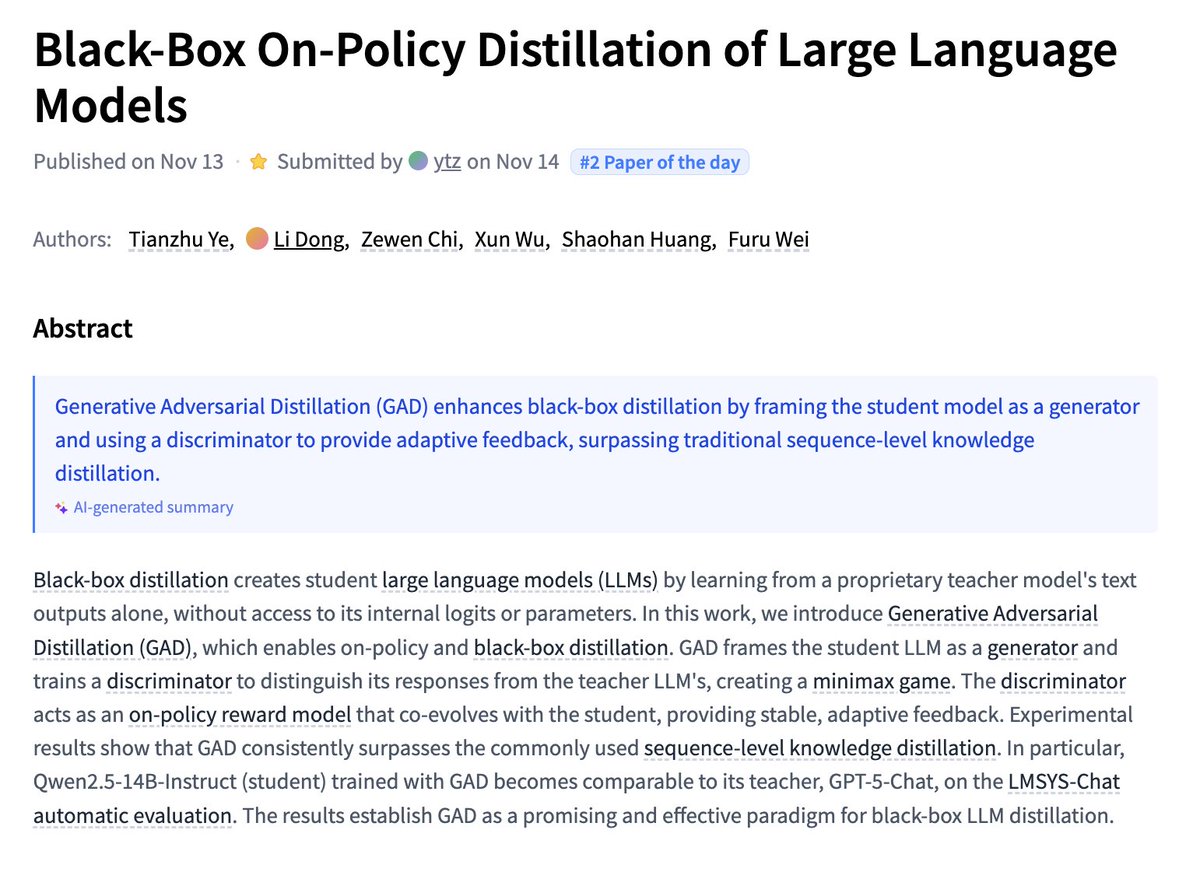
The win is less about a single leaderboard and more about training loop control: on‑policy signals tend to be more stable than off‑policy KL targets. If reproducible, studios could tune task‑specific writers without teacher logits or weights ArXiv paper.
Music Flamingo scales music understanding with MF‑Skills and RL post‑training
NVIDIA’s Music Flamingo is an audio‑language model trained on MF‑Skills (rich music captions and QA) and then strengthened with MF‑Think chain‑of‑thought and GRPO reinforcement, hitting SOTA across 10+ benchmarks. For musicians and audio apps, that means better structure, harmony, and timbre reasoning instead of shallow captions Paper summary.
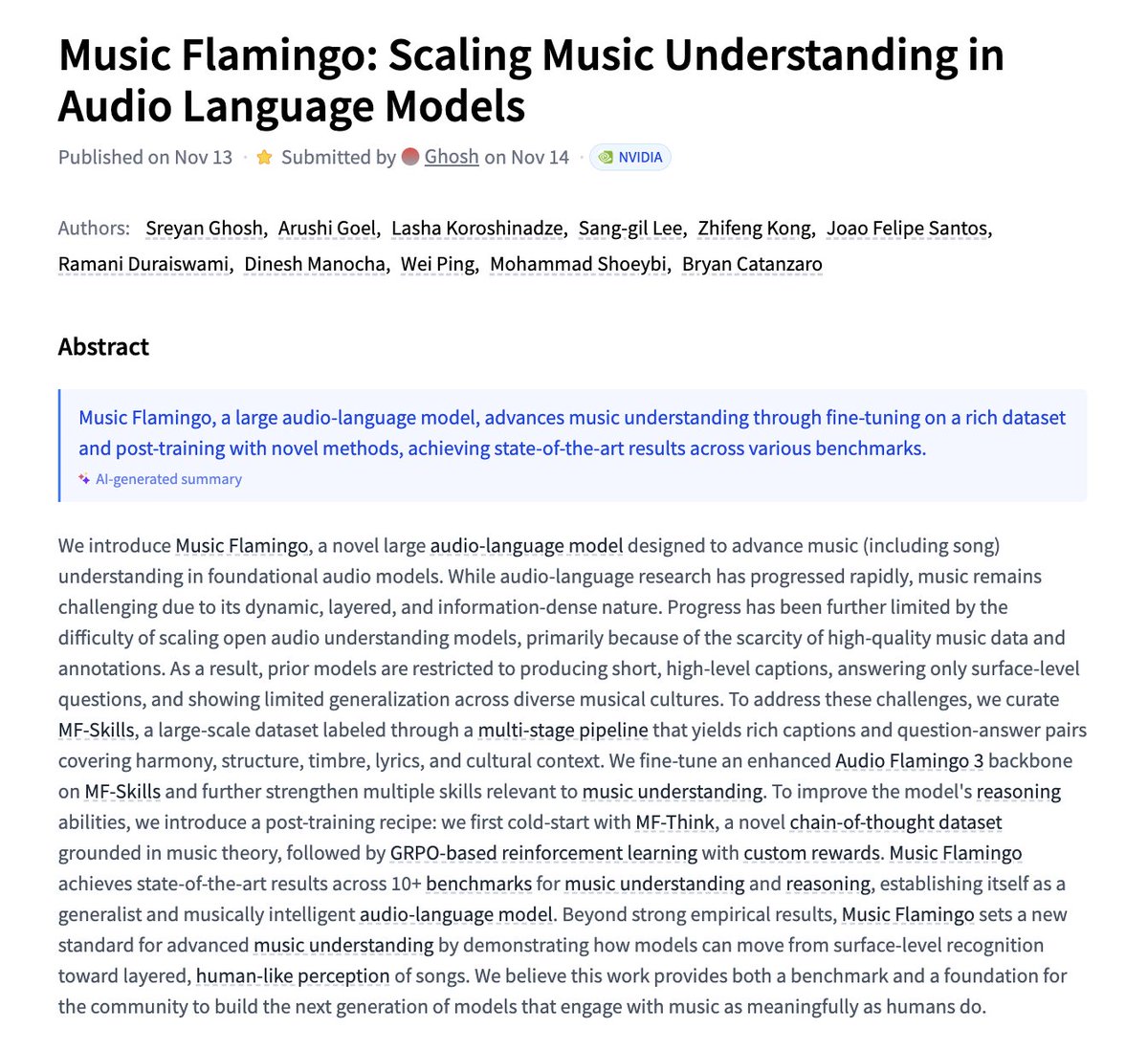
The recipe matters: data richness plus staged post‑training improved reasoning, not just tagging. This could power smarter stem notes, arrangement suggestions, and context‑aware lyric feedback in DAWs ArXiv paper.
UniVA proposes an open‑source universal video agent workflow
UniVA unifies video understanding, segmentation, editing, and generation into a Plan‑and‑Act multi‑agent system with hierarchical memory. For filmmakers and editors, it hints at a single orchestration layer that can plan tasks, call tools, and iterate without hand‑holding Paper overview.

The team also ships UniVA‑Bench to measure multi‑step video tasks, which helps compare pipelines beyond one‑shot prompts. If tool servers and memory are reliable, you could route i2v → multi‑round edits → object segmentation inside one agentic loop ArXiv paper.
Moondream2 tops ~1.87M monthly downloads on Hugging Face
Open‑source vision‑language model moondream2 logged about 1,870,671 downloads in the last month, per its Hugging Face page. That’s a strong signal of real‑world adoption for lightweight captioning and visual Q&A in creative pipelines Adoption chart.
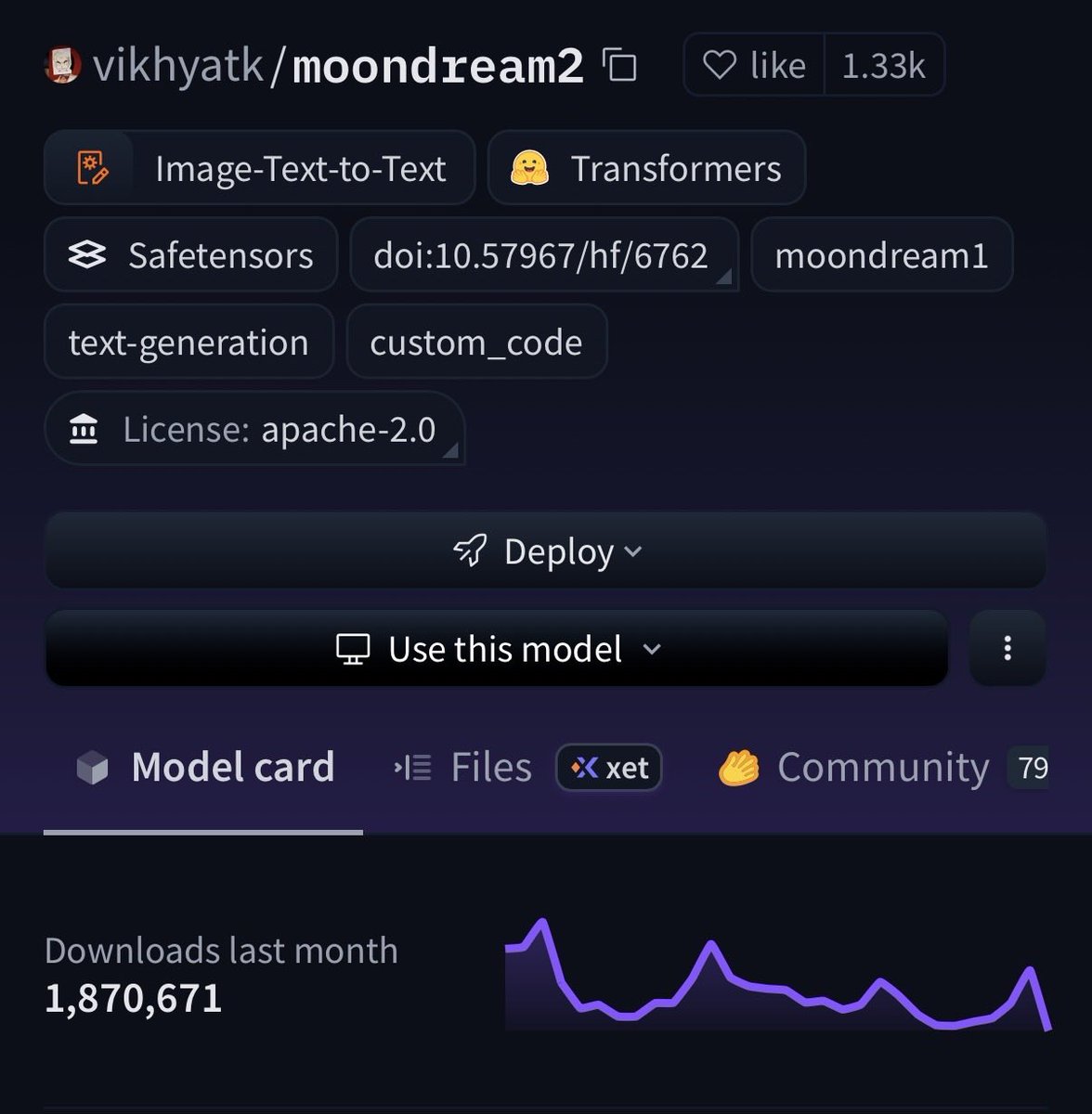
For designers and story teams, a small, permissive model that runs cheaply is useful for auto‑tagging moodboards, asset search, and quick storyboard notes without sending everything to a paid API.
⚖️ Credit and privacy battles
Community and legal flashpoints: a credit/permission call‑out in the ComfyUI scene and NYT’s demand for 20M private ChatGPT chats; OpenAI plans to de‑identify and contest scope.
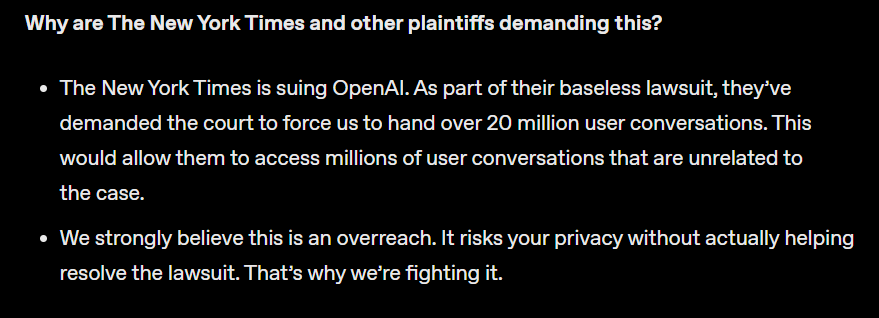
NYT demands 20M ChatGPT chats; OpenAI to de‑identify data and fight scope
The New York Times is seeking 20 million private ChatGPT conversations in its suit; OpenAI says it will comply under protest, strip PII, limit access to an audited legal team, and challenge the request’s breadth in court. The sample spans Dec 2022–Nov 2024 and excludes business/API users; OpenAI also signals client‑side chat encryption to reduce future exposure Case summary.
ComfyUI calls out a16z partner for reposting creator’s video without credit
ComfyUI publicly accused an a16z partner of reposting a creator’s ComfyUI subreddit video without permission or attribution, noting the clip cut the on‑screen credit segment Attribution call-out. The team amplified the original artist (@VisualFrisson) and flagged a live workflow stream invite, spotlighting recurring attribution gaps in open‑source AI art circles Artist follow-up.
📣 Product‑to‑ad in minutes (plus BFCM deals)
E‑com creators get faster pipelines: Higgsfield’s URL‑to‑ad builder demo and Pictory’s BFCM offer with Getty/ElevenLabs access.
Paste a URL, get an ad: Higgsfield’s product‑to‑video builder
Higgsfield is previewing a paste‑a‑URL “product‑to‑ad” tool that auto‑builds short spots with AI avatars and voiceover in minutes, aimed squarely at e‑com creators who need fast, social‑ready creatives UI screenshot.