
InVideo Agents hub opens 70+ models for 5 days – unlimited tests

Stay in the loop
Free daily newsletter & Telegram daily report
Executive Summary
After three days of single‑model headlines like FLUX.2 and Retake, today is about orchestration and cheap experimentation, led by InVideo. Its new Agents & Models hub is wide open for five days of free, unlimited use of 70+ image, video, and audio models for any paying user, so you can pit Veo 3.1, Sora 2, Kling 2.5, Nano Banana Pro, and Flux 2 against each other on the same script. The proof reel is strong already: a Heineken spec spot, Prada‑style fashion film, and a self‑referential InVideo ad all cut entirely inside the hub.
Precision tools keep evolving in parallel. ElevenLabs now pipes LTX‑2 Retake into its Image & Video product for 2–16 second in‑shot fixes, while Lovart’s Touch Edit lets you literally click a shirt or headline and rewrite it without re‑rendering the frame. Shot‑to‑shorts recipes mature too: NB Pro → Hailuo/Kling anime fights, Higgsfield’s URBAN CUTS for beat‑synced outfit reels, and a House of David pipeline that scaled to 253 AI shots.
Under the hood, Tencent’s Hunyuan 3D‑PolyGen 1.5 finally gives quad‑mesh gen, Comfy’s Z‑Image Turbo hits 2K in ~6s and reportedly runs under 2 GB VRAM, and a stealth “Whisper Thunder” model tops AA’s T2V board while CritPt reminds us Gemini 3 Pro still stalls at 9.1% physics accuracy. Black Friday boosts the experimentation budget: Higgsfield jumps to 70% off unlimited, Vidu slices 40% off annuals, and Hedra, Hailuo, and Pictory shovel in bonus credits so you can stress‑test all of this without torching cash. We help creators ship faster by paying attention to these levers, not leaderboard drama alone.
Top links today
- Higgsfield unlimited image models Black Friday deal
- Higgsfield URBAN CUTS beat-synced outfit videos
- Hedra Thanksgiving video templates and credits offer
- Tencent Hunyuan 3D Studio 1.1 with PolyGen 1.5
- Lovart Touch Edit precision image editing tool
- ElevenLabs Image and Video with LTX Retake
- ComfyUI Z-Image Turbo 2K photorealistic model
- Freepik LTX-2 4K audio-synced video generation
- Hailuo creator partnership program application
- FLUX.2 dev and pro models on Fal
- Invideo Agents and Models unlimited access promo
- Runware HunyuanImage 3.0 image model launch
- Vidu AI Black Friday video plans and credits
- LatentMAS paper on latent multi-agent collaboration
- Pictory AI Black Friday video creation offer
Feature Spotlight
Agents & Models free‑for‑all (InVideo)
InVideo’s Agents & Models goes free & unlimited till Dec 1 with 70+ SOTA models (Veo 3.1, Sora 2, Kling 2.5, Flux 2, NB Pro). It’s the widest no‑limits playground this week for creators to ship studio‑grade ads and shorts.
Cross‑account story: InVideo opens its Agents & Models hub for 5 days of FREE, UNLIMITED access to 70+ top image/video/audio models—timed for Thanksgiving/Black Friday—showing pro ad results creators can replicate now.
Jump to Agents & Models free‑for‑all (InVideo) topicsTable of Contents
🎁 Agents & Models free‑for‑all (InVideo)
Cross‑account story: InVideo opens its Agents & Models hub for 5 days of FREE, UNLIMITED access to 70+ top image/video/audio models—timed for Thanksgiving/Black Friday—showing pro ad results creators can replicate now.
InVideo opens 5‑day free, unlimited “Agents & Models” access to 70+ AI tools
InVideo has turned on a five‑day all‑you‑can‑gen window for its new Agents & Models hub: 70+ top image, video, and audio models (including Veo 3.1, Sora 2, Kling 2.5, Nano Banana Pro, Flux 2) are free and unlimited for all users on any paid plan until 1 December. agents overview Creators get per‑project orchestration plus team collaboration, so you can spin up full campaigns or spec pieces without worrying about per‑render costs. team workflow
The offer effectively converts InVideo into a sandbox for stacking state‑of‑the‑art models: you can route a single script through different video engines, test multiple image styles, and layer sound design from the same canvas. agents overview Access is straightforward: sign up for a Plus, Max, or Generative plan, then use any model via the Agents & Models surface with no metering until Dec 1. access steps The deal is especially attractive if you want to benchmark Veo vs Kling vs Sora vs NB Pro on your own footage or brand assets instead of relying on vendor reels. offer recap For small teams, the shared project space means directors, editors, and marketers can all poke at the same sequences instead of bouncing exports around. team workflow
Heineken spec ad shows InVideo’s Agents & Models can hit big‑brand polish
A full Heineken spec commercial by director Simon Meyer was produced entirely inside InVideo’s Agents & Models hub, and it looks like something you’d expect from a large agency budget. heineken case The piece uses multiple AI video models driven from one project, with Agents handling shot planning, variations, and refinement so the director can focus on pacing, framing, and brand feel instead of manual compositing. agents overview
For filmmakers, the takeaway is practical: the same stack that’s free‑to‑hammer for five days can already deliver beer‑brand‑grade lighting, liquid simulation, and motion continuity, as long as the prompts and storyboards are tight. agents overview It’s a good reference for how far you can push cinematic realism and product focus in an AI‑assisted workflow before you ever touch a 3D package or a live set.
Prada‑style and meta InVideo ads highlight Agents & Models’ fashion‑film range
Beyond the Heineken spec, creators are using InVideo’s Agents & Models to deliver high‑end fashion and brand work, including a cinematic Prada ad and a meta spot advertising InVideo itself that were both built inside the platform. (prada example, meta invideo ad) These projects lean on stylized lighting, controlled camera moves, and consistent character looks across shots, showing that the hub is not only for flashy sizzle reels but also for mood‑driven storytelling.
For fashion, beauty, or luxury creators, that means you can prototype full campaigns—hero film, cutdowns, social loops—by combining Agents for scripting and shot breakdown with different video engines and image models for look tests. agents overview The fact that an ad about InVideo was made inside the same system underlines the point: this is now a viable place to art‑direct on‑brand films that feel like traditional productions, especially while the 5‑day unlimited window is live. access steps
✂️ Pinpoint edits: Retake + Touch Edit
Today’s precision tools focus on targeted changes without re‑renders. Excludes InVideo’s free window (feature). ElevenLabs adds LTX‑2 Retake for in‑shot edits; Lovart ships Touch Edit for point‑to‑edit and multi‑image remix.
ElevenLabs Image & Video adds LTX‑2 Retake for timecoded in‑shot edits
ElevenLabs has integrated LTX‑2 and its Retake feature directly into ElevenLabs Image & Video, so you can now reshoot only specific timecoded sections of a shot instead of regenerating the whole clip. elevenlabs announcement
Retake lets you pick a 2–16 second segment, change the action, adjust phrasing, or even shift the camera angle while keeping lighting, motion, and character look consistent, which is a big deal for narrative work, ads, and UGC where one line or gesture feels off. ltx feature breakdown Creators are already sharing examples of swapping expressions and performance beats mid‑shot without breaking continuity, and LTXStudio is pushing a full tutorial so filmmakers can fold Retake into proper directing workflows rather than one‑off gimmicks. (retake workflow demo, ltx tutorial cta)
Lovart ships Touch Edit for point‑to‑edit and multi‑image remixing
Lovart launched Touch Edit, a precision image tool where you literally click on clothes, text, or objects and describe changes, instead of trying to steer the whole frame with one global prompt. touch edit launch
Alongside point‑to‑edit, the new Select & Remix mode lets you pull elements from multiple images into a single composite in one prompt, which is handy for things like combining the best outfit, background, and pose from different drafts. touch edit launch The feature lives inside Lovart’s "design agent" surface, so designers and marketers can iterate on product shots, key art, or social graphics with targeted fixes and quick mashups rather than full re‑renders. (lovart cta, design agent page)
🎬 Shot‑to‑shorts pipelines & tutorials
Creators show practical stacks from stills to action. Highlights include NB Pro → Hailuo/Kling I2V fights, beat‑synced outfit cuts, LTX‑2 on Freepik for 4K sync, and knitted‑yarn parade shorts with NB Pro + LTX‑2 Fast.
NB Pro stills → Hailuo + Kling turn Chainsaw Man into live‑action fight
Creator @heydin_ai broke down a full Denji vs Katana Man sequence built from Nano Banana Pro stills, then animated via an image‑to‑video stack using Hailuo 02 and Kling 2.5 Turbo, cut in CapCut Pro and upscaled with Topaz Labs for a polished live‑action anime feel Chainsaw Man workflow.
For filmmakers and motion designers, it’s a clear recipe: design keyframes in NB Pro (with full control over framing and style), batch them through fast I2V models to capture motion and energy, then lean on consumer editors and upscalers for pacing and final sharpness. The result shows you can get complex, high‑speed action without touching a traditional 3D or compositing stack.
Freepik adds LTX‑2 for 4K, longer, synced audio‑video shots
Freepik is now hosting the LTX‑2 video model, letting users generate longer, crisp 4K shots with synchronized audio directly from their creative toolkit LTX-2 Freepik note.
This puts the same model that powers precise in‑shot edits in other tools into a more design‑centric surface, so you can go from moodboards and posters to matching motion clips without leaving Freepik’s ecosystem Freepik try call. For short‑form storytellers, that means you can prototype full sequences—dialogue, camera movement, and sound—inside the same place you source your stills, then export ready‑to‑cut footage for your editor.
Higgsfield’s URBAN CUTS auto‑cuts outfit videos to the beat
Higgsfield launched URBAN CUTS, a tool that turns outfit photos into 10‑second vertical clips with hard cuts locked to each music beat, pitched as a way to "break the feed" for fashion and creator accounts Urban Cuts launch.
You upload a character shot and outfit, pick a track, and URBAN CUTS detects the rhythm to generate shot changes that land on the beat, so you get TikTok‑ready transitions without manual editing Urban Cuts try link. For short‑form creators who live on Reels, Shorts, or TikTok, this compresses what was a multi‑layer timeline job in Premiere into a simple prompt‑and‑song workflow, especially attractive while their 65%‑off Black Friday unlimited plan is running.
House of David S2 uses 253 AI shots in hybrid Gen‑3 + LED wall workflow
Wonder Project and Vu Technologies detailed how House of David Season 2 scaled to blockbuster visuals with 253 AI‑driven shots, up from 73 in Season 1, combining Runway Gen‑3 Alpha, virtual‑production LED walls, RTX 6000 GPUs, and live practical effects Hybrid workflow summary.
They treat Gen‑3 as "horsepower" for armies of 100,000, set extensions, and complex battles, while real actors perform on LED stages that already embed those AI worlds, so directors can compose shots like a normal drama and skip huge chunks of post workflow article. For indie filmmakers and series creators, it’s proof that the same shot‑to‑short principles—design plates with generative tools, stage on walls, then polish—scale from TikTok clips all the way to a 40M‑viewer streaming show.
LTXStudio shares full NB Pro prompt set for knitted NYC Thanksgiving short
LTXStudio dropped a complete prompt pack for a New York Thanksgiving micro‑film, using Nano Banana Pro to design a fully knitted‑yarn universe and LTX‑2 Fast to animate it into a cohesive sequence Knitted parade short.
The thread includes shot‑level prompts for a knit parade balloon between skyscrapers, the yarn‑textured skyline, marching band close‑ups, chaos in a kitchen with a burnt knitted turkey, and intimate apartment scenes, all matched in aesthetic and lighting Knitted prompt pack. For directors and designers, this functions like a storyboard‑to‑shot recipe: you reuse the same visual rules across multiple prompts so LTX‑2 can stitch them into a consistent, stylized short without custom training.
Techhalla outlines Higgs + NB Pro + Veo 3.1 GTA‑style workflow
Creator @techhalla published a step‑by‑step "GTA" workflow using Nano Banana Pro inside Higgsfield to design a 4‑panel grid of keyframes, then extracting each frame and animating them into reusable shots with Veo 3.1 Fast GTA workflow intro.
The process is: generate a 2×2 storyboard grid with NB Pro, run simple prompts like “extract first frame” to isolate each still, then feed those into Veo for character moves, in‑game angles, and cinematic variations—always reusing the same text prompt for consistency Workflow thread. For people trying to get game‑engine‑style cutscenes from pure gen‑AI, it’s a concrete pattern that separates design, framing, and motion into clean, repeatable stages.
Glif agent turns research, NB Pro visuals, and music into a full explainer
Glif showed a "Slidesgiving" pipeline where a single agent handles research, script, video, captions, and music, while Nano Banana Pro is used inside the flow to render logos and characters that match reference images exactly Glif Slidesgiving thread.
Instead of juggling separate tools, you inject your brand or character references, let the agent draft the story and visual plan, and Glif calls NB Pro for style‑consistent frames, then assembles the result into a narrated, captioned video. For educators and storytellers, it’s a template for going from topic idea to finished short in one place, with NB Pro acting as the visual engine rather than a separate side quest.
Hailuo Start/End Frame fuels "Epic Turkey Escapes" remixable shorts
Hailuo used its Start/End Frame feature to release a pack of "Epic Turkey Escapes" clips for Thanksgiving, inviting creators to remix, extend, or completely change each turkey’s fate Turkey escape drop.
Building on the same Start/End pipeline highlighted in start–end frames, where NB Pro images bookend tense scenes, these shorts show how you can give the community pre‑built arcs that still leave room for new middle beats CPP shoutout. Paired with a small Pro‑membership giveaway and CPP recruitment Thanksgiving giveaway, it doubles as both a tutorial and a prompt library for fast holiday‑themed content.
Kling 2.5 Turbo tutorial shows how to animate "mochi cats"
Kling AI shared a hands‑on tutorial for making adorable "mochi cat" animations with Kling 2.5 Turbo, starting from a simple squishy cat concept and iterating on shape and motion Mochi cat guide.
The clip walks through sculpting the character, then using Kling’s motion controls to squash, stretch, and emote in a short, loopable shot—exactly the kind of asset you can drop into TikToks, emotes, or stickers. For illustrators who have characters but no animation skills, it’s a lightweight way to turn static designs into expressive, on‑brand minis.
Cupcake horror music video shows Midjourney → Hedra → Suno stack
OpenArt spotlighted a music video where hyper‑detailed, unsettling cupcakes are rendered as stills, then animated and scored using a three‑tool pipeline: Midjourney for imagery, Hedra for motion, and Suno for the jazzy soundtrack Cupcake music video.
For musicians and visual storytellers, it’s a clean pattern: concept and design in your image model, temporal movement and camera in a video tool, then music from an AI composer that reacts to the mood. The result feels like a fully art‑directed MV, but each stage is swappable depending on your favorite tools.
🖼️ NB Pro style control, typography & quick comps
Hands‑on NB Pro recipes dominated image work today—style‑intensity control, Midjourney lookalikes, clever typography shapes, fast composites, and slice‑of‑life scenes. Mostly creator tests and prompts.
NB Pro gets explicit style‑intensity control and strong Midjourney mimicry
Nano Banana Pro users are starting to treat style as a dial, not a black box: Halim shows a prompt pattern that applies a style reference at 10%, 50%, and 100% intensity, with clear shifts in color, lighting, and texture while keeping the character pose consistent style reference slider.

In a separate comparison, he argues NB Pro is currently "the best model" for duplicating Midjourney’s aesthetic, especially when you feed it multiple style frames rather than one hero image Midjourney style match. For creatives, this combo—multi‑ref style capture plus a controllable intensity prompt—means you can build reusable style packs, then decide whether you want a subtle influence for new IP or a near‑perfect clone for sequels, brand systems, or client rounds where matching an existing look matters.
NB Pro demo swaps a selfie into a studio shot in under 90 seconds
ai_for_success shows NB Pro handling a classic composite task: taking a casual selfie, dropping that face and body onto a posed studio shot, and changing the bold background letter from B to A—all in "under 90 seconds" of prompting 90 second edit demo.
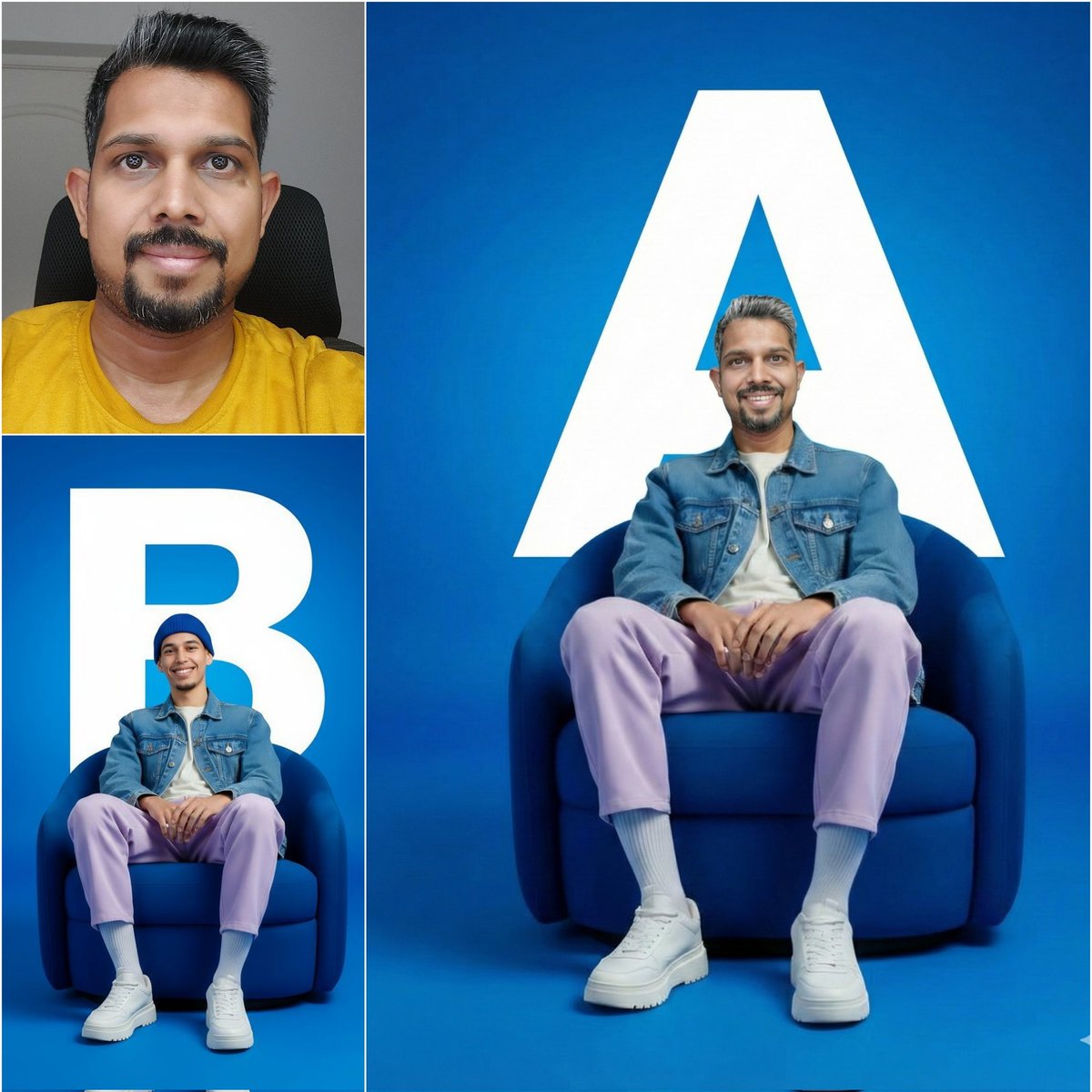
The before/after triptych keeps clothing folds, chair perspective, and lighting consistent while only the subject identity and backdrop letter change, which is exactly the kind of quick personalization brands and content teams need for ad variants, thumbnails, or social assets without going back to Photoshop layers and masking for every version.
NB Pro worldbuilds believable torus colonies with tiny environmental details
fofr keeps pushing NB Pro into hard sci‑fi territory with prompts like “an amateur photo of an expansive torus colony’s interior,” yielding hazy, wide‑angle shots packed with terraces, transit pods, and crowds that feel like casual travel snaps rather than concept art torus colony prompt.

Another shot of a massive enclosed habitat shows a crowded concourse and a big "Community market – Sector 4" sign, while a separate interior scene quietly includes a "Community notice: water recycling update" board water recycling detail. That kind of incidental signage and infrastructure detail is what filmmakers, comic artists, and game environment teams look for when using AI for worldbuilding plates and moodboards.
NB Pro turns single words into complex typographic illustrations
fofr is leaning into NB Pro as a layout engine, not just an image model, by prompting it to shape entire words into recognizable objects—like "THANKSGIVING" warped into the full silhouette of a turkey in bold black‑and‑white graphic design turkey typography example.

He follows it up with a more intricate piece where the phrase "fofr loves melty ai" becomes a melting monstera‑leaf heart, with green accents and drippy negative space monstera typography. For designers, these examples show NB Pro can handle clever logotypes, posters, and merch concepts from pure text prompts, saving a lot of sketch‑and‑vector time when exploring directions.
NB Pro handles cozy slice‑of‑life scenes with rich staging prompts
In a more narrative‑driven test, fofr prompts NB Pro for "a photo of a black and white cat stealing turkey from a kitchen table while a labradoodle sleeps unaware underneath" in a sleek slate‑gray kitchen, and the model nails both the story beat and the interior design brief cat and dog prompt.
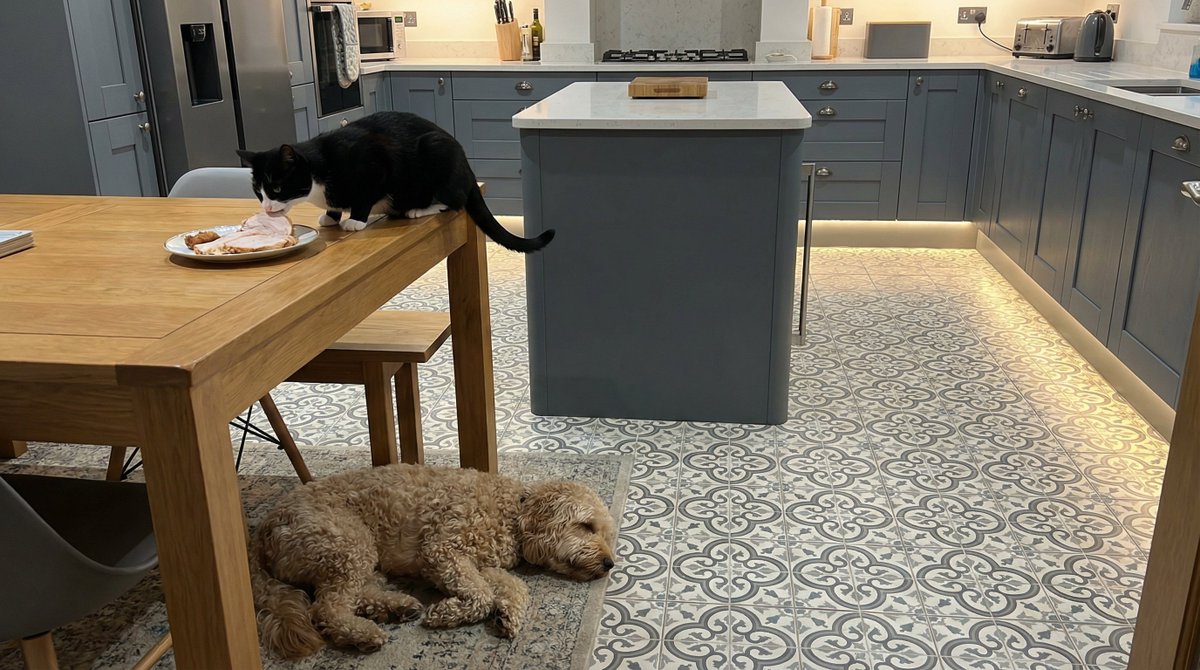
The result gets the staging right—the cat mid‑theft, the dog out cold under the table, floor uplighting and patterned tiles visible—showing NB Pro can be used to storyboard domestic vignettes, kid’s books, or social content ideas where the exact relationships between characters and props really matter.
NB Pro prompt recipe turns any character into a handcrafted plush keychain shot
Amira (azed_ai) shares a Leonardo workflow where Nano Banana Pro generates ultra‑cute close‑ups of felt plush keychains based on an attached emoji or image, all with shallow depth of field, neutral backdrops, and studio‑style soft lighting keychain prompt.
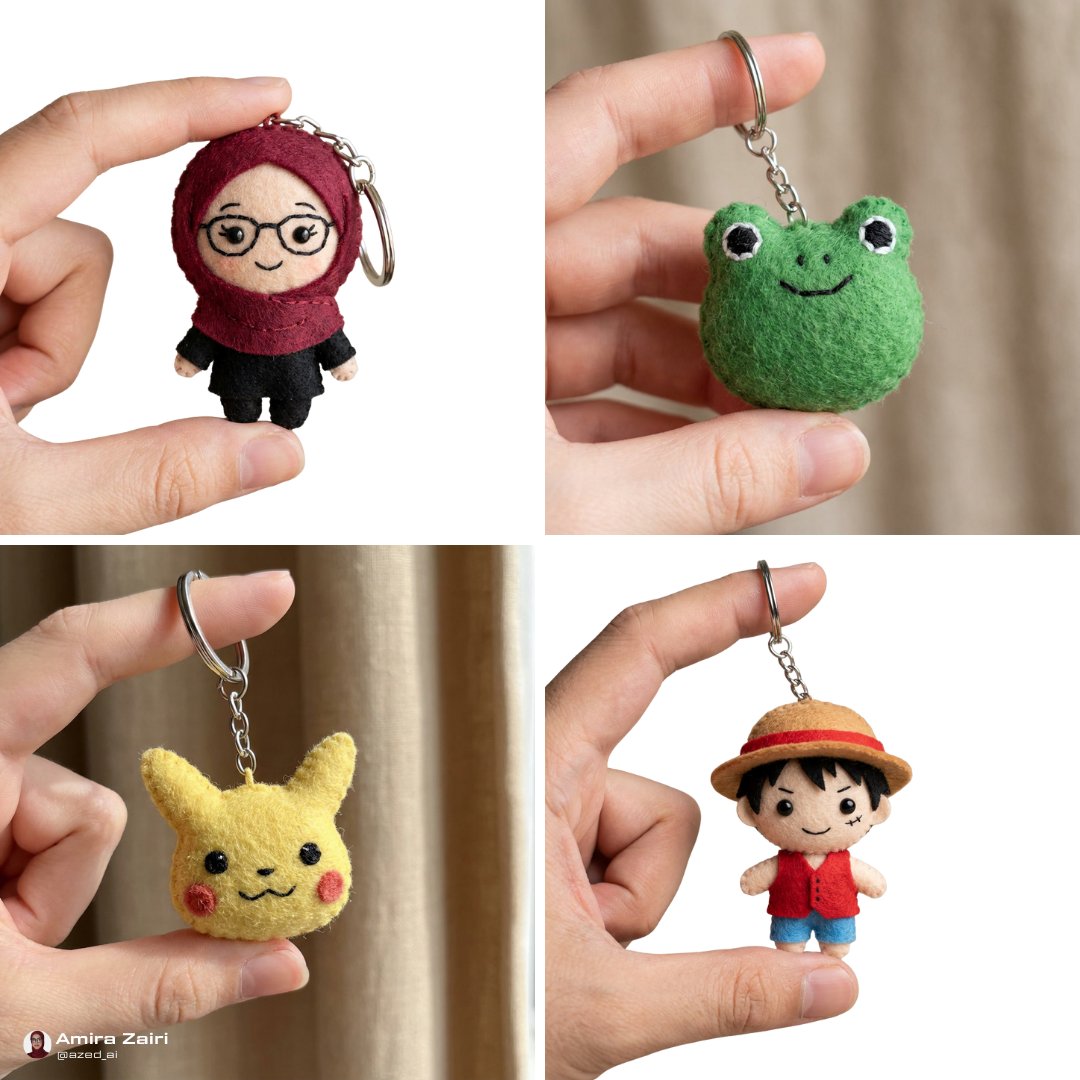
The single prompt template (“close‑up photo of a small plush keychain of [attached image/emojis]…”) produces consistent product‑shot framing across hijabi dolls, frog faces, Pikachu, and anime characters, giving merch designers and illustrators a fast way to explore collectible lines or Etsy‑style listings without having to physically sew and photograph prototypes first.
🧩 Script → trailer automation
A full walkthrough turns a TV pilot into a finished trailer: import script, auto‑analyze, write trailer, break into shots, and paste into a video model. Useful for filmmakers/storytellers planning promos.
BeatBandit Trailer Wizard turns full TV scripts into AI-generated trailers
BeatBandit’s new Trailer Wizard walks a finished script all the way to an AI-ready trailer, auto‑analyzing story beats, characters, and tone, then drafting a full trailer script from your TV pilot or feature. You can import a Final Draft .fdx file or paste plain text, let it crunch the structure, then tweak the generated trailer copy inside the app before moving on to shot planning workflow thread import step demo.
From there, the Shot List Wizard explodes the trailer script into individual shots, each with a detailed prompt and tags for recurring elements (characters, locations, props), so consistency is baked in across the whole sequence shot list wizard. Those per‑shot prompts are designed to be copy‑pasted directly into video models like Sora; the creator shows pasting shots one by one, rendering them, and then cutting the results together in Premiere into a finished trailer sora export demo. For writers and showrunners, this means you can pressure‑test how a story sells in trailer form and get a visual draft for notes or pitching without manually re‑outlining or storyboarding every beat first (BeatBandit platform).
🎨 Reusable looks: anime OVA, felt stop‑motion & fabric art
Fresh style references and prompt packs for consistent looks: 1980s OVA cel‑shade, cozy felt stop‑motion, and a fabric sculpture stop‑motion template. Mostly srefs and templates for repeatable aesthetics.
Midjourney sref 3286416787 locks in retro 1980s OVA anime look
Artedeingenio shares a new Midjourney style reference, --sref 3286416787, that nails a retro 1980s OVA cel-shaded anime aesthetic with analog color, bold linework, and a modern clean finish. Anime sref details

The example frames cover vampires, gladiators, Roman soldiers and elderly characters with consistent shading and sky treatment, giving anime creators a one-line way to keep character art, keyframes, and promo posters in the same high‑end OVA style across a whole project.
New MJ sref 3671690810 captures cozy felt stop-motion / Laika vibe
A second Midjourney style reference, --sref 3671690810, is tuned for a handcrafted felt stop-motion look that recalls The Moomins, Isle of Dogs, Laika shorts and Fraggle Rock, with fuzzy wool textures, stitched clothing and miniature sets. Felt sref overview
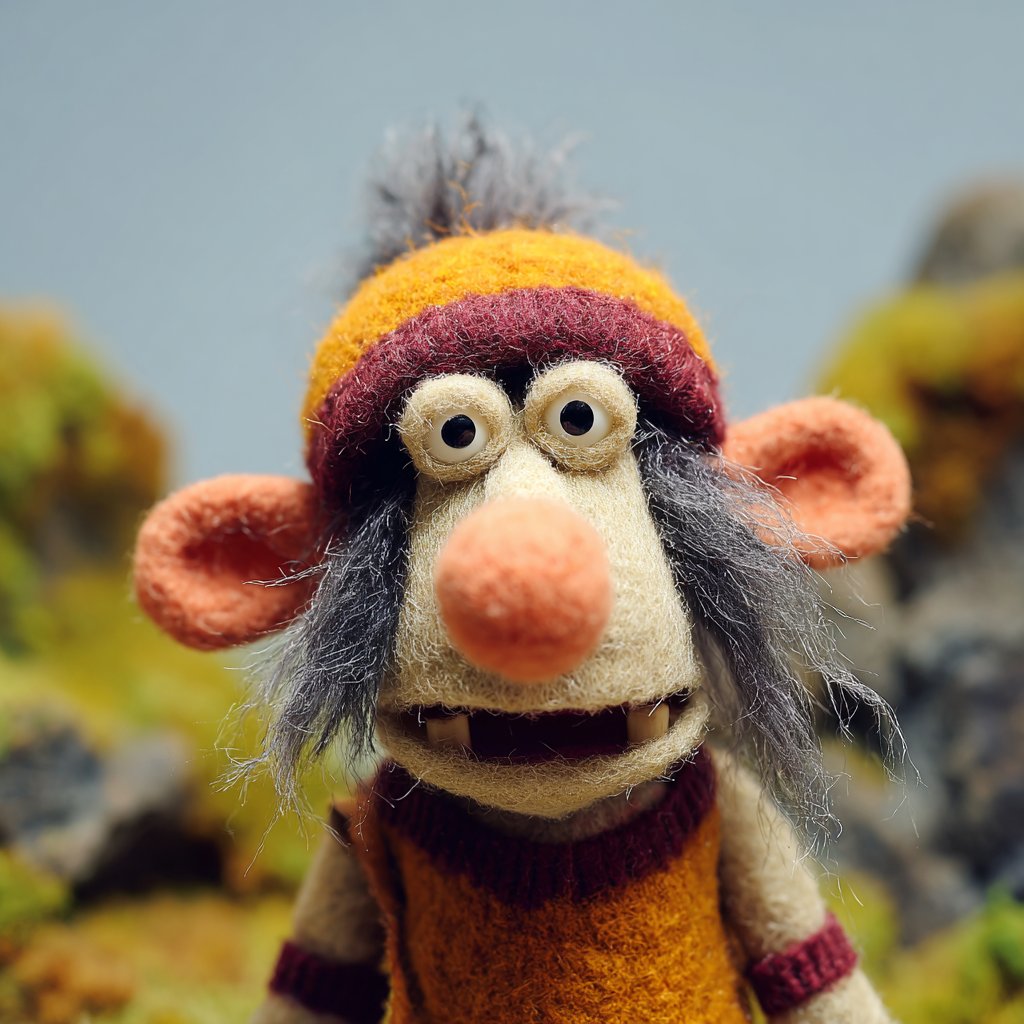
The examples span puppets, dragons, quirky kids and forest fairies, so illustrators and filmmakers can quickly generate entire casts and environments that feel like they’re shot in a cozy tabletop puppet world, while keeping the aesthetic perfectly consistent shot to shot.
Fabric sculpture prompt template turns any subject into felt stop-motion art
Azed_ai shares a reusable "Fabric sculpture" prompt that describes how to render any subject as a whimsical stop-motion sculpture made from felt and yarn, posed on handmade props with visible stitching and soft, handcrafted textures. Fabric sculpture prompt

The template exposes slots for the subject and base object (e.g., cat on a rug, wizard on a magic circle, dragon on a cloud, frog on a lily pad), letting designers keep the same stitched, cozy craft aesthetic while swapping concepts for cohesive series, children’s books, or animated loops.
🧱 Art‑grade quad meshes for 3D
Tencent’s Hunyuan 3D Studio 1.1 integrates PolyGen 1.5 to output native quad topology with clean edge loops—aimed at game/animation/VR pipelines. A pure 3D quality upgrade day for asset creators.
Hunyuan 3D Studio 1.1 ships PolyGen 1.5 for art‑grade quad meshes
Tencent upgraded Hunyuan 3D Studio to v1.1 and integrated the new Hunyuan 3D‑PolyGen 1.5 model, which learns quad topology end‑to‑end to output native quad meshes with clean, continuous edge loops instead of traditional tri‑only meshes. This is pitched as "art‑grade" quality that drops directly into professional game, animation, and VR pipelines without a retopo pass, while still allowing exports in either quad or tri topology for both soft and hard‑surface assets. PolyGen 1.5 launch
For 3D artists and technical directors, the big deal is workflow: better wireframes mean more predictable deformations for character rigs, easier UV layout, and saner subdivision, which usually costs a lot of manual cleanup when starting from auto‑generated tri meshes. Tencent also claims PolyGen 1.5 sets a new state of the art for stability and fine detail while staying robust enough to plug straight into production, which makes it worth a test on real studio assets rather than only as a toy generator. PolyGen 1.5 launch
⚙️ Fast photorealism in Comfy: Z‑Image Turbo
Efficiency news for designers: Z‑Image Turbo (6B distilled) hits native 2K in ~6s on Comfy Cloud with strong realism. Community notes extreme low‑VRAM tests. Mostly performance and example threads.
Z‑Image Turbo hits native 2K photorealism in ~6s on Comfy Cloud
Following up on fal day0, where Z‑Image Turbo first showed up as a very fast open‑source image model, ComfyUI is now demoing it on Comfy Cloud with native 2K outputs in roughly 6 seconds per image and strong photorealism. launch thread The team describes it as a distilled 6B model that’s "highly efficient" yet "production‑level photorealistic," which matters if you’re doing portrait or product work and need near‑final quality without FLUX‑class VRAM or latency. launch thread For Comfy‑based workflows, this means you can keep your existing node graphs and swap in Z‑Image Turbo as a drop‑in for fast 2K stills instead of sending everything to a third‑party host. A follow‑up thread shows multiple close‑up portraits and stylized shots that hold up well when zoomed, reinforcing that this isn’t only about speed but about detailed, client‑ready images. example images For designers and filmmakers blocking storyboards, the practical takeaway is simple: you can now iterate high‑res, realistic frames directly in Comfy Cloud at a pace that lines up with a normal review loop, rather than waiting tens of seconds per render.
Community reports Z‑Image Turbo can run in under 2 GB VRAM
ComfyUI is amplifying community tests that suggest Z‑Image Turbo can be squeezed into configurations using less than 2 GB of VRAM, a big deal if you’re trying to run serious photoreal models on modest hardware. low vram tests If these setups prove reproducible, it means indie artists and small studios could prototype with Z‑Image Turbo on older cards or tiny cloud instances, reserving heavy GPUs for final batches or video. The point is: this pushes high‑quality 2K image generation much closer to "runs on whatever you already own" territory, which lowers the barrier for Comfy‑based pipelines in classrooms, hobby rigs, and lightweight render nodes.
📊 Leaderboards: T2V champs & image model ranking
Benchmark pulse for creatives: a stealth T2V model edges Veo/Kling/Sora on AA’s board; FLUX.2 appears on yupp_ai’s image leaderboard; separate physics CritPt shows LLM limits. Excludes broader research methods.
Stealth Whisper Thunder model tops AA’s text‑to‑video leaderboard
Artificial Analysis’ global text‑to‑video leaderboard now has "Whisper Thunder (aka David)" in the #1 spot with an ELO of 1,247 over 7,411 appearances, edging out Google’s Veo 3, Kling 2.5 Turbo 1080p, Veo 3.1 variants, Luma Ray 3, and OpenAI’s Sora 2 Pro. AA T2V board For filmmakers and motion designers, this signals a non‑big‑tech model is currently winning real pairwise quality votes, so it’s worth tracking for future host integrations.
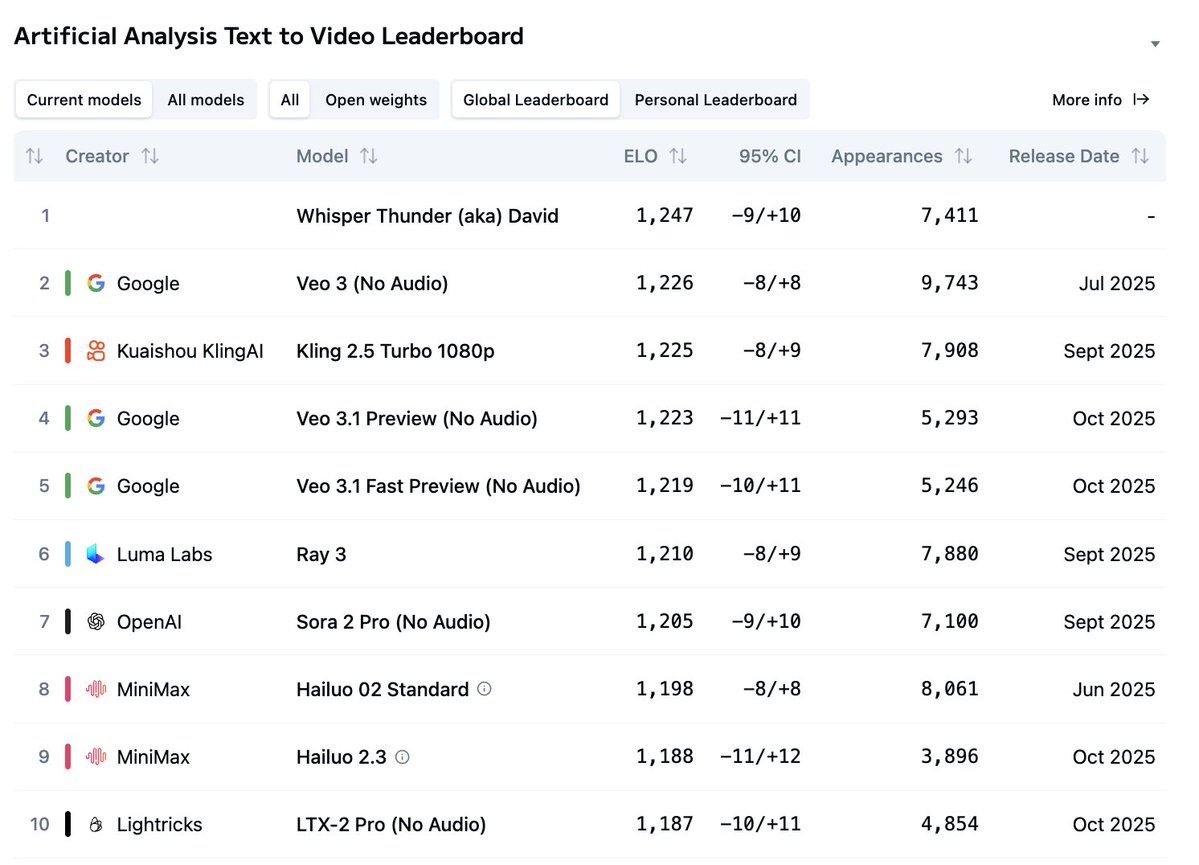
Because AA’s board is driven by head‑to‑head user comparisons rather than lab metrics, it reflects what viewers actually pick in blind tests, not whose brand is on the model. If you rely on Veo, Kling, or Sora pipelines today, this is a nudge to watch for "Whisper Thunder" surfacing on platforms you use and to budget time to A/B it on your own prompts once access appears.
CritPt physics benchmark shows Gemini 3 Pro capped at 9.1%
Artificial Analysis’ new CritPt benchmark for graduate‑level physics problems puts Gemini 3 Pro Preview on top at only 9.1% accuracy across 70 unpublished challenges, with GPT‑5.1 at 4.9% and most other frontier models clustered below 3%. CritPt summary The average base model sits around 5.7%, underscoring how limited current LLMs still are at deep, verifiable scientific reasoning.
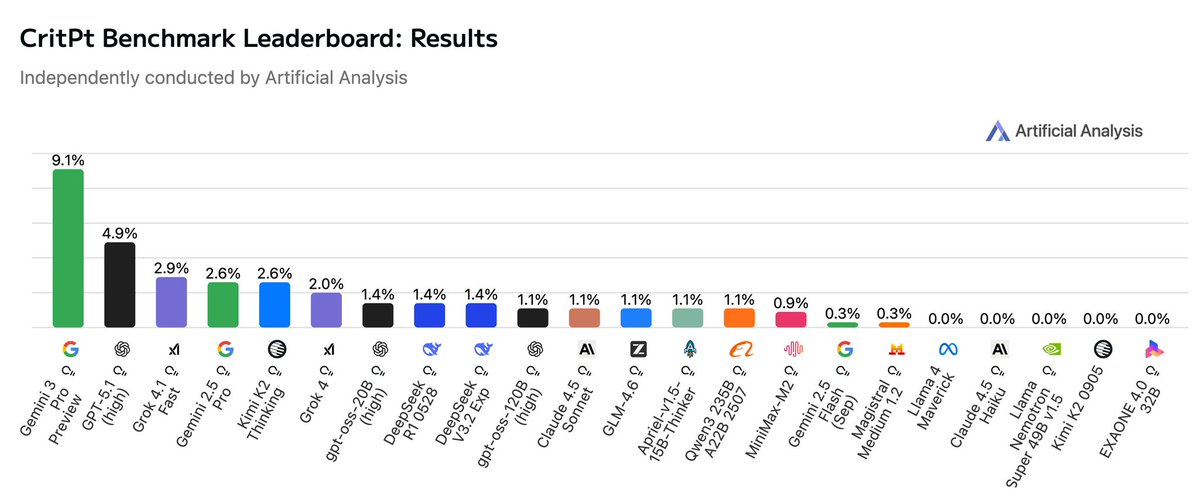
For creatives using these models to script sci‑fi, simulate realistic physics in shots, or auto‑check technically heavy dialogue, the takeaway is blunt: they’re good at style and structure but weak at airtight technical truth. If you lean on AI for science‑flavored storytelling or FX notes, treat its outputs as draft material and keep human experts or reliable references in the loop, especially for anything beyond high‑school level intuition.
FLUX.2 Pro and Flex enter yupp_ai’s community image leaderboard
Image models FLUX.2 Pro and FLUX.2 Flex have been added to yupp_ai’s public image leaderboard, which has already gathered around 8,000 user votes across models. yupp leaderboard For illustrators and art directors, this gives an early crowd‑sourced read on how Flux 2 stacks up visually against other top generators.
Since yupp_ai ranks models via community choices rather than vendor marketing, you can use its standings as one input when deciding whether to re‑tool workflows away from Midjourney‑style stacks or Nano Banana Pro. The practical move now is to browse Flux 2 entries on that board, note the kinds of prompts where it dominates, and mirror those tests inside your own host of choice before committing to big style or pipeline changes.
🧠 Creator‑relevant research drops
Mostly foundational methods that will trickle into creative tools: Apple’s CLaRa (latent RAG), LatentMAS (latent multi‑agent collab), Meta’s CoT verifier, and DeepSeek Math V2 (open Apache 2.0).
Apple’s CLaRa unifies retrieval and generation in a continuous latent space
Apple researchers propose CLaRa (Continuous Latent Reasoning), a framework that does retrieval‑augmented generation and answer prediction in the same latent space instead of juggling long text contexts and separate rankers. clara overview It uses SCP (a key‑preserving synthetic data scheme) plus a differentiable top‑k operator so gradients flow from the generator back into the retriever, aligning “what’s retrieved” with “what produces correct answers”.
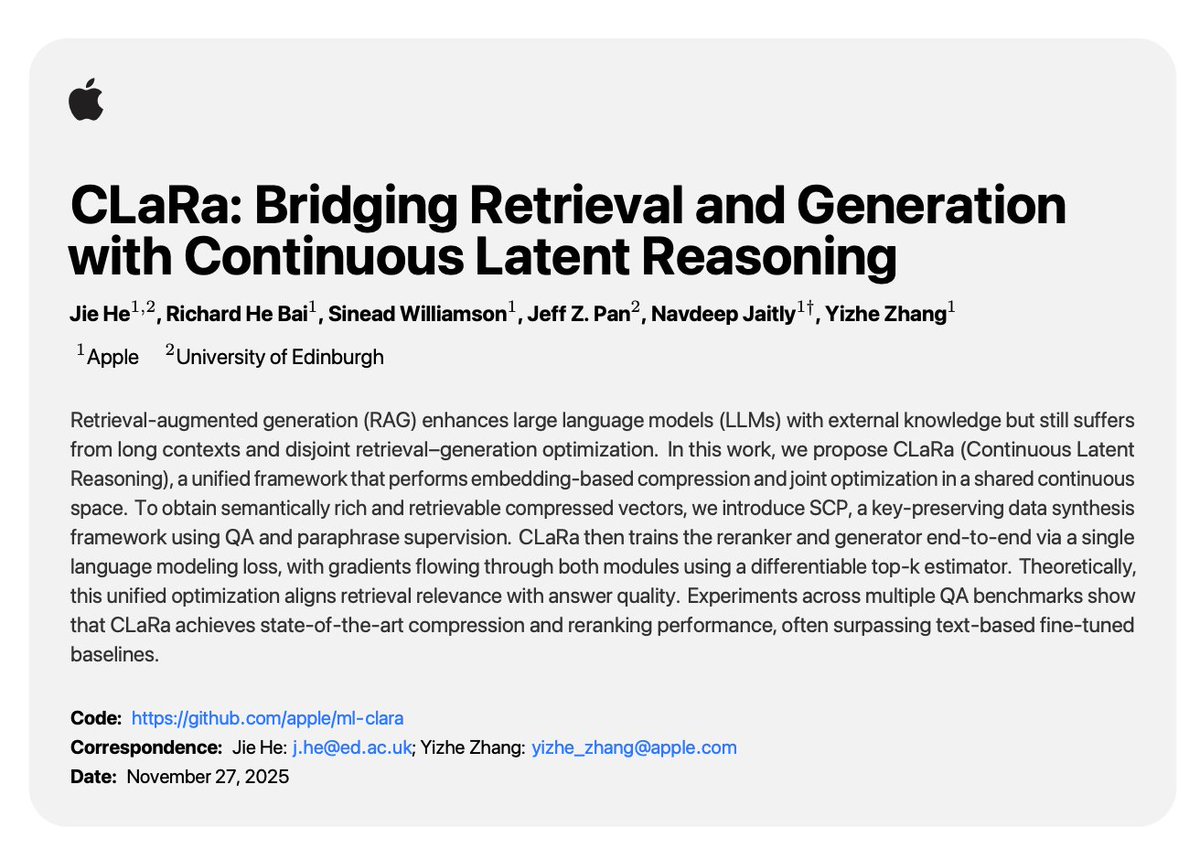
For creative tools, this points toward faster, more controllable “memory” systems: think style libraries, knowledge bases, or asset catalogs where the model can compress and retrieve rich visual or narrative chunks without ballooning context windows. It also suggests future assistants that update their own retrieval behavior as you correct drafts or storyboards, instead of relying on a fixed embedding search stack.
DeepSeek open‑sources gold‑level math model with Apache 2.0 license
DeepSeek Math V2 is now fully open‑sourced under Apache 2.0, delivering IMO 2025 and CMO 2024 gold‑level performance plus a 118/120 score on Putnam 2024, all built on the DeepSeek V3.2 Exp Base backbone. math model summary The system pairs a generator with a verifier that checks proofs step‑by‑step and lets the model repair its own mistakes, targeting self‑verifiable reasoning rather than one‑shot answers.
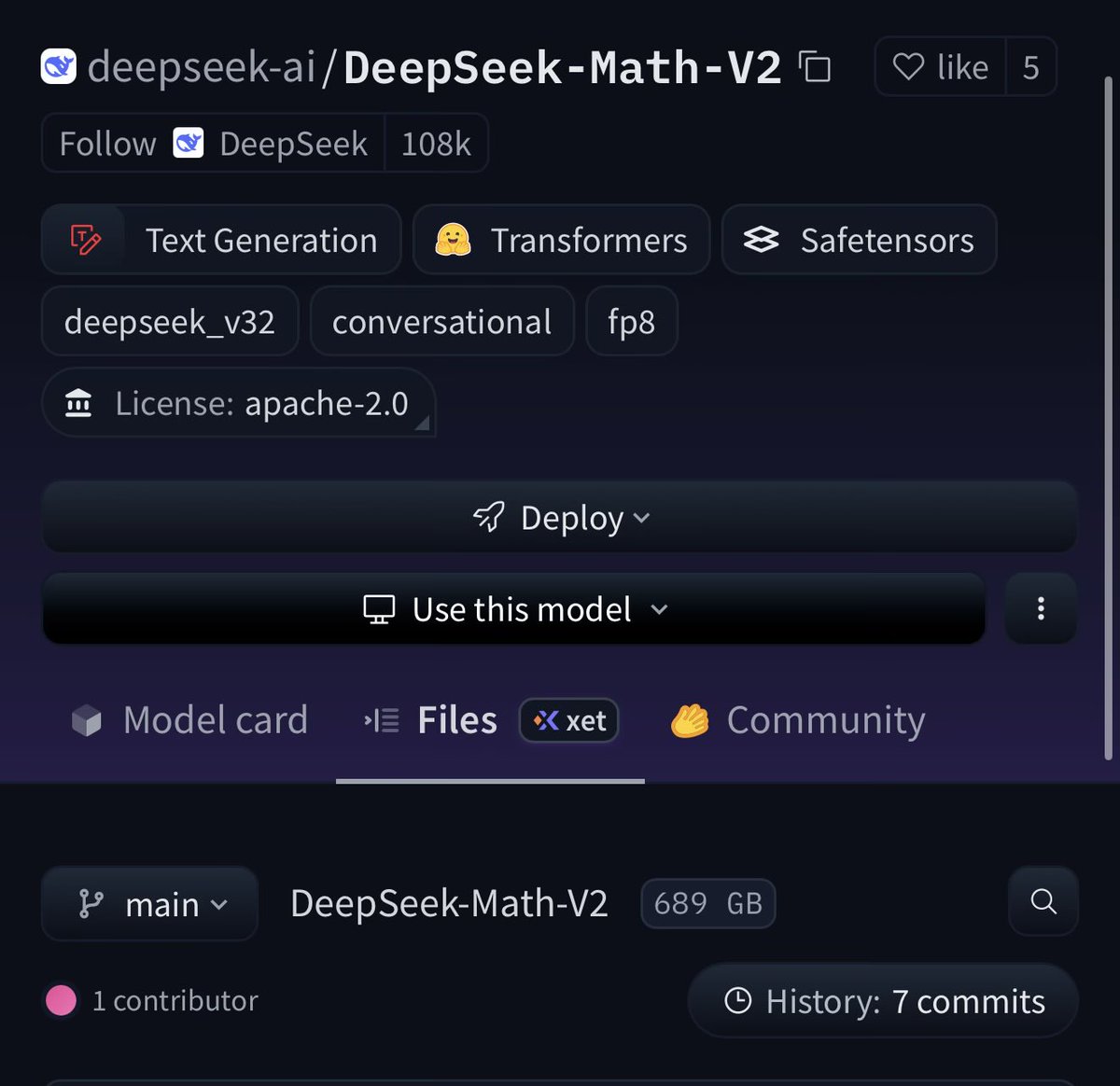
Even though it’s “math,” this matters for creative work that depends on precise structure—camera math in 3D scenes, physically plausible motion, generative CAD, or complex spreadsheet‑driven budgets and schedules. Because it’s Apache‑licensed and hefty (the repo lists 689 GB of assets), toolmakers can fine‑tune or distill it into specialized assistants—say, a rigging helper inside a DCC, or a production spreadsheet copilot—without negotiating commercial terms, which lowers the bar for pro‑grade reasoning inside creative software.
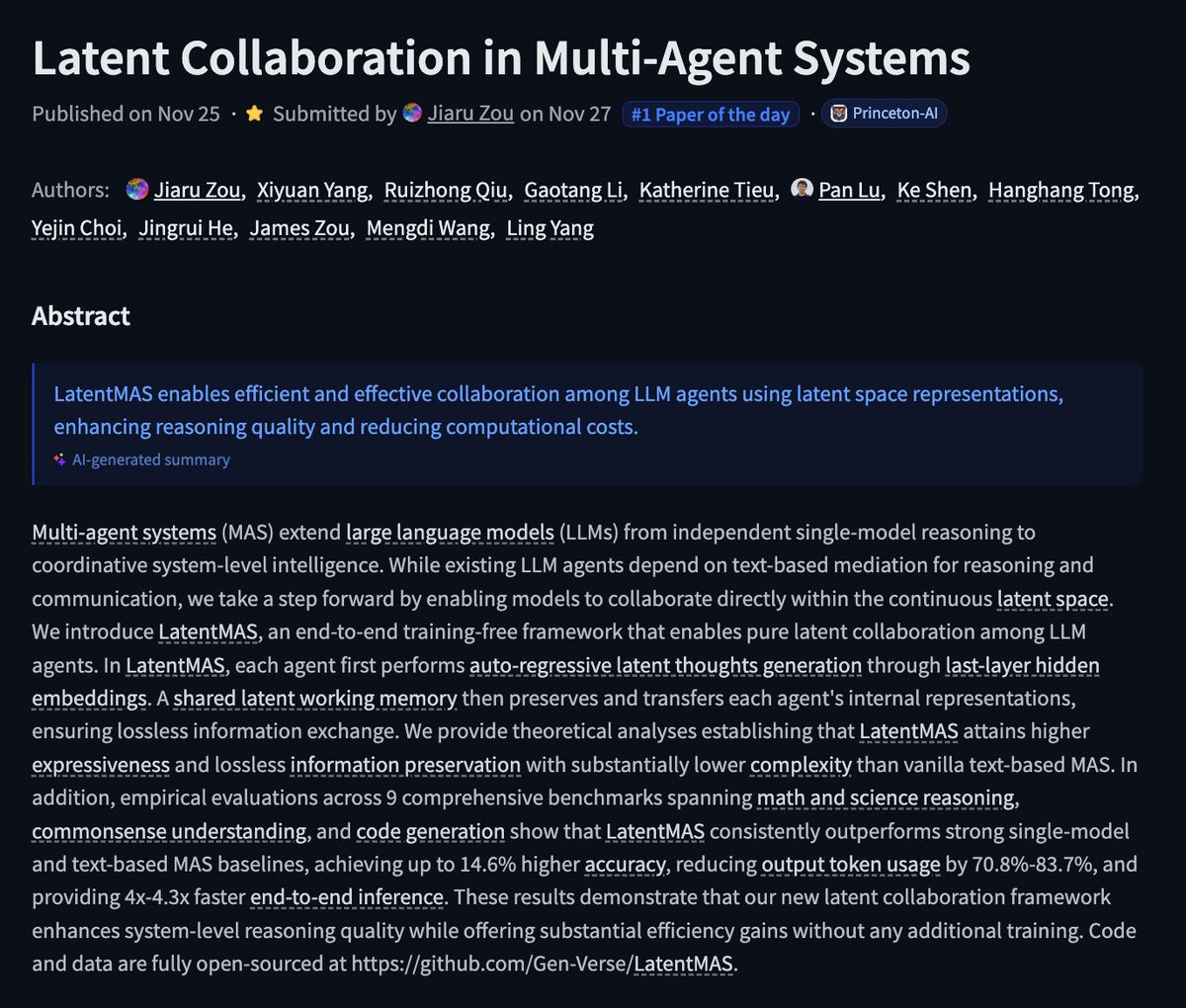
LatentMAS shows LLM agents collaborate in latent space with 4× faster runs
LatentMAS introduces a training‑free way for multiple LLM agents to think together directly in the last‑layer embedding space instead of sending each other long messages. latentmas summary Each agent writes "latent thoughts" into a shared working memory; others read and extend those vectors, giving up to 14.6% higher accuracy, 70–84% fewer output tokens, and 4–4.3× faster end‑to‑end inference across 9 reasoning benchmarks.
For creatives, this is a preview of future “writer rooms in a box”: specialized agents (story, pacing, visuals, marketing) could coordinate behind the scenes without spamming you with extra text, making multi‑agent copilots cheaper and more responsive. Because LatentMAS is training‑free and wraps existing models, it’s the kind of technique that can sneak into tools you already use—script breakdown, pitch decks, or complex shot planning—once vendors start chasing lower latency and token bills.
Meta posts a TopK transcoder to verify chain‑of‑thought reasoning on Hugging Face
Meta released a new TopK transcoder–style verifier on Hugging Face that scores step‑by‑step chain‑of‑thought outputs, aiming to catch incorrect reasoning even when final answers look plausible. verifier release Instead of trusting one long CoT, a generator can produce options while this verifier grades intermediate steps and filters out broken derivations.
For AI creatives, this kind of verifier is a building block for safer automation: story logic checkers that flag plot holes, pipeline agents that sanity‑check prompts or edit plans before burning GPU, or math/physics‑aware assistants embedded in animation and VFX tools. As more hosts add this pattern—"model writes, verifier judges"—you should expect fewer silent failures in complex scripted workflows and more reliable reuse of long prompt chains.
📣 AI personas & social strategy
Tools and tactics for growth: Apob pitches always‑on AI influencers (face swap + video + talking avatars). A creator thread advises muting AI haters to avoid feed poisoning. Practical ops for marketers.
Apob pitches always‑on AI influencers as a new “attention asset”
Apob is marketing its virtual‑influencer stack as a way to build 6‑figure, always‑on creator businesses driven by AI personas instead of human‑on‑camera work. The pitch centers on three tools in one place: face swap to keep a consistent identity, video generation with realistic motion, and talking avatars that front campaigns and content 24/7. Apob creator pitch
For AI creatives and marketers, the angle is blunt: the “biggest wealth transfer of 2025 isn’t crypto—it’s attention”, and those who package a strong character plus a clear niche can turn that into recurring brand deals and digital products without studios or gear. Follow‑up posts double down on the idea that “face‑less channels are out, AI personalities are in”, reframing an influencer as an owned asset you can scale across platforms and languages rather than as a single human schedule. AI personality framing The obvious trade‑offs: you still need taste, positioning, and a content strategy; Apob removes production friction, not the need for a point of view. But if you already think in campaigns and story arcs, this is a concrete path to test a persona brand cheaply and then decide whether to keep it purely virtual, introduce a human counterpart, or spin it into client work as an “AI influencer studio” offer.
Thread warns AI creators not to engage with “AI haters” in comments
Artedeingenio shared a blunt playbook for AI artists and educators: stop replying directly to AI‑hater comments if you care about reach and sanity. The thread argues that engaging boosts haters in the algorithm (so you start seeing more of them and less of your real audience), that many hostile replies come from throwaway or bot accounts which later get nuked (leaving you “punished” for engaging spam), and that trying to rationally debate entrenched haters is like arguing with flat‑earthers. AI hater strategy The takeaway for AI creatives is tactical, not philosophical: treat hate as an environment hazard, not a debate to win. Mute or block aggressively, protect your feed health, and pour energy into fans, collaborators, and neutral onlookers instead of feeding outrage cycles. That’s how you keep your persona’s tone, comment section, and recommendation graph aligned with the people who might actually hire or follow you.
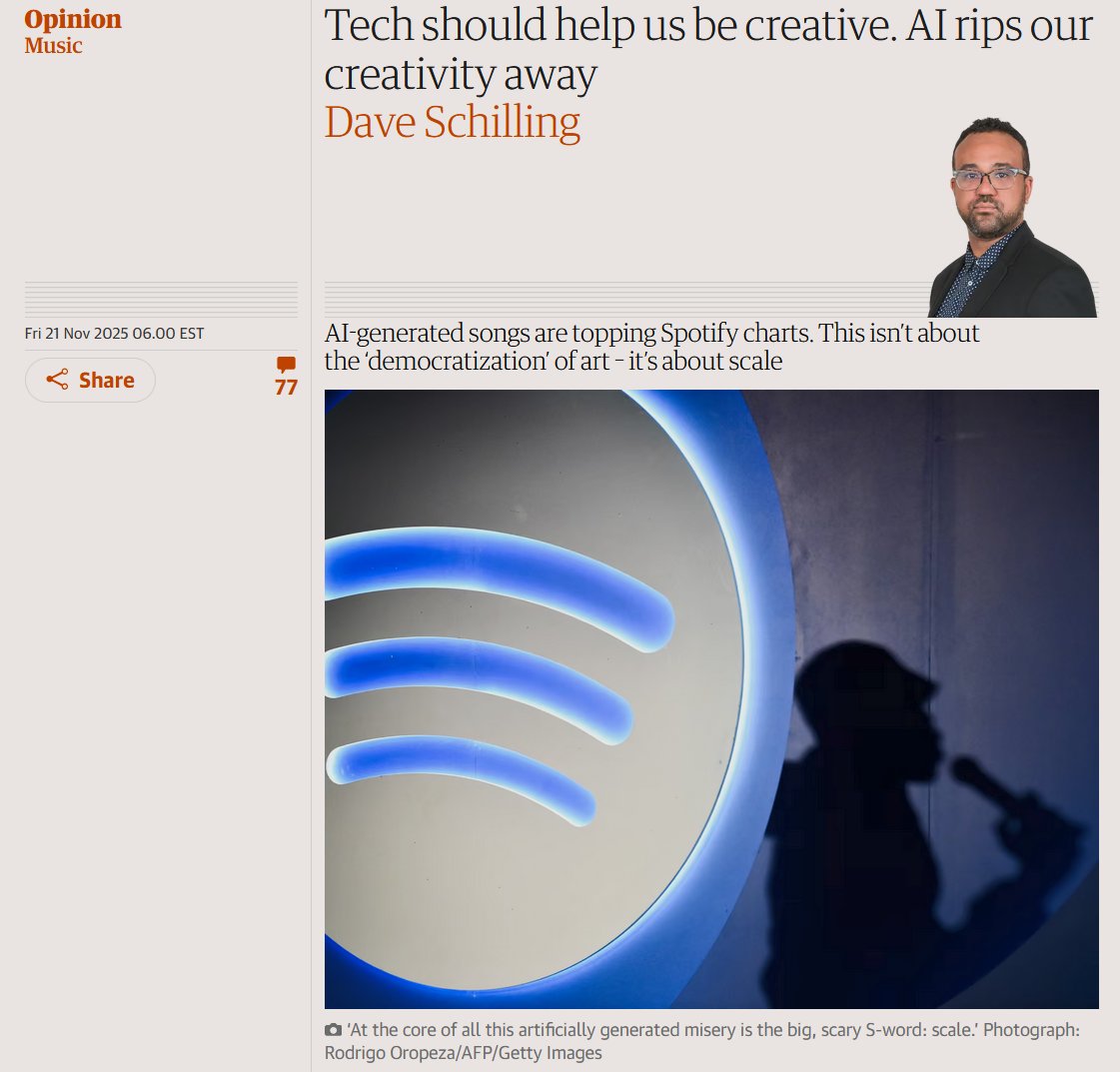
Guardian op‑ed on AI music warns of “scale over creativity” backlash
Kol Tregaskes surfaced a Dave Schilling Guardian op‑ed arguing that AI is enabling effortless mass production of mediocre songs, and that platforms and labels increasingly prize scale and engagement over effort or artistry. The piece cites AI‑generated tracks topping Spotify’s Viral 50 and a rising flood of AI music as evidence that “democratization” is veering into industrialized filler, with users pushed toward passive consumption instead of creative achievement. AI music oped
For AI musicians and storytellers, the signal is cultural, not technical: audiences and tastemakers are already questioning whether AI‑heavy workflows cheapen the sense of craft. The risk isn’t “using AI”; it’s leaning on it so hard that your work looks like scaled sludge rather than a recognizable voice. Practically, that means being explicit about where your effort lives—concept, lyrics, arrangement, performance—and being prepared to show drafts, stems, or process if you want to position yourself as an artist rather than a content farm. It’s a reminder that your public persona needs a story about why your work exists, not just how fast you can ship it with models.
💸 Black Friday boosts (non‑InVideo)
Holiday offers relevant to creatives, excluding the InVideo free window (feature). Higgsfield raises to 70% OFF unlimited image suite, Vidu 40% OFF + credits, Hedra 2,500‑credit drop, Hailuo giveaways, Pictory 50% OFF.
Higgsfield bumps Black Friday to 70% off unlimited image suite
Higgsfield increased its Black Friday deal from 65% to 70% off and extended it three more days for a full year of unlimited access to all its image models, following the earlier near-expiry sale Higgsfield sale 70 off extension.
For AI creatives this means a discounted year of Nano Banana Pro, Soul, REVE, Face Swap and the full Pro suite, plus a short 9‑hour window where retweeting and replying nets an extra 300 credits via DM for experimentation sprints 70 off extension.
Pictory BFCM deal adds expert session and Getty/ElevenLabs perks
Pictory refreshed its Black Friday / Cyber Monday offer: pay for six months and get six months free on annual plans (effectively 50% off), plus 2,400 AI credits, a free session with a video expert, and access to ElevenLabs voices and Getty images Pictory sale bfcm pricing update.

Combined with its script‑to‑video and text‑to‑image features, this promo is aimed squarely at marketers, educators, and solo creators who want to stand up a year‑long video pipeline without hiring motion teams, and the bundled coaching call lowers the learning curve for turning outlines or slide decks into publishable content pictory academy overview thanksgiving thank you.
Hedra Thanksgiving templates add 2,500‑credit rush for first 500
Hedra rolled out Thanksgiving-themed templates that turn a single uploaded photo into a "funny video" gag, and is giving 2,500 credits each to the first 500 followers who comment “Hedra Thanksgiving” Hedra templates hedra thanksgiving drop.
For creators, that’s a fast way to spin up holiday social clips or campaign assets without setting up a full video workflow, with enough free credits on offer (up to 1.25M total) to actually try multiple variants and share them back to Hedra for extra exposure when they repost their favorites hedra thanksgiving drop.
Vidu Black Friday: 40% off annual plans plus big bonus credits
Vidu launched its Black Friday offer with 40% off all annual plans until December 4, then layered on aggressive credit bonuses for group signups and social engagement vidu offer details.
Teams that subscribe together can push effective costs down to about $3.66 per month by joining with 3–10 people, earning 500–2,500 extra credits per user based on group size, while anyone who follows, retweets, and leaves their Vidu email gets an additional 500 credits credited to their account vidu offer details 500 credit cta.

For small studios and solo filmmakers, this stacks into a sizable pool of generation minutes to prototype more shots, iterate edits, and test styles without worrying about burning through the meter.
Hailuo Thanksgiving event bundles turkey templates with 3‑month Pro giveaway
Hailuo is using its "Epic Turkey Escapes" start/end frame pack to anchor a Thanksgiving event and giveaway, where 20 participants will get three months of Hailuo Pro for free turkey escapes pack giveaway rules.
The campaign asks users to follow, repost with the #Hailuo tag, and then remix or extend the turkey sequences, while also inviting more serious creators into its CPP (Creator Partner Program) for ongoing tools access and collaboration cpp program cta shoutout reel. For filmmakers and motion designers, it’s both a themed prompt pack to play with and a shot at several months of no-cost, high-quality image-to-video runs.