Nano Banana Pro fuels 8 blueprints and 70%‑off unlimited – de facto camera

Stay in the loop
Free daily newsletter & Telegram daily report
Executive Summary
Nano Banana Pro stopped being “the alt to FLUX.2” this week and started looking like the default camera in half the ecosystem. Higgsfield is in a 48‑hour sprint with 70%‑off unlimited NB Pro, Soul, and REVE plus 240 and 216 bonus credits, while Leonardo ships 8 NB Pro Blueprints that turn background swaps and relights into one‑click routines. Kimi piles on with Agentic Slides: upload a 100‑page PDF and get an editable PPTX deck with NB Pro illustrations slotted into each slide.
On the craft side, creators are treating NB Pro like a ControlNet hybrid: feed canny, depth, or edge maps and it hugs structure closely enough to turn rough LCD scribbles into textbook diagrams. Long “lens‑accurate” prompts specifying 50mm vs 85mm, f/2.0, ISO 160, and golden‑hour lighting are yielding portraits that look like real editorial shoots. A new six‑part prompt template plus a helper GPT is spreading as the studio‑friendly way to keep outputs consistent across teams.
Filmmakers are using 3×3 NB Pro cinematic grids as coverage plans, then pushing each tile through Veo 3.1 for multi‑angle motion, turning one concept into a full contact sheet. The catch, as David Comfort notes: flat‑rate NB Pro deals rarely guarantee future models or APIs, so lock in look, not lock‑in pricing.
Top links today
- Canvas-to-Image multimodal controls paper
- Video generation models reward paper
- Z-Image Turbo ComfyUI integration guide
- NimVideo new models announcement
- Kimi Slides agentic presentations feature
- LTX Retake step-by-step tutorial
- Magnific AI Skin Enhancer release
- Glif storytelling agent tutorial
- PixVerse e-commerce ad effects and API
- Pictory AI text to speech overview
- Comet AI browser launch article
- Higgsfield unlimited image models offer
- Nano Banana Pro Black Friday sale
- Freepik AI tools Black Friday offer details
- Krea AI creative tools Black Friday sale
Feature Spotlight
NB Pro everywhere: edits, slides, blueprints
Nano Banana Pro becomes the week’s default creator engine: Higgsfield’s 70% OFF unlimited push, Leonardo’s 8 NB‑powered Blueprints, and Kimi’s Agentic Slides (free 48h) put pro edits and decks a click away.
Cross‑account surge in Nano Banana Pro across creator tools: unlimited deals, new “blueprints,” agentic slide decks, and control‑style workflows. This is today’s dominant story for image creators and filmmakers.
Jump to NB Pro everywhere: edits, slides, blueprints topicsTable of Contents
🍌 NB Pro everywhere: edits, slides, blueprints
Cross‑account surge in Nano Banana Pro across creator tools: unlimited deals, new “blueprints,” agentic slide decks, and control‑style workflows. This is today’s dominant story for image creators and filmmakers.
Kimi’s Agentic Slides use NB Pro visuals to auto-design editable decks
Kimi launched Agentic Slides, a feature that takes long documents or research topics and turns them into fully editable PPTX decks, pairing K2’s agentic search with Nano Banana Pro‑generated slide art, and it’s free and unlimited for the first 48 hours. You can upload 100‑page PDFs or technical papers and get back consultant‑style presentations with infographics, diagrams, and NB Pro illustrations, then tweak every text box and layout in PowerPoint. (Slides quick demo, Slides deep dive)
For creatives, this is interesting less as a note‑taking tool and more as a rapid pitch‑deck and look‑book generator: you can specify visual styles like Studio Ghibli or Slam Dunk, and NB Pro handles the art direction while K2 structures the narrative. The sample decks show mental‑health onboarding slides with mascots and rainbow workflows that feel like something from a real HR agency, not a generic template pack.

Because the output is standard PPTX, you can still refine typography, swap assets, or re‑use NB Pro frames elsewhere; Agentic Slides becomes a fast way to get from concept to a first pass that a designer can polish instead of starting from a blank canvas. Slides feature recap
Higgsfield’s final 48h: 70% off unlimited image models plus credit drops
Higgsfield is in the last ~48 hours of its Thanksgiving / Black Friday promo, keeping 70% off yearly access to its full image toolkit with unlimited Nano Banana Pro, Soul and REVE for a year, and layering on engagement bounties of 240 and 216 credits for retweets and replies. This follows the earlier bump to 70% off unlimited access 70off unlimited, and the push now leans heavily on “we built the viral 1‑click apps you’re seeing everywhere” to pull creators into its ecosystem. (70off toolkit offer, One click apps promo)
For image makers and filmmakers, this means a short window where NB Pro usage is effectively unmetered inside Higgsfield, which is attractive if you’re experimenting with high‑volume blueprints or running lots of stylistic iterations. The credit drops (240 and 216) are small but useful for sampling the platform if you’re NB‑curious but not ready to commit to a full year yet, and the emphasis on “Behind the Scenes & Breakdown” style 1‑click apps signals that Higgsfield wants to be the default place to package repeatable NB Pro workflows into creator‑friendly mini‑apps.
Leonardo AI ships 8 NB Pro “Blueprints” for one-click relight and background swaps
Leonardo AI rolled out 8 new NB Pro–powered Blueprints, including Background Change and Custom Relight, giving creators one‑click recipes to intelligently swap environments and lighting while keeping subjects intact. In the Background Change demo, a portrait is cleanly composited from a plain room into a lush jungle, while Custom Relight turns harsh front lighting into a soft golden look without breaking skin or fabric detail. (Blueprints launch thread, Background change demo)
For designers and photographers, these Blueprints act like pre‑tuned control stacks for NB Pro: you upload a shot, pick a blueprint, and NB Pro handles masking, harmonizing colors, and re‑lighting in one pass. That cuts out a lot of manual Photoshop‑style work, and because they’re still NB Pro under the hood, you can expect the same style fidelity you get from raw prompts, but wrapped in a more production‑friendly UX. (Relight demo, Creator reaction)
GeminiApp creators push NB Pro photorealism with lens-accurate mega-prompts
Multiple long‑form prompts on GeminiApp and Freepik highlight how far NB Pro can go in photorealistic portraiture with explicit camera and lighting control. One beachside fashion prompt specifies everything from crochet cardigan texture and pastel appliqués to Fujifilm GFX vs Sony A7R IV bodies, 50mm vs 85mm primes, f/2.0 aperture, shutter speeds, ISO 160, and even 8K resolution, and the output looks like a real golden‑hour editorial. Beachside fashion prompt
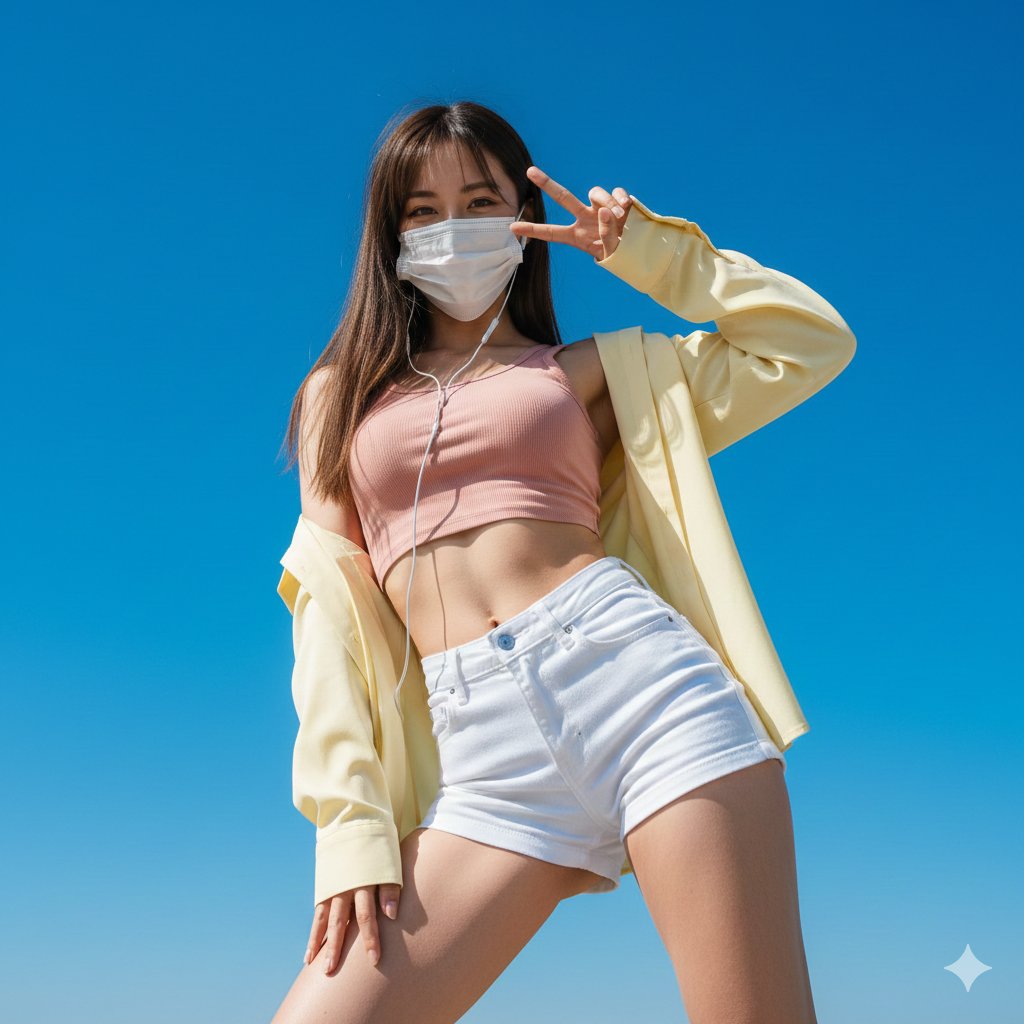
Other recipes cover a vintage Western pin‑up with analog film grain, a matte‑black interior stairwell selfie shot on an 85mm portrait lens, and a low‑angle outdoor portrait with a masked subject against an infinite cerulean sky, again with full exposure and DOF parameters spelled out. (Western editorial prompt, Luxury staircase shot) The pattern is clear: NB Pro responds well when you treat prompts like a shot list plus lighting diagram, not a loose vibe description. Creators are locking in physique, fabrics, accessories, lens choice, color temperature and even rim‑light positions, and NB Pro is hitting those specs tightly enough that you can imagine it as a virtual camera in a real production pipeline. (Low angle portrait prompt, Moody neon room prompt)
NB Pro behaves like a ControlNet when fed canny, depth or edge maps
Creator tests show Nano Banana Pro can act like a ControlNet: if you feed it canny, depth or soft‑edge guidance images, it will tightly follow structure while still re‑imagining style. One thread walks through taking a distorted portrait, treating it as a sculptural object, then generating both a rotated bust and a photo of two people carrying a wooden version out of a gallery, all while preserving the core stretched‑face geometry. (Controlnet behavior claim, Sculpture sequence prompt)
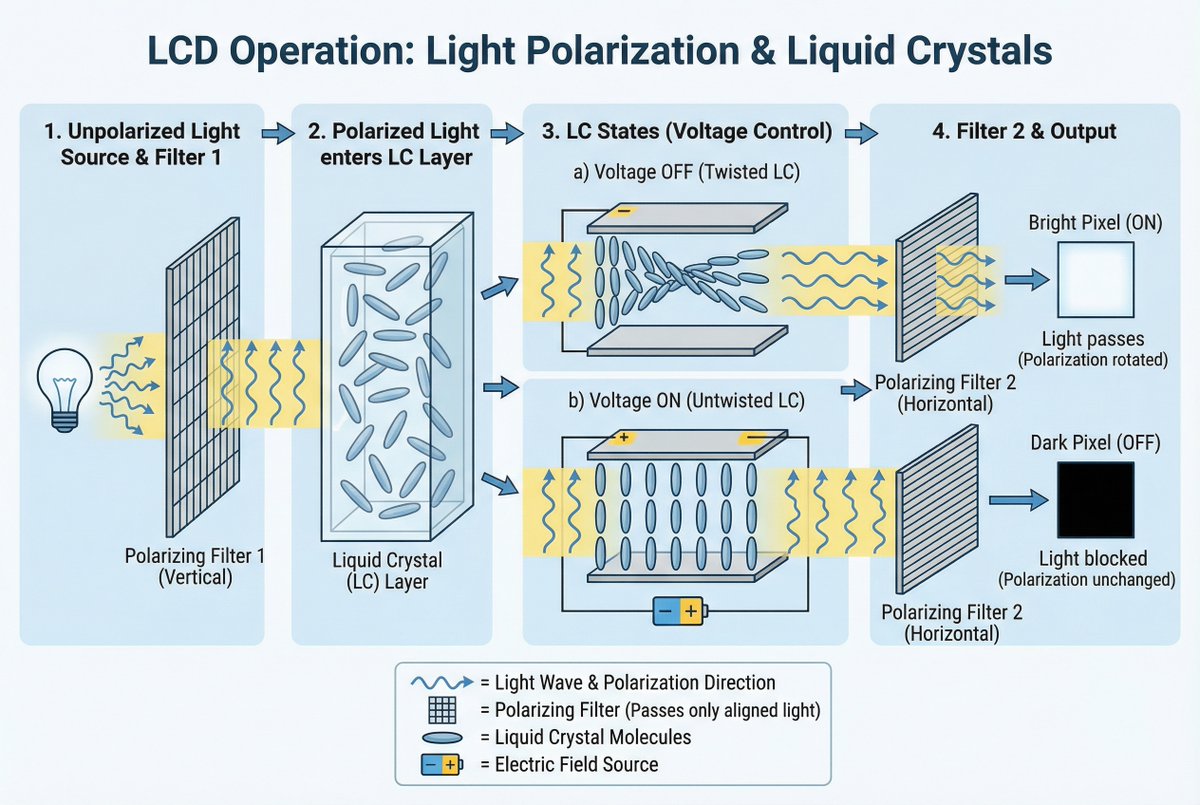
The same workflow is used to produce an educational diagram explaining LCD polarization and liquid crystals: NB Pro respects arrows, labels, and component layout from the source sketch, then renders a clean, textbook‑grade figure. LCD diagram example This is a big deal for designers and educators, because it means you can drive NB Pro not only with text and photo refs, but also with structural maps—canny edges for precise silhouettes, depth for camera moves, or soft edges for looser compositions—without needing an external ControlNet stack. It effectively turns NB Pro into a multi‑purpose "paint over my guide" engine for storyboards, product diagrams, and concept art.
NB Pro cinematic grids feed Veo 3.1 for multi-angle shots
Creators are starting to use NB Pro not just for hero frames, but for cinematic coverage planning: Techhalla and others share prompts that turn a single reference into a 3×3 grid containing ELS, LS, MS, MCU, CU, ECU, plus low and high angles, all in a consistent style. Cinematic grid prompts Those grids then become structured input for Veo 3.1, where each tile can seed a slightly different camera move or composition, expanding one concept into multiple shots.
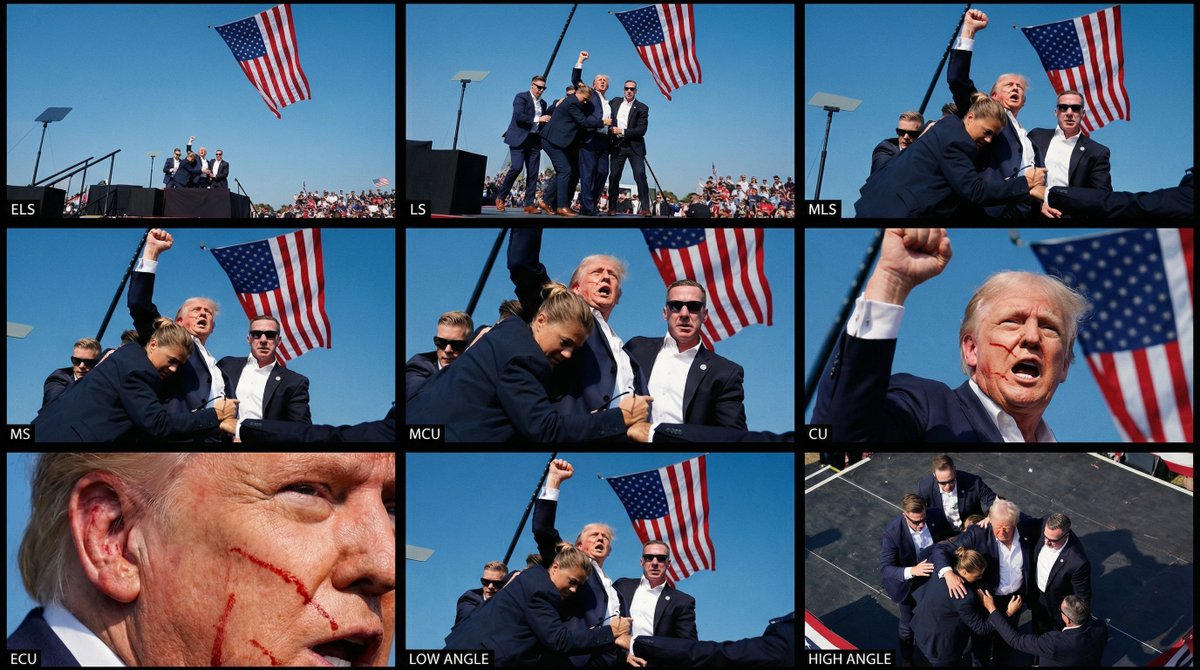
David Comfort takes this further by converting a “Shot 8” concept into a full contact sheet via NB Pro and piping that into Veo 3.1, noting that while not every tile translates perfectly, several work well enough to stand as distinct angles in a cut. Veo 3 contact sheet test This builds on earlier NB Pro + Veo 3.1 car‑spot experiments car spot, but shifts the focus from single money shots to coverage—think storyboards, animatics, and pre‑viz where you want nine ways to see the same beat.
Comfort also shares analysis of NB Pro pricing across platforms, warning that flat‑rate deals like Higgsfield’s don’t usually apply to future model versions or API workflows, so if you’re planning a Veo‑plus‑NB pipeline you should sanity‑check how portable your prompts and budgets really are. (Pricing analysis thread, Extra Veo 3.1 test)
Prompt engineer publishes structured NB Pro recipe and dedicated helper GPT
Eugenio Fierro posted a detailed take on why NB Pro feels like the new default for image work, along with a prompt structure and a dedicated GPT trained to follow it. His recommended format breaks every request into six parts—Subject, Scene, Action, Visual details, Style, and Consistency—arguing that this removes ambiguity and makes NB Pro’s outputs more stable across iterations and batches. Method thread
He’s already trained a GPT that knows NB Pro’s quirks, real examples, and consistency rules, so instead of free‑writing prompts you can describe intent and have the GPT emit a clean, structured NB Pro prompt that respects lens, lighting, and identity constraints. For creatives, the takeaway is simple: prompt discipline pays off with this model, and it may be worth standardizing your studio’s NB Pro prompts around a shared template so different artists can still generate interchangeable shots. Fierro also contrasts this with emerging "canvas" approaches like Canvas‑to‑Image that unify pose, layout, and identity into a single control image Composition control thread ArXiv paper, framing NB Pro as today’s practical workhorse while hinting at where composition control is heading.
🎬 Directable video and ad‑ready workflows
Filmmaker tools leaned into in‑shot edits, fast T2V, and turnkey ad effects. Excludes NB Pro news (see feature).
LTXStudio’s Retake Challenge turns in-shot edits into a PRO contest
LTXStudio is running a public Retake Challenge where creators download a base video, rewrite the scene with a Retake prompt, and compete for three 6‑month PRO subscriptions worth $750 each challenge post. Following up on initial launch, this turns Retake from a new feature into a structured directing exercise for filmmakers.
LTX shares four retake examples that show how far you can push performance, props, tone, and timing while preserving the original camera move example reel. A detailed step‑by‑step tutorial and downloadable source clip make it easy to test Retake inside a real workflow rather than a toy prompt (retake tutorial, source clip ), and clear T&Cs confirm winners will be picked next week terms summary.
Nim adds LTX-2 and LTX-2 fast for 20s ads and shorts
Video platform Nim has added Alibaba Tongyi Lab’s LTX‑2 and LTX‑2 fast models for text‑to‑video and image‑to‑video clips up to about 20 seconds, slotting them alongside its existing generation stack new model reel. For small teams this means they can prototype full short ads or social bumps directly in Nim instead of stitching together multiple tools.
LTX‑2 focuses on higher fidelity while LTX‑2 fast favors speed, giving directors a practical quality/iteration trade‑off for different stages of a campaign new model reel. Both models are already live in the Nim web app and accessible through its production‑ready APIs try now link, so you can start routing scripts or keyframes into them today via the unified dashboard (nim homepage).
Hailuo brings Sora 2 to its AI video suite with promos
AI video app Hailuo has rolled out Sora 2, promising more realistic motion, physics, cinematic visuals, and synced audio in a single text‑to‑video tool, and is offering free Ultra memberships to some users who follow and retweet the launch sora announcement. For storytellers and ad teams this is another high‑end model you can reach without touching raw APIs.
Alongside the new model, power users are calling out Hailuo’s underused endframe system, which lets you lock a specific last frame for more controllable story beats and loopable shots endframe tip. Combined, Sora 2’s motion quality and endframe control make Hailuo a stronger option for quick hero shots, animated explainers, and social promos where you want precise start–end framing without manual compositing.
PixVerse ships 1-click e-commerce ad effects with 20+ templates
PixVerse is pushing a 1‑click e‑commerce ad workflow: you feed it a product photo and choose from 20+ pro effect templates, and it returns stylized video ads tuned for social feeds ad template teaser. For small shops and indie brands this replaces a lot of timeline work in Premiere or CapCut with a menu of pre‑designed motion styles.
The system is also exposed via an API aimed at businesses ad template teaser, so agencies can script bulk ad generation and A/B testing instead of hand‑cutting every variation. The same effects live in PixVerse’s consumer app, so you can prototype looks there and then scale winning formats programmatically (pixverse app).
Veo 3.1 fast powers cinematic car spots from storyboarded stills
Creators are leaning on Veo 3.1 fast inside GeminiApp for ad‑style hero shots, with a new sample showing a low‑angle Dodge Challenger SRT Hellcat drifting through dust as a background explosion hits right on cue drift spot demo. It’s a clean example of Veo handling complex motion, debris, and camera tracking in a single prompt.
Following up on car spot workflow, community experiments point to a workable pattern: storyboard a "shot 8" or similar frame in a still‑image model, arrange a 3×3 grid of coverage (ELS→CU, low/high angles), then push those concepts through Veo 3.1 to get multiple animated angles from one idea contact sheet run. Another test confirms this flow works directly from a phone UI, hinting at on‑the‑go previsualization and spec‑ad creation phone UI demo.
🧩 Where to run the new models
Access hubs and hosts adding fresh image/video/LLM endpoints creators can use today. Excludes NB Pro items (covered as the feature).
Nim adds Imagen4‑Ultra plus Z‑Image Turbo and LTX‑2 to its video app
AI video platform Nim has expanded its model lineup to include Google’s Imagen4‑Ultra for images, Z‑Image Turbo for photoreal stills, and LTX‑2 / LTX‑2 fast for text‑to‑video and image‑to‑video clips up to 20 seconds. nim model lineup The update reel shows these options inside a single creator‑facing UI rather than separate tools.
For filmmakers and social teams this means you can storyboard, generate key art (Imagen4‑Ultra, Z‑Image), and then cut short motion beats (LTX‑2) in one app, instead of juggling separate image and video services—useful if you want to prototype ad concepts, music visuals, or story animatics and keep all outputs in one project. nim homepage
Replicate adds Z‑Image Turbo as one‑click inference provider
Z‑Image Turbo is now selectable as a hosted text‑to‑image model on Replicate, with the UI showing 16,736 downloads in the last month and a simple prompt box plus "Generate" button. replicate provider For image makers this turns a strong 6B photoreal model into a no‑infrastructure endpoint: you can hit it from Replicate’s API or web console without touching CUDA, VRAM tuning, or Comfy setups.
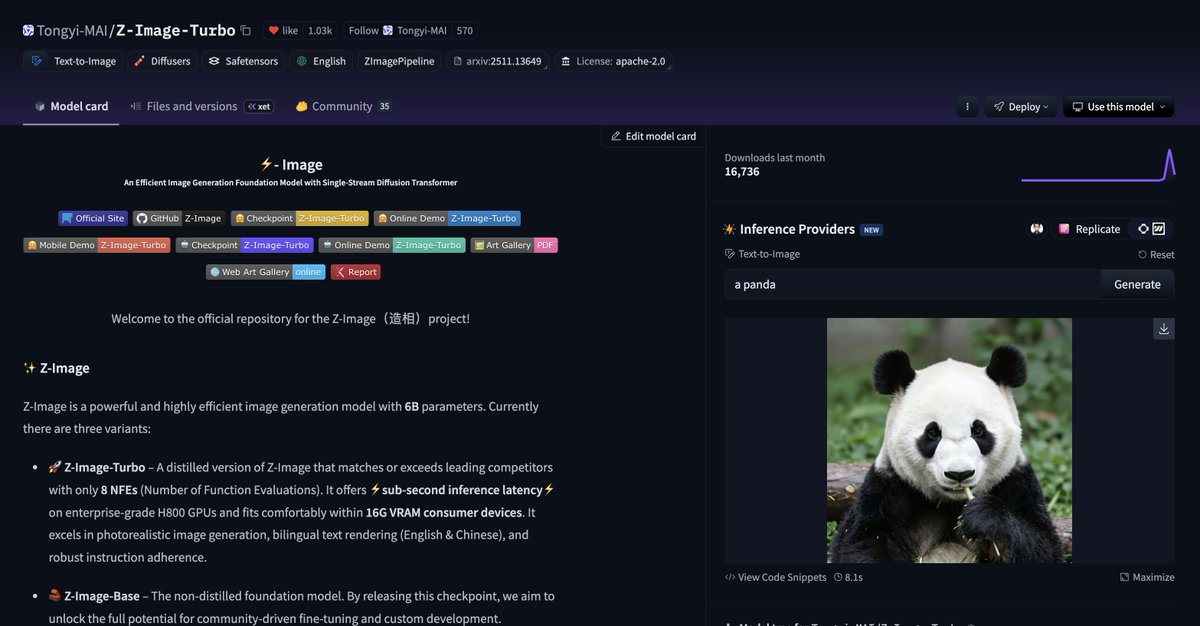
If you’re prototyping new styles, this is a fast way to A/B Z‑Image Turbo against whatever you currently call from Replicate (FLUX, SDXL, etc.), then wire the winner into your app or pipeline using the same auth and billing you already use.
ComfyUI hosts Z‑Image Turbo local/cloud deep‑dive livestream
ComfyUI is running a Z‑Image Turbo session on November 28 (3pm PST / 6pm EST) that walks through using Alibaba Tongyi’s 6B text‑to‑image model both locally and on Comfy Cloud, aimed at artists pushing photoreal work. livestream details This follows cloud 2K, where Comfy Cloud support and ~6s 2K renders were highlighted, so the new piece is education and workflow rather than raw capability.
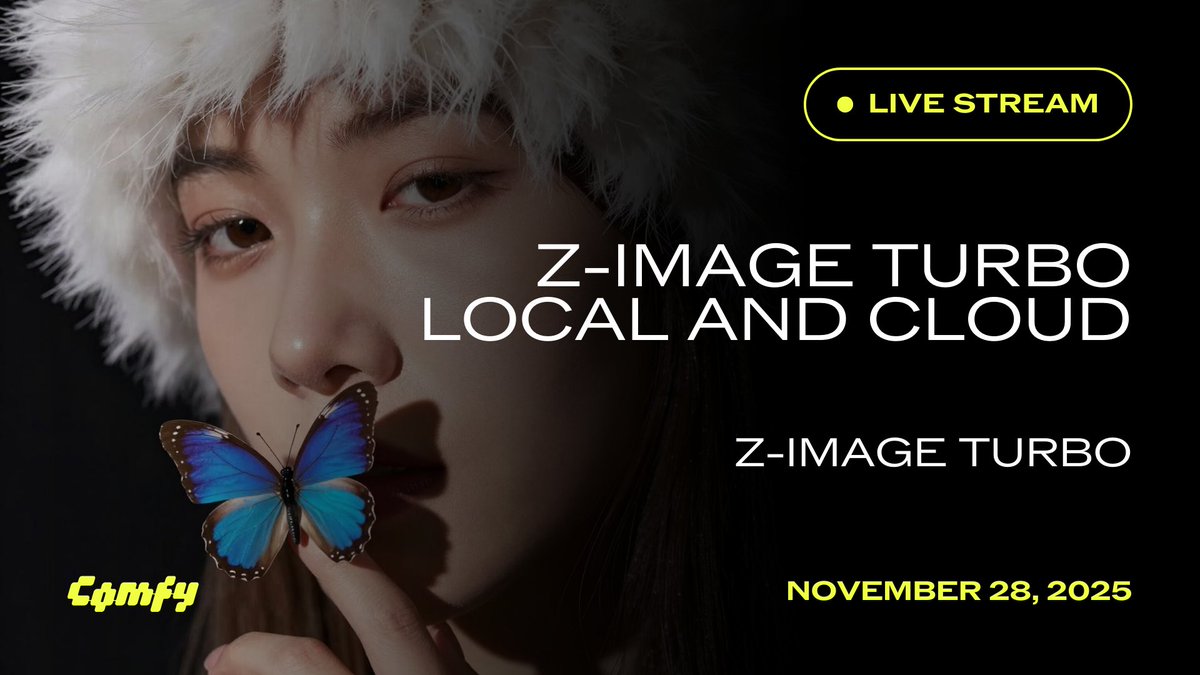
For creatives, this means Z‑Image Turbo is not only available in ComfyUI pipelines but now has official guidance on prompt structure, parameter choices, and when to favor local vs cloud runs—useful if you’ve been on Stable Diffusion and want a concrete migration path without reverse‑engineering community graphs. comfyui mention
Perplexity rolls Grok 4.1 to all Pro and Max subscribers
Perplexity has made xAI’s Grok 4.1 available to every Perplexity Pro and Max subscriber, with a short product clip showing the model in the app. grok rollout For storytellers, researchers, and scriptwriters who live inside Perplexity for outlining and fact‑checking, this adds another top‑tier reasoning model to switch to without leaving your search workspace.
The practical angle: you can now compare Grok 4.1’s style and recall to Perplexity’s default models on real tasks—summarising long articles into beats, checking historical timelines for period pieces, or drafting technical explainers—while keeping the multi‑source citations and browsing tools Perplexity already wraps around its answers.
AnyCoder surfaces Claude Opus 4.5 and peers in app‑builder UI
The AnyCoder interface on Hugging Face now exposes a model dropdown where Claude‑Opus‑4.5 sits alongside Gemini 3.0 Pro, Grok 4.1 Fast, GPT‑5.1 variants, DeepSeek R1, Kimi K2 Thinking and more as first‑class options for building AI apps. model list screenshot This turns AnyCoder into a small hub for trying different frontier LLMs against the same chat‑style or tool‑using app without re‑wiring your stack.
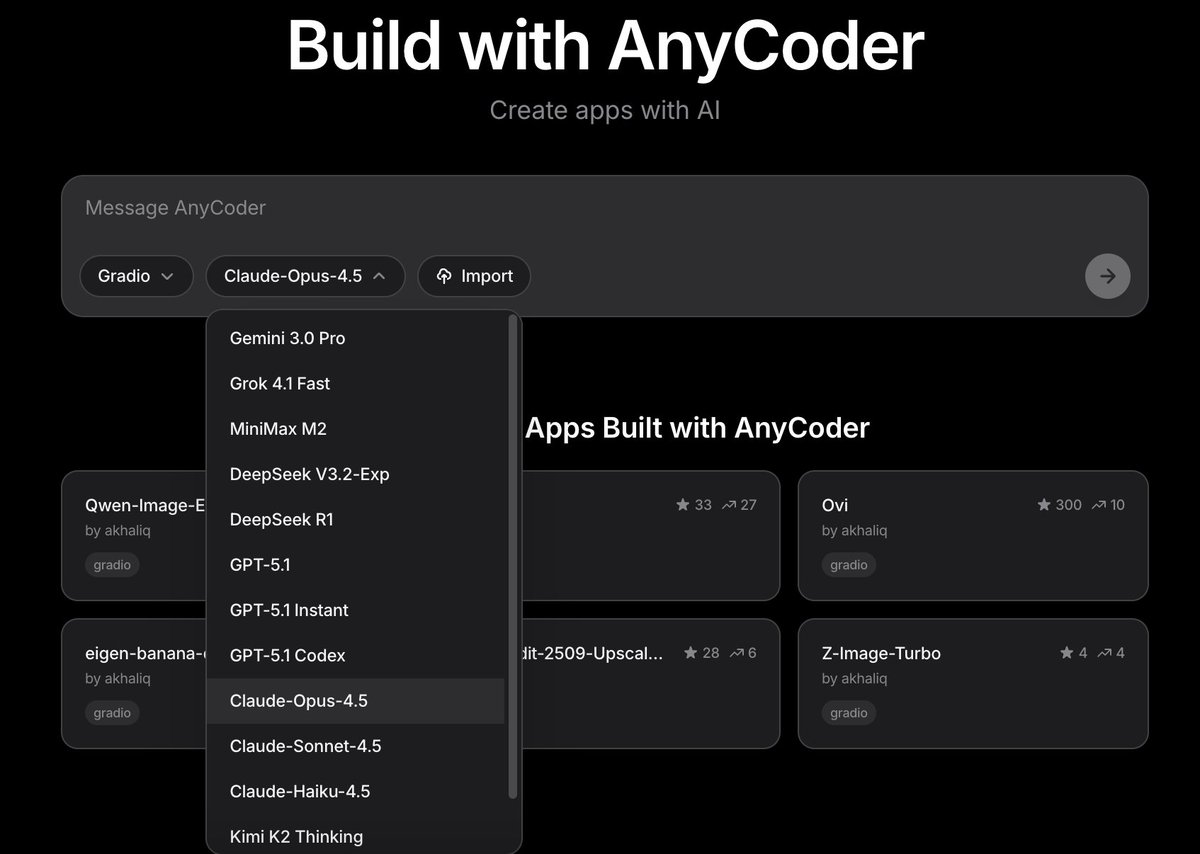
For creative coders, this is a handy place to see how Claude Opus 4.5 feels on things like outline to script, UX copy, or prompt‑engineering helpers compared with GPT‑5.1 or Gemini, all inside one browser window; the choice is a dropdown change, not a new SDK. anycoder space
ComfyUI Z‑Image Turbo local and Cloud workflows spotlighted for artists
ComfyUI is again highlighting that Z‑Image Turbo now runs both locally and via Comfy Cloud, with a focused "Z‑Image Turbo in ComfyUI – Local and Cloud" call‑out aimed at creators building workflows around the model. comfyui mention While the capability landed earlier, the renewed push plus the livestream gives image makers a clear sense that Z‑Image is a first‑class citizen in the Comfy ecosystem rather than an experimental add‑on. livestream details
If you already use Comfy for SDXL or FLUX graphs, this is your cue to duplicate a favorite workflow, swap in Z‑Image Turbo nodes, and see where its identity fidelity and text rendering outperform your current default, knowing you can always burst to Cloud when local VRAM runs out.
🧪 Creator‑relevant research: control & alignment
Mostly paper drops on compositional control and preference optimization for video generation; practical implications for layout control and faster reward learning.
Canvas-to-Image unifies pose, refs, text and layout into one control canvas
Canvas-to-Image introduces a "Multi-Task Canvas" interface where you sketch layout, drop reference faces/objects, annotate poses and add text—all baked into a single conditioning image that a diffusion model then follows, instead of juggling separate ControlNets and ref slots. A short demo shows a rough house doodle being turned into a detailed photo while preserving geometry and composition far more faithfully than typical text-to-image runs canvas demo.
The accompanying paper argues this unified canvas improves identity preservation and compositional adherence over baselines like Nano Banana and Qwen-Image-Edit, especially on multi-character scenes and precise spatial layouts, by training on a suite of multi-task datasets that teach the model to interpret different control types encoded into the same image (ArXiv paper). For creators, the implication is straightforward: you can plan a shot almost like a storyboard panel—blocking characters, props, and text on a 2D canvas—then let the model render a coherent, high-fidelity frame from that plan, instead of iterating through separate pose, face and inpainting passes.
PRFL shows video generators double as efficient latent reward models
Tencent’s "Video Generation Models Are Good Latent Reward Models" paper proposes Process Reward Feedback Learning (PRFL), which does preference optimization entirely in the noisy latent space of a pre-trained video diffusion model instead of in decoded RGB frames prfl summary image.
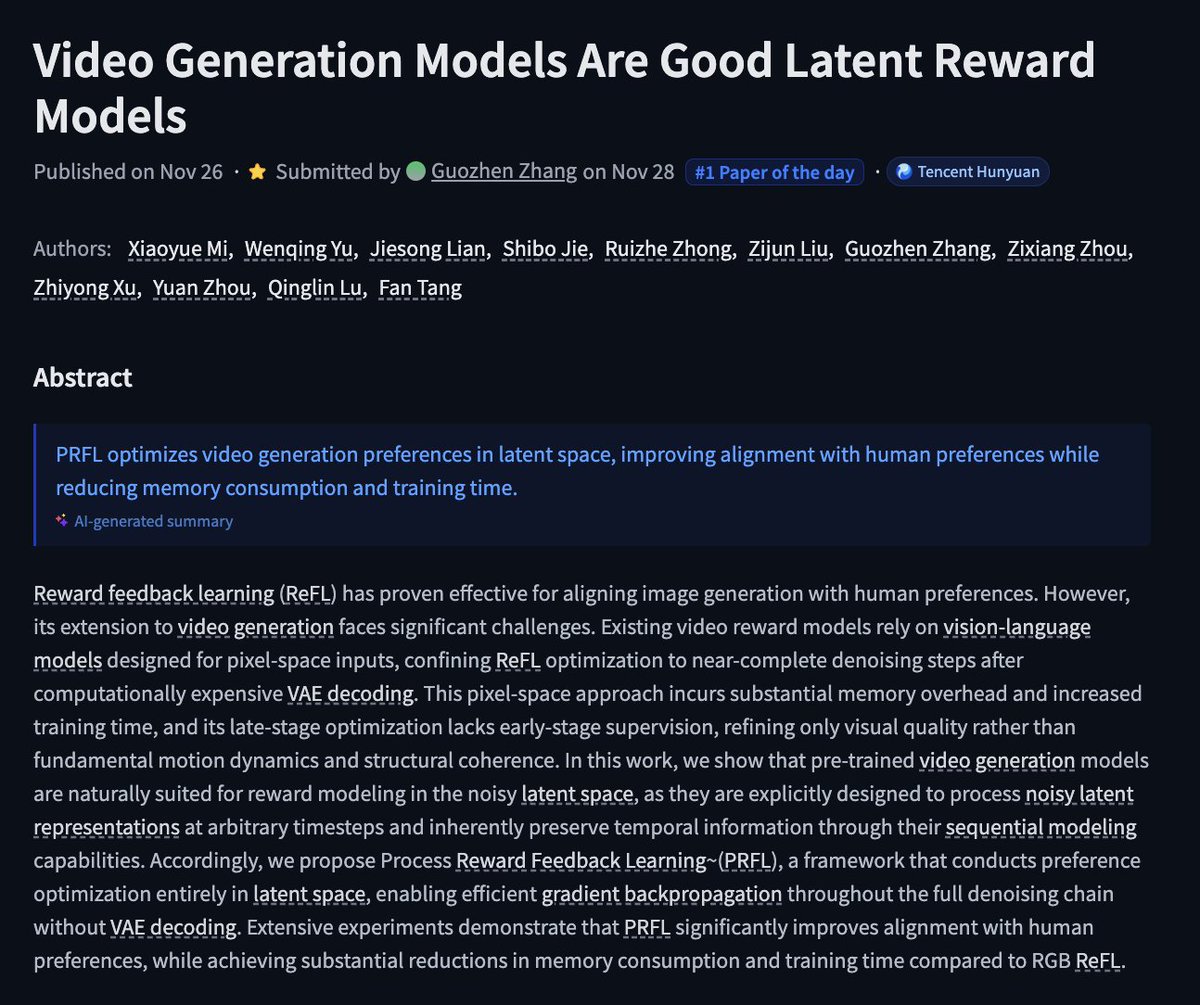
Because the reward model operates on the same latent trajectory the generator already uses, PRFL backpropagates through all denoising steps without ever running the expensive VAE decode, cutting both memory footprint and training time while still aligning motion, structure, and style with human preferences (ArXiv paper). For filmmakers and motion designers, this points to a near-future where you can steer video models toward your taste—"more stable camera", "less jittery limbs", "closer to this director’s pacing"—with far cheaper fine-tuning, making custom-aligned video generators realistic for small studios instead of only labs with massive GPU budgets.
✨ Polish and finishing: upscalers & smart browsers
Post‑process upgrades and assistive browsing for faster creative turnarounds. NB Pro news is excluded (see feature).
Magnific Skin Enhancer v1 adds “Transform to real” for one-click photoreal polish
Magnific AI has rolled out Skin Enhancer v1, a post‑process model that can turn stylized or illustrated art into convincing photorealistic renders via a new “Transform to real” option plus tunable sharpening and smart grain controls transform to real demo feature roundup.
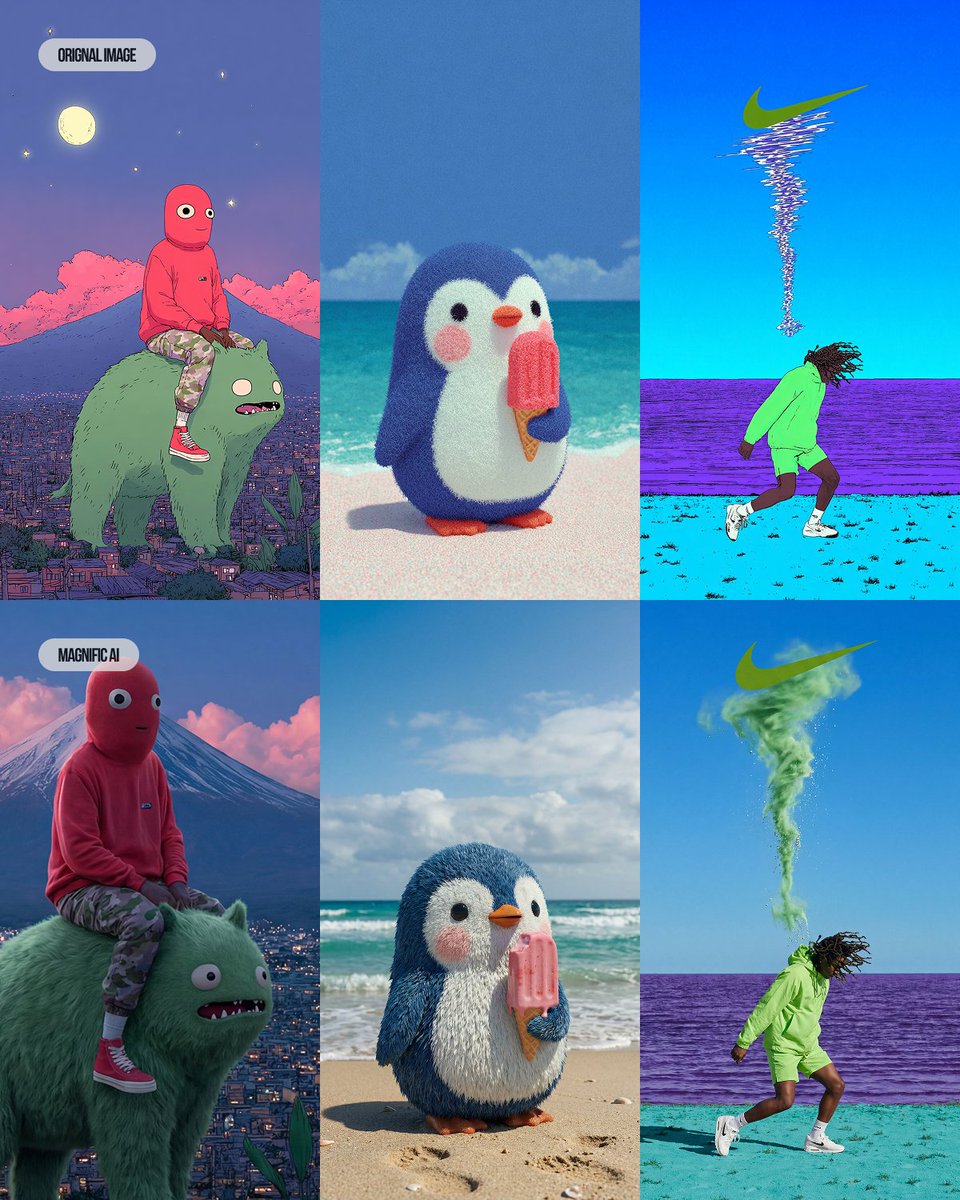
Creators are running Midjourney and NB Pro images through it to add realistic skin, fabric and lighting detail while preserving framing and design, with grids showing cartoon mascots and painterly scenes upgraded into live‑action‑style stills rather than being fully re‑generated before after grid skin enhancer shots. For illustrators, filmmakers and music video teams, this acts like a last‑mile finishing pass: it can push keyframes, posters and cover art closer to “shot on camera” quality in a single step, instead of hours of manual retouching in Photoshop or Lightroom workflow tips.
Comet ships AI-first Android browser that researches, organizes, and drafts for you
Comet has launched an AI‑powered browser for Android that bills itself as “the browser that works for you,” with an integrated assistant that can summarize pages, compare how different outlets cover the same story, cluster tabs by topic, build simple sites, and draft replies or study plans using your existing content browser feature summary launch blog.
For creatives and small teams, this turns a lot of boring glue work—research synthesis, shopping for gear, inbox replies, even vacation or shoot planning—into in‑browser agent tasks instead of a separate chat tab. Comet already supports cross‑device sync via a one‑time code system, so you can keep your AI‑assisted workspace consistent between desktop and phone without routing everything through a separate account system sync feature note.
🎨 Reusable looks: MJ srefs & 3D caricature trend
A day rich in style packs: multiple Midjourney srefs for anime/children’s books/textured worlds, plus the viral 3D caricature prompt remix. Independent of the NB Pro feature.
Midjourney sref 441917578 nails 80s–90s fantasy OVA anime look
Midjourney artists get a new reusable style with --sref 441917578, described as a late‑80s/90s OVA fantasy aesthetic with European high‑fantasy vibes and painterly Ghibli‑style backgrounds. Style reference breakdown

The reference pack shows richly costumed characters, jewel‑heavy designs, and moody cinematic framing, making it a strong base for things like "Lord of the Rings as 90s anime" explorations or fantasy key art. For storytellers and illustrators, this sref is effectively a locked‑in look that can keep a whole project visually coherent across characters, locations, and promo shots.
MJ sref 8584200701 creates plush, stippled toy‑world environments
The new Midjourney style ref --sref 8584200701 produces highly tactile, stippled creatures and landscapes that look halfway between plush toys and 3D‑printed sculptures. Textured style gallery
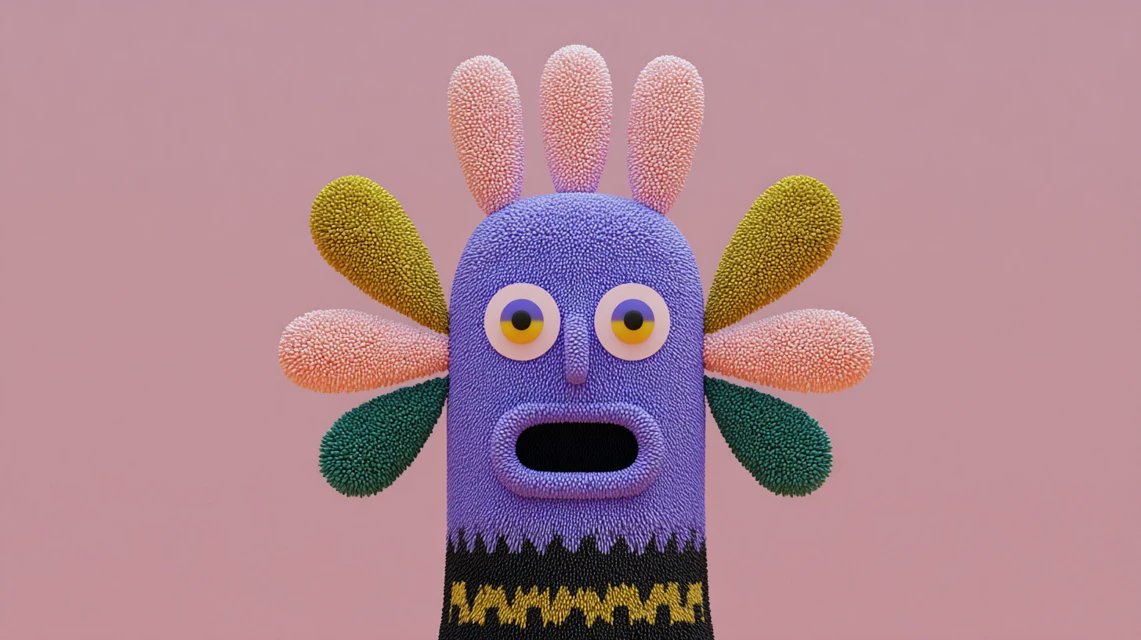
The gallery shows bumpy, foam‑like surfaces, bold color blocking, and simple character silhouettes that still feel premium, which is perfect for toy‑line concepts, kid‑brand key art, or stylized motion boards. Because the sref keeps texture and lighting consistent across characters, props, and environments, designers can spin up entire worlds that read like one coherent product line or animated series.
Oversized‑head 3D caricature prompt becomes a cross‑tool meme
A single "3D caricature" prompt recipe with oversized heads and polished materials is spreading fast, with creators adapting it to different celebrities, self‑portraits, and tools. The original share specifies a smooth 3D render, big expressive heads, minimal backgrounds, and soft lighting, making it easy to reuse across models. Prompt recipe

Community posts show variants built on Leonardo, Grok Imagine, and other image tools, including tech‑founder caricatures, stylized Teslas, and fan art, all clearly derived from the same core structure. (Community remix, Self caricature) For character designers and VTuber/brand‑mascot folks, this is turning into a de facto template: drop in a different subject, tweak outfit and background, and you get a recognizable, on‑brand 3D avatar in the same visual universe every time.
MJ sref 1587503968 locks in warm colored‑pencil children’s book style
Another Midjourney style reference, --sref 1587503968, gives you a consistent colored‑pencil children’s illustration look with irregular outlines and visible texture, aimed squarely at picture‑book work. Style description
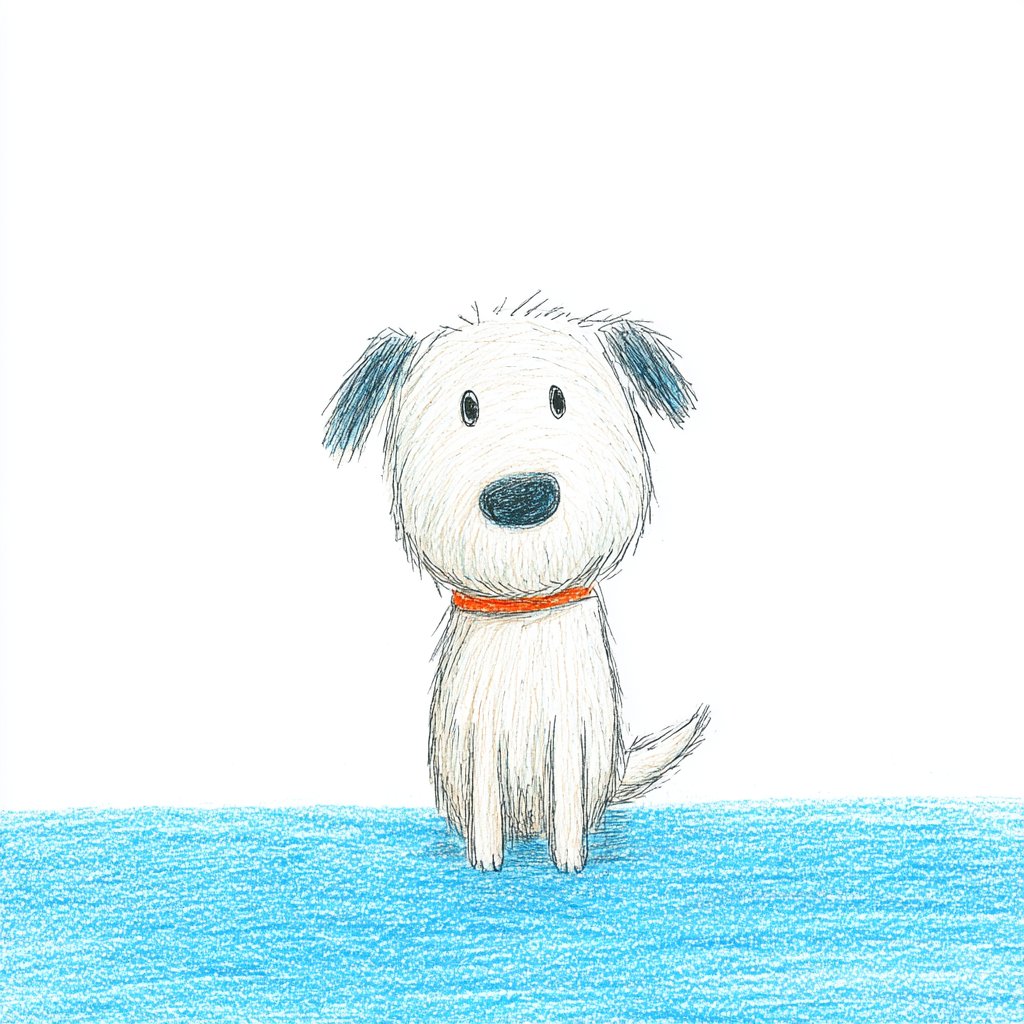
The examples span a dog, astronaut kid, Viking, and classroom scene while staying unified in palette, line wobble, and paper grain, so you can swap in your own characters or scenes without losing the handmade, nostalgic feel. That makes it a handy base style for kids’ books, educational posters, or gentle explainer visuals where a digital‑but‑warm look matters.
📣 AI influencers and product‑studio agents
Creators lean into AI personas and automated promo production. NB Pro platform news is excluded here (see feature).
Glif’s Product Studio agent assembles full promo and story videos from a prompt
Glif is formalizing its end-to-end video agents into a "Product Studio" that can take a short brief about a product or brand and spin out social-ready promo videos, wiring together Nano Banana Pro imagery, Claude Sonnet copy, and ElevenLabs-style voice-over under one agent interface Product Studio link agent page.
Building on earlier experiments where a Glif agent turned research plus NB Pro visuals into a full explainer video Glif explainer agent, the team is now showcasing agents that tell narrative promos like an MGK vs. Eminem "beef" timeline without any manual editing, and a YouTube walkthrough frames this as “your entire creative team” in one agent that handles storyboard, images, script, VO, and assembly Beef explainer demo agent tutorial. For solo creators, brands, and small studios this means you can prototype or even ship product spots and story-led content by iterating on a single agent prompt instead of juggling separate tools for design, copy, and editing.
Apob pushes always-on AI influencer “studios” for borderless creator income
Apob is leaning hard into the pitch that AI-generated personalities can behave like always-on influencer "assets," combining face-swap, realistic motion, and talking avatars to output content 24/7 across locations without the human creator being on camera. Following up on earlier positioning of AI personas as a new kind of attention income stream Virtual influencer pitch, today’s posts stress consistent identity across videos, cinematic visual quality, and the ability to scale content globally instead of “trading time for money,” while hinting that some users are already building six-figure channels with this setup Apob global pitch AI personality thread Time for money pitch.
For creatives, the interesting part isn’t the slogans but the workflow: Apob is explicitly designed around reusing a single AI face across many shoots, swapping it into stock or AI-generated footage, and then routing that to multiple language markets, which makes it attractive if you’re running faceless or multilingual channels and want a single, persistent “character” fronting them Attention shift thread.
🎵 Music & voice tools for editors
New music gen options and practical TTS for quick narration. Light but actionable for video editors and storytellers today.
Mureka ships O2 and V7.6 music models for cheaper, production-ready scoring
Mureka releases two new music generation models through its API—O2 for richer, more emotional vocals, and V7.6 tuned for faster generation that can support near real-time or highly iterative workflows Mureka models. The models are positioned as cheaper at scale than competing services while being "actually production-ready instead of demo-only," and are explicitly pitched for AI podcast background music, game narration, and adaptive soundtracks where reliability and latency matter as much as audio quality Mureka models.
Pictory spotlights lifelike Text-to-Speech with a how-to for editors
Pictory promotes its Text-to-Speech feature as a way to turn scripts into "lifelike voiceovers" within minutes, aimed at creators who need professional narration without hiring voice talent or recording themselves Pictory TTS. An accompanying Pictory Academy lesson walks through animating and styling on-screen text inside the editor while pairing it with TTS, giving video editors and social storytellers a concrete workflow for adding coherent narration on top of animated titles and layouts voice tutorial.

🏷️ Last‑call Black Friday for creators (non‑NB Pro)
Extended and ending promos across creative suites for video/image work. Excludes NB Pro‑specific offers (those are in the feature).
Freepik extends up to 50% off Premium annual plans for Black Friday
Freepik is keeping its Black Friday window open, offering up to 50% off Premium, Premium+ and Pro annual plans instead of ending the promo this week Freepik sale.
Existing monthly subscribers are explicitly allowed to switch to annual or upgrade tiers and still benefit from the discount, according to a follow‑up FAQ that answers “can I benefit if I already have an active subscription?” Freepik faq. Full terms and plan breakdowns sit on their promo landing page for anyone budgeting stock, vectors, and AI generation into next year’s workflows offer details.
Hedra’s Black Friday ends today with 50% off Creator plans
Hedra says today is the last chance for its Black Friday deal: 50% off Creator Plans on both monthly and yearly billing, with final discount codes going out to users who comment for a DM Hedra last call.
If you’ve been using their photo‑to‑talking‑video templates for shorts, memes, or explainer content, this effectively halves your ongoing cost to keep publishing while they continue rolling out new seasonal templates like the recent Thanksgiving set.
ImagineArt extends 66% off Black Friday bundle with $2 multi‑model entry
ImagineArt is heavily extending its Black Friday campaign, advertising up to 66% off access plus a teaser that “the deal we shouldn’t have done is ending,” covering unlimited use of its full image and video suite ImagineArt last call.
A separate promo highlights that for around $2 you can get started with a bundle that includes Sora 2, FLUX.2 Pro, and Nano Banana Pro under one roof, effectively turning the platform into a low‑cost hub for cross‑model experimentation ImagineArt bundle. With contests dangling $11,000 in prizes on top of this ImagineArt contest, it’s a strong nudge for filmmakers and designers who want multiple high‑end models without juggling separate subscriptions.
Kling AI’s last‑call Black Friday: 50% off plus 40% extra credits
Kling AI is in last‑call mode for its Black Friday offer: 50% off your first‑year subscription, up to 40% extra credits on every top‑up, and Unlimited Generation unlocked for Ultra and Premier tiers before the deadline tonight Kling countdown.
For video creators already testing Kling 2.5 and its text‑to‑video capabilities, this is a rare chance to drop per‑shot costs while stockpiling discounted credits for upcoming shorts, ads, and experiments.
Hailuo Black Friday: 60% off yearly plans plus iPhone giveaway
Hailuo’s Black Friday push combines a 60% discount on yearly plans with a sweepstakes for an iPhone 17, unlocked by following the account and retweeting the promo Hailuo Black Friday.
The sale applies to their full creative video stack (including recent Sora‑style tools featured separately), so filmmakers and social video teams can secure a lower annual rate while also getting a bit of extra lottery upside if they were already planning to upgrade.
Krea runs one‑day 40% off sale on yearly plans
Krea is running a “today only” Black Friday sale that cuts 40% off its yearly plans, aimed at creators using its real‑time generative canvas and video tools Krea discount.
The company is also featured in Stripe’s BFCM live showcase, which helps validate it as a serious creative SaaS rather than a short‑lived side project Stripe event shot. For designers and motion artists who lean on Krea for explorations and style studies, this is the cheapest path to lock in a full year of higher‑limit usage.
WaveSpeedAI Black Friday event adds 20% bonus credits for media generation
WaveSpeedAI has kicked off a Black Friday event that adds a 20% bonus on purchased credits, pitched as a way to "unlock your full creative potential" on its image and video generation APIs WaveSpeed promo.
Those credits can be spent across models like Nano Banana Pro for text‑to‑image and InfiniteTalk for talking avatars, so teams building AI content pipelines get a small but concrete reduction in effective per‑asset cost during the sale window WaveSpeed details wavespeed page.