ChatGPT wires 3 in‑chat ad types – creators eye 2 rival models

Stay in the loop
Free daily newsletter & Telegram daily report
Executive Summary
OpenAI hasn’t announced anything, but the code is loud: fresh com.openai.feature.ads.data.* hooks for ApiSearchAd, SearchAd, and SearchAdsCarousel are now sitting in the ChatGPT client, pointing to a proper in‑chat ad system being wired up. Power users who treat ChatGPT as a neutral collaborator are already posting mock screenshots of “helpful” Bose, Herman Miller, and CapCut pitches woven into answers and saying, bluntly, that this is where trust snaps—and where subscriptions flip to Gemini or smaller models.
The fear isn’t banner clutter; it’s conflicted recommendations in sensitive chats about work, health, or money where you no longer know if a suggestion is best for the brief or for an ad campaign. That’s a sharp contrast to the rest of the ecosystem, where the energy is going into capability, not extraction: a stealth “Whisper Thunder / David” model now tops Artificial Analysis’ T2V leaderboard with a 1,247 ELO across 7,344 appearances, while LTX’s Retake (which we covered earlier this week) leans into reshoot‑free dialogue rewrites and multilingual dubs, sweetened by 40% off annual plans.
On the style side, Midjourney’s new Style Creator turns arcane prompt spells into point‑and‑click aesthetics, and ComfyUI is literally projecting AI films onto a 300‑year‑old fortress in Niš, which is a healthier way to monetize attention than sneaking ads into your therapy chats.
Top links today
- Report on OpenAI adding ChatGPT ads
- Nano Banana Pro prompting guide blog
- Overview of xAI Whisper Thunder video model
- Vidu Q2 Digital Human product page
- Flux.2 and Veo 3.1 creative workflow
- Midjourney Style Creator feature overview
- LTXStudio Retake dialogue rewriting tool
- Pictory AI Black Friday creator offer
- ComfyUI Echoes of Time challenge details
- ElevenLabs Summit session on assistive voice
- ElevenLabs London summit registration page
Feature Spotlight
ChatGPT ads: trust and UX shock
Evidence of ad plumbing in ChatGPT sparks a trust crisis: creatives fear blended suggestions in guidance, research, and client work—potentially shifting workflows away from ChatGPT.
Cross‑account chatter shows OpenAI preparing ads inside ChatGPT; creators worry about biased suggestions in sensitive chats. This is the big platform story today for anyone relying on ChatGPT for creative work.
Jump to ChatGPT ads: trust and UX shock topicsTable of Contents
🧭 ChatGPT ads: trust and UX shock
Cross‑account chatter shows OpenAI preparing ads inside ChatGPT; creators worry about biased suggestions in sensitive chats. This is the big platform story today for anyone relying on ChatGPT for creative work.
Code strings suggest OpenAI is wiring ads infrastructure into ChatGPT
Developers have spotted new com.openai.feature.ads.data.* classes in a ChatGPT client build, including ApiSearchAd, SearchAd, and SearchAdsCarousel, pointing to an internal ads system being actively wired up even though nothing is live yet. ads code screenshot
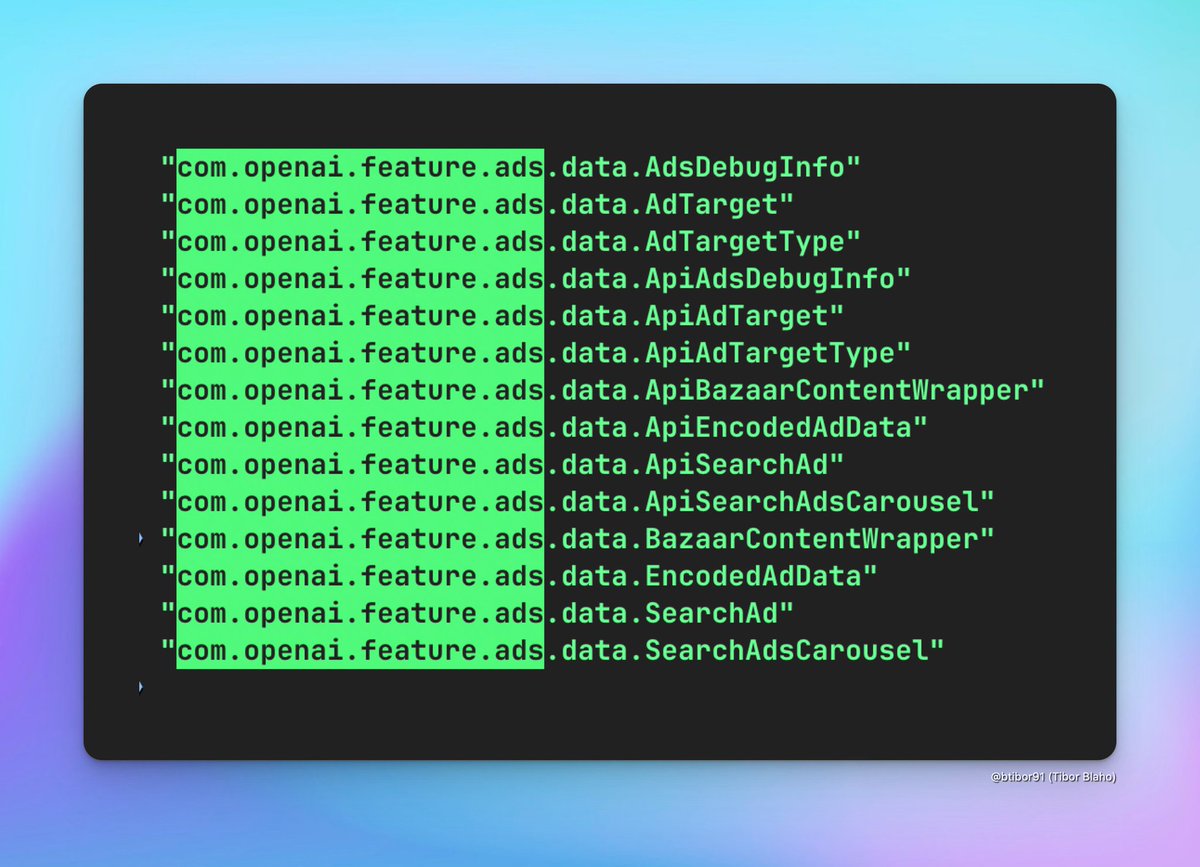
For creatives who treat ChatGPT as a neutral collaborator, this matters because it hints at sponsored units appearing alongside search or answer content rather than in a clearly separate ad box, which could subtly steer tool, product, or platform choices inside the same interface they use for briefs and scripts. The presence of detailed types like AdTarget, EncodedAdData, and BazaarContentWrapper suggests more than a trivial experiment and looks like a proper ad-serving pipeline being integrated into ChatGPT’s stack, even though OpenAI hasn’t commented publicly yet. trust loss comment
Creators warn ChatGPT ads will erode trust and push them to rivals
Reaction from power users has been swift: creators are posting mock dialogues showing ChatGPT’s advice quietly spliced with product plugs (“Bose QuietComfort Ultra…”, “Herman Miller chairs…”, “CapCut and Adobe Premiere Rush…”) to illustrate how in-chat ads could turn sensitive conversations about work, health, or focus into covert affiliate recommendations. ad dialogue mockups
One long‑time user says “all trust in its responses will be lost” and directly asks Sam Altman not to ship ads in ChatGPT, framing the move as incompatible with using the tool for honest emotional and creative decision making. trust loss comment Others report cancelling or planning to cancel paid ChatGPT in favor of Gemini or other models if ads land (“I already Unsub, I'll stick to gemini and see”; “I once cancelled my ChatGPT sub lol”), signaling real churn risk among exactly the heavy creative users OpenAI has depended on. (user unsub reply, previous cancel note) For designers, filmmakers, and writers who lean on ChatGPT for unbiased brainstorming and vendor‑agnostic tool picks, the fear is less about seeing banners and more about not knowing when a suggestion is there because it’s best for the work versus best for an ad campaign.
🎬 T2V model race: David, Veo 3.1, Kling
Mostly evals and head‑to‑heads today—continuing the leaderboard narrative without touching LTX Retake. Focus is on model quality perceptions and what’s winning in creator tests.
Emad M. hints at wave of new video models as creators eye “solved” pixels
Emad Mostaque says “so many” new video models are coming and predicts that next year text‑to‑video pixel generation will be effectively “solved,” reinforcing a sense among builders that the race beyond Veo 3.1, Kling 2.5 and Whisper Thunder is about to accelerate hard Emad outlook.
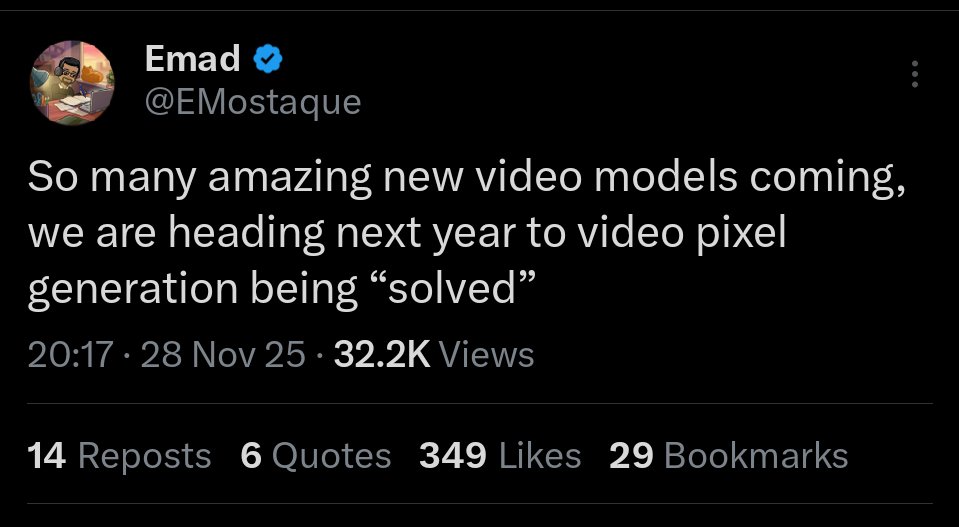
Creators are already treating this as a near‑term roadmap, tying Emad’s comment to at least two unannounced models that infra providers like FAL and Replicate are quietly testing and hyping as the next big step beyond current leaders provider chatter. In the same conversation, people note that a stealth model (“Whisper Thunder / David”) is already topping Artificial Analysis’ text‑to‑video leaderboard over Veo 3, Veo 3.1 and Kling 2.5 Turbo, with an ELO of 1247 from 7,344 appearances AA leaderboard, so the bar for any 2026‑class model is now very specific: better motion, consistency and style control than that. The point is: if you’re a filmmaker or motion designer investing in prompt recipes and pipelines today, this hints that your workflows may need a refresh in a few months as a new crop of models lands with meaningfully different strengths and weaknesses.
Creator says Veo 3.1 looks worse than Veo 3 on the same shot
A Gemini App creator re‑ran an old prompt that had looked great on Veo 3 and found Veo 3.1’s output clearly weaker side‑by‑side, claiming “Veo 3 was better then Veo 3.1” and asking others which version they prefer comparison comment.
In the posted split‑screen, both clips follow the same brief (a stylized dance scene), but the original Veo 3 render appears smoother and more cohesive, while the Veo 3.1 version shows more jitter and slightly flatter lighting comparison comment. This is interesting because Google has been positioning Veo 3.1 as a refinement, and other demos like the 8‑second “scorpion car” spot from Veo 3.1 Fast on Gemini show very strong, low‑angle tracking and dramatic light flares car spot demo. For filmmakers and editors, the takeaway is that version bumps aren’t always strict upgrades on every axis: if Veo 3.1 is now your default, it can be worth A/B‑testing key hero shots against Veo 3 (or alternative models like Kling or Whisper Thunder) before locking a look that really matters.
🎙️ Fix it in post: Retake for dialogue and dubs
Shot‑internal edits keep momentum: Retake showcases dialogue rewrites that preserve voice and performance, plus multilingual swaps. Excludes model leaderboard items.
LTXStudio’s Retake now rewrites lines and dubs shots without reshoots
LTXStudio is leaning into its Retake feature with new demos showing how you can completely rewrite dialogue inside an existing shot while keeping the same voice, timing, and performance, plus swap that line into other languages on the fly. Following up on Retake challenge where Retake was framed as a pro in‑shot edit tool, today’s clips make the core use case very clear: fix that one bad line in post instead of calling the actor and crew back. Retake demo clip
A second demo runs the same performance through English, Spanish, and French, preserving lip timing and emotional delivery while changing the words, positioning Retake as a practical solution for localized campaigns and multi‑market releases rather than full re‑dubs. Language swap reel
For filmmakers and editors, the point is: Retake turns a reshoot‑level change into an editorial decision—so you can fix awkward phrasing, adjust brand messaging, or localize a spot late in the process without touching your original shoot, at the cost of one more AI pass instead of another day on set.
LTX Studio offers 40% off yearly plans to drive Retake adoption
LTX Studio has launched a Black Friday offer giving 40% off all yearly plans until Sunday, November 30, and is explicitly pitching it as a way to get Retake into more editors’ hands. Retake promo details The deal bundles full access to LTX’s AI video stack (story, shots, and in‑shot edits) so teams who like the new dialogue rewrite and multilingual dub workflows can bake them into regular production rather than buying them à la carte. LTX Studio site
For working filmmakers, this turns Retake from a "nice to try" lab feature into something you can reasonably keep on for a year of client work: if you’re already spending on pickups or recording alt lines, the discounted annual price is effectively an insurance policy that your next script change or localization tweak can live in post instead of forcing a reshoot.
🛠️ Creator pipelines: NB Pro → Kling/Veo/Firefly
End‑to‑end workflows mixing stills and T2V: NB Pro art feeds Kling/Veo/Luma/Firefly for polished shorts and trailers. This is about method and look, not model rankings.
Single NB Pro still expanded into a sci‑fi trailer with Luma and Veo 3.1
Following up on earlier NB Pro → Veo 3.1 workflows for multi-angle shots NB Pro grids, creator Heydin shows a "Final Horizon" concept trailer built from one Nano Banana Pro still inside Adobe Firefly. Final Horizon workflow The pipeline is: generate a detailed sci‑fi frame with NB Pro (which is currently unlimited in Firefly), push that frame through Luma Ray 3 for image-to-video motion, then refine and extend with Veo 3.1 via Firefly Boards to get a cohesive, multi-shot sequence.
This matters if you pitch stories or teasers: you can now get from a single hero frame to a mood-accurate, moving trailer without storyboarding every beat, using Firefly as the glue layer to orchestrate NB Pro stills, Luma’s motion, and Veo’s cinematic finish.
NB Pro + Kling 2.5 turn Stranger Things into an anime opening
A creator rebuilt the Stranger Things intro as a short anime-style opening by pairing Nano Banana Pro stills with Kling 2.5 Turbo image-to-video, showing how far fan-made title sequences can go without a 3D team. Stranger Things pipeline NB Pro handles the illustrated character and scene look, while Kling adds motion, camera moves, and pacing so the whole piece feels like a real OVA opening rather than a slideshow.
For editors and storytellers, this pipeline is a template: design a few strong keyframes in NB Pro, then lean on Kling to interpolate, pan, and stylize into a coherent sequence that’s good enough for spec work, pitch animatics, or social fan projects.
DomoAI’s video-to-video styles morph a single cheetah run into many looks
DomoAI’s new video-to-video styles are demoed on a single cheetah running through the savanna, where the motion stays intact but the visual style flips every few seconds—from watercolor to sketchy line art to other looks—without retracking the action. DomoAI styles demo It’s a clear example of using one source plate as a skeleton for many aesthetic passes instead of re-rendering separate clips.
For filmmakers and motion designers, this opens a smart workflow: shoot or generate one good base take, then lean on DomoAI for multiple art-directed versions for A/B tests, alternate cuts, or multi-platform campaigns, all while keeping timing and blocking locked.
Midjourney + NB Pro + Kling build a SpongeBob AI game world
Anima Labs showcase a SpongeBob-style "AI video game world" built with a three-step stack: Midjourney for some concept art, Nano Banana Pro for additional imagery, and Kling 2.5 for the final animated shots. SpongeBob pipeline The result looks like a promo for a stylized platformer, with consistent characters and environments despite the mixed image sources.
For game artists and motion designers, this is a concrete recipe for turning moodboards into motion: let one or two image models explore the visual language, then hand their stills to Kling for movement, parallax, and camera work without touching a DCC tool.
NB Pro + Kling 2.5 via Freepik hit near-live-action realism
A "maximum realism" test shows a tiny banana product shot animated with Kling 2.5 straight from Freepik AI, with no external upscaling or post, and it looks close to live-action macro footage. Freepik banana workflow Another clip of a cityscape labelled "Saigon" uses the same Nano Banana Pro + Kling combo for sweeping, cinematic establishing shots, again rendered directly from the model stack. Saigon city example
For ad creatives, this suggests you can now prototype snackable product and B‑roll shots (food, gadgets, city opens) entirely in an NB Pro → Kling pipeline, then decide later whether it even needs a real shoot or if this passes for final in social and vertical formats.
Flux.2 imagery piped into Veo 3.1 for abstract worldbuilding reels
A short demo shows Flux.2 generating highly stylized, abstract landscapes and shapes that are then animated using Veo 3.1, yielding a fast-cut worldbuilding reel with fluid morphs and camera sweeps. Flux2 Veo workflow The combo leans on Flux.2 for painterly frames and Veo for temporal coherence and motion design rather than character animation.
For title designers and music video teams, this is a practical route to build animated backgrounds, interludes, or lyric video plates: treat Flux.2 as your look-dev engine, then feed picks into Veo 3.1 to get motion that feels like bespoke design, not slideshow panning.
🖼️ NB Pro recipes: cinematic, mini product ads, macros
A flood of prompt formulas and showcases—cinematic JSON specs, tiny luxury product shots, annotated macro toys, spatial inference, and holiday interiors.
Rugged-survivor JSON prompt becomes a go-to NB Pro cinematic recipe
Azed’s long JSON brief for "a rugged male survivor" walking through an overgrown, post‑apocalyptic city street is emerging as a reusable cinematic template for Nano Banana Pro inside the Gemini app. Rugged survivor prompt The schema breaks the scene into nested blocks (subject, accessories, photography, background, lighting), which makes it easy for other creatives to swap in themselves or clients while keeping the same lensing, mood, and environmental storytelling.
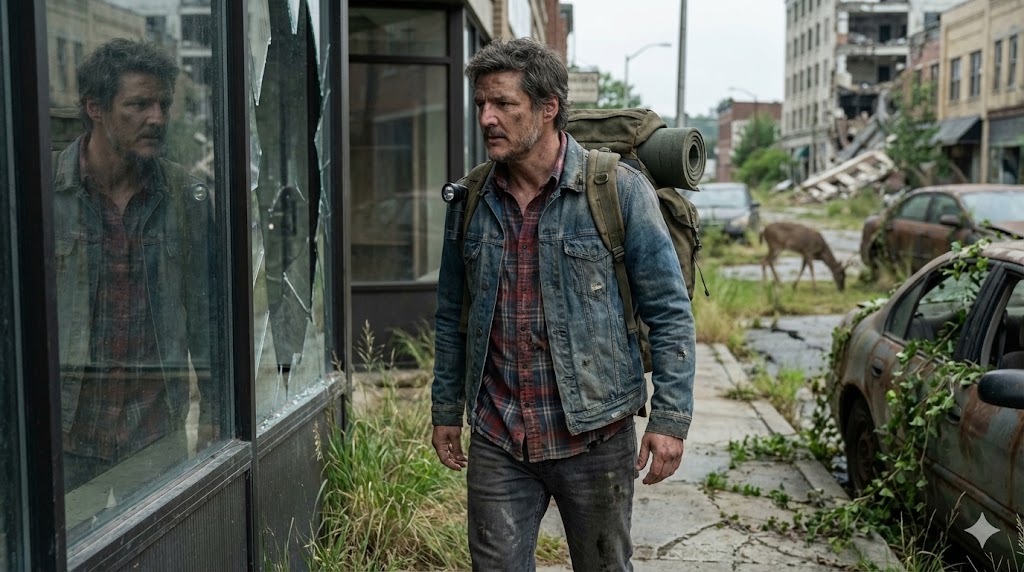
Creators are already re‑using the same structure with their own photos, turning it into a plug‑and‑play pipeline for post‑apocalyptic character key art and story frames. (Emotional reunion remix, Motorcycle wanderer remix, Forest trail remix) For filmmakers and concept artists, the point is: you can treat this kind of JSON as a "shot blueprint" and systematically generate variants—change clothing or props, keep the deer-in-street background, or invert it (e.g., make it dawn instead of overcast) without losing the overall composition or realism.
Chair-and-graffiti NB Pro portrait prompt becomes a personal-brand staple
Azed’s full-body studio prompt—"cool, confident" subject on a black folding chair against seamless white, wrapped in hand-drawn words like VISION, HUSTLE, FOCUS, RISE, BOLD and blue lightning doodles—is turning into a mini-meme template for NB Pro portraits. Chair prompt
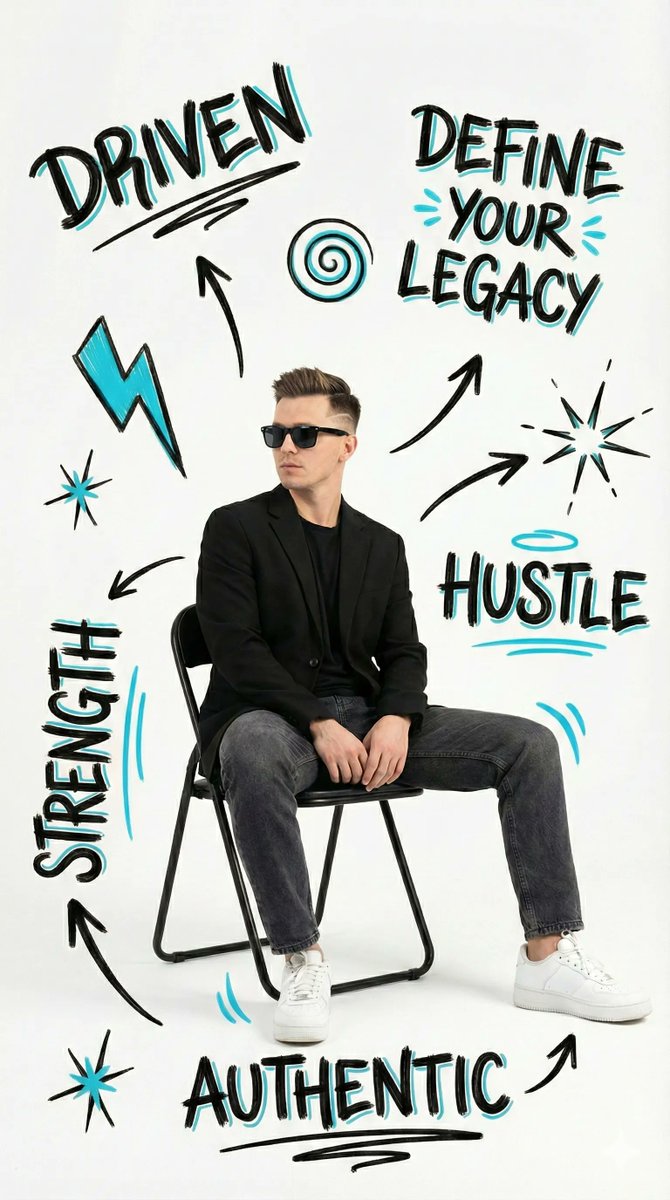
Multiple creators have dropped their own versions with different outfits, genders, and poses (including a hijabi variant) while the graphic treatment stays constant, showing how well this style transfers across identities. (Hijab version, Long hair variant) For creatives, this is a ready-made hero-shot recipe for personal branding, course thumbnails, or portfolio covers: one prompt, then iterate the copy (e.g. swap HUSTLE for CREATE or LEARN) and color accents to match each client or campaign.
NB Pro "behind-the-scenes" prompt reframes Stranger Things stills as full sets
Ror_Fly shared a clever NB Pro prompt that takes dramatic Stranger Things keyframes and regenerates them as behind‑the‑scenes photos: same characters and poses, but now surrounded by crew, green screens, dollies, softboxes, and flame rigs on a street set. Stranger Things BTS
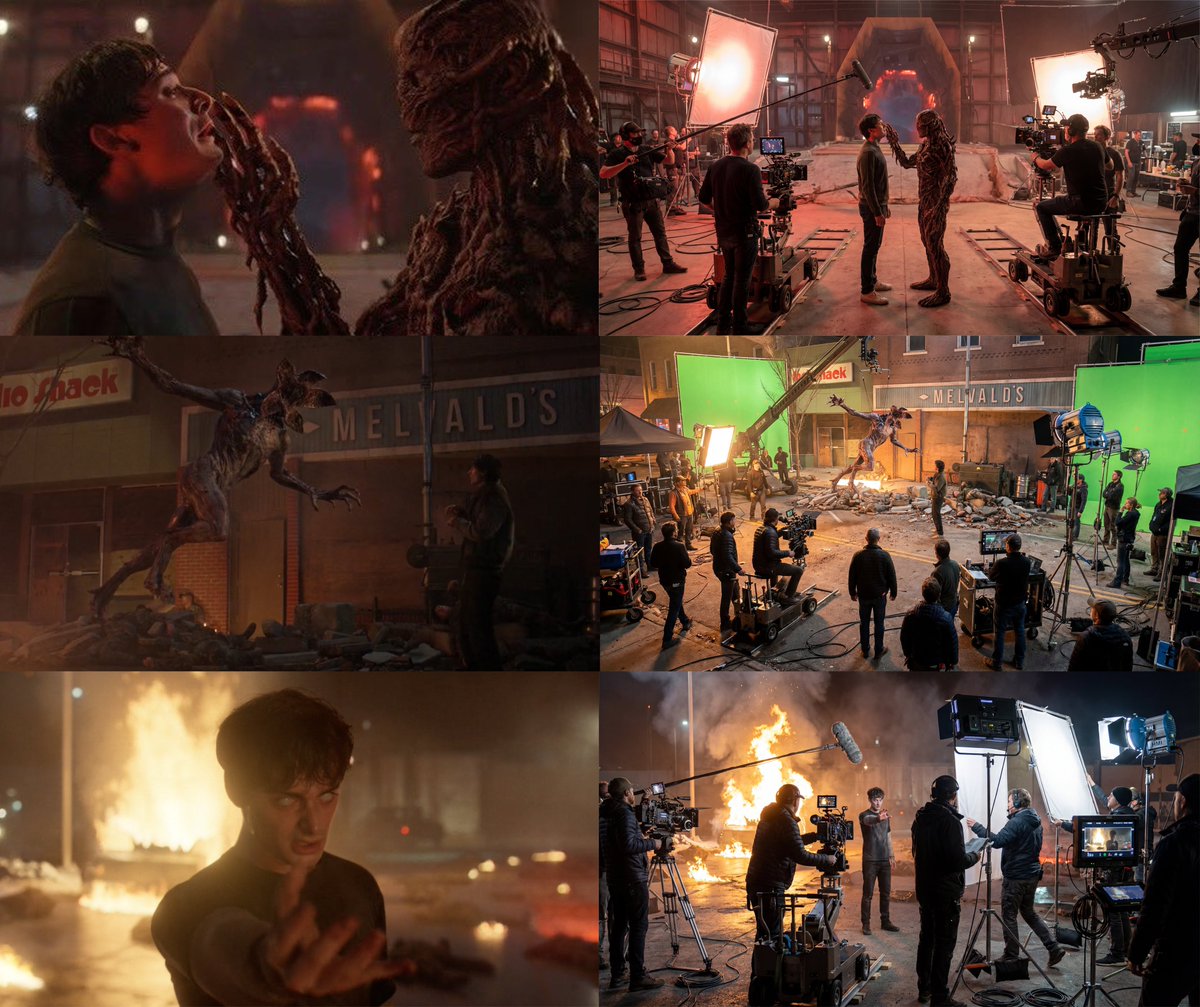
The key instruction—"Show the behind the scenes view of this movie set of this exact scene. Keeping the characters in position, but showing the technical equipment, lighting, and ambient motion of the crew"—turns NB Pro into a virtual unit photographer, which is gold if you’re pitching concepts, teaching film craft, or building meta content about production itself. It hints at a broader recipe: take any iconic or client frame, then ask the model for its making-of version to help audiences see the work behind the shot.
NB Pro nails tiny luxury product shots for mini ad concepts
NB Pro is being pushed into a fun macro-ad direction: Azed shows a set of "tiny, adorable" product shots—mini iPhone-style phone, Pringles can, Louis Vuitton Speedy, and Dior Sauvage bottle—pinched between fingers against a clean white background. Mini product set

Another creator riffs on the format with miniature perfume bottles and luxury handbags, confirming the style is robust enough to carry brand cues like labels, caps, and monograms even at toy scale. More mini lux For designers and marketers, this recipe is a quick way to mock up high-end product ads, key visuals for ecommerce, or collectible-style promos where exaggerated smallness and hand context sell the "premium but playful" feel without a full studio shoot.
Reusable cinematic close‑up prompt template spreads across NB Pro
Azed shared a clean, text-only "cinematic close‑up" prompt pattern that slots in placeholders like [character], [object], [lighting], and [emotion] to generate hyperreal, story-driven portraits in NB Pro and similar models. Cinematic template The template standardizes core ingredients—intentful pose, reflections on accessories, atmospheric particles, and eye expression—so artists can quickly adapt it to wizards, rebels, masked vigilantes, or any brief while getting consistent 8K-style framing and detail.
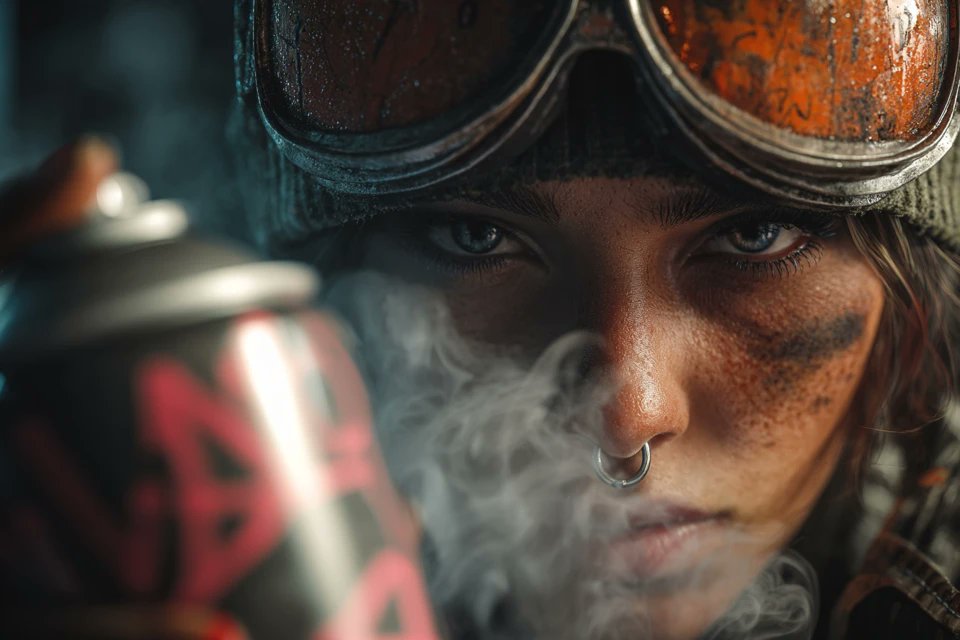
For creatives, this is a lightweight alternative to JSON: you keep one base sentence structure, then focus your effort on swapping narrative variables (who, what, mood, atmosphere) rather than re‑writing a whole shot description each time. It’s especially handy for storyboards, character posters, and thumbnails where "eyes carry the story" and you want strong, repeatable close‑up language without re‑inventing it every job.
Macro NB Pro prompt turns toys into annotated x‑ray cutaways
Ozan shared a macro NB Pro prompt that renders a small toy figure split vertically—one half opaque plastic, the other a transparent shell exposing glowing circuits, gears, and skeleton—then overlays white leader lines with Turkish labels like "BEYİN ÇİPİ" and "GÜÇ ÜNİTESİ" on top. Macro toy prompt

This is a powerful pattern for anyone doing educational, sci‑fi, or brand storytelling work: the same structure could explain a fictional robot, a gadget concept, or a character’s "inner workings" while staying photoreal and legible. Because the annotations are baked into the prompt, you get art-directed labeling and composition in one pass instead of compositing UI later in Photoshop.
NB Pro infers character height and framing from separate photos
Techhalla highlighted a subtle but important NB Pro behavior: given two separate reference photos of characters, and a prompt that never mentions height, the model still outputs a multi-shot collage where one character is consistently taller in every framing (ELS, LS, MCU, CU, low and high angle). Height inference demo
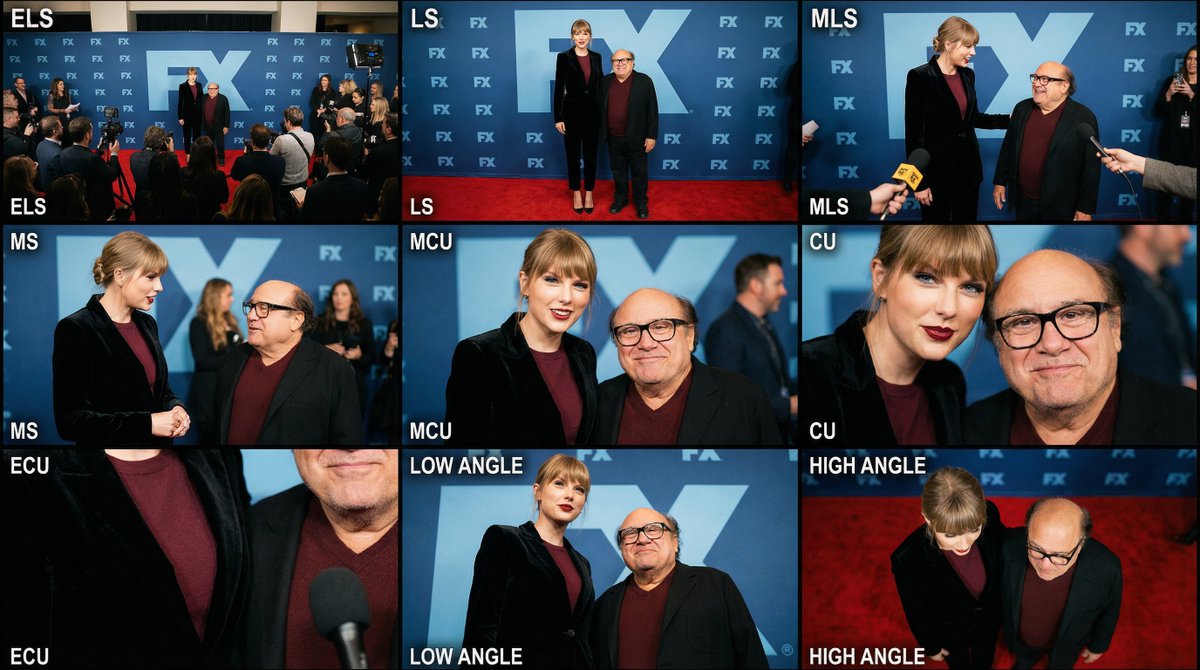
For storytellers and character artists, this means you can often rely on NB Pro to deduce relative scale and presence from source images alone, then carry that through a whole shot list. That’s useful when you’re building faux red-carpet sets, duo portraits, or cast grids—rather than micromanaging "tall" and "short" in every line of the prompt, you focus on mood and camera language and let the model handle proportional consistency.
NB Pro sketchbook prompt visualizes a character bursting off the page
ProperPrompter showed an NB Pro illustration where an anime-style girl in a hoodie appears to rise out of the pages of an open sketchbook: her upper body is fully rendered in color, while her legs and feet remain pencil lines on the page, surrounded by real-world pencils and a coffee cup. Sketchbook scene
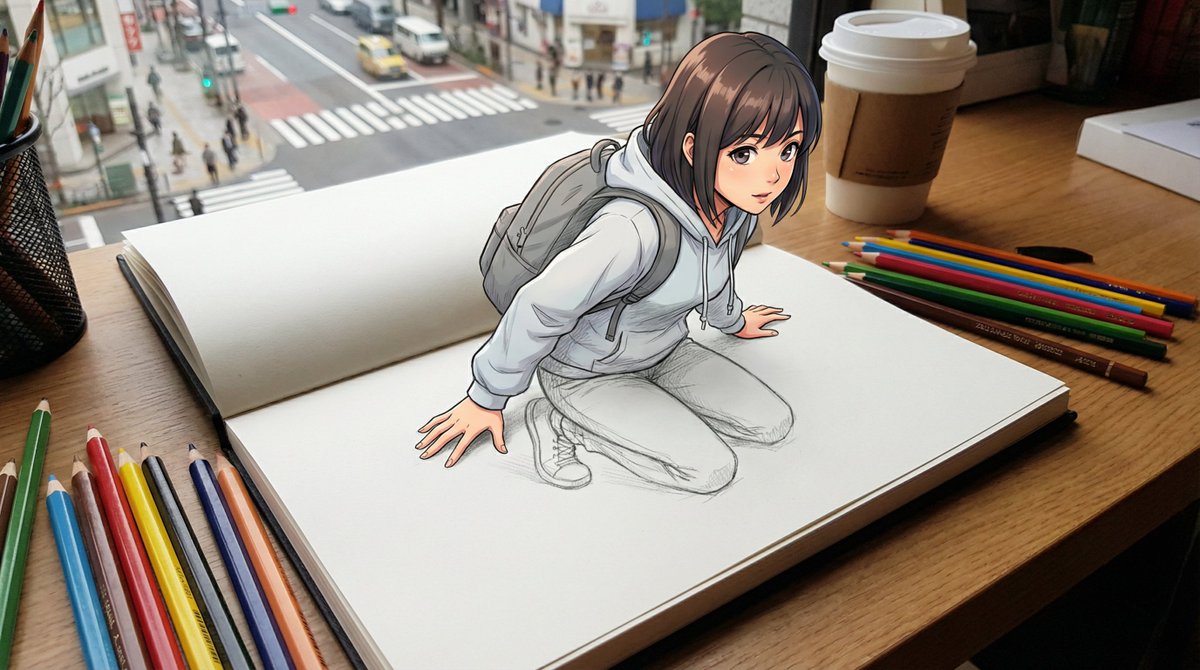
It’s a neat narrative pattern for storytellers and educators: you can use a similar prompt to depict ideas escaping notebooks, characters "coming to life" from scripts, or the bridge between drafts and finished work. The hybrid drawn/real aesthetic also gives motion designers an easy base for parallax or subtle camera moves in After Effects without extra compositing.
Cozy Christmas living room becomes a de facto holiday interior prompt
Ai_for_success posted a richly staged Christmas living room—towering tree packed with red and gold ornaments, stockings on the mantel, garlands over doorways, nativity on the coffee table, and warm firelight tying it together—generated from a simple request for a "Christmas theme". Christmas interior
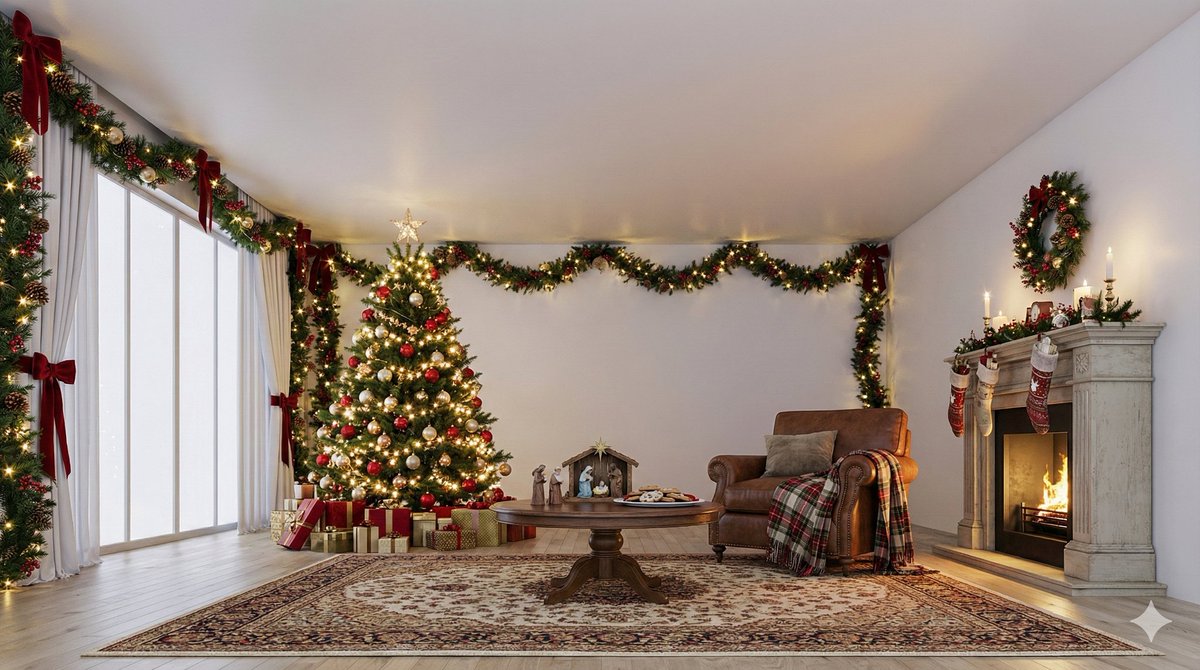
For designers, filmmakers, and social teams, this serves as a de facto reference for how much set dressing you can and should ask an image model for in one go: layered lighting, foreground props, and wall-level decor, not just a tree and a couch. Even without sharing the exact prompt, the shot gives you clear art direction targets (garlands framing windows, plaid blanket, mixed warm light sources) you can encode the next time you brief a model for seasonal content.
🎨 Midjourney style systems: Style Creator + V7 looks
Midjourney news centers on the new Style Creator UI and fresh V7 recipes and srefs. This is styling/control specific and separate from NB Pro prompt guides.
Midjourney ships Style Creator for point-and-click aesthetic control
Midjourney quietly rolled out its new Style Creator interface, letting you browse house styles, hover a "Try" button to apply one to your own prompt, and see textual "refinements" update as you tweak the look. Style Creator overview Creators are already calling out that this changes prompting from memorizing magic words to interactively steering a style, even if the first version’s UI feels cramped and light on sliders.
Early feedback is that it’s powerful but not yet polished: one user wants real-time previews and more control over style strength and components, noting that the current layout doesn’t make the new generations "front and centre" and that there’s no way yet to dial how much of each refinement you borrow. Style Creator overview For working illustrators and art directors, the takeaway is that Midjourney is formalizing its style system into something closer to an asset you can pick, test, and hand off—rather than a personal stash of half-remembered prompt incantations.
Shared V7 prompt recipe shows coherent blue–yellow fashion look
A creator shared a compact Midjourney V7 recipe—--chaos 9 --ar 3:4 --sref 942676631 --sw 500 --stylize 500—that produces a tight, graphic blue-and-yellow visual language across portraits, fashion poses, and action shots. V7 prompt recipe The grid shows everything from an elderly man, to a boxer, to street-style characters, all unified by the same saturated palette and flat, poster-like compositions.
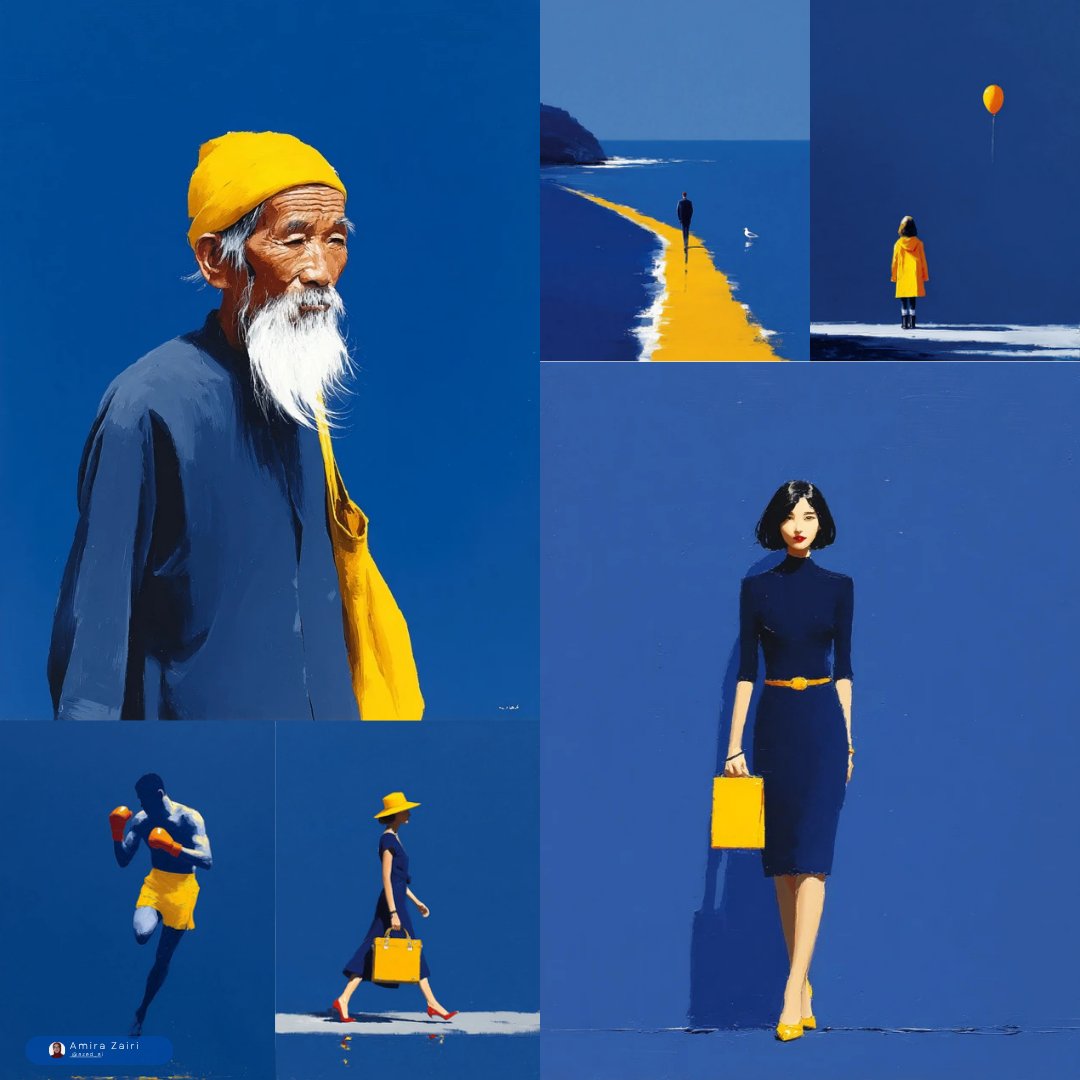
For designers and storytellers working in V7, this is essentially a ready-made "mini brand system": you can swap the subject but keep the same style ref and settings to get consistent campaign imagery or panel art. The relatively high --stylize paired with --sw 500 means you can expect strong adherence to the style ref while still letting pose and layout respond to your base prompt, which is useful if you’re trying to keep a look coherent across a series without manually retouching each frame.
Midjourney sref 2504160915 recreates late-80s/90s OVA anime aesthetics
Another shared Midjourney style reference, --sref 2504160915, is tuned for late-80s/early-90s Japanese OVA anime—explicitly name-checking Dragon Ball Z, City Hunter, Wicked City, Bubblegum Crisis, and Kimagure Orange Road as touchstones. OVA style description Sample frames show thick outlines, film-like grain, and the color grading and character design language you’d expect from that era.
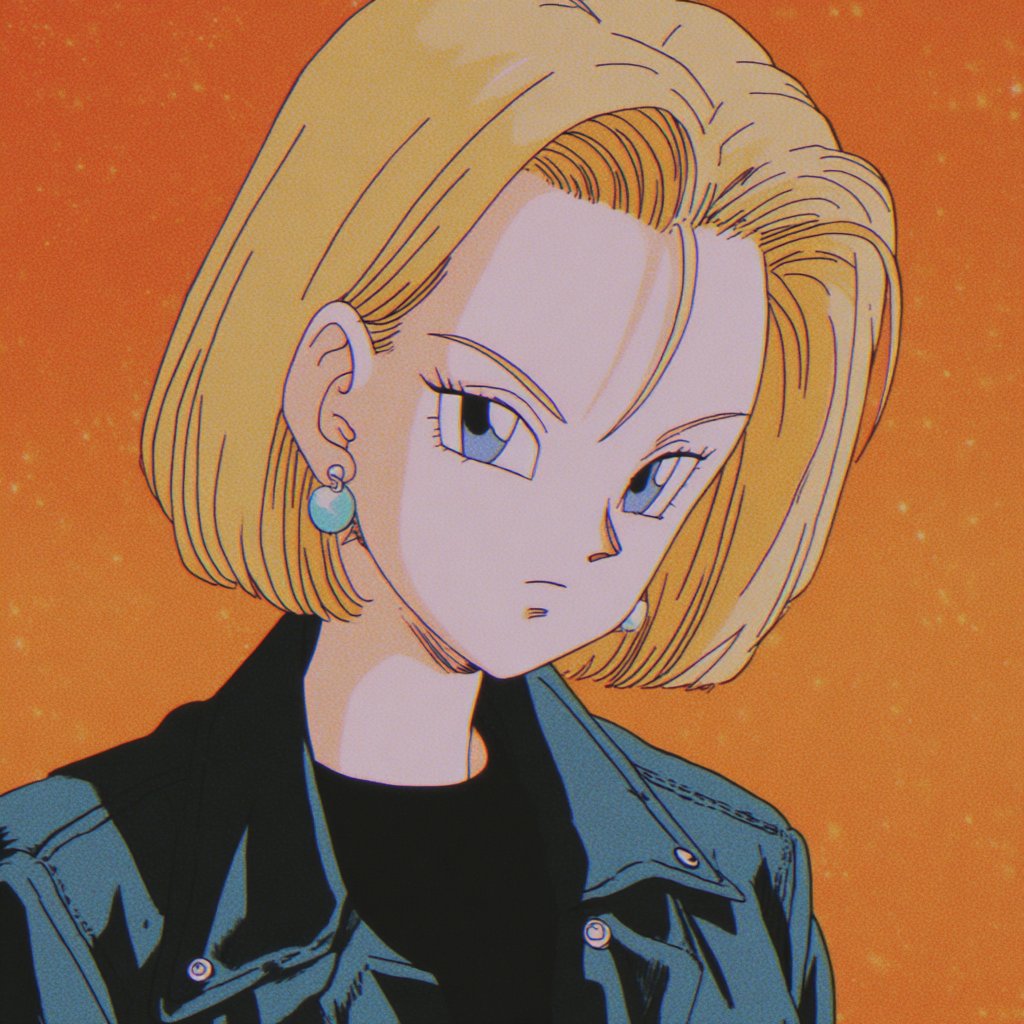
If you do anime fan art, motion boards, or stylized key art for AI video pipelines, this sref is a strong starting point when you need that specific VHS-era feel. Because it’s a single style token, you can bolt it onto existing prompts or mix it with character references, then feed the resulting stills into tools like Kling or Veo for animated openings while keeping a consistent retro look end to end.
New Midjourney sref 1760926510 nails bold-line kidlit and doodle pop art
A new Midjourney style reference, --sref 1760926510, captures a bold-line children’s illustration look with flat colors and simple shapes, and even blends drawings over real photos. Children style ref Examples include a scribbly-outlined dog sitting on a real yellow couch and ultra-minimal character designs with thick outlines and primary colors.
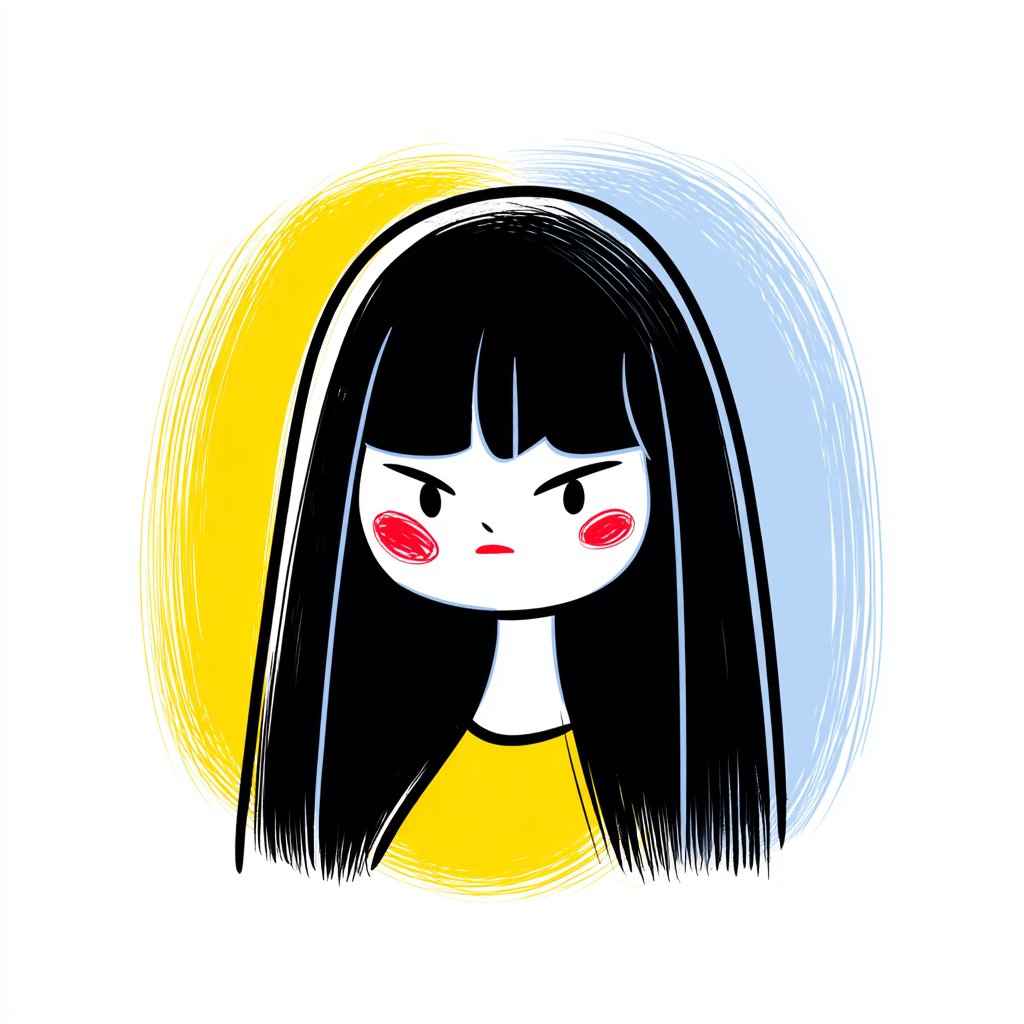
For picture-book artists, educators, and product designers, this gives you a fast route to kid-safe visuals that still feel authored rather than generic stock. Because the style plays nicely with both pure illustration and photo-plus-doodle overlays, you can prototype book spreads, classroom posters, or UX mascots in the same aesthetic, then keep iterating by changing only the content of your prompt and reusing the same style ref.
🧩 AI Studio on mobile and Gemini‑first web design
Tooling for designers: hints of an AI Studio mobile app, plus creators shipping blogs and UI quickly with Gemini 3. Focus is workflow speed and iteration.
AI Studio mobile app quietly teased with “Build Anything” icon
A new "Build Anything" app icon and splash screen suggests Google’s AI Studio is coming to mobile, giving builders a way to spin up and test AI tools from their phones rather than being tied to desktop. mobile hint
For creatives, designers, and filmmakers, a mobile AI Studio would mean being able to tweak prompts, review generations, and prototype small workflows on the go—during shoots, client meetings, or commutes—rather than waiting to get back to a laptop. Even though this is only a tease for now, it’s a strong signal that Google wants AI Studio to be a daily companion app rather than a dev-only web console.
Creator ships NB Pro prompt guide blog built with AI Studio and Gemini 3
A creator launched a full blog and detailed Nano Banana Pro prompting guide, noting the site itself was assembled with AI Studio plus Gemini 3 Pro inside Cursor, then filled with structured examples and recipes. (blog announcement, NB Pro guide) The guide leans into iterative prompt evolution (from "a fashion photo" to rich, directed scenes) and exercises like recreating existing images to learn how the model "thinks," which is exactly the kind of workflow AI Studio is meant to accelerate for visual storytellers. For designers and filmmakers, this shows a practical pattern: use Gemini 3 to draft and organize your educational content or documentation, while AI Studio hosts the experience and NB Pro handles the visuals.
Gemini 3 helps designer focus on web layouts instead of implementation
A designer says Gemini 3 has "rediscovered" their love for web design because it lets them focus on composition and UX details while the model handles implementation, component wiring, and polish that would normally eat hours. web design comment The point is: instead of hand-coding every section, they can think in terms of how to highlight prompts, outputs, and process, then let Gemini handle the repetitive layout and refinement work. For creatives who mostly care about narrative and visual hierarchy—not CSS minutiae—this is a strong example of a Gemini-first workflow that turns web design back into art direction rather than production slog.
📣 AI content studios: influencers, explainers, spec ads
Marketing‑focused making: AI influencer pipelines, one‑photo digital humans for explainers, and playful spec ads. Excludes subscription deals, which are separate.
Vidu Q2 turns a single photo into talking explainer avatars
Vidu is pushing its Q2 Digital Human feature: upload one photo, and it generates presenter-style explainer videos in around 10 seconds, with no modeling or filming required. That’s aimed squarely at YouTubers, course creators, and marketing teams who want studio‑like host videos from static headshots. Vidu Q2 teaser
The linked Q2 API page shows this is wired into Vidu’s broader text‑to‑video stack, so you can feed scripts or marketing copy and get a branded “digital human” reading it on demand, which is exactly the kind of reusable asset small studios and agencies can scale across product explainers and ad variants. Vidu API For AI creatives, this slots in as the on‑camera half of a content studio: pair it with NB Pro or Midjourney visuals, then drop these digital presenters in to narrate specs, onboarding flows, or UGC‑style ads without recurring shoot days.
Apob pitches AI‑polished influencer videos as a crewless alternative
Apob is marketing itself to creators as a way to skip $10k production crews by running selfie footage through an AI “studio” that fixes lighting and motion so sponsorship videos look closer to agency work. Apob creator pitch The promise is straightforward: better‑looking talking‑head and lifestyle clips should convert into higher engagement and bigger brand deals, without changing your shooting setup.
For AI‑savvy influencers and small brands, Apob effectively becomes a virtual post house on top of your phone—cleaning exposure, stabilizing or smoothing movement, and generally making ad‑read content feel premium enough for mid‑tier campaigns. That matters if you’re already scripting with LLMs and cutting with tools like CapCut or Pictory; Apob slides in as a final polish pass so one‑person studios can pitch “agency‑grade” video packages while keeping costs low.
- Test it on one existing brand script and compare retention against your normal edit.
- Use it to batch‑upgrade evergreen explainer clips (FAQ answers, product demos) instead of reshooting.
- A/B pitch decks with before/after frames to justify higher rates to sponsors.
NB Pro creators spin a Stranger Things x Dairy Queen spec ad
Creator Ror_Fly shared a playful spec ad built with Nano Banana Pro: Vecna from Stranger Things holds an upside‑down Dairy Queen Blizzard toward the camera, with the copy “He likes it cold. You like it Upside Down” in the show’s title font and a 3:4 print‑ad framing. NB Pro Vecna ad It’s fan art, but it doubles as a live prompt recipe for horror‑flavored CPG posters.
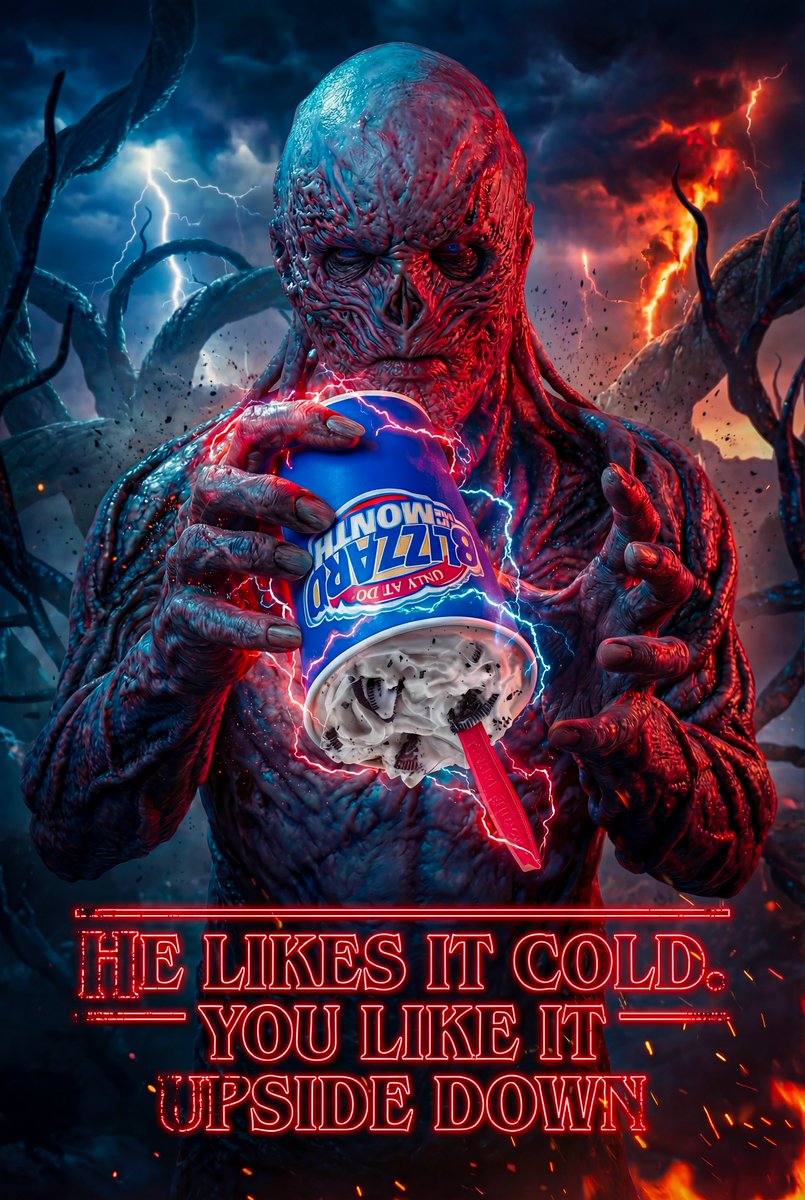
The prompt leans on NB Pro’s strengths—hyper‑real lighting, sharp branding on the cup, and franchise‑accurate character styling—to hit a level that feels close to a real campaign one‑sheet. For AI art directors and motion designers, this is a good template: you can swap brand, slogan, and IP wrapper to mock up speculative collaborations or pitch decks fast, then animate variations later in Kling, Veo, or DomoAI once a client bites.
💸 Creator discounts to jump in now
A lighter deals day focused on production tools. Keep in mind this excludes the separate ChatGPT ads feature story.
LTX Studio runs 40% off annual plans for Retake-powered video teams
LTX Studio is running a Black Friday-style promo with 40% off all yearly plans until Sunday, November 30, positioning it as the moment for filmmakers and editors to adopt its Retake in-shot dialogue tools at a lower commit price ltx discount post. The deal directly targets people cutting narrative, ads, and explainers who want to rewrite lines after the shoot and handle multi-language versions without re-recording.
For context, Retake lets you swap dialogue in an existing shot while preserving the actor’s voice and performance, and can re-write lines across multiple languages while keeping timing and delivery intact retake feature demo multilingual retake demo. For solo creators and small studios who’ve been on the fence about AI-assisted reshoots, this discount turns a full year of access into a lower-risk experiment rather than a big production expense (details on tiers are in the site’s pricing section ltx studio page).
🎟️ Community calls: fortress projection + open share space
Opportunities to participate: a real‑world projection‑mapping challenge and an open thread for weekly creator shoutouts.
ComfyUI invites creators to project AI films onto a 300‑year‑old fortress
ComfyUI is running its final Season 1 "Echoes of Time" challenge, where 15 AI‑generated videos will be projection‑mapped onto the walls of Serbia’s historic Niš Fortress in a live festival event on December 13. Submissions must explore the idea of time (blending eras, history vs future), be 1920×1080 at 24 fps, and run at least 30 seconds, with a deadline of December 6 for uploads via the official form challenge announcement challenge details.
A follow‑up post shows both a real photo of the fortress and a test projection on a 3D model, underlining that this is a true physical installation, not a virtual gallery fortress reference. For filmmakers, motion designers, and ComfyUI graph nerds, this is a rare chance to see node‑driven generative work leave the timeline and hit stone at architectural scale.
Weekly open thread lets AI creators share work for public shoutouts
Creator and curator @techhalla opened a community "space" thread inviting AI artists, filmmakers, and designers to say hi, mingle, and drop their best recent work, with a promise to highlight favorite pieces in a weekly follow‑up post community space.
For smaller or emerging creators, it’s a low‑friction way to get more eyes on experiments, find collaborators across tools (NB Pro, Kling, Grok Imagine, etc.), and see what styles and workflows other people are actually shipping right now.
📊 Reasoning models and AI political lean profiles
High‑level analysis threads relevant to tool choice: OpenAI’s shift to inference‑time reasoning and a study mapping model political leanings. No model launch here—just context.
OpenAI is betting on slow “thinking” models over bigger pre-trains
A long thread argues OpenAI has shifted R&D from ever-bigger base models to inference-time reasoning (o‑series style "thinking" passes), after GPT‑4.5 underwhelmed and the team paused major pre-train scale-ups for ~2.5 years OpenAI strategy thread. The take is that GPT‑5’s base is only slightly larger than GPT‑4, smaller than GPT‑4.5, and that OpenAI is now competitive mainly on hard scientific and coding work where long reasoning shines, while Google and Anthropic win day‑to‑day UX with faster, stronger non‑reasoning models. For creatives and storytellers, this frames a trade: OpenAI’s models may give deeper, more coherent story logic or complex shot planning when you let them "think" for many seconds, but that latency makes them feel sluggish for rapid ideation loops compared to lighter Gemini or Claude calls—so your tool choice should depend on whether you’re doing quick moodboards and copy passes, or thorny narrative/technical work where the extra think-time actually matters.
Study finds most frontier models lean libertarian-left; Grok-4 skews right
A new "political compass" study simulates voting and policy design across eight national elections with six frontier models (GPT‑5, Gemini 2.5 Pro, Claude 4.5 Sonnet, Grok‑4, Kimi K2 Thinking, Mistral Magistral Medium), and finds five of them cluster in the libertarian‑left quadrant while Grok‑4 sits closer to libertarian‑right, aligning better with real‑world outcomes in six races ideology study summary.

For AI creatives, the point is not abstract politics; it’s that your "neutral" co‑writer or concept partner probably has a mild progressive, techno‑solutionist bias baked in (e.g., favoring redistribution, AI surveillance, and blockchain fixes), while Grok‑4 may push more deregulation and sovereignty‑first ideas. When you’re writing scripts, ad campaigns, or political/issue storytelling with these models, you should expect that default suggestions around policy, authority, and social norms may lean one way, and plan prompts, reviews, or model mixing accordingly—especially on projects where perceived neutrality or audience alignment really matters.