Kling O1 fuses 3–10s shots and edits – partners ship 365‑day unlimited tiers

Stay in the loop
Free daily newsletter & Telegram daily report
Executive Summary
Following last weekend’s Omni teaser, Kling O1 actually landed as a real tool, not a mood board. It eats text, stills, prior clips, and explicit start/end frames, then spits out 3–10s shots, with some users pushing it toward 2‑minute, audio‑on runs, so “describe the change” becomes the core editing primitive.
The Elements system is the quiet power move: define a product or character pack once and O1 keeps it on‑model while you relight scenes, swap props, erase crowds, or auto‑bridge two clips with a fresh continuity shot. Within hours, Freepik, OpenArt, Leonardo, ElevenLabs, fal, Krea and others wired it in, and creators were already turning day into golden‑hour, keying backgrounds, and morphing cars into black horses without opening a compositor. We help creators ship faster, and this yanks a lot of grunt work out of color, keying, and clean‑up sessions.
Access is in classic land‑grab mode: Higgsfield is dangling 70%‑off “Unlimited Kling O1 Video & Edit,” Lovart is offering up to 365 days of unlimited O1 plus Nano Banana Pro, and Krea stacks 40% off yearly plans. Your timeline this week is basically storyboards arguing with discount codes, while Runway’s newly unmasked Gen‑4.5 quietly chases the crown on raw leaderboard quality.
Top links today
- Kling O1 unified video model overview
- Runway Gen-4.5 frontier video model
- PixVerse V5.5 multi-shot video launch
- Vidu Q2 image generation model page
- Ovis-Image 7B text-to-image model card
- Z-Image Alibaba text-to-image on Glif
- Sora 2 video generation on Hailuo
- AnyTalker multi-person talking video project
- Pruna P-models real-time image generation
- DeepSeek V3.2 reasoning-first language models
- Vision Bridge Transformer at Scale paper
- Infinity-RoPE infinite video generation paper
- Layer-Aware Video Composition Split-then-Merge paper
- Test-time scaling of diffusions with flow maps
Feature Spotlight
Kling O1 becomes the all‑in‑one video engine
Kling O1 consolidates generation and editing into one model and lands across major platforms (Freepik, OpenArt, fal, Leonardo, ElevenLabs, more). For filmmakers, it’s a directable VFX stack: relight, swap, restyle, extend—fast.
Massive cross‑account day: creators and platforms light up around Kling O1, a unified gen+edit model with multi‑reference Elements, 3–10s shots, and start/end frame control. Threads show relight, prop swap, out/‑inpainting, and continuity tools in action.
Jump to Kling O1 becomes the all‑in‑one video engine topicsTable of Contents
🎬 Kling O1 becomes the all‑in‑one video engine
Massive cross‑account day: creators and platforms light up around Kling O1, a unified gen+edit model with multi‑reference Elements, 3–10s shots, and start/end frame control. Threads show relight, prop swap, out/‑inpainting, and continuity tools in action.
Freepik, OpenArt, Leonardo and others ship Kling O1 on day one
O1 didn’t stay locked in Kling’s own app for long: a wave of creative platforms lit it up on day one, giving artists and filmmakers several ways to try it without touching an API. Freepik now bills Kling O1 as “world’s first unified multimodal video model” inside its Video Generator, and has pushed 10 ready‑made templates for things like dynamic product showcases, fashion motion lookbooks, prev/next‑shot generation, and illustration‑to‑animation workflows Freepik launch Freepik template demo.
OpenArt exposes O1 as “Unlimited Kling O1” with a chat‑to‑edit interface and separate text‑to‑video, image‑to‑video, and video‑to‑video tools; azed’s thread there shows how O1 handles crowd removal, day‑to‑sunset transforms, and wool‑felt restyles while respecting character consistency OpenArt integration OpenArt edit demo. Leonardo AI has adopted O1 as one of its strongest video models, highlighting support for up to five reference images plus start/end frames to control continuity and multi‑instruction prompts for complex scenes Leonardo launch. ElevenLabs folded O1 into its Image & Video product as a backbone for multimodal input, fine control over pace and detail, and strong character fidelity, pairing it with their audio stack for end‑to‑end clips ElevenLabs integration. On the more developer‑centric side, fal offers O1 as an exclusive API with ready endpoints for reference‑to‑video, image‑to‑video, and several video‑editing flows Fal API launch, while creative‑tool startups like Krea, ImagineArt, Wavespeed, and others quietly added O1 as the engine behind prompt‑driven video editing UIs Krea integration Wavespeed mention. For working creatives, that means O1 shows up where they already live—asset sites, editing suites, and voice tools—rather than demanding yet another siloed app.
Kling O1 debuts as unified multimodal video generator and editor
Kling has officially launched O1 as its flagship unified multimodal video model, turning the earlier Omni week tease into a concrete tool that can both generate and edit shots from text, images, and videos in one place, following up on initial teaser. The core model takes mixed inputs (text prompts, reference images, prior clips, start/end frames) and outputs 3–10 second shots, with some docs and threads noting support for up to 2‑minute clips with native audio for longer pieces Feature breakdown.
O1 exposes director‑style controls like explicit start and end frames for smooth transitions or loopable shots, layered compositing using @‑style element references (characters, props, backgrounds), and text‑based editing verbs like “add,” “remove,” “restyle,” and “extend” instead of manual masking or keyframing Feature breakdown. Kling frames this as Day 1 of its Omni Launch Week, with four more announcements locked behind a day‑by‑day timeline poster that has the creator crowd speculating on what comes next Official launch thread Launch week graphic. Early commentary from filmmakers compares O1 to Runway’s Aleph editor, with one creator summarizing it as “a video editor inside a model” rather than a pure text‑to‑video toy Creator reaction. For creatives, the point is straightforward: O1 collapses what used to be separate generate, edit, and extend stages into a single conversational model that speaks the language of shots, camera moves, and elements instead of nodes or timelines.
Creators stress‑test Kling O1 relight, prop swap, keying and continuity tools
Within hours of launch, editors and solo filmmakers are hammering Kling O1’s editing verbs—relight, replace, remove, restyle, and bridge shots—and reporting that it behaves more like a VFX assistant than a one‑shot generator. In Invideo’s new “VFX House” chat UI powered by O1, ProperPrompter and azed show full relights (“make this warm sunset mood”), product swaps, background cleanup, AI color grading, green‑screen keying, and a Continuity Engine that invents an in‑between shot to connect two clips without visible jitter or flicker Invideo feature thread Continuity example.
On OpenArt, azed drops existing clips into O1 and uses prompts like “erase the crowd,” “turn day into sunset,” or “restyle this as wool felt,” with the model re‑rendering scenes to match the request while preserving motion and composition OpenArt edit demo. Fal exposes similar controls behind a more developer‑oriented UI, where prompts such as “replace the people in this shot” or “change the weather to snow” add or remove subjects while keeping lighting and camera motion consistent Fal edit example. Individual creators echo this behavior in small tests: cfryant notes how well O1 handles moving water reflections on a re‑edited clip Water reflection test, while others show vehicle‑to‑creature swaps (a car morphing into a black horse on command) and new close‑ups generated from a wide driving shot with only a short text instruction Car to horse test Driver close‑up test. For working video people, the takeaway is that O1 already covers a lot of the grunt work that used to live in compositing, keying, and color sessions, so you can stay in “describe the change” mode instead of wrestling with masks and trackers.
Kling IMAGE O1 lands with unlimited tiers and fal day‑zero partner
On Day 2 of Omni Launch Week, Kling announced IMAGE O1, an image model aimed at the same “input anything, understand everything” brief as its video sibling, but focused on consistency, precise modifications, and stylization for stills Image O1 launch. Pro, Premier, and Ultra subscribers get a full year of unlimited IMAGE O1 access, and Kling is again dangling 200‑credit giveaways and Standard‑plan raffles to pull more people into its ecosystem Image O1 launch.
IMAGE O1 is pitched as a full pipeline: generate, then refine, then restyle, all inside one model—matching the O1 video philosophy but in 2D. Fal positions itself as an exclusive day‑zero partner on the image side, offering an “all‑in‑one image creation and editing” surface where you can change camera angles, shot sizes, expressions, materials, and styles through natural‑language prompts, plus classic tasks like text removal, perspective shifts, group photo assembly, and headshot/virtual try‑on work Fal image launch. Their demo grid shows a single subject expanded from solo portrait to a believable three‑person group shot, and from head‑only frames to full‑body compositions with consistent faces, suggesting IMAGE O1 inherits the Element‑style identity locking of the video model Group photo examples. For illustrators, photographers, and designers who already live in image tools, IMAGE O1 looks like Kling’s pitch to be as central for stills as O1 is quickly becoming for shots.
Kling O1 Elements keep characters and props on‑model across shots
Creators are converging on O1’s “Elements” system as the key to keeping characters and products consistent across complex sequences, something earlier models struggled with. Elements are effectively small reference packs—multiple angles of the same person, creature, or object—that O1 uses to lock identity while freely changing camera, setting, or style.
Techhalla shows a corridor scene where two characters recur across different angles and cuts; O1 places them correctly in‑frame while shifting the camera from high‑angle to close‑up, using previously created Elements rather than raw prompts to preserve faces and outfits Corridor character demo. Heydin runs multi‑image reference tests where a character designed in one model and a background in another feed into O1, which then outputs a coherent video with both on‑model despite aspect‑ratio differences Multi image test. Pzf_AI goes further by mixing a Lucid Origin human, a Nano Banana Pro dragon, and a Flux.2 bakery exterior; O1 stitches them into a single shot where the man walks with the dragon toward a “No Dragons Allowed” sign, then enters the shop while the dragon waits outside Dragon bakery clip Creator analysis. Azed’s warrior‑on‑motorcycle demo underlines the same point: the bike and rider, defined as Elements, stay visually identical as O1 generates a tracking shot down a highway at sunset Warrior motorcycle test. For storytellers planning multi‑shot pieces, this Elements pattern looks like the practical route to cast stability and prop continuity without re‑prompting every frame.
Higgsfield and Lovart dangle unlimited Kling O1 in deep discount bundles
Access pricing for O1 is shaking out fast, and several partner platforms are using limited‑time discounts and “unlimited” bundles to lock in video creators. Higgsfield is pushing a 70% off deal that includes Unlimited Kling O1 Video & Video Edit, marketed as day‑zero access with 2K resolution and 3–10 second clips, plus bonus credits for people who retweet and reply Higgsfield promo.
Later threads from the same team extend their “Teams Challenge” and “Banana Challenge,” and bundle year‑long unlimited Nano Banana Pro and Kling access for those who buy annual plans during the sale window Challenge extension Cyber Monday bundle. Lovart, a design‑agent startup, announces that Kling O1 is now included in its subscriptions and runs a flash sale through December 7 with up to 50% off plus up to 365 days of unlimited, zero‑credit access to both Nano Banana Pro and Kling O1 for new subscribers Lovart flash sale Lovart landing. Krea adds its own 40% off yearly plans Cyber Monday promotion alongside telling users they can now “edit videos with prompts and images – like Nano Banana but for video” via O1 Krea intro Krea sale. For independent editors and small studios, this week is likely the cheapest moment to experiment heavily with O1‑powered workflows before credit pricing tightens.
Kling O1 plus Nano Banana Pro become a go‑to stack for consistent ads
Several creators are already standardizing on a two‑model stack for product and character marketing: use Nano Banana Pro for rock‑solid stills, then hand those references to Kling O1 for motion. Ror_Fly demonstrates “coherent product versioning” by first generating a grid of product shots in Nano Banana Pro, then animating them with Kling and using O1 to swap between product variants in the same hero shot—treating each version as an Element to keep framing and environment unchanged Product versioning demo.
Techhalla’s Higgsfield tutorial pushes a similar pattern: generate a 4‑view character grid with Nano Banana Pro, slice each panel into its own still, then feed those into Kling O1 on Higgsfield as a single Element, plus a separate environment image. O1 then outputs multiple cinematic clips where the same character walks through that location from different angles, and later threads show the same workflow extended to London street scenes and other backdrops Consistency grid example Higgsfield workflow guide. The pitch from both creators is that Nano Banana Pro “locks” the look of products or characters in high‑quality stills, while O1 turns those into ad‑ready moving shots or swaps variants (new label, different colorway) without having to re‑shoot or re‑design. For brand and ecommerce teams, this combo makes it realistic to test many product versions and campaign concepts without worrying that the hero object or mascot drifts off‑model from shot to shot.
🎥 Runway Gen‑4.5 leads the leaderboard
Runway confirms Gen‑4.5 (formerly Whisper Thunder) with state‑of‑the‑art motion and fidelity and posts 1,247 ELO on Artificial Analysis. Excludes Kling O1, which is covered as the feature.
Runway confirms Gen-4.5 (Whisper Thunder) as new T2V leader
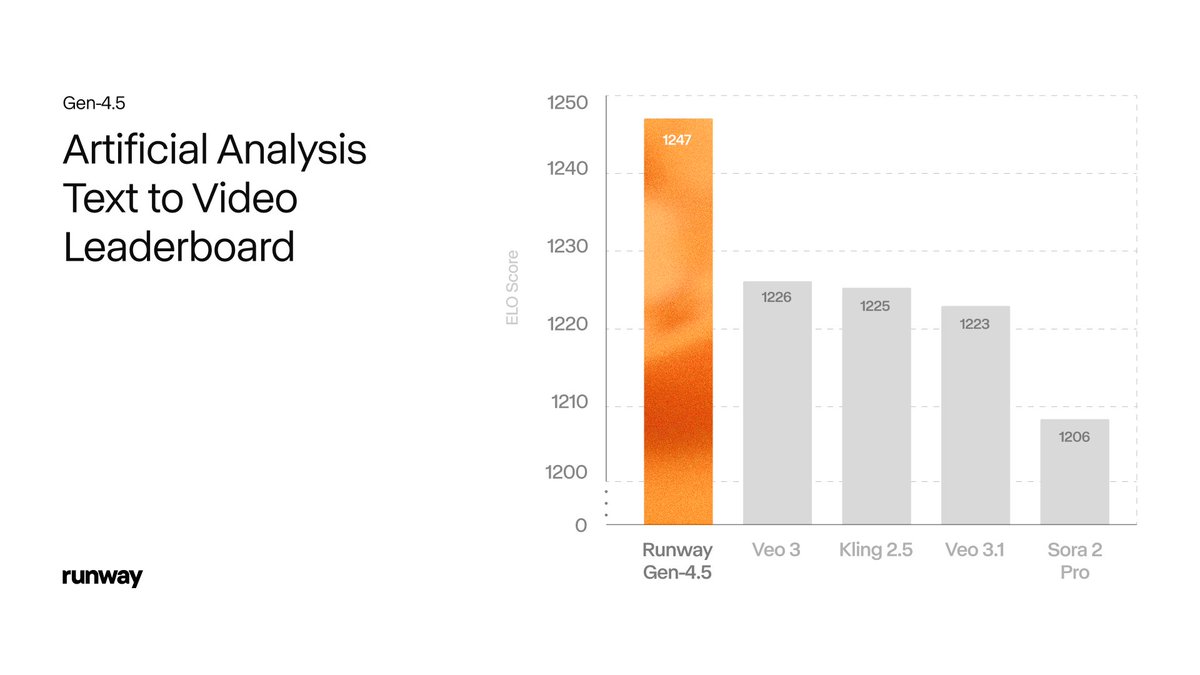
Runway has officially revealed its new frontier video model Gen-4.5—previously the anonymous "Whisper Thunder (aka David)"—and confirmed it sits at the top of the Artificial Analysis text-to-video leaderboard with 1,247 Elo, ahead of Veo 3.x, Kling 2.5 and Sora 2 Pro. runway launch Following up on Whisper Thunder lead, where the codename first appeared on the board, the team now positions Gen‑4.5 as its foundation for "world modeling" with state‑of‑the‑art motion quality, prompt adherence and visual fidelity. elo update
Runway’s own chart shows Gen‑4.5 at 1,247 Elo versus Veo 3 at 1,226, Kling 2.5 at 1,225, Veo 3.1 at 1,223 and Sora 2 Pro at 1,206, with confidence intervals around each score, underlining a small but statistically meaningful edge.
A separate Arena leaderboard screenshot shared by a team member shows Runway Gen‑4.5 ranked #1 globally with 8,073 appearances, reinforcing that the win isn’t a fluke from a tiny sample. global leaderboard Under the hood, Runway says Gen‑4.5 improves both pre‑training data efficiency and post‑training techniques, and that the full stack—from training to inference—has been tuned on NVIDIA Hopper and Blackwell GPUs for Gen‑4‑class speed despite higher quality. (runway launch, feature breakdown) Control modes span text‑to‑video, image‑to‑video, keyframes and video‑to‑video, with some still "coming soon", giving filmmakers the familiar Gen‑4 toolbox but with sharper physics, more stable textures and better camera choreography. feature breakdown The team also publishes a short list of known failure modes—causal mistakes where effects precede causes, objects vanishing unexpectedly and actions succeeding unrealistically often—framing Gen‑4.5 as a big step but not a solved world model, and signalling active research to address those issues. feature breakdown For creators who were already testing Whisper Thunder via Arena matchups, this announcement mainly changes how much they can trust it on demanding commercial work: same feel, but with a public name, docs and a clear statement that it’s Runway’s new flagship.
Creators rush to test Runway Gen-4.5, praise motion and control
Within hours of the Gen‑4.5 reveal, video creators and filmmakers were openly rearranging their week to hammer on the new model, with several saying they’re cancelling other exports to move tests into Runway. One director jokes that Gen‑4.5 is "the sound of people who were about to export their latest AI film quietly clicking "cancel" and opening up Runway," capturing the sense that serious users want to see how it handles real projects, not just sizzle reels. filmmaker quip
Early hands‑on testers who had private access are now free to share work; one long thread of "POV world explorations" shows complex, moving camera paths and coherent spaces, and the author says "I can finally share everything I made with 4.5 for the last few weeks," hinting that the model has already been usable for exploratory worldbuilding, not only short demos. creator explorations Another creator calls the release "insane" in terms of progress since Gen‑1 and says they have "zero doubt" more movie studios will be using AI next year, explicitly tying Gen‑4.5’s motion and physics to production‑grade potential. creator reaction Several well‑known Runway users say they’re "brewing coffee" and clearing time to test it properly this week, treating it as a major new tool in their pipeline rather than a toy. creator plan A separate analysis thread frames Gen‑4.5 as "the new benchmark for video models" while warning that the real test will be how it performs in demanding multi‑shot workflows once control modes like keyframes and video‑to‑video are fully exposed. model analysis Not all feedback is unqualified praise: one commentator notes that while the visual fidelity and physics look excellent, "the audio doesn't seem to be as polished as Sora 2," suggesting that for projects where sound design matters, teams may still layer Gen‑4.5 visuals under separate audio tools or Sora‑style outputs. audio comparison Overall the mood from filmmakers and designers is that Gen‑4.5 is strong enough to warrant immediate testing on specs, music videos and short films, and that its success or failure over the next few weeks will be decided by how controllable it feels on real sequences, not by leaderboard scores.
🖼️ New T2I stacks: Vidu Q2, Ovis‑Image 7B, Pruna P‑models
A busy day for stills: Vidu Q2 Image (text/ref/edit + unlimited promo), Ovis‑Image 7B optimized for text rendering (now on fal), and Pruna’s P‑Image/P‑Image‑Edit hit runware/Replicate with low‑latency pricing. Excludes Kling IMAGE O1 (feature).
Pruna’s P‑Image and P‑Image‑Edit hit Runware and Replicate with sub‑1s, penny‑level pricing
Pruna and its partners pushed P‑Image and P‑Image‑Edit into production hosts, pitching them as real-time image stacks for builders who care more about speed, cost, and predictability than maximum spectacle. On Replicate, P‑Image is advertised as handling clean text rendering, strong prompt adherence, and fine-grained details at about half a cent per image with sub‑1 second generation P models intro.
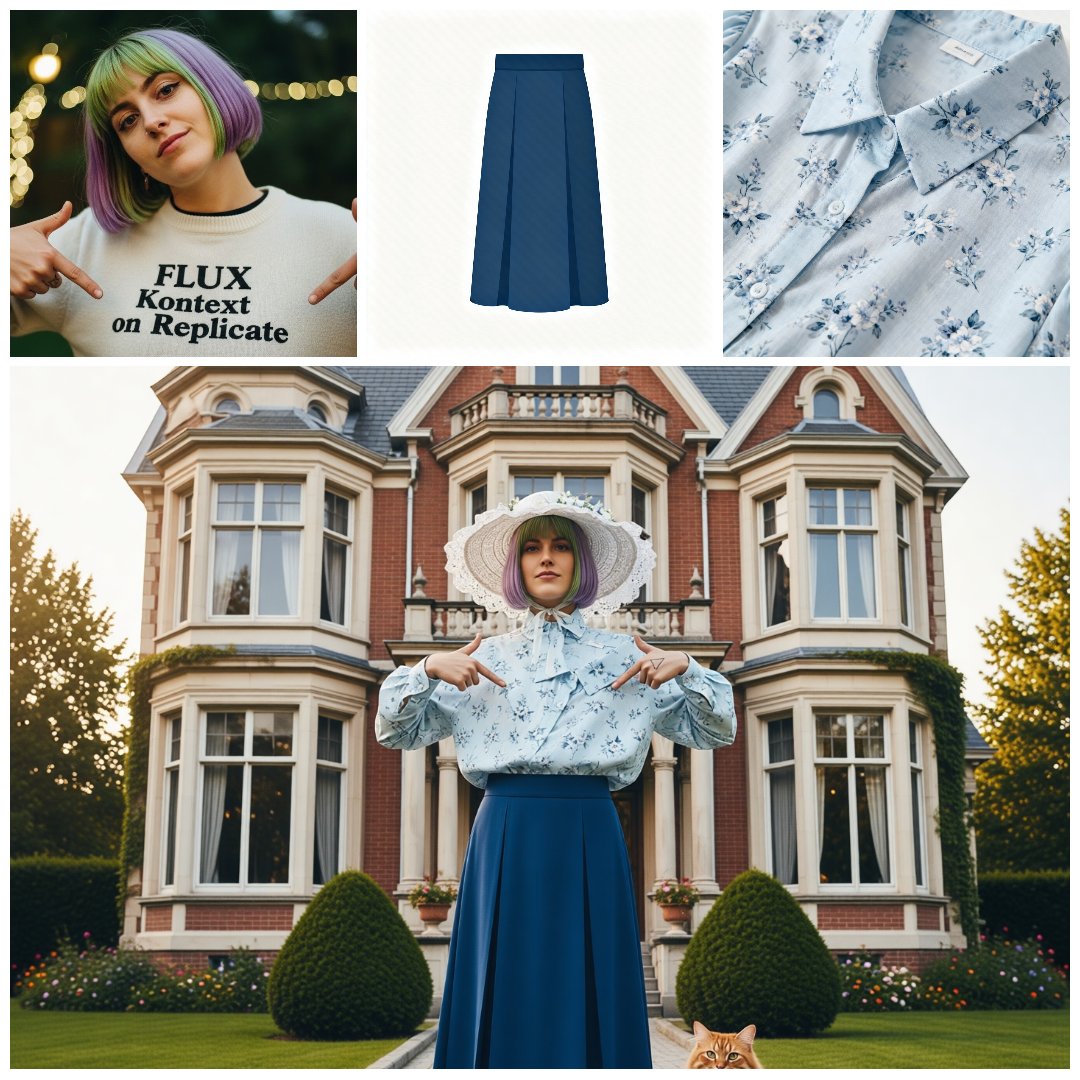
Runware followed up with a D0 launch that exposes both P‑Image and P‑Image‑Edit via its API, starting at roughly $0.0044 per image and $0.0088 per edit, and explicitly targeting "production-ready" multi-image refinement, masking, and style transfer workloads runware pricing. Subsequent examples show accurate on-face compositing, wardrobe swaps, and on-image copy changes while keeping backgrounds and layout intact edit collage prompt adherence example, plus native text rendering for things like posters and UI text rendering sample. For teams wiring up internal tools or batch pipelines, the draw is clear: predictable outputs, very low latency, and pricing that finally makes thousands of variants per day feel reasonable.
Vidu launches Q2 Image model with fast T2I, ref-to-image, and unlimited promo
Vidu rolled out its new Q2 Image Model for text-to-image, reference-to-image, and image editing, promising 4K output and generations in as little as 5 seconds, plus "super consistency" across shots Q2 image launch. Members get unlimited image generation with free 1080p exports until December 31, and new users can redeem extra credits with the VIDUQ2RTI code Q2 promo details.
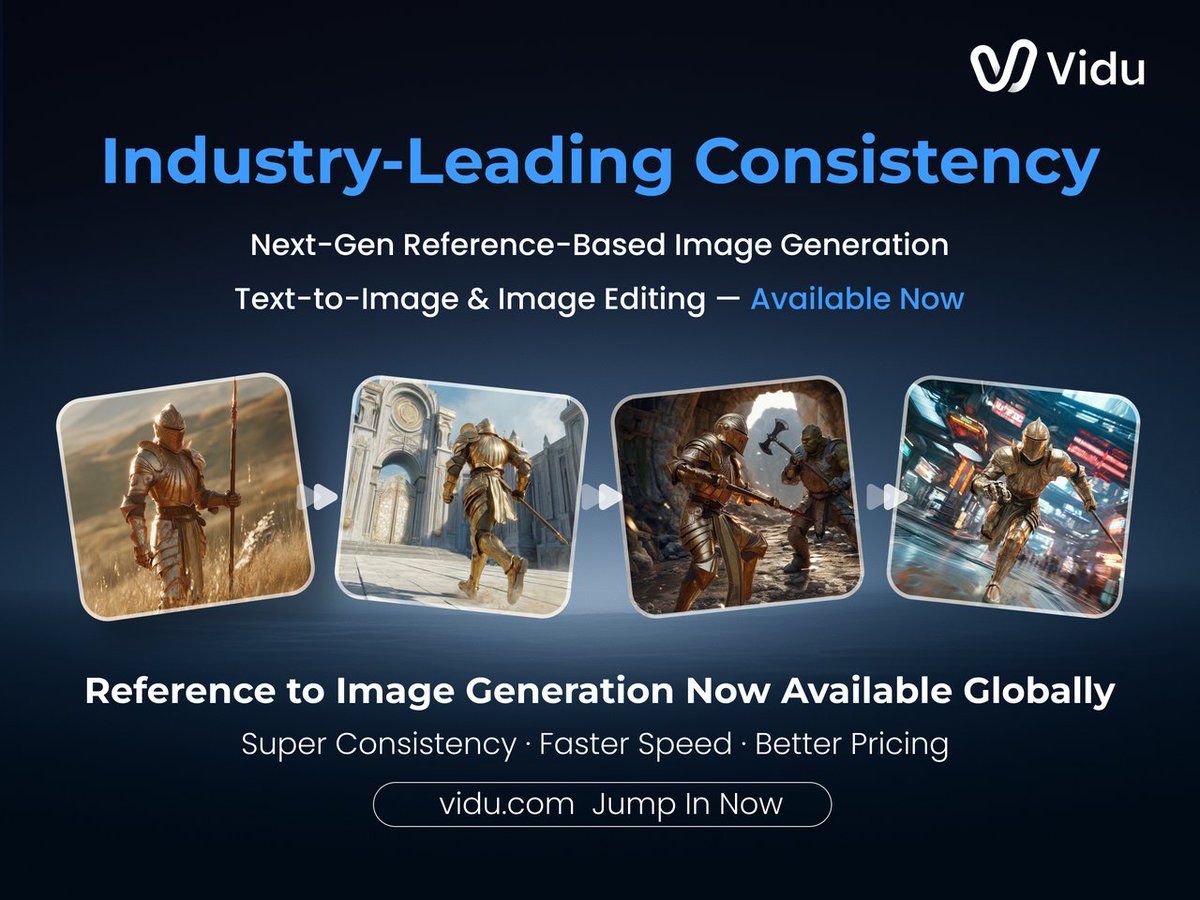
Following up on digital humans, where Q2 turned a single photo into talking explainer avatars, this update completes the stills side of the stack: you can now generate characters, turn them into reusable references, and then push them straight into Q2’s video tools in one workflow Q2 promo details. Vidu also highlighted that Q2 Image has already entered the Artificial Analysis Image Editing Arena, debuting at #4 and inviting creators to stress-test its editing and consistency on real prompts arena ranking arena invite. For working artists, the near-term value is clear: batch out style-consistent stills cheaply this month, lock in looks, and then reuse those references when you move into motion later.
Ovis‑Image 7B debuts as a compact text-focused T2I model and lands on fal
Ovis‑Image, a 7B-parameter text-to-image model tuned specifically for high-quality text rendering, was released on Hugging Face with examples spanning posters, logos, UI, and complex English/Chinese typography model overview. The pitch is that it matches or approaches much larger models on graphic design tasks while staying light enough for cheaper inference.
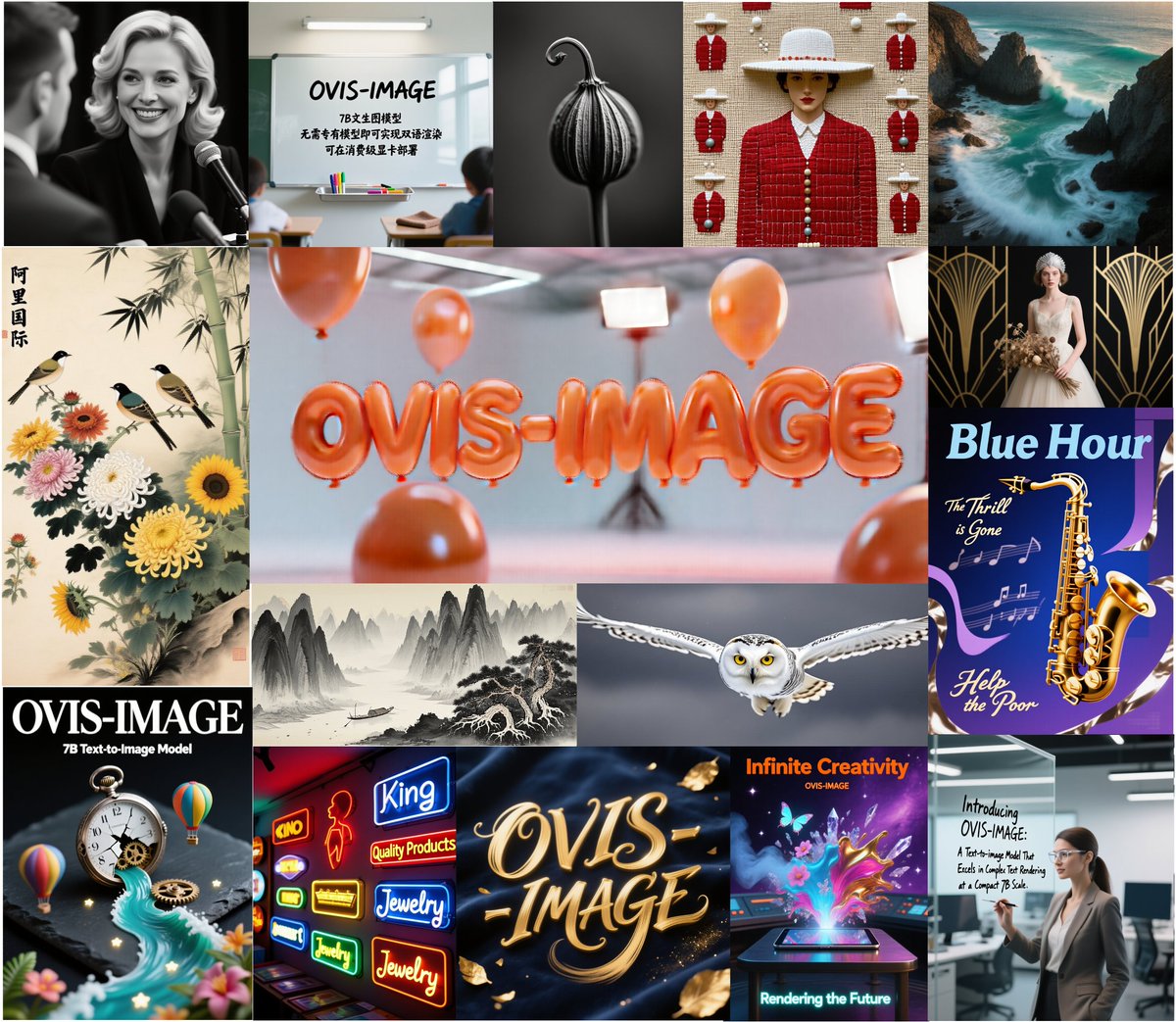
Inference access arrived the same day on fal, which added Ovis‑Image as a new hosted model aimed at posters, banners, logos, and UI mockups, framing it as a sweet spot between efficiency and fidelity fal launch. Creatives get two immediate ways to kick the tires: an interactive HF Space for playing with prompts and typographic edge cases HF space, and fal’s production endpoint for slotting Ovis into real pipelines where you care if the tagline on the bottle or the button label is actually legible fal sample images.
Glif creators lean into Alibaba’s Z‑Image for high-fidelity open T2I
Glif called Alibaba’s Z‑Image "the most exciting open-source image model since SDXL," citing its realism, prompt adherence, and fewer content constraints as reasons it’s rapidly becoming the go‑to open model among their users Z Image endorsement. They’ve wired it into ready-made workflows, including a "Z Image Turbo" glif and side‑by‑side comparisons against Nano Banana Pro and Flux 2 on demanding cinematic portrait grids NB vs Flux grid Z Image Turbo glif.
In one shared test, a single reference portrait was expanded into a 4×4 grid of stylized angles and framings, with Z‑Image holding identity and lighting remarkably well across 16 shots while competing models showed more drift NB vs Flux grid. For illustrators and concept artists who prefer open weights but need something that doesn’t crumble on faces or typography, this is a nudge that Z‑Image is worth adding to the roster alongside SDXL and Flux.
🎚️ PixVerse V5.5: multi‑shot + native audio
PixVerse ships V5.5 with one‑prompt multi‑shot generation and vivid audio baked into 10‑second clips—useful for montage/hype edits. Excludes Kling O1 (feature).
PixVerse V5.5 adds one‑prompt multi‑shot video with native audio
PixVerse rolled out V5.5 of its video generator with a focus on 10‑second clips that can now include multiple shots and vivid, synced audio from a single prompt, targeting creators who live on montages, hype edits, and shorts. (launch details, feature breakdown)
Instead of prompting several times and stitching in an editor, you can fire one prompt and get a multi‑shot sequence with smoother transitions and audio baked straight into the render, branded as "Infinite Voices. Infinite Shots" and "A Story, A Tap". (launch details, multi-angle demo) That multi‑shot logic applies both to pure text prompts and to reworking a single clip into several camera angles, which is handy for turning one piece of footage into a fuller story beat. multi-angle demo PixVerse is pitching this as a faster way to experiment with ad concepts, music edits, and narrative hooks, since you can explore several cuts and pacing options in one go instead of juggling exports and separate audio layers. storytelling promo A companion explainer notes that the engine focuses on 10‑second outputs, with one‑tap, audio‑visual synchronized sequences that are already close to social‑ready. feature breakdown To get people testing V5.5, PixVerse is running credit and subscription promos (RT/follow/reply for 300–500 credits, plus limited‑time discounts on yearly plans), so you can stress‑test multi‑shot and audio workflows without a big up‑front bill. (launch details, discount offer) For hands‑on trials, they’re steering users to the main app experience. PixVerse app
⌨️ Prompting & authoring boosters for creatives
Utilities that cut prompt time and structure ideas: Hedra’s TAB‑to‑prompt, AiPPT’s markdown‑to‑slides with model imagery, and Perplexity’s email assistant gains image/file handling. Useful for pre‑vis, decks, and briefs.
Hedra ships TAB-to-prompt autocomplete for rich video directions
Hedra Labs rolled out Prompt Autocomplete: as you type, hitting TAB explodes a short idea into a fully fleshed-out prompt with camera moves, lighting, dialogue, emotion cues and more, aimed squarely at people scripting AI video scenes. feature announcement They’re seeding adoption by giving 1,000 credits to the first 500 followers who reply, which makes it an easy tool for filmmakers and motion designers to test in their daily prompt drafting.
For creatives, this turns the “blank page” into a structured shot description in one keystroke, so you can iterate on tone and composition instead of manually specifying technical details every time.
AiPPT markdown flow turns messy notes into structured slide decks
AiPPT’s latest workflow lets you paste messy notes or rough markdown and have it infer hierarchy—headings become slide titles, bullets become slide content—so a full deck drops out in under 30 seconds. workflow thread It can also generate slide images via models like Nano Banana Pro, and accepts reference files for context-aware decks, which is handy for client presentations and pitch pre‑vis.
For creatives and agencies, this cuts the time from brainstorm doc to presentable storyboard: draft in plain text (or export from Gemini/ChatGPT), then let AiPPT structure and illustrate the slides automatically, with manual polish only where it matters. AiPPT app
Perplexity Email Assistant now reads image and file attachments
Perplexity upgraded its Email Assistant so you can drag images and PDFs into a message and have them parsed directly in the reply, instead of summarizing everything by hand. feature demo The short clip shows a user dropping a product image and a PDF into a draft and the assistant labeling them "Image Processing" and "File Processing", then using both as context.
For designers, producers, and account leads, that means you can forward client moodboards, storyboards, or briefs and ask for a synthesized checklist, shot list, or reply email, with the AI actually seeing the visual references and documents rather than treating them as separate uploads.
Thread maps out recovery plan after an X shadowban for creators
Creator @techhalla shared a detailed playbook for recovering reach on X after a shadowban, including deleting the last 5 days of posts and comments, logging out for 1–2 days, then returning with slower, higher‑value posting and organic engagement. shadowban guide A key tip for AI artists and educators is to reuse existing posts when sharing YouTube or external links, since fresh outbound links can hurt reach; using old posts with the link already present is treated more like internal navigation. Link penalty tip
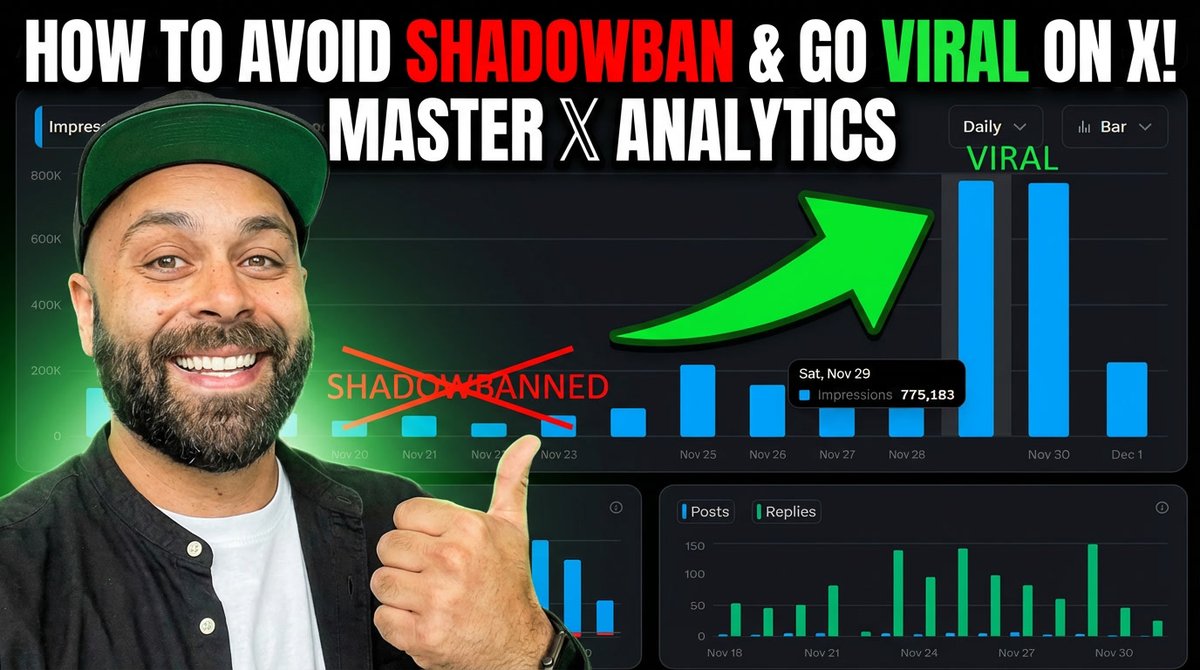
For AI creatives who rely on X for distribution, this is a pragmatic “reset protocol”: clean recent activity, stop spamming links, lean into threads and prompt shares with >5% engagement, and then double down on whatever format the algorithm actually surfaces.
Glif shows how to auto-generate full NB Pro slide decks
Glif highlighted a workflow where Nano Banana Pro generates clean slide visuals and Glif stitches them into a full slideshow that literally teaches you how to use NB Pro, end‑to‑end. NB Pro slideshow A follow‑up tutorial walks through building your own slideshow generator in Glif, so you can feed in concepts or prompts and get a multi‑slide deck out automatically. slideshow tutorial
For educators, studios, and course creators, this is a template for auto‑authoring learning decks or client walkthroughs: parameterize your topic, let Glif script and render slides with NB Pro, then tweak only the narrative and key examples instead of hand‑building every frame. Glif tutorial
🧪 World‑modeling and gen‑video research to watch
Mostly video‑gen/control papers and methods relevant to filmmakers: infinite video rollouts, layer‑aware composition, flow‑based video, and scaling tricks. Strong day for methods; few benchmark charts beyond Runway.
Apple’s STARFlow‑V applies normalizing flows directly to video generation
Apple’s STARFlow‑V paper explores an end‑to‑end video generative model built on normalizing flows rather than diffusion, aiming for stable causal prediction and more efficient sampling in spatiotemporal latent space. That’s relevant if you care about long shots with coherent physics and fewer weird time glitches. discussion link STARFlow‑V combines a global‑local architecture to preserve causal structure across frames while still allowing rich local interactions inside each frame, and introduces a "flow‑score matching" trick with a lightweight causal denoiser to keep autoregressive rollouts from drifting. A video‑aware Jacobi iteration scheme further reduces sampling cost, which matters when you’re trying to preview or render many versions of a clip. While this is still research code, it signals that big players are seriously testing non‑diffusion foundations for gen‑video; you can unpack the architecture and sampling math on the official paper page.
Infinity-RoPE shows action‑controlled infinite video via autoregressive rollout
Infinity-RoPE is a new world‑modeling method that can generate effectively infinite video by autoregressively rolling out future frames while letting you steer actions (walk, jump, turn) over time. For filmmakers and game builders, this hints at continuous shots and playable scenes that don’t have a fixed duration, where motion responds to control signals instead of a fixed script. paper teaser
The model uses an "autoregressive self‑rollout" strategy: it predicts the next segment of video conditioned on both past frames and high‑level action commands, then feeds its own outputs back in, making the horizon limited mostly by compute rather than model design. The authors show long clips where a character keeps moving through varied actions without the drift and collapse you usually see when you push video models too far. For creatives, the idea is closer to a lightweight world engine than a one‑off shot generator, and it’s worth watching if you care about AI‑driven camera moves or interactive sequences. You can dig into the architecture and examples in the official ArXiv paper.
Adversarial Flow Models unify GANs and flows with strong one‑step ImageNet FIDs
"Adversarial Flow Models" propose a hybrid generative architecture that borrows adversarial training from GANs but keeps the invertible structure of flow models, reporting ImageNet‑256 FIDs as low as 2.08 and 1.94 with a single forward pass. For visual creators, this kind of efficiency in image generation often trickles into video models as higher frame rates or longer clips under the same compute budget. overview thread
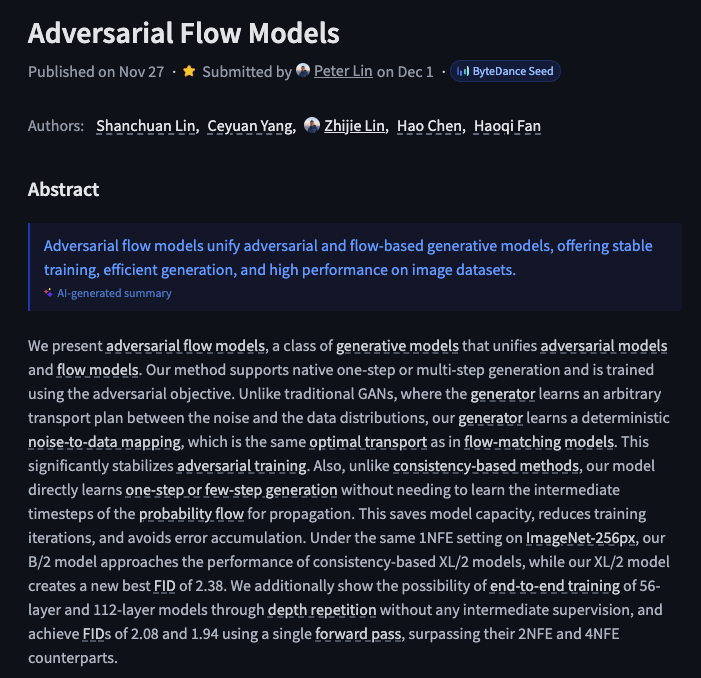
The abstract screenshot highlights that the model supports native one‑step and few‑step generation while still learning a true probability flow over data space, which is unusual for adversarial systems. Compared to diffusion, you trade long sampling chains for a faster but still high‑quality generator that can in principle extend along the time dimension. If video teams start building world models on top of these flows, you could see near‑realtime T2V or in‑editor previews with far less waiting. The authors outline the training objective and ImageNet benchmarks in the paper summary.
HKUST’s AnyTalker open‑sources multi‑person talking video with identity‑aware attention
HKUST released AnyTalker, a multi‑person talking‑head video generator that scales to many speakers by iteratively applying an identity‑aware attention block, plus an efficient training pipeline that mostly uses single‑speaker data. For YouTube‑style panel shows, podcasts, and explainer content, this is one of the first open systems that can plausibly handle more than one face without constantly mixing up who’s speaking. AnyTalker overview
The team trains on single‑person videos to learn speech‑to‑motion patterns, then fine‑tunes on a much smaller multi‑person set to capture interaction dynamics, cutting down the data cost that usually blocks smaller labs. At inference, the model supports automatic switching between single and multi‑person modes, runs 480p at 24 FPS on a single GPU, and is released under Apache‑2.0 with code and weights on Hugging Face, which is unusually permissive for this space. A detailed breakdown of the architecture, licensing, and use cases (from animated conversations to low‑budget media production) is available in the blog analysis.
Layer-Aware Video Composition proposes Split‑then‑Merge for cleaner compositing
A new "Layer‑Aware Video Composition via Split‑then‑Merge" paper introduces a control method that explicitly decomposes scenes into layers, edits or swaps them, then recombines them into a final video, aiming to avoid the mushy, artifact‑heavy look of naive T2V compositing. For VFX and motion‑graphics work, this points toward AI systems that behave more like a real compositor, with separate foregrounds, backgrounds, and inserts that can be manipulated without wrecking the rest of the frame. method summary
The demo shows side‑by‑side comparisons where independently edited layers are merged into one coherent clip with better boundaries and fewer ghosting artifacts than baseline methods. Conceptually, the pipeline "splits" input into structured components, performs editing or generation at the layer level, then "merges" them via a learned compositor that understands occlusion and motion. If you rely on green‑screen, object inserts, or complex overlays, this kind of architecture is exactly what you want T2V models to converge on; the technical details and ablations are laid out in the ArXiv paper.
Flow‑map test‑time scaling sharpens diffusion outputs without retraining
"Test‑time scaling of diffusions with flow maps" shows a way to squeeze more quality out of existing diffusion models by introducing a learned flow field during sampling, letting images resolve into sharper, more detailed results without retraining the base model. For video and concept art pipelines, this is attractive because it hints at post‑hoc upgrades to your current models rather than another full fine‑tune. short demo
The animation starts from noisy outputs and progressively reveals a crisply detailed image, contrasting standard diffusion sampling with the flow‑map‑enhanced variant. The key idea is to learn a corrective mapping over the sampling trajectory so that, at inference, you can run more—or smarter—steps that converge to higher‑fidelity images. It’s framed as "test‑time scaling": spend extra compute when you care about quality, not when you’re prototyping. Details on the method and trade‑offs are in the ArXiv page.
Vision Bridge Transformer aims to scale cross‑modal world understanding
The "Vision Bridge Transformer at Scale" work sketches an architecture that acts as a bridge between visual streams and language, focusing on efficient large‑scale training rather than one specific product. For storytellers, these cross‑modal backbones matter because they often become the perception layer inside future world models and editing tools. announcement thread
The teaser animation shows a dedicated "bridge" module shuttling features between vision encoders and downstream tasks like captioning or reasoning, promising better transfer across tasks and more robust grounding of text in visual structure. While there’s no direct video‑generation demo yet, an accurate and scalable visual bridge is exactly the sort of component that makes text‑described camera moves, continuity, and action understanding work in gen‑video systems. More technical details and discussion are collected on the shared project page.
GR‑RL targets dexterous, precise long‑horizon robotic manipulation
The GR‑RL work ("Going Dexterous and Precise for Long‑Horizon Robotic Manipulation") demonstrates a learned controller that can execute extended, multi‑step pick‑and‑place sequences with high precision, using a compact visual‑motor representation. While it’s robotics first, the same kind of long‑horizon, physically plausible motion is exactly what filmmakers want from action‑heavy world models. paper combo
In the demo, a robotic arm handles different small objects over many steps without obvious wobble or resets, suggesting the underlying model has a strong sense of state and continuity. The system is optimized to run at video‑like frame rates (24 FPS output is cited in the tech summary), which is a good sign if you imagine reusing similar architectures for character animation or stunt blocking in AI video tools. Full methods, training setup, and evaluation metrics are linked from the GR‑RL RL paper.
🕹️ Playable AI worlds arrive
ScaryStories Live pushes beyond passive T2V: a real‑time, choice‑driven horror engine where narrative, visuals, and consequences generate on the fly. Excludes Kling O1 (feature).
ScaryStories Live debuts real-time playable AI horror world model
ScaryStories Live is introduced as an alpha "playable world model" where story, visuals, and consequences are generated in real time as you speak or type choices, rather than pre-rendered text-to-video clips. world model demo
The engine currently runs a 5-scene horror experience that reshapes environments based on player actions (one run morphs a lab into a "cosmic nightmare"), supports natural-language interaction instead of WASD controls, and lets you bring AI teammates that comment on your decisions. mechanics overview A dynamic camera system reacts cinematically to events, and each session ends with a downloadable 20-second recap clip; access is free during alpha, making this an accessible sandbox for writers, filmmakers, and game designers who want to prototype interactive stories inside a live generative world rather than static cutscenes. world model demo
⚖️ ChatGPT Pro ad sighting triggers trust debate
Screens of a Peloton‑style block inside Pro chats spark backlash; some vow to unsubscribe. Follow‑up says OpenAI claims it wasn’t an ad—still irrelevant to the query. Creatives question guidance bias risks.
ChatGPT Pro users spot Peloton-style block under answers, OpenAI says it’s “not an ad”
ChatGPT Pro subscribers are sharing screenshots of what looks like a Peloton-style promo block appearing directly below responses in the $200 Pro tier, triggering threats to cancel and a wider trust debate about commercial content in assistant outputs pro plan screenshot.
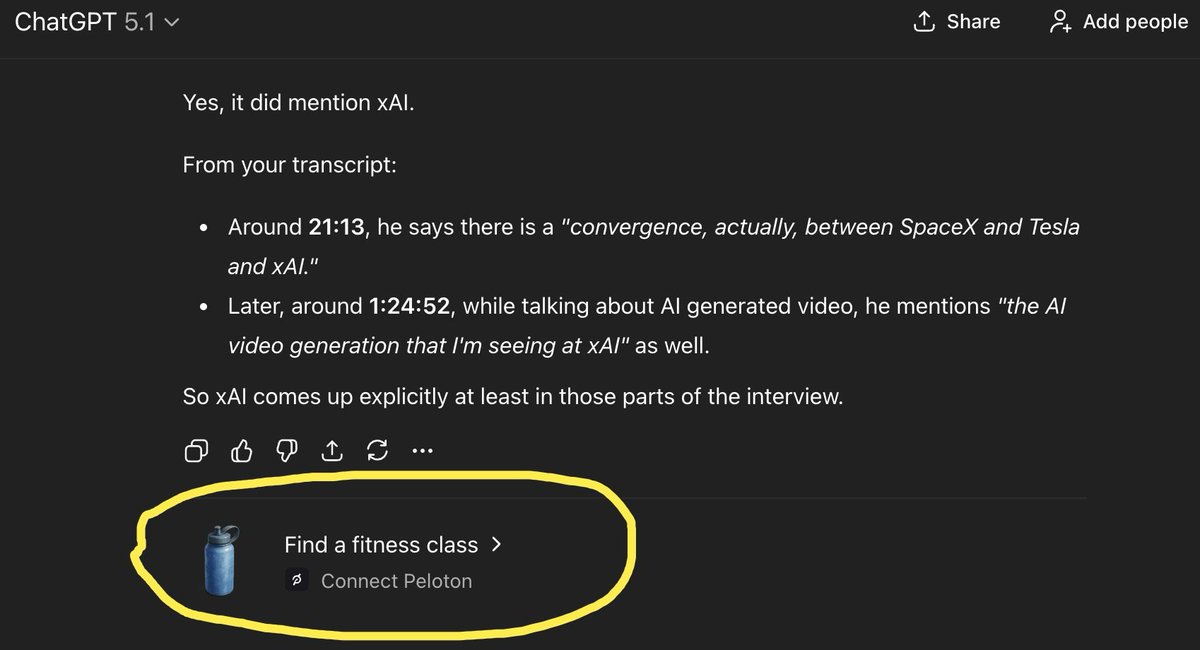
One creator shows the fitness "Find a fitness class > Connect Peloton" unit circled under a normal answer and calls it an instant unsubscribe if deliberate creator complaint, while another user confirms with the original poster that the account is indeed on a paid Pro plan creator complaint. Following up on trust backlash where people already worried about future ads in ChatGPT, the same user later posts OpenAI’s response saying the block "was not an ad" but also "wasn't relevant to your query," implying some kind of non-requested suggestion layer is now wired into chats openai reply screenshot. For creatives who lean on ChatGPT for research, ideation, and briefs, the episode raises a practical question: if the model can surface unrelated commercial-style units inside Pro chats, how confident can you be that future guidance won’t be nudged by monetization or opaque recommendation logic, even before formal "ads" arrive?
🗣️ Voices & audio: ElevenLabs in the spotlight
Voice tools continue to permeate creative workflows: a Forbes profile frames ElevenLabs as the "voice of AI," and Producer AI runs an audio‑effects challenge. Excludes any Kling O1 integrations (feature).
Forbes dubs ElevenLabs the emerging "voice of AI" for creators
Forbes ran a Daily Cover feature on ElevenLabs, framing it as competing with Google, Microsoft, Amazon and OpenAI to become the default "voice of AI" and highlighting how natural the tools now feel for creating and interacting with synthetic audio Forbes cover thread.
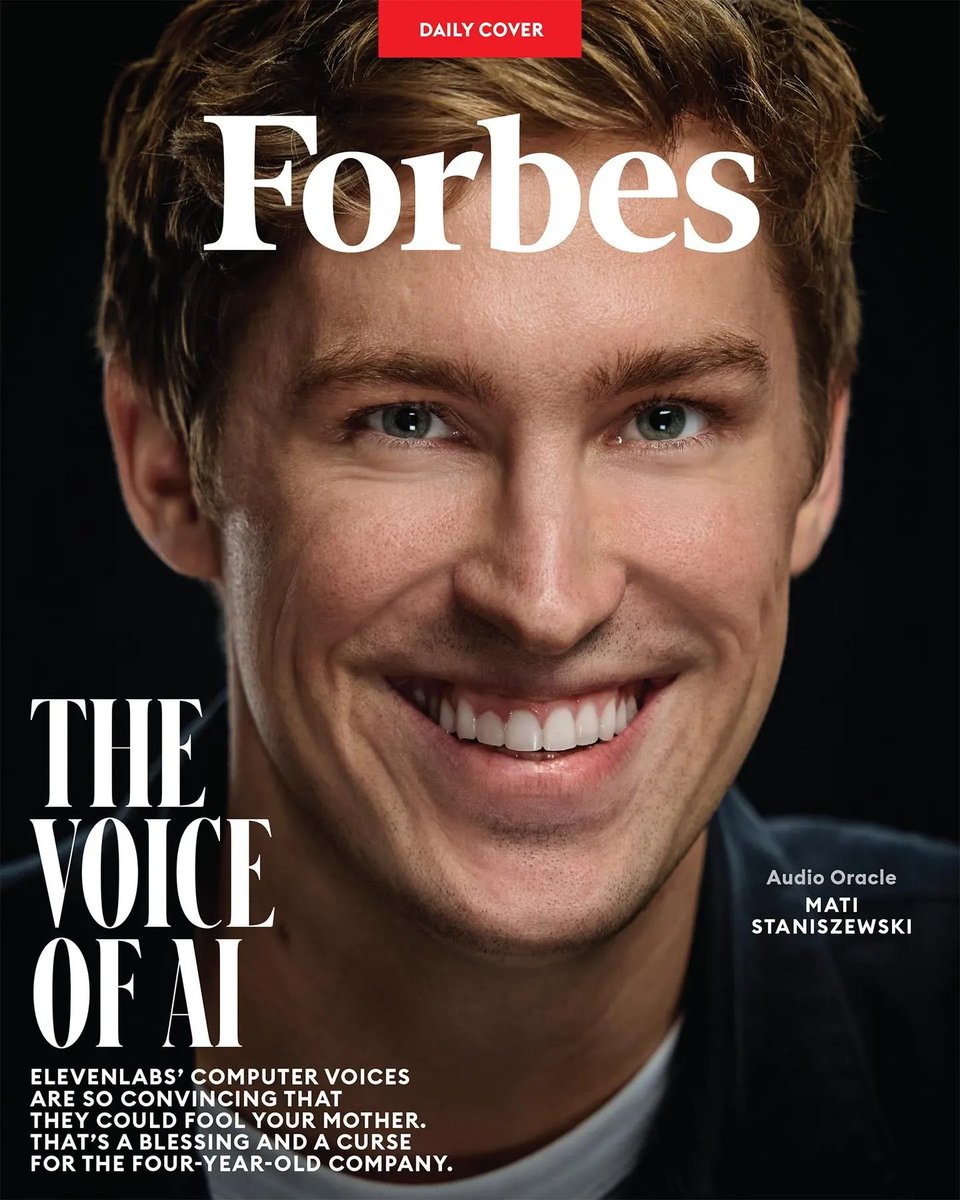
ElevenLabs says this mainstream recognition reflects a shift from experimental tech to everyday creative tool, as its voices are now good enough to "fool your mother" and are showing up across dubbing, narration and character work Forbes cover thread. The company adds that seeing this shift acknowledged is motivating, as it continues pushing toward audio that lets people create and communicate with computers in a way that feels natural and human ElevenLabs reflection (see also the full profile in Forbes article).
Producer AI launches audio‑effects challenge with 1,000 credit prize pool
Producer AI opened a community challenge that asks creators to apply only audio effects to a provided track, with up to 1,000 bonus credits on offer for standout submissions challenge announcement.
Participants must keep the original composition but transform the listening experience through processing alone, which is a useful sandbox for sound designers and musicians to stress‑test their FX chains, AI‑driven processors and mixing workflows on the same source material challenge announcement. The track and rules are shared via their Discord, with the song itself available for download and experimentation here challenge song.
💸 Creator discounts & trials to jump in now
Handy promos not tied to the feature story: LTX Studio 50% off annuals (Retake era), Krea 40% off yearly, and PixVerse credit promos/subscription push. Excludes Kling O1‑specific offers (covered as the feature).
LTX Studio boosts yearly discount to 50% and wraps $750 Retake challenge
LTX Studio cranked its Cyber Monday deal up to 50% off all yearly plans, building on LTX 40% sale that first made Retake more affordable for small video teams. The promo lands alongside a final‑call Retake Challenge with a $750 prize for the best "Retake" entry, giving filmmakers a reason to both subscribe and ship a test project right now 50 percent off promo retake prize thread.
If you’re already experimenting with AI-assisted reshoots, this is the cheapest window to lock in a year of Retake access and potentially offset it entirely with the challenge payout pricing page.
Pictory extends BFCM: 50% off annual plans plus 2,400 extra AI credits
Pictory AI extended its Black Friday sale, offering 50% off all annual plans and throwing in 2,400 additional AI credits (they frame it as ~$100 of value) if you sign up before Tuesday at midnight extended bfcm offer. For solo creators and marketing teams, that’s a year of captioned, stock‑backed video generation at half price plus enough credits to cover a lot of extra drafts and revisions text animation explainer.

If you’re already using Pictory for social clips or course videos on a monthly plan, this is the moment to switch to annual; the combined discount and credit pack will matter most to channels that publish several videos per week pictory offer page.
Krea runs one-day Cyber Monday sale with 40% off all yearly plans
Krea announced a one‑day Cyber Monday offer of 40% off every yearly plan, aimed at getting more creators into its image and video tools without a big upfront cost cyber monday offer. That makes this a good moment to lock in a year if you’re planning to lean on Krea for higher‑volume concepting or its new Kling O1 video editing support later on.
For designers and editors who’ve been on the fence, the math is simple: if you expect to use Krea regularly over the next few months, this discount effectively gives you several months free vs paying month‑to‑month subscription page.
PixVerse V5.5 dangles 300-credit Black Friday promo to drive subscriptions
PixVerse is stacking promos on top of its V5.5 launch by running a 48‑hour Black Friday push: retweet, follow, and reply for 300 free credits, plus unspecified "bigger discounts" for heavy creators who subscribe during the window 300 credit promo. That’s effectively a risk‑free way to test the new multi‑shot, audio‑baked clips before deciding whether the subscription fits into your regular ad or short‑form workflow subscription reminder.
If you’re already cutting TikToks or reels, those 300 credits are enough to prototype several campaigns and see whether V5.5’s one‑prompt multi‑shot flow really saves you edit time pixverse subscribe page.
AiPPT pushes markdown-to-slides flow with creator discount code
AiPPT’s markdown‑driven deck builder got a spotlight today, with a creator showing it turn messy notes into a full slide deck in under 30 seconds, and sharing a discount code "ASH11" for people who want to try the paid tiers markdown deck demo. The tool already plugs into models like Nano Banana Pro for images, so the code is effectively a cheaper way to get an AI slide pipeline up and running instead of hand‑building PowerPoints.
If you’re a solo educator or agency rep constantly pitching, this is the sort of deal where one or two saved hours per week easily cover the subscription, especially when you factor in AI‑generated visuals aippt site.
TapNow offers 50% off as creators explore its Nano Banana Pro workflows
TapNow quietly rolled out a 50% off Black Friday deal on its workflow platform, right as creators start sharing examples of Gemini 3 + Nano Banana Pro pipelines running inside it tapnow discount note. For anyone building reusable image or video workflows (relighting, batch generations, etc.), this is a chance to lock in a year at half price while you experiment with those flows instead of wiring everything yourself.
Even without flashy launch videos, the discount makes sense if you see TapNow as a “workflow OS” for AI tools: the value comes from time saved on glue code and orchestration rather than raw model access.
🎨 Reusable looks: OVA anime, painterly anime, and character sheets
Fresh style kits and prompt templates for illustrators and storytellers: OVA‑era Gothic Fantasy and hand‑painted anime srefs, plus a versatile manga character‑sheet prompt. A few standout art demos round it out.
Manga character‑sheet prompt template for expressions and angles
Azed_ai posted a reusable text prompt for generating full character sheets: "A character sheet sketch of [subject], showing varied facial expressions and angles. Drawn with pencil and ballpoint pen in sharp, clean lines. Pastel color palette, high contrast, white background, hand‑drawn manga style." Character sheet prompt Used with different subjects, it yields sheets of heads and busts in multiple views and moods that feel like scanned sketchbook pages.
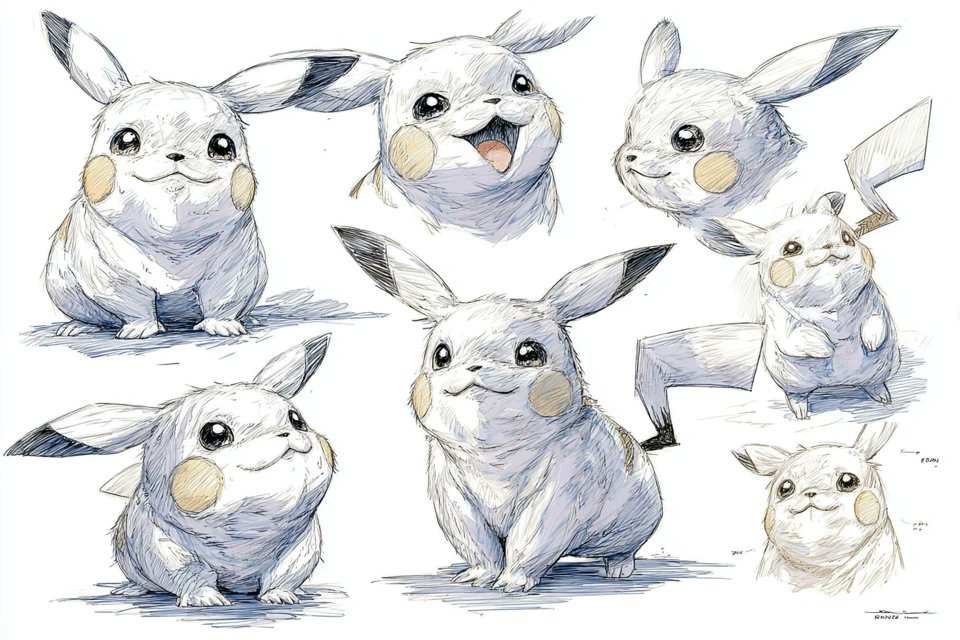
The examples cover chubby electric mascots, dragons, stern heroines and scruffy guys, all in lightly tinted graphite/pen, which makes them easy to paint over or hand to collaborators. For character designers and storytellers, this is effectively a mini‑pipeline: swap the subject description, keep the rest of the prompt, and you get consistent expression sheets without re‑engineering your instructions every time.
Neo‑OVA Gothic Fantasy Midjourney style ref 3761329795 lands
Artedeingenio shared a new Midjourney style reference --sref 3761329795 that nails a retro 80s OVA anime vibe blended with gothic fantasy, Amano‑style elegance, and a touch of Moebius cyanotype toning, shown across multiple character and portrait panels Gothic style ref. This one is tuned for rich linework, ornate jewelry and architecture, and moody European atmospheres, making it a strong base for dark fantasy comics, title cards, and character posters.
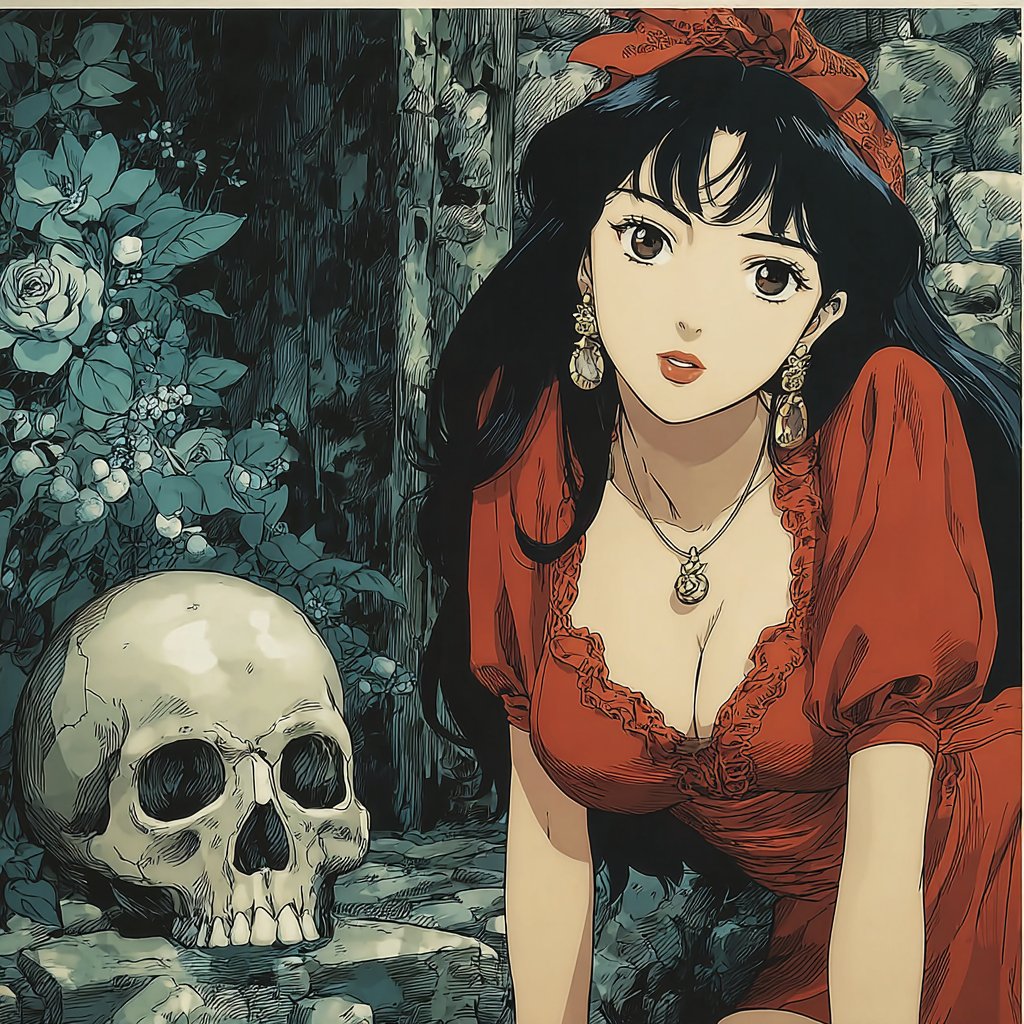
A separate short OVA‑style animation clip from the same creator underscores how well this aesthetic carries into motion, with dramatic lighting and flowing hair that feel era‑accurate rather than "modern anime" shiny OVA motion demo
. If you’re chasing late‑80s VHS‑era drama—with skull props, capes, and lush foliage—this sref is an easy drop‑in for your prompt stack.
Hand‑painted emotional anime style ref 1457984344
A second Midjourney style ref from Artedeingenio, --sref 1457984344, focuses on modern, hand‑painted anime illustration that feels like current concept art for games or films rather than retro OVA Painterly anime sref. The gallery shows close, emotional portraits lit by windows or hard spotlights, with visible sketch lines and soft brushwork that keep things expressive instead of plastic.

This look is tuned for story beats: characters caught mid‑reaction, rim‑lit profiles, or dramatic upward gazes in snow or stage light. If you’re building keyframes, posters, or pitch decks, plugging this sref into your V7 prompts gives you a coherent visual language you can keep reusing across a project.
FLUX.2 shows expressive painterly worlds for concept art
FOFR highlighted how FLUX.2 Pro excels at expressive, painterly concept art with two very different scenes: an upside‑down glowing city in the sky above a lone figure on a cliff, and a lush alien colony overrun by greenery under twin moons Expressive FLUX2 painting Flux2 sci-fi example. Both images lean into thick, oil‑painting textures and strong lighting rather than hyper‑sharp photorealism.
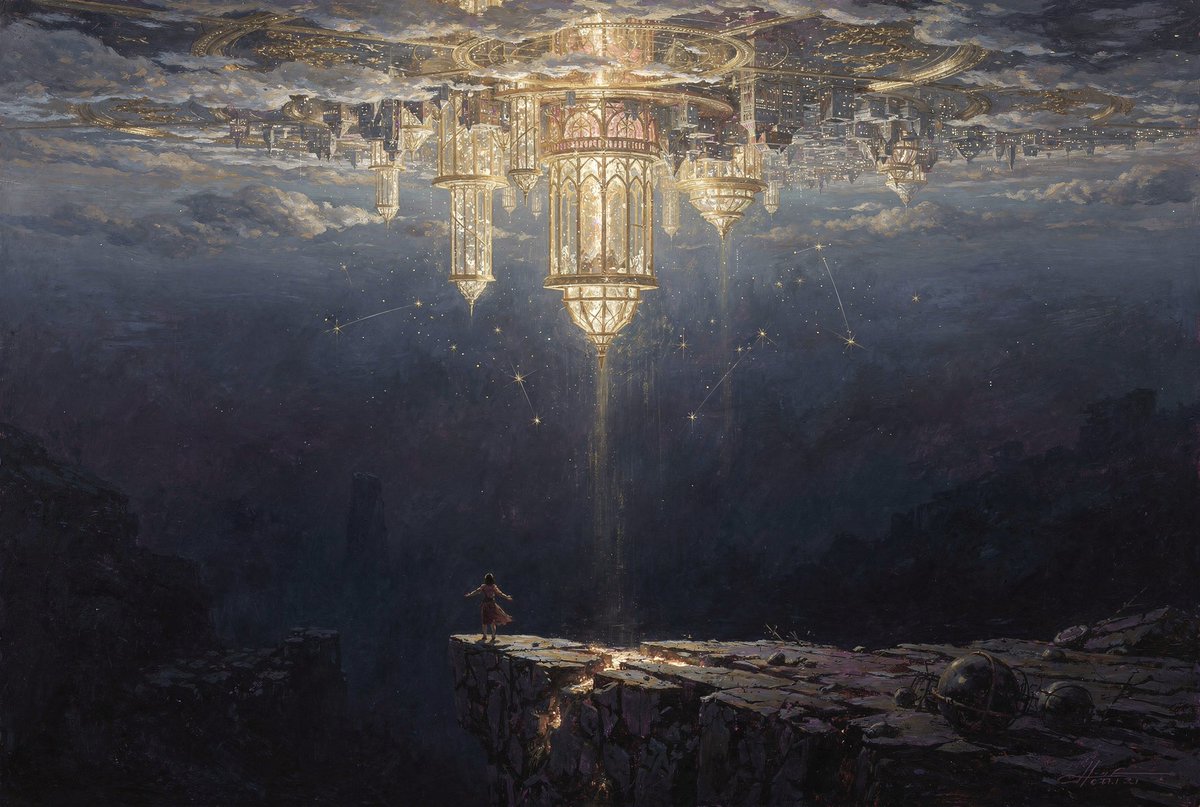
For illustrators and worldbuilders, these examples are a reminder that FLUX.2 isn’t only about clean product shots; it’s also a strong choice when you want moody key art, big scale, and painterly brush energy. It looks especially good for fantasy cities, overgrown sci‑fi ruins, and concept pieces where atmosphere matters more than minute detail.
Grainy cinematic Midjourney style ref 7723291648
Azed_ai also dropped a new Midjourney style reference, --sref 7723291648, that produces grainy, high‑contrast images with heavy vignettes, light leaks, and bold red/orange flares Moody photo style. The examples range from moody portraits and silhouettes to stark beach scenes, all with a strong film‑grain patina and minimal color palette.
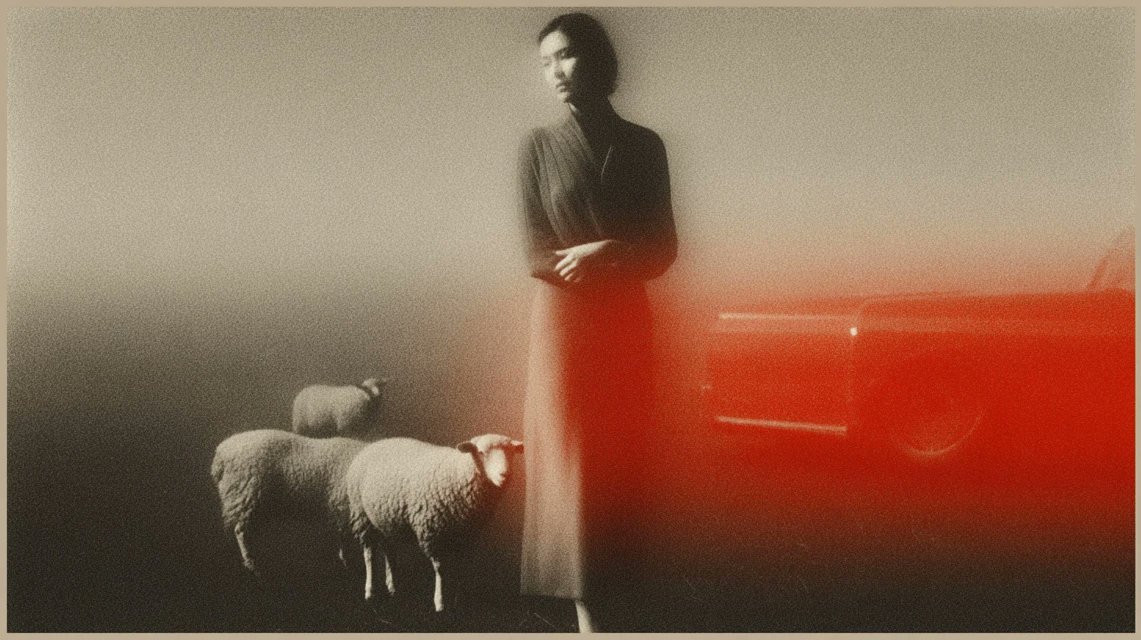
Think of this as a ready‑made look for album covers, posters, or interstitial shots in a motion piece: it reads like art‑house photography more than clean digital illustration. If your story needs a sense of memory, loss, or analog grit, parking this sref in your prompt stack gives you a consistent visual tone across a whole series.
Midjourney V7 style ref 3196551659 for warm narrative panels
Azed_ai shared a Midjourney V7 prompt using --sref 3196551659 that generates a 3×2 grid of warm, graphic panels with strong silhouettes and simplified shapes—figures near tulips, sneakers on power lines, lone people facing crowds, and moody city corners V7 grid example. The palette leans orange and red with flat backgrounds, giving everything a coherent poster‑like feel.
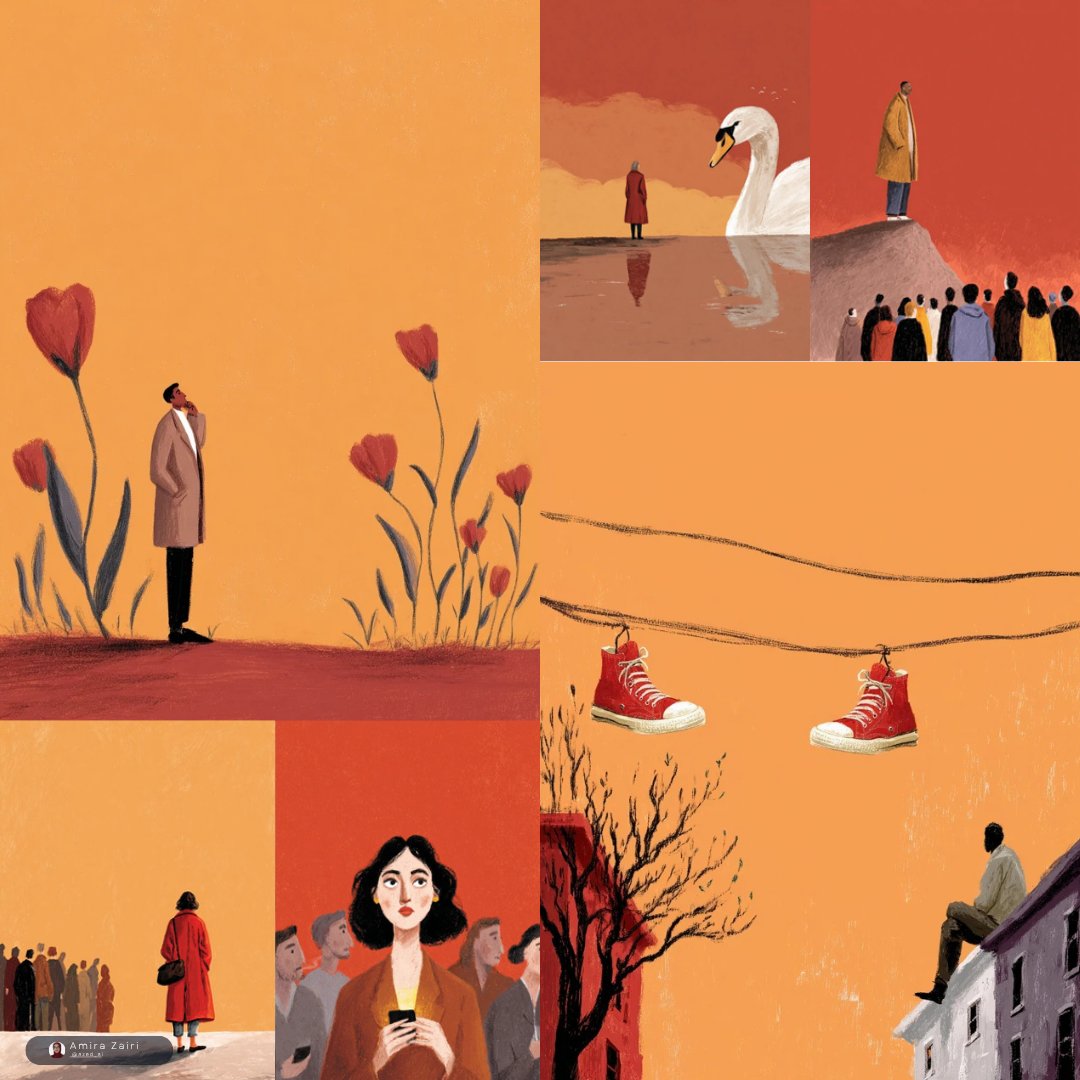
This recipe is handy if you want to explore multiple vignette ideas in a single shot—storyboard rows, cover variations, or a brand campaign’s narrative beats. Once you get a panel you like, you can upscale or re‑prompt around that frame to develop a full‑size illustration, while keeping the same visual language anchored by the sref.
Nano Banana Pro prompt for miniature origami macro shots
IqraSaifiii shared a neat Nano Banana Pro pattern for macro product‑style shots: a "miniature origami [ANIMAL TYPE] perched on the tip of a person's index finger," folded from specified paper colors with accent details, where both the paper texture and the fingerprint ridges are sharply in focus against a soft, neutral bokeh background Origami macro prompt. It’s a single, reusable template you can adapt by swapping animal, paper color, and accent fields.
The result is a repeatable look that reads like DSLR macro photography—perfect for educational posters, playful social posts, or a consistent series of "tiny worlds" in a children’s book. Treat it as a style card: keep the macro/fingerprint/neutral‑background structure, and iterate on animals and color palettes to build a cohesive collection.
James Yeung’s watchtower and portal pieces as reusable sci‑fi looks
James Yeung continued his run of atmospheric sci‑fi illustrations with "The Watch Tower"—a lone observation deck jutting over a city at night, lit by neon rings and a looming blue planet overhead Watch tower art—and a sister piece showing four vertical portals over misty water, each framing a different sky Portals artwork. A related cityscape, "A City that never Sleeps", extends the same deep‑blue, billboard‑lit mood into a dense skyline City night artwork.
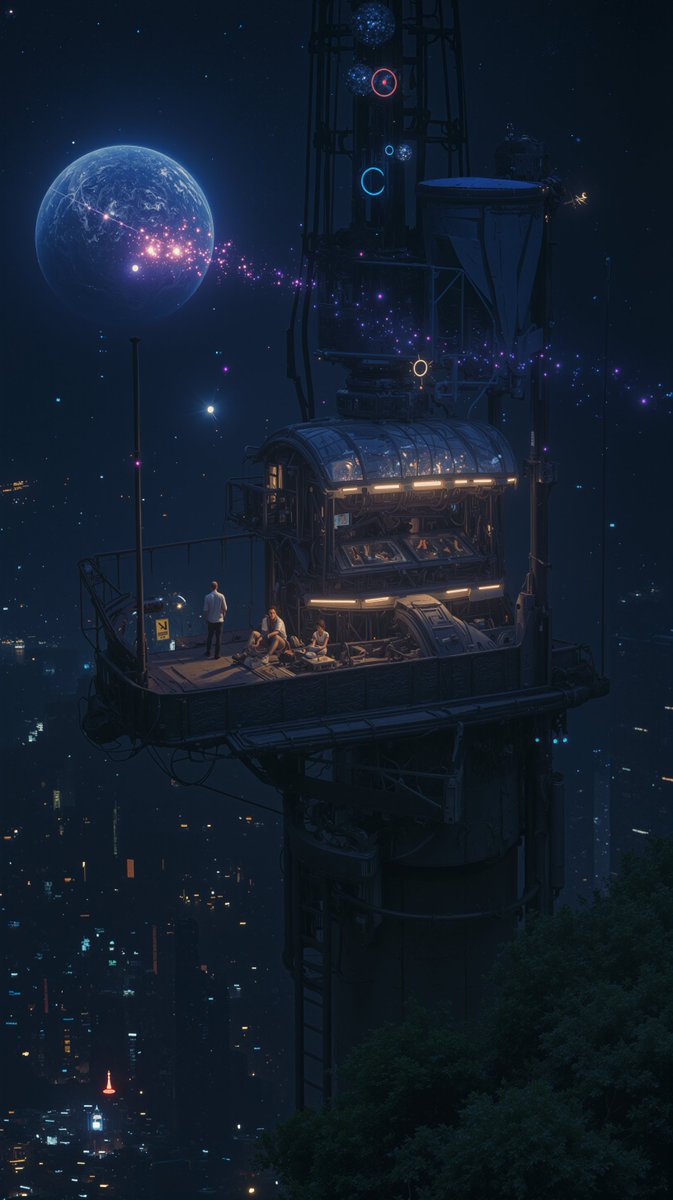
An animated version of The Watch Tower sells how well the style translates to motion, with subtle twinkling lights and drifting particles
. For storytellers, this cluster is a strong reference for "lonely observer vs infinite city" vibes—perfect for key art, establishing shots, or a recurring visual motif around surveillance, guardianship, or cosmic contact.