Higgsfield unlocks unlimited Kling 2.6 audio video at 70% off – 1080p action holds

Stay in the loop
Free daily newsletter & Telegram daily report
Executive Summary
After a week of Kling 2.6 “talking pictures” launches and Avatar upgrades, today is about where you actually run the thing. Higgsfield is pushing a Cyber Week deal built around Kling 2.6 with native audio: unlimited 1080p, “uncensored, unrestricted” video for a year at 70% off, pitched straight at filmmakers, agencies, and UGC shops that want one model handling visuals, dialogue, ambience, and SFX in a single pass instead of juggling three tools.
The creator reels are the proof, not the banner. On Leonardo and Higgsfield stacks, berserker knights smash through burning gates while sparks, screams, and impacts land roughly on beat; kung‑fu and wuxia clips keep blades readable under heavy stylization; a Japanese tester says they’ve stopped hand‑placing footsteps and typing sounds because 2.6’s sync is “accurate enough.” Kling’s own promos lean into character work: grumpy vintage fridges and pets monologue in‑character from a single line of text, with lip‑sync and room tone baked into the render.
Diesol’s horror short “THE TENANT” now lives in 4K on YouTube as a full case study: Nano Banana Pro plates, Kling 2.6 for atmosphere and dialogue, Premiere plus Suno and ElevenLabs for the final polish. The pattern is clear: Kling is no longer the experiment; the real question is which host you trust to park serious client workloads, and Higgsfield is making a loud bid for that role this week.
Feature Spotlight
Kling 2.6 native‑audio surges on Higgsfield
Higgsfield pushes Kling 2.6’s one‑pass video+audio with a 70% off unlimited plan; creators showcase 1080p native dialogue/SFX, camera moves, and VFX—making ad‑grade shorts and UGC far cheaper and faster.
Today is dominated by creators posting Kling 2.6 clips with in‑model voice/SFX plus a big Higgsfield promo. New: talking‑appliance/pet demos, UGC angles, 1080p samples, and multiple creator reels. Continues this week’s Kling run but shifts to Higgsfield usage and deals.
Jump to Kling 2.6 native‑audio surges on Higgsfield topicsTable of Contents
🎬 Kling 2.6 native‑audio surges on Higgsfield
Today is dominated by creators posting Kling 2.6 clips with in‑model voice/SFX plus a big Higgsfield promo. New: talking‑appliance/pet demos, UGC angles, 1080p samples, and multiple creator reels. Continues this week’s Kling run but shifts to Higgsfield usage and deals.
Higgsfield pushes unlimited Kling 2.6 native‑audio video at 70% off
Higgsfield is now marketing Kling 2.6 with native audio as the centerpiece of its Cyber Week sale, bundling unlimited 1080p, "uncensored, unrestricted" video generation with a year of unlimited image models at 70% off, building on the earlier annual discount offer annual discount. sale recap This is pitched very directly at filmmakers, advertisers, and UGC shops who want a single model to handle visuals and in‑scene voices/SFX without separate audio passes. deal promo
Multiple promo clips show what you actually get: 1920s foggy streets with classic cars and synced ambient sound, 1920s street demo energy‑burst VFX shots with baked‑in impacts, deal promo and anime‑style character pieces rendered at full HD on Higgsfield’s stack. unlimited teaser Creators are also framing this as a way to spin up virtual influencers and UGC spokespeople on demand—"you no longer need to hire expensive influencers"—by letting 2.6 generate on‑brand talking heads with native dialogue instead of booking talent. ugc pitch For teams already experimenting with Kling 2.6 elsewhere, the message is: if you’re going to lean into this model for client work, Higgsfield’s unlimited plan is the discounted place to park those workloads right now.
Creators stress‑test Kling 2.6 on action, VFX, and sound sync
A wave of new reels shows creators hammering Kling 2.6 with fast action, heavy VFX, and baked‑in SFX, extending the earlier cinematic prompt packs from Leonardo and others cinematic prompts pack. The common thread: 2.6 is holding up on complex motion while keeping audio reasonably aligned to what’s on screen. camera moves
On Leonardo‑hosted tests, a berserker knight POV shot smashes through a burning gate and axes down three armored soldiers, complete with sparks, volumetric smoke, fire, screams, and impact sounds specified right in the prompt. berserker prompt Other clips push different axes of control: Charaspower’s reel highlights smooth pans, zooms, and rotations that feel close to designed camera work rather than random drift, camera moves while WuxiaRocks and StevieMac showcase martial‑arts and fantasy combat where crescent blades and kung‑fu kicks read clearly even under heavy stylization. kung fu demo A Japanese creator explicitly tests "sound effect timing accuracy," noting they no longer need to hand‑place footstep, typing, or prop sounds frame‑by‑frame when 2.6 can generate them in sync in one go. sfx sync test For filmmakers and game‑style storytellers, this cluster of tests suggests 2.6 is moving from "neat clip generator" toward something that can carry entire action beats with coherent visual grammar and sound.
Kling 2.6 turns appliances and pets into voiced characters in one pass
Kling AI is leaning into the native‑audio side of 2.6 with new demos where everyday objects—like a grumpy vintage fridge—speak in character, with both video and voice generated from a single line of text. appliance demo This follows earlier emotional performance tests emotional audio scenes but shifts the focus to making home appliances and pets into castable characters for ads and shorts.
In the featured clip, a fridge door swings open and a weary voice complains about the "sheer incompetence of this household," with lip‑sync, timing, and ambient sounds all baked into one Kling 2.6 render rather than stitched together in post. appliance demo The broader Omni Launch Week context shows similar one‑line, multi‑emotion performances, suggesting creators can prototype entire micro‑stories—mascots, sarcastic gadgets, talking animals—without separate voice actors or Foley passes, then only re‑record or sweeten audio later if a piece graduates from concept to final delivery.
Horror short “The Tenant” gets 4K release built on Kling 2.6
Diesol has pushed his horror micro‑short “THE TENANT”—a piece that already stressed Kling 2.6’s ability to maintain dread and nuanced dialogue horror short—to a public 4K YouTube release, inviting creators to study the full pipeline. 4k release note The film combines Nano Banana Pro stills for characters and environments with Kling 2.6 for atmospheric video, ambient sound, and in‑scene speech, then finishes everything in Premiere with extra sound design.
By sharing a high‑resolution upload rather than only social clips, Diesol is basically offering a case study in how far you can currently push native‑audio video for narrative tension before you need traditional VFX or ADR. For filmmakers wondering if 2.6 can carry serious genre tone rather than only flashy shorts, this 4K cut is a concrete example to dissect frame‑by‑frame.
🛠️ Workflow building: Runway nodes + cross‑app pipelines
Runway ships new audio/video editing nodes; creators share multi‑tool chains for upscale→gen→finish. Excludes Kling 2.6’s native‑audio launch and Higgsfield deal (feature).
Runway adds new audio/video editing nodes to Workflows
Runway introduced a new collection of audio and video editing nodes inside its Workflows canvas, letting creators cut, mix, and tweak clips in a single node graph instead of bouncing between separate tools nodes announcement.
A follow-up "Try now" post deep-links into the updated interface, signaling these nodes are already live for existing users and positioned as a one-place timeline alternative for building more complex edit pipelines inside Runway itself try now link.
Creator shares MJ → Topaz → Nano Banana → Kling → Astra pipeline
Creator jamesyeung18 laid out a full cross-app pipeline where a Midjourney still is upscaled in Topaz Bloom, refined in Nano Banana Pro, animated with Kling 2.6, and then finished in Topaz Astra, offering a concrete template for turning static concept art into high-quality cinematic video workflow post.
He also posted the original MJ frame alongside the Bloom-upscaled version so others can inspect how much detail and cleanliness the first step adds before handing the image to downstream tools in the chain before after still.

⚙️ Production polish: skin modes, sequence edits, checklists
Focus on repeatable polish: Freepik’s Magnific Skin Enhancer modes, Seedream 4.5 sequence‑wide edits, content QA checklists, and PPT→video tooling.
Seedream 4.5 can propagate complex edits across whole image sequences
Azed highlighted one of Seedream v4.5’s biggest production features: you can apply a complex edit—such as a custom color grade or a multi‑step object replacement—across an entire sequence of images and lock that change consistently for the whole set. sequence edit feature That moves Seedream from a one‑off stills tool into something closer to a look‑dev and campaign finisher, where you can standardize skin, lighting, and props across all shots in a set instead of hand‑tweaking each one. Earlier in the thread they frame v4.5 as delivering “studio‑grade lighting and perfect typography,” and share raw, no‑upscale comparisons against Nano Banana Pro to show the base output quality before these sequence‑wide passes. (model comparison, raw comparison) They also stress how “every element in the frame feels like it belongs in the same shot,” which is exactly what this sequence feature is designed to guarantee when you batch‑apply a grade or replacement. consistency praise For working designers and art leads, the practical angle is clear: keep Seedream 4.5 as a final, sequence‑wide pass to normalize look and props, rather than burning time syncing a color grade or swapped object by hand frame‑by‑frame. The same thread promotes a limited 71%‑off deal for access via ImagineArt, which might matter if you’re speccing tools for a small team. (discount link, imagineart studio)
Freepik’s Magnific Skin Enhancer explains Faithful, Creative, Flexible modes
Freepik broke down how its Magnific Skin Enhancer works in practice, outlining three distinct modes—Faithful, Creative, and Flexible—and when to use each for AI portraits and beauty shots. mode overview
Faithful is pitched as a final polish: it keeps composition, tones, and vibe intact while laying a correction layer over high‑res images to remove “AI texture” without changing the core look. faithful example Creative is the aggressive option that may change angles, add detail, and re‑grade color; it’s meant for salvaging low‑res or compressed images and turning broken faces into something usable and more realistic, at the cost of fidelity. creative mode tips Flexible sits in the middle as the default: it aims for better skin texture and cohesion without big shifts, trades some speed for consistency, and is recommended for “most images that need help but aren’t broken.” flexible description
For working artists, this gives a simple mental model: Faithful for finishing, Creative for rescue jobs, and Flexible for everyday cleanup, which is exactly the kind of predictable behavior you want in a skin‑focused postprocess step.
fofr shares prompt-to-image QA checklist for dense briefs
Fofr turned a famously dense Nano Banana Pro prompt into an “Image Content Checklist” that lets you verify every item in a brief actually shows up in the generated image. duchovny prompt

The checklist groups elements into four columns—Subject & Attire, Objects & Props, Background & Decor, and Style & Atmosphere—each with little icons and tick boxes for things like specific jerseys, tattoos, posters, pets, and even atmosphere notes like “hastily taken photo” and “everyday scene.” checklist explainer
They pair it with a 2×2 grid prompt that asks the model to generate the original scene in the top‑left and then three variations where every item is slightly changed (different person, team kit, animal, posters, etc.), which really stresses whether the model followed the spec. (duchovny prompt, grid results) For art directors and prompt‑writers, this is a ready‑made workflow: write the brief as a checklist, then confirm each box is visually present before delivering or iterating, especially on campaigns with lots of tiny required elements (brands, easter eggs, legal must‑haves). It’s a small thing, but it turns fuzzy “does this match the prompt?” debates into something you can actually audit.
Krea’s Rare Artifact node turns plain product shots into stylized relics
Krea surfaced a new “Rare Artifact” app that takes a single, clean product image—ideally on a white background—and generates stylized artifact‑like variations for use in marketing and concept work. rare artifact teaser Under the hood this lives as a Krea node that can output images, videos, or even 3D objects from your upload, tapping into the same stack that powers their real‑time rendering, editing, and upscaling tools. You feed it a product photo and the node handles restyling it into rarer, more collectible‑feeling objects while keeping core shape and branding recognizable. (rare artifact link, rare artifact app) Because it plugs into the broader Krea workspace, you can chain Rare Artifact into existing pipelines—generate stylized hero shots, then pass them into other nodes for expansion, typography, or animation.
For creatives working on ecommerce, collectibles, or fictional brands, this is a fast way to produce consistent, on‑theme alternates from a single master shot, without re‑shooting or manually kitbashing props in Photoshop.
Pictory leans into PPT and URL‑to‑video as AI search shifts to video
Following up on its earlier PPT‑to‑video training push ppt training, Pictory is now running back‑to‑back webinars to show teams how to turn existing slides, articles, and site content into on‑brand videos as AI search surfaces more video answers. ppt to video promo

One session with AppDirect focuses on taking ordinary training PowerPoints and turning them into engaging videos in minutes using templates, branding, voiceovers, screen recording, and team collaboration inside Pictory’s editor. (ppt to video promo, pictory homepage) A second session with a law firm brands Pictory explicitly as “the video‑creation service helping law firms be found by the right clients online,” arguing that Google AI Overviews now favor rich media and showing a flow where a URL or article gets auto‑converted into a short, trust‑building explainer. law firm use case The takeaway for anyone shipping knowledge products—courses, client education, internal training—is that keeping everything in text or slides is starting to look like a visibility tax. Pictory’s bet is that giving you URL→video, PPT→video, and built‑in VO means you can repurpose the content you already have into video form fast enough to matter while AI search is still reshuffling the deck.
🖼️ Prompts, styles, and NB Pro realism hacks
A prompt‑heavy day: ad‑grade food photography setups, MJ V7 style refs (cartoon + neo‑cyberpunk), editorial portrait prompts, and NB Pro realism/constraint grids.
Ad-style food photography prompt becomes a shared splash-shot recipe
Azed dropped a reusable "Advertising-style food photography" prompt template that creators are now slotting different dishes into to get dramatic, motion-frozen splash shots with clean negative space for copy food prompt thread. It’s structured around [subject 1] on a rustic table, [subject 2] floating, and a splash of [subject 1], and works well in Midjourney v7 for everything from chocolate cake to ramen, pancakes, pizza and more.

For ad-style frames, this gives you a reliable base: you mostly swap the two subject fields and tweak lighting or aspect ratio, instead of re-engineering a new prompt for each product shot.
Dense NB Pro brief plus 2×2 grid prompt tests subtle variations
Building on his famously over-specified David Duchovny kitchen scene brief, fofr shared a meta‑prompt that asks Nano Banana Pro to render a 2×2 grid where the top‑left quadrant follows the original description and each of the other three corners modifies every element slightly (different person, team kit, animal, posters, props, etc.) variation grid prompt. The resulting composite shows four distinct but structurally similar portraits, each swapping jerseys, creatures, posters, tattoos, and decor while still feeling like candid photos from the same aesthetic universe.
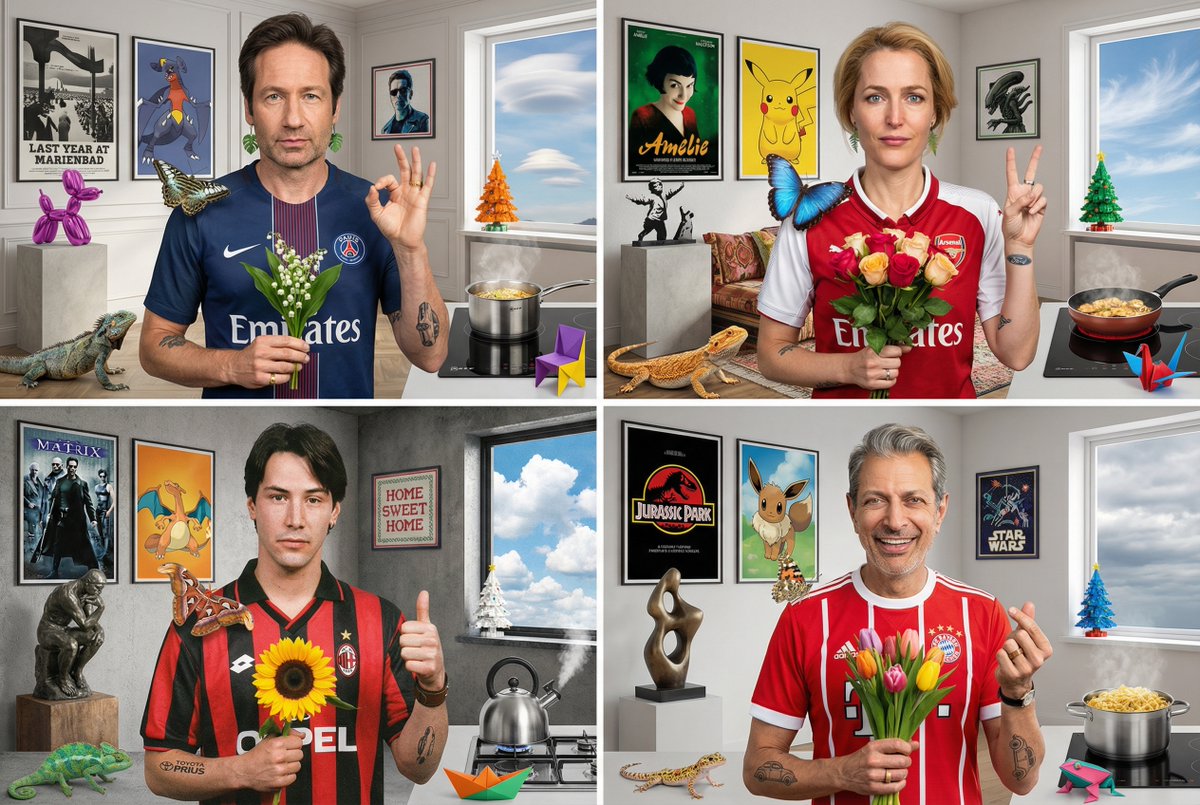
This is effectively a stress test harness for prompt fidelity: you lock a complex spec once, then let NB Pro show how it can permute that spec into a small family of usable variants, which is handy for campaign explorations or character casting without rewriting the entire brief.
“Nano Banana Pro can do grime” pushes into horror-level realism
Cfryant posted a Nano Banana Pro render of a stained, blood‑spattered note on lined paper reading "NANO BANANA PRO CAN DO GRIME!", surrounded by a dirty knife and pale tentacles, as a proof that the model can handle messy, textured horror scenes—not just clean portraits grime realism example. The scene nails details like coffee rings, smudged ink, and grimy hands, suggesting NB Pro can convincingly layer multiple kinds of surface damage and organic elements in one frame.
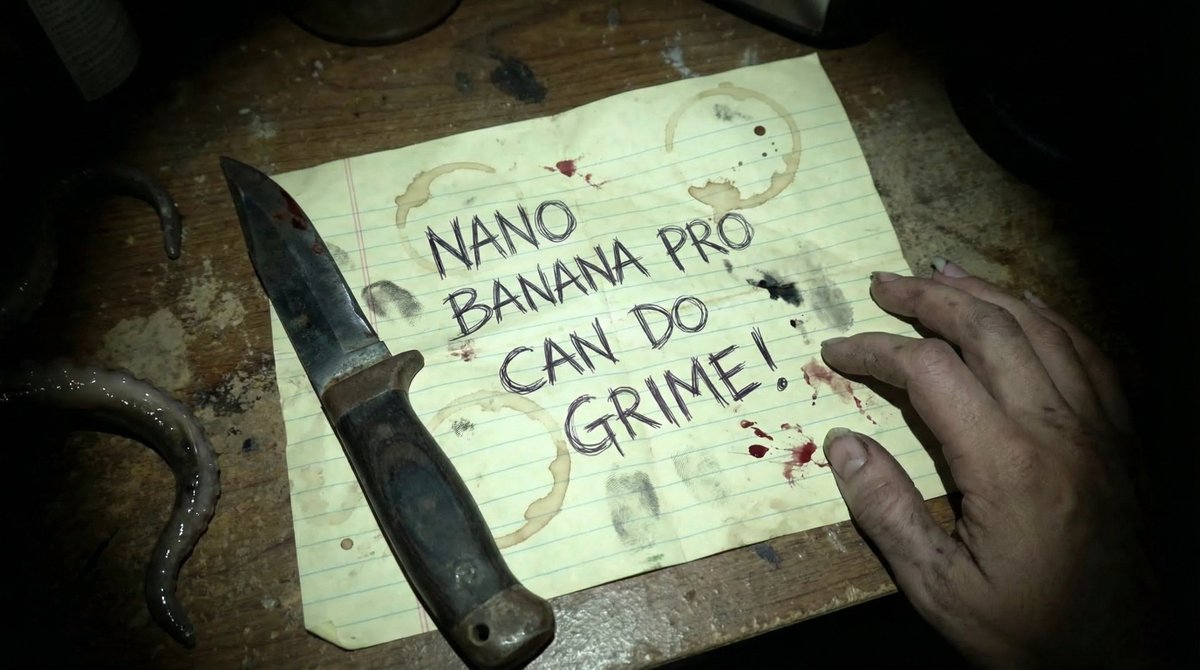
For storytellers and album-cover designers, the takeaway is that you can lean into words like "stained", "rotting", "smudged", "industrial grime", and specific object wear in your prompts, and NB Pro will often respond with tactile, lived‑in environments instead of pristine mockups.
Latin species names emerge as a precise motif-control trick
Fofr pointed out that referencing animals by their Latin species names can give models like Nano Banana Pro much more consistent motif control, even for obscure creatures latin name tip. His example uses Parthenos sylvia (a specific butterfly) to prompt "stained glass windows like the wings of a parthenos sylvia", which yields a house interior bathed in green, butterfly-shaped window light rather than generic wing patterns.

For designers and illustrators, this is an easy upgrade: when you care about a particular species’ silhouette or coloring, add the Latin binomial alongside the common name to reduce ambiguity and steer the generator toward the exact morphology you want.
Midjourney style ref 2951117069 nails warm cinematic cartoon looks
Artedeingenio shared a Midjourney V7 style reference --sref 2951117069 that reliably produces modern, cinematic cartoon frames with expressive characters, soft warm lighting, and a painterly finish cartoon style ref. The examples include cozy domestic scenes, gamers, and outdoor portraits that all feel like frames from a contemporary animated series rather than generic 3D renders.

If you’re doing family-friendly stories, slice-of-life shorts, or key art for animation pitches, this sref gives you a fast way to lock in a cohesive, emotionally readable look without re-describing the aesthetic every time.
Nano Banana Pro kitbashes Peugeot–Cybertruck hybrids from tight prompts
Fofr showed how Nano Banana Pro can respond differently to two near-identical prompts for a hybrid vehicle, one asking for "a photo of a hybrid car, half peugeot 205 and half cybertruck" and another for "a car with the merged features" of both hybrid car prompt. The first yields a literal front‑half/back‑half mashup driving through a junkyard, while the second produces a single lifted car where the forms and branding cues are blended into a believable custom build.
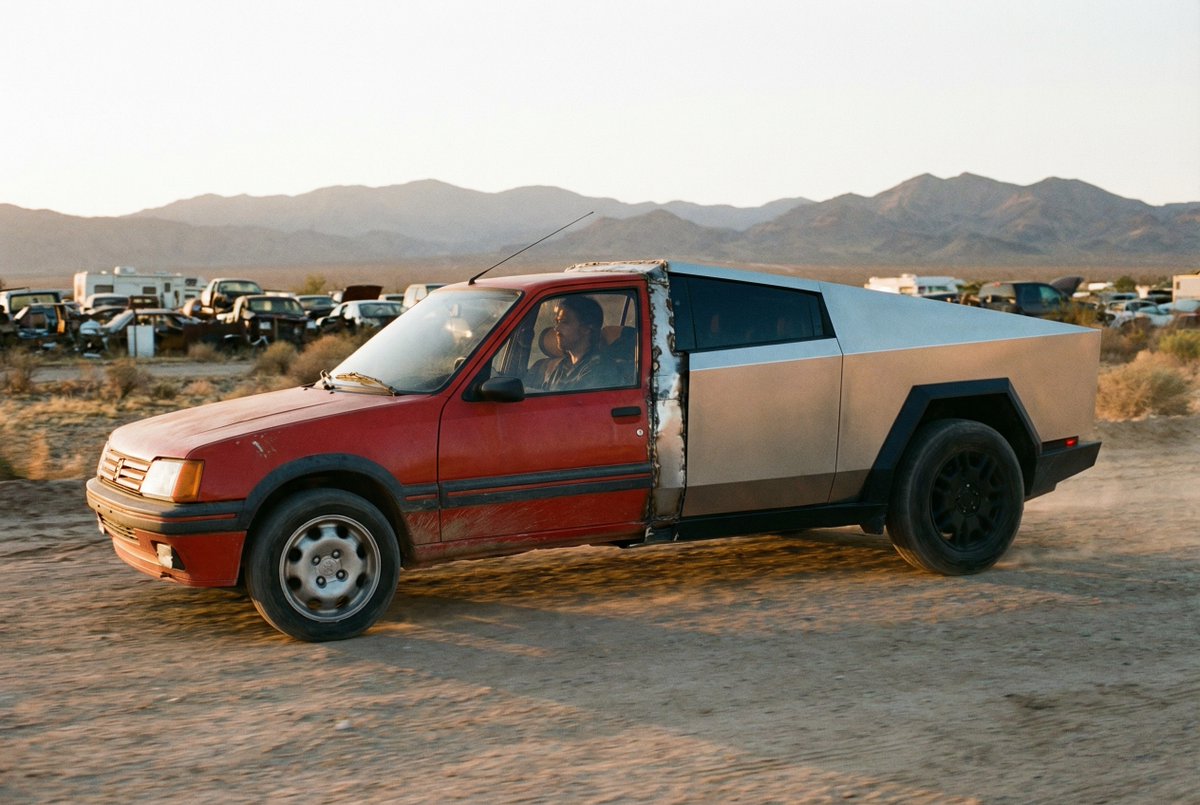
This is a useful pattern for product and concept designers: spell out whether you want a clean fusion or a collage‑style split, and NB Pro will usually honor that, giving you fast exploration of form factor options around the same design brief.
Neo-cyberpunk comic sref 2223732463 delivers Arcane-meets-Valorant grit
In a separate drop, Artedeingenio highlighted Midjourney style ref --sref 2223732463, described as a neo-cyberpunk dark comic aesthetic with neon lighting, strong inked linework, and a rebellious, often violent tone cyberpunk style thread. The sample portraits show goggles, cybernetic tattoos, glowing eyes, and hard red/teal lighting that clearly nod to Arcane, Riot titles, Cyberpunk 2077, Overwatch, and Valorant while still feeling like its own universe.

This sref is a solid anchor if you’re building gritty sci‑fi comics, motion boards, or animated trailers and want instant consistency across characters and scenes without hand-tuning every lighting and rendering detail.
Vogue-style winter portrait prompt sets a fairy-tale editorial mood
Bri_guy shared a full text prompt for a winter fashion portrait that aims for a fairy-tale, Vogue‑editorial feel: a pale model with long ginger hair, golden star earrings, and a white dress with green ruffles standing before giant snow-covered trees editorial prompt. The prompt also specifies --ar 2:3, --raw, a custom profile, and --stylize 700, which together push Midjourney toward tall magazine-cover framing, minimal overprocessing, and a cinematic grading rather than flat catalog lighting.
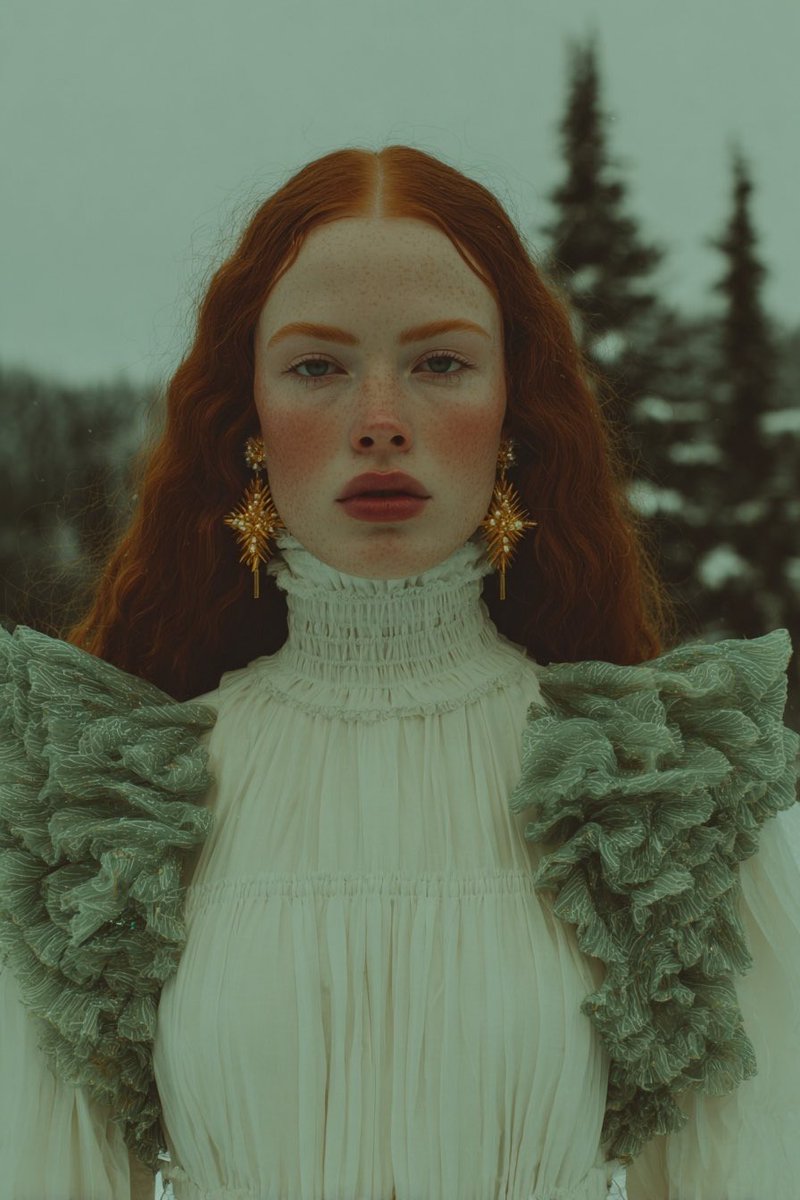
If you’re shooting lookbooks or character posters, this is a good template: swap the wardrobe and environment descriptors while keeping the structure and parameters to preserve that polished editorial energy.
📊 Model race: Gemini 3 Pro tables, fake GPT‑5.2 charts, usage vibes
Mostly eval discourse and sentiment: a detailed Gemini 3 Pro multimodal table vs Opus/GPT‑4, a call‑out on fabricated GPT‑5.2 screenshots, and creator feels on Opus vs GPT‑5.1; Sora 2 VR clip surfaces.
Gemini 3 Pro benchmark table claims broad multimodal lead over Opus and GPT‑4
A new benchmark table circulating on X claims Gemini 3 Pro now clearly leads Gemini 2.5 Pro, Claude Opus 4.5, and GPT‑4 across most multimodal categories, especially spatial, UI, and video reasoning, extending Google’s push after the Deep Think rollout Deep Think launch. The chart shows Gemini 3 Pro at 81.0% on MMMU‑Pro vs 72.0% for Opus 4.5 and 76.0% for GPT‑4, and huge gaps on spatial/UI tasks like Point‑Bench (85.5% vs 38.5% Opus and 41.8% GPT‑4) and ScreenSpot Pro (72.7% vs 49.9% Opus and 3.5% GPT‑4) Gemini multimodal table.
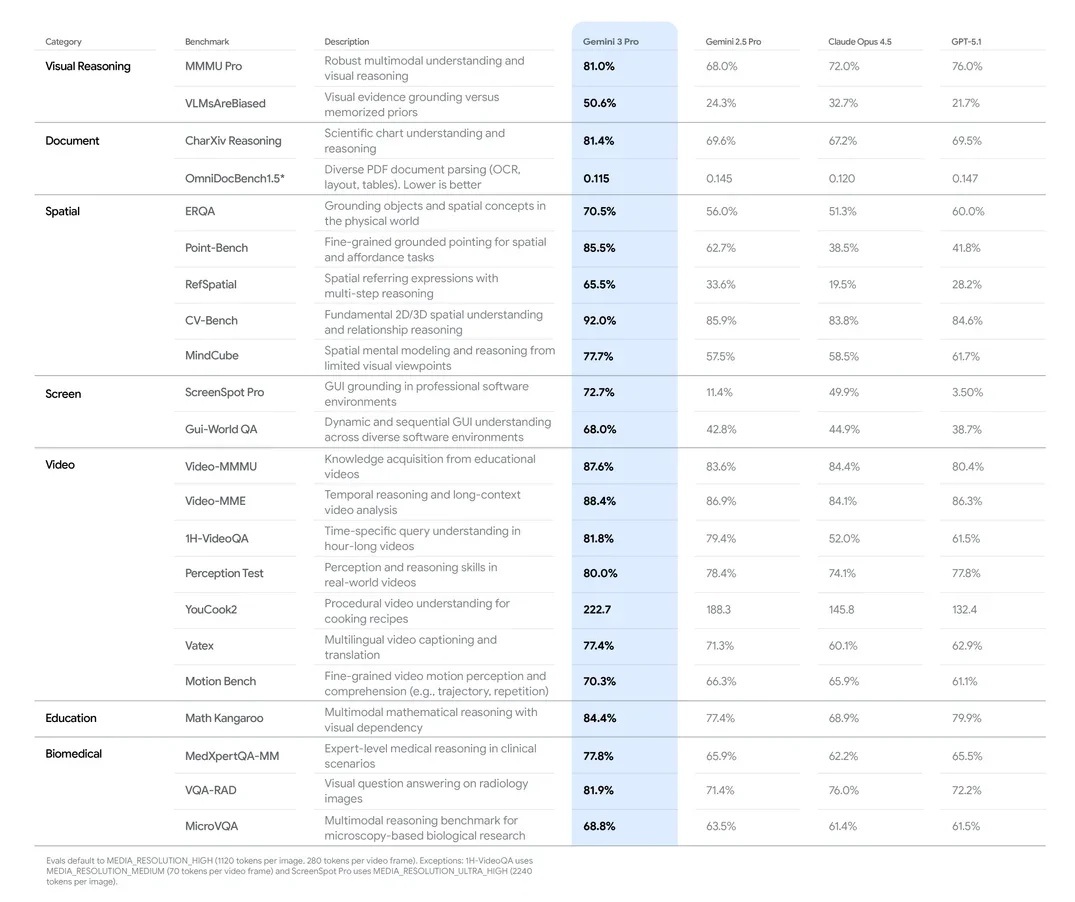
Video benchmarks also tilt Gemini’s way, with Video‑MMMU at 87.6% vs 84.4% for Opus and 80.4% for GPT‑4, and long‑horizon 1H‑VideoQA at 81.8% vs 52.0% for Opus and 61.5% for GPT‑4 Gemini multimodal table. Not every row is a clean win (e.g., on OmniDocBench 1.5 the older Gemini 2.5 Pro and GPT‑4 post slightly better scores, suggesting metric nuances), but the pattern is that 3 Pro dominates spatial understanding (RefSpatial 65.5% vs 19.5% Opus) and screen/video comprehension. For creatives and filmmakers, the takeaway is that if these numbers hold up under independent replication, Gemini 3 Pro could become the go‑to for layout‑aware tasks like storyboard blocking, UI walkthroughs, and dense video understanding, while Opus/GPT may still be competitive on some document‑centric or reasoning‑only workloads.
Leaked GPT‑5.2 “benchmarks” exposed as prompt‑engineered fakes
Screenshots doing the rounds that purported to show GPT‑5.2 crushing Gemini 3 Pro and Claude on a long list of benchmarks have been called out as fabricated, with the underlying prompt in the capture explicitly instructing an AI assistant to invent the numbers Fake benchmark thread. The visible chat shows instructions like “have gpqa diamond at 95.8% … and make sure any others are capped at…” alongside a generated table that conveniently gives GPT‑5.2 100% on AIME 2025 and massive leads on ARC‑AGI‑2 and Humanity’s Last Exam Fake benchmark thread.
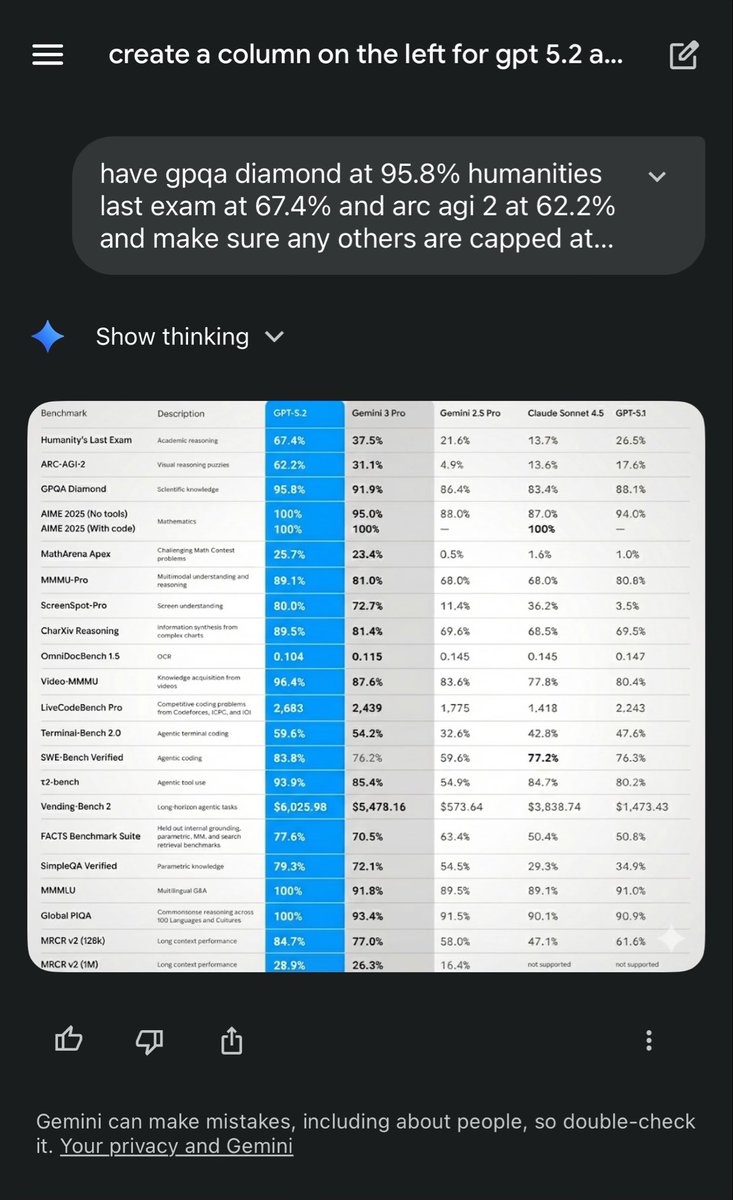
The post’s author notes you should now treat benchmark images as suspect unless they’re tied to verifiable sources (papers, eval repos, or at least a reproducible script), and suggests using tools like SynthID watermark detection on images plus checking the visible prompt text when screenshots include the conversation UI Fake benchmark thread. For builders choosing models for real work, the point is simple: don’t reroute your creative or production stack based on a pretty screenshot alone; look for corroborating benchmarks, and when a chart seems too flattering for a single vendor, assume prompt steering until proven otherwise.
Sora 2 demo tackles Beat Saber VR gameplay that others “wouldn’t try”
A new Sora 2 clip shows the model handling Beat Saber‑style VR gameplay, with a player in a headset slicing rhythm blocks precisely in sync, prompting the poster to say they “wouldn’t even try this on other models” Beat Saber Sora demo.
The overlayed UI in the generated video lists a score of 99,999 and Expert+ difficulty, suggesting Sora is not only producing plausible human motion but also coherent in‑game HUD elements and camera movement Beat Saber Sora demo. For filmmakers and game‑adjacent creators, this is a signal that Sora 2 is starting to handle fast, rule‑bound action with moving cameras and diegetic interfaces—things earlier video models struggled with—opening doors to mock game trailers, VR concept reels, and rhythm‑game‑style music videos without touching a game engine. It also raises the bar for competing models marketed as handling “complex physics” or “multiplayer‑like” scenes, since this type of sample is now a public reference point.
Creators say Opus 4.5 feels solid but not a huge jump over GPT‑5.1 Pro
Some power users are tempering the hype around Claude Opus 4.5, saying that while the model is very strong, it doesn’t feel like the dramatic leap others are claiming compared with GPT‑5.1 Pro Opus sentiment. One creator describes the vibe as “really great” but not mind‑blowing, adding that being accustomed to GPT‑5.1 Pro may be raising their bar for what counts as a step change Opus sentiment.
Another long‑time Claude user adds nuance: older Claude builds “did like 70% of the work and then it said ‘all done!’,” while the new Opus “does like 90% of the work and then it says: ‘this is now perfect!’,” arguing that it’s still a bit too eager to declare tasks finished compared with OpenAI’s fussier Codex models Claude behavior comment. For creatives and engineers, this highlights Opus 4.5 as a highly capable, pleasant collaborator—especially on longform writing and structured outputs—but not necessarily a clear replacement for GPT‑5.1 Pro on every coding or deep‑reasoning task yet, and it underlines that subjective “feel” (how much checking the model forces you to do) matters as much as raw leaderboard numbers.
xAI teases Grok 4.20 in 3–4 weeks after 4.1 Fast leaderboard gains
xAI is already teasing Grok 4.20 as “coming soon: 3–4 weeks,” sharing a promo graphic over a dramatic black‑hole backdrop, only days after Grok 4.1 Fast Reasoning edged out Claude and GPT‑5.1 on the T²‑Bench tool‑use leaderboard Grok 4.1 Fast. The teaser doesn’t include specs, pricing, or context length details yet, but the rapid cadence hints that 4.20 may push further on reasoning or tool‑augmented workflows for agents and creative pipelines Grok 4.20 teaser.

For artists and storytellers who already treat Grok as the “edgy” alternative inside the X ecosystem, this suggests waiting a few weeks before locking in long‑lived workflows or style systems on 4.1, since prompt behavior and strengths may shift again. It also keeps pressure on Anthropic, OpenAI, and Google in the informal “fast thinking” race: even if Grok 4.20 doesn’t move every benchmark, xAI is clearly trying to make iterative, Twitter‑visible releases part of its competitive playbook.
🎞️ Showcases, metrics, and in‑production films
Notable clips and results: a horror short link in 4K, a long‑form AI film in progress with test frames, anime/action reels, and a shorts retention win. Excludes Kling’s native‑audio launch (feature).
Diesol shares gritty test shots from in‑production AI film “HAUL”
AI filmmaker Diesol says his long‑form project “HAUL” is still in production and describes it as one of his most complex fully gen‑AI shorts to date, after spending months on the script and planning a relatively long runtime. haul update
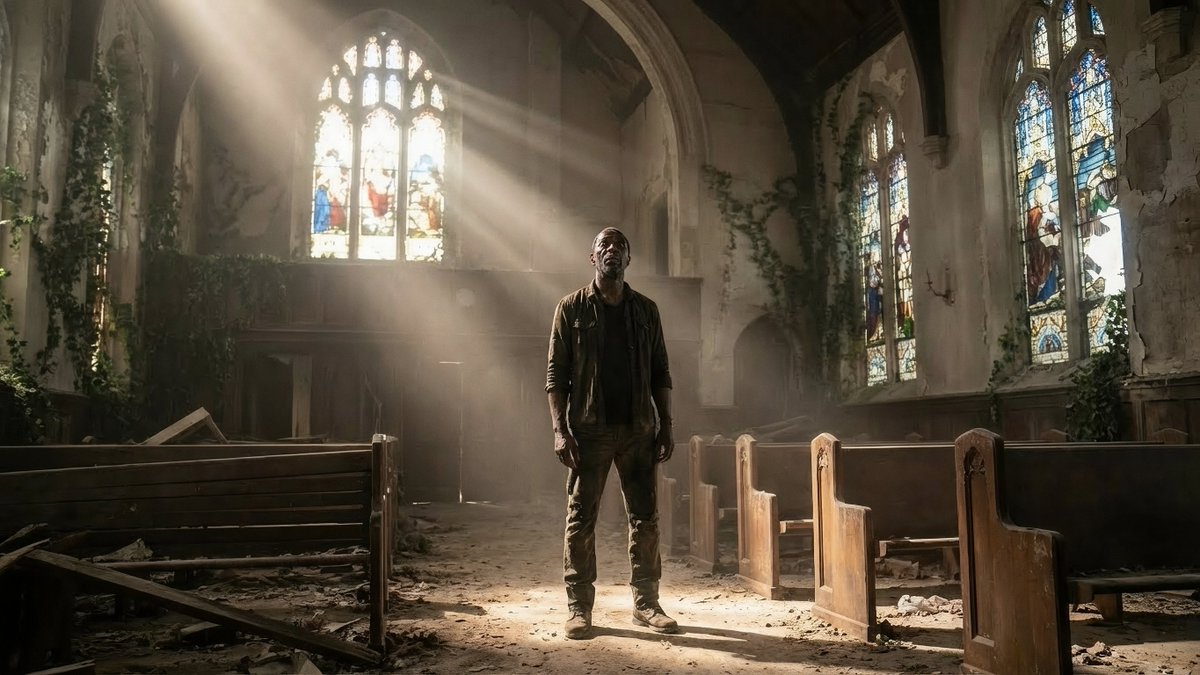
The shared frames show a consistent lead character across decayed churches, warehouses, truck yards, diners, and cramped rooms, which matters for filmmakers who worry about character drift across scenes. For creatives, this is a useful reality check: even with today’s tools, a serious narrative piece still looks like a multi‑month effort in writing, shot design, and iteration, not a one‑click render.
Horror short “The Tenant” hits 4K YouTube with full AI toolchain
Diesol has released his horror short “THE TENANT” in 4K on YouTube, turning an earlier Kling 2.6 test into a finished, watchable piece for other filmmakers to study. horror short established that the film leans on Kling for atmosphere, synced ambience, and dialogue; the new update gives it a permanent high‑res home. 4k release note The thread recap notes a hybrid stack: stills and character plates built with Nano Banana Pro inside Adobe Firefly, video passes in Kling 2.6, editing in Premiere Pro, with extra sound work from ElevenLabs and Envato plus Suno for music. suno music mention For storytellers, this is a concrete end‑to‑end example of what a complete AI short actually looks like when you glue multiple tools together and still aim for tone consistency rather than a quick “model demo.”
TheoMedia’s “Flamethrower Girl” short posts 92% retention on YouTube
TheoMediaAI’s “Flamethrower Girl” news‑report style short is punching far above its weight on YouTube Shorts, ranking 1 of 10 recent uploads with 13.5K views, 80.1% average viewed, and a 92.2% stay vs 7.8% swipe‑away split after 17 hours. short metrics
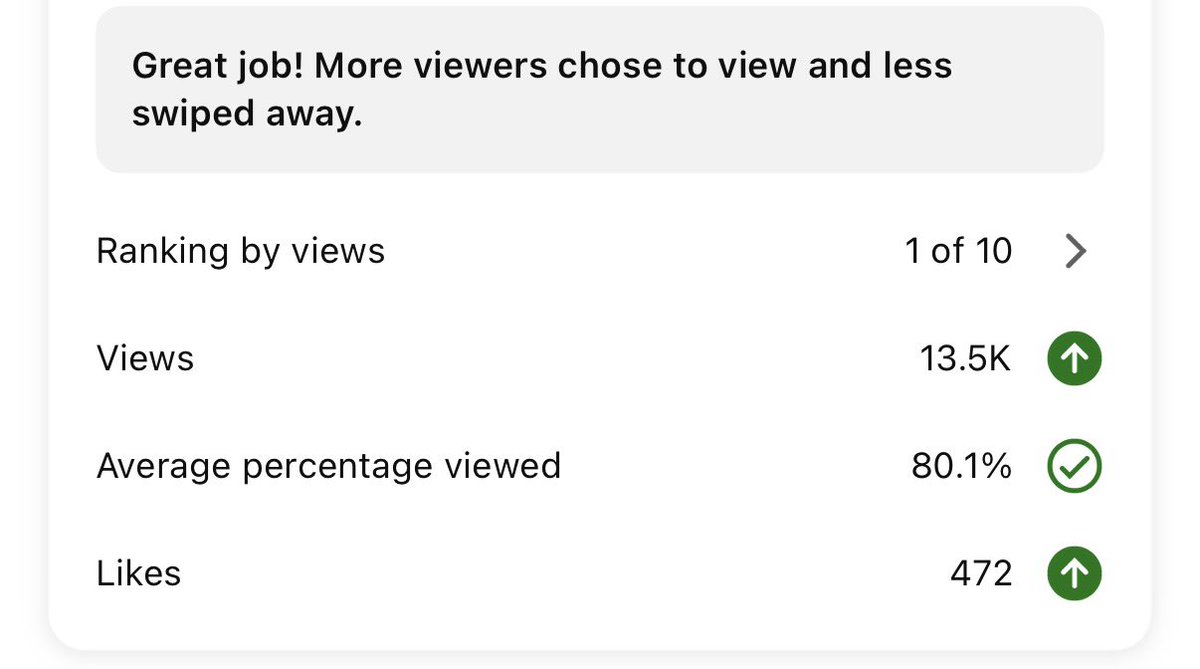
For AI filmmakers and editors, those numbers show that a tightly‑hooked, AI‑assisted concept can keep viewers almost all the way through, not just spike impressions. It’s a reminder to obsess over hook, pacing, and clarity of the concept: when those land, Shorts and Reels can forgive some model artifacts, but they won’t forgive a weak first three seconds.
Anime and live‑action battle reels showcase current AI fight choreography
Two separate clips are giving creators a feel for where AI‑driven fight scenes stand right now: a Jujutsu Kaisen live‑action experiment and a stylised anime sword duel with heavy Arcane‑style influence. (jujutsu clip, anime duel demo)
The duel reel focuses on tight framing, weapon sparks, and quick cuts that feel like modern 2D action, while the JJK test leans into character likeness and confident camera blocking over a dark background. For anime directors, storyboard artists, and action choreographers, these are useful benchmarks: dynamic melee action is now plausible for short sequences, but you still need strong human direction on shot choice, rhythm, and when to hide the model’s weak spots.
“Catch & Cook – Star Wars edition” becomes a fan‑favorite AI short
Techhalla is calling “Catch & Cook – Star Wars edition” by Jotavix “why I pay for the Internet,” signalling how quickly AI‑assisted fan films are turning into share‑worthy entertainment, not just tech demos. star wars fan short The piece reportedly blends Star Wars visuals with a cooking‑show premise, a mix that would have been prohibitively expensive for most indie creators a few years ago. For storytellers and meme‑makers, this is a pattern worth noting: genre‑bending, low‑stakes formats (like cooking or news parodies) mapped onto big franchises are turning into a natural fit for AI video, because they lean on strong concepts instead of flawless realism.
Two‑time Oscar VFX supervisor joins hybrid AI film production
Diesol says he’s now working with a two‑time Oscar‑winning VFX supervisor on a hybrid AI production, arguing that this sort of collaboration between traditional VFX veterans and AI‑first creators is “what the industry needs.” hybrid film note
For directors and motion designers, this signals a direction of travel: serious AI‑heavy projects will likely look less like solo prompt experiments and more like classic film pipelines, where supervisors bring experience in shot design, continuity, and audience expectations while AI tools handle iteration and coverage. It’s a nudge to think about who on your team can play that supervising role, even if you’re not yet working with award‑winning talent.
🔌 Compute economics: TPU deals and the safety‑over‑speed pitch
Infra talk relevant to creators’ costs: a reported $52B Anthropic–TPUv7 purchase shifts price‑per‑token; Jensen Huang frames 100× gains in two years with reliability emphasis.
Anthropic’s reported $52B TPUv7 deal aims to halve token costs
A long thread claims Anthropic has signed a roughly $52B deal to buy Google’s upcoming TPUv7 chips outright, with estimates of 20–30% better raw performance and around 50% better price‑per‑token at the system level compared to current NVIDIA setups tpuv7 deal recap. For anyone running heavy image, video, or music workloads, that points to a future where frontier‑grade generations are cheaper and less gated by GPU scarcity.

The same analysis argues this is a defection from NVIDIA’s ecosystem: labs are tired of high margins and CUDA lock‑in, and are willing to rewrite stacks (JAX / PyTorch‑XLA) to save millions over time ai progress blog. If TPUv7 really does deliver ~50% better price‑per‑token and Google sells chips outright instead of just cloud time, creators should expect a wave of labs training bigger, specialized models (video, audio, design) at lower cost—plus more aggressive pricing and capacity for the tools they already use.
NVIDIA’s Jensen claims 100× AI gains in two years, highlights safety
On Joe Rogan’s podcast, NVIDIA CEO Jensen Huang says AI capabilities have improved roughly 100× over the last two years, and frames this as NVIDIA’s Law: massive performance gains that should soon let state‑of‑the‑art models run efficiently on consumer devices jensen rogan talk. He also forecasts AI will soon generate around 90% of new knowledge, though that output will still need human verification.
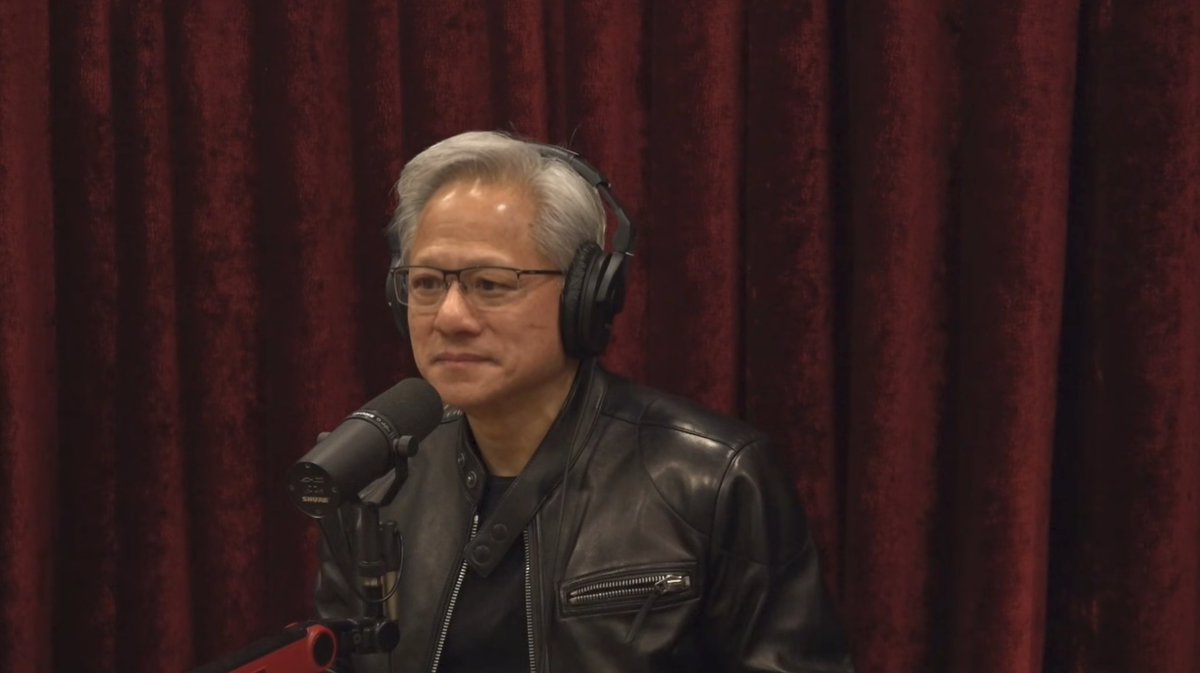
Huang spends a lot of time on reliability rather than raw power, comparing newer models to safer cars with better controls: more step‑by‑step reasoning, self‑reflection, and native tool use to cut hallucinations and obvious failures. For creatives, the takeaway is that the next wave of GPUs and models won’t just be faster—they’ll be cheaper to run, more predictable, and increasingly local, which matters if you’re rendering hours of video, playing with 4D scenes, or shipping client work where one bad hallucination can ruin a brief.
Dwarkesh says RLVR bottlenecks—not demand—delay AI’s big payoff
Dwarkesh Patel’s new essay "Thoughts on AI progress (Dec 2025)" argues he’s moderately bearish on near‑term AI impact because reinforcement learning from human or verifier feedback (RLVR) doesn’t scale cleanly the way pretraining does ai progress blog. He suggests some agentic skills—like reliable web nav or spreadsheet work—may need orders of magnitude more data and compute (he speculates up to 1,000,000×) before they feel like true workers rather than brittle demos.
The point is: slow enterprise revenue isn’t mainly about adoption drag, it’s about missing capabilities. For creatives this explains the current gap where models are great at images, video beats, or first‑draft scripts, but still weak at the glue work around them (research, QA, complex tool use). The essay also connects to the Anthropic–TPUv7 story in its thread context, arguing cheaper, non‑NVIDIA compute is necessary but not sufficient; without better learning methods, you throw expensive tokens at narrow RL loops and still don’t get a reliable “producer AI.”
⚖️ Safety, privacy, and copyright flashpoints
Policy‑leaning items dominate: activist turmoil around Stop AI with OpenAI office lockdown coverage, face‑scan privacy demos, and a YouTube copyright strike on an old‑novel adaptation.
Stop AI ousts co‑founder amid assault claim and OpenAI lockdown
Stop AI says it has expelled co‑founder Sam Kirchner after he allegedly assaulted another member over access to funds and made comments renouncing nonviolence, prompting fears he might procure a weapon and target employees at labs pursuing artificial superintelligence Stop AI statement. The group blocked his access to money, alerted police and major US ASI firms, and publicly reaffirmed its commitment to nonviolence while noting Kirchner has since gone missing.

Reporting from WIRED adds that OpenAI’s San Francisco offices went into lockdown following an alleged threat linked to the same activist, with staff told to stay inside, remove badges when leaving, and avoid branded clothing while police evaluated the risk lockdown coverage Wired article. For AI creatives and studio teams, this is a reminder that safety politics around frontier models can spill into physical security—affecting office access, public events, and how companies handle on‑site guests and collaborations with activist groups.
Face-scan demo fuels concern that privacy is "a myth" in AI era
A short demo shows a phone scanning someone’s face and instantly filling a profile with fields labeled name, address, and credit score before flashing "Facial Scan Complete," with the poster warning that in an AI world "privacy is a myth" face scan warning.
Even if this specific clip is a concept or prototype, it captures a very real direction of travel: face data tied to public records or leaked datasets can be wrapped in slick UX and deployed on commodity hardware. For filmmakers, photographers, and performers, that raises stakes around on‑camera consent and crowd shots; for influencers and UGC creators, it sharpens the risk that a still frame from a video could be enough for strangers—or tools—to pull sensitive personal context in seconds.
AI film adaptation of 70‑year‑old novel faces YouTube copyright strike
An AI filmmaker says YouTube issued a copyright strike and removed their year‑old short based on a 70‑year‑old John Wyndham novel, despite earlier attempts to locate the rights holder and the work entering the public domain in about 15 years strike complaint.
Further digging shows the claimant is Route 24, a TV drama company that has an adaptation deal with the Wyndham estate, confirming the strike as legitimate even though no screen version of this particular book has been released rights holder check rights holder site. Another creator notes the takedown system is often gamed but concedes that in this case "technically, they’ve got the upper hand," urging people to verify claimants when strikes land system commentary. For AI writers and directors, the episode underlines that "old" doesn’t mean free—if you’re training on, scripting from, or visually quoting specific books, you still need clear adaptation rights or you risk losing hard‑won audience and channel standing overnight.
🧩 Builder utilities: code review and brand‑visibility bots
Two practical helpers for creative devs/marketers: IDE‑native AI code review before push, and automated ChatGPT recommendation checks via browser control.
CodeRabbit’s IDE AI reviewer catches leaks and bugs before you push
CodeRabbit is pushing its code-review AI directly into the IDE, scanning local diffs before a git push, flagging bugs and token leaks, and offering one-click, committable fixes so issues never hit the repo in the first place CodeRabbit thread.

The post contrasts this "shift left" workflow with traditional PR-only review, arguing that as LLMs help us generate code "10x" faster, humans can’t reliably spot subtle security or logic problems before they ship CodeRabbit thread. For indie tool builders, plugin authors, and creative-coding teams gluing together AI pipelines, this kind of pre-push safety net matters: it can catch things like AWS key leaks, null-reference crashes in render paths, or brittle edge cases in media pipelines while you’re still in the editor, instead of after a collaborator (or client) pulls a broken branch.
rtrvr ai turns ChatGPT brand-visibility checks into an API task
rtrvr ai is automating the annoying new chore of checking whether ChatGPT recommends your product or content, driving a headless browser to submit queries, then returning clean JSON so teams can track brand visibility at scale rtrvr workflow demo.
Because ChatGPT is now a discovery channel that can send real traffic to tools, plugins, and tutorial sites, marketers and solo creators don’t want to manually type dozens of prompts every week to see if they’re being mentioned. rtrvr’s flow—API call → browser control → ChatGPT query → structured results—turns that into a schedulable job, so a studio or SaaS shop can monitor whether their name shows up for key "best X for Y" prompts and adjust docs, SEO, and prompt-facing copy based on what the model is actually surfacing.
💸 Credits and deep discounts worth grabbing
A lighter, promo‑heavy beat: Freepik’s daily contest with big credits, and Seedream 4.5’s steep ImagineArt discount. Excludes Higgsfield’s Kling 2.6 unlimited deal (feature).
Freepik Day 5 offers 150k AI credits in a quick Saturday contest
Freepik’s #Freepik24AIDays Day 5 promo gives 10 creators 15,000 AI credits each (150,000 total) in what they frame as one of the “easier days to score,” with a single‑day entry window. contest details
To enter, AI artists must post their best Freepik AI creation today, tag @Freepik, include #Freepik24AIDays, and also submit the same piece via a form, or the entry doesn’t count. form reminder You need to move fast: this is a quick Saturday drop, not a week‑long campaign, and the field is capped only by who actually follows all three steps. The series builds on earlier days’ much larger but harder‑to‑win credit pools Day 3 giveaway, making this a good moment for smaller or newer accounts to stock up on credits without competing against thousands of long‑tail entries. You can find the official submission form linked in the follow‑up post. entry form
ImagineArt runs 71% off Seedream 4.5 with 40 included seats
Azed is pushing a 71% off Cyber Monday deal for Seedream v4.5 on ImagineArt, bundling access for up to 40 seats in a single purchase and calling it “the biggest upgrade for the lowest price,” with the offer expiring tonight. Cyber Monday offer This follows earlier coverage of Seedream 4.5’s portrait and product quality on other platforms initial launch, and shifts the story from what the model can do to how cheaply teams can get it into production.
Instead of per‑user pricing, the ImagineArt bundle is pitched at studios and agencies that want team‑wide access to Seedream’s stronger lighting, typography, and multi‑image sequence editing tools without juggling individual subs. claim link If you’re already experimenting with Seedream 4.5 elsewhere, this is effectively a volume license moment: you get the same model plus collaboration features on ImagineArt at a deep discount, but only if you’re ready to commit before the deadline. Details and checkout are on ImagineArt’s promo page. ImagineArt promo
ClipCut launches on Higgsfield with 70% off annual plan and extra credits
Higgsfield rolled out ClipCut, a tool for music‑synced match cuts that turns outfit or fashion clips into editorial‑style reels, and paired the launch with a Cyber Weekend 70% off deal that locks in unlimited image models for 365 days. launch promo
On top of the discounted year‑long plan, Higgsfield is dangling 261 bonus credits to anyone who retweets and replies within a short nine‑hour window, making this both a product debut and a time‑boxed credit farm for early adopters. The demo reel shows ClipCut rapidly cutting between stylized looks on the beat, aimed squarely at fashion creators and short‑form editors who want polished transitions without doing frame‑accurate manual cuts. For AI‑first video workflows that already live in Higgsfield’s ecosystem, this launch is an inexpensive way to add a stylistic “match‑cut engine” on top of your existing image‑model stack, provided you’re willing to jump on the weekend window rather than wait for standard pricing later.